Solved The operation failed to complete because theDisk Management console

masterpradipg

New member
Local time
7:11 PM
Messages
5
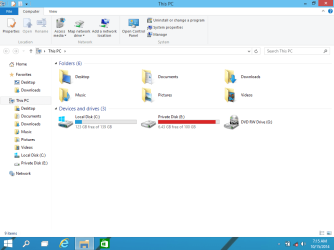
guys I have a serious problem ... I have 4 primary partition 1.system reserved 2.C 3.D 4.E
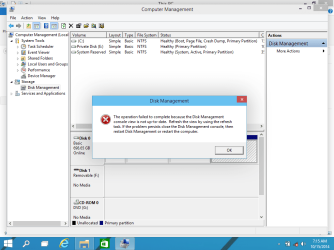
first three partition r are shown by file manager and last one is only shown in disk management ... when I tried to assign a drive letter it gives error message" The operation failed to complete because the
Disk Management console view is not up-to-date.
Refresh the view by using the refresh task. If the
problem persists close the disk Management console,
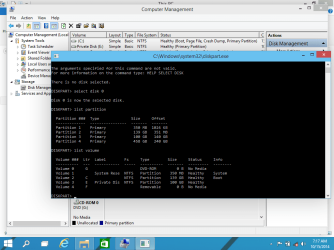
then restart Disk Manangement or restart " .... disk part is also not showing that drive or volume so that I couldn't assign any letter to it ....
The problem is with internal hard disk not with external or usb disk ...... probably problem is caused when I installed Windows 10 technical preview alone with I install partition magic which suggests to check errors of drives and I press OK ..... also at the same time have installed wimax usb driver ..... also at the same time I was having some unallocated space and I extended size of c drive by that unallocated space and after that when I opened my computer my drived was not there ......

Even I reformatted and at the time of installation that that very hidden drive was not shown ..... even with Ubuntu live cd I am unable to mount ......
Plz suggest ...... I need that data drive at any cost
 

My Computer My Computer

At a glance

windows 10 technical preview 64 biti5-2450M
Computer type
Laptop
Computer Manufacturer/Model Number
dell
OS
windows 10 technical preview 64 bit
CPU
i5-2450M
Post a snapshot of a fullscreen Disk Management Window:
To open Disk Management, press Windows key+r, type diskmgmt.msc and press Enter or click GO. Make it full screen. Expand the fields as necessary so everything can be seen.

How to Use the Snipping Tool in Vista - Vista Forums (says it's for Vista but also works with Win 7/8).

Once you have the image saved, click the Go Advanced button then click on the Paperclip Icon next to the Smiley Icon. In the Manage Attachments window, click Browse and navigate to where you saved the image and select it.
Click the Upload button.
Close the Manage Attachments window.
Click on the Paperclip Icon again and select the image you uploaded. It will be placed in your post.
 

My Computer My Computer

At a glance

Windows 10 Pro X64Intel Quad Core i7-4770 @ 3.4Ghz16.0GB PC3-12800 DDR3 SDRAM 1600 MHzIntel Integrated HD Graphics
Computer type
PC/Desktop
Computer Manufacturer/Model Number
Lenovo IdeaCenter 450
OS
Windows 10 Pro X64
CPU
Intel Quad Core i7-4770 @ 3.4Ghz
Memory
16.0GB PC3-12800 DDR3 SDRAM 1600 MHz
Graphics Card(s)
Intel Integrated HD Graphics
Sound Card
Realtek HD Audio
Monitor(s) Displays
HP 22" LCD
Screen Resolution
1680 x 1050
Hard Drives
250GB Samsung EVO SATA-3 SSD
2TB Seagate ST2000DM001 SATA-2
1.5TB Seagate ST3150041AS SATA
Keyboard
Dell USB
Mouse
Lenovo USB
Internet Speed
Cable via Road Runner 3MB Upload, 30MB Download
Antivirus
Windows Defender, MBAM Pro, MBAE
Browser
Seamonkey
Other Info
UEFI/GPT
PLDS DVD-RW DH16AERSH

My Computer My Computer

At a glance

Windows 10 Pro. 64/ version 1709 Windows 7 Pr...Intel i7-6800K @ 4.3Corsair Platinum 16 gig @2400EVGA GTX 1070 OC
Computer type
PC/Desktop
Computer Manufacturer/Model Number
Home made Desktop
OS
Windows 10 Pro. 64/ version 1709 Windows 7 Pro/64
CPU
Intel i7-6800K @ 4.3
Motherboard
ASUS X-99 Deluxe II
Memory
Corsair Platinum 16 gig @2400
Graphics Card(s)
EVGA GTX 1070 OC
Monitor(s) Displays
Asus 27" LED LCD/VE278Q
Screen Resolution
1920-1080 or 1280-720 HDMI
Hard Drives
INTEL SSD 730-240 Gb Sata 3.0/
PSU
EVGA Platium 1200W
Case
Phanteks Luxe Tempered Glass 8 fans/ one radiator
Cooling
XSPC/ Water Cooled CPU
Keyboard
Das 4 Professional
Mouse
Logitech M705/MX Anywhere 2-S
Internet Speed
100 mbits
Antivirus
Microsoft Security Essentials/ Malwarebytes Premium 3.0/ SAS
Browser
I.E. 11 default/Firefox/ ISP Time Warner Cable/Spectrum
Other Info
LG BluRay Burner/
Sound system-KLipsch-THX/
Icy Dock ssd Hot Swap bays.
I have uploaded screen shots ..... hope I my problem will b solved as soon as possible ...
 

Attachments

  • Screenshot (1).png
    Screenshot (1).png
    34.4 KB · Views: 2
  • Screenshot (2).png
    Screenshot (2).png
    33.4 KB · Views: 2
  • Screenshot (5).png
    Screenshot (5).png
    43 KB · Views: 1
  • Screenshot (6).png
    Screenshot (6).png
    47.8 KB · Views: 2

My Computer My Computer

At a glance

windows 10 technical preview 64 biti5-2450M
Computer type
Laptop
Computer Manufacturer/Model Number
dell
OS
windows 10 technical preview 64 bit
CPU
i5-2450M
It would be helpful if we could see the entire Disk Management. The tutorial does show how that is done.
 

My Computer My Computer

At a glance

Windows 10 Pro. 64/ version 1709 Windows 7 Pr...Intel i7-6800K @ 4.3Corsair Platinum 16 gig @2400EVGA GTX 1070 OC
Computer type
PC/Desktop
Computer Manufacturer/Model Number
Home made Desktop
OS
Windows 10 Pro. 64/ version 1709 Windows 7 Pro/64
CPU
Intel i7-6800K @ 4.3
Motherboard
ASUS X-99 Deluxe II
Memory
Corsair Platinum 16 gig @2400
Graphics Card(s)
EVGA GTX 1070 OC
Monitor(s) Displays
Asus 27" LED LCD/VE278Q
Screen Resolution
1920-1080 or 1280-720 HDMI
Hard Drives
INTEL SSD 730-240 Gb Sata 3.0/
PSU
EVGA Platium 1200W
Case
Phanteks Luxe Tempered Glass 8 fans/ one radiator
Cooling
XSPC/ Water Cooled CPU
Keyboard
Das 4 Professional
Mouse
Logitech M705/MX Anywhere 2-S
Internet Speed
100 mbits
Antivirus
Microsoft Security Essentials/ Malwarebytes Premium 3.0/ SAS
Browser
I.E. 11 default/Firefox/ ISP Time Warner Cable/Spectrum
Other Info
LG BluRay Burner/
Sound system-KLipsch-THX/
Icy Dock ssd Hot Swap bays.
what do u mean by entire disk management ???
 

My Computer My Computer

At a glance

windows 10 technical preview 64 biti5-2450M
Computer type
Laptop
Computer Manufacturer/Model Number
dell
OS
windows 10 technical preview 64 bit
CPU
i5-2450M
That means you haven't read the tutorial properly. :)

Click on the "Show/Hide Console Tree" and "Show/Hide Action Pane" buttons in tool bar on top to hide those. That will give you a full screen of Windows Disk Management without any truncation.

This has been indicated in the tutorial.

Do it and you will know what he means.:)
 

My Computer My Computer

At a glance

Windows 7 Home Premium 32 bit
OS
Windows 7 Home Premium 32 bit
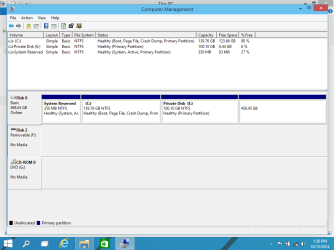
here goes my entire disk management console .. plz help
 

Attachments

  • Screenshot (9).png
    Screenshot (9).png
    27.7 KB · Views: 3

My Computer My Computer

At a glance

windows 10 technical preview 64 biti5-2450M
Computer type
Laptop
Computer Manufacturer/Model Number
dell
OS
windows 10 technical preview 64 bit
CPU
i5-2450M
What I see is 3 primary partitions and a empty partition without a drive letter.
E is full and in that condition you won't be able to do much with that except extend it to the right.
What is on E?

Now in exact terms could you tell us what you are trying to do.
 

My Computer My Computer

At a glance

Windows 10 Pro. 64/ version 1709 Windows 7 Pr...Intel i7-6800K @ 4.3Corsair Platinum 16 gig @2400EVGA GTX 1070 OC
Computer type
PC/Desktop
Computer Manufacturer/Model Number
Home made Desktop
OS
Windows 10 Pro. 64/ version 1709 Windows 7 Pro/64
CPU
Intel i7-6800K @ 4.3
Motherboard
ASUS X-99 Deluxe II
Memory
Corsair Platinum 16 gig @2400
Graphics Card(s)
EVGA GTX 1070 OC
Monitor(s) Displays
Asus 27" LED LCD/VE278Q
Screen Resolution
1920-1080 or 1280-720 HDMI
Hard Drives
INTEL SSD 730-240 Gb Sata 3.0/
PSU
EVGA Platium 1200W
Case
Phanteks Luxe Tempered Glass 8 fans/ one radiator
Cooling
XSPC/ Water Cooled CPU
Keyboard
Das 4 Professional
Mouse
Logitech M705/MX Anywhere 2-S
Internet Speed
100 mbits
Antivirus
Microsoft Security Essentials/ Malwarebytes Premium 3.0/ SAS
Browser
I.E. 11 default/Firefox/ ISP Time Warner Cable/Spectrum
Other Info
LG BluRay Burner/
Sound system-KLipsch-THX/
Icy Dock ssd Hot Swap bays.
any ways thanks to everyone
my problem solved by EASYUS partition recover wizard ... but I don't think windows can solved this sorts of problem when the problem is created by third party software or power failure. ...windows can deleted and recreate partition but cannot save data .. if we want our precious data back we need to use third-party software like easeus or any other ....
 

My Computer My Computer

At a glance

windows 10 technical preview 64 biti5-2450M
Computer type
Laptop
Computer Manufacturer/Model Number
dell
OS
windows 10 technical preview 64 bit
CPU
i5-2450M
"The operation failed to complete because the Disk Management console

I also got the same problem and tried every option I could find and none worked. The partition would not format, even after deleting the volume and creating it again, the error would still return.
I worked out a way through this way:
I selected the Primary Volume, right clicked on it, selected Extend Volume. Next...next ..OKAY and the primary volume expanded to include the volume that would not format. I was satisfied with that after deciding I did not need the partition as a separate volume. There is an option to Shrink Volume if you want to recreate the volume.
 

My Computer My Computer

At a glance

win 7 32 pro
Computer type
Laptop
Computer Manufacturer/Model Number
acer
OS
win 7 32 pro

My Computer My Computer

At a glance

Windows 10 Pro. 64/ version 1709 Windows 7 Pr...Intel i7-6800K @ 4.3Corsair Platinum 16 gig @2400EVGA GTX 1070 OC
Computer type
PC/Desktop
Computer Manufacturer/Model Number
Home made Desktop
OS
Windows 10 Pro. 64/ version 1709 Windows 7 Pro/64
CPU
Intel i7-6800K @ 4.3
Motherboard
ASUS X-99 Deluxe II
Memory
Corsair Platinum 16 gig @2400
Graphics Card(s)
EVGA GTX 1070 OC
Monitor(s) Displays
Asus 27" LED LCD/VE278Q
Screen Resolution
1920-1080 or 1280-720 HDMI
Hard Drives
INTEL SSD 730-240 Gb Sata 3.0/
PSU
EVGA Platium 1200W
Case
Phanteks Luxe Tempered Glass 8 fans/ one radiator
Cooling
XSPC/ Water Cooled CPU
Keyboard
Das 4 Professional
Mouse
Logitech M705/MX Anywhere 2-S
Internet Speed
100 mbits
Antivirus
Microsoft Security Essentials/ Malwarebytes Premium 3.0/ SAS
Browser
I.E. 11 default/Firefox/ ISP Time Warner Cable/Spectrum
Other Info
LG BluRay Burner/
Sound system-KLipsch-THX/
Icy Dock ssd Hot Swap bays.
"The operation failed to complete because the Disk Management...

when I tried to assign a drive letter it gives error message "The operation failed to complete because the Disk Management console view is not up-to-date."

disk part is also not showing that drive or volume so that I couldn't assign any letter to it ....
The problem is with internal hard disk not with external or usb disk ......
probably problem is caused when I installed Windows 10 technical preview alone with I install partition magic which suggests to check errors of drives and I press OK .....

Exactly The same happen to my laptop ,,,,

In my case i have 2 partition's (C and D, both primary) and i wanted to create new partition so i used "Partition Magic" from Hiren's BootCD, upon opening it (Booted CD) suggests to check for errors of drives and I pressed Okay and then i realized there is something wrong, so i quite from the program and rushed to see if everything is alright with my windows, but when i logged in to my windows i found out that one of my partitions are missing (The D partition)!

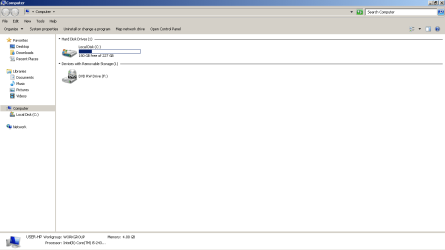
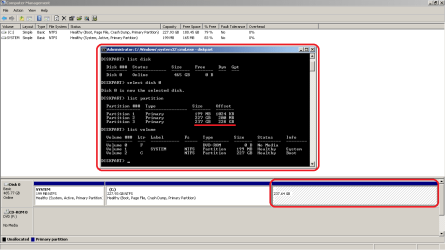
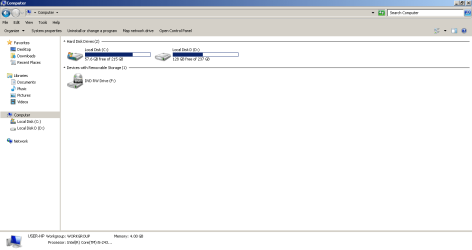
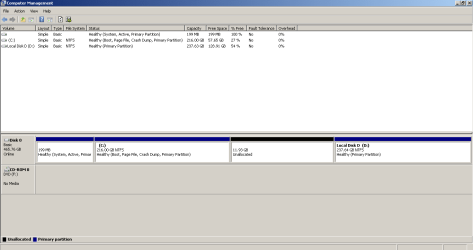
Here is a screenshot of the "Disk Management" and "My Computer"

Disk Management.png
My Computer.png

I tried every option I could find online; starting from DISKPART trying to assign a new letter:
Diskpart.png
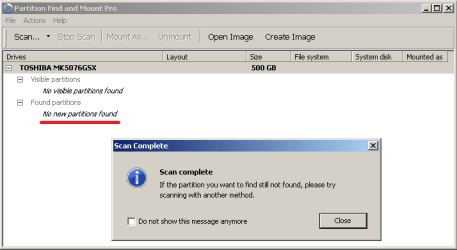
Till using variety of different 3'rd party partition software's. i'll list them down below with some screenshot's :
Keep in mind that some of them are 32 bit, so remember to install then in the (C:\Program Files (x86)) folder in case you were like me running x64 of windows.

1-Find and Mount Pro (Licensed)
Find and Mount Pro.png
2-EaseUS Partition Recovery 8.5 (freeware)
3-EaseUS Data Recovery Wizard Professional 10.8.0 (Licensed)
4-EASEUS Partition Master 12.5 (Licensed)
5-EaseUS Partition Master 12.9 Technician Edition (Licensed)
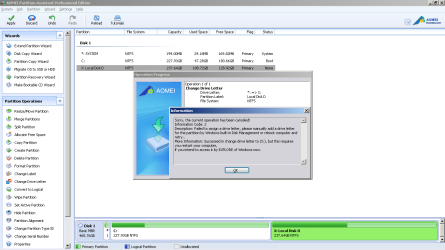
6-AOMEI Partition Assistant Pro Edition 5.1 (Licensed)
AOMEI Partition Assistant Professional_Changing letter.png
7-AOMEI Partition Assistant 7.2 Technician Edition (Licensed)
8-MiniTool Partition Wizard Professional 9.1 (Licensed)
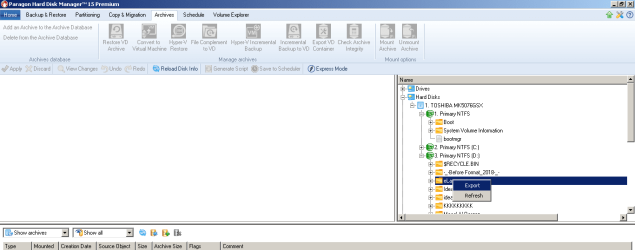
9-Paragon Hard Disk Manager 15 Premium (Licensed)
10-MBR Regenerator v4.5

Long story short, ALL IN VAIN
UNTIL i noticed something in "EaseUS Partition Master".
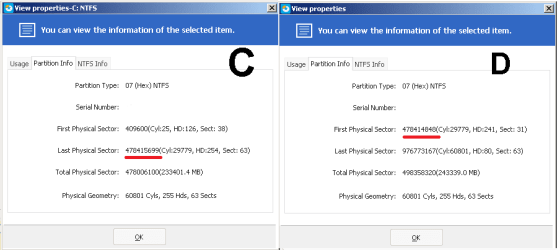
By right clicking both the "C and D partition" from "EaseUS Partition Master", and clicking on "proprietaries" from the drop-down menu and then viewing the "Partition info" tab i've noticed that there is something odd going on with the "First Physical Sector and the Last Physical Sector " numbers for the two partition's!!
Here is How it looks like:
EaseUS Partition Master C & D.png

to make it simple, if to say the C drive sectors starts from 0 to 100 , the D drive had to be from 101 to 200, that would make some sense, But what i have is like the C starts from 0 to 100 and the D starts from 80 to 200 !!
IT DOESN'T"T ADD UP !!
so what i have to do is to fix the "Last Physical Sector" for drive C, and the "First Physical Sector" for drive D.

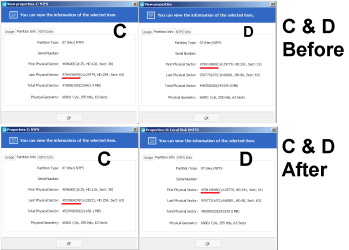
i managed to do it by shrinking down the C drive using any of the above partition software's (I went with AOMEI Partition Assistant Pro Edition).

Now after shrinking the C drive, it look like this:
C & D_After.png
C&D B4 nd After.png
My Computer_After.png
Disk Management_After.png
:party::party::party::party::party::party:
All that's left is to Extend Volume C to have that unallocated space back to the C drive.

BS: in between, i managed to copy everything in my D Drive to a different location before attempting doing anything in case i end up loosing both of my partition's by using "Paragon Hard Disk Manager 15 Premium".
Paragon.png
 
Last edited:

My Computer My Computer

At a glance

Windows 7 Home Basic x64 SP1 (6.1, Build 7601)Intel Core i5-2430M CPU @ 2.40GHz (4 CPUs),~2...4GB 1333MHZIntel(R) HD Graphics Family, 1696 MB
Computer type
Laptop
Computer Manufacturer/Model Number
HP Pavilion g4-1220ee Notebook
OS
Windows 7 Home Basic x64 SP1 (6.1, Build 7601)
CPU
Intel Core i5-2430M CPU @ 2.40GHz (4 CPUs),~2.4GHz, 2nd gen
Motherboard
Intel(R) 6 Series/C200 Series Chipset Family
Memory
4GB 1333MHZ
Graphics Card(s)
Intel(R) HD Graphics Family, 1696 MB
Sound Card
IDT High Definition Audio CODEC+Intel(R) Display Audio
Hard Drives
TOSHIBA MK5076GSX
Size:465.76 GB

Drive: C:
Free Space: 59.0 GB
Total Space: 221.2 GB
File System: NTFS

Drive: D:
Free Space: 132.0 GB
Total Space: 243.3 GB
File System: NTFS
Antivirus
Avira Free antivirus
Browser
Chrome, Firefox
Back
Top