DSR ON 700 Series- Better start OCING!!!

N00berG00ber

Weekend Warrior
Power User
VIP
Local time
1:05 PM
Messages
1,485
So nvidia just released a driver update enabling DSR (Dynamic Super Resolution) to all 600 and 700 series GPU enabling 4k gameplay on 1080p monitors!!!!! Better start OCing those GPUs!!!!
 

My Computer My Computer

At a glance

Windows 10 ProIntel i7-3770K 4.4GHz8GB G.SKILL Ripjaws 1866 MHzEVGA GTX 980 Classified
Computer type
PC/Desktop
Computer Manufacturer/Model Number
Weekend Warrior Rig
OS
Windows 10 Pro
CPU
Intel i7-3770K 4.4GHz
Motherboard
ASUS P8Z77-V Pro
Memory
8GB G.SKILL Ripjaws 1866 MHz
Graphics Card(s)
EVGA GTX 980 Classified
Monitor(s) Displays
Asus VH238H 23" 2ms
Screen Resolution
1920x1080
Hard Drives
Intel 330 120GB SSD /
WD Blue 1TB /
WD Black 500GB
PSU
Corsair CX750M
Case
NZXT H440
Cooling
Corsair H80i- CPU / Corsair H90- GPU
Keyboard
Logitech K360 LE
Mouse
Logitech G500
Antivirus
Avast
Browser
Chrome
Other Info
1200W 2.1 Surround Sound Audio

My Computer My Computer

At a glance

Windows 10 Pro X64Intel(R) Core(TM) i5-3570K CPU OC@ 4.5GHZ Turbo8.00 GB DDR3 1600MhzMSI Gaming X GTX 1070
Computer type
PC/Desktop
Computer Manufacturer/Model Number
Dude Build
OS
Windows 10 Pro X64
CPU
Intel(R) Core(TM) i5-3570K CPU OC@ 4.5GHZ Turbo
Motherboard
MSI Z77A-G45 Gaming
Memory
8.00 GB DDR3 1600Mhz
Graphics Card(s)
MSI Gaming X GTX 1070
Sound Card
Realtek High Definition
Monitor(s) Displays
Dell S23O9W, HP L1710
Screen Resolution
DELL-1920 x 1080 HP-1280 x1024
Hard Drives
Crucial m4 256 SSD, WD 7200RPM 500GB WD 1TB
PSU
Seasonic X650 GOLD
Case
Zalman Z12
Cooling
Antec Kuhler 920
Keyboard
Logitech
Mouse
MSI DS100 Interceptor
Internet Speed
50 down and 5 up
Antivirus
MSE
Browser
Chrome, IE 11
Other Info
Logitech X-620 Speakers
Its like Downsampling...but NviDIA had made it accessible by control panel. Never tried on AMD, though!

From what i'd read quickly it does Power Hungry.
 

Attachments

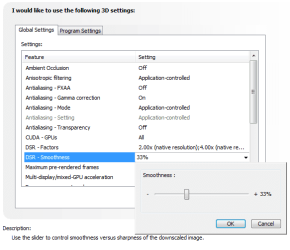
  • nvidia-control-panel-dsr-sharpness.png
    nvidia-control-panel-dsr-sharpness.png
    16.3 KB · Views: 6

My Computer My Computer

At a glance

Windows 7 Professional SP1 - x64 [Non-UEFI Boot]Ivy Bridge Core i5 3570K (Delidded)G.Skill "Ares" DDR3 PC3-12800 - 1600MHz (16Gb)Asus Dual-RX480-O4G
Computer type
PC/Desktop
Computer Manufacturer/Model Number
Custom Build
OS
Windows 7 Professional SP1 - x64 [Non-UEFI Boot]
CPU
Ivy Bridge Core i5 3570K (Delidded)
Motherboard
Asus P8Z77-V LE PLUS
Memory
G.Skill "Ares" DDR3 PC3-12800 - 1600MHz (16Gb)
Graphics Card(s)
Asus Dual-RX480-O4G
Sound Card
Creative Sound Blaster Z w/5.1 sound system
Monitor(s) Displays
Asus IPS 23"
Screen Resolution
16/9
Hard Drives
Internal:
500Go Sata 6Gb/s (x2)
500Go Sata 3Gb/s (x2)
SSD 60Go Sata 6Gb/s
PSU
In Win C 900W Series 80+ Platinum
Case
Thermaltake Chaser A71
Cooling
Custom Water Cooling Loop
Keyboard
Cooler Master QuickFire XTi
Mouse
Razer Imperator 2012 (4G)
Antivirus
MSE
Browser
IE 11.0.xxx Rtm
Other Info
"Raid0" with Intel Smart Response Technology (HDD/SSD)
I tested it out the other day on Grid Autosport.

It took a pretty big hit. I made some adjustments.

On Ultra settings I had to drop MSAA down to 2X to get a min of 42FPS and a Max of 62FPS.
I then changed default to High and whacked MSAA back up to 8X and got a min of 70FPS and a Max of 105FPS.

In the end I set a custom profile and changed many things back to Ultra and managed to maintain a steady 60FPS.

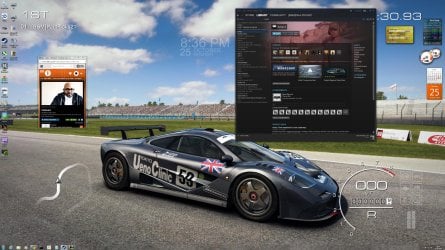
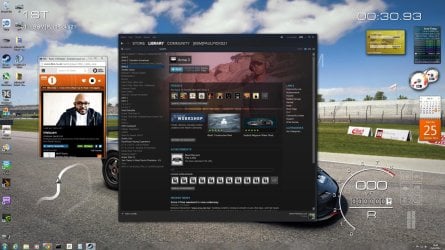
I was just messing around which changing the entire PC to 4K. You need good eyesight to read stuff and confirms my belief that you want a 30" + screen size to be able to enjoy 4K. In gaming it looked great on my 27" screen though.

Couple of desktop pics for comparison. The wallpaper was already a 4K game screenshot I grabbed hence the same size in both pics.
 

Attachments

  • 4k.jpg
    4k.jpg
    780.1 KB · Views: 3
  • 2560.jpg
    2560.jpg
    442.2 KB · Views: 3

My Computer My Computer

At a glance

Windows 7 Professional 64 bit
OS
Windows 7 Professional 64 bit
Not too bad...details, light & contrast appear quite well on the background wallpaper. When you're gaming you don't need all of those reading stuff!
 

My Computer My Computer

At a glance

Windows 7 Professional SP1 - x64 [Non-UEFI Boot]Ivy Bridge Core i5 3570K (Delidded)G.Skill "Ares" DDR3 PC3-12800 - 1600MHz (16Gb)Asus Dual-RX480-O4G
Computer type
PC/Desktop
Computer Manufacturer/Model Number
Custom Build
OS
Windows 7 Professional SP1 - x64 [Non-UEFI Boot]
CPU
Ivy Bridge Core i5 3570K (Delidded)
Motherboard
Asus P8Z77-V LE PLUS
Memory
G.Skill "Ares" DDR3 PC3-12800 - 1600MHz (16Gb)
Graphics Card(s)
Asus Dual-RX480-O4G
Sound Card
Creative Sound Blaster Z w/5.1 sound system
Monitor(s) Displays
Asus IPS 23"
Screen Resolution
16/9
Hard Drives
Internal:
500Go Sata 6Gb/s (x2)
500Go Sata 3Gb/s (x2)
SSD 60Go Sata 6Gb/s
PSU
In Win C 900W Series 80+ Platinum
Case
Thermaltake Chaser A71
Cooling
Custom Water Cooling Loop
Keyboard
Cooler Master QuickFire XTi
Mouse
Razer Imperator 2012 (4G)
Antivirus
MSE
Browser
IE 11.0.xxx Rtm
Other Info
"Raid0" with Intel Smart Response Technology (HDD/SSD)
Looks good Paul. I'm still playing with the settings on it. I turn AA down and use this, it looks pretty good :cool:
 

My Computer My Computer

At a glance

Windows 10 Pro X64Intel(R) Core(TM) i5-3570K CPU OC@ 4.5GHZ Turbo8.00 GB DDR3 1600MhzMSI Gaming X GTX 1070
Computer type
PC/Desktop
Computer Manufacturer/Model Number
Dude Build
OS
Windows 10 Pro X64
CPU
Intel(R) Core(TM) i5-3570K CPU OC@ 4.5GHZ Turbo
Motherboard
MSI Z77A-G45 Gaming
Memory
8.00 GB DDR3 1600Mhz
Graphics Card(s)
MSI Gaming X GTX 1070
Sound Card
Realtek High Definition
Monitor(s) Displays
Dell S23O9W, HP L1710
Screen Resolution
DELL-1920 x 1080 HP-1280 x1024
Hard Drives
Crucial m4 256 SSD, WD 7200RPM 500GB WD 1TB
PSU
Seasonic X650 GOLD
Case
Zalman Z12
Cooling
Antec Kuhler 920
Keyboard
Logitech
Mouse
MSI DS100 Interceptor
Internet Speed
50 down and 5 up
Antivirus
MSE
Browser
Chrome, IE 11
Other Info
Logitech X-620 Speakers
Not too bad...details, light & contrast appear quite well on the background wallpaper. When you're gaming you don't need all of those reading stuff!

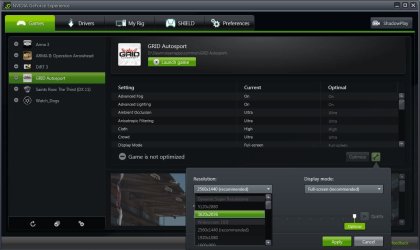
No, I agree. It works well in the 1 game I have tried it in so far. I had to use the Nvidia Experience to select the res for the game to get it to work (see screenshot). The Nvidia Experience only seems to have picked up 6 games that I have on my PC out of maybe 15 installed for some reason but of those 6 it appears it will work on 4 of them. The 2 Arma games the 4k resolution is simply not there to select.
 

Attachments

  • dsr3.JPG
    dsr3.JPG
    77.2 KB · Views: 2

My Computer My Computer

At a glance

Windows 7 Professional 64 bit
OS
Windows 7 Professional 64 bit
Looks good Paul. I'm still playing with the settings on it. I turn AA down and use this, it looks pretty good :cool:

It's not awful, just hard on the eyes. I had to change the 2 pics I attached from png to jpeg as the 4K shot was 11mb! so the quality of the pics were reduced.

But in game it looked great and no problems on the eyes just more of the track to see.
 

My Computer My Computer

At a glance

Windows 7 Professional 64 bit
OS
Windows 7 Professional 64 bit
I've tried different resolution settings but have not touched the smoothness setting yet.
 

My Computer My Computer

At a glance

Windows 10 Pro X64Intel(R) Core(TM) i5-3570K CPU OC@ 4.5GHZ Turbo8.00 GB DDR3 1600MhzMSI Gaming X GTX 1070
Computer type
PC/Desktop
Computer Manufacturer/Model Number
Dude Build
OS
Windows 10 Pro X64
CPU
Intel(R) Core(TM) i5-3570K CPU OC@ 4.5GHZ Turbo
Motherboard
MSI Z77A-G45 Gaming
Memory
8.00 GB DDR3 1600Mhz
Graphics Card(s)
MSI Gaming X GTX 1070
Sound Card
Realtek High Definition
Monitor(s) Displays
Dell S23O9W, HP L1710
Screen Resolution
DELL-1920 x 1080 HP-1280 x1024
Hard Drives
Crucial m4 256 SSD, WD 7200RPM 500GB WD 1TB
PSU
Seasonic X650 GOLD
Case
Zalman Z12
Cooling
Antec Kuhler 920
Keyboard
Logitech
Mouse
MSI DS100 Interceptor
Internet Speed
50 down and 5 up
Antivirus
MSE
Browser
Chrome, IE 11
Other Info
Logitech X-620 Speakers
I've tried different resolution settings but have not touched the smoothness setting yet.

TBH Doug, for Gaming I don't think you need to mess with it. I changed it from 33% to 27% as it made the text sharper on the desktop but the in game menu's were just fine as it was.

Edit: I don't think people are gonna use this for a general PC resolution, just for gaming. Me being a tinkerer I had to test it out both ways lol.
 

My Computer My Computer

At a glance

Windows 7 Professional 64 bit
OS
Windows 7 Professional 64 bit
Not too bad...details, light & contrast appear quite well on the background wallpaper. When you're gaming you don't need all of those reading stuff!

No, I agree. It works well in the 1 game I have tried it in so far. I had to use the Nvidia Experience to select the res for the game to get it to work (see screenshot). The Nvidia Experience only seems to have picked up 6 games that I have on my PC out of maybe 15 installed for some reason but of those 6 it appears it will work on 4 of them. The 2 Arma games the 4k resolution is simply not there to select.

Looks like Nvidia Experience its a bit as AMD Gaming Evolved, which last one is not install on my PC. I saw AMD downsampling youtube video and the way to set is quite complicated (back and forth).

Downsampling with AMD: Guide and Demonstration page 33

With the commercial battle those two are giving, Amd might react soon to this.
 

My Computer My Computer

At a glance

Windows 7 Professional SP1 - x64 [Non-UEFI Boot]Ivy Bridge Core i5 3570K (Delidded)G.Skill "Ares" DDR3 PC3-12800 - 1600MHz (16Gb)Asus Dual-RX480-O4G
Computer type
PC/Desktop
Computer Manufacturer/Model Number
Custom Build
OS
Windows 7 Professional SP1 - x64 [Non-UEFI Boot]
CPU
Ivy Bridge Core i5 3570K (Delidded)
Motherboard
Asus P8Z77-V LE PLUS
Memory
G.Skill "Ares" DDR3 PC3-12800 - 1600MHz (16Gb)
Graphics Card(s)
Asus Dual-RX480-O4G
Sound Card
Creative Sound Blaster Z w/5.1 sound system
Monitor(s) Displays
Asus IPS 23"
Screen Resolution
16/9
Hard Drives
Internal:
500Go Sata 6Gb/s (x2)
500Go Sata 3Gb/s (x2)
SSD 60Go Sata 6Gb/s
PSU
In Win C 900W Series 80+ Platinum
Case
Thermaltake Chaser A71
Cooling
Custom Water Cooling Loop
Keyboard
Cooler Master QuickFire XTi
Mouse
Razer Imperator 2012 (4G)
Antivirus
MSE
Browser
IE 11.0.xxx Rtm
Other Info
"Raid0" with Intel Smart Response Technology (HDD/SSD)
I did some more conclusive testing to highlight the performance hit between my native 2560x1440 resolution and the 4k DSR.
This was on Grid Autosport using the built in benchmark.

2560x1440
Ultra Preset 8xMSAA Min 83FPS Max 121FPS
Ultra Preset 2xMSAA Min 83FPS Max 128FPS
High Preset 8xMSAA Min 126FPS Max 188FPS
4K-
Ultra Preset 8xMSAA Min 39FPS Max 58FPS
Ultra Preset 2xMSAA Min 42FPS Max 62FPS
High Preset 8XMSAA Min 70FPS Max 105FPS

In all cases the 4k pretty much halves the framerate which I suppose is to be expected.
 

My Computer My Computer

At a glance

Windows 7 Professional 64 bit
OS
Windows 7 Professional 64 bit
I did some more conclusive testing to highlight the performance hit between my native 2560x1440 resolution and the 4k DSR.
This was on Grid Autosport using the built in benchmark.

2560x1440
Ultra Preset 8xMSAA Min 83FPS Max 121FPS
Ultra Preset 2xMSAA Min 83FPS Max 128FPS
High Preset 8xMSAA Min 126FPS Max 188FPS
4K-
Ultra Preset 8xMSAA Min 39FPS Max 58FPS
Ultra Preset 2xMSAA Min 42FPS Max 62FPS
High Preset 8XMSAA Min 70FPS Max 105FPS

In all cases the 4k pretty much halves the framerate which I suppose is to be expected.


Thanks for posting this Paul. I didn't check fps, just visuals:geek:
 

My Computer My Computer

At a glance

Windows 10 Pro X64Intel(R) Core(TM) i5-3570K CPU OC@ 4.5GHZ Turbo8.00 GB DDR3 1600MhzMSI Gaming X GTX 1070
Computer type
PC/Desktop
Computer Manufacturer/Model Number
Dude Build
OS
Windows 10 Pro X64
CPU
Intel(R) Core(TM) i5-3570K CPU OC@ 4.5GHZ Turbo
Motherboard
MSI Z77A-G45 Gaming
Memory
8.00 GB DDR3 1600Mhz
Graphics Card(s)
MSI Gaming X GTX 1070
Sound Card
Realtek High Definition
Monitor(s) Displays
Dell S23O9W, HP L1710
Screen Resolution
DELL-1920 x 1080 HP-1280 x1024
Hard Drives
Crucial m4 256 SSD, WD 7200RPM 500GB WD 1TB
PSU
Seasonic X650 GOLD
Case
Zalman Z12
Cooling
Antec Kuhler 920
Keyboard
Logitech
Mouse
MSI DS100 Interceptor
Internet Speed
50 down and 5 up
Antivirus
MSE
Browser
Chrome, IE 11
Other Info
Logitech X-620 Speakers
Its really just a gaming thing. not for regular desktop. however, how i was going to use it was keeping my games maxed out already, i would up the resolution until i get just below 60FPS. OR i would keep details at max and turn down the AA and up the resolution. either way, i cant wait to play with it!!! i stil have yet to order my 780 Ti. still waiting for my refund. if im lucky, tomorrow will be the day! Enough with this intel HD 4000 graphics and playing COD at 720p on lowest settings! lol
 

My Computer My Computer

At a glance

Windows 10 ProIntel i7-3770K 4.4GHz8GB G.SKILL Ripjaws 1866 MHzEVGA GTX 980 Classified
Computer type
PC/Desktop
Computer Manufacturer/Model Number
Weekend Warrior Rig
OS
Windows 10 Pro
CPU
Intel i7-3770K 4.4GHz
Motherboard
ASUS P8Z77-V Pro
Memory
8GB G.SKILL Ripjaws 1866 MHz
Graphics Card(s)
EVGA GTX 980 Classified
Monitor(s) Displays
Asus VH238H 23" 2ms
Screen Resolution
1920x1080
Hard Drives
Intel 330 120GB SSD /
WD Blue 1TB /
WD Black 500GB
PSU
Corsair CX750M
Case
NZXT H440
Cooling
Corsair H80i- CPU / Corsair H90- GPU
Keyboard
Logitech K360 LE
Mouse
Logitech G500
Antivirus
Avast
Browser
Chrome
Other Info
1200W 2.1 Surround Sound Audio
Back
Top