Solved How to check if a program is working?

Callender

New member
Guru
Gold Member
VIP
Local time
10:26 AM
Messages
4,776
Location
United Kingdom
Here's the situation. I'm using an account with admin rights (not the built in admin account) and I've heard that it's not a good idea to run browsers and the like using an admin account.

Anyway I'm trying SrtipMyRights: StripMyRights - Based on DropMyRights

Instructions state to run a browser as a normal user. (I assume this means Standard User in Windows 7)

So using the following command in the Opera browser shortcut does indeed launch the browser.

C:\Windows\System32\StripMyRights.exe /L N "Full Path To\opera.exe"

My question is how can I test that the browser is actually running with Standard User rights?
 

My Computer My Computer

Computer type
Laptop
Computer Manufacturer/Model Number
ASUS
OS
Microsoft Windows 7 Home Premium 64-bit 7601 Multiprocessor Free Service Pack 1
CPU
AMD C-60 APU with Radeon(tm) HD Graphics
Motherboard
ASUSTeK COMPUTER INC. X501U
Memory
4.00 GB
Graphics Card(s)
AMD Radeon HD 6290 Graphics
Sound Card
(1) AMD High Definition Audio Device (2) Realtek High Defi
Screen Resolution
1366 x 768 x 32 bits (4294967296 colors) @ 60 Hz
Hard Drives
Hitachi HTS545050A7E380 SATA Disk Device
Antivirus
Comodo CIS & FW, SecureAplus App Whitelisting, Threatfire
Browser
Cyberfox 64bit, Opera 64bit, Airfox
Other Info
Spy-The-Spy, HitmanPro.Alert, Norton Connect Safe, MJRegWatcher, BitDefender TrafficLight, Voodoo Shield, Zemana AntiMalware
Process Explorer

Do you have Process Explorer?

You can add a column called "Integrity Level" to the display.
I think it's called that; I'm in LM17 now so I can't check.

You can then compare the browser values to your other User processes and the System processes. :)

You could also try downloading a file to a protected system folder (instead of your User folders).
Obviously, you should be careful if you try this. :eek:
 
Last edited:

My Computer My Computer

Computer type
PC/Desktop
Computer Manufacturer/Model Number
n/a
OS
W7 Ultimate SP1, LM19.2 MATE, W10 Home 1703, W10 Pro 1703 VM, #All 64 bit
CPU
AMD Phenom II x6 1100T, 3.3 GHz
Motherboard
ASUS M4A88T-M/USB3 (AM3)
Memory
12GB DDR3 1333 G-Skill (4GB x 2), G-Skill (2GB x 2)
Graphics Card(s)
NVIDIA GeForce GTX 660
Sound Card
Realtek?
Monitor(s) Displays
Samsung S23B350
Screen Resolution
1920x1080
Hard Drives
WD Green 2TB (SATA), WD Green 3TB (SATA), WD Blue 4TB (SATA), WD Blue 6TB (SATA)
PSU
Cooler Master
Case
Antec GX300 Tower
Cooling
3x Antec TRICOOL 120mm Fans
Mouse
Wired Optical
Internet Speed
DSL
Antivirus
Avast
Browser
Pale Moon (64 bit)
Other Info
2018-12-27 Upgraded HDDs
2015-12-10 Upgraded case, graphics card, storage
2015-08-15 Upgraded motherboard & RAM
2015-07-15 Upgraded LM17.1 to LM17.2
Process Explorer and Integrity

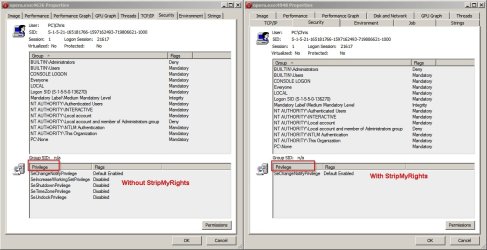
I do have ProcessExplorer and had already used it to check integrity. It shows medium integrity for both:

Opera - old version without StripMyRights
Opera - newer verion with StripMyRights

The screenshot shows some differences under "Privilege" but I'm not sure exactly what this means.

Opera.jpg
 

My Computer My Computer

Computer type
Laptop
Computer Manufacturer/Model Number
ASUS
OS
Microsoft Windows 7 Home Premium 64-bit 7601 Multiprocessor Free Service Pack 1
CPU
AMD C-60 APU with Radeon(tm) HD Graphics
Motherboard
ASUSTeK COMPUTER INC. X501U
Memory
4.00 GB
Graphics Card(s)
AMD Radeon HD 6290 Graphics
Sound Card
(1) AMD High Definition Audio Device (2) Realtek High Defi
Screen Resolution
1366 x 768 x 32 bits (4294967296 colors) @ 60 Hz
Hard Drives
Hitachi HTS545050A7E380 SATA Disk Device
Antivirus
Comodo CIS & FW, SecureAplus App Whitelisting, Threatfire
Browser
Cyberfox 64bit, Opera 64bit, Airfox
Other Info
Spy-The-Spy, HitmanPro.Alert, Norton Connect Safe, MJRegWatcher, BitDefender TrafficLight, Voodoo Shield, Zemana AntiMalware
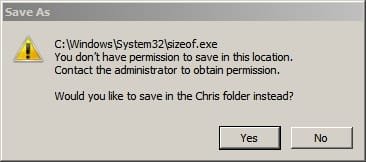
Tried downloading sizeof.exe (I know it's a safe file)

Gammadyne's Free DOS Utilities

It's supposed to be placed in the root of C: but I tried saving in system32.

Both versions of Opera (StripMyRights vs without StripMyRights) refused to let me save the file there!
 

My Computer My Computer

Computer type
Laptop
Computer Manufacturer/Model Number
ASUS
OS
Microsoft Windows 7 Home Premium 64-bit 7601 Multiprocessor Free Service Pack 1
CPU
AMD C-60 APU with Radeon(tm) HD Graphics
Motherboard
ASUSTeK COMPUTER INC. X501U
Memory
4.00 GB
Graphics Card(s)
AMD Radeon HD 6290 Graphics
Sound Card
(1) AMD High Definition Audio Device (2) Realtek High Defi
Screen Resolution
1366 x 768 x 32 bits (4294967296 colors) @ 60 Hz
Hard Drives
Hitachi HTS545050A7E380 SATA Disk Device
Antivirus
Comodo CIS & FW, SecureAplus App Whitelisting, Threatfire
Browser
Cyberfox 64bit, Opera 64bit, Airfox
Other Info
Spy-The-Spy, HitmanPro.Alert, Norton Connect Safe, MJRegWatcher, BitDefender TrafficLight, Voodoo Shield, Zemana AntiMalware
Are you sure Opera doesn't have built-in "Integrity Level" control (i.e. it runs as Standard even in an Administrator account)?

Does the account you're using, still offer "Run as administrator" in the context menu?
If yes, does using it to launch Opera make any difference?
 

My Computer My Computer

Computer type
PC/Desktop
Computer Manufacturer/Model Number
n/a
OS
W7 Ultimate SP1, LM19.2 MATE, W10 Home 1703, W10 Pro 1703 VM, #All 64 bit
CPU
AMD Phenom II x6 1100T, 3.3 GHz
Motherboard
ASUS M4A88T-M/USB3 (AM3)
Memory
12GB DDR3 1333 G-Skill (4GB x 2), G-Skill (2GB x 2)
Graphics Card(s)
NVIDIA GeForce GTX 660
Sound Card
Realtek?
Monitor(s) Displays
Samsung S23B350
Screen Resolution
1920x1080
Hard Drives
WD Green 2TB (SATA), WD Green 3TB (SATA), WD Blue 4TB (SATA), WD Blue 6TB (SATA)
PSU
Cooler Master
Case
Antec GX300 Tower
Cooling
3x Antec TRICOOL 120mm Fans
Mouse
Wired Optical
Internet Speed
DSL
Antivirus
Avast
Browser
Pale Moon (64 bit)
Other Info
2018-12-27 Upgraded HDDs
2015-12-10 Upgraded case, graphics card, storage
2015-08-15 Upgraded motherboard & RAM
2015-07-15 Upgraded LM17.1 to LM17.2
Run as Admin is the key

Thanks very much indeed.

Running Opera as Admin from the right click context menu with StripMyRights gives the following error:

Opera 2.jpg

Running the other version of Opera as Admin from the right click context menu without StripMyRights:

I can then save the file to system32 - no problem.

I guess we can say that the question has been solved. Many thanks indeed!
 
Last edited:

My Computer My Computer

Computer type
Laptop
Computer Manufacturer/Model Number
ASUS
OS
Microsoft Windows 7 Home Premium 64-bit 7601 Multiprocessor Free Service Pack 1
CPU
AMD C-60 APU with Radeon(tm) HD Graphics
Motherboard
ASUSTeK COMPUTER INC. X501U
Memory
4.00 GB
Graphics Card(s)
AMD Radeon HD 6290 Graphics
Sound Card
(1) AMD High Definition Audio Device (2) Realtek High Defi
Screen Resolution
1366 x 768 x 32 bits (4294967296 colors) @ 60 Hz
Hard Drives
Hitachi HTS545050A7E380 SATA Disk Device
Antivirus
Comodo CIS & FW, SecureAplus App Whitelisting, Threatfire
Browser
Cyberfox 64bit, Opera 64bit, Airfox
Other Info
Spy-The-Spy, HitmanPro.Alert, Norton Connect Safe, MJRegWatcher, BitDefender TrafficLight, Voodoo Shield, Zemana AntiMalware
Sorry - Can't rep you at this point in time Lehnerus2000
 

My Computer My Computer

Computer type
Laptop
Computer Manufacturer/Model Number
ASUS
OS
Microsoft Windows 7 Home Premium 64-bit 7601 Multiprocessor Free Service Pack 1
CPU
AMD C-60 APU with Radeon(tm) HD Graphics
Motherboard
ASUSTeK COMPUTER INC. X501U
Memory
4.00 GB
Graphics Card(s)
AMD Radeon HD 6290 Graphics
Sound Card
(1) AMD High Definition Audio Device (2) Realtek High Defi
Screen Resolution
1366 x 768 x 32 bits (4294967296 colors) @ 60 Hz
Hard Drives
Hitachi HTS545050A7E380 SATA Disk Device
Antivirus
Comodo CIS & FW, SecureAplus App Whitelisting, Threatfire
Browser
Cyberfox 64bit, Opera 64bit, Airfox
Other Info
Spy-The-Spy, HitmanPro.Alert, Norton Connect Safe, MJRegWatcher, BitDefender TrafficLight, Voodoo Shield, Zemana AntiMalware
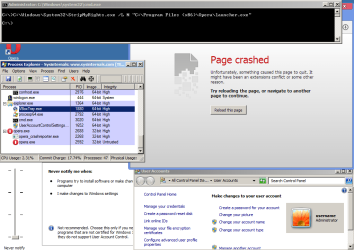
Turning off UAC on an user:admin account and using StripMyRights results in a non-functioning browser.

opera.png

Subsequent attempts to surf to websites result in waiting forever for the page to load.


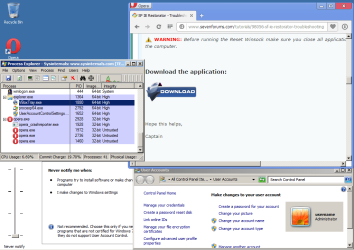
Running the browser without StripMyRights, results in a working browser running processes at the following integrity levels:

opera2.png
 
Last edited:

My Computer My Computer

Computer type
Laptop
Computer Manufacturer/Model Number
Employer provided Dell Latitude
OS
W7 Pro SP1 64bit
CPU
i7
Memory
8GB
Graphics Card(s)
Intel HD Graphics
Hard Drives
crappy SSD
Antivirus
Employer mandated Symantec Endpoint Protection
Browser
Pale Moon 64bit, IE11 64bit & Chrome 64bit
Thanks very much indeed.

Running Opera as Admin from the right click context menu with StripMyRights gives the following error:
~~~

How did you launch Opera from the context menu and still use StripMyRights?

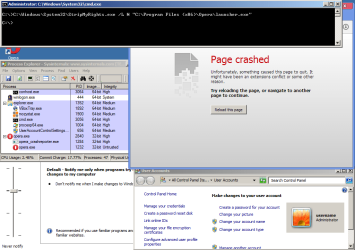
Using an elevated command prompt to results in the same crash that I mentioned above:

opera3.png
 

My Computer My Computer

Computer type
Laptop
Computer Manufacturer/Model Number
Employer provided Dell Latitude
OS
W7 Pro SP1 64bit
CPU
i7
Memory
8GB
Graphics Card(s)
Intel HD Graphics
Hard Drives
crappy SSD
Antivirus
Employer mandated Symantec Endpoint Protection
Browser
Pale Moon 64bit, IE11 64bit & Chrome 64bit
Sorry - Can't rep you at this point in time Lehnerus2000
No problems. :)

I often run into that issue myself (I guess I need to hand out more Rep).
 

My Computer My Computer

Computer type
PC/Desktop
Computer Manufacturer/Model Number
n/a
OS
W7 Ultimate SP1, LM19.2 MATE, W10 Home 1703, W10 Pro 1703 VM, #All 64 bit
CPU
AMD Phenom II x6 1100T, 3.3 GHz
Motherboard
ASUS M4A88T-M/USB3 (AM3)
Memory
12GB DDR3 1333 G-Skill (4GB x 2), G-Skill (2GB x 2)
Graphics Card(s)
NVIDIA GeForce GTX 660
Sound Card
Realtek?
Monitor(s) Displays
Samsung S23B350
Screen Resolution
1920x1080
Hard Drives
WD Green 2TB (SATA), WD Green 3TB (SATA), WD Blue 4TB (SATA), WD Blue 6TB (SATA)
PSU
Cooler Master
Case
Antec GX300 Tower
Cooling
3x Antec TRICOOL 120mm Fans
Mouse
Wired Optical
Internet Speed
DSL
Antivirus
Avast
Browser
Pale Moon (64 bit)
Other Info
2018-12-27 Upgraded HDDs
2015-12-10 Upgraded case, graphics card, storage
2015-08-15 Upgraded motherboard & RAM
2015-07-15 Upgraded LM17.1 to LM17.2
Launching browser using StripMyRights

Sorry, I'm at work currently so from memory:

Modified the browser desktop shortcut using

C:\Windows\System32\StripMyRights.exe /L N "Full Path To\opera.exe"

Right clicked the shortcut and chose "Run as admin"

It's a shortcut to the portable version of Opera. I'll test on another installed browser later.

I can post more specific details later.
 

My Computer My Computer

Computer type
Laptop
Computer Manufacturer/Model Number
ASUS
OS
Microsoft Windows 7 Home Premium 64-bit 7601 Multiprocessor Free Service Pack 1
CPU
AMD C-60 APU with Radeon(tm) HD Graphics
Motherboard
ASUSTeK COMPUTER INC. X501U
Memory
4.00 GB
Graphics Card(s)
AMD Radeon HD 6290 Graphics
Sound Card
(1) AMD High Definition Audio Device (2) Realtek High Defi
Screen Resolution
1366 x 768 x 32 bits (4294967296 colors) @ 60 Hz
Hard Drives
Hitachi HTS545050A7E380 SATA Disk Device
Antivirus
Comodo CIS & FW, SecureAplus App Whitelisting, Threatfire
Browser
Cyberfox 64bit, Opera 64bit, Airfox
Other Info
Spy-The-Spy, HitmanPro.Alert, Norton Connect Safe, MJRegWatcher, BitDefender TrafficLight, Voodoo Shield, Zemana AntiMalware
Shortcut - Run as administrator

That should work.

I've used that for my VMware Workstation batch file (starts services, starts VMW, stops services).

You should be able to set the shortcut to automatically "Run as administrator".
You will still need to acknowledge a UAC prompt.
273648d1371916775-privileges-win-7-help-run-administrator.png
 

My Computer My Computer

Computer type
PC/Desktop
Computer Manufacturer/Model Number
n/a
OS
W7 Ultimate SP1, LM19.2 MATE, W10 Home 1703, W10 Pro 1703 VM, #All 64 bit
CPU
AMD Phenom II x6 1100T, 3.3 GHz
Motherboard
ASUS M4A88T-M/USB3 (AM3)
Memory
12GB DDR3 1333 G-Skill (4GB x 2), G-Skill (2GB x 2)
Graphics Card(s)
NVIDIA GeForce GTX 660
Sound Card
Realtek?
Monitor(s) Displays
Samsung S23B350
Screen Resolution
1920x1080
Hard Drives
WD Green 2TB (SATA), WD Green 3TB (SATA), WD Blue 4TB (SATA), WD Blue 6TB (SATA)
PSU
Cooler Master
Case
Antec GX300 Tower
Cooling
3x Antec TRICOOL 120mm Fans
Mouse
Wired Optical
Internet Speed
DSL
Antivirus
Avast
Browser
Pale Moon (64 bit)
Other Info
2018-12-27 Upgraded HDDs
2015-12-10 Upgraded case, graphics card, storage
2015-08-15 Upgraded motherboard & RAM
2015-07-15 Upgraded LM17.1 to LM17.2
DropMyRights and StripMyRights were developed in the XP days, before UAC was born. If you have UAC enabled and you launch a program and you don't get an UAC prompt - then you're running as a Standard user (unless you've made some elevated without prompt override special)

To launch a shortcut to StripMyRights as admin only to have StripMyRights then remove the admin rights and then launch the program.... :confused: Trust UAC instead!
 

My Computer My Computer

Computer type
Laptop
Computer Manufacturer/Model Number
HP Elitebook 8540p
OS
Windows 7 Pro 32
CPU
Intel(R) Core(TM) i5 CPU M 540 @ 2.53GHz
Motherboard
Hewlett-Packard 1521
Memory
4,00 GB (Usable 2,98)
Graphics Card(s)
NVIDIA NVS 5100M
Sound Card
NVIDIA High Definition Audio
Screen Resolution
1600x900
Hard Drives
INTEL SSDSA2CW120G3
Antivirus
F-Secure Internet Security
Browser
IE, Firefox, Opera
Other Info
Sandboxie,
SRP (Software Restriction Policy),
EMET (Enhanced Mitigation Experience Toolkit),
WFC (Windows Firewall Control by BiniSoft),
Malwarebytes Premium
Sorry, I'm at work currently so from memory:

Modified the browser desktop shortcut using

C:\Windows\System32\StripMyRights.exe /L N "Full Path To\opera.exe"

Right clicked the shortcut and chose "Run as admin"

It's a shortcut to the portable version of Opera. I'll test on another installed browser later.

I can post more specific details later.
Doing those steps for the installed version of the Opera browser caused the same non-working browser as shown in post #9. At least it did for me :-)
 

My Computer My Computer

Computer type
Laptop
Computer Manufacturer/Model Number
Employer provided Dell Latitude
OS
W7 Pro SP1 64bit
CPU
i7
Memory
8GB
Graphics Card(s)
Intel HD Graphics
Hard Drives
crappy SSD
Antivirus
Employer mandated Symantec Endpoint Protection
Browser
Pale Moon 64bit, IE11 64bit & Chrome 64bit
Shortcut - StripMyRights

Sorry, I'm at work currently so from memory:

Modified the browser desktop shortcut using

C:\Windows\System32\StripMyRights.exe /L N "Full Path To\opera.exe"

Right clicked the shortcut and chose "Run as admin"

It's a shortcut to the portable version of Opera. I'll test on another installed browser later.

I can post more specific details later.
Doing those steps for the installed version of the Opera browser caused the same non-working browser as shown in post #9. At least it did for me :-)

Hmm, I'm not sure what's going on here.

More information:

Account Type is Administrator
Built in Administrator account is disabled
UAC is enabled

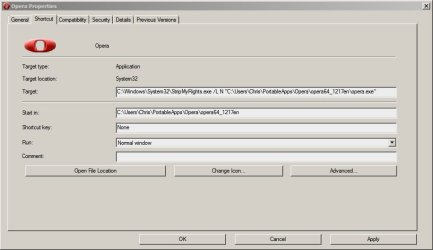
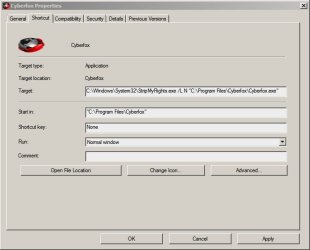
I've now tested shortcuts for Opera12.17 64bit portable (heartbleed patched version) and Cyberfox v33 64bit installed version. Both browsers launch.

Screenshots of shortcuts:

Opera Shortcut Properties.jpg

Cyberfox Shortcut Properties.jpg
 

My Computer My Computer

Computer type
Laptop
Computer Manufacturer/Model Number
ASUS
OS
Microsoft Windows 7 Home Premium 64-bit 7601 Multiprocessor Free Service Pack 1
CPU
AMD C-60 APU with Radeon(tm) HD Graphics
Motherboard
ASUSTeK COMPUTER INC. X501U
Memory
4.00 GB
Graphics Card(s)
AMD Radeon HD 6290 Graphics
Sound Card
(1) AMD High Definition Audio Device (2) Realtek High Defi
Screen Resolution
1366 x 768 x 32 bits (4294967296 colors) @ 60 Hz
Hard Drives
Hitachi HTS545050A7E380 SATA Disk Device
Antivirus
Comodo CIS & FW, SecureAplus App Whitelisting, Threatfire
Browser
Cyberfox 64bit, Opera 64bit, Airfox
Other Info
Spy-The-Spy, HitmanPro.Alert, Norton Connect Safe, MJRegWatcher, BitDefender TrafficLight, Voodoo Shield, Zemana AntiMalware
Command Line usage

Thanks very much indeed.

Running Opera as Admin from the right click context menu with StripMyRights gives the following error:
~~~

How did you launch Opera from the context menu and still use StripMyRights?

Using an elevated command prompt to results in the same crash that I mentioned above:

View attachment 338441

Elevated Command Prompt that works for me is:

StripMyRights.exe /L N "C:\Users\Chris\PortableApps\Opera\opera64_1217en\opera.exe"

So no path is needed in front of StripMyRights.exe
 
Last edited:

My Computer My Computer

Computer type
Laptop
Computer Manufacturer/Model Number
ASUS
OS
Microsoft Windows 7 Home Premium 64-bit 7601 Multiprocessor Free Service Pack 1
CPU
AMD C-60 APU with Radeon(tm) HD Graphics
Motherboard
ASUSTeK COMPUTER INC. X501U
Memory
4.00 GB
Graphics Card(s)
AMD Radeon HD 6290 Graphics
Sound Card
(1) AMD High Definition Audio Device (2) Realtek High Defi
Screen Resolution
1366 x 768 x 32 bits (4294967296 colors) @ 60 Hz
Hard Drives
Hitachi HTS545050A7E380 SATA Disk Device
Antivirus
Comodo CIS & FW, SecureAplus App Whitelisting, Threatfire
Browser
Cyberfox 64bit, Opera 64bit, Airfox
Other Info
Spy-The-Spy, HitmanPro.Alert, Norton Connect Safe, MJRegWatcher, BitDefender TrafficLight, Voodoo Shield, Zemana AntiMalware
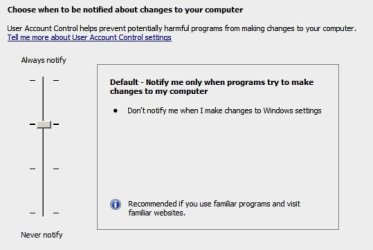
UAC Settings

UAC is set like this:

User Account Control Settings.jpg

Other settings:

Code:
129) Operating System 

 
Item	Value	   
Name	7	   
Edition	Home Premium Edition	   
Install Date	20130822204251.000000+060	   
Registered Owner	Chris	   
Registered Organization		   
Product ID	*****-OEM-*******-****	   
Major Version Number	6	   
Minor Version Number	1	   
Build Number	7601	   
Service Pack	Service Pack 1	   
Service Pack Version	1.0	   
Plus! Version Number	<null>	   
DirectX Version	9.0c	   
Windows Directory	C:\Windows\	   
System Directory	C:\Windows\system32\	   
Temporary Directory	V:\AppData\Local\Temp\	   
Operating System Language	English	   
Number of Bits	64	 


149) Registry Security Values 

 
Subkey	Setting	   
CodeIdentifiers\AuthenticodeEnabled 	0 	   
Driver Signing\Policy 	01000000 	   
Eventlog\Application\RestrictGuestAccess 	1 	   
Eventlog\Security\RestrictGuestAccess 	1 	   
Eventlog\System\RestrictGuestAccess 	1 	   
Eventlog\Application\Retention 	0 	   
Eventlog\Security\Retention 	0 	   
Eventlog\System\Retention 	0 	   
Eventlog\Application\MaxSize 	83886080 	   
Eventlog\Security\MaxSize 	838860800 	   
Eventlog\System\MaxSize 	83886080 	   
LanManServer\Parameters\AutoDisconnect 	15 	   
LanManServer\Parameters\EnableForcedLogOff 	1 	   
LanManServer\Parameters\EnableSecuritySignature 	0 	   
LanManServer\Parameters\NullSessionPipes 	 	   
LanManServer\Parameters\RequireSecuritySignature 	0 	   
LanManServer\Parameters\RestrictNullSessAccess 	1 	   
LanmanWorkstation\Parameters\EnablePlainTextPassword 	0 	   
LanmanWorkstation\Parameters\EnableSecuritySignature 	1 	   
LanmanWorkstation\Parameters\RequireSecuritySignature 	0 	   
LDAP\LDAPClientIntegrity 	1 	   
Lsa\AuditBaseObjects 	0 	   
Lsa\CrashOnAuditFail 	0 	   
Lsa\DisableDomainCreds 	0 	   
Lsa\EveryoneIncludesAnonymous 	0 	   
Lsa\FIPSAlgorithmPolicy\Enabled 	 	   
Lsa\ForceGuest 	0 	   
Lsa\FullPrivilegeAuditing 	00 	   
Lsa\LimitBlankPasswordUse 	1 	   
Lsa\LmCompatibilityLevel 	0 	   
Lsa\MSV1_0\NTLMMinClientSec 	537395200 	   
Lsa\MSV1_0\NTLMMinServerSec 	537395200 	   
Lsa\NoLMHash 	1 	   
Lsa\RestrictAnonymous 	0 	   
Lsa\RestrictAnonymousSAM 	1 	   
Netlogon\Parameters\DisablePasswordChange 	0 	   
Netlogon\Parameters\MaximumPasswordAge 	30 	   
Netlogon\Parameters\RequireSignOrSeal 	1 	   
Netlogon\Parameters\RequireStrongKey 	1 	   
Netlogon\Parameters\SealSecureChannel 	1 	   
Netlogon\Parameters\SignSecureChannel 	1 	   
NTDS\Parameters\LDAPServerIntegrity 	 	   
Session Manager\Kernel\ObCaseInsensitive 	1 	   
Session Manager\ProtectionMode 	1 	   
Session Manager\SubSystems\optional 	 	   
System\ConsentPromptBehaviorAdmin 	5 	   
System\ConsentPromptBehaviorUser 	 	   
System\DisableCAD 	 	   
System\DontDisplayLastUserName 	0 	   
System\EnableInstallerDetection 	 	   
System\EnableLUA 	1 	   
System\EnableSecureUIAPaths 	 	   
System\EnableUIADesktopToggle 	 	   
System\EnableVirtualization 	 	   
System\FilterAdministratorToken 	 	   
System\LegalNoticeCaption 	 	   
System\LegalNoticeText 	 	   
System\PromptOnSecureDesktop 	1 	   
System\ScForceOption 	0 	   
System\ShutdownWithoutLogon 	1 	   
System\UndockWithoutLogon 	1 	   
System\ValidateAdminCodeSignatures 	 	   
Winlogon\CachedLogonsCount 	 	   
Winlogon\ForceUnlockLogon 	 	   
Winlogon\PasswordExpiryWarning 	 	   
Winlogon\ScRemoveOption 	 	 


154) User Rights Assignment 

 
Policy	Security Setting	   
Access Credential Manager as a trusted caller 	 	   
Access this computer from the network 	S-1-5-32-551, Users, Administrators, Everyone 	   
Act as part of the operating system 	Chris 	   
Add workstations to domain 	 	   
Adjust memory quotas for a process 	Administrators, NETWORK SERVICE, LOCAL SERVICE 	   
Allow log on through Terminal Services 	S-1-5-32-555, Administrators 	   
Back up files and directories 	S-1-5-32-551, Administrators 	   
Bypass traverse checking 	S-1-5-32-551, Users, Administrators, NETWORK SERVICE, LOCAL SERVICE, Everyone 	   
Change the system time 	Administrators, LOCAL SERVICE 	   
Change the time zone 	Users, Administrators, LOCAL SERVICE 	   
Create a pagefile 	Administrators 	   
Create a token object 	 	   
Create global objects 	SERVICE, Administrators, NETWORK SERVICE, LOCAL SERVICE 	   
Create permanent shared objects 	 	   
Create symbolic links 	Administrators, Chris 	   
Debug programs 	Administrators 	   
Deny access to this computer from the network 	Guest 	   
Deny log on as a batch job 	 	   
Deny log on as a service 	 	   
Deny log on locally 	 	   
Deny log on through Terminal Services 	 	   
Enable delegation 	 	   
Force shutdown from a remote system 	Administrators 	   
Generate security audits 	NETWORK SERVICE, LOCAL SERVICE 	   
Impersonate a client after authentication 	SERVICE, Administrators, NETWORK SERVICE, LOCAL SERVICE 	   
Increase a process working set 	Users 	   
Increase scheduling priority 	Administrators 	   
Load and unload device drivers 	Administrators 	   
Lock pages in memory 	Chris 	   
Log on as a batch job 	Performance Log Users, S-1-5-32-551, Administrators 	   
Log on as a service 	 	   
Log on locally 	S-1-5-32-551, Users, Administrators, Guest 	   
Manage auditing and security log 	Administrators 	   
Manage the files on a volume 	Administrators 	   
Modify an object label 	 	   
Modify firmware environment values 	Administrators 	   
Profile single process 	Administrators 	   
Profile system performance 	WdiServiceHost, Administrators 	   
Remove computer from docking station 	Users, Administrators 	   
Replace a process-level token 	NETWORK SERVICE, LOCAL SERVICE 	   
Restore files and directories 	S-1-5-32-551, Administrators 	   
Shut down the system 	S-1-5-32-551, Users, Administrators 	   
Synchronize directory service data 	 	   
Take ownership of files or other objects 	Administrators, Chris 	 


157) Administrators 
 
Item	Value	   
Group Type	Local	   
Group Name	Administrators	   
Comment	Administrators have complete and unrestricted access to the computer/domain	 


160) Guests 
 
Item	Value	   
Group Type	Local	   
Group Name	Guests	   
Comment	Guests have the same access as members of the Users group by default, except for the Guest account which is further restricted	 


165) Users 
 
Item	Value	   
Group Type	Local	   
Group Name	Users	   
Comment	Users are prevented from making accidental or intentional system-wide changes and can run most applications	 


166) Group Policy 

 
Group Name	Privilege Name	   
Administrators 	SeSecurityPrivilege 	   
Administrators 	SeBackupPrivilege 	   
Administrators 	SeRestorePrivilege 	   
Administrators 	SeSystemtimePrivilege 	   
Administrators 	SeShutdownPrivilege 	   
Administrators 	SeRemoteShutdownPrivilege 	   
Administrators 	SeTakeOwnershipPrivilege 	   
Administrators 	SeDebugPrivilege 	   
Administrators 	SeSystemEnvironmentPrivilege 	   
Administrators 	SeSystemProfilePrivilege 	   
Administrators 	SeProfileSingleProcessPrivilege 	   
Administrators 	SeIncreaseBasePriorityPrivilege 	   
Administrators 	SeLoadDriverPrivilege 	   
Administrators 	SeCreatePagefilePrivilege 	   
Administrators 	SeIncreaseQuotaPrivilege 	   
Administrators 	SeChangeNotifyPrivilege 	   
Administrators 	SeUndockPrivilege 	   
Administrators 	SeManageVolumePrivilege 	   
Administrators 	SeImpersonatePrivilege 	   
Administrators 	SeCreateGlobalPrivilege 	   
Administrators 	SeTimeZonePrivilege 	   
Administrators 	SeCreateSymbolicLinkPrivilege 	   
Administrators 	SeInteractiveLogonRight 	   
Administrators 	SeNetworkLogonRight 	   
Administrators 	SeBatchLogonRight 	   
Administrators 	SeRemoteInteractiveLogonRight 	   
Performance Log Users 	SeBatchLogonRight 	   
Users 	SeChangeNotifyPrivilege 	   
Users 	SeUndockPrivilege 	   
Users 	SeIncreaseWorkingSetPrivilege 	   
Users 	SeTimeZonePrivilege 	   
Users 	SeInteractiveLogonRight 	   
Users 	SeNetworkLogonRight 	   
Users 	SeShutdownPrivilege 	 


168) Administrator 
 
Item	Value	   
User Account	Administrator	   
Full Name		   
Description	Built-in account for administering the computer/domain	   
Account Status	Disabled, Not LockedPassword is required, Can change password, Password never expires, Password has not expired	   
Local Groups	Administrators	   
Global Groups	None	   
Last Logon	2010-11-21 03:47:20	   
Last Logoff		   
Number of Logons	6	   
Bad Password Count	0	   
Password Age	1436 Days	   
Password Expired	No	   
Account Expires		 

169) Chris 
 
Item	Value	   
User Account	Chris	   
Full Name		   
Description		   
Account Status	Enabled, Not LockedPassword not required, Can change password, Password never expires, Password has not expired	   
Local Groups	Administrators	   
Global Groups	None	   
Last Logon	2014-10-27 19:30:10	   
Last Logoff		   
Number of Logons	1677	   
Bad Password Count	0	   
Password Age	431 Days	   
Password Expired	No	   
Account Expires		 

170) Guest 
 
Item	Value	   
User Account	Guest	   
Full Name		   
Description	Built-in account for guest access to the computer/domain	   
Account Status	Disabled, Not LockedPassword not required, Can change password, Password never expires, Password has not expired	   
Local Groups	Guests	   
Global Groups	None	   
Last Logon		   
Last Logoff		   
Number of Logons	0	   
Bad Password Count	0	   
Password Age	346 Days	   
Password Expired	No	   
Account Expires

Some programs do run from elevated shortcuts but browsers including opera are not elevated.

Registry Settings for UAC are set to;

HKEY_LOCAL_MACHINE\SOFTWARE\Microsoft\Windows\CurrentVersion\Policies\System

Default: Notify and Dim
UnableLUA = 1
ConsentPromptBehaviorAdmin = 5
PromptOnSecureDesktop = 1

My best guess is that maybe you've got UAC on the maximum setting rather than the default setting?

EDIT:

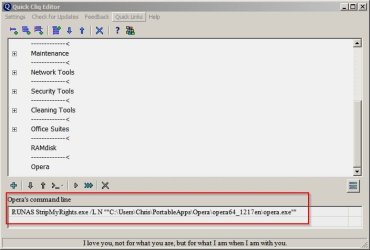
This also works - running Opera from a program launcher with the following command:

Quick Cliq Editor.jpg
 
Last edited:

My Computer My Computer

Computer type
Laptop
Computer Manufacturer/Model Number
ASUS
OS
Microsoft Windows 7 Home Premium 64-bit 7601 Multiprocessor Free Service Pack 1
CPU
AMD C-60 APU with Radeon(tm) HD Graphics
Motherboard
ASUSTeK COMPUTER INC. X501U
Memory
4.00 GB
Graphics Card(s)
AMD Radeon HD 6290 Graphics
Sound Card
(1) AMD High Definition Audio Device (2) Realtek High Defi
Screen Resolution
1366 x 768 x 32 bits (4294967296 colors) @ 60 Hz
Hard Drives
Hitachi HTS545050A7E380 SATA Disk Device
Antivirus
Comodo CIS & FW, SecureAplus App Whitelisting, Threatfire
Browser
Cyberfox 64bit, Opera 64bit, Airfox
Other Info
Spy-The-Spy, HitmanPro.Alert, Norton Connect Safe, MJRegWatcher, BitDefender TrafficLight, Voodoo Shield, Zemana AntiMalware
UAC Enabled

DropMyRights and StripMyRights were developed in the XP days, before UAC was born. If you have UAC enabled and you launch a program and you don't get an UAC prompt - then you're running as a Standard user (unless you've made some elevated without prompt override special)

To launch a shortcut to StripMyRights as admin only to have StripMyRights then remove the admin rights and then launch the program.... :confused: Trust UAC instead!

UAC is enabled - Was set to default level but I've just set it to maximum level.

Some reading material here about admin level accounts when browsing:

Security Fix - The Importance of the Limited User, Revisited

StripMyRights is supposed to give the browser standard user rights even if the user chooses to "run as admin" - and it's supposed to run the browser with standard user rights if the user has an admin level account.
 

My Computer My Computer

Computer type
Laptop
Computer Manufacturer/Model Number
ASUS
OS
Microsoft Windows 7 Home Premium 64-bit 7601 Multiprocessor Free Service Pack 1
CPU
AMD C-60 APU with Radeon(tm) HD Graphics
Motherboard
ASUSTeK COMPUTER INC. X501U
Memory
4.00 GB
Graphics Card(s)
AMD Radeon HD 6290 Graphics
Sound Card
(1) AMD High Definition Audio Device (2) Realtek High Defi
Screen Resolution
1366 x 768 x 32 bits (4294967296 colors) @ 60 Hz
Hard Drives
Hitachi HTS545050A7E380 SATA Disk Device
Antivirus
Comodo CIS & FW, SecureAplus App Whitelisting, Threatfire
Browser
Cyberfox 64bit, Opera 64bit, Airfox
Other Info
Spy-The-Spy, HitmanPro.Alert, Norton Connect Safe, MJRegWatcher, BitDefender TrafficLight, Voodoo Shield, Zemana AntiMalware
That article is written for people who have Windows XP. For Vista and later there's UAC. With UAC enabled it will disable administrator permissions for all programs you start. If the program requires to be run as admin then you'll get an UAC prompt. So if you never get an UAC prompt it means the programs is running as standard user. If you get a UAC prompt and you answer Yes, only then will the program have admin rights.

Think of it like this: UAC enabled = admin rights disabled (until UAC prompts and you answer Yes)

A browser shouldn't run as admin at all. If a browser requires that, then I wouldn't use it.

To be clear, I'm talking about an account type of administrator. Not the hidden/built-in administrator account.
 

My Computer My Computer

Computer type
Laptop
Computer Manufacturer/Model Number
HP Elitebook 8540p
OS
Windows 7 Pro 32
CPU
Intel(R) Core(TM) i5 CPU M 540 @ 2.53GHz
Motherboard
Hewlett-Packard 1521
Memory
4,00 GB (Usable 2,98)
Graphics Card(s)
NVIDIA NVS 5100M
Sound Card
NVIDIA High Definition Audio
Screen Resolution
1600x900
Hard Drives
INTEL SSDSA2CW120G3
Antivirus
F-Secure Internet Security
Browser
IE, Firefox, Opera
Other Info
Sandboxie,
SRP (Software Restriction Policy),
EMET (Enhanced Mitigation Experience Toolkit),
WFC (Windows Firewall Control by BiniSoft),
Malwarebytes Premium
Sorry, I'm at work currently so from memory:

Modified the browser desktop shortcut using

C:\Windows\System32\StripMyRights.exe /L N "Full Path To\opera.exe"

Right clicked the shortcut and chose "Run as admin"

It's a shortcut to the portable version of Opera. I'll test on another installed browser later.

I can post more specific details later.
Perhaps the portable version acts differently. All of my testing was done using the installed version. I did not know that you were using a portable version until this post. Which is probably a good thing, since it lead me to test a different setup.


UAC is set like this:

View attachment 338494

~~~
My best guess is that maybe you've got UAC on the maximum setting rather than the default setting?

EDIT:

This also works - running Opera from a program launcher with the following command:

View attachment 338496

The UAC settings was set to the default. I was using the same setup as shown in post 9 - except the shortcut target field was modified/used to run as admin instead of using the elevated command prompt.
 

My Computer My Computer

Computer type
Laptop
Computer Manufacturer/Model Number
Employer provided Dell Latitude
OS
W7 Pro SP1 64bit
CPU
i7
Memory
8GB
Graphics Card(s)
Intel HD Graphics
Hard Drives
crappy SSD
Antivirus
Employer mandated Symantec Endpoint Protection
Browser
Pale Moon 64bit, IE11 64bit & Chrome 64bit
Back
Top