SSID Disappears after turning on my laptop!

Ripshock

New member
Local time
7:18 PM
Messages
96
Location
Bayt jala, Palestine
Hi All,
Greetings, i have an Asus k55a laptop, a Tenda W548D router and every time i turn on my laptop from powered-off state my network ssid is gone from all devices which makes me to restart the router several times to get back normal.
so please help fix this problem or explain to me why
Thanks in advance
 

My Computer My Computer

At a glance

windows 7 home premium 64 bitintel cor i3-3110mram 4gbintel hd graphics 4000
Computer type
Laptop
Computer Manufacturer/Model Number
Asus
OS
windows 7 home premium 64 bit
CPU
intel cor i3-3110m
Motherboard
k55a
Memory
ram 4gb
Graphics Card(s)
intel hd graphics 4000
Hard Drives
500gb
Cooling
within laptop
Keyboard
built-in
Mouse
touchpad built in
Internet Speed
4mbs
Antivirus
trend micro titanium internet security 2012
Browser
google chrome
Hello,

You might want to see if there's an updated firmware version for your router.

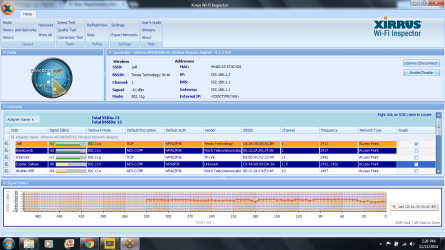
Also, can you please post a Xirrus Wi-fi Inspector snip for review? You'll find a quick guide here.
 

My Computer My Computer

At a glance

Win7 & Win8 64bitIntel i5
Computer Manufacturer/Model Number
Lenovo Desktop/Samsung Laptop
OS
Win7 & Win8 64bit
CPU
Intel i5
Internet Speed
Charter-20 Mbps
Antivirus
Avast
Browser
FF, IE9 and Chrome
Hello,

You might want to see if there's an updated firmware version for your router.

Also, can you please post a Xirrus Wi-fi Inspector snip for review? You'll find a quick guide here.

when installing it says This installation package could not be opened. Verify that the package exists and that you can access it, or contact the application vendor to verify that this is a valid Windows Installer package
Edit: i have just created a new user, idk what happened but it installed fine
here router 1.png
 
Last edited:

My Computer My Computer

At a glance

windows 7 home premium 64 bitintel cor i3-3110mram 4gbintel hd graphics 4000
Computer type
Laptop
Computer Manufacturer/Model Number
Asus
OS
windows 7 home premium 64 bit
CPU
intel cor i3-3110m
Motherboard
k55a
Memory
ram 4gb
Graphics Card(s)
intel hd graphics 4000
Hard Drives
500gb
Cooling
within laptop
Keyboard
built-in
Mouse
touchpad built in
Internet Speed
4mbs
Antivirus
trend micro titanium internet security 2012
Browser
google chrome
Hi,

Sorry for the tardiness, I was away due to my hectic schedule. Thanks for providing the Xirrus snip, it looks good.

Is the issue only happening from the laptop? Can the laptop sees other Wi-Fi networks other than yours?

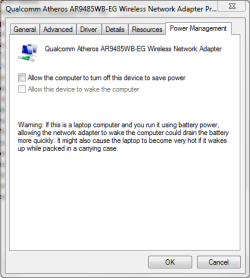
You might want to disable the Power Management mode of your wireless network adapter from Device Manager.
 

Attachments

  • Power Management mode - disable Wi-Fi.PNG
    Power Management mode - disable Wi-Fi.PNG
    13.7 KB · Views: 13

My Computer My Computer

At a glance

Win7 & Win8 64bitIntel i5
Computer Manufacturer/Model Number
Lenovo Desktop/Samsung Laptop
OS
Win7 & Win8 64bit
CPU
Intel i5
Internet Speed
Charter-20 Mbps
Antivirus
Avast
Browser
FF, IE9 and Chrome
Hi,

Sorry for the tardiness, I was away due to my hectic schedule. Thanks for providing the Xirrus snip, it looks good.

Is the issue only happening from the laptop? Can the laptop sees other Wi-Fi networks other than yours?

You might want to disable the Power Management mode of your wireless network adapter from Device Manager.

It`s okay, as long as you response, it`s all fine perfectly.
yes, only from this laptop. yes, it can.
i have tried that but after i have restarted my SSID has gone from all devices
 

My Computer My Computer

At a glance

windows 7 home premium 64 bitintel cor i3-3110mram 4gbintel hd graphics 4000
Computer type
Laptop
Computer Manufacturer/Model Number
Asus
OS
windows 7 home premium 64 bit
CPU
intel cor i3-3110m
Motherboard
k55a
Memory
ram 4gb
Graphics Card(s)
intel hd graphics 4000
Hard Drives
500gb
Cooling
within laptop
Keyboard
built-in
Mouse
touchpad built in
Internet Speed
4mbs
Antivirus
trend micro titanium internet security 2012
Browser
google chrome
Just to confirm, when you restart your router, the SSID is not visible anymore from any of your wireless devices - i.e. Tablets, smartphones, laptops?
i have restarted my SSID has gone from all devices
If this is the case, I'd suggest to download and install the latest router's firmware, make sure that you use a wired connection to install the latest firmware. Test the connection after, if it still an issue next thing to do is... reset to the factory default setting. Please backup the current router setting prior to the reset.

If you need guidance (tutorials) to do the above process please let us know. Please post the make and model of your router.
 

My Computer My Computer

At a glance

Win7 & Win8 64bitIntel i5
Computer Manufacturer/Model Number
Lenovo Desktop/Samsung Laptop
OS
Win7 & Win8 64bit
CPU
Intel i5
Internet Speed
Charter-20 Mbps
Antivirus
Avast
Browser
FF, IE9 and Chrome
Just to confirm, when you restart your router, the SSID is not visible anymore from any of your wireless devices - i.e. Tablets, smartphones, laptops?
i have restarted my SSID has gone from all devices
If this is the case, I'd suggest to download and install the latest router's firmware, make sure that you use a wired connection to install the latest firmware. Test the connection after, if it still an issue next thing to do is... reset to the factory default setting. Please backup the current router setting prior to the reset.

If you need guidance (tutorials) to do the above process please let us know. Please post the make and model of your router.
My bad i should have put a coma after restarted, i mean restarted my pc
 

My Computer My Computer

At a glance

windows 7 home premium 64 bitintel cor i3-3110mram 4gbintel hd graphics 4000
Computer type
Laptop
Computer Manufacturer/Model Number
Asus
OS
windows 7 home premium 64 bit
CPU
intel cor i3-3110m
Motherboard
k55a
Memory
ram 4gb
Graphics Card(s)
intel hd graphics 4000
Hard Drives
500gb
Cooling
within laptop
Keyboard
built-in
Mouse
touchpad built in
Internet Speed
4mbs
Antivirus
trend micro titanium internet security 2012
Browser
google chrome
No worries...... but all other wireless devices gets disconnected after you restarted your computer?
 

My Computer My Computer

At a glance

Win7 & Win8 64bitIntel i5
Computer Manufacturer/Model Number
Lenovo Desktop/Samsung Laptop
OS
Win7 & Win8 64bit
CPU
Intel i5
Internet Speed
Charter-20 Mbps
Antivirus
Avast
Browser
FF, IE9 and Chrome
No worries...... but all other wireless devices gets disconnected after you restarted your computer?

yes and no sign of my SSID until restarting the router several times and what i mean by several times that on first restart of my router it connects but then it disappear then i restart my router again also same result on the third or 4th it works usually but rarely on first or second also i have tried upgrading firmware still same result
 

My Computer My Computer

At a glance

windows 7 home premium 64 bitintel cor i3-3110mram 4gbintel hd graphics 4000
Computer type
Laptop
Computer Manufacturer/Model Number
Asus
OS
windows 7 home premium 64 bit
CPU
intel cor i3-3110m
Motherboard
k55a
Memory
ram 4gb
Graphics Card(s)
intel hd graphics 4000
Hard Drives
500gb
Cooling
within laptop
Keyboard
built-in
Mouse
touchpad built in
Internet Speed
4mbs
Antivirus
trend micro titanium internet security 2012
Browser
google chrome
Are there any small appliance/electronic devices (i.e. microware, cell phone, speakers) nearby?

Are the wired connection (i.e. computer, printer) affected or only wireless connection?

Do a test – turn off the computer that’s causing the issue and leave all other wireless devices on, keep an eye out for a while for any disconnections. If all is well, turn the computer back on and see if all the wireless devices will stay connected to your network.
 

My Computer My Computer

At a glance

Win7 & Win8 64bitIntel i5
Computer Manufacturer/Model Number
Lenovo Desktop/Samsung Laptop
OS
Win7 & Win8 64bit
CPU
Intel i5
Internet Speed
Charter-20 Mbps
Antivirus
Avast
Browser
FF, IE9 and Chrome
Are there any small appliance/electronic devices (i.e. microware, cell phone, speakers) nearby?

Are the wired connection (i.e. computer, printer) affected or only wireless connection?

Do a test – turn off the computer that’s causing the issue and leave all other wireless devices on, keep an eye out for a while for any disconnections. If all is well, turn the computer back on and see if all the wireless devices will stay connected to your network.

if nearby the router, No
no, only wireless
i did try that but same results
 

My Computer My Computer

At a glance

windows 7 home premium 64 bitintel cor i3-3110mram 4gbintel hd graphics 4000
Computer type
Laptop
Computer Manufacturer/Model Number
Asus
OS
windows 7 home premium 64 bit
CPU
intel cor i3-3110m
Motherboard
k55a
Memory
ram 4gb
Graphics Card(s)
intel hd graphics 4000
Hard Drives
500gb
Cooling
within laptop
Keyboard
built-in
Mouse
touchpad built in
Internet Speed
4mbs
Antivirus
trend micro titanium internet security 2012
Browser
google chrome
It won't hurt to change your wireless channel to 6, see if it helps.

Next step will be.... Post# 6
Test the connection after, if it still an issue next thing to do is... reset to the factory default setting. Please backup the current router setting prior to the reset.

If you need guidance (tutorials) to do the above process please let us know. Please post the make and model of your router.
 

My Computer My Computer

At a glance

Win7 & Win8 64bitIntel i5
Computer Manufacturer/Model Number
Lenovo Desktop/Samsung Laptop
OS
Win7 & Win8 64bit
CPU
Intel i5
Internet Speed
Charter-20 Mbps
Antivirus
Avast
Browser
FF, IE9 and Chrome
It won't hurt to change your wireless channel to 6, see if it helps.

Next step will be.... Post# 6
Test the connection after, if it still an issue next thing to do is... reset to the factory default setting. Please backup the current router setting prior to the reset.

If you need guidance (tutorials) to do the above process please let us know. Please post the make and model of your router.

tried that without telling me, i have tried most of what you told me but worthless
 

My Computer My Computer

At a glance

windows 7 home premium 64 bitintel cor i3-3110mram 4gbintel hd graphics 4000
Computer type
Laptop
Computer Manufacturer/Model Number
Asus
OS
windows 7 home premium 64 bit
CPU
intel cor i3-3110m
Motherboard
k55a
Memory
ram 4gb
Graphics Card(s)
intel hd graphics 4000
Hard Drives
500gb
Cooling
within laptop
Keyboard
built-in
Mouse
touchpad built in
Internet Speed
4mbs
Antivirus
trend micro titanium internet security 2012
Browser
google chrome
Any changes in your network? New ISP or new wireless device (s) added?

You've done all what you can, what's left to do......
Is your router provided by your ISP? You might need a replacement. Also, have you contacted them regarding your issue?
 
Last edited:

My Computer My Computer

At a glance

Win7 & Win8 64bitIntel i5
Computer Manufacturer/Model Number
Lenovo Desktop/Samsung Laptop
OS
Win7 & Win8 64bit
CPU
Intel i5
Internet Speed
Charter-20 Mbps
Antivirus
Avast
Browser
FF, IE9 and Chrome
Any changes in your network? New ISP or new wireless device (s) added?

You've done all what you can, what's left to do......
Is your router provided by your ISP? You might need a replacement. Also, have you contacted them regarding your issue?
I told ghis problem has started since i first use this laptop
 

My Computer My Computer

At a glance

windows 7 home premium 64 bitintel cor i3-3110mram 4gbintel hd graphics 4000
Computer type
Laptop
Computer Manufacturer/Model Number
Asus
OS
windows 7 home premium 64 bit
CPU
intel cor i3-3110m
Motherboard
k55a
Memory
ram 4gb
Graphics Card(s)
intel hd graphics 4000
Hard Drives
500gb
Cooling
within laptop
Keyboard
built-in
Mouse
touchpad built in
Internet Speed
4mbs
Antivirus
trend micro titanium internet security 2012
Browser
google chrome
Understood.... Also, it can be a coincidence that there might be some other issues that contributed when you connected your laptop, these things can happen unexpectedly. I'm sure that others will have other insights. :)
 

My Computer My Computer

At a glance

Win7 & Win8 64bitIntel i5
Computer Manufacturer/Model Number
Lenovo Desktop/Samsung Laptop
OS
Win7 & Win8 64bit
CPU
Intel i5
Internet Speed
Charter-20 Mbps
Antivirus
Avast
Browser
FF, IE9 and Chrome
Back
Top