Solved "Spyware and unwanted software protection" issue

Larnika3511

New member
Local time
1:28 PM
Messages
13
Every day, on my action center page, I receive the following two messages:
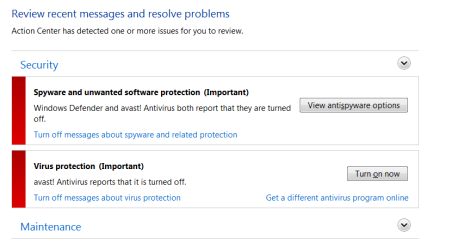
Action center messages.png
My Avast program says that it is is up to date and shields are active.

I tried to run my system specs using the file above, but got this error:
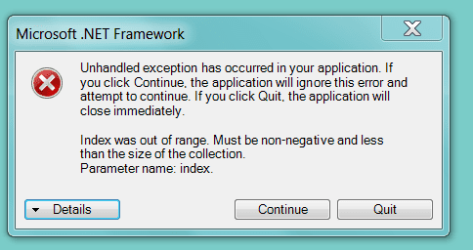
systemInfo error.png

*Background*
For several weeks, each day my computer tried unsuccessfully to load
"Security Update for Microsoft .NET Framework 3.5.1 on Windows 7 and Windows Server 2008 R2 SP1 for x64-based Systems (KB2894844)".
Today I using instructions on this forum, I downloaded and ran the SUR and scannow. After running those, it loaded successfully. I rebooted, but I am still having the issue above.

Can anyone help me please? I appreciate any input. I am new to this forum, so please excuse my unfamiliarity... If you need additional information, please let me know what to attach. (Does this need to be in the "Update" section?)
 

My Computer My Computer

Computer type
Laptop
Computer Manufacturer/Model Number
Dell
OS
64-bit Windows 7 ultimate
Browser
Google chrome
Disable Windows Defender. You can't have both active.

Can't see any "file above" but assume you mean SystemInfo.exe It's probably a bug in the program or your system is missing something that is assumed to exist in all systems. If you click on the Details button you'll get information that can be useful to identify the problem. Post a new screenshot of that info.
You should be able to click the Continue button and hopefully the rest of the program will work so you can see the system specs.
 

My Computer My Computer

Computer type
Laptop
Computer Manufacturer/Model Number
HP Elitebook 8540p
OS
Windows 7 Pro 32
CPU
Intel(R) Core(TM) i5 CPU M 540 @ 2.53GHz
Motherboard
Hewlett-Packard 1521
Memory
4,00 GB (Usable 2,98)
Graphics Card(s)
NVIDIA NVS 5100M
Sound Card
NVIDIA High Definition Audio
Screen Resolution
1600x900
Hard Drives
INTEL SSDSA2CW120G3
Antivirus
F-Secure Internet Security
Browser
IE, Firefox, Opera
Other Info
Sandboxie,
SRP (Software Restriction Policy),
EMET (Enhanced Mitigation Experience Toolkit),
WFC (Windows Firewall Control by BiniSoft),
Malwarebytes Premium
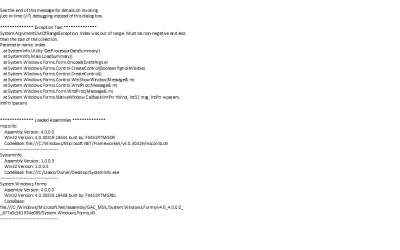
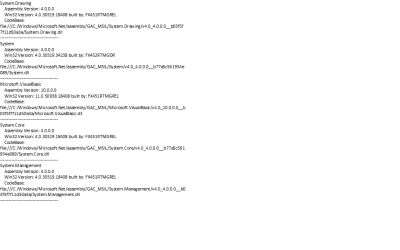
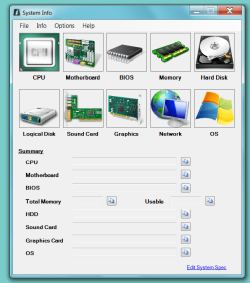
Yes, it was systeminfo.exe. When I click continue, none of the fields are populated. Here are the details to the error message, and the screen shot of the results. Thanks for your help.
systeminfo error details 1.png
systeminfo error details 2.png
systeminfo error details 3.png
systemInfo unpop.png
 

My Computer My Computer

Computer type
Laptop
Computer Manufacturer/Model Number
Dell
OS
64-bit Windows 7 ultimate
Browser
Google chrome
It seems to be related with getting info about the processor. Thanks for the info.
You can try to click each of the 10 images: CPU, Motherboard etc. Maybe you can get the info from there even though it's not populated directly from start.

How's the action center message? Did you disable Windows Defender?
 

My Computer My Computer

Computer type
Laptop
Computer Manufacturer/Model Number
HP Elitebook 8540p
OS
Windows 7 Pro 32
CPU
Intel(R) Core(TM) i5 CPU M 540 @ 2.53GHz
Motherboard
Hewlett-Packard 1521
Memory
4,00 GB (Usable 2,98)
Graphics Card(s)
NVIDIA NVS 5100M
Sound Card
NVIDIA High Definition Audio
Screen Resolution
1600x900
Hard Drives
INTEL SSDSA2CW120G3
Antivirus
F-Secure Internet Security
Browser
IE, Firefox, Opera
Other Info
Sandboxie,
SRP (Software Restriction Policy),
EMET (Enhanced Mitigation Experience Toolkit),
WFC (Windows Firewall Control by BiniSoft),
Malwarebytes Premium
I have not disabled Windows Defender. Do I need to? I have Avast (the free version) and although the action center reports it closed, the avast program itself shows "active".

Also, I tried clicking on each individual image, but none populated. I'm not sure how to get the information without this program, manually. Do you think it's related to the security issue?
 

My Computer My Computer

Computer type
Laptop
Computer Manufacturer/Model Number
Dell
OS
64-bit Windows 7 ultimate
Browser
Google chrome
Try and disable it to see if that makes Avast report that it's working. It that doesn't help you could try to uninstall and reinstall Avast.

When you click the images a new smaller window should open and from there you can copy the information. I don't think doing that will populate the main window.
Don't know why you get that error. What processor do you have? Look in Control Panel - System
 

My Computer My Computer

Computer type
Laptop
Computer Manufacturer/Model Number
HP Elitebook 8540p
OS
Windows 7 Pro 32
CPU
Intel(R) Core(TM) i5 CPU M 540 @ 2.53GHz
Motherboard
Hewlett-Packard 1521
Memory
4,00 GB (Usable 2,98)
Graphics Card(s)
NVIDIA NVS 5100M
Sound Card
NVIDIA High Definition Audio
Screen Resolution
1600x900
Hard Drives
INTEL SSDSA2CW120G3
Antivirus
F-Secure Internet Security
Browser
IE, Firefox, Opera
Other Info
Sandboxie,
SRP (Software Restriction Policy),
EMET (Enhanced Mitigation Experience Toolkit),
WFC (Windows Firewall Control by BiniSoft),
Malwarebytes Premium

My Computer My Computer

Computer type
Laptop
Computer Manufacturer/Model Number
HP Elitebook 8540p
OS
Windows 7 Pro 32
CPU
Intel(R) Core(TM) i5 CPU M 540 @ 2.53GHz
Motherboard
Hewlett-Packard 1521
Memory
4,00 GB (Usable 2,98)
Graphics Card(s)
NVIDIA NVS 5100M
Sound Card
NVIDIA High Definition Audio
Screen Resolution
1600x900
Hard Drives
INTEL SSDSA2CW120G3
Antivirus
F-Secure Internet Security
Browser
IE, Firefox, Opera
Other Info
Sandboxie,
SRP (Software Restriction Policy),
EMET (Enhanced Mitigation Experience Toolkit),
WFC (Windows Firewall Control by BiniSoft),
Malwarebytes Premium
Thanks! I'll give these a try and post the results.
 

My Computer My Computer

Computer type
Laptop
Computer Manufacturer/Model Number
Dell
OS
64-bit Windows 7 ultimate
Browser
Google chrome
Disable Windows Defender. You can't have both active.

That is wrong-you most certainly can use both at the same time. Windows 8 and above windows defender is an antivirus, so then you would not want to use both. But in windows 7 and below it is just antispyware. You can certainly use both at the same time with no problems.

I am concerned at the messages you are receiving, it is especially odd that avast says everything is fine.

First,

I would uninstall avast as normal trough control panel uninstall a program; and then use the removal utility outlined here:

http://www.sevenforums.com/tutorials/343783-avast-uninstall-completely.html

Once this is done, reinstall avast antivirus.

Then restart and check windows security center.

If you are still having problems after doing the above, please post these logs:

* Download the Farbar Service Scanner.

* Once download, right click the fss.exe file, and choose run as administrator.

*Checkmark the following boxes:

-Internet services
-Windows firewall
-System Restore
-Security center/action center
-Windows Update
-Windows defender

*Click Scan. A notepad window will appear with your log file. Save it to the desktop. Then upload the log here in your next reply using the paperclip on the reply box.

___________________________________________________________________________________


1.) Download security check below.

This will show me what security software you use and what the status is of them:

Downloading SecurityCheck

Open and run: SecurityCheck.exe
Follow the instructions inside the window that appears.

When done, a Notepad report opens automatically, called: checkup.txt

Please post the checkup.txt in your reply using the paperclip:

picture.php


My Computer My Computer

Computer type
PC/Desktop
Computer Manufacturer/Model Number
Custom Built
OS
Windows 10 Pro
CPU
AMD Ryzen 5 2400G Processor with Radeon RX Vega 11 Graphics
Motherboard
ASRock X470 Master SLI/AC AM4 AMD Promontory X470 SATA 6Gb/s
Memory
G.SKILL Ripjaws V Series 16GB (2 x 8GB) 288-Pin DDR4 SDRAM D
Graphics Card(s)
2047MB NVIDIA GeForce GTX 1060 6GB (EVGA)
Sound Card
Motherboard Built in
Monitor(s) Displays
Acer R240HY bidx 23.8-Inch IPS HDMI DVI VGA (1920 x 1080) Wi
Screen Resolution
1920 x 1080
Hard Drives
1TB Sandisk SSD PLUS (Main drive)
500 GB Seagate 7200 RPM (Games)
500 GB Western Digital 7200 RPM (Virtual Machines)
PSU
CORSAIR TX Series TX650M 650W 80+ Gold Modular Power Supply
Case
CORSAIR CARBIDE SPEC-02 Mid-Tower Gaming Case, Red LED Fan
Cooling
220mm, two 120mm, and four 60mm fans
Keyboard
Wired Dell keyboard
Mouse
Wireless Logitech mouse
Internet Speed
250mb down, 30mb up
Antivirus
Panda Cloud Antivirus
Browser
Chrome-ish x64
Other Info
Your awesome for reading this.
Thanks for helping Andrew, good suggestions. My mistake, confused it with Defender in Win 8 and the fact that both were reported as off for Spyware protection.
 

My Computer My Computer

Computer type
Laptop
Computer Manufacturer/Model Number
HP Elitebook 8540p
OS
Windows 7 Pro 32
CPU
Intel(R) Core(TM) i5 CPU M 540 @ 2.53GHz
Motherboard
Hewlett-Packard 1521
Memory
4,00 GB (Usable 2,98)
Graphics Card(s)
NVIDIA NVS 5100M
Sound Card
NVIDIA High Definition Audio
Screen Resolution
1600x900
Hard Drives
INTEL SSDSA2CW120G3
Antivirus
F-Secure Internet Security
Browser
IE, Firefox, Opera
Other Info
Sandboxie,
SRP (Software Restriction Policy),
EMET (Enhanced Mitigation Experience Toolkit),
WFC (Windows Firewall Control by BiniSoft),
Malwarebytes Premium
YAY! Thank you SO much! No more action center messages! I REALLY appreciate the time you both gave to help me resolve this issue. I am forever grateful. Have a good day!
 

My Computer My Computer

Computer type
Laptop
Computer Manufacturer/Model Number
Dell
OS
64-bit Windows 7 ultimate
Browser
Google chrome
Great! Please also inform what you did to solve it as that may help others that find this thread in the future.
 

My Computer My Computer

Computer type
Laptop
Computer Manufacturer/Model Number
HP Elitebook 8540p
OS
Windows 7 Pro 32
CPU
Intel(R) Core(TM) i5 CPU M 540 @ 2.53GHz
Motherboard
Hewlett-Packard 1521
Memory
4,00 GB (Usable 2,98)
Graphics Card(s)
NVIDIA NVS 5100M
Sound Card
NVIDIA High Definition Audio
Screen Resolution
1600x900
Hard Drives
INTEL SSDSA2CW120G3
Antivirus
F-Secure Internet Security
Browser
IE, Firefox, Opera
Other Info
Sandboxie,
SRP (Software Restriction Policy),
EMET (Enhanced Mitigation Experience Toolkit),
WFC (Windows Firewall Control by BiniSoft),
Malwarebytes Premium
Great! Please also inform what you did to solve it as that may help others that find this thread in the future.

Disable Windows Defender. You can't have both active.

That is wrong-you most certainly can use both at the same time. Windows 8 and above windows defender is an antivirus, so then you would not want to use both. But in windows 7 and below it is just antispyware. You can certainly use both at the same time with no problems.

I am concerned at the messages you are receiving, it is especially odd that avast says everything is fine.

First,

I would uninstall avast as normal trough control panel uninstall a program; and then use the removal utility outlined here:

http://www.sevenforums.com/tutorials/343783-avast-uninstall-completely.html

Once this is done, reinstall avast antivirus.

Then restart and check windows security center.

If you are still having problems after doing the above, please post these logs:

since they did not post the logs, I believed the above fixed it. :cool:
 

My Computer My Computer

Computer type
PC/Desktop
Computer Manufacturer/Model Number
Custom Built
OS
Windows 10 Pro
CPU
AMD Ryzen 5 2400G Processor with Radeon RX Vega 11 Graphics
Motherboard
ASRock X470 Master SLI/AC AM4 AMD Promontory X470 SATA 6Gb/s
Memory
G.SKILL Ripjaws V Series 16GB (2 x 8GB) 288-Pin DDR4 SDRAM D
Graphics Card(s)
2047MB NVIDIA GeForce GTX 1060 6GB (EVGA)
Sound Card
Motherboard Built in
Monitor(s) Displays
Acer R240HY bidx 23.8-Inch IPS HDMI DVI VGA (1920 x 1080) Wi
Screen Resolution
1920 x 1080
Hard Drives
1TB Sandisk SSD PLUS (Main drive)
500 GB Seagate 7200 RPM (Games)
500 GB Western Digital 7200 RPM (Virtual Machines)
PSU
CORSAIR TX Series TX650M 650W 80+ Gold Modular Power Supply
Case
CORSAIR CARBIDE SPEC-02 Mid-Tower Gaming Case, Red LED Fan
Cooling
220mm, two 120mm, and four 60mm fans
Keyboard
Wired Dell keyboard
Mouse
Wireless Logitech mouse
Internet Speed
250mb down, 30mb up
Antivirus
Panda Cloud Antivirus
Browser
Chrome-ish x64
Other Info
Your awesome for reading this.
Correct. For the action center security messages, I followed Andrew's instructions:
First,

I would uninstall avast as normal trough control panel uninstall a program; and then use the removal utility outlined here:

Avast - Uninstall Completely
Once this is done, reinstall avast antivirus.
Then restart and check windows security center.​

Since that corrected the issue, I did not go any farther in the post.

I was not able to repair the SysInfo program, but since my issue was solved, I decided not to keep pursuing it.

Thanks for all the help. This is my first time on this forum, so i am just learning the protocol. Thanks for the guidance!
 

My Computer My Computer

Computer type
Laptop
Computer Manufacturer/Model Number
Dell
OS
64-bit Windows 7 ultimate
Browser
Google chrome
Thanks for updating!
 

My Computer My Computer

Computer type
Laptop
Computer Manufacturer/Model Number
HP Elitebook 8540p
OS
Windows 7 Pro 32
CPU
Intel(R) Core(TM) i5 CPU M 540 @ 2.53GHz
Motherboard
Hewlett-Packard 1521
Memory
4,00 GB (Usable 2,98)
Graphics Card(s)
NVIDIA NVS 5100M
Sound Card
NVIDIA High Definition Audio
Screen Resolution
1600x900
Hard Drives
INTEL SSDSA2CW120G3
Antivirus
F-Secure Internet Security
Browser
IE, Firefox, Opera
Other Info
Sandboxie,
SRP (Software Restriction Policy),
EMET (Enhanced Mitigation Experience Toolkit),
WFC (Windows Firewall Control by BiniSoft),
Malwarebytes Premium
@Larnika3511

As an added precaution, you might want to consider running a boot scan with avast to make sure your system is clean as well.
 

My Computer My Computer

Computer type
PC/Desktop
Computer Manufacturer/Model Number
Custom Built
OS
Windows 10 Pro
CPU
AMD Ryzen 5 2400G Processor with Radeon RX Vega 11 Graphics
Motherboard
ASRock X470 Master SLI/AC AM4 AMD Promontory X470 SATA 6Gb/s
Memory
G.SKILL Ripjaws V Series 16GB (2 x 8GB) 288-Pin DDR4 SDRAM D
Graphics Card(s)
2047MB NVIDIA GeForce GTX 1060 6GB (EVGA)
Sound Card
Motherboard Built in
Monitor(s) Displays
Acer R240HY bidx 23.8-Inch IPS HDMI DVI VGA (1920 x 1080) Wi
Screen Resolution
1920 x 1080
Hard Drives
1TB Sandisk SSD PLUS (Main drive)
500 GB Seagate 7200 RPM (Games)
500 GB Western Digital 7200 RPM (Virtual Machines)
PSU
CORSAIR TX Series TX650M 650W 80+ Gold Modular Power Supply
Case
CORSAIR CARBIDE SPEC-02 Mid-Tower Gaming Case, Red LED Fan
Cooling
220mm, two 120mm, and four 60mm fans
Keyboard
Wired Dell keyboard
Mouse
Wireless Logitech mouse
Internet Speed
250mb down, 30mb up
Antivirus
Panda Cloud Antivirus
Browser
Chrome-ish x64
Other Info
Your awesome for reading this.
Thanks, Andrew. I definitely will run the boot scan. I really appreciate your assistance in getting this solved!
 

My Computer My Computer

Computer type
Laptop
Computer Manufacturer/Model Number
Dell
OS
64-bit Windows 7 ultimate
Browser
Google chrome
No problem, its what we do here. Work together help others. And hopefully people learn some things in the process. :thumbsup:
 

My Computer My Computer

Computer type
PC/Desktop
Computer Manufacturer/Model Number
Custom Built
OS
Windows 10 Pro
CPU
AMD Ryzen 5 2400G Processor with Radeon RX Vega 11 Graphics
Motherboard
ASRock X470 Master SLI/AC AM4 AMD Promontory X470 SATA 6Gb/s
Memory
G.SKILL Ripjaws V Series 16GB (2 x 8GB) 288-Pin DDR4 SDRAM D
Graphics Card(s)
2047MB NVIDIA GeForce GTX 1060 6GB (EVGA)
Sound Card
Motherboard Built in
Monitor(s) Displays
Acer R240HY bidx 23.8-Inch IPS HDMI DVI VGA (1920 x 1080) Wi
Screen Resolution
1920 x 1080
Hard Drives
1TB Sandisk SSD PLUS (Main drive)
500 GB Seagate 7200 RPM (Games)
500 GB Western Digital 7200 RPM (Virtual Machines)
PSU
CORSAIR TX Series TX650M 650W 80+ Gold Modular Power Supply
Case
CORSAIR CARBIDE SPEC-02 Mid-Tower Gaming Case, Red LED Fan
Cooling
220mm, two 120mm, and four 60mm fans
Keyboard
Wired Dell keyboard
Mouse
Wireless Logitech mouse
Internet Speed
250mb down, 30mb up
Antivirus
Panda Cloud Antivirus
Browser
Chrome-ish x64
Other Info
Your awesome for reading this.
Back
Top