
VirusTotal getting annoying cause of FPs

Tookeri

Security enthusiast
Guru
VIP
Local time
7:14 PM
Messages
1,049
I use sigcheck from Sysinternals to once a month or so check all executable images in system32\drivers and system32 on VirusTotal. Usually there's only a few false positives, mostly from AegisLab and sometimes from ByteHero. I don't know these two engines but from what I've seen so far, I'm not impressed. Anyone knows these two?

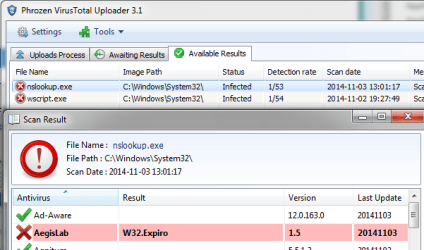
This time I got A LOT of FPs from these two, mostly from AegisLab. Almost all files belong to the Windows OS. Sigcheck opens a browser window for every detection and I guess there were like 50-100 files detected. Luckily I was watching my PC so I could close the windows, otherwise my PC probably had crashed.
I have a VirusTotal uploader tool(PhrozenSoft's) but I prefer sigcheck as it's usually not that many FPs.
Here's an example of nslookup.exe a file that hasn't been modified in almost 2 years:
https://www.virustotal.com/en/file/...b5f2a1970e501d839e1f8276/analysis/1415019677/

Question: Does anybody know a way to use VirusTotal but to have it ignore detections only by some engines?
If not, I'm thinking of creating a program that can do this because these FPs by AegisLab are getting ridiculous. The program would still use sigcheck but write detections to a log instead of opening a browser, and then use the log to get each report from VT, parse the result and exclude AegisLab, then show the result.

Interesting fact: I compared engines on VirusTotal and HerdProtect and even though HerdProtect has more engines they haven't included AegisLab. I wonder why ;)
 

My Computer My Computer

Computer type
Laptop
Computer Manufacturer/Model Number
HP Elitebook 8540p
OS
Windows 7 Pro 32
CPU
Intel(R) Core(TM) i5 CPU M 540 @ 2.53GHz
Motherboard
Hewlett-Packard 1521
Memory
4,00 GB (Usable 2,98)
Graphics Card(s)
NVIDIA NVS 5100M
Sound Card
NVIDIA High Definition Audio
Screen Resolution
1600x900
Hard Drives
INTEL SSDSA2CW120G3
Antivirus
F-Secure Internet Security
Browser
IE, Firefox, Opera
Other Info
Sandboxie,
SRP (Software Restriction Policy),
EMET (Enhanced Mitigation Experience Toolkit),
WFC (Windows Firewall Control by BiniSoft),
Malwarebytes Premium
Apart from specifying no reports -v instead of -vr in the command-line I don't think you can do that directly.

I don't use Sigcheck that way myself, I added the Hash function to Explorer's context-menu via registry and I use it on specific files (mainly installers).

I've thought about creating a small program like you, but I think you're better off building a database of hashes on all system files, and then on schedule only check the files that have changed on virustotal. It would greatly decrease the number of files/hashes sent and therefore FPs if that's a problem.
 

My Computer My Computer

Computer type
PC/Desktop
OS
Windows 8
That's another idea, thanks! I'll think about it and compare pros and cons.

About checking mainly installers, check out this Tutorial: http://www.sevenforums.com/tutorials/346474-virustotal-herdprotect-check-files-simultaneously.html
It checks both VirusTotal(sigcheck) and HerdProtect. There's no tool that I know of that can check individual files on Herdprotect, so this batch file will get the SHA1 for the file(s), build the URL for it to Herdprotects Knowledge base, download the page source and parse it. It turned out really nice, a batch file that creates and executes a VBscript :)
It doesn't submit unknowns to VT but you can just modify the code if you want that.
 

My Computer My Computer

Computer type
Laptop
Computer Manufacturer/Model Number
HP Elitebook 8540p
OS
Windows 7 Pro 32
CPU
Intel(R) Core(TM) i5 CPU M 540 @ 2.53GHz
Motherboard
Hewlett-Packard 1521
Memory
4,00 GB (Usable 2,98)
Graphics Card(s)
NVIDIA NVS 5100M
Sound Card
NVIDIA High Definition Audio
Screen Resolution
1600x900
Hard Drives
INTEL SSDSA2CW120G3
Antivirus
F-Secure Internet Security
Browser
IE, Firefox, Opera
Other Info
Sandboxie,
SRP (Software Restriction Policy),
EMET (Enhanced Mitigation Experience Toolkit),
WFC (Windows Firewall Control by BiniSoft),
Malwarebytes Premium

My Computer My Computer

Computer type
PC/Desktop
Computer Manufacturer/Model Number
Golden Mk. I.4
OS
Windows 10 Pro x64 ; Xubuntu x64
CPU
Intel i7 860 @ 2.80 GHz O/C'ed to 4.0GHz
Motherboard
Gigabyte P55A-UD3R Rev.1. Award BIOS F13
Memory
16GB Corsair Vengance DDR3 @ 661 MHz Dual Channel (9-9-9-24)
Graphics Card(s)
EVGA NVidia GTX 560 1024MB
Sound Card
Realtek Integrated
Monitor(s) Displays
Dual Samsung SyncMaster 2494HS
Screen Resolution
1920*1080 and 1920*1080
Hard Drives
1*Samsung 840 EVO 120GB SSD;
1*OCZ Vertex 2 60GB SSD;
2*Samsung F3 SpinPoint 1TB in RAID0;
1*Samsung F1 SpinPoint 1TB;
2*Western Digital 1TB External USB 3.0
1*Western Digital 500GB External USB 3.0
1*Seagate 500GB External USB 2.0
PSU
Thermaltake ToughPower QFan 750W
Case
Thermaltake Element S VK60001W2Z
Cooling
Corsair H60 Water Cooling, 2*230mm and 2*80mm case fans
Keyboard
Logitech G110
Mouse
Logitech MX518
Last edited:

My Computer My Computer

Computer type
Laptop
Computer Manufacturer/Model Number
ASUS
OS
Microsoft Windows 7 Home Premium 64-bit 7601 Multiprocessor Free Service Pack 1
CPU
AMD C-60 APU with Radeon(tm) HD Graphics
Motherboard
ASUSTeK COMPUTER INC. X501U
Memory
4.00 GB
Graphics Card(s)
AMD Radeon HD 6290 Graphics
Sound Card
(1) AMD High Definition Audio Device (2) Realtek High Defi
Screen Resolution
1366 x 768 x 32 bits (4294967296 colors) @ 60 Hz
Hard Drives
Hitachi HTS545050A7E380 SATA Disk Device
Antivirus
Comodo CIS & FW, SecureAplus App Whitelisting, Threatfire
Browser
Cyberfox 64bit, Opera 64bit, Airfox
Other Info
Spy-The-Spy, HitmanPro.Alert, Norton Connect Safe, MJRegWatcher, BitDefender TrafficLight, Voodoo Shield, Zemana AntiMalware
Thanks for the suggestions guys!

I'll have a look at Metascan, but is it as frequently used as VT? I don't know, but one of best things with sigcheck and VT is that it almost never have to submit any files because someone else has already done it, including recently updates files. Checking thousands of files only takes a few minutes.

Haven't tried SigCheckGUI. Anyway, the problem with any VT tool I think is that it only shows the detection rate. To see which AV's detected something you have to open the report for each file. Example:
VTex.png
 

My Computer My Computer

Computer type
Laptop
Computer Manufacturer/Model Number
HP Elitebook 8540p
OS
Windows 7 Pro 32
CPU
Intel(R) Core(TM) i5 CPU M 540 @ 2.53GHz
Motherboard
Hewlett-Packard 1521
Memory
4,00 GB (Usable 2,98)
Graphics Card(s)
NVIDIA NVS 5100M
Sound Card
NVIDIA High Definition Audio
Screen Resolution
1600x900
Hard Drives
INTEL SSDSA2CW120G3
Antivirus
F-Secure Internet Security
Browser
IE, Firefox, Opera
Other Info
Sandboxie,
SRP (Software Restriction Policy),
EMET (Enhanced Mitigation Experience Toolkit),
WFC (Windows Firewall Control by BiniSoft),
Malwarebytes Premium
Report for each file

It's the same with SigCheckGUI - it shows the scores but you have to click each link to get a report on each file.
 

My Computer My Computer

Computer type
Laptop
Computer Manufacturer/Model Number
ASUS
OS
Microsoft Windows 7 Home Premium 64-bit 7601 Multiprocessor Free Service Pack 1
CPU
AMD C-60 APU with Radeon(tm) HD Graphics
Motherboard
ASUSTeK COMPUTER INC. X501U
Memory
4.00 GB
Graphics Card(s)
AMD Radeon HD 6290 Graphics
Sound Card
(1) AMD High Definition Audio Device (2) Realtek High Defi
Screen Resolution
1366 x 768 x 32 bits (4294967296 colors) @ 60 Hz
Hard Drives
Hitachi HTS545050A7E380 SATA Disk Device
Antivirus
Comodo CIS & FW, SecureAplus App Whitelisting, Threatfire
Browser
Cyberfox 64bit, Opera 64bit, Airfox
Other Info
Spy-The-Spy, HitmanPro.Alert, Norton Connect Safe, MJRegWatcher, BitDefender TrafficLight, Voodoo Shield, Zemana AntiMalware
Then at least you understand my problem ;) Maybe it's just me that's paranoid enough to scan system32 and drivers. If you would too you'll see that AegisLab makes reading the result very difficult when you check thousands of files and many are wrongly detected. I could of course simply ignore all files with only 1 detection and make sigcheck not open reports. But it just feels wrong to do that because one AV isn't doing its job properly. And I hope that VT doesn't keep adding more questionable AV's so that we end up with 200 or so in ten years :confused:
 

My Computer My Computer

Computer type
Laptop
Computer Manufacturer/Model Number
HP Elitebook 8540p
OS
Windows 7 Pro 32
CPU
Intel(R) Core(TM) i5 CPU M 540 @ 2.53GHz
Motherboard
Hewlett-Packard 1521
Memory
4,00 GB (Usable 2,98)
Graphics Card(s)
NVIDIA NVS 5100M
Sound Card
NVIDIA High Definition Audio
Screen Resolution
1600x900
Hard Drives
INTEL SSDSA2CW120G3
Antivirus
F-Secure Internet Security
Browser
IE, Firefox, Opera
Other Info
Sandboxie,
SRP (Software Restriction Policy),
EMET (Enhanced Mitigation Experience Toolkit),
WFC (Windows Firewall Control by BiniSoft),
Malwarebytes Premium
VirusTotal results

I always ignore anything flagged up unless there's multiple detections or I double check using other scanners.

I like this one but it only scans running processes/ drivers against common AV's:

System Explorer Scan Results - report just finished.
 

My Computer My Computer

Computer type
Laptop
Computer Manufacturer/Model Number
ASUS
OS
Microsoft Windows 7 Home Premium 64-bit 7601 Multiprocessor Free Service Pack 1
CPU
AMD C-60 APU with Radeon(tm) HD Graphics
Motherboard
ASUSTeK COMPUTER INC. X501U
Memory
4.00 GB
Graphics Card(s)
AMD Radeon HD 6290 Graphics
Sound Card
(1) AMD High Definition Audio Device (2) Realtek High Defi
Screen Resolution
1366 x 768 x 32 bits (4294967296 colors) @ 60 Hz
Hard Drives
Hitachi HTS545050A7E380 SATA Disk Device
Antivirus
Comodo CIS & FW, SecureAplus App Whitelisting, Threatfire
Browser
Cyberfox 64bit, Opera 64bit, Airfox
Other Info
Spy-The-Spy, HitmanPro.Alert, Norton Connect Safe, MJRegWatcher, BitDefender TrafficLight, Voodoo Shield, Zemana AntiMalware
SigCheck System32 Drivers

Sigcheck scan finished. All zero scores on VirusTotal and along with a few unknown (to VirusTotal) drivers.

Report attached.

View attachment output.txt

You're right - it's a pain having to check each link.
 

My Computer My Computer

Computer type
Laptop
Computer Manufacturer/Model Number
ASUS
OS
Microsoft Windows 7 Home Premium 64-bit 7601 Multiprocessor Free Service Pack 1
CPU
AMD C-60 APU with Radeon(tm) HD Graphics
Motherboard
ASUSTeK COMPUTER INC. X501U
Memory
4.00 GB
Graphics Card(s)
AMD Radeon HD 6290 Graphics
Sound Card
(1) AMD High Definition Audio Device (2) Realtek High Defi
Screen Resolution
1366 x 768 x 32 bits (4294967296 colors) @ 60 Hz
Hard Drives
Hitachi HTS545050A7E380 SATA Disk Device
Antivirus
Comodo CIS & FW, SecureAplus App Whitelisting, Threatfire
Browser
Cyberfox 64bit, Opera 64bit, Airfox
Other Info
Spy-The-Spy, HitmanPro.Alert, Norton Connect Safe, MJRegWatcher, BitDefender TrafficLight, Voodoo Shield, Zemana AntiMalware
Re: Your questions

Your original browser questions - I don't know how to exclude scan engines from VT but I certainly didn't see any browser window opening but then there were no detections!

I guess the answer is to drop the -r switch and output to text file.
 

My Computer My Computer

Computer type
Laptop
Computer Manufacturer/Model Number
ASUS
OS
Microsoft Windows 7 Home Premium 64-bit 7601 Multiprocessor Free Service Pack 1
CPU
AMD C-60 APU with Radeon(tm) HD Graphics
Motherboard
ASUSTeK COMPUTER INC. X501U
Memory
4.00 GB
Graphics Card(s)
AMD Radeon HD 6290 Graphics
Sound Card
(1) AMD High Definition Audio Device (2) Realtek High Defi
Screen Resolution
1366 x 768 x 32 bits (4294967296 colors) @ 60 Hz
Hard Drives
Hitachi HTS545050A7E380 SATA Disk Device
Antivirus
Comodo CIS & FW, SecureAplus App Whitelisting, Threatfire
Browser
Cyberfox 64bit, Opera 64bit, Airfox
Other Info
Spy-The-Spy, HitmanPro.Alert, Norton Connect Safe, MJRegWatcher, BitDefender TrafficLight, Voodoo Shield, Zemana AntiMalware
Oh, maybe drivers were clean and all FP's were in system32. That's probably how it was, hard to remember when browser windows were popping up all the time. I spent more time closing them than actually read their content ;) Well, I can only say that having each report opened in a browser is a terrible idea if there are many FP's.

If you want you can just check nslookup.exe and wscript.exe in system32. There were so many so I can't remember them all

Browser reports are only opened when you use parameter -vr for sigcheck.exe Don't know if the GUI app has similar functionality.
 

My Computer My Computer

Computer type
Laptop
Computer Manufacturer/Model Number
HP Elitebook 8540p
OS
Windows 7 Pro 32
CPU
Intel(R) Core(TM) i5 CPU M 540 @ 2.53GHz
Motherboard
Hewlett-Packard 1521
Memory
4,00 GB (Usable 2,98)
Graphics Card(s)
NVIDIA NVS 5100M
Sound Card
NVIDIA High Definition Audio
Screen Resolution
1600x900
Hard Drives
INTEL SSDSA2CW120G3
Antivirus
F-Secure Internet Security
Browser
IE, Firefox, Opera
Other Info
Sandboxie,
SRP (Software Restriction Policy),
EMET (Enhanced Mitigation Experience Toolkit),
WFC (Windows Firewall Control by BiniSoft),
Malwarebytes Premium
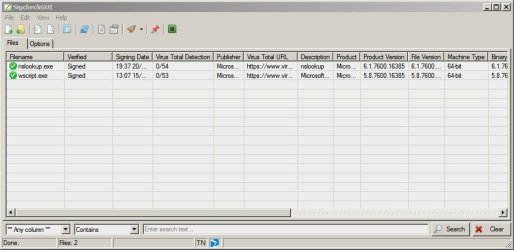
SigCheckGUI results

That's funny - they both show up zero detections.

SigcheckGUI Results.jpg
 

My Computer My Computer

Computer type
Laptop
Computer Manufacturer/Model Number
ASUS
OS
Microsoft Windows 7 Home Premium 64-bit 7601 Multiprocessor Free Service Pack 1
CPU
AMD C-60 APU with Radeon(tm) HD Graphics
Motherboard
ASUSTeK COMPUTER INC. X501U
Memory
4.00 GB
Graphics Card(s)
AMD Radeon HD 6290 Graphics
Sound Card
(1) AMD High Definition Audio Device (2) Realtek High Defi
Screen Resolution
1366 x 768 x 32 bits (4294967296 colors) @ 60 Hz
Hard Drives
Hitachi HTS545050A7E380 SATA Disk Device
Antivirus
Comodo CIS & FW, SecureAplus App Whitelisting, Threatfire
Browser
Cyberfox 64bit, Opera 64bit, Airfox
Other Info
Spy-The-Spy, HitmanPro.Alert, Norton Connect Safe, MJRegWatcher, BitDefender TrafficLight, Voodoo Shield, Zemana AntiMalware
I did a re-check, you're correct, they're clean now! Well, at least nice to see that AegisLab could fix their FPs quickly. I'm sure they got massive reports when they started detecting lots of files wrongly.

I still don't like these questionable AVs and can't understand why VirusTotal would include them in the first place :huh:
 

My Computer My Computer

Computer type
Laptop
Computer Manufacturer/Model Number
HP Elitebook 8540p
OS
Windows 7 Pro 32
CPU
Intel(R) Core(TM) i5 CPU M 540 @ 2.53GHz
Motherboard
Hewlett-Packard 1521
Memory
4,00 GB (Usable 2,98)
Graphics Card(s)
NVIDIA NVS 5100M
Sound Card
NVIDIA High Definition Audio
Screen Resolution
1600x900
Hard Drives
INTEL SSDSA2CW120G3
Antivirus
F-Secure Internet Security
Browser
IE, Firefox, Opera
Other Info
Sandboxie,
SRP (Software Restriction Policy),
EMET (Enhanced Mitigation Experience Toolkit),
WFC (Windows Firewall Control by BiniSoft),
Malwarebytes Premium
I still don't like these questionable AVs and can't understand why VirusTotal would include them in the first place :huh:

Never heard of them before using VT either but I think they are experimental or outliers. Maybe they even use overly aggressive heuristics by default which usually isn't the case in other AVs. They "might" pick up things that regular AVs miss. Of course you'll get more FPs this way too.

This might be bad, or rather inconvenient, for end-users but for the other AVs, it's a great way to get warned of any new malware that bypassed their cautious engines. After all, they don't participate in VT for charity, they do get benefits from it too.

There was a recent article on how malware creators use VT to check what they build, and when they get a "safe" on all major AVs, they start distributing them. So including very aggressive AVs on VT is a good way to make sure everyone get alerted fast when that happens.

There was no definitive pattern to the kinds of changes that reduced the detection rate. Although all of the samples Dixon tracked got detected by one or more antivirus engine, those with low detection rates were often found only by the more obscure engines that are not in popular use.
Source : A Google Site Meant to Protect You Is Helping Hackers Attack You | WIRED
 
Last edited:

My Computer My Computer

Computer type
PC/Desktop
OS
Windows 8
Yes that's true. I think I've read somewhere that when an AV detects something on VT it's reported to all other AVs as well, but maybe that was what you meant.

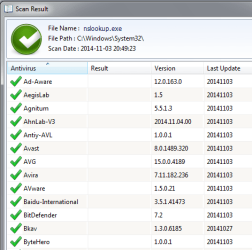
I noticed something interesting, the version info. If that's the version of the AV software it might reveal the ones that haven't been available that long.
AVversions.png

Interesting you mentioned that article. When I first heard about it I thought can't VT keep track of these files that are only slightly modified and rescanned several times? I mean they do it until the file is clean. Rescanning a file that previously had detections and suddenly is clean, maybe even without updated definitions from all AVs. They can't track with hashes of course but there must be other ways to track the content.
 

My Computer My Computer

Computer type
Laptop
Computer Manufacturer/Model Number
HP Elitebook 8540p
OS
Windows 7 Pro 32
CPU
Intel(R) Core(TM) i5 CPU M 540 @ 2.53GHz
Motherboard
Hewlett-Packard 1521
Memory
4,00 GB (Usable 2,98)
Graphics Card(s)
NVIDIA NVS 5100M
Sound Card
NVIDIA High Definition Audio
Screen Resolution
1600x900
Hard Drives
INTEL SSDSA2CW120G3
Antivirus
F-Secure Internet Security
Browser
IE, Firefox, Opera
Other Info
Sandboxie,
SRP (Software Restriction Policy),
EMET (Enhanced Mitigation Experience Toolkit),
WFC (Windows Firewall Control by BiniSoft),
Malwarebytes Premium
My Computer My Computer

Computer type
Laptop
Computer Manufacturer/Model Number
HP Elitebook 8540p
OS
Windows 7 Pro 32
CPU
Intel(R) Core(TM) i5 CPU M 540 @ 2.53GHz
Motherboard
Hewlett-Packard 1521
Memory
4,00 GB (Usable 2,98)
Graphics Card(s)
NVIDIA NVS 5100M
Sound Card
NVIDIA High Definition Audio
Screen Resolution
1600x900
Hard Drives
INTEL SSDSA2CW120G3
Antivirus
F-Secure Internet Security
Browser
IE, Firefox, Opera
Other Info
Sandboxie,
SRP (Software Restriction Policy),
EMET (Enhanced Mitigation Experience Toolkit),
WFC (Windows Firewall Control by BiniSoft),
Malwarebytes Premium
This is funny: (from that same article)

"They made it particularly easy to track their code in the wild because even the emails and attachments they used in their phishing campaigns got tested on VirusTotal. More surprising, they even uploaded files they’d stolen from victims’s machines. Dixon found calendar documents and attachments taken from some of the group’s Tibetan victims uploaded to VirusTotal. He thinks, ironically, that the hackers may have been testing the files to see if they were infected before opening them on their own machines."
 

My Computer My Computer

Computer type
Laptop
Computer Manufacturer/Model Number
HP Elitebook 8540p
OS
Windows 7 Pro 32
CPU
Intel(R) Core(TM) i5 CPU M 540 @ 2.53GHz
Motherboard
Hewlett-Packard 1521
Memory
4,00 GB (Usable 2,98)
Graphics Card(s)
NVIDIA NVS 5100M
Sound Card
NVIDIA High Definition Audio
Screen Resolution
1600x900
Hard Drives
INTEL SSDSA2CW120G3
Antivirus
F-Secure Internet Security
Browser
IE, Firefox, Opera
Other Info
Sandboxie,
SRP (Software Restriction Policy),
EMET (Enhanced Mitigation Experience Toolkit),
WFC (Windows Firewall Control by BiniSoft),
Malwarebytes Premium

My Computer My Computer

Computer type
PC/Desktop
Computer Manufacturer/Model Number
Bruce ... somewhere in his 40's
OS
Windows 7 Ultimate 32bit SP1
CPU
Intel(R) Core(TM)2 Quad CPU @ 2.40GHz, 2400 MHz
Motherboard
INTEL/D975XBX2
Memory
4 GB
Graphics Card(s)
ATI Radeon HD 2600 Pro
Monitor(s) Displays
Samsung SyncMaster 914v
Screen Resolution
1280 x 1024
Hard Drives
2/500GB each ... ST3500630AS ATA Device.
One is not connected
PSU
Rocketfish 700 W
Case
G.Skill Gigabyte Chassis
Keyboard
Standard PS/2 Keyboard
Mouse
Microsoft PS/2 Mouse
Internet Speed
DSL
Antivirus
Avira Internet Security
Browser
IE 11
Other Info
ATI HDMI Audio
@Tookeri

Yes the article had funny parts. If you imagined all these hackers were pros/geniuses with a deep understanding of computers/security, then it's a letdown.
From what I gathered in the article, most of these groups don't create anything new, they just modify already existing malware until they can bypass AV checks.
 

My Computer My Computer

Computer type
PC/Desktop
OS
Windows 8
Back
Top