What do you think of Driver View

gregrocker

New member
Guru
Local time
7:36 AM
Messages
50,634
My friend Rob Brown who is top poster SpiritX in MS Forums is here at MVP Summit and convinced me we cannot rely completely on Windows Update to deliver drivers, even though he was in the tour with me 3 years ago of the Windows Hardware Quality Labs where we were shown how all drivers are tested and then loaded into Updates. I was sold. But he has doubts about the quality testing.

Rob likes Nirsoft's Driver View standalone executable that provides a list of all installed drivers along with everything needed to know about them. If one hides the MS drivers from the View Tab and ignores Drivers prefixed by dump, there is a small manageable list to use for searching the OEM's Support Downloads webpage for a newer version.

Rob thinks this needs to be done at reinstall and every few months. I wonder why there's never
been any inquiries for malfunctioning or poor performance drivers provided mostly by Updates after a million users have done a Clean Reinstall - Factory OEM Windows 7. But I also think this method can do no harm and maybe help users do a little extra to keep their driver's current.

What say you?
 
I'm using DriverView x64 mostly because it can highlights the non-microsoft drivers i have difficulties to locate.

I never rely on automated windows update offers for the Microsoft drivers and software offered ones, because of all those stand-alone article IDs "hotfixes" provided that might change the original Windows 7 SP1 clean install. And Softwares that need drivers and hardwares too are a bit sensitive because most of us like to update to the most-up-to-date ones. And for those last ones, Microsoft is generally not providing enough recent drivers. But sure you can list view before patching your machine.

I remember that the only time did rely on the Microsoft update was for the Conexant SmartAudio on my old XP because i couldn't find any working drivers for it.

DriverView permit to see and list by date or created date which Microsoft drivers that are still from the 2009 RTM Ed and the ones that came with 2010 SP1 Ed and all the others what so called in hotfixes, SP2. That is usefull to trace the change made if you have saved the original list view of your clean install.
 

My Computer My Computer

At a glance

Windows 7 Professional SP1 - x64 [Non-UEFI Boot]Ivy Bridge Core i5 3570K (Delidded)G.Skill "Ares" DDR3 PC3-12800 - 1600MHz (16Gb)Asus Dual-RX480-O4G
Computer type
PC/Desktop
Computer Manufacturer/Model Number
Custom Build
OS
Windows 7 Professional SP1 - x64 [Non-UEFI Boot]
CPU
Ivy Bridge Core i5 3570K (Delidded)
Motherboard
Asus P8Z77-V LE PLUS
Memory
G.Skill "Ares" DDR3 PC3-12800 - 1600MHz (16Gb)
Graphics Card(s)
Asus Dual-RX480-O4G
Sound Card
Creative Sound Blaster Z w/5.1 sound system
Monitor(s) Displays
Asus IPS 23"
Screen Resolution
16/9
Hard Drives
Internal:
500Go Sata 6Gb/s (x2)
500Go Sata 3Gb/s (x2)
SSD 60Go Sata 6Gb/s
PSU
In Win C 900W Series 80+ Platinum
Case
Thermaltake Chaser A71
Cooling
Custom Water Cooling Loop
Keyboard
Cooler Master QuickFire XTi
Mouse
Razer Imperator 2012 (4G)
Antivirus
MSE
Browser
IE 11.0.xxx Rtm
Other Info
"Raid0" with Intel Smart Response Technology (HDD/SSD)
Thanks. Do you think the second paragraph of my OP is enough to add to my tutorials to get them started?

Since youre obviously sn enthusiast Would you be interested in writing a Driver View tutorial that expands on the options and explains how each are useful? This could be a valuable link for us all.
 
Thanks. Do you think the second paragraph of my OP is enough to add to my tutorials to get them started?

Since youre obviously sn enthusiast Would you be interested in writing a Driver View tutorial that expands on the options and explains how each are useful? This could be a valuable link for us all.

Well, "right click" on the highlighted driver you want to check brings to a goolgle search within its own driver name....it can also give you a Tab view for the "Properties" to have a clear definition of the listed driver without resizing the columns. Still you can "Autosize columns" & "Choose columns" to display..

Writing a tutorial might be a little tricky since not everybody might have the same configured machine. Driver View can be useful for those wanted to be sure having patched well their machine along all those hotfixes provided after SP1 update and for those just checking their drivers versions.

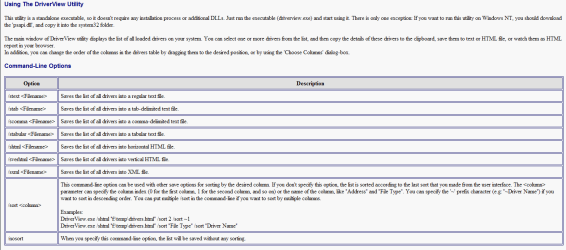
The downloaded folder does provide a "DriverView.chm" help too with the basics command-line options sufficient to most users.
 

Attachments

  • Capture.PNG
    Capture.PNG
    30.6 KB · Views: 5
Last edited:

My Computer My Computer

At a glance

Windows 7 Professional SP1 - x64 [Non-UEFI Boot]Ivy Bridge Core i5 3570K (Delidded)G.Skill "Ares" DDR3 PC3-12800 - 1600MHz (16Gb)Asus Dual-RX480-O4G
Computer type
PC/Desktop
Computer Manufacturer/Model Number
Custom Build
OS
Windows 7 Professional SP1 - x64 [Non-UEFI Boot]
CPU
Ivy Bridge Core i5 3570K (Delidded)
Motherboard
Asus P8Z77-V LE PLUS
Memory
G.Skill "Ares" DDR3 PC3-12800 - 1600MHz (16Gb)
Graphics Card(s)
Asus Dual-RX480-O4G
Sound Card
Creative Sound Blaster Z w/5.1 sound system
Monitor(s) Displays
Asus IPS 23"
Screen Resolution
16/9
Hard Drives
Internal:
500Go Sata 6Gb/s (x2)
500Go Sata 3Gb/s (x2)
SSD 60Go Sata 6Gb/s
PSU
In Win C 900W Series 80+ Platinum
Case
Thermaltake Chaser A71
Cooling
Custom Water Cooling Loop
Keyboard
Cooler Master QuickFire XTi
Mouse
Razer Imperator 2012 (4G)
Antivirus
MSE
Browser
IE 11.0.xxx Rtm
Other Info
"Raid0" with Intel Smart Response Technology (HDD/SSD)
I saw the google search link too but Rob said its better to start at the OEM's Support Diwnloads webpage for the PC or Device. This avoids them getting snagged by driver-finder links disguised as official support.
 

My Computer My Computer

At a glance

Windows 7 Professional SP1 - x64 [Non-UEFI Boot]Ivy Bridge Core i5 3570K (Delidded)G.Skill "Ares" DDR3 PC3-12800 - 1600MHz (16Gb)Asus Dual-RX480-O4G
Computer type
PC/Desktop
Computer Manufacturer/Model Number
Custom Build
OS
Windows 7 Professional SP1 - x64 [Non-UEFI Boot]
CPU
Ivy Bridge Core i5 3570K (Delidded)
Motherboard
Asus P8Z77-V LE PLUS
Memory
G.Skill "Ares" DDR3 PC3-12800 - 1600MHz (16Gb)
Graphics Card(s)
Asus Dual-RX480-O4G
Sound Card
Creative Sound Blaster Z w/5.1 sound system
Monitor(s) Displays
Asus IPS 23"
Screen Resolution
16/9
Hard Drives
Internal:
500Go Sata 6Gb/s (x2)
500Go Sata 3Gb/s (x2)
SSD 60Go Sata 6Gb/s
PSU
In Win C 900W Series 80+ Platinum
Case
Thermaltake Chaser A71
Cooling
Custom Water Cooling Loop
Keyboard
Cooler Master QuickFire XTi
Mouse
Razer Imperator 2012 (4G)
Antivirus
MSE
Browser
IE 11.0.xxx Rtm
Other Info
"Raid0" with Intel Smart Response Technology (HDD/SSD)
DriverView is used daily in BSOD analysis to check staus of 3rd party drivers. Its very reliable.

I would not, however, recommend its use as part of a general installation tutorial. Its too specific to recommend as a generic step in an installation tutorial.

The golden rule is keep the tutorial as simple and short as possible. It does not matter how well they are written - an OP faced with a long tutorial will simply suffer from information overload. We see that all the time.
 

My Computer My Computer

At a glance

Windows 10 Pro x64 ; Xubuntu x64Intel i7 860 @ 2.80 GHz O/C'ed to 4.0GHz16GB Corsair Vengance DDR3 @ 661 MHz Dual Cha...EVGA NVidia GTX 560 1024MB
Computer type
PC/Desktop
Computer Manufacturer/Model Number
Golden Mk. I.4
OS
Windows 10 Pro x64 ; Xubuntu x64
CPU
Intel i7 860 @ 2.80 GHz O/C'ed to 4.0GHz
Motherboard
Gigabyte P55A-UD3R Rev.1. Award BIOS F13
Memory
16GB Corsair Vengance DDR3 @ 661 MHz Dual Channel (9-9-9-24)
Graphics Card(s)
EVGA NVidia GTX 560 1024MB
Sound Card
Realtek Integrated
Monitor(s) Displays
Dual Samsung SyncMaster 2494HS
Screen Resolution
1920*1080 and 1920*1080
Hard Drives
1*Samsung 840 EVO 120GB SSD;
1*OCZ Vertex 2 60GB SSD;
2*Samsung F3 SpinPoint 1TB in RAID0;
1*Samsung F1 SpinPoint 1TB;
2*Western Digital 1TB External USB 3.0
1*Western Digital 500GB External USB 3.0
1*Seagate 500GB External USB 2.0
PSU
Thermaltake ToughPower QFan 750W
Case
Thermaltake Element S VK60001W2Z
Cooling
Corsair H60 Water Cooling, 2*230mm and 2*80mm case fans
Keyboard
Logitech G110
Mouse
Logitech MX518
Colin I totally agree with you.

This was my main concern as Rob walked me through this in the MS Commons night before last. He kept repeating that the protocol I give in Clean Reinstall tutorial is adequate and maybe all that's needed. But I wanted to try to add a paragraph if he thought it required. He didn't seem to think it was that important. You seem to second that.

I am aware the Clean Reinstall tutorial is way too long and starts to defeat itself by its length. I would very much appreciate any edits that enthusiasts have at this point. It is always a work in progress. We've sold MS on its value, and now it is ours to carry on with their assent for more millions to benefit...
 
DriverView can be useful (i use it too) but IMO it provides WAY too much detail (to the point of overwhelming) for the average user. It provides info about each driver file, not the driver package. It's the driver package (not the individual driver files) you want to know when you go looking to update your drivers.

  1. The driver package is the set of files that make up the driver (the driver's INF file, sys, dll, cat, etc)
  2. I suggest one really wants to know the list of driver packages on their computer (not driver files) to understand what's on their machine. The "package" is the more logical unit. When looking for driver updates, one goes looking for the package
  3. To that end, use DoubleDriver instead. It provides a more intuitive list of driver packages on your machine PLUS allows you to backup each package. Having the packages on backup media is quite useful when it comes time to reinstall. It assures you can get all your devices up and running first. THEN one can decide if they want to look for something newer.

Foot note: Note the driver package is only those files needed to support the hardware interface. When you download from a vendor site, one typically downloads a "device installation app". The distinction: the app may contain application level software as well as the driver package. (Catalyst Control Center is a good example. It's an app provided in addition to the package)

Driver backup tools like Double Driver only backup the package, not the app. But that's all one needs to get the hardware up and running again after a reinstall. After that, one can go looking for the device installation app if they want the app software as well
 

Attachments

  • DD.jpg
    DD.jpg
    88.2 KB · Views: 2

My Computer My Computer

At a glance

Desk 1: Win 7 Pro x32; Desk 2: Windows 10 x64
Computer type
PC/Desktop
Computer Manufacturer/Model Number
Dell Optiplex 360 and Optiplex 755
OS
Desk 1: Win 7 Pro x32; Desk 2: Windows 10 x64
Hard Drives
500GB Crucial SSD in both Desktops
Other Info
Buffalo 6TB NAS, Raid 1
I had one problem case we're working here install it as a test to see if it can be useful for troubleshooting. I immediately spot he has both Intel and Nividia display drivers, and then Intel is for Windows 8 on a Win7 system. This causes me to ask him about these being possible onboard and video card, whether they're switchable and prompt to get the correct driver for the Intel to test his display problems.

You're welcome to join in the thread here to help demonstrate how the tool can be used to resolve his problems: Comp started freezing, but not crashing. No error message. - Page 2 - Windows 7 Help Forums
 
Back
Top