Solved After Windows update, cannot login nor restore system

Ok, so now, I am really confused. I'm not sure if you want me in safe mode or not. So, here are the steps I took:

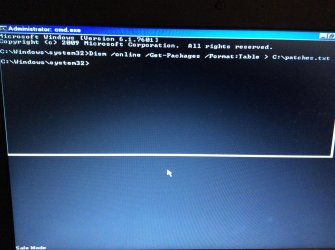
Went into safe mode with command prompt, typed in Dism /online /Get-Packages /Format:Table > C:\patches.txt. System sent back another command line.

Restarted, F8

Chose Repair My Computer (to see is something different might happen)
This time, got system recovery options screen
Chose startup repair: nothing
Chose system restore: no restore points
Chose command prompt. Typed in same code as above: system just sent back another command line.

do Dism /online /Get-Packages /Format:Table > C:\patches.txt
in safe mode. then post c:\patches.txt

Built in administrator account is already ACTIVE? And working?
 

My Computer My Computer

Computer type
Laptop
Computer Manufacturer/Model Number
ACER ASPIRE 5742G
OS
Microsoft Windows 7 Home Premium 64-bits 7601 Multiprocessor Free Service Pack 1
CPU
Intel(R) Core(TM) i3 CPU M 370 @ 2.40GHz
Motherboard
Acer Aspire 5742G
Memory
4,00 GB
Graphics Card(s)
ATI Mobility Radeon HD 5400 Series
Sound Card
(1) AMD High Definition Audio Device (2) Realtek High Defi
Screen Resolution
1366 x 768 x 32 bits (4294967296 colors) @ 60 Hz
Hard Drives
WDC WD5000BEVT-22ZAT0
So you use only ms office, internet explorer and some win7 built-in applications? Not a lot settings you have changed. Correct?
 

My Computer My Computer

Computer type
Laptop
Computer Manufacturer/Model Number
ACER ASPIRE 5742G
OS
Microsoft Windows 7 Home Premium 64-bits 7601 Multiprocessor Free Service Pack 1
CPU
Intel(R) Core(TM) i3 CPU M 370 @ 2.40GHz
Motherboard
Acer Aspire 5742G
Memory
4,00 GB
Graphics Card(s)
ATI Mobility Radeon HD 5400 Series
Sound Card
(1) AMD High Definition Audio Device (2) Realtek High Defi
Screen Resolution
1366 x 768 x 32 bits (4294967296 colors) @ 60 Hz
Hard Drives
WDC WD5000BEVT-22ZAT0
Sorry, I missed those messages.
 

My Computer My Computer

Computer type
Laptop
Computer Manufacturer/Model Number
Lenovo Thinkpad
OS
Windows 7 Enterprise 64bit
Antivirus
AVG
Browser
Firefox
So you use only ms office, internet explorer and some win7 built-in applications? Not a lot settings you have changed. Correct?

That's correct.
 

My Computer My Computer

Computer type
Laptop
Computer Manufacturer/Model Number
Lenovo Thinkpad
OS
Windows 7 Enterprise 64bit
Antivirus
AVG
Browser
Firefox
Ok, so now, I am really confused. I'm not sure if you want me in safe mode or not. So, here are the steps I took:

Went into safe mode with command prompt, typed in Dism /online /Get-Packages /Format:Table > C:\patches.txt. System sent back another command line.

Restarted, F8

Chose Repair My Computer (to see is something different might happen)
This time, got system recovery options screen
Chose startup repair: nothing
Chose system restore: no restore points
Chose command prompt. Typed in same code as above: system just sent back another command line.

do Dism /online /Get-Packages /Format:Table > C:\patches.txt
in safe mode. then post c:\patches.txt

Built in administrator account is already ACTIVE? And working?

No, the built in admin account is not active. Doing the code now - will post in a minute
 

My Computer My Computer

Computer type
Laptop
Computer Manufacturer/Model Number
Lenovo Thinkpad
OS
Windows 7 Enterprise 64bit
Antivirus
AVG
Browser
Firefox
All your document are in "my documents" (and its subfolders)? And "my pictures" and "my music" etc? So not spread all around the harddrive?

C:\users\[youraccount] has these subfolders (and more)
Desktop=>what's on your desktop
Documents=>your documents
Downloads=>your downloads
Favorites=>your internet explorer favorites
Links=>favorite folders show in top left of "file explorer"
Music=>your music
Pictures=>your pictures
Videos=> you video's

Why not simple create a new user account? Afterwards move what's in those folders to the new user account?

Don't forget to delete the old username and its files after a few weeks!
 

My Computer My Computer

Computer type
Laptop
Computer Manufacturer/Model Number
ACER ASPIRE 5742G
OS
Microsoft Windows 7 Home Premium 64-bits 7601 Multiprocessor Free Service Pack 1
CPU
Intel(R) Core(TM) i3 CPU M 370 @ 2.40GHz
Motherboard
Acer Aspire 5742G
Memory
4,00 GB
Graphics Card(s)
ATI Mobility Radeon HD 5400 Series
Sound Card
(1) AMD High Definition Audio Device (2) Realtek High Defi
Screen Resolution
1366 x 768 x 32 bits (4294967296 colors) @ 60 Hz
Hard Drives
WDC WD5000BEVT-22ZAT0
do Dism /online /Get-Packages /Format:Table > C:\patches.txt
in safe mode. then post c:\patches.txt
image.jpg
View attachment patches.txt
There is one interesting that has happened. Just to check, I chose safe mode, then chose my profile and tried to log in. Surprisingly, I was able to log in. Feeling optimistic, I started windows normally and tried to login. Unfortunately, I still received the message "the user profile service failed the logon.user profile cannot be loaded"
 
Last edited:

My Computer My Computer

Computer type
Laptop
Computer Manufacturer/Model Number
Lenovo Thinkpad
OS
Windows 7 Enterprise 64bit
Antivirus
AVG
Browser
Firefox
All your document are in "my documents" (and its subfolders)? And "my pictures" and "my music" etc? So not spread all around the harddrive?

C:\users\[youraccount] has these subfolders (and more)
Desktop=>what's on your desktop
Documents=>your documents
Downloads=>your downloads
Favorites=>your internet explorer favorites
Links=>favorite folders show in top left of "file explorer"
Music=>your music
Pictures=>your pictures
Videos=> you video's

Why not simple create a new user account? Afterwards move what's in those folders to the new user account?

Don't forget to delete the old username and its files after a few weeks!


That's a good idea, but can I do that while in safe mode?
 

My Computer My Computer

Computer type
Laptop
Computer Manufacturer/Model Number
Lenovo Thinkpad
OS
Windows 7 Enterprise 64bit
Antivirus
AVG
Browser
Firefox
Code:
net   user   administrator   /active:yes
net   user   administrator   AnyPasswordYouWantAndDontForget

Have you done that already in safe mode?
After that login to user administrator with the correct password
 

My Computer My Computer

Computer type
Laptop
Computer Manufacturer/Model Number
ACER ASPIRE 5742G
OS
Microsoft Windows 7 Home Premium 64-bits 7601 Multiprocessor Free Service Pack 1
CPU
Intel(R) Core(TM) i3 CPU M 370 @ 2.40GHz
Motherboard
Acer Aspire 5742G
Memory
4,00 GB
Graphics Card(s)
ATI Mobility Radeon HD 5400 Series
Sound Card
(1) AMD High Definition Audio Device (2) Realtek High Defi
Screen Resolution
1366 x 768 x 32 bits (4294967296 colors) @ 60 Hz
Hard Drives
WDC WD5000BEVT-22ZAT0
The built-in administror account is for troubleshooting only! So logon normally with that name and create a new user account with admin rights. then logon as that user.

Post results
 

My Computer My Computer

Computer type
Laptop
Computer Manufacturer/Model Number
ACER ASPIRE 5742G
OS
Microsoft Windows 7 Home Premium 64-bits 7601 Multiprocessor Free Service Pack 1
CPU
Intel(R) Core(TM) i3 CPU M 370 @ 2.40GHz
Motherboard
Acer Aspire 5742G
Memory
4,00 GB
Graphics Card(s)
ATI Mobility Radeon HD 5400 Series
Sound Card
(1) AMD High Definition Audio Device (2) Realtek High Defi
Screen Resolution
1366 x 768 x 32 bits (4294967296 colors) @ 60 Hz
Hard Drives
WDC WD5000BEVT-22ZAT0
Code:
net   user   administrator   /active:yes
net   user   administrator   AnyPasswordYouWantAndDontForget

Have you done that already in safe mode?
After that login to user administrator with the correct password

I did this and logged in using that profile. Soon after I logged on, my system froze and then I received an error about netprofm.dll. Then an error stating "the instruction at 0x00000.....referenced memory at 0x0000........ The required data was not placed into memory because of an I/O error status of OXC..." When I clicked ok, it was still frozen and has taken sometime to restart.
 

My Computer My Computer

Computer type
Laptop
Computer Manufacturer/Model Number
Lenovo Thinkpad
OS
Windows 7 Enterprise 64bit
Antivirus
AVG
Browser
Firefox
try it again
 

My Computer My Computer

Computer type
Laptop
Computer Manufacturer/Model Number
ACER ASPIRE 5742G
OS
Microsoft Windows 7 Home Premium 64-bits 7601 Multiprocessor Free Service Pack 1
CPU
Intel(R) Core(TM) i3 CPU M 370 @ 2.40GHz
Motherboard
Acer Aspire 5742G
Memory
4,00 GB
Graphics Card(s)
ATI Mobility Radeon HD 5400 Series
Sound Card
(1) AMD High Definition Audio Device (2) Realtek High Defi
Screen Resolution
1366 x 768 x 32 bits (4294967296 colors) @ 60 Hz
Hard Drives
WDC WD5000BEVT-22ZAT0
Ok, this time I was able to log in and create another account to copy my other login. I am now logged into that account.
 

My Computer My Computer

Computer type
Laptop
Computer Manufacturer/Model Number
Lenovo Thinkpad
OS
Windows 7 Enterprise 64bit
Antivirus
AVG
Browser
Firefox
So far, so good. Everything seems to be working fine so far. Thank you very, very much for hanging in there with me.
 

My Computer My Computer

Computer type
Laptop
Computer Manufacturer/Model Number
Lenovo Thinkpad
OS
Windows 7 Enterprise 64bit
Antivirus
AVG
Browser
Firefox
All your document are in "my documents" (and its subfolders)? And "my pictures" and "my music" etc? So not spread all around the harddrive?

C:\users\[youraccount] has these subfolders (and more)
Desktop=>what's on your desktop
Documents=>your documents
Downloads=>your downloads
Favorites=>your internet explorer favorites
Links=>favorite folders show in top left of "file explorer"
Music=>your music
Pictures=>your pictures
Videos=> you video's

Why not simple create a new user account? Afterwards move what's in those folders to the new user account?

Don't forget to delete the old username and its files after a few weeks!

Can you tell me how to move the files over to the new profile?
 

My Computer My Computer

Computer type
Laptop
Computer Manufacturer/Model Number
Lenovo Thinkpad
OS
Windows 7 Enterprise 64bit
Antivirus
AVG
Browser
Firefox
What was your exact old username?
Wat exact new username?
 

My Computer My Computer

Computer type
Laptop
Computer Manufacturer/Model Number
ACER ASPIRE 5742G
OS
Microsoft Windows 7 Home Premium 64-bits 7601 Multiprocessor Free Service Pack 1
CPU
Intel(R) Core(TM) i3 CPU M 370 @ 2.40GHz
Motherboard
Acer Aspire 5742G
Memory
4,00 GB
Graphics Card(s)
ATI Mobility Radeon HD 5400 Series
Sound Card
(1) AMD High Definition Audio Device (2) Realtek High Defi
Screen Resolution
1366 x 768 x 32 bits (4294967296 colors) @ 60 Hz
Hard Drives
WDC WD5000BEVT-22ZAT0
Katina was old name
Kat is new name
 

My Computer My Computer

Computer type
Laptop
Computer Manufacturer/Model Number
Lenovo Thinkpad
OS
Windows 7 Enterprise 64bit
Antivirus
AVG
Browser
Firefox
MOVE everything inside c:\users\Katina\documents to c:\users\Kat\documents
now you see the stuff in "my documents"?
Post results
 

My Computer My Computer

Computer type
Laptop
Computer Manufacturer/Model Number
ACER ASPIRE 5742G
OS
Microsoft Windows 7 Home Premium 64-bits 7601 Multiprocessor Free Service Pack 1
CPU
Intel(R) Core(TM) i3 CPU M 370 @ 2.40GHz
Motherboard
Acer Aspire 5742G
Memory
4,00 GB
Graphics Card(s)
ATI Mobility Radeon HD 5400 Series
Sound Card
(1) AMD High Definition Audio Device (2) Realtek High Defi
Screen Resolution
1366 x 768 x 32 bits (4294967296 colors) @ 60 Hz
Hard Drives
WDC WD5000BEVT-22ZAT0
So in file explorer go to c:\users\Katina
right click on documents, click "cut"
go to c:\users\Kat
right click in empty space and do "paste".

It says "already exists...." Respond with merge folders or something alike. desktop.ini already exists... you may overwrite... they are the same.
 

My Computer My Computer

Computer type
Laptop
Computer Manufacturer/Model Number
ACER ASPIRE 5742G
OS
Microsoft Windows 7 Home Premium 64-bits 7601 Multiprocessor Free Service Pack 1
CPU
Intel(R) Core(TM) i3 CPU M 370 @ 2.40GHz
Motherboard
Acer Aspire 5742G
Memory
4,00 GB
Graphics Card(s)
ATI Mobility Radeon HD 5400 Series
Sound Card
(1) AMD High Definition Audio Device (2) Realtek High Defi
Screen Resolution
1366 x 768 x 32 bits (4294967296 colors) @ 60 Hz
Hard Drives
WDC WD5000BEVT-22ZAT0
Got it. Just moved all documents over. Thank you!
 

My Computer My Computer

Computer type
Laptop
Computer Manufacturer/Model Number
Lenovo Thinkpad
OS
Windows 7 Enterprise 64bit
Antivirus
AVG
Browser
Firefox
Back
Top