Solved I reinstalled W7 and now PotPlayer crashes

pooksahib

New member
Member
VIP
Local time
7:25 AM
Messages
149
Location
Scotland
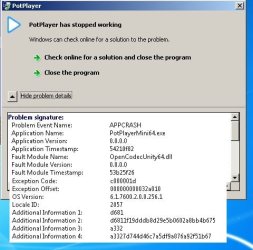
Hi. Prior to my reinstall of Win7 done a couple of days ago, I was a happy PotPlayer user (although I couldn't tell you which version). I installed the latest PotPlayer easily enough but this is what happens when I try to play anything. Can anyone suggest a cause/cure? Many thanks if you can.
 

Attachments

  • pot.jpg
    pot.jpg
    37.4 KB · Views: 20

My Computer My Computer

At a glance

Microsoft Windows 7 Ultimate 64-bit 7601 Mult...Intel(R) Core(TM) i3-4150 CPU @ 3.50GHz8.00 GBIntel(R) HD Graphics 4400
Computer type
PC/Desktop
Computer Manufacturer/Model Number
self build
OS
Microsoft Windows 7 Ultimate 64-bit 7601 Multiprocessor Free Service Pack 1
CPU
Intel(R) Core(TM) i3-4150 CPU @ 3.50GHz
Motherboard
ASUSTeK COMPUTER INC. H97M-PLUS
Memory
8.00 GB
Graphics Card(s)
Intel(R) HD Graphics 4400
Sound Card
(1) High Definition Audio Device (2) USB Audio Device
Screen Resolution
1024 x 768 x 32 bits (4294967296 colors) @ 75 Hz
Hard Drives
(1) SAMSUNG HD103SI ATA Device (2) Samsung SSD 840 EVO 120GB ATA Device (3) ST31000528AS ATA Device (4) GENERIC USB Storage-CFC USB Device (5) GENERIC USB Storage-MSC USB Device (6) GENERIC USB Storage-SDC USB Device (7) GENERIC USB Stora
PSU
Corsair CXM 430W Modular 80 PLUS Bronze
Antivirus
Panda Free
Browser
Firefox+NoScript, AdBlockPlus, Disconnect
If you don't know what version you had formerly, all we can guess is...

You now have the newer/newest version

(Are all of your Windows updates installed? Flash Player, java?)

perhaps the batch of Windows updates cranked out in this Tuesday might have induced a bug....?
 

My Computer My Computer

At a glance

Windows 7 Home Premium 64 bitAMD A45 GBIntegrated Radeon
Computer type
PC/Desktop
Computer Manufacturer/Model Number
HP
OS
Windows 7 Home Premium 64 bit
CPU
AMD A4
Memory
5 GB
Graphics Card(s)
Integrated Radeon
Hard Drives
500 gb WD
Antivirus
360 TS
Browser
IE
Yes, all installed. I'll maybe try it again, maybe go with VLC, haven't decided yet.
 

My Computer My Computer

At a glance

Microsoft Windows 7 Ultimate 64-bit 7601 Mult...Intel(R) Core(TM) i3-4150 CPU @ 3.50GHz8.00 GBIntel(R) HD Graphics 4400
Computer type
PC/Desktop
Computer Manufacturer/Model Number
self build
OS
Microsoft Windows 7 Ultimate 64-bit 7601 Multiprocessor Free Service Pack 1
CPU
Intel(R) Core(TM) i3-4150 CPU @ 3.50GHz
Motherboard
ASUSTeK COMPUTER INC. H97M-PLUS
Memory
8.00 GB
Graphics Card(s)
Intel(R) HD Graphics 4400
Sound Card
(1) High Definition Audio Device (2) USB Audio Device
Screen Resolution
1024 x 768 x 32 bits (4294967296 colors) @ 75 Hz
Hard Drives
(1) SAMSUNG HD103SI ATA Device (2) Samsung SSD 840 EVO 120GB ATA Device (3) ST31000528AS ATA Device (4) GENERIC USB Storage-CFC USB Device (5) GENERIC USB Storage-MSC USB Device (6) GENERIC USB Storage-SDC USB Device (7) GENERIC USB Stora
PSU
Corsair CXM 430W Modular 80 PLUS Bronze
Antivirus
Panda Free
Browser
Firefox+NoScript, AdBlockPlus, Disconnect
Yes, all installed. I'll maybe try it again, maybe go with VLC, haven't decided yet.
In all the years I've been using numerous versions of PotPlayer, I honestly have never ever seen a crash. I gave up using VLC long ago because since discovering it I much prefer the user interface and functionality of PotPlayer. I've got it set as my default player for just about all video files I would otherwise have played with WMP or WMC. I still use Winamp as my default music player, but Jaangle is my music collection organizer/player.


What was the particular file you tried to play that produced the specific crash you posted that screenshot for? Audio? Video? What file type, and did you create it yourself or obtain it externally? File played without problem using PotPlayer before your Windows reinstall?

Does the same file play problem-free with Windows Media Player?

Did you install an external codec pack as part of your Windows reinstall? FFDSHOW? Anything else not part of standard Windows relating to multimedia playback?

Latest Intel graphics driver installed?

32-bit or 64-bit version of PotPlayer? Where did you get it from?


I'd suggest uninstalling PotPlayer to completely start over, and then downloading/installing THIS English 64-bit version 1.6.49952 from DVB Support Download Center.

Then, open the program and right-click on the main central window area and select "preferences". Then on the opening General tab, check the option for "store settings to .ini file". Then click OK to close the "preferences" dialog window, and close the the program.

Download my own PotPlayerMini64.ini file which is attached here (as ZIP, so you'll need to unzip it of course) and place it in your own C:\Users\<userid>\AppData\Roaming\PotPlayerMini64 folder, replacing the small default version of PotPlayerMini64.ini you will find there. If you want you can just rename the existing INI file to .BAK or something, and just put my INI file into this folder.

[NOTE: \Appdata is a "hidden" folder by default, so if you haven't already done it you'll need to make it visible. Open an Explorer window, click on Organize and select "Folder and search options", and then select the View tab. Down a few items is the "Hidden files and folders" category, and you should check the "show hidden files, folders, and drives" radio button. Click OK and close the Explorer window. You'll now be able to re-launch an Explorer window and you will now be able to navigate to C:\Users\<userid?\Appdata\Roaming\PotPlayerMini64 folder to drop in my INI file attached here.]

Now re-launch PotPlayer. Does it open without a problem?

Now select an AVI or MPG or some straightforward video file you have, and see if PotPlayer crashes as it did before or now works?

 

Attachments

My Computer My Computer

At a glance

Windows 7 Pro x64 (1), Win7 Pro X64 (2)i5-3350p 3.1Ghz/6MB-cache (1); E8400 3.0Ghz/6...8GB PC3-12800 DDR3 (1); 4GB PC3-10600 DDR3 (2)ATI HD7750 (1), (see TV cards); ATI R7 250 (2)
Computer type
PC/Desktop
Computer Manufacturer/Model Number
Home-built, two systems (1) and (2)
OS
Windows 7 Pro x64 (1), Win7 Pro X64 (2)
CPU
i5-3350p 3.1Ghz/6MB-cache (1); E8400 3.0Ghz/6MB-cache (2)
Motherboard
ASUS P8Z77-V Pro (1); ASUS P5Q3 (2)
Memory
8GB PC3-12800 DDR3 (1); 4GB PC3-10600 DDR3 (2)
Graphics Card(s)
ATI HD7750 (1), (see TV cards); ATI R7 250 (2)
Sound Card
Realtek ALC892 HD Audio (1); Realtek ALC1200 HD Audio (2)
Monitor(s) Displays
Eizo HD2441W LCD, Eizo S2433W (1); Eizo 24" S2433W (2)
Screen Resolution
1920x1200, 1920x1200 (1); 1920x1200 (2)
Hard Drives
(1) 1TB SATA-II (7200RPM), 2x2TB SATA-III (7200RPM), 250GB SATA-III (10000RPM) for OS; 2x2TB external USB 3.0

(2) 320GB SATA-II (7200RPM), 750GB SATA-II (7200RPM), 150GB SATA-II (10000RPM) for OS; 2TB external USB 3.0
PSU
Nesteq ECS-6001 600W (1); Nesteq ECS-5001 500W (2)
Case
Acousti-Case 360 (1) and (2)
Cooling
Noctua NH-U12P SE2 for CPU, 2x120mm case fans (1) and (2)
Keyboard
IBM PS/2 (1) and (2)
Mouse
Logitech MX Revolution wireless (1); Microsoft wired (2)
Internet Speed
100mbps down / 10mbps up
Antivirus
Microsoft Security Essentials; Malwarebyte Anti-Malware Pro
Browser
Firefox
Other Info
Ceton InfiniTV 4-tuner cablecard-enabled TV card as well as Hauppauge HVR-2250 OTA/ATSC 2-tuner TV card in (1), running under Win7 WMC
Hi dsperber. That's a lot of effort you've gone to for me and I really appreciate it, thank you. However, I've already downloaded VLC (portable) and it works effortlessly so I'm sticking with it. Even better is that that I don't (as I thought I would) have to install the full version - the portable can be set as the default player. Although PotPlayer is good, I can live without it as I just test films and music on my PC prior to sending them to my audio and video players connected to my hi-fi and TV. Thanks again and I'm sorry that your good work was in vain.
 

My Computer My Computer

At a glance

Microsoft Windows 7 Ultimate 64-bit 7601 Mult...Intel(R) Core(TM) i3-4150 CPU @ 3.50GHz8.00 GBIntel(R) HD Graphics 4400
Computer type
PC/Desktop
Computer Manufacturer/Model Number
self build
OS
Microsoft Windows 7 Ultimate 64-bit 7601 Multiprocessor Free Service Pack 1
CPU
Intel(R) Core(TM) i3-4150 CPU @ 3.50GHz
Motherboard
ASUSTeK COMPUTER INC. H97M-PLUS
Memory
8.00 GB
Graphics Card(s)
Intel(R) HD Graphics 4400
Sound Card
(1) High Definition Audio Device (2) USB Audio Device
Screen Resolution
1024 x 768 x 32 bits (4294967296 colors) @ 75 Hz
Hard Drives
(1) SAMSUNG HD103SI ATA Device (2) Samsung SSD 840 EVO 120GB ATA Device (3) ST31000528AS ATA Device (4) GENERIC USB Storage-CFC USB Device (5) GENERIC USB Storage-MSC USB Device (6) GENERIC USB Storage-SDC USB Device (7) GENERIC USB Stora
PSU
Corsair CXM 430W Modular 80 PLUS Bronze
Antivirus
Panda Free
Browser
Firefox+NoScript, AdBlockPlus, Disconnect
Back
Top