Tried to install Service Pack 1, now I'm getting various errors

rskfx

New member
Local time
4:13 PM
Messages
29
I have tried removing the update but it doesn't show up under uninstall updates yet under installed updates it shows that today at 1:51am it was installed, there was also an update in there that wouldn't give me the option to remove it but it disappeared when I cleared the updater cache.. I've tried doing a system restore at various points and it always tells me that it failed and could not change system files or settings. And I've even tried going to Windows Update to install files that maybe I need for this to work but I get the 80072efe error every single time that I try. I ended up trying various things like the Windows Update tool and MS Fix It and neither worked. The Windows Update tool told me that the error is a problem that occurred while installing an update. I tried downloading the standalone SP1 for Windows 7 x32 and it gave me a 0x80080005 error and that same error is now popping up when I try to do the install from Windows Update. I have Windows 7 Ultimate.
 

My Computer My Computer

At a glance

Windows 7 Ultimate x32
Computer type
PC/Desktop
Computer Manufacturer/Model Number
Toshiba
OS
Windows 7 Ultimate x32

My Computer My Computer

At a glance

Dual Boot: Windows 8.1 & Server 2012r2 VMs: K...A10 7700 Kavari SteamRoller8GB DDR3 SDRAM PC3-85001024MB ATI AMD Radeon R7 Graphics
Computer type
PC/Desktop
Computer Manufacturer/Model Number
Custom
OS
Dual Boot: Windows 8.1 & Server 2012r2 VMs: Kali Linux, Backbox, Matriux, Windows 8.1
CPU
A10 7700 Kavari SteamRoller
Motherboard
ASUS A88XM-PLUS (FM2+ )
Memory
8GB DDR3 SDRAM PC3-8500
Graphics Card(s)
1024MB ATI AMD Radeon R7 Graphics
Sound Card
Realtek High Definition Audio
Monitor(s) Displays
Samsung
Hard Drives
SSD Crucial 120gb
WD VelociRaptor 1tb
PSU
Rosewill Gaming 650w
Case
Rosewill Galaxy 2
Internet Speed
55/12
Antivirus
Malwarebytes, MSE, SAS
Browser
FireFox, Chrome
Step 1 installed the hot fix and didn't show any error until I ran the updater which gave me the error code 80080005.

Step 2 tells me for the sfc /scannow option "Windows Resource Protection could not start the repair service." And doing a system restore ends up just telling me that nothing can be changed.

Step 3 the only error code I am getting now is the 80080005 error, although Windows Update Diagnostic tells me "Problems installing recent updates."

Step 4 I added the CBS document to this post.

EDIT: I ran the update diagnostic test again and got two errors. I get the "Problems installing recent updates" and now "Windows Update error 0x80080005(2014-12-16-T-03_12_18A)" and the detailed gives me the information that I attached with the CBS file.
 
Last edited:

My Computer My Computer

At a glance

Windows 7 Ultimate x32
Computer type
PC/Desktop
Computer Manufacturer/Model Number
Toshiba
OS
Windows 7 Ultimate x32
PLEASE follow the instructions that Cator posted - we need ALL the data requested to be able to properly diagnose and repair the error

Here's what appears to be the critical error from the posted data - from your further attempt to install SP1...
Code:
2014-12-15 23:02:18, Info                  CBS    Failed to load Core DLL from path: C:\Windows\winsxs\x86_microsoft-windows-servicingstack_31bf3856ad364e35_6.1.7601.17592_none_0b0e4b4025cf4049\cbscore.dll [HRESULT = 0x8007007e - ERROR_MOD_NOT_FOUND]
2014-12-15 23:02:18, Info                  CBS    Failed to initialize CBS Core. [HRESULT = 0x8007007e - ERROR_MOD_NOT_FOUND]

...but it's no use fixin that if there are still a lot of other errors that need fixing.
 

My Computer My Computer

At a glance

Win 7 x64 Home Premium (and x86 VirtualBox VM...i3 370M/i7 6500U8GB - finally :)/8GBit's an i3, dude!/dual Intel&nVidia
Computer type
Laptop
Computer Manufacturer/Model Number
Asus K52F or Lenovo B51-80
OS
Win 7 x64 Home Premium (and x86 VirtualBox VM)/Win10
CPU
i3 370M/i7 6500U
Motherboard
Asus/Lenovo
Memory
8GB - finally :)/8GB
Graphics Card(s)
it's an i3, dude!/dual Intel&nVidia
Sound Card
onboard
Monitor(s) Displays
15.6" built-in
Screen Resolution
1366x768/1920x1080
Hard Drives
750GB Seagate internal
Sundry external drives attached to other computers on the local network
1TB SSD on the Lenovo
PSU
n/a
Internet Speed
as much as I can get - usually on a dongle/phone, so <1MB/s
Antivirus
MSE/Defender
Browser
IE11/12/Edge/Chrome/FF(if I must)
PLEASE follow the instructions that Cator posted - we need ALL the data requested to be able to properly diagnose and repair the error

Here's what appears to be the critical error from the posted data - from your further attempt to install SP1...
Code:
2014-12-15 23:02:18, Info                  CBS    Failed to load Core DLL from path: C:\Windows\winsxs\x86_microsoft-windows-servicingstack_31bf3856ad364e35_6.1.7601.17592_none_0b0e4b4025cf4049\cbscore.dll [HRESULT = 0x8007007e - ERROR_MOD_NOT_FOUND]
2014-12-15 23:02:18, Info                  CBS    Failed to initialize CBS Core. [HRESULT = 0x8007007e - ERROR_MOD_NOT_FOUND]

...but it's no use fixin that if there are still a lot of other errors that need fixing.

I'm not sure what I'm supposed to post. The first thing just told me that it installed the hot fix. And the sfc /scannnow doesn't work for me. I tried over and over but it keeps telling me that "Windows Resource Protection could not start the repair service." I get Error 126 when I try to start the Windows Modules Installer. Also, the only error code I'm receiving is the 80080005 when I click to search for updates and when I run the Windows Update Diagnostic.
 

My Computer My Computer

At a glance

Windows 7 Ultimate x32
Computer type
PC/Desktop
Computer Manufacturer/Model Number
Toshiba
OS
Windows 7 Ultimate x32
You are supposed to post the WHOLE CBS folder - not just the CBS.log file. Please read the link Gator posted again.
 

My Computer My Computer

At a glance

Win 7 x64 Home Premium (and x86 VirtualBox VM...i3 370M/i7 6500U8GB - finally :)/8GBit's an i3, dude!/dual Intel&nVidia
Computer type
Laptop
Computer Manufacturer/Model Number
Asus K52F or Lenovo B51-80
OS
Win 7 x64 Home Premium (and x86 VirtualBox VM)/Win10
CPU
i3 370M/i7 6500U
Motherboard
Asus/Lenovo
Memory
8GB - finally :)/8GB
Graphics Card(s)
it's an i3, dude!/dual Intel&nVidia
Sound Card
onboard
Monitor(s) Displays
15.6" built-in
Screen Resolution
1366x768/1920x1080
Hard Drives
750GB Seagate internal
Sundry external drives attached to other computers on the local network
1TB SSD on the Lenovo
PSU
n/a
Internet Speed
as much as I can get - usually on a dongle/phone, so <1MB/s
Antivirus
MSE/Defender
Browser
IE11/12/Edge/Chrome/FF(if I must)
You are supposed to post the WHOLE CBS folder - not just the CBS.log file. Please read the link Gator posted again.

I added the whole folder this time. Hopefully that can tell you because I really need to fix this fast. :( A job I'm trying to get depends on it.
 

My Computer My Computer

At a glance

Windows 7 Ultimate x32
Computer type
PC/Desktop
Computer Manufacturer/Model Number
Toshiba
OS
Windows 7 Ultimate x32
You still haven't included the older CBSPersist files - these are important as they contain currently your SFC results.
The CheckSUR results show the following problems...
Code:
(f) CSI Payload File Missing 0x00000000 dpx.dll x86_microsoft-windows-servicingstack_31bf3856ad364e35_6.1.7601.17592_none_0b0e4b4025cf4049 
(f) CSI Payload File Missing 0x00000000 poqexec.exe x86_microsoft-windows-servicingstack_31bf3856ad364e35_6.1.7601.17592_none_0b0e4b4025cf4049 
(f) CSI Payload File Missing 0x00000000 cmiadapter.dll x86_microsoft-windows-servicingstack_31bf3856ad364e35_6.1.7601.17592_none_0b0e4b4025cf4049 
(f) CSI Payload File Missing 0x00000000 fastprox.dll x86_microsoft-windows-servicingstack_31bf3856ad364e35_6.1.7601.17592_none_0b0e4b4025cf4049 
(f) CSI Payload File Missing 0x00000000 helpcins.dll x86_microsoft-windows-servicingstack_31bf3856ad364e35_6.1.7601.17592_none_0b0e4b4025cf4049 
(f) CSI Payload File Missing 0x00000000 CbsCore.dll x86_microsoft-windows-servicingstack_31bf3856ad364e35_6.1.7601.17592_none_0b0e4b4025cf4049 
(f) CSI Payload File Missing 0x00000000 apircl.dll x86_microsoft-windows-servicingstack_31bf3856ad364e35_6.1.7601.17592_none_0b0e4b4025cf4049 
(f) CSI Payload File Missing 0x00000000 CntrtextInstaller.dll x86_microsoft-windows-servicingstack_31bf3856ad364e35_6.1.7601.17592_none_0b0e4b4025cf4049 
(f) CSI Payload File Missing 0x00000000 smiengine.dll x86_microsoft-windows-servicingstack_31bf3856ad364e35_6.1.7601.17592_none_0b0e4b4025cf4049 
(f) CSI Payload File Missing 0x00000000 drvstore.dll x86_microsoft-windows-servicingstack_31bf3856ad364e35_6.1.7601.17592_none_0b0e4b4025cf4049 
(f) CSI Payload File Missing 0x00000000 PkgMgr.exe x86_microsoft-windows-servicingstack_31bf3856ad364e35_6.1.7601.17592_none_0b0e4b4025cf4049 
(f) CSI Payload File Missing 0x00000000 wdscore.dll x86_microsoft-windows-servicingstack_31bf3856ad364e35_6.1.7601.17592_none_0b0e4b4025cf4049 
(f) CSI Payload File Missing 0x00000000 smipi.dll x86_microsoft-windows-servicingstack_31bf3856ad364e35_6.1.7601.17592_none_0b0e4b4025cf4049 
(f) CSI Payload File Missing 0x00000000 cmiv2.dll x86_microsoft-windows-servicingstack_31bf3856ad364e35_6.1.7601.17592_none_0b0e4b4025cf4049 
(f) CSI Payload File Missing 0x00000000 wcp.dll x86_microsoft-windows-servicingstack_31bf3856ad364e35_6.1.7601.17592_none_0b0e4b4025cf4049 
(f) CSI Payload File Missing 0x00000000 wrpint.dll x86_microsoft-windows-servicingstack_31bf3856ad364e35_6.1.7601.17592_none_0b0e4b4025cf4049 
(f) CSI Payload File Missing 0x00000000 wbemcore.dll x86_microsoft-windows-servicingstack_31bf3856ad364e35_6.1.7601.17592_none_0b0e4b4025cf4049 
(f) CSI Payload File Missing 0x00000000 wbemcomn.dll x86_microsoft-windows-servicingstack_31bf3856ad364e35_6.1.7601.17592_none_0b0e4b4025cf4049 
(f) CSI Payload File Missing 0x00000000 wmicmiplugin.dll x86_microsoft-windows-servicingstack_31bf3856ad364e35_6.1.7601.17592_none_0b0e4b4025cf4049 
(f) CSI Payload File Missing 0x00000000 ntoskrnl.exe x86_microsoft-windows-os-kernel_31bf3856ad364e35_6.1.7600.16792_none_6bf8ee9215816c61 
(f) CSI Payload File Missing 0x00000000 ntkrnlpa.exe x86_microsoft-windows-os-kernel_31bf3856ad364e35_6.1.7600.16792_none_6bf8ee9215816c61 
(f) CSI Payload File Missing 0x00000000 ntoskrnl.exe x86_microsoft-windows-os-kernel_31bf3856ad364e35_6.1.7601.21701_none_6ec9394b2b7d606e 
(f) CSI Payload File Missing 0x00000000 ntkrnlpa.exe x86_microsoft-windows-os-kernel_31bf3856ad364e35_6.1.7601.21701_none_6ec9394b2b7d606e 
(f) CSI Payload File Missing 0x00000000 ntoskrnl.exe x86_microsoft-windows-os-kernel_31bf3856ad364e35_6.1.7601.17592_none_6ddf4b9812a7d84d 
(f) CSI Payload File Missing 0x00000000 ntkrnlpa.exe x86_microsoft-windows-os-kernel_31bf3856ad364e35_6.1.7601.17592_none_6ddf4b9812a7d84d 
(f) CSI Payload File Missing 0x00000000 ntoskrnl.exe x86_microsoft-windows-os-kernel_31bf3856ad364e35_6.1.7600.20941_none_6cb79c952e776446 
(f) CSI Payload File Missing 0x00000000 ntkrnlpa.exe x86_microsoft-windows-os-kernel_31bf3856ad364e35_6.1.7600.20941_none_6cb79c952e776446

The SFC scan may show more - or less.
 

My Computer My Computer

At a glance

Win 7 x64 Home Premium (and x86 VirtualBox VM...i3 370M/i7 6500U8GB - finally :)/8GBit's an i3, dude!/dual Intel&nVidia
Computer type
Laptop
Computer Manufacturer/Model Number
Asus K52F or Lenovo B51-80
OS
Win 7 x64 Home Premium (and x86 VirtualBox VM)/Win10
CPU
i3 370M/i7 6500U
Motherboard
Asus/Lenovo
Memory
8GB - finally :)/8GB
Graphics Card(s)
it's an i3, dude!/dual Intel&nVidia
Sound Card
onboard
Monitor(s) Displays
15.6" built-in
Screen Resolution
1366x768/1920x1080
Hard Drives
750GB Seagate internal
Sundry external drives attached to other computers on the local network
1TB SSD on the Lenovo
PSU
n/a
Internet Speed
as much as I can get - usually on a dongle/phone, so <1MB/s
Antivirus
MSE/Defender
Browser
IE11/12/Edge/Chrome/FF(if I must)
Never mind - with luck this will repair things enough to get the SFC working properly...


I've uploaded a file - rfxaa.zip - to my OneDrive at Noel's OneDrive
Please download and save it.

Right-click on the saved file and select Extract all...
Change the target to C:\ and click on Extract
Close all windows (it would be a good idea to print these instructions!)

Now reboot to the Repair Environment - as soon as the machine restarts, start tapping F8 - this should bring up the Advanced Boot Menu, at the top of which should be the option 'Repair my Computer'
Pick that
You'll have to log in with your username and password.

Pick the option to use a Command Prompt
At the prompt type
DIR C:\rfxaa
hit the enter key - if you get a 'Not Found' error try
DIR D:\rfxaa
or
DIR E:\rfxaa


The drive letter in use when you find the folder will need to be substituted (for<drive>) into the following command...


XCOPY <drive>:\rfxaa <drive>:\windows\winsxs /y /i /s /v /h


(e.g. XCOPY P:\wfire P:\windows\winsxs /y /i /s /v /h )


run the command (it should take almost no time) and when the prompt returns, type
EXIT
and hit the Enter key to exit Command Prompt - reboot to Normal Mode Windows.

Now run SFC /SCANNOW in an Elevated Command Prompt
then reboot and upload the new CBS.log file to your reply
 

My Computer My Computer

At a glance

Win 7 x64 Home Premium (and x86 VirtualBox VM...i3 370M/i7 6500U8GB - finally :)/8GBit's an i3, dude!/dual Intel&nVidia
Computer type
Laptop
Computer Manufacturer/Model Number
Asus K52F or Lenovo B51-80
OS
Win 7 x64 Home Premium (and x86 VirtualBox VM)/Win10
CPU
i3 370M/i7 6500U
Motherboard
Asus/Lenovo
Memory
8GB - finally :)/8GB
Graphics Card(s)
it's an i3, dude!/dual Intel&nVidia
Sound Card
onboard
Monitor(s) Displays
15.6" built-in
Screen Resolution
1366x768/1920x1080
Hard Drives
750GB Seagate internal
Sundry external drives attached to other computers on the local network
1TB SSD on the Lenovo
PSU
n/a
Internet Speed
as much as I can get - usually on a dongle/phone, so <1MB/s
Antivirus
MSE/Defender
Browser
IE11/12/Edge/Chrome/FF(if I must)
Never mind - with luck this will repair things enough to get the SFC working properly...


I've uploaded a file - rfxaa.zip - to my OneDrive at Noel's OneDrive
Please download and save it.

Right-click on the saved file and select Extract all...
Change the target to C:\ and click on Extract
Close all windows (it would be a good idea to print these instructions!)

Now reboot to the Repair Environment - as soon as the machine restarts, start tapping F8 - this should bring up the Advanced Boot Menu, at the top of which should be the option 'Repair my Computer'
Pick that
You'll have to log in with your username and password.

Pick the option to use a Command Prompt
At the prompt type
DIR C:\rfxaa
hit the enter key - if you get a 'Not Found' error try
DIR D:\rfxaa
or
DIR E:\rfxaa


The drive letter in use when you find the folder will need to be substituted (for<drive>) into the following command...


XCOPY <drive>:\rfxaa <drive>:\windows\winsxs /y /i /s /v /h


(e.g. XCOPY P:\wfire P:\windows\winsxs /y /i /s /v /h )


run the command (it should take almost no time) and when the prompt returns, type
EXIT
and hit the Enter key to exit Command Prompt - reboot to Normal Mode Windows.

Now run SFC /SCANNOW in an Elevated Command Prompt
then reboot and upload the new CBS.log file to your reply

It finds the file but xcopy says "Access denied. Unable to create directory - C:\Windows\winsxs 0 files copied.
 

My Computer My Computer

At a glance

Windows 7 Ultimate x32
Computer type
PC/Desktop
Computer Manufacturer/Model Number
Toshiba
OS
Windows 7 Ultimate x32
You haven't followed the instructions -
Check the results of the DIR commands and use that
 

My Computer My Computer

At a glance

Win 7 x64 Home Premium (and x86 VirtualBox VM...i3 370M/i7 6500U8GB - finally :)/8GBit's an i3, dude!/dual Intel&nVidia
Computer type
Laptop
Computer Manufacturer/Model Number
Asus K52F or Lenovo B51-80
OS
Win 7 x64 Home Premium (and x86 VirtualBox VM)/Win10
CPU
i3 370M/i7 6500U
Motherboard
Asus/Lenovo
Memory
8GB - finally :)/8GB
Graphics Card(s)
it's an i3, dude!/dual Intel&nVidia
Sound Card
onboard
Monitor(s) Displays
15.6" built-in
Screen Resolution
1366x768/1920x1080
Hard Drives
750GB Seagate internal
Sundry external drives attached to other computers on the local network
1TB SSD on the Lenovo
PSU
n/a
Internet Speed
as much as I can get - usually on a dongle/phone, so <1MB/s
Antivirus
MSE/Defender
Browser
IE11/12/Edge/Chrome/FF(if I must)
You haven't followed the instructions -
Check the results of the DIR commands and use that

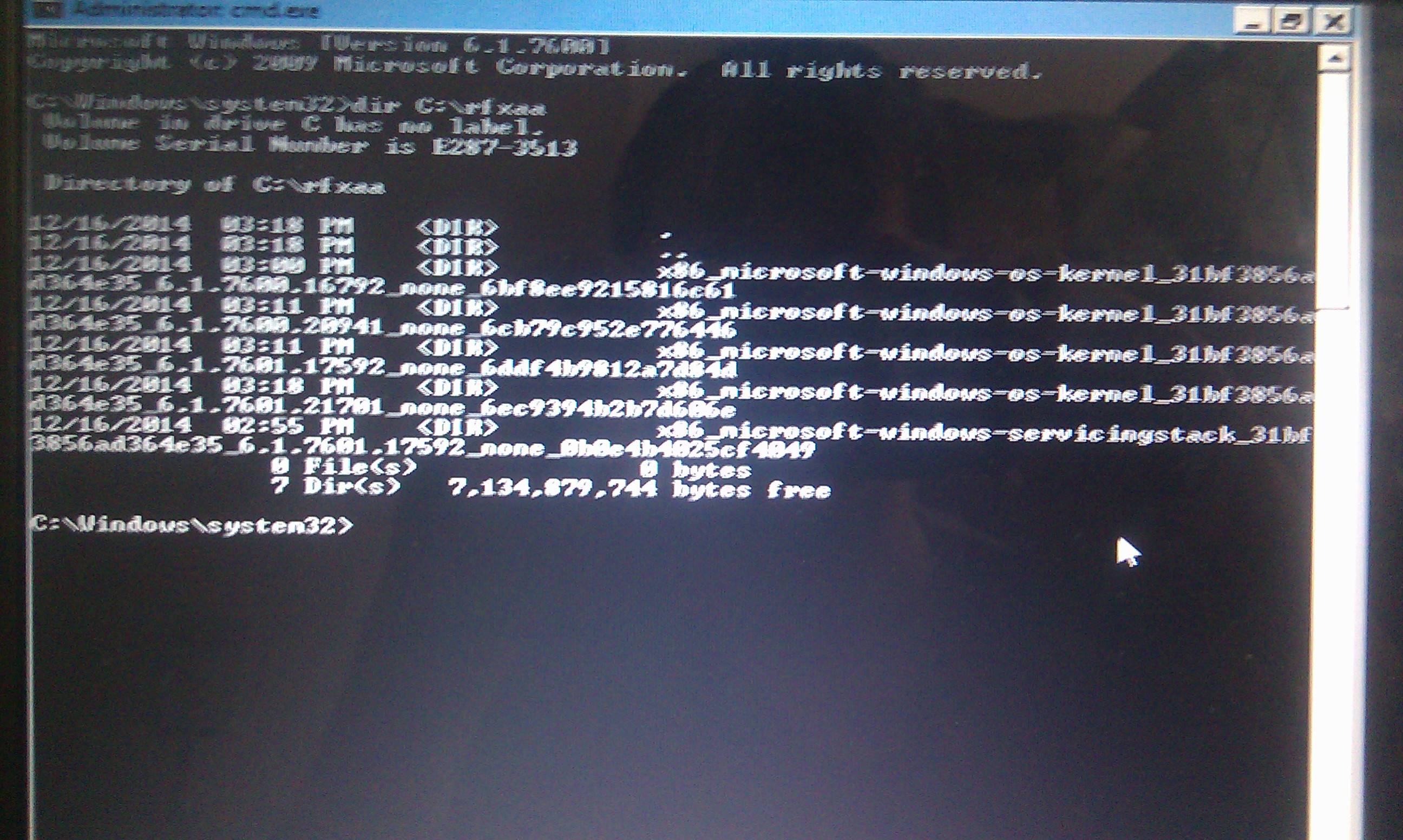
This is the result I get when I type in the DIR command. I don't see C: or D: or similar options.
eWZETAK.jpg
 

My Computer My Computer

At a glance

Windows 7 Ultimate x32
Computer type
PC/Desktop
Computer Manufacturer/Model Number
Toshiba
OS
Windows 7 Ultimate x32
You're doing that from a normal boot!
You MUST boot to the Repair Environment as described.
 

My Computer My Computer

At a glance

Win 7 x64 Home Premium (and x86 VirtualBox VM...i3 370M/i7 6500U8GB - finally :)/8GBit's an i3, dude!/dual Intel&nVidia
Computer type
Laptop
Computer Manufacturer/Model Number
Asus K52F or Lenovo B51-80
OS
Win 7 x64 Home Premium (and x86 VirtualBox VM)/Win10
CPU
i3 370M/i7 6500U
Motherboard
Asus/Lenovo
Memory
8GB - finally :)/8GB
Graphics Card(s)
it's an i3, dude!/dual Intel&nVidia
Sound Card
onboard
Monitor(s) Displays
15.6" built-in
Screen Resolution
1366x768/1920x1080
Hard Drives
750GB Seagate internal
Sundry external drives attached to other computers on the local network
1TB SSD on the Lenovo
PSU
n/a
Internet Speed
as much as I can get - usually on a dongle/phone, so <1MB/s
Antivirus
MSE/Defender
Browser
IE11/12/Edge/Chrome/FF(if I must)
You're doing that from a normal boot!
You MUST boot to the Repair Environment as described.

Well, the start up I have comes up in Spanish but there are also no option at the top that says to repair the computer. There are 3 forms of safe mode at the top and then various other options on the bottom for things like boot-logging, lower resolution, and similar things but nothing for repairing.

EDIT: I figured out the way to reactivate the Repair Computer option. When I go into it and pick to do the startup repair it just keeps staying on the screen and doesn't even load anything, however starting Windows normally works just fine.
 
Last edited:

My Computer My Computer

At a glance

Windows 7 Ultimate x32
Computer type
PC/Desktop
Computer Manufacturer/Model Number
Toshiba
OS
Windows 7 Ultimate x32
In that case you either need to create a repair disk, or use a full Install disk, to get the same functionality.
 

My Computer My Computer

At a glance

Win 7 x64 Home Premium (and x86 VirtualBox VM...i3 370M/i7 6500U8GB - finally :)/8GBit's an i3, dude!/dual Intel&nVidia
Computer type
Laptop
Computer Manufacturer/Model Number
Asus K52F or Lenovo B51-80
OS
Win 7 x64 Home Premium (and x86 VirtualBox VM)/Win10
CPU
i3 370M/i7 6500U
Motherboard
Asus/Lenovo
Memory
8GB - finally :)/8GB
Graphics Card(s)
it's an i3, dude!/dual Intel&nVidia
Sound Card
onboard
Monitor(s) Displays
15.6" built-in
Screen Resolution
1366x768/1920x1080
Hard Drives
750GB Seagate internal
Sundry external drives attached to other computers on the local network
1TB SSD on the Lenovo
PSU
n/a
Internet Speed
as much as I can get - usually on a dongle/phone, so <1MB/s
Antivirus
MSE/Defender
Browser
IE11/12/Edge/Chrome/FF(if I must)
In that case you either need to create a repair disk, or use a full Install disk, to get the same functionality.

I managed to get sfc /scannow to work by doing a system restore to the earliest date I could, which was only like 20 minutes before the update that messed everything up. It didn't work like it should have but at least I could run that scan and also it got rid of the 80080005 error and now I just get the 80072EFE error instead. Here are the files now that I finished the scan.
 

My Computer My Computer

At a glance

Windows 7 Ultimate x32
Computer type
PC/Desktop
Computer Manufacturer/Model Number
Toshiba
OS
Windows 7 Ultimate x32
The SFC scan is clear - please run a new CheckSUR scan/install and post the new CheckSUR.log file
 

My Computer My Computer

At a glance

Win 7 x64 Home Premium (and x86 VirtualBox VM...i3 370M/i7 6500U8GB - finally :)/8GBit's an i3, dude!/dual Intel&nVidia
Computer type
Laptop
Computer Manufacturer/Model Number
Asus K52F or Lenovo B51-80
OS
Win 7 x64 Home Premium (and x86 VirtualBox VM)/Win10
CPU
i3 370M/i7 6500U
Motherboard
Asus/Lenovo
Memory
8GB - finally :)/8GB
Graphics Card(s)
it's an i3, dude!/dual Intel&nVidia
Sound Card
onboard
Monitor(s) Displays
15.6" built-in
Screen Resolution
1366x768/1920x1080
Hard Drives
750GB Seagate internal
Sundry external drives attached to other computers on the local network
1TB SSD on the Lenovo
PSU
n/a
Internet Speed
as much as I can get - usually on a dongle/phone, so <1MB/s
Antivirus
MSE/Defender
Browser
IE11/12/Edge/Chrome/FF(if I must)
The SFC scan is clear - please run a new CheckSUR scan/install and post the new CheckSUR.log file

Here is the log.
 

My Computer My Computer

At a glance

Windows 7 Ultimate x32
Computer type
PC/Desktop
Computer Manufacturer/Model Number
Toshiba
OS
Windows 7 Ultimate x32
That's also clear (surprisingly!)

Go ahead and see how Windows Update behaves now.
Do a new Check for Updates, then attempt to install ONLY the oldest found update.

What happens?
 

My Computer My Computer

At a glance

Win 7 x64 Home Premium (and x86 VirtualBox VM...i3 370M/i7 6500U8GB - finally :)/8GBit's an i3, dude!/dual Intel&nVidia
Computer type
Laptop
Computer Manufacturer/Model Number
Asus K52F or Lenovo B51-80
OS
Win 7 x64 Home Premium (and x86 VirtualBox VM)/Win10
CPU
i3 370M/i7 6500U
Motherboard
Asus/Lenovo
Memory
8GB - finally :)/8GB
Graphics Card(s)
it's an i3, dude!/dual Intel&nVidia
Sound Card
onboard
Monitor(s) Displays
15.6" built-in
Screen Resolution
1366x768/1920x1080
Hard Drives
750GB Seagate internal
Sundry external drives attached to other computers on the local network
1TB SSD on the Lenovo
PSU
n/a
Internet Speed
as much as I can get - usually on a dongle/phone, so <1MB/s
Antivirus
MSE/Defender
Browser
IE11/12/Edge/Chrome/FF(if I must)
That's also clear (surprisingly!)

Go ahead and see how Windows Update behaves now.
Do a new Check for Updates, then attempt to install ONLY the oldest found update.

What happens?

I get error 80072EFE when I try to check for updates.
 

My Computer My Computer

At a glance

Windows 7 Ultimate x32
Computer type
PC/Desktop
Computer Manufacturer/Model Number
Toshiba
OS
Windows 7 Ultimate x32
Back
Top