is 16gb ram suitable for my dell laptop?

anveshreddy

New member
Local time
3:00 AM
Messages
7
hi there,

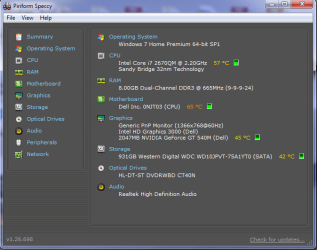
i have a dell xps l502x laptop with the following configuration( image attached). i wanted to install windows 2012 and sharepoint server on my laptop as dual boot. would someone please suggest whether i can upgrade my ram from 8gb to 16gb?? if so what speed and which suits??

i rang dell customer support today, they mentioned that this motherboard can only support upto 8gb, not more than that..

thanks alot in advance.
 

Attachments
  • Untitled.png
    Untitled.png
    26.2 KB · Views: 71

My Computer My Computer

At a glance

windows 7 home premium 64 bit
Computer type
Laptop
Computer Manufacturer/Model Number
dell
OS
windows 7 home premium 64 bit
According to the Dell manual 8 GB is max.
Memory​
Memory
module
connector
two user-accessible
SODIMM connectors
Memory
module
capacities
1 GB, 2 GB, and 4 GB
Minimum
memory
2 GB
Maximum
memory​
8 GB
 

My Computer My Computer

At a glance

Windows 10 64 bitIntel i7 6700K16GB Corsair DominatorIntel CPU Graphics
Computer type
PC/Desktop
Computer Manufacturer/Model Number
My Own Build
OS
Windows 10 64 bit
CPU
Intel i7 6700K
Motherboard
ASUS ROG Maximus VIII Hero
Memory
16GB Corsair Dominator
Graphics Card(s)
Intel CPU Graphics
Sound Card
RealTek
Monitor(s) Displays
27" Dell S2719dgf
Screen Resolution
2560X1440
Hard Drives
1 TB Samsung 850 EVO SSD for Win 10 Pro
500GB Samsung 850 EVO SSD for Win 10 Insider
2 TB drive for backup
PSU
EVGA Supernova 750G2
Case
BeQuiet Silent Base 600
Cooling
Deepcool Captain 120EX
Keyboard
Microsoft Wireless 2000
Mouse
Microsoft wireless
Internet Speed
100 MB/sec (Cable)
Antivirus
Microsoft Defender and Malwarebytes
Browser
Edge/Firefox
Other Info
Cakewalk (Sonar) by BandLab and Studio One 4.1 Pro recording studio software. MOTU 896Mk3 Hybrid recording interface, Frontier Tranzport wireless control unit, Behringer X-Touch Control Surface.
Five USB connected optical drives for CD Audio production using Nero BurningROM
Apart from the already mentioned...

If you are actually planning to use the server for anything (i.e. this is not for testing/learning purposes in which the proposed is appropriate), you really want a desktop platform. Always. The naked fact is that laptop hardware doesn't compete with their desktop equivalents (especially pertaining to RAM and CPU - the two most important for servers/NAS). You will always get better performance/price out of a desktop. Laptops, still, can't compete there.

Laptops I see supporting 16GB RAM are in the $1,000 ballpark...

Anyway. The bare essentials for your basic home or even small mom and pop business server/NAS would indeed be 16GB RAM, but also with the lowest CAS Latency and highest clock speed you can afford (note that lower CAS will garner more performance gains over merely choosing higher clock speed but with higher CAS). And, of course, the best CPU you can afford (this here is handy).

Everything else depends entirely on what you're actually going to be using the server for. Different functions require different hardware.

Straight up, you will be far better served re-purposing a desktop than attempting this with a laptop. Or, even looking in classifieds for a used server that may or may not need some upgrades/repairs.
 

My Computer My Computer

At a glance

7 Ultimate SP1 x64AMD FX-8350 4.0GHz8GB Corsair Vengeance LP DDR3 1600EVGA GTX760 SC 2GB GDDR5
Computer type
PC/Desktop
Computer Manufacturer/Model Number
Custom [03/21/2014]
OS
7 Ultimate SP1 x64
CPU
AMD FX-8350 4.0GHz
Motherboard
Asus M5A99FX Pro R2.0
Memory
8GB Corsair Vengeance LP DDR3 1600
Graphics Card(s)
EVGA GTX760 SC 2GB GDDR5
Sound Card
Realtek ALC892
Monitor(s) Displays
23" Syncmaster P2370HD
Screen Resolution
1920 x 1080
Hard Drives
Scorpio Black WD1003FZEX 1TB
PSU
Corsair RM 750W
Case
Gigabyte Sumo Omega
Cooling
Noctua NH-D14 | 6 120mm case.
Keyboard
Tt eSPORTS Poesidon Z - Blue Switch
Mouse
Logitech M510
Internet Speed
FiOS 100/100
Antivirus
MBAM
Browser
WaterFox & Chrome
Other Info
NETWORKING:
FiOS G1100 (v1.03)
Netgear WNDR37AV
Actiontec MI424WR (Rev. I)
PRINTER:
Canon MX340
I don't see why it won't support 16GB.
Reason of having 8GB max mentioned is that only 4GB sticks were available at the moment when laptop came out. :)

I have also seen users reporting that even 1866MHz RAM works at full speed in this laptop.
 

My Computer My Computer

At a glance

Windows 7 Ultimate SP1 X64Intel Core i7-2760QMSamsung 16GB DDR3 1333MHzNvidia Geforce GT 555M
Computer type
Laptop
Computer Manufacturer/Model Number
Dell XPS L702X
OS
Windows 7 Ultimate SP1 X64
CPU
Intel Core i7-2760QM
Motherboard
Intel HM67
Memory
Samsung 16GB DDR3 1333MHz
Graphics Card(s)
Nvidia Geforce GT 555M
Screen Resolution
1920x1080
Hard Drives
Samsung 860 EVO 500GB
Toshiba 1TB 5400RPM
I don't see why it won't support 16GB.
Reason of having 8GB max mentioned is that only 4GB sticks were available at the moment when laptop came out. :)

I have also seen users reporting that even 1866MHz RAM works at full speed in this laptop.
That would be because your L702x supports 16GB and has 4 slots. The L502x does not and has 2 slots. Yours is most likely running 4x4 SODIMM to derive 16GB. And as far as 1866MHz RAM functioning on a system that supports 1333MHz RAM, that's not surprising. But its not going to actually function at 1866MHz unless the motherboard supports overclocking. The 1866MHz RAM will operate on the board's supported 1333MHz standard otherwise.

Some motherboards, particularly laptop boards, are very choosy about their RAM. Not just voltages and clock speeds, but capacities and how those capacities are split on the channels. Some boards just flat-out don't like and/or do not support higher capacity RAM per DIMM.

OP, I wouldn't risk trying it because more likely than not, even if you did get a 2x8 SO-DIMM kit, it wouldn't work. At best case scenario, it would see and use half of it only. At worst, it won't work at all. I suppose there's no real harm in attempting it, but definitely check the return policy and save the receipt.
 

My Computer My Computer

At a glance

7 Ultimate SP1 x64AMD FX-8350 4.0GHz8GB Corsair Vengeance LP DDR3 1600EVGA GTX760 SC 2GB GDDR5
Computer type
PC/Desktop
Computer Manufacturer/Model Number
Custom [03/21/2014]
OS
7 Ultimate SP1 x64
CPU
AMD FX-8350 4.0GHz
Motherboard
Asus M5A99FX Pro R2.0
Memory
8GB Corsair Vengeance LP DDR3 1600
Graphics Card(s)
EVGA GTX760 SC 2GB GDDR5
Sound Card
Realtek ALC892
Monitor(s) Displays
23" Syncmaster P2370HD
Screen Resolution
1920 x 1080
Hard Drives
Scorpio Black WD1003FZEX 1TB
PSU
Corsair RM 750W
Case
Gigabyte Sumo Omega
Cooling
Noctua NH-D14 | 6 120mm case.
Keyboard
Tt eSPORTS Poesidon Z - Blue Switch
Mouse
Logitech M510
Internet Speed
FiOS 100/100
Antivirus
MBAM
Browser
WaterFox & Chrome
Other Info
NETWORKING:
FiOS G1100 (v1.03)
Netgear WNDR37AV
Actiontec MI424WR (Rev. I)
PRINTER:
Canon MX340
Your RAM limit is 'built-in' to the system board and the BIOS. It is not changeable. It is a matter of hardware design.

Sorry, only 8 gig for that machine.
 

My Computer My Computer

At a glance

Windows 7 64 Bit Home Premium SP1i7-3820GSkill F3-14900CL9Q - 16GBEVGA GeForce GTX660 - Driver 352.86
Computer type
PC/Desktop
Computer Manufacturer/Model Number
Home Built - Jan 2013
OS
Windows 7 64 Bit Home Premium SP1
CPU
i7-3820
Motherboard
Asus P9X79-PRO - Bios 4608
Memory
GSkill F3-14900CL9Q - 16GB
Graphics Card(s)
EVGA GeForce GTX660 - Driver 352.86
Sound Card
On board Realtek ALC898
Monitor(s) Displays
Acer S271HL
Screen Resolution
1920 x 1080
Hard Drives
#1- Samsung 840 Pro Series
#2- Western Digital WD1002FAEX Sata3 Black
#3- Western Digital WD1002FAEX Sata3 Black
PSU
Corsair CMPSU-850TX-V2 - 850 watt (by Seasonic)
Case
Corsair Obsidian 550D
Cooling
Standard 3 120mm case fans, Cooler Master Hyper 212 EVO
Keyboard
MS KC-0405
Mouse
Intellimouse 5-button
Internet Speed
56 Mbits/Sec (on a good day)
Antivirus
Avast & Malwarebytes
Browser
Firefox
Other Info
Asus DVD - DRW-24B1ST 24X

My Computer My Computer

At a glance

Windows 7 Ultimate 64-bit, Windows 8.1 64-bit...
Computer type
PC/Desktop
Computer Manufacturer/Model Number
Customs, Dell, Gateway, HP, Toshiba, Acer, ASUS
OS
Windows 7 Ultimate 64-bit, Windows 8.1 64-bit, Mac OS X 10.10, Linux Mint 17, Windows 10 Pro TP
Keyboard
Microsoft
Mouse
Microsoft
That would be because your L702x supports 16GB and has 4 slots. The L502x does not and has 2 slots. Yours is most likely running 4x4 SODIMM to derive 16GB. And as far as 1866MHz RAM functioning on a system that supports 1333MHz RAM, that's not surprising. But its not going to actually function at 1866MHz unless the motherboard supports overclocking. The 1866MHz RAM will operate on the board's supported 1333MHz standard otherwise.
Actually i am not suggesting this because of my L702X. :)
Back in the day when i got L702X, i was active in notebookreview/dell forums for a year or so.
And i know following things....

XPS L502X does support 8GB sticks and will support 16GB max. Doesn't matter what the manual or company says. And L702X will support 32GB with its four slots (guess you gonna need at least win 7 professional to support that by the way).

And about 1866MHz memory, i didn't just say that it'll work. I said full speed means "CPU-Z reporting 931MHz DRAM Frequency".
Though it works on L502X, but for some weird reason Dell locked the L702X to 1333MHz only, that's the reason i am running at 1333MHz.

Feel free to dig through those forums.
 

My Computer My Computer

At a glance

Windows 7 Ultimate SP1 X64Intel Core i7-2760QMSamsung 16GB DDR3 1333MHzNvidia Geforce GT 555M
Computer type
Laptop
Computer Manufacturer/Model Number
Dell XPS L702X
OS
Windows 7 Ultimate SP1 X64
CPU
Intel Core i7-2760QM
Motherboard
Intel HM67
Memory
Samsung 16GB DDR3 1333MHz
Graphics Card(s)
Nvidia Geforce GT 555M
Screen Resolution
1920x1080
Hard Drives
Samsung 860 EVO 500GB
Toshiba 1TB 5400RPM
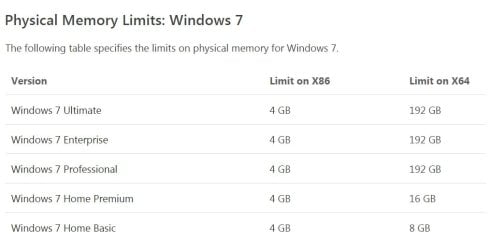
You'll need Windows Pro or better to use more than 8GB. I'm not sure if the bit-depth matters, but I'd suggest installing 64-bit version.

edit: I stand corrected ... see gulls post# 12 for correct information on OS versions and memory.

My Vista laptop had the same 'issue' - specs stated maxmem at 2 GB, but about three years later, the specs were changed (doubled maxmem). I added the memory and it worked fine - this was not a case of a product change, just poor specs documentation.
 
Last edited:

My Computer My Computer

At a glance

x64 (6.3.9600) Win8.1 Pro & soon dual boot x6...AMD A6-3420M APU with Radeon(tm) HD Graphics6.00 GBAMD Radeon(TM) HD 6520G
Computer type
Laptop
Computer Manufacturer/Model Number
HP Pavilion dv6-6c10us
OS
x64 (6.3.9600) Win8.1 Pro & soon dual boot x64 (6.1.7601) Win7_SP1 HomePrem
CPU
AMD A6-3420M APU with Radeon(tm) HD Graphics
Motherboard
Hewlett-Packard 1805
Memory
6.00 GB
Graphics Card(s)
AMD Radeon(TM) HD 6520G
Sound Card
(1) AMD High Definition Audio Device (2) IDT High Definiti
Monitor(s) Displays
HP W2072a 20" LCD (1600 x 900) @ 60 Hz
Screen Resolution
1366 x 768 x 32 bits (4294967296 colors) @ 60 Hz
Hard Drives
ST640LM0 00 HM641JI SATA Disk Device
Keyboard
Logitech k520 wireless KB
Mouse
Logitech m320 wireless mouse (bundled with KB)
Internet Speed
15/5 | 54 MB Wireless 'n'
Antivirus
Realtime: Defender or Avast | On-demand: Malwarebytes, ESET
Browser
IE 11 on Win8, IE 10 on win 7
Other Info
Media: [Gimp, Audacity, VLC] || Comm: [WEmail 2012, Skype] || Productivity: [OpenOffice,| Textpad] || Utils: [Sysinternals, cCleaner, Speccy, Defraggler]
You'll need Windows Pro or better to use more than 8GB.

I don't believe this is true.
I am running 16GB on Home Premium right now.
I believe the limit for Home Premium is 16GB.
 

My Computer My Computer

At a glance

Windows 7 64 Bit Home Premium SP1i7-3820GSkill F3-14900CL9Q - 16GBEVGA GeForce GTX660 - Driver 352.86
Computer type
PC/Desktop
Computer Manufacturer/Model Number
Home Built - Jan 2013
OS
Windows 7 64 Bit Home Premium SP1
CPU
i7-3820
Motherboard
Asus P9X79-PRO - Bios 4608
Memory
GSkill F3-14900CL9Q - 16GB
Graphics Card(s)
EVGA GeForce GTX660 - Driver 352.86
Sound Card
On board Realtek ALC898
Monitor(s) Displays
Acer S271HL
Screen Resolution
1920 x 1080
Hard Drives
#1- Samsung 840 Pro Series
#2- Western Digital WD1002FAEX Sata3 Black
#3- Western Digital WD1002FAEX Sata3 Black
PSU
Corsair CMPSU-850TX-V2 - 850 watt (by Seasonic)
Case
Corsair Obsidian 550D
Cooling
Standard 3 120mm case fans, Cooler Master Hyper 212 EVO
Keyboard
MS KC-0405
Mouse
Intellimouse 5-button
Internet Speed
56 Mbits/Sec (on a good day)
Antivirus
Avast & Malwarebytes
Browser
Firefox
Other Info
Asus DVD - DRW-24B1ST 24X
Well.....
 

Attachments

  • Untitled.jpg
    Untitled.jpg
    30.4 KB · Views: 2

My Computer My Computer

At a glance

Windows 7 Ultimate SP1 X64Intel Core i7-2760QMSamsung 16GB DDR3 1333MHzNvidia Geforce GT 555M
Computer type
Laptop
Computer Manufacturer/Model Number
Dell XPS L702X
OS
Windows 7 Ultimate SP1 X64
CPU
Intel Core i7-2760QM
Motherboard
Intel HM67
Memory
Samsung 16GB DDR3 1333MHz
Graphics Card(s)
Nvidia Geforce GT 555M
Screen Resolution
1920x1080
Hard Drives
Samsung 860 EVO 500GB
Toshiba 1TB 5400RPM
You'll need Windows Pro or better to use more than 8GB.

I don't believe this is true.
I am running 16GB on Home Premium right now.
I believe the limit for Home Premium is 16GB.


Well.....

Thank you everyone ... keep keeping me honest!

My apologies, I should have confirmed (I usually post the same sheet gulls posted - shame on me!). I've corrected my post.

Looking at your SF profile specs (Ult x64), I think you'll be alright. It's not only the OS, but the Mobo must be able to address the available memory. Is there any way you could borrow memory to test it out before spending money?

As MagusMagnus said I suppose there's no real harm in attempting it, but definitely check the return policy and save the receipt.
 

My Computer My Computer

At a glance

x64 (6.3.9600) Win8.1 Pro & soon dual boot x6...AMD A6-3420M APU with Radeon(tm) HD Graphics6.00 GBAMD Radeon(TM) HD 6520G
Computer type
Laptop
Computer Manufacturer/Model Number
HP Pavilion dv6-6c10us
OS
x64 (6.3.9600) Win8.1 Pro & soon dual boot x64 (6.1.7601) Win7_SP1 HomePrem
CPU
AMD A6-3420M APU with Radeon(tm) HD Graphics
Motherboard
Hewlett-Packard 1805
Memory
6.00 GB
Graphics Card(s)
AMD Radeon(TM) HD 6520G
Sound Card
(1) AMD High Definition Audio Device (2) IDT High Definiti
Monitor(s) Displays
HP W2072a 20" LCD (1600 x 900) @ 60 Hz
Screen Resolution
1366 x 768 x 32 bits (4294967296 colors) @ 60 Hz
Hard Drives
ST640LM0 00 HM641JI SATA Disk Device
Keyboard
Logitech k520 wireless KB
Mouse
Logitech m320 wireless mouse (bundled with KB)
Internet Speed
15/5 | 54 MB Wireless 'n'
Antivirus
Realtime: Defender or Avast | On-demand: Malwarebytes, ESET
Browser
IE 11 on Win8, IE 10 on win 7
Other Info
Media: [Gimp, Audacity, VLC] || Comm: [WEmail 2012, Skype] || Productivity: [OpenOffice,| Textpad] || Utils: [Sysinternals, cCleaner, Speccy, Defraggler]
Sorry to burst your bubble.
I have 2 memory slots on my XPS l7 702x i installed 8 gb. & 8 gb. tolal 16gb. As long as you are rurning 64 bit it runs perfect. fast. 10 sec. boot up. I bought the memory from the Crusial web site 3 years ago.
Also i'm running windows 7 premium.
 

My Computer My Computer

At a glance

windows 7-64bitquad core 3.46 max.16 gig.555m
Computer type
Laptop
Computer Manufacturer/Model Number
dell
OS
windows 7-64bit
CPU
quad core 3.46 max.
Motherboard
dell xps l7 702x with 555m vedio card
Memory
16 gig.
Graphics Card(s)
555m
Hard Drives
samsung 840 pro.
Antivirus
kaspersky pure 3.0
Browser
mozilla firefox
Back
Top