Installation/Restoration of Windows 7 to New SSD

vkw104

New member
Local time
1:25 PM
Messages
14
Hello all,
I'm making the plunge into SSDs and would like to know what the best way of installing a new one is, if I already have W7 installed on my current hard drive.
I've made a complete image using Acronis True Image that I was planning on restoring directly onto the SSD after removing my original hard drive, but I read that Windows 7 has to do some "alignment" of the SSD. If I simply restored the file, would that not occur?

Should I just do a fresh install and reinstall my other programs one by one?
 

My Computer My Computer

At a glance

Windows 7 x64
OS
Windows 7 x64
There are quite a few features that W7 modifies or turns off/on when it knows it's running on an SSD. Whether these are turned on or off on the fly after an install I don't know and so would have to assume "No".

The surer bet would be to install fresh onto the SSD...
 

My Computer My Computer

At a glance

Windows 7 x64 Ultimatei7 96012 Gig Corsair DominatorNvidia 480
Computer Manufacturer/Model Number
Scratch built
OS
Windows 7 x64 Ultimate
CPU
i7 960
Motherboard
Asus P6X58D
Memory
12 Gig Corsair Dominator
Graphics Card(s)
Nvidia 480
Sound Card
Maudio Delta 44 + breakout box
Monitor(s) Displays
Dell UltraSharp U2410 24in and Samsung 21 dual monitors
Screen Resolution
1920x1200 and 1280x1024
Hard Drives
Primary: Intel X-25M G2 160G SSD
Secondary: Segate baracuda 1.0 TB
HDs in AHCI mode.
PSU
Corasair TX850
Case
Cooler Master HAF
Cooling
Corsair H50
Keyboard
Logitech G15 + N52 game pad
Mouse
Logitech MX518
Internet Speed
15kbs down 4.5kbps up
Other Info
WEI 7.6
CPU & RAM 7.6
Graphics 7.9
Hard disk 7.7
Absolutely fresh install. Apart from the alignment, when the Win7 installer determines that it is a disk with zero spin, it will modify all kinds of things in the system - e.g. :

Windows Indexing Service
System Restore
Windows Defrag
Use Large System Cache
Ntfs Memory Usage
Disable 8.3 Filenames
Disable Date Stamping
Disable Boot Tracing
Windows Prefetcher
Windows Superfetch
 

My Computer My Computer

At a glance

Vista, Windows7, Mint Mate, Zorin, Windows 8from 1.6GHz Duo to i7
Computer Manufacturer/Model Number
HP, Dell, Gateway, Toshiba - 4 laptops and 2 desktops
OS
Vista, Windows7, Mint Mate, Zorin, Windows 8
CPU
from 1.6GHz Duo to i7
Monitor(s) Displays
2x HP w2207
Hard Drives
5x HDD, 7x SSD, 12x Externals
Keyboard
with trackball - no mices
Mouse
Trackball mice
Internet Speed
DSL 6000
Ah, I see. Thanks for the heads up!

All that is done automatically, so I would just install as normal, correct?
 

My Computer My Computer

At a glance

Windows 7 x64
OS
Windows 7 x64
Correct.

PS: what model SSD did you buy. Make sure the firmware supports "Trim". Win7 has Trim support, but it has to be supported by the SSD too. This is important to maintain the write speed over time. Only a few recent SSDs support that, so you have to watch out and possibly update the firmware (if an update is available).
http://en.wikipedia.org/wiki/TRIM_(SSD_command)
 

My Computer My Computer

At a glance

Vista, Windows7, Mint Mate, Zorin, Windows 8from 1.6GHz Duo to i7
Computer Manufacturer/Model Number
HP, Dell, Gateway, Toshiba - 4 laptops and 2 desktops
OS
Vista, Windows7, Mint Mate, Zorin, Windows 8
CPU
from 1.6GHz Duo to i7
Monitor(s) Displays
2x HP w2207
Hard Drives
5x HDD, 7x SSD, 12x Externals
Keyboard
with trackball - no mices
Mouse
Trackball mice
Internet Speed
DSL 6000
In addition to the above. Remember to do not run a disk defragmenter on a SSD. It can shorten it's life span.
 

My Computer My Computer

At a glance

64-bit Windows 11 Pro for WorkstationsIntel i7-8700K OC'd to 5 GHz64 GB (4x16GB) G.SKILL TridentZ RGB DDR4 3600...ASUS ROG-STRIX-GTX1080TI-O11G-GAMING
Computer type
PC/Desktop
Computer Manufacturer/Model Number
Self built custom
OS
64-bit Windows 11 Pro for Workstations
CPU
Intel i7-8700K OC'd to 5 GHz
Motherboard
ASUS ROG Maximus XI Formula Z390
Memory
64 GB (4x16GB) G.SKILL TridentZ RGB DDR4 3600 MHz
Graphics Card(s)
ASUS ROG-STRIX-GTX1080TI-O11G-GAMING
Sound Card
Integrated
Monitor(s) Displays
2 x Samsung Odyssey G7 27"
Screen Resolution
2560x1440
Hard Drives
1TB Samsung 990 PRO M.2,
4TB Samsung 990 PRO PRO M.2,
TerraMaster F8 SSD Plus NAS
PSU
Seasonic Prime Titanium 850W
Case
Thermaltake Core P3
Cooling
Corsair Hydro H115i
Keyboard
Logitech wireless K800
Mouse
Logitech MX Master 4
Internet Speed
2 Gb/s Download and 100 Mb/s Upload
Antivirus
Malwarebyte Anti-Malware Premium
Browser
Google Chrome
Other Info
Logitech Z625 speaker system,
Logitech BRIO 4K Pro webcam,
HP Color LaserJet Pro MFP M477fdn,
APC SMART-UPS RT 1000 XL - SURT1000XLI,
Galaxy S23 Plus phone
Absolutely fresh install. Apart from the alignment, when the Win7 installer determines that it is a disk with zero spin, it will modify all kinds of things in the system - e.g. :

Windows Indexing Service
System Restore
Windows Defrag
Use Large System Cache
Ntfs Memory Usage
Disable 8.3 Filenames
Disable Date Stamping
Disable Boot Tracing
Windows Prefetcher
Windows Superfetch
Please not that not all of those are disabled automatically. (maybe on some SSD on some installs, but not all the time)
Several posts determined this on forums. I installed 7 pro RTM on my OCZ Vertex and had to manually disable all of those.
 

My Computer My Computer

At a glance

Windows 7 PRO x64Phenom II 1090T @ 4.00GHz8gb DDR31x ATI Diamond 5850
OS
Windows 7 PRO x64
CPU
Phenom II 1090T @ 4.00GHz
Motherboard
Crosshair IV Formula
Memory
8gb DDR3
Graphics Card(s)
1x ATI Diamond 5850
Monitor(s) Displays
50in HDTV (HDMI)
Screen Resolution
1080P
Hard Drives
2x 1TB barracuda
1x 1TB WD Black
1x 2TB WD
1x OCZ Vertex 2 40GB
PSU
1000w Xion
Case
Armor+ VH6000BWS
Cooling
W/C
Internet Speed
60Mbps down, 7 up
Correct.

PS: what model SSD did you buy. Make sure the firmware supports "Trim". Win7 has Trim support, but it has to be supported by the SSD too. This is important to maintain the write speed over time. Only a few recent SSDs support that, so you have to watch out and possibly update the firmware (if an update is available).
http://en.wikipedia.org/wiki/TRIM_(SSD_command)

I grabbed the Gen 2 Intel X25M 80GB, so I think that supports TRIM.

As for disabling the other stuff, would that require any registry edits or just finding the right menu and unchecking some boxes?
 

My Computer My Computer

At a glance

Windows 7 x64
OS
Windows 7 x64
I have the Gen 2 Intel X25M 80GB myself...it's a great drive. It will support TRIM...but there is going to be a firmware update from Intel to actually support that functionality. Intel is supposed to release around the same time that Win 7 releases. Oct 22.
 

My Computer My Computer

At a glance

Windows 7 Ultimate x64Intel Q9550 2.83Ghz OC'd to 3.40Ghz8GB G.Skill PI DDR2-800, 4-4-4-12 timingsEVGA 1280MB Nvidia GeForce GTX570
Computer Manufacturer/Model Number
Self-Built in July 2009
OS
Windows 7 Ultimate x64
CPU
Intel Q9550 2.83Ghz OC'd to 3.40Ghz
Motherboard
Gigabyte GA-EP45-UD3R rev. 1.1, F12 BIOS
Memory
8GB G.Skill PI DDR2-800, 4-4-4-12 timings
Graphics Card(s)
EVGA 1280MB Nvidia GeForce GTX570
Sound Card
Realtek ALC899A 8 channel onboard audio
Monitor(s) Displays
23" Acer x233H
Screen Resolution
1920x1080
Hard Drives
Intel X25-M 80GB Gen 2 SSD
Western Digital 1TB Caviar Black, 32MB cache. WD1001FALS
PSU
Corsair 620HX modular
Case
Antec P182
Cooling
stock
Keyboard
ABS M1 Mechanical
Mouse
Logitech G9 Laser Mouse
Internet Speed
15/2 cable modem
Other Info
Windows and Linux enthusiast. Logitech G35 Headset.
Absolutely fresh install. Apart from the alignment, when the Win7 installer determines that it is a disk with zero spin, it will modify all kinds of things in the system - e.g. :

Windows Indexing Service
System Restore
Windows Defrag
Use Large System Cache
Ntfs Memory Usage
Disable 8.3 Filenames
Disable Date Stamping
Disable Boot Tracing
Windows Prefetcher
Windows Superfetch
Please not that not all of those are disabled automatically. (maybe on some SSD on some installs, but not all the time)
Several posts determined this on forums. I installed 7 pro RTM on my OCZ Vertex and had to manually disable all of those.

Right, at the moment, not ll of the above are being disabled automatically. That's why I said "e.g." But maybe I did not make that clear enough. This article describes the current situation: Engineering Windows 7 : Support and Q&A for Solid-State Drives If you want a full tweak, you can use this tweak utility that some friendly soul provided: Guide SSD Tweak Utility - OCZ Forum
 

My Computer My Computer

At a glance

Vista, Windows7, Mint Mate, Zorin, Windows 8from 1.6GHz Duo to i7
Computer Manufacturer/Model Number
HP, Dell, Gateway, Toshiba - 4 laptops and 2 desktops
OS
Vista, Windows7, Mint Mate, Zorin, Windows 8
CPU
from 1.6GHz Duo to i7
Monitor(s) Displays
2x HP w2207
Hard Drives
5x HDD, 7x SSD, 12x Externals
Keyboard
with trackball - no mices
Mouse
Trackball mice
Internet Speed
DSL 6000
Hmm, I installed the SSD and Windows 7 onto it, everything was running fine. Installed all my programs, then upon my first restart, it said "Reboot and select boot device" or something to that effect. My SSD is correctly at the top of the boot priority but it doesn't seem to be able to boot from it. I tried repairing with my W7 disc, but it doesn't find my original installation of Windows 7. It's like I never installed anything.

Any ideas?

Update:
Ummm...well it works now. I just can't put the Intel SSD as the first boot drive, even though it's installed to the SSD. It boots fine so long as I put my secondary HD as #1 on the boot device list. I wonder if this means I should update my BIOS?
 
Last edited:

My Computer My Computer

At a glance

Windows 7 x64
OS
Windows 7 x64
VKW,

If you go into Disk Management, is there a 100MB "System Reserved" partition on your secondary HD by chance? That is the boot file used by Windows 7.
 

My Computer My Computer

At a glance

64-bit Windows 11 Pro for WorkstationsIntel i7-8700K OC'd to 5 GHz64 GB (4x16GB) G.SKILL TridentZ RGB DDR4 3600...ASUS ROG-STRIX-GTX1080TI-O11G-GAMING
Computer type
PC/Desktop
Computer Manufacturer/Model Number
Self built custom
OS
64-bit Windows 11 Pro for Workstations
CPU
Intel i7-8700K OC'd to 5 GHz
Motherboard
ASUS ROG Maximus XI Formula Z390
Memory
64 GB (4x16GB) G.SKILL TridentZ RGB DDR4 3600 MHz
Graphics Card(s)
ASUS ROG-STRIX-GTX1080TI-O11G-GAMING
Sound Card
Integrated
Monitor(s) Displays
2 x Samsung Odyssey G7 27"
Screen Resolution
2560x1440
Hard Drives
1TB Samsung 990 PRO M.2,
4TB Samsung 990 PRO PRO M.2,
TerraMaster F8 SSD Plus NAS
PSU
Seasonic Prime Titanium 850W
Case
Thermaltake Core P3
Cooling
Corsair Hydro H115i
Keyboard
Logitech wireless K800
Mouse
Logitech MX Master 4
Internet Speed
2 Gb/s Download and 100 Mb/s Upload
Antivirus
Malwarebyte Anti-Malware Premium
Browser
Google Chrome
Other Info
Logitech Z625 speaker system,
Logitech BRIO 4K Pro webcam,
HP Color LaserJet Pro MFP M477fdn,
APC SMART-UPS RT 1000 XL - SURT1000XLI,
Galaxy S23 Plus phone
VKW,

If you go into Disk Management, is there a 100MB "System Reserved" partition on your secondary HD by chance? That is the boot file used by Windows 7.

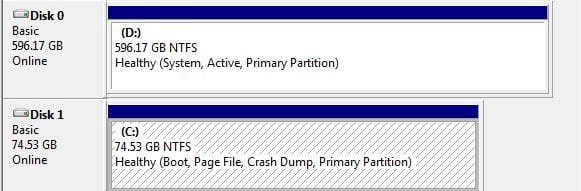
Not that I see. D:/ (secondary drive) has it's allocation and Healthy (system, active, primary partition)

C:/ (supposed boot/SSD) says Health (boot, page file, crash dump, primary partition)

No reserved space or anything
 

My Computer My Computer

At a glance

Windows 7 x64
OS
Windows 7 x64
It sounds like the boot file was installed on the D: drive. Could you post a screenshot of Disk Management to be sure though?
 

My Computer My Computer

At a glance

64-bit Windows 11 Pro for WorkstationsIntel i7-8700K OC'd to 5 GHz64 GB (4x16GB) G.SKILL TridentZ RGB DDR4 3600...ASUS ROG-STRIX-GTX1080TI-O11G-GAMING
Computer type
PC/Desktop
Computer Manufacturer/Model Number
Self built custom
OS
64-bit Windows 11 Pro for Workstations
CPU
Intel i7-8700K OC'd to 5 GHz
Motherboard
ASUS ROG Maximus XI Formula Z390
Memory
64 GB (4x16GB) G.SKILL TridentZ RGB DDR4 3600 MHz
Graphics Card(s)
ASUS ROG-STRIX-GTX1080TI-O11G-GAMING
Sound Card
Integrated
Monitor(s) Displays
2 x Samsung Odyssey G7 27"
Screen Resolution
2560x1440
Hard Drives
1TB Samsung 990 PRO M.2,
4TB Samsung 990 PRO PRO M.2,
TerraMaster F8 SSD Plus NAS
PSU
Seasonic Prime Titanium 850W
Case
Thermaltake Core P3
Cooling
Corsair Hydro H115i
Keyboard
Logitech wireless K800
Mouse
Logitech MX Master 4
Internet Speed
2 Gb/s Download and 100 Mb/s Upload
Antivirus
Malwarebyte Anti-Malware Premium
Browser
Google Chrome
Other Info
Logitech Z625 speaker system,
Logitech BRIO 4K Pro webcam,
HP Color LaserJet Pro MFP M477fdn,
APC SMART-UPS RT 1000 XL - SURT1000XLI,
Galaxy S23 Plus phone

Attachments

  • DMgmt.JPG
    DMgmt.JPG
    26.3 KB · Views: 66

My Computer My Computer

At a glance

Windows 7 x64
OS
Windows 7 x64
Yep, the "System" boot partition was installed on the D: drive.

A easy way to fix this is to run a repair install within Windows 7 (C: drive). During the repair install, make sure that Disk 1 (C: drive) is selected to install on.
 

My Computer My Computer

At a glance

64-bit Windows 11 Pro for WorkstationsIntel i7-8700K OC'd to 5 GHz64 GB (4x16GB) G.SKILL TridentZ RGB DDR4 3600...ASUS ROG-STRIX-GTX1080TI-O11G-GAMING
Computer type
PC/Desktop
Computer Manufacturer/Model Number
Self built custom
OS
64-bit Windows 11 Pro for Workstations
CPU
Intel i7-8700K OC'd to 5 GHz
Motherboard
ASUS ROG Maximus XI Formula Z390
Memory
64 GB (4x16GB) G.SKILL TridentZ RGB DDR4 3600 MHz
Graphics Card(s)
ASUS ROG-STRIX-GTX1080TI-O11G-GAMING
Sound Card
Integrated
Monitor(s) Displays
2 x Samsung Odyssey G7 27"
Screen Resolution
2560x1440
Hard Drives
1TB Samsung 990 PRO M.2,
4TB Samsung 990 PRO PRO M.2,
TerraMaster F8 SSD Plus NAS
PSU
Seasonic Prime Titanium 850W
Case
Thermaltake Core P3
Cooling
Corsair Hydro H115i
Keyboard
Logitech wireless K800
Mouse
Logitech MX Master 4
Internet Speed
2 Gb/s Download and 100 Mb/s Upload
Antivirus
Malwarebyte Anti-Malware Premium
Browser
Google Chrome
Other Info
Logitech Z625 speaker system,
Logitech BRIO 4K Pro webcam,
HP Color LaserJet Pro MFP M477fdn,
APC SMART-UPS RT 1000 XL - SURT1000XLI,
Galaxy S23 Plus phone
Hmm, I think I might have to do a fresh install...things are kind of wonky right now. Is there some way to delete the system part of my D:/ drive?
 

My Computer My Computer

At a glance

Windows 7 x64
OS
Windows 7 x64
When you reinstall, pull the wire from the D: drive. Safest method to make sure things don't get mixed up.
 

My Computer My Computer

At a glance

Vista, Windows7, Mint Mate, Zorin, Windows 8from 1.6GHz Duo to i7
Computer Manufacturer/Model Number
HP, Dell, Gateway, Toshiba - 4 laptops and 2 desktops
OS
Vista, Windows7, Mint Mate, Zorin, Windows 8
CPU
from 1.6GHz Duo to i7
Monitor(s) Displays
2x HP w2207
Hard Drives
5x HDD, 7x SSD, 12x Externals
Keyboard
with trackball - no mices
Mouse
Trackball mice
Internet Speed
DSL 6000
When you reinstall, pull the wire from the D: drive. Safest method to make sure things don't get mixed up.

It was a pain to do, but everything is working now. Thanks for all the help everyone!
 

My Computer My Computer

At a glance

Windows 7 x64
OS
Windows 7 x64
Back
Top