BadUSB: Big, bad USB security problems ahead

Borg 386

ADHD Senior Member
Guru
Gold Member
VIP
Local time
9:53 PM
Messages
5,489
Location
In a house with a cat trying to kill me
The base problem, according to the pair, is "USB has become so commonplace that we rarely worry about its security implications. USB sticks undergo the occasional virus scan, but we consider USB to be otherwise perfectly safe — until now."
Nohl and Lell have discovered that USB controller chips' firmware offer no protection from reprogramming. Using a set of proof-of-concept tools they call BadUSB, they claim that an ordinary USB device, even a thumb drive, can be used to compromise computers in the following ways:

  • A device can emulate a keyboard and issue commands on behalf of the logged-in user, for example to exfiltrate files or install malware. Such malware, in turn, can infect the controller chips of other USB devices connected to the computer.
  • The device can also spoof a network card and change the computer’s DNS setting to redirect traffic.
  • A modified thumb drive or external hard disk can — when it detects that the computer is starting up — boot a small virus, which infects the computer’s operating system prior to boot.
BadUSB: Big, bad USB security problems ahead | ZDNet
 

My Computer My Computer

Computer type
PC/Desktop
Computer Manufacturer/Model Number
Dell Hell oh Well
OS
Win 7 32 Home Premium, Win 7 64 Pro, Win 8.1, Win 10
CPU
Intel Core 2 Duo 2.93GHz
Memory
Not much with my ADHD
Graphics Card(s)
ATI Radeon HD 4350
Monitor(s) Displays
24" HDTV/Monitor
Screen Resolution
Blurry after a Scotch or 2
Hard Drives
1 HDD 250 GB, 1 HDD 1 TB, 3 - 1 TB Externals
Case
Don't get on my case...man :D
Cooling
I have an Air Conditioner & Diet Pepsi
Keyboard
Saitek Cyborg
Mouse
10 yr old MS optical mouse that still works
Internet Speed
Never fast enough
Antivirus
Various
Browser
Various
For some reason the masses can't remember, if something can connect to a computer in any fashion it can be a security problem.
 

My Computer My Computer

Computer type
PC/Desktop
Computer Manufacturer/Model Number
Home made Desktop
OS
Windows 10 Pro. 64/ version 1709 Windows 7 Pro/64
CPU
Intel i7-6800K @ 4.3
Motherboard
ASUS X-99 Deluxe II
Memory
Corsair Platinum 16 gig @2400
Graphics Card(s)
EVGA GTX 1070 OC
Monitor(s) Displays
Asus 27" LED LCD/VE278Q
Screen Resolution
1920-1080 or 1280-720 HDMI
Hard Drives
INTEL SSD 730-240 Gb Sata 3.0/
PSU
EVGA Platium 1200W
Case
Phanteks Luxe Tempered Glass 8 fans/ one radiator
Cooling
XSPC/ Water Cooled CPU
Keyboard
Das 4 Professional
Mouse
Logitech M705/MX Anywhere 2-S
Internet Speed
100 mbits
Antivirus
Microsoft Security Essentials/ Malwarebytes Premium 3.0/ SAS
Browser
I.E. 11 default/Firefox/ ISP Time Warner Cable/Spectrum
Other Info
LG BluRay Burner/
Sound system-KLipsch-THX/
Icy Dock ssd Hot Swap bays.
Some years ago when the live picture frames came out, I recall the firmware was loaded with a virus. Thousands of unsuspecting users (PCs) were infected when they loaded pictures into the frame. The USB "drive" firmware is pretty basic. It will read and write anything.
 

My Computer My Computer

Computer type
PC/Desktop
Computer Manufacturer/Model Number
Built 2/11/2011
OS
Windows 7 Pro-x64
CPU
i7-2600 3.4GHz - 3.8GHz Turbo
Motherboard
Intel DH67BL-B3
Memory
8Gb - 2x4GB, Muskin 991770 PC3-1333
Graphics Card(s)
Integrated Intel HD 2000
Sound Card
Integrated Intel 10.1 HD, RealTek ALC892
Monitor(s) Displays
Asus LCD VH222H, Haier HL24XSL2a
Screen Resolution
1920x1080, 1920x1080
Hard Drives
Crucial SSD C300-128Gb,
Western Digital WD5002AALX - 500Gb,
Western Digital WD7501AALS - 750Gb
PSU
Seasonic 650W 80+ Gold Modular
Case
Rosewill Defender
Cooling
Stock CPU, Four 120mm case fans, PCH fan added
Keyboard
Logitech EX100 Y-RBH94 Wireless
Mouse
Logitech EX100 M-RCE95 Wireless
Internet Speed
3.0/1.5 Mbs
Antivirus
Microsoft Security Essentials
Browser
Microsoft Internet Explorer 11
Other Info
Antec Veris Premier-Multimedia IR Station,
Cyber Accoustics-3602 Speakers,
AFT XM-5U Card Reader,
Hauppauge TV-HVR-2250,
Sony LX300 USB Turntable
I'm just learning about this.

I use a lot of USB devices, but none that I've bought from ebay. I've plugged a lot of cheap mice into my computer and shared data with people via a number of USB clips.

Anyone know what the ones to look out for are and how serious this is?

I use mostly Sandisk flash drives. I have one TDK and all the ones I've used have been bought from supposedly reputable sources. Can I trust Logitech devices though, and cheap Asda mice? I also have a 4 way micro hub that I think installed drivers, not sure.

Anyway, I recently reinstalled my entire OS from a back up and I'm encountering the same problems as before, especially when I start looking at photos or using Adobe Photoshop CS3. I do a lot of panoramic stitching and stuff from large 24MB HDR files from my Nikon camera, and if I start looking through photos from my hard drive on Windows Photo Viewer what usually happens is it starts to go slow after a few photos and then it hangs up causing me to either close programs down through task manager, and if that doesn't open too readily I'll just turn it off at the button and do a safe restart.

Is there a chance my computer could have been infected by a bad USB?

Is there the same security risk with SD cards?
 

My Computer My Computer

Computer Manufacturer/Model Number
SONY VAIO PCG-81312M
OS
Windows 7 Home Premium 64
CPU
Intel Core i7-2630QM
Memory
4GB
Graphics Card(s)
NVidia GeForce with Cuda
Hard Drives
Hitachi 500GB
Anyway, I recently reinstalled my entire OS from a back up and I'm encountering the same problems as before, especially when I start looking at photos or using Adobe Photoshop CS3. I do a lot of panoramic stitching and stuff from large 24MB HDR files from my Nikon camera, and if I start looking through photos from my hard drive on Windows Photo Viewer what usually happens is it starts to go slow after a few photos and then it hangs up causing me to either close programs down through task manager, and if that doesn't open too readily I'll just turn it off at the button and do a safe restart.

Is there a chance my computer could have been infected by a bad USB?

Is there the same security risk with SD cards?

I would go ahead and open a new topic here, because I'm sure that the people who could help are more likely to see your post.
 

My Computer My Computer

Computer type
PC/Desktop
Computer Manufacturer/Model Number
iBuyPower NZXT
OS
Microsoft Windows 10 Home Build 15036
CPU
Intel(R) Core(TM) i7-860 @ 2.80GHz
Motherboard
Gigabyte Technology Co., Ltd. P55-UD3L
Memory
4.00 GB
Graphics Card(s)
NVIDIA GeForce GTX 750
Sound Card
(1) Line 6 UX2 (2) Realtek High Definition Audio
Monitor(s) Displays
23" acer
Screen Resolution
1920 x 1080 x 32 bits (4294967296 colors) @ 60 Hz
Hard Drives
(1) WDC WD5000AAKS-00D2B0 ATA Device (2) Seagate FreeAgent Go 250G USB Device
Cooling
Corsair H75 liquid cooler (Very easy to install, actually)
Internet Speed
60M cable modem-->Linksys E1200-->1Gbps net card
Browser
Chrome
Other Info
This is probably the longest I've ever had a Windows machine run without having to restore it to scratch. I'm used to restoring to "factory" about every 2 yrs. I've run with Win7 since new in 2009 and only recently (Nov, '14) restored to clean up the machine from all my 'xperimenting. LOL!! I may never need another machine.

Upgraded to 10 when it was still free, then installed 2017 update.
I'm trying to keep things tidy and avoid creating duplicate threads. There's only a few posts, and my query is mostly relevant to the discussion of bad USBs. There's doesn't seem to be much discussion on it anywhere else, this is the only thread I could find from a search.
 

My Computer My Computer

Computer Manufacturer/Model Number
SONY VAIO PCG-81312M
OS
Windows 7 Home Premium 64
CPU
Intel Core i7-2630QM
Memory
4GB
Graphics Card(s)
NVidia GeForce with Cuda
Hard Drives
Hitachi 500GB
USB viruses?

Take a look at this article to disable Autorun on USB:

How to Disable Autorun - USB Drives

Note: You still need to scan files on the USB with your AV to check for threats.

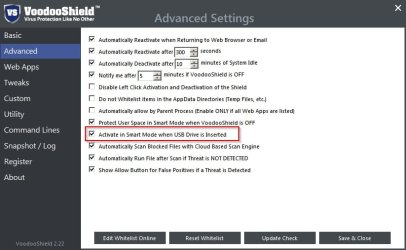
Personally I'm also using other methods including VoodoShield Pro:

VoodooShield Settings.jpg

Also make sure that your AV is up to date and has an on access file scanner enabled.
 

My Computer My Computer

Computer type
Laptop
Computer Manufacturer/Model Number
ASUS
OS
Microsoft Windows 7 Home Premium 64-bit 7601 Multiprocessor Free Service Pack 1
CPU
AMD C-60 APU with Radeon(tm) HD Graphics
Motherboard
ASUSTeK COMPUTER INC. X501U
Memory
4.00 GB
Graphics Card(s)
AMD Radeon HD 6290 Graphics
Sound Card
(1) AMD High Definition Audio Device (2) Realtek High Defi
Screen Resolution
1366 x 768 x 32 bits (4294967296 colors) @ 60 Hz
Hard Drives
Hitachi HTS545050A7E380 SATA Disk Device
Antivirus
Comodo CIS & FW, SecureAplus App Whitelisting, Threatfire
Browser
Cyberfox 64bit, Opera 64bit, Airfox
Other Info
Spy-The-Spy, HitmanPro.Alert, Norton Connect Safe, MJRegWatcher, BitDefender TrafficLight, Voodoo Shield, Zemana AntiMalware
Thanks, can this access and scan the firmware on USBs?
 

My Computer My Computer

Computer Manufacturer/Model Number
SONY VAIO PCG-81312M
OS
Windows 7 Home Premium 64
CPU
Intel Core i7-2630QM
Memory
4GB
Graphics Card(s)
NVidia GeForce with Cuda
Hard Drives
Hitachi 500GB
Scan USB Firmware

Thanks, can this access and scan the firmware on USBs?

No it can't do that. It will block anything untrusted that tries to run and prompt the user for action.
 

My Computer My Computer

Computer type
Laptop
Computer Manufacturer/Model Number
ASUS
OS
Microsoft Windows 7 Home Premium 64-bit 7601 Multiprocessor Free Service Pack 1
CPU
AMD C-60 APU with Radeon(tm) HD Graphics
Motherboard
ASUSTeK COMPUTER INC. X501U
Memory
4.00 GB
Graphics Card(s)
AMD Radeon HD 6290 Graphics
Sound Card
(1) AMD High Definition Audio Device (2) Realtek High Defi
Screen Resolution
1366 x 768 x 32 bits (4294967296 colors) @ 60 Hz
Hard Drives
Hitachi HTS545050A7E380 SATA Disk Device
Antivirus
Comodo CIS & FW, SecureAplus App Whitelisting, Threatfire
Browser
Cyberfox 64bit, Opera 64bit, Airfox
Other Info
Spy-The-Spy, HitmanPro.Alert, Norton Connect Safe, MJRegWatcher, BitDefender TrafficLight, Voodoo Shield, Zemana AntiMalware
I'll look into this thanks. If I disable autorun then does that mean USB peripherals wont work though? Can I still use flash drives without installing the drivers? I also sometimes charge my iPod up, but my iTunes is on my old Mac, it still installs drivers for some reason. If my computer is infected at the firmware level of some of the hardware inside, is there nothing I can do to fix it then?
 

My Computer My Computer

Computer Manufacturer/Model Number
SONY VAIO PCG-81312M
OS
Windows 7 Home Premium 64
CPU
Intel Core i7-2630QM
Memory
4GB
Graphics Card(s)
NVidia GeForce with Cuda
Hard Drives
Hitachi 500GB
What exactly do you mean by a bad usb device.

If a flash stick is checked for infections, wiped and formatted then it's about as safe as you or I can make it. Now all you have to do is worry about what someone installs on the flash drive.

Their is always a chance that hardware could come with infections if it has some sort of memory ability.
Some hardware comes with a installation disc that could be infected. Their are all kinds of methods the crooks know about.

Brand names really don't mean a lot in many cases because the Chinese counterfeit just about everything.

I don't use auto run anything. If you do the bad things can install on your computer before your can run any security programs.
 

My Computer My Computer

Computer type
PC/Desktop
Computer Manufacturer/Model Number
Home made Desktop
OS
Windows 10 Pro. 64/ version 1709 Windows 7 Pro/64
CPU
Intel i7-6800K @ 4.3
Motherboard
ASUS X-99 Deluxe II
Memory
Corsair Platinum 16 gig @2400
Graphics Card(s)
EVGA GTX 1070 OC
Monitor(s) Displays
Asus 27" LED LCD/VE278Q
Screen Resolution
1920-1080 or 1280-720 HDMI
Hard Drives
INTEL SSD 730-240 Gb Sata 3.0/
PSU
EVGA Platium 1200W
Case
Phanteks Luxe Tempered Glass 8 fans/ one radiator
Cooling
XSPC/ Water Cooled CPU
Keyboard
Das 4 Professional
Mouse
Logitech M705/MX Anywhere 2-S
Internet Speed
100 mbits
Antivirus
Microsoft Security Essentials/ Malwarebytes Premium 3.0/ SAS
Browser
I.E. 11 default/Firefox/ ISP Time Warner Cable/Spectrum
Other Info
LG BluRay Burner/
Sound system-KLipsch-THX/
Icy Dock ssd Hot Swap bays.
Well if I'd known this before... I'll be more careful in future I guess.
 

My Computer My Computer

Computer Manufacturer/Model Number
SONY VAIO PCG-81312M
OS
Windows 7 Home Premium 64
CPU
Intel Core i7-2630QM
Memory
4GB
Graphics Card(s)
NVidia GeForce with Cuda
Hard Drives
Hitachi 500GB
Being careful is good.
Keep watching the forum Security thread and you will get a good idea what the bad guys are up to.
It's a never ending battle between the good guys and the bad guys.
Never under estimate the bad guys.
 

My Computer My Computer

Computer type
PC/Desktop
Computer Manufacturer/Model Number
Home made Desktop
OS
Windows 10 Pro. 64/ version 1709 Windows 7 Pro/64
CPU
Intel i7-6800K @ 4.3
Motherboard
ASUS X-99 Deluxe II
Memory
Corsair Platinum 16 gig @2400
Graphics Card(s)
EVGA GTX 1070 OC
Monitor(s) Displays
Asus 27" LED LCD/VE278Q
Screen Resolution
1920-1080 or 1280-720 HDMI
Hard Drives
INTEL SSD 730-240 Gb Sata 3.0/
PSU
EVGA Platium 1200W
Case
Phanteks Luxe Tempered Glass 8 fans/ one radiator
Cooling
XSPC/ Water Cooled CPU
Keyboard
Das 4 Professional
Mouse
Logitech M705/MX Anywhere 2-S
Internet Speed
100 mbits
Antivirus
Microsoft Security Essentials/ Malwarebytes Premium 3.0/ SAS
Browser
I.E. 11 default/Firefox/ ISP Time Warner Cable/Spectrum
Other Info
LG BluRay Burner/
Sound system-KLipsch-THX/
Icy Dock ssd Hot Swap bays.
Disable Autorun

I'll look into this thanks. If I disable autorun then does that mean USB peripherals wont work though? Can I still use flash drives without installing the drivers? I also sometimes charge my iPod up, but my iTunes is on my old Mac, it still installs drivers for some reason. If my computer is infected at the firmware level of some of the hardware inside, is there nothing I can do to fix it then?

Well disabling Autorun just prevents files loaded on the USB from running automatically when it's plugged in. It doesn't prevent driver installation. I had a similar problem with my webcam driver being installed on every boot but I can't remember how I solved the issue!

As for firmware infections there are some interesting articles here:

http://www.sevenforums.com/security-news/352834-detekt-detects-spyware-post2944300.html#post2944300

I guess what you really need to know and monitor is:

"what's connecting and where is it connecting to"
 

My Computer My Computer

Computer type
Laptop
Computer Manufacturer/Model Number
ASUS
OS
Microsoft Windows 7 Home Premium 64-bit 7601 Multiprocessor Free Service Pack 1
CPU
AMD C-60 APU with Radeon(tm) HD Graphics
Motherboard
ASUSTeK COMPUTER INC. X501U
Memory
4.00 GB
Graphics Card(s)
AMD Radeon HD 6290 Graphics
Sound Card
(1) AMD High Definition Audio Device (2) Realtek High Defi
Screen Resolution
1366 x 768 x 32 bits (4294967296 colors) @ 60 Hz
Hard Drives
Hitachi HTS545050A7E380 SATA Disk Device
Antivirus
Comodo CIS & FW, SecureAplus App Whitelisting, Threatfire
Browser
Cyberfox 64bit, Opera 64bit, Airfox
Other Info
Spy-The-Spy, HitmanPro.Alert, Norton Connect Safe, MJRegWatcher, BitDefender TrafficLight, Voodoo Shield, Zemana AntiMalware
I've always thought USBs presented a security risk like this, but just assumed it wasn't much of a threat since no-one ever talked about it. I don't understand how this has been overlooked for so long, or has it been considered a risk for sometime... I dunno. Like I say I just heard about it.
 

My Computer My Computer

Computer Manufacturer/Model Number
SONY VAIO PCG-81312M
OS
Windows 7 Home Premium 64
CPU
Intel Core i7-2630QM
Memory
4GB
Graphics Card(s)
NVidia GeForce with Cuda
Hard Drives
Hitachi 500GB
USB - risks

Well personally I have a stack of USB's that were purchased ages ago and those are the one I use. I only ever use them for booting various linux distros, installing windows or on rare occasions moving files from one machine to another. I admit that I don't fully understand the problem but from what I've read the main risk with the firmware is allowing the USB to remain plugged in on boot.
 

My Computer My Computer

Computer type
Laptop
Computer Manufacturer/Model Number
ASUS
OS
Microsoft Windows 7 Home Premium 64-bit 7601 Multiprocessor Free Service Pack 1
CPU
AMD C-60 APU with Radeon(tm) HD Graphics
Motherboard
ASUSTeK COMPUTER INC. X501U
Memory
4.00 GB
Graphics Card(s)
AMD Radeon HD 6290 Graphics
Sound Card
(1) AMD High Definition Audio Device (2) Realtek High Defi
Screen Resolution
1366 x 768 x 32 bits (4294967296 colors) @ 60 Hz
Hard Drives
Hitachi HTS545050A7E380 SATA Disk Device
Antivirus
Comodo CIS & FW, SecureAplus App Whitelisting, Threatfire
Browser
Cyberfox 64bit, Opera 64bit, Airfox
Other Info
Spy-The-Spy, HitmanPro.Alert, Norton Connect Safe, MJRegWatcher, BitDefender TrafficLight, Voodoo Shield, Zemana AntiMalware
Back
Top