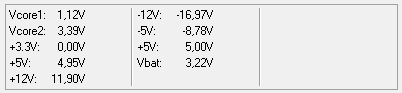
Any HW voltage experts here?

nate42nd

Learning every day
Guru
Gold Member
VIP
Local time
3:40 PM
Messages
2,036
Location
The Wild West
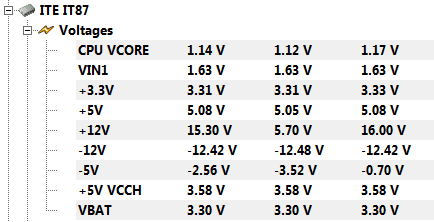
I have noticed some readings on HWMonitor for my newest build. Maybe I haven't noticed it before but are these readings correct? The BIOS shows the 12 and 5 volt readings fine so I assume this is normal or a software "thing" do you know if this looks okay?
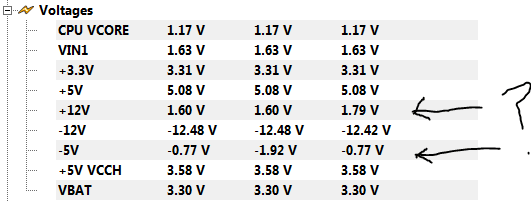
voltages.PNG
 

My Computer

Computer Manufacturer/Model Number
Keeps changing - (Custom)
OS
Windows 7 Professional x64
CPU
Intel Core i7 860
Motherboard
Gigabyte GA-P55-UD4P
Memory
4GB DDR3 Mushkin 1600Mhz @ 7-8-7-20
Graphics Card(s)
MSI GTS250 1GB DDR3 Twin Frozr
Sound Card
Onboard realtek
Monitor(s) Displays
Samsung SyncMaster 24" P2450 + Samsung 20" 2033
Screen Resolution
1920 X 1080 and 1600 X 900 (#2 system 1440 X 900)
Hard Drives
Patriot Inferno 120GB SSD + 3 WD Blue 640GB drives
PSU
Corsair 750 HX Modular
Case
Lancool PC-K62
Cooling
Cooler Master TX3 CPU cooler and 4-140mm and 1-120mm case
Keyboard
Gigabyte USB keyboard
Mouse
Microsoft wireless laser mouse 5000
Internet Speed
7 Mb down 1.5 up
Other Info
System #2: AMD Phenom II X6 1055T (Freezer 7 Pro cooler) - Gigabyte 880GMA-UD2H - WD 500GB Black - 9500GT (1GB) 500W OCZ modular PSU - Antec 200 case. System #3 (LapTop) Core 2 Duo T6670 - 320GB 7200RPM HD - 4GB DDR3 RAM.
First let me say that software is one of the worst ways to read things like voltages, the only accurate way is to use a voltmeter. Different programs can report different readings. That said it can be any of the following,

bios
sensor chip
the program itself

Are all those readings reported in the bios? If so do they look OK? If so then it can still be a bios/sensor chip reporting issue (which you can't do anything about, unless the board manufacturer has a bios update that fixes it), or the program doesn't have the necessary bits in it to read the specific sensor chip on the motherboard.

P.S. If it helps any HWMonitor doesn't even read the 12V on mine at all. Neither does Asus' own Asus Probe (and both will report the 3.3V reading at around ~1.15V). The only program I have used that reads mine properly is Everest
 

My Computer

Computer type
PC/Desktop
Computer Manufacturer/Model Number
Me
OS
Win 7 Ultimate x64
CPU
FX-8350 @ 4.6 GHz so far
Motherboard
Asus M5A97 EVO
Memory
ADATA XPG V1 Series Black 8GB DDR3 1600
Graphics Card(s)
Sapphire R9 270x Dual-X
Sound Card
Xonar DGX w/ Corsair Vengence 1300
Monitor(s) Displays
Acer S232HL Abid
Screen Resolution
1920x1080
Hard Drives
120 GB OCZ Vertex 3
500 GB Seagate 7200.12
PSU
Antec Earthwatts 650W Green
Case
Antec Three Hundred
Cooling
Cooler Master 212 EVO
Keyboard
Logitech G510
Mouse
Logitech G500s
Internet Speed
35000/3000
As I said in the 1st post, the BIOS shows the 12 and 5V fine.

I can't even find the voltage "section" in Everest.

I'm sure everything is fine. It's a new P55 motherboard. Maybe it's a new sensor chip and the software has not caught up yet.

For all I know these are correct. I am not an electronics wizard. I don't even know why there is a "-12" and "-5 and have no idea what the "+5 VCCH" is. The BIOS only shows the 12V and 5V. They are fine according to the BIOS.
 

My Computer

Computer Manufacturer/Model Number
Keeps changing - (Custom)
OS
Windows 7 Professional x64
CPU
Intel Core i7 860
Motherboard
Gigabyte GA-P55-UD4P
Memory
4GB DDR3 Mushkin 1600Mhz @ 7-8-7-20
Graphics Card(s)
MSI GTS250 1GB DDR3 Twin Frozr
Sound Card
Onboard realtek
Monitor(s) Displays
Samsung SyncMaster 24" P2450 + Samsung 20" 2033
Screen Resolution
1920 X 1080 and 1600 X 900 (#2 system 1440 X 900)
Hard Drives
Patriot Inferno 120GB SSD + 3 WD Blue 640GB drives
PSU
Corsair 750 HX Modular
Case
Lancool PC-K62
Cooling
Cooler Master TX3 CPU cooler and 4-140mm and 1-120mm case
Keyboard
Gigabyte USB keyboard
Mouse
Microsoft wireless laser mouse 5000
Internet Speed
7 Mb down 1.5 up
Other Info
System #2: AMD Phenom II X6 1055T (Freezer 7 Pro cooler) - Gigabyte 880GMA-UD2H - WD 500GB Black - 9500GT (1GB) 500W OCZ modular PSU - Antec 200 case. System #3 (LapTop) Core 2 Duo T6670 - 320GB 7200RPM HD - 4GB DDR3 RAM.
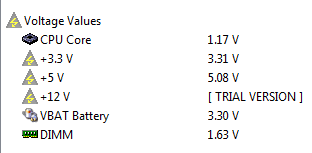
I can't even find the voltage "section" in Everest.

It's under Computer - Sensor.

Also with Everest if you haven't found it yet, it has full Sidebar support in & and Vista (look in File-Preferences) depending on whether your version is recent enough (anything from 4.xx and up I believe). If you have an older version you can give the latest beta versions a test from here,

Lavalys - Comprehensive IT Security and Management
 

My Computer

Computer type
PC/Desktop
Computer Manufacturer/Model Number
Me
OS
Win 7 Ultimate x64
CPU
FX-8350 @ 4.6 GHz so far
Motherboard
Asus M5A97 EVO
Memory
ADATA XPG V1 Series Black 8GB DDR3 1600
Graphics Card(s)
Sapphire R9 270x Dual-X
Sound Card
Xonar DGX w/ Corsair Vengence 1300
Monitor(s) Displays
Acer S232HL Abid
Screen Resolution
1920x1080
Hard Drives
120 GB OCZ Vertex 3
500 GB Seagate 7200.12
PSU
Antec Earthwatts 650W Green
Case
Antec Three Hundred
Cooling
Cooler Master 212 EVO
Keyboard
Logitech G510
Mouse
Logitech G500s
Internet Speed
35000/3000
I though there might more comprehensive values like HW Monitor but I found them. They look fine but I have a "trial version" of Everest but it's a 5.xxx beta. I really like SIW better. I was wondering if maybe someone could look at their HW Monitor values and see if mine are about the same. I think i will get a voltage meter.

everestvolt.PNG
 

My Computer

Computer Manufacturer/Model Number
Keeps changing - (Custom)
OS
Windows 7 Professional x64
CPU
Intel Core i7 860
Motherboard
Gigabyte GA-P55-UD4P
Memory
4GB DDR3 Mushkin 1600Mhz @ 7-8-7-20
Graphics Card(s)
MSI GTS250 1GB DDR3 Twin Frozr
Sound Card
Onboard realtek
Monitor(s) Displays
Samsung SyncMaster 24" P2450 + Samsung 20" 2033
Screen Resolution
1920 X 1080 and 1600 X 900 (#2 system 1440 X 900)
Hard Drives
Patriot Inferno 120GB SSD + 3 WD Blue 640GB drives
PSU
Corsair 750 HX Modular
Case
Lancool PC-K62
Cooling
Cooler Master TX3 CPU cooler and 4-140mm and 1-120mm case
Keyboard
Gigabyte USB keyboard
Mouse
Microsoft wireless laser mouse 5000
Internet Speed
7 Mb down 1.5 up
Other Info
System #2: AMD Phenom II X6 1055T (Freezer 7 Pro cooler) - Gigabyte 880GMA-UD2H - WD 500GB Black - 9500GT (1GB) 500W OCZ modular PSU - Antec 200 case. System #3 (LapTop) Core 2 Duo T6670 - 320GB 7200RPM HD - 4GB DDR3 RAM.
I though there might more comprehensive values like HW Monitor but I found them. They look fine but I have a "trial version" of Everest but it's a 5.xxx beta. I really like SIW better. I was wondering if maybe someone could look at their HW Monitor values and see if mine are about the same. I think i will get a voltage meter.
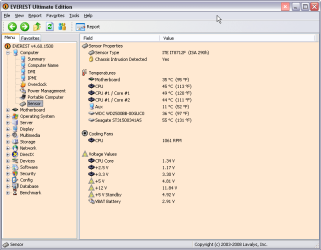
Everest Ultimate 406, under XP Pro, Gateway:

(I don't have SATA)

What does your SIW show for voltages ?
 

Attachments

  • EV_volts.png
    EV_volts.png
    22.2 KB · Views: 61

My Computer

Computer Manufacturer/Model Number
Gateway GT5056
OS
XP_Pro, W7_7201, W7RC.vhd, SciLinux5.3, Fedora12, Fedora9_2x, OpenSolaris_09-06
CPU
AMD 64x2
Motherboard
Yes
Memory
1 gig
Graphics Card(s)
Dunno
Sound Card
Realtek something
Monitor(s) Displays
Samsung SyncMaster 940MW w/TV
Screen Resolution
1280x1024
Hard Drives
250 GB WD, USB Seagate Freedesk 1.5 T
Internet Speed
Cable modem
Other Info
1 + 1 = 10b,
7 + 7 = 16o,
a + b = 15h.
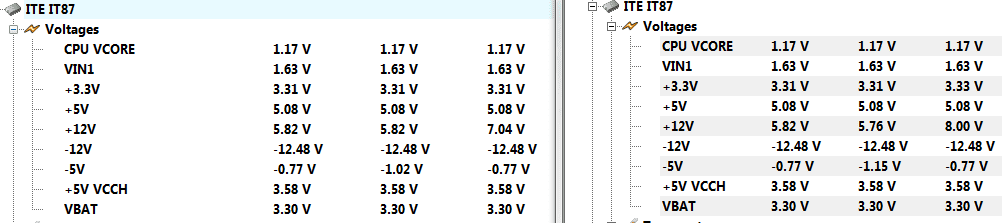
SIW and HWMonitor must grab the use the same sensor and give all information. Everest looks like it uses a different sensor or reads it different. Here is SIW and HWMonitor side by side.
siwvolt.PNG

I think the sensor on this new motherboard may be faulty. I have never seen the +12 like this before. I may need a multi-meter.
 

My Computer

Computer Manufacturer/Model Number
Keeps changing - (Custom)
OS
Windows 7 Professional x64
CPU
Intel Core i7 860
Motherboard
Gigabyte GA-P55-UD4P
Memory
4GB DDR3 Mushkin 1600Mhz @ 7-8-7-20
Graphics Card(s)
MSI GTS250 1GB DDR3 Twin Frozr
Sound Card
Onboard realtek
Monitor(s) Displays
Samsung SyncMaster 24" P2450 + Samsung 20" 2033
Screen Resolution
1920 X 1080 and 1600 X 900 (#2 system 1440 X 900)
Hard Drives
Patriot Inferno 120GB SSD + 3 WD Blue 640GB drives
PSU
Corsair 750 HX Modular
Case
Lancool PC-K62
Cooling
Cooler Master TX3 CPU cooler and 4-140mm and 1-120mm case
Keyboard
Gigabyte USB keyboard
Mouse
Microsoft wireless laser mouse 5000
Internet Speed
7 Mb down 1.5 up
Other Info
System #2: AMD Phenom II X6 1055T (Freezer 7 Pro cooler) - Gigabyte 880GMA-UD2H - WD 500GB Black - 9500GT (1GB) 500W OCZ modular PSU - Antec 200 case. System #3 (LapTop) Core 2 Duo T6670 - 320GB 7200RPM HD - 4GB DDR3 RAM.
The voltages come up (except the -5) during load. I don't now if this matters.

Load
loadtemp.PNG

Not under load
voltages.PNG
 

My Computer

Computer Manufacturer/Model Number
Keeps changing - (Custom)
OS
Windows 7 Professional x64
CPU
Intel Core i7 860
Motherboard
Gigabyte GA-P55-UD4P
Memory
4GB DDR3 Mushkin 1600Mhz @ 7-8-7-20
Graphics Card(s)
MSI GTS250 1GB DDR3 Twin Frozr
Sound Card
Onboard realtek
Monitor(s) Displays
Samsung SyncMaster 24" P2450 + Samsung 20" 2033
Screen Resolution
1920 X 1080 and 1600 X 900 (#2 system 1440 X 900)
Hard Drives
Patriot Inferno 120GB SSD + 3 WD Blue 640GB drives
PSU
Corsair 750 HX Modular
Case
Lancool PC-K62
Cooling
Cooler Master TX3 CPU cooler and 4-140mm and 1-120mm case
Keyboard
Gigabyte USB keyboard
Mouse
Microsoft wireless laser mouse 5000
Internet Speed
7 Mb down 1.5 up
Other Info
System #2: AMD Phenom II X6 1055T (Freezer 7 Pro cooler) - Gigabyte 880GMA-UD2H - WD 500GB Black - 9500GT (1GB) 500W OCZ modular PSU - Antec 200 case. System #3 (LapTop) Core 2 Duo T6670 - 320GB 7200RPM HD - 4GB DDR3 RAM.
Don't trust any software when you try to get information about current voltage.
I have top model of the strong Tagan PSU and for example for years SpeedFan shows me this voltages (in attach)

Fortunatelly I have multimeter and I can by self manually check this, and you know what? Voltages are always stable and OK in my case.

My advice - buy simple multimeter or voltage-meter and check voltage by self, I'm sure it will be OK (you have good PSU model)
yellow_multimeter.gif
 

Attachments

  • voltage.png
    voltage.png
    828 bytes · Views: 4

My Computer

Computer type
PC/Desktop
Computer Manufacturer/Model Number
Self Built
OS
Windows 7 Home Premium x32 SP1
CPU
x2 2.6 GHz
Motherboard
Asus
Memory
A-Data 2GB DDR2-800
Graphics Card(s)
ATI X1250
Sound Card
SB 5.1 Live!
Hard Drives
WD and Seagate FAP
PSU
Tagan TG-480-U01
Keyboard
BTC 6300
Mouse
Logitech VX Nano
Antivirus
None
Don't trust any software when you try to get information about current voltage.
I have top model of the strong Tagan PSU and for example for years SpeedFan shows me this voltages (in attach)

Fortunatelly I have multimeter and I can by self manually check this, and you know what? Voltages are always stable and OK in my case.

My advice - buy simple multimeter or voltage-meter and check voltage by self, I'm sure it will be OK (you have good PSU model)
Yep,

First let me say that software is one of the worst ways to read things like voltages, the only accurate way is to use a voltmeter.

Also nate42ndif any of those 12V readings that are showing in all those screen shots of yours were accurate, your computer either wouldn't boot (too low) or something would be fried (16V peak, I don't think so).
 

My Computer

Computer type
PC/Desktop
Computer Manufacturer/Model Number
Me
OS
Win 7 Ultimate x64
CPU
FX-8350 @ 4.6 GHz so far
Motherboard
Asus M5A97 EVO
Memory
ADATA XPG V1 Series Black 8GB DDR3 1600
Graphics Card(s)
Sapphire R9 270x Dual-X
Sound Card
Xonar DGX w/ Corsair Vengence 1300
Monitor(s) Displays
Acer S232HL Abid
Screen Resolution
1920x1080
Hard Drives
120 GB OCZ Vertex 3
500 GB Seagate 7200.12
PSU
Antec Earthwatts 650W Green
Case
Antec Three Hundred
Cooling
Cooler Master 212 EVO
Keyboard
Logitech G510
Mouse
Logitech G500s
Internet Speed
35000/3000
I have come to believe the ITE sensor chip is bad on my new motherboard. The BIOS shows good voltage and it works fine. Now I have to decide whether or not to send it back because of this. I hate to send it back but I would like the board to function right.

Would this be a reason to take your computer apart and send the board back? I don't know. It overclocks and runs fine......
 

My Computer

Computer Manufacturer/Model Number
Keeps changing - (Custom)
OS
Windows 7 Professional x64
CPU
Intel Core i7 860
Motherboard
Gigabyte GA-P55-UD4P
Memory
4GB DDR3 Mushkin 1600Mhz @ 7-8-7-20
Graphics Card(s)
MSI GTS250 1GB DDR3 Twin Frozr
Sound Card
Onboard realtek
Monitor(s) Displays
Samsung SyncMaster 24" P2450 + Samsung 20" 2033
Screen Resolution
1920 X 1080 and 1600 X 900 (#2 system 1440 X 900)
Hard Drives
Patriot Inferno 120GB SSD + 3 WD Blue 640GB drives
PSU
Corsair 750 HX Modular
Case
Lancool PC-K62
Cooling
Cooler Master TX3 CPU cooler and 4-140mm and 1-120mm case
Keyboard
Gigabyte USB keyboard
Mouse
Microsoft wireless laser mouse 5000
Internet Speed
7 Mb down 1.5 up
Other Info
System #2: AMD Phenom II X6 1055T (Freezer 7 Pro cooler) - Gigabyte 880GMA-UD2H - WD 500GB Black - 9500GT (1GB) 500W OCZ modular PSU - Antec 200 case. System #3 (LapTop) Core 2 Duo T6670 - 320GB 7200RPM HD - 4GB DDR3 RAM.
I have come to believe the ITE sensor chip is bad on my new motherboard. The BIOS shows good voltage and it works fine. Now I have to decide whether or not to send it back because of this. I hate to send it back but I would like the board to function right.

Would this be a reason to take your computer apart and send the board back? I don't know. It overclocks and runs fine......

It's up to you, anyways... why it is so important to you? I mean every single Hi-end PSU has built-in all voltage control management system, if smth is not correct with voltage then PSU stop working. You don't have to control it by self all the time.
 

My Computer

Computer type
PC/Desktop
Computer Manufacturer/Model Number
Self Built
OS
Windows 7 Home Premium x32 SP1
CPU
x2 2.6 GHz
Motherboard
Asus
Memory
A-Data 2GB DDR2-800
Graphics Card(s)
ATI X1250
Sound Card
SB 5.1 Live!
Hard Drives
WD and Seagate FAP
PSU
Tagan TG-480-U01
Keyboard
BTC 6300
Mouse
Logitech VX Nano
Antivirus
None
I have come to believe the ITE sensor chip is bad on my new motherboard. The BIOS shows good voltage and it works fine. Now I have to decide whether or not to send it back because of this. I hate to send it back but I would like the board to function right.

Would this be a reason to take your computer apart and send the board back? I don't know. It overclocks and runs fine......

It's up to you, anyways... why it is so important to you? I mean every single Hi-end PSU has built-in all voltage control management system, if smth is not correct with voltage then PSU stop working. You don't have to control it by self all the time.

I just like perfection. I will probably just deal with it. I hope no other problems will come up.
 

My Computer

Computer Manufacturer/Model Number
Keeps changing - (Custom)
OS
Windows 7 Professional x64
CPU
Intel Core i7 860
Motherboard
Gigabyte GA-P55-UD4P
Memory
4GB DDR3 Mushkin 1600Mhz @ 7-8-7-20
Graphics Card(s)
MSI GTS250 1GB DDR3 Twin Frozr
Sound Card
Onboard realtek
Monitor(s) Displays
Samsung SyncMaster 24" P2450 + Samsung 20" 2033
Screen Resolution
1920 X 1080 and 1600 X 900 (#2 system 1440 X 900)
Hard Drives
Patriot Inferno 120GB SSD + 3 WD Blue 640GB drives
PSU
Corsair 750 HX Modular
Case
Lancool PC-K62
Cooling
Cooler Master TX3 CPU cooler and 4-140mm and 1-120mm case
Keyboard
Gigabyte USB keyboard
Mouse
Microsoft wireless laser mouse 5000
Internet Speed
7 Mb down 1.5 up
Other Info
System #2: AMD Phenom II X6 1055T (Freezer 7 Pro cooler) - Gigabyte 880GMA-UD2H - WD 500GB Black - 9500GT (1GB) 500W OCZ modular PSU - Antec 200 case. System #3 (LapTop) Core 2 Duo T6670 - 320GB 7200RPM HD - 4GB DDR3 RAM.
I have come to believe the ITE sensor chip is bad on my new motherboard. The BIOS shows good voltage and it works fine. Now I have to decide whether or not to send it back because of this. I hate to send it back but I would like the board to function right.

Would this be a reason to take your computer apart and send the board back? I don't know. It overclocks and runs fine......

It's up to you, anyways... why it is so important to you? I mean every single Hi-end PSU has built-in all voltage control management system, if smth is not correct with voltage then PSU stop working. You don't have to control it by self all the time.

I just like perfection. I will probably just deal with it. I hope no other problems will come up.
As I said before, test it by self. No one here can tell you that everything is 100% OK we can guess it is not the same. Keep in your mind that even hi-end products can be not perfect because eg. one item from x thousand is damaged. So if you have still warranty on that, better will be test your PSU by multimeter - 1 minute and you will know if everything is OK or not.
 

My Computer

Computer type
PC/Desktop
Computer Manufacturer/Model Number
Self Built
OS
Windows 7 Home Premium x32 SP1
CPU
x2 2.6 GHz
Motherboard
Asus
Memory
A-Data 2GB DDR2-800
Graphics Card(s)
ATI X1250
Sound Card
SB 5.1 Live!
Hard Drives
WD and Seagate FAP
PSU
Tagan TG-480-U01
Keyboard
BTC 6300
Mouse
Logitech VX Nano
Antivirus
None
It's up to you, anyways... why it is so important to you? I mean every single Hi-end PSU has built-in all voltage control management system, if smth is not correct with voltage then PSU stop working. You don't have to control it by self all the time.

I just like perfection. I will probably just deal with it. I hope no other problems will come up.
As I said before, test it by self. No one here can tell you that everything is 100% OK we can guess it is not the same. Keep in your mind that even hi-end products can be not perfect because eg. one item from x thousand is damaged. So if you have still warranty on that, better will be test your PSU by multimeter - 1 minute and you will know if everything is OK or not.

FYI - I took the motherboard out, put my EP45-UD3P into the system and replaced (of course) the CPU, and memory with the correct ones. The PSU is fine and the voltages are showing fine on the P45 board. The ITE chip or something else was bad on the P55 board. I sent it back for a replacement. I will be happy with a new one. That way I will not have to guess the voltages or go to the BIOS if I need to know them.

Thanks for all the suggestions. I will wait a week for my new board. I have a nice P45 board here with a Q8200 and 8GB of RAM. I'll be fine. haha
 

My Computer

Computer Manufacturer/Model Number
Keeps changing - (Custom)
OS
Windows 7 Professional x64
CPU
Intel Core i7 860
Motherboard
Gigabyte GA-P55-UD4P
Memory
4GB DDR3 Mushkin 1600Mhz @ 7-8-7-20
Graphics Card(s)
MSI GTS250 1GB DDR3 Twin Frozr
Sound Card
Onboard realtek
Monitor(s) Displays
Samsung SyncMaster 24" P2450 + Samsung 20" 2033
Screen Resolution
1920 X 1080 and 1600 X 900 (#2 system 1440 X 900)
Hard Drives
Patriot Inferno 120GB SSD + 3 WD Blue 640GB drives
PSU
Corsair 750 HX Modular
Case
Lancool PC-K62
Cooling
Cooler Master TX3 CPU cooler and 4-140mm and 1-120mm case
Keyboard
Gigabyte USB keyboard
Mouse
Microsoft wireless laser mouse 5000
Internet Speed
7 Mb down 1.5 up
Other Info
System #2: AMD Phenom II X6 1055T (Freezer 7 Pro cooler) - Gigabyte 880GMA-UD2H - WD 500GB Black - 9500GT (1GB) 500W OCZ modular PSU - Antec 200 case. System #3 (LapTop) Core 2 Duo T6670 - 320GB 7200RPM HD - 4GB DDR3 RAM.
I thought I would give an update. If anyone is getting a P55 Gigabyte board, keep in mind you will get odd voltage readings from HWMonitor. I have done 3 now. 2 P55-UD4P and 1 P55-UD3R and none have worked correctly with HWMonitor. Here's an example next to Gigabyte's own monitor. My PSU is VERY high quality and the other 2 were just as good. It's almost like it's showing the +12 in the -12 row. On other boards it shows all kinds of odd stuff (-5 and -3) and it's unpredictable. I have seen all kinds of weird stuff.

sidebysidevolt.PNG
 

My Computer

Computer Manufacturer/Model Number
Keeps changing - (Custom)
OS
Windows 7 Professional x64
CPU
Intel Core i7 860
Motherboard
Gigabyte GA-P55-UD4P
Memory
4GB DDR3 Mushkin 1600Mhz @ 7-8-7-20
Graphics Card(s)
MSI GTS250 1GB DDR3 Twin Frozr
Sound Card
Onboard realtek
Monitor(s) Displays
Samsung SyncMaster 24" P2450 + Samsung 20" 2033
Screen Resolution
1920 X 1080 and 1600 X 900 (#2 system 1440 X 900)
Hard Drives
Patriot Inferno 120GB SSD + 3 WD Blue 640GB drives
PSU
Corsair 750 HX Modular
Case
Lancool PC-K62
Cooling
Cooler Master TX3 CPU cooler and 4-140mm and 1-120mm case
Keyboard
Gigabyte USB keyboard
Mouse
Microsoft wireless laser mouse 5000
Internet Speed
7 Mb down 1.5 up
Other Info
System #2: AMD Phenom II X6 1055T (Freezer 7 Pro cooler) - Gigabyte 880GMA-UD2H - WD 500GB Black - 9500GT (1GB) 500W OCZ modular PSU - Antec 200 case. System #3 (LapTop) Core 2 Duo T6670 - 320GB 7200RPM HD - 4GB DDR3 RAM.
Back
Top