My ASUS Optical Drive just vanished from Windows 7? Please help!

bal1985

New member
Member
Local time
1:18 PM
Messages
48
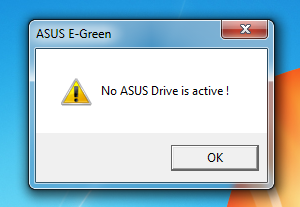
I was going to burn a DVD for a friend when I noticed my ASUS BW-12B1ST Optical Drive was no longer listed? It's always been there. Under "Driver & Tools" I see only "ASUS E-Green Utility Version 1.01.41" which I already have installed. When I open E-Green I get this error, "No ASUS Drive is Active!". I'm on Windows 7 64bit.

This is what I see in My Computer, only my SSD, HDD and Flash Drive. The BR Drive no longer shows?

I don't know when the drive vanished? I just installed ConvertXToDVD a minute ago, placed a DVD in to burn but ConvertXToDVD couldn't burn the video because there was no drive.

Please help as I just built this PC, my first. I have an SSD and a HDD, yesterday I woke up and everything on the HDD was wiped, nothing left. I don't know what the hell is going on but I'd really like to fix this BR Drive issue.

Maybe I erased something by mistake with CCleaner? Any help would be greatly appreciated, thanks!
 

My Computer My Computer

At a glance

Windows 7 x64Intel Core i5-4440 3.1GHz Quad-CoreG.Skill Ripjaws X Series 8GB (2 x 4GB) DDR3-1600HIS Radeon R9 270 2GB IceQ X²
Computer type
PC/Desktop
Computer Manufacturer/Model Number
Custom build
OS
Windows 7 x64
CPU
Intel Core i5-4440 3.1GHz Quad-Core
Motherboard
ASRock Z97 PRO4 ATX LGA1150
Memory
G.Skill Ripjaws X Series 8GB (2 x 4GB) DDR3-1600
Graphics Card(s)
HIS Radeon R9 270 2GB IceQ X²
Monitor(s) Displays
Asus VE247H 23.6"
Screen Resolution
1920x1080
Hard Drives
Crucial M500 240GB SSD, Western Digital Caviar Blue 1TB HDD & Western Digital My Book Essential 1TB External HDD
PSU
Rosewill 750W
Case
Corsair 200R ATX Mid Tower
Cooling
Cooler Master Hyper 212 EVO 82.9 CFM Sleeve Bearing
Keyboard
Logitech Wireless Illuminated Keyboard K800
Mouse
Logitech Anywhere Mouse MX
Internet Speed
Verizon FiOS 75/75 Mbps
Antivirus
MSE & Malwarebytes
Browser
Chrome 39.0.2171.95 m
Reboot and go into the system BIOS - make sure it's listed there. If not, recheck/reconnect power and data cables, and see if it shows up in the BIOS at that point.

If it shows up there but not in Windows, that's a different set of steps, but we need to know the BIOS can see the drive first (because if it's not visible there, you will want to try new cables for power and/or data that are known-good, or replace the drive with a known-working one to test).
 

My Computer My Computer

At a glance

Windows 10 Pro x64Intel Core i7 4790K @ 4.5GHz32GB DDR3Nvidia GeForce GTX970
Computer type
PC/Desktop
Computer Manufacturer/Model Number
Custom
OS
Windows 10 Pro x64
CPU
Intel Core i7 4790K @ 4.5GHz
Motherboard
Asus Maximus Hero VII
Memory
32GB DDR3
Graphics Card(s)
Nvidia GeForce GTX970
Sound Card
Realtek HD Audio
Screen Resolution
1920x1200
Hard Drives
1x Samsung 250GB SSD
4x WD RE 2TB (RAIDZ)
PSU
Corsair AX760i
Case
Fractal Design Define R4
Cooling
Noctua NH-D15
Reboot and go into the system BIOS - make sure it's listed there. If not, recheck/reconnect power and data cables, and see if it shows up in the BIOS at that point.

If it shows up there but not in Windows, that's a different set of steps, but we need to know the BIOS can see the drive first (because if it's not visible there, you will want to try new cables for power and/or data that are known-good, or replace the drive with a known-working one to test).

How do I get into BIOS? My buddy basically built it for me. I'm not to tech savy. I did open the PC up and it seems the cables are connected. The BR drive light flashes when I put a DVD in and it also opens and closes.

My ASRock Z97 PRO4 ATX LGA1150 motherboard has an application called ASRock A-Tuning. I clicked on the Live Update tab and it says there is an update for my BIOS, my current is 1.30 and the latest is 1.70.

4NYz6uJ.png

hbvCMAw.png
 

My Computer My Computer

At a glance

Windows 7 x64Intel Core i5-4440 3.1GHz Quad-CoreG.Skill Ripjaws X Series 8GB (2 x 4GB) DDR3-1600HIS Radeon R9 270 2GB IceQ X²
Computer type
PC/Desktop
Computer Manufacturer/Model Number
Custom build
OS
Windows 7 x64
CPU
Intel Core i5-4440 3.1GHz Quad-Core
Motherboard
ASRock Z97 PRO4 ATX LGA1150
Memory
G.Skill Ripjaws X Series 8GB (2 x 4GB) DDR3-1600
Graphics Card(s)
HIS Radeon R9 270 2GB IceQ X²
Monitor(s) Displays
Asus VE247H 23.6"
Screen Resolution
1920x1080
Hard Drives
Crucial M500 240GB SSD, Western Digital Caviar Blue 1TB HDD & Western Digital My Book Essential 1TB External HDD
PSU
Rosewill 750W
Case
Corsair 200R ATX Mid Tower
Cooling
Cooler Master Hyper 212 EVO 82.9 CFM Sleeve Bearing
Keyboard
Logitech Wireless Illuminated Keyboard K800
Mouse
Logitech Anywhere Mouse MX
Internet Speed
Verizon FiOS 75/75 Mbps
Antivirus
MSE & Malwarebytes
Browser
Chrome 39.0.2171.95 m
How do I get into BIOS? My buddy basically built it for me. I'm not to tech savy. I did open the PC up and it seems the cables are connected. The BR drive light flashes when I put a DVD in and it also opens and closes.
On an ASRock motherboard, it's usually by pressing DEL during the preboot POST that the BIOS does before it tries to boot Windows. Generally you'll also see text stating "Press <key> to enter setup", in which case press that key it mentions repeatedly until you do enter BIOS setup. Read the manual for how to get into the BIOS menus and what's in there if you don't know what you're doing just yet.

My ASRock Z97 PRO4 ATX LGA1150 motherboard has an application called ASRock A-Tuning. I clicked on the Live Update tab and it says there is an update for my BIOS, my current is 1.30 and the latest is 1.70.
BIOS updates are generally only recommended when you're having an issue that an update specifically fixes, although I usually don't like being more than 2 versions behind if I can avoid it. It might make sense to update the BIOS in this case if you're that behind in this case.

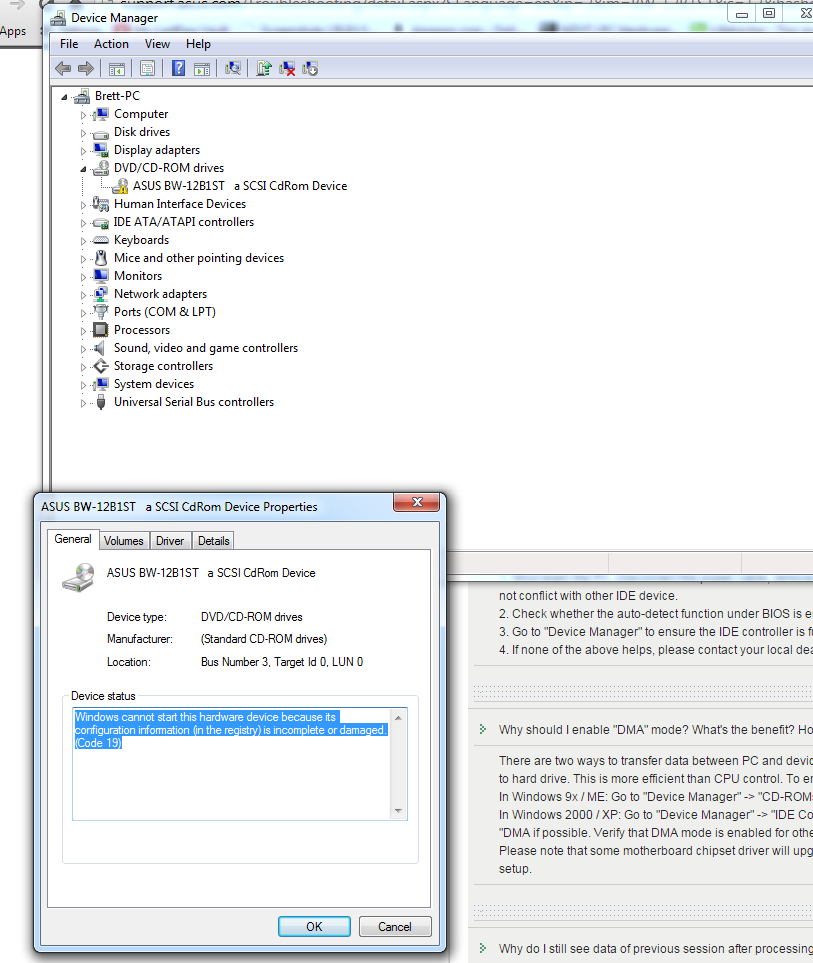
As to the picture, it looks like something has messed with the upper/lower filters of the drive in the registry - it might make sense to uninstall all of the ASRock utilities from the system, and then delete the drive itself from device manager. Reboot and see if it comes back.
 

My Computer My Computer

At a glance

Windows 10 Pro x64Intel Core i7 4790K @ 4.5GHz32GB DDR3Nvidia GeForce GTX970
Computer type
PC/Desktop
Computer Manufacturer/Model Number
Custom
OS
Windows 10 Pro x64
CPU
Intel Core i7 4790K @ 4.5GHz
Motherboard
Asus Maximus Hero VII
Memory
32GB DDR3
Graphics Card(s)
Nvidia GeForce GTX970
Sound Card
Realtek HD Audio
Screen Resolution
1920x1200
Hard Drives
1x Samsung 250GB SSD
4x WD RE 2TB (RAIDZ)
PSU
Corsair AX760i
Case
Fractal Design Define R4
Cooling
Noctua NH-D15
How do I get into BIOS? My buddy basically built it for me. I'm not to tech savy. I did open the PC up and it seems the cables are connected. The BR drive light flashes when I put a DVD in and it also opens and closes.
On an ASRock motherboard, it's usually by pressing DEL during the preboot POST that the BIOS does before it tries to boot Windows. Generally you'll also see text stating "Press <key> to enter setup", in which case press that key it mentions repeatedly until you do enter BIOS setup. Read the manual for how to get into the BIOS menus and what's in there if you don't know what you're doing just yet.

My ASRock Z97 PRO4 ATX LGA1150 motherboard has an application called ASRock A-Tuning. I clicked on the Live Update tab and it says there is an update for my BIOS, my current is 1.30 and the latest is 1.70.
BIOS updates are generally only recommended when you're having an issue that an update specifically fixes, although I usually don't like being more than 2 versions behind if I can avoid it. It might make sense to update the BIOS in this case if you're that behind in this case.

As to the picture, it looks like something has messed with the upper/lower filters of the drive in the registry - it might make sense to uninstall all of the ASRock utilities from the system, and then delete the drive itself from device manager. Reboot and see if it comes back.

Delete ASRock utl? Why? The issue is the ASUS BR drive.
 

My Computer My Computer

At a glance

Windows 7 x64Intel Core i5-4440 3.1GHz Quad-CoreG.Skill Ripjaws X Series 8GB (2 x 4GB) DDR3-1600HIS Radeon R9 270 2GB IceQ X²
Computer type
PC/Desktop
Computer Manufacturer/Model Number
Custom build
OS
Windows 7 x64
CPU
Intel Core i5-4440 3.1GHz Quad-Core
Motherboard
ASRock Z97 PRO4 ATX LGA1150
Memory
G.Skill Ripjaws X Series 8GB (2 x 4GB) DDR3-1600
Graphics Card(s)
HIS Radeon R9 270 2GB IceQ X²
Monitor(s) Displays
Asus VE247H 23.6"
Screen Resolution
1920x1080
Hard Drives
Crucial M500 240GB SSD, Western Digital Caviar Blue 1TB HDD & Western Digital My Book Essential 1TB External HDD
PSU
Rosewill 750W
Case
Corsair 200R ATX Mid Tower
Cooling
Cooler Master Hyper 212 EVO 82.9 CFM Sleeve Bearing
Keyboard
Logitech Wireless Illuminated Keyboard K800
Mouse
Logitech Anywhere Mouse MX
Internet Speed
Verizon FiOS 75/75 Mbps
Antivirus
MSE & Malwarebytes
Browser
Chrome 39.0.2171.95 m
No, the issue is something has messed with the registry filters for the CD/DVD optical drives. Unless you have something else installed that would be doing that (daemon tools, DVD software, etc), I can't think of anything else but to get to stock Windows without any add-on or cruft before troubleshooting further.
 

My Computer My Computer

At a glance

Windows 10 Pro x64Intel Core i7 4790K @ 4.5GHz32GB DDR3Nvidia GeForce GTX970
Computer type
PC/Desktop
Computer Manufacturer/Model Number
Custom
OS
Windows 10 Pro x64
CPU
Intel Core i7 4790K @ 4.5GHz
Motherboard
Asus Maximus Hero VII
Memory
32GB DDR3
Graphics Card(s)
Nvidia GeForce GTX970
Sound Card
Realtek HD Audio
Screen Resolution
1920x1200
Hard Drives
1x Samsung 250GB SSD
4x WD RE 2TB (RAIDZ)
PSU
Corsair AX760i
Case
Fractal Design Define R4
Cooling
Noctua NH-D15
No, the issue is something has messed with the registry filters for the CD/DVD optical drives. Unless you have something else installed that would be doing that (daemon tools, DVD software, etc), I can't think of anything else but to get to stock Windows without any add-on or cruft before troubleshooting further.

A guy on Reddit posted this link: The CD drive or the DVD drive does not work as expected on a computer that is running Windows Vista

He said my issue was pretty "common". I deleted the UpperFilters & UpperFilters in RegEdit like in Step 3-7. Anything I should do now or any idea why this happened? Was it something I installed? I mean I've had this newly built PC for about a month and this is the first time it happend. It just seems strange that once I installed Burning Software program, this happens.
 

My Computer My Computer

At a glance

Windows 7 x64Intel Core i5-4440 3.1GHz Quad-CoreG.Skill Ripjaws X Series 8GB (2 x 4GB) DDR3-1600HIS Radeon R9 270 2GB IceQ X²
Computer type
PC/Desktop
Computer Manufacturer/Model Number
Custom build
OS
Windows 7 x64
CPU
Intel Core i5-4440 3.1GHz Quad-Core
Motherboard
ASRock Z97 PRO4 ATX LGA1150
Memory
G.Skill Ripjaws X Series 8GB (2 x 4GB) DDR3-1600
Graphics Card(s)
HIS Radeon R9 270 2GB IceQ X²
Monitor(s) Displays
Asus VE247H 23.6"
Screen Resolution
1920x1080
Hard Drives
Crucial M500 240GB SSD, Western Digital Caviar Blue 1TB HDD & Western Digital My Book Essential 1TB External HDD
PSU
Rosewill 750W
Case
Corsair 200R ATX Mid Tower
Cooling
Cooler Master Hyper 212 EVO 82.9 CFM Sleeve Bearing
Keyboard
Logitech Wireless Illuminated Keyboard K800
Mouse
Logitech Anywhere Mouse MX
Internet Speed
Verizon FiOS 75/75 Mbps
Antivirus
MSE & Malwarebytes
Browser
Chrome 39.0.2171.95 m
My crystal ball is in the shop, but in general that error is due to registry corruption or filters in the registry pointing to nonexistant or malfunctioning software other than the drivers for the drive itself. However, I can't say with 100% certainty why it happened because that's impossible, but I can say why it usually happens, and yes, that's (registry filters) what I'm talking about.
 

My Computer My Computer

At a glance

Windows 10 Pro x64Intel Core i7 4790K @ 4.5GHz32GB DDR3Nvidia GeForce GTX970
Computer type
PC/Desktop
Computer Manufacturer/Model Number
Custom
OS
Windows 10 Pro x64
CPU
Intel Core i7 4790K @ 4.5GHz
Motherboard
Asus Maximus Hero VII
Memory
32GB DDR3
Graphics Card(s)
Nvidia GeForce GTX970
Sound Card
Realtek HD Audio
Screen Resolution
1920x1200
Hard Drives
1x Samsung 250GB SSD
4x WD RE 2TB (RAIDZ)
PSU
Corsair AX760i
Case
Fractal Design Define R4
Cooling
Noctua NH-D15
My crystal ball is in the shop, but in general that error is due to registry corruption or filters in the registry pointing to nonexistant or malfunctioning software other than the drivers for the drive itself. However, I can't say with 100% certainty why it happened because that's impossible, but I can say why it usually happens, and yes, that's (registry filters) what I'm talking about.


I don't know what reg corruption means? Can you explain to a novice user what your talking about please? Also, are there any steps I should take to make sure it doesn't happen again or is there a checklist I can go through?

Example, you told me to update my BIOS, should I still do that? Anything else I should do?

And about updating the BIOS, I've read that it could lead to worse things to updating it doesn't always turn out well, that a noob, like me could brick the mobo?

And I do appreciate your help on this matter, thank you.
 

My Computer My Computer

At a glance

Windows 7 x64Intel Core i5-4440 3.1GHz Quad-CoreG.Skill Ripjaws X Series 8GB (2 x 4GB) DDR3-1600HIS Radeon R9 270 2GB IceQ X²
Computer type
PC/Desktop
Computer Manufacturer/Model Number
Custom build
OS
Windows 7 x64
CPU
Intel Core i5-4440 3.1GHz Quad-Core
Motherboard
ASRock Z97 PRO4 ATX LGA1150
Memory
G.Skill Ripjaws X Series 8GB (2 x 4GB) DDR3-1600
Graphics Card(s)
HIS Radeon R9 270 2GB IceQ X²
Monitor(s) Displays
Asus VE247H 23.6"
Screen Resolution
1920x1080
Hard Drives
Crucial M500 240GB SSD, Western Digital Caviar Blue 1TB HDD & Western Digital My Book Essential 1TB External HDD
PSU
Rosewill 750W
Case
Corsair 200R ATX Mid Tower
Cooling
Cooler Master Hyper 212 EVO 82.9 CFM Sleeve Bearing
Keyboard
Logitech Wireless Illuminated Keyboard K800
Mouse
Logitech Anywhere Mouse MX
Internet Speed
Verizon FiOS 75/75 Mbps
Antivirus
MSE & Malwarebytes
Browser
Chrome 39.0.2171.95 m
Any time you're writing to (normally) Read-Only Memory, yes, there's a risk of bricking. This is usually caused by losing power nowadays, so you do take a tiny risk when updating a system without a backup ROM to make sure you don't lose power.
 

My Computer My Computer

At a glance

Windows 10 Pro x64Intel Core i7 4790K @ 4.5GHz32GB DDR3Nvidia GeForce GTX970
Computer type
PC/Desktop
Computer Manufacturer/Model Number
Custom
OS
Windows 10 Pro x64
CPU
Intel Core i7 4790K @ 4.5GHz
Motherboard
Asus Maximus Hero VII
Memory
32GB DDR3
Graphics Card(s)
Nvidia GeForce GTX970
Sound Card
Realtek HD Audio
Screen Resolution
1920x1200
Hard Drives
1x Samsung 250GB SSD
4x WD RE 2TB (RAIDZ)
PSU
Corsair AX760i
Case
Fractal Design Define R4
Cooling
Noctua NH-D15
Any time you're writing to (normally) Read-Only Memory, yes, there's a risk of bricking. This is usually caused by losing power nowadays, so you do take a tiny risk when updating a system without a backup ROM to make sure you don't lose power.

Your not answering my question, I understand there are risks. I'm however, asking you, the veteran here at these forums, if I should update the BIOS or stay put? Knowing what you know now from my previous posts in this thread, do you think the benefits outweigh the risks? Especially coming from a novice like me who has never dealt with updating a BIOS. You also said that you only usually the BIOS if the latest updates change log has one of your computers issues listed. Well, my ASRock motherboard website doesn't give very much detail on what the update fixes and if I would benefit from it.

Most importantly, was this Optical Drive "peek-a-boo" a random issue or could there be something else sitting and waiting to strike again, some error in the build of my PC?

I told you I followed the directions in that Windows Help link I posted previously, but I don't see how deleting two items in the registry simply fixes this and the drive just re-appears again? I doubt I fixed the issue for good, I'm guessing I just did a band-aid fix.
 

My Computer My Computer

At a glance

Windows 7 x64Intel Core i5-4440 3.1GHz Quad-CoreG.Skill Ripjaws X Series 8GB (2 x 4GB) DDR3-1600HIS Radeon R9 270 2GB IceQ X²
Computer type
PC/Desktop
Computer Manufacturer/Model Number
Custom build
OS
Windows 7 x64
CPU
Intel Core i5-4440 3.1GHz Quad-Core
Motherboard
ASRock Z97 PRO4 ATX LGA1150
Memory
G.Skill Ripjaws X Series 8GB (2 x 4GB) DDR3-1600
Graphics Card(s)
HIS Radeon R9 270 2GB IceQ X²
Monitor(s) Displays
Asus VE247H 23.6"
Screen Resolution
1920x1080
Hard Drives
Crucial M500 240GB SSD, Western Digital Caviar Blue 1TB HDD & Western Digital My Book Essential 1TB External HDD
PSU
Rosewill 750W
Case
Corsair 200R ATX Mid Tower
Cooling
Cooler Master Hyper 212 EVO 82.9 CFM Sleeve Bearing
Keyboard
Logitech Wireless Illuminated Keyboard K800
Mouse
Logitech Anywhere Mouse MX
Internet Speed
Verizon FiOS 75/75 Mbps
Antivirus
MSE & Malwarebytes
Browser
Chrome 39.0.2171.95 m
Do not update the BIOS at this time. It is an extreme longshot that your problem would be due to a BIOS version.

First, get into your BIOS settings and see if the optical drive is present there.
That is the first step. Do not do any other steps until you have done the first step.

Losing all data from the HDD is even more concerning. You should explain that better.
 

My Computer My Computer

At a glance

Windows 7 64 Bit Home Premium SP1i7-3820GSkill F3-14900CL9Q - 16GBEVGA GeForce GTX660 - Driver 352.86
Computer type
PC/Desktop
Computer Manufacturer/Model Number
Home Built - Jan 2013
OS
Windows 7 64 Bit Home Premium SP1
CPU
i7-3820
Motherboard
Asus P9X79-PRO - Bios 4608
Memory
GSkill F3-14900CL9Q - 16GB
Graphics Card(s)
EVGA GeForce GTX660 - Driver 352.86
Sound Card
On board Realtek ALC898
Monitor(s) Displays
Acer S271HL
Screen Resolution
1920 x 1080
Hard Drives
#1- Samsung 840 Pro Series
#2- Western Digital WD1002FAEX Sata3 Black
#3- Western Digital WD1002FAEX Sata3 Black
PSU
Corsair CMPSU-850TX-V2 - 850 watt (by Seasonic)
Case
Corsair Obsidian 550D
Cooling
Standard 3 120mm case fans, Cooler Master Hyper 212 EVO
Keyboard
MS KC-0405
Mouse
Intellimouse 5-button
Internet Speed
56 Mbits/Sec (on a good day)
Antivirus
Avast & Malwarebytes
Browser
Firefox
Other Info
Asus DVD - DRW-24B1ST 24X
Back
Top