Copying Audio Track information in WMP 12

Bertison

Senior Learner
Power User
VIP
Local time
12:19 PM
Messages
423
Location
Lincolnshire, UK.
Hello all
Basically, as in Thread Title. I am in the process of copying all my CD's to my (2TB) NAS. As I am a 69 year old music lover with a wide taste, I have loads of music. I would like to copy track details, mostly titles, into a document and have a copy of all titles for comparison, to avoid duplicating. I intend to stream audio across the house, via my NAS.

I know that I can use the Snipping Tool to copy, but this is a long process needing large file resources. Does anyone know how I can copy the titles and paste into an Open Office document please?

All advice gratefully accepted.
 

My Computer My Computer

At a glance

Windows 7/64 HPremium.AMD FX-6300.Corsair (2x4) GB DDR3 CMXGX3M2A1337CL9.NVidia/Gigabyte GT730 (2GB) GDDR5.
Computer type
PC/Desktop
Computer Manufacturer/Model Number
bertison
OS
Windows 7/64 HPremium.
CPU
AMD FX-6300.
Motherboard
Asus M5A78L-M LE/USB3.
Memory
Corsair (2x4) GB DDR3 CMXGX3M2A1337CL9.
Graphics Card(s)
NVidia/Gigabyte GT730 (2GB) GDDR5.
Sound Card
Onboard.
Monitor(s) Displays
Iiyama PLE2407HDS.
Screen Resolution
1920 x 1280
Hard Drives
Desktop: 1TB. WD10EZEX-00BN5A0.
Zyxel nsa310 NAS: 2TB Seagate Barracuda 7200.14.
Cache Drive: Sandisk SDSSDRC032G.
Laptop Lenovo B50/80 128 GB SSD.
PSU
Corsair 750M.
Case
Coolermaster N300.
Cooling
FRONT: (2X) 140mm. TOP: (1x) 120mm. REAR: (1x) 120mm.
Keyboard
Logitech K290
Mouse
Trust Optical Wired
Internet Speed
15 Mb Down, 0.55 Up.
Antivirus
Kaspersky Total Security 2017, Hitman Pro.
Browser
Firefox.
Other Info
NETWORK:
Sky "Q box" and router.
Desktop & NAS - 30 Metres Cat6 Ethernet wired, via TP-Link 4-port switch.
Lenovo B50/80 Laptop, 2x Wileyfox phones, Lenovo TAB3-8 tablet - all wireless.
Grandchildren, their parents and friends as bandwidth 'parasites' at various times!
Tell me more.

What file format are you using? Mp3? WAV? FLAC?

Do you want to create a catalog of all files you have ripped from your CDs and put them into an Excel or Word type file?

or

Do you want to simply have a way of examining a folder structure of hundreds or thousands of songs and identifying the duplicates?

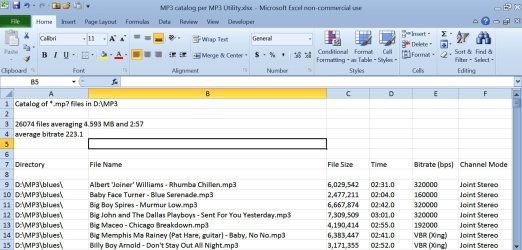
For cataloging mp3s, I use Mp3 Utility, which produces a text file that I can open in Excel. Below is a sample of what that Excel file looks like. It creates a bunch of columns, most of which I don't need and have deleted.

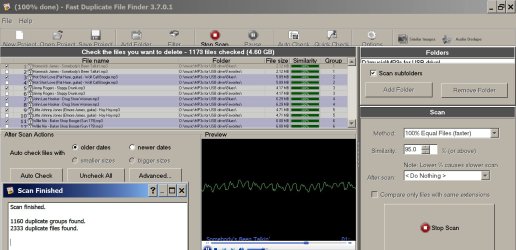
For finding duplicates, I'd use Fast Duplicate File Finder. It scans a chosen folder and locates duplicates within your selected degree of accuracy. Below is a sample of its output. You can see it found a bunch of duplicates and you can delete either of the duplicates or do nothing.
 

Attachments

  • mp3 catalog.jpg
    mp3 catalog.jpg
    202.5 KB · Views: 1
  • fast duplicate file finder.jpg
    fast duplicate file finder.jpg
    183.1 KB · Views: 3

My Computer My Computer

At a glance

Windows 7 Home Premium SP1, 64-bitIntel Skylake i5-6600K, not overclocked8 GB HyperX DDR4-2666 (2 x 4 GB)none; graphics are integrated on CPU
Computer type
PC/Desktop
Computer Manufacturer/Model Number
Ignatz Special; 4 speed manual gearbox; factory air conditioning; one of one
OS
Windows 7 Home Premium SP1, 64-bit
CPU
Intel Skylake i5-6600K, not overclocked
Motherboard
AsRock Z170M Extreme 4, micro ATX
Memory
8 GB HyperX DDR4-2666 (2 x 4 GB)
Graphics Card(s)
none; graphics are integrated on CPU
Sound Card
onboard: Realtek ALC1150; external: USB Behringer UF0-202
Monitor(s) Displays
Dell S2340M 23 inch IPS
Screen Resolution
1600 x 900
Hard Drives
System: Crucial MX100 series SSD, 128 GB;
Data: Samsung Spinpoint 103SJ, 1 TB;
Backup: WD Caviar Green WD30EZRX-00D8PB0, 3 TB
PSU
Rosewill SilentNight 500 watt fanless, semi-modular
Case
Antec Solo II
Cooling
Noctua NH-U12S; Noctua F12 intake, Noctua S12A exhaust
Keyboard
Microsoft 200 6JH-00001 USB
Mouse
Dell or Microsoft optical wired; USB
Antivirus
Microsoft Security Essentials and Malwarebytes Premium
Browser
Pale Moon
Other Info
All fans PWM; speeds at idle: CPU circa 500 rpm; intake circa 600 rpm; exhaust circa 600 rpm; CPU temps 27 idle and 47 C load in a warm room (27 C/81 F) when running Intel Extreme Tuning Utility stress test.
Hi ignatzatsonic & thanks for the response.
Answers to your questions:

* using WMA/WAV, not MP3. I just want the music "as is" on my NAS, to stream around the network as and when.

* I am in the process of ripping lots of music, first recording to my desktop, then to my NAS. Eventually I will want to catalogue the result, but I want to avoid duplicating as I rip, I already have a lot of albums and tracks on the NAS, so I would like to be able to copy the text that is in the titles already on the NAS, in order to check that and avoid duplication. I had not thought of using Excel, which is Calc in Open Office. I was going to try creating Tables in OO Writer.

* Fast Duplicate File Finder looks great, thanks for that, but I won't need it until I have completed the process of ripping all my music. Which will be a long process, because when I have finished the CD's, I have over 500 vinyl albums and about 250 '45 records. (remember them?)

* Recording all of that, and then using FDFF to find and delete duplicates, would be a very long process. I am trying to avoid that by spotting duplicates before I rip them.

I hope that makes sense; I just want to be able to copy the title text that is already on the NAS, into a document, say a Table in OO Writer. If I can set that up, it would be an ongoing process. I would then create a catalogue when it is all done.
 

My Computer My Computer

At a glance

Windows 7/64 HPremium.AMD FX-6300.Corsair (2x4) GB DDR3 CMXGX3M2A1337CL9.NVidia/Gigabyte GT730 (2GB) GDDR5.
Computer type
PC/Desktop
Computer Manufacturer/Model Number
bertison
OS
Windows 7/64 HPremium.
CPU
AMD FX-6300.
Motherboard
Asus M5A78L-M LE/USB3.
Memory
Corsair (2x4) GB DDR3 CMXGX3M2A1337CL9.
Graphics Card(s)
NVidia/Gigabyte GT730 (2GB) GDDR5.
Sound Card
Onboard.
Monitor(s) Displays
Iiyama PLE2407HDS.
Screen Resolution
1920 x 1280
Hard Drives
Desktop: 1TB. WD10EZEX-00BN5A0.
Zyxel nsa310 NAS: 2TB Seagate Barracuda 7200.14.
Cache Drive: Sandisk SDSSDRC032G.
Laptop Lenovo B50/80 128 GB SSD.
PSU
Corsair 750M.
Case
Coolermaster N300.
Cooling
FRONT: (2X) 140mm. TOP: (1x) 120mm. REAR: (1x) 120mm.
Keyboard
Logitech K290
Mouse
Trust Optical Wired
Internet Speed
15 Mb Down, 0.55 Up.
Antivirus
Kaspersky Total Security 2017, Hitman Pro.
Browser
Firefox.
Other Info
NETWORK:
Sky "Q box" and router.
Desktop & NAS - 30 Metres Cat6 Ethernet wired, via TP-Link 4-port switch.
Lenovo B50/80 Laptop, 2x Wileyfox phones, Lenovo TAB3-8 tablet - all wireless.
Grandchildren, their parents and friends as bandwidth 'parasites' at various times!
Hi ignatzatsonic


* I am in the process of ripping lots of music, first recording to my desktop, then to my NAS. Eventually I will want to catalogue the result, but I want to avoid duplicating as I rip, I already have a lot of albums and tracks on the NAS, so I would like to be able to copy the text that is in the titles already on the NAS, in order to check that and avoid duplication.

* I have over 500 vinyl albums and about 250 '45 records. (remember them?)

* Recording all of that, and then using FDFF to find and delete duplicates, would be a very long process. I am trying to avoid that by spotting duplicates before I rip them.

I hope that makes sense; I just want to be able to copy the title text that is already on the NAS, into a document, say a Table in OO Writer. If I can set that up, it would be an ongoing process. I would then create a catalogue when it is all done.

Do I remember 45s? I've got about 20,000 of them in an adjacent bedroom, along with 2,000 78s (remember them) and 3,000 LPs.

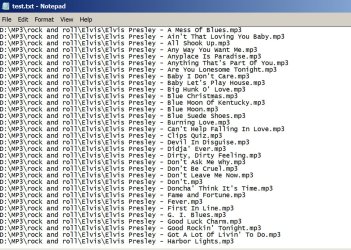
See the picture below. It is a pic of portions of the output of a command I ran from a command prompt. I was in my D:\mp3 directory (which has a bunch of sub-directories) and ran this command:

dir /b /s > d:\test.txt

That created test.txt in the root of the D drive. The /s forces subdirectories to be included.

You should be able to create a similar file of your existing rips on the NAS by adapting the above command to fit your circumstances.

Other thoughts:

I don't know that I would necessarily try to avoid ripping duplicates. Why? Well, quality varies between pressings, re-issues, sources. One version may simply sound better and you'd want to keep only the best sounding version. The only way to tell is to rip both and compare with your ears after the rip. CDs typically avoid the ticks and pops of vinyl, but some CDs are mastered from bad sources, so are not a net improvement on vinyl.

Incidentally, I can point you to an excellent tick and pop removal tool for your vinyl stuff if interested.

But maybe you aren't necessarily interested in identifying and retaining the best sounding version of a particular recording. I am, so I am constantly doing comparisons and keeping only best copies.

What's your estimate of the total number of tracks? How many supposedly duplicates? 100 out of 10,000? Or 3,000 out of 10,000? If it's closer to the former (one percent), I probably just rip em all.

Give me some more feedback and maybe I can give more advice.
 

Attachments

  • commandprompt.jpg
    commandprompt.jpg
    298 KB · Views: 1

My Computer My Computer

At a glance

Windows 7 Home Premium SP1, 64-bitIntel Skylake i5-6600K, not overclocked8 GB HyperX DDR4-2666 (2 x 4 GB)none; graphics are integrated on CPU
Computer type
PC/Desktop
Computer Manufacturer/Model Number
Ignatz Special; 4 speed manual gearbox; factory air conditioning; one of one
OS
Windows 7 Home Premium SP1, 64-bit
CPU
Intel Skylake i5-6600K, not overclocked
Motherboard
AsRock Z170M Extreme 4, micro ATX
Memory
8 GB HyperX DDR4-2666 (2 x 4 GB)
Graphics Card(s)
none; graphics are integrated on CPU
Sound Card
onboard: Realtek ALC1150; external: USB Behringer UF0-202
Monitor(s) Displays
Dell S2340M 23 inch IPS
Screen Resolution
1600 x 900
Hard Drives
System: Crucial MX100 series SSD, 128 GB;
Data: Samsung Spinpoint 103SJ, 1 TB;
Backup: WD Caviar Green WD30EZRX-00D8PB0, 3 TB
PSU
Rosewill SilentNight 500 watt fanless, semi-modular
Case
Antec Solo II
Cooling
Noctua NH-U12S; Noctua F12 intake, Noctua S12A exhaust
Keyboard
Microsoft 200 6JH-00001 USB
Mouse
Dell or Microsoft optical wired; USB
Antivirus
Microsoft Security Essentials and Malwarebytes Premium
Browser
Pale Moon
Other Info
All fans PWM; speeds at idle: CPU circa 500 rpm; intake circa 600 rpm; exhaust circa 600 rpm; CPU temps 27 idle and 47 C load in a warm room (27 C/81 F) when running Intel Extreme Tuning Utility stress test.
Back
Top