Dolby Home Theater V4 only working with one program at a time

HellOnWheels357

New member
Local time
1:03 PM
Messages
12
I recently received the new Alienware 18 with Windows 8.1. Not liking that OS I installed Windows 7 Professional. I downloaded all the appropriate drivers from Dell's website for my specific computer. For sound I was given Realtek HD audio with Dolby Home Theater v4. I like the program well enough, but I'm having some issues. As the title says, Dolby only works for 1 program at a time. Say I'm listening to iTunes, Dolby will work with it, but if I open up Teamspeak, it continues to work for iTunes but not Teamspeak. If I was to pause iTunes and my friend started talking in Teamspeak, Dolby will switch to Teamspeak and everything else (iTunes, games, YouTube) will go on using default audio. With my Alienware m18x I had previous to this, I had IDT Audio. I miss that software, it would work with everything at the same time.

Things I've tried:
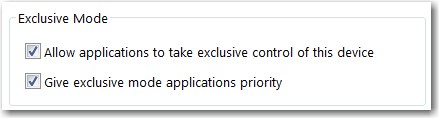
1. Going into sound options/speaker properties/advanced/ and disabling "Allow applications to take exclusive control of this device."
2. Updated LAN driver (someone in another forum said it fixed it for them)
3. I have a Realtek driver downloaded from their website, I haven't installed it yet because after reading their disclaimer, I am under the impression that Dolby is not included.

So if y'all have any ideas, please let me know. Thank you.
 

My Computer My Computer

At a glance

Windows 7 Professional 64bitIntel Core i7-4810mq32gb ddr3x2 Nvidia Geforce GTX 880m
Computer type
PC/Desktop
Computer Manufacturer/Model Number
Alienware 18
OS
Windows 7 Professional 64bit
CPU
Intel Core i7-4810mq
Motherboard
Unsure
Memory
32gb ddr3
Graphics Card(s)
x2 Nvidia Geforce GTX 880m
Hard Drives
x1 Samsung 256GB SSD
x1 5400rpm 1TB
Antivirus
AVG 2015
Browser
Firefox
Sounds like the way it should work? Dell has a special forum section, on their forum, just for Alienware users. May want to post there.

Alienware Club - Dell Community
 

My Computer My Computer

At a glance

Windows 10 64 bitIntel i7 6700K16GB Corsair DominatorIntel CPU Graphics
Computer type
PC/Desktop
Computer Manufacturer/Model Number
My Own Build
OS
Windows 10 64 bit
CPU
Intel i7 6700K
Motherboard
ASUS ROG Maximus VIII Hero
Memory
16GB Corsair Dominator
Graphics Card(s)
Intel CPU Graphics
Sound Card
RealTek
Monitor(s) Displays
27" Dell S2719dgf
Screen Resolution
2560X1440
Hard Drives
1 TB Samsung 850 EVO SSD for Win 10 Pro
500GB Samsung 850 EVO SSD for Win 10 Insider
2 TB drive for backup
PSU
EVGA Supernova 750G2
Case
BeQuiet Silent Base 600
Cooling
Deepcool Captain 120EX
Keyboard
Microsoft Wireless 2000
Mouse
Microsoft wireless
Internet Speed
100 MB/sec (Cable)
Antivirus
Microsoft Defender and Malwarebytes
Browser
Edge/Firefox
Other Info
Cakewalk (Sonar) by BandLab and Studio One 4.1 Pro recording studio software. MOTU 896Mk3 Hybrid recording interface, Frontier Tranzport wireless control unit, Behringer X-Touch Control Surface.
Five USB connected optical drives for CD Audio production using Nero BurningROM
Thank you for the information. I'll post it there too. I hope that's not the case, as I said the IDT audio worked for everything. I'm hoping there is a way to make Dolby work the same.
 

My Computer My Computer

At a glance

Windows 7 Professional 64bitIntel Core i7-4810mq32gb ddr3x2 Nvidia Geforce GTX 880m
Computer type
PC/Desktop
Computer Manufacturer/Model Number
Alienware 18
OS
Windows 7 Professional 64bit
CPU
Intel Core i7-4810mq
Motherboard
Unsure
Memory
32gb ddr3
Graphics Card(s)
x2 Nvidia Geforce GTX 880m
Hard Drives
x1 Samsung 256GB SSD
x1 5400rpm 1TB
Antivirus
AVG 2015
Browser
Firefox
The Dolby is just a software enhancement to the RealTek. Its not a different sound driver.
 

My Computer My Computer

At a glance

Windows 10 64 bitIntel i7 6700K16GB Corsair DominatorIntel CPU Graphics
Computer type
PC/Desktop
Computer Manufacturer/Model Number
My Own Build
OS
Windows 10 64 bit
CPU
Intel i7 6700K
Motherboard
ASUS ROG Maximus VIII Hero
Memory
16GB Corsair Dominator
Graphics Card(s)
Intel CPU Graphics
Sound Card
RealTek
Monitor(s) Displays
27" Dell S2719dgf
Screen Resolution
2560X1440
Hard Drives
1 TB Samsung 850 EVO SSD for Win 10 Pro
500GB Samsung 850 EVO SSD for Win 10 Insider
2 TB drive for backup
PSU
EVGA Supernova 750G2
Case
BeQuiet Silent Base 600
Cooling
Deepcool Captain 120EX
Keyboard
Microsoft Wireless 2000
Mouse
Microsoft wireless
Internet Speed
100 MB/sec (Cable)
Antivirus
Microsoft Defender and Malwarebytes
Browser
Edge/Firefox
Other Info
Cakewalk (Sonar) by BandLab and Studio One 4.1 Pro recording studio software. MOTU 896Mk3 Hybrid recording interface, Frontier Tranzport wireless control unit, Behringer X-Touch Control Surface.
Five USB connected optical drives for CD Audio production using Nero BurningROM
I know, I was just saying IDT would run everything, not one thing at a time. Could I run IDT with Realtek?
 

My Computer My Computer

At a glance

Windows 7 Professional 64bitIntel Core i7-4810mq32gb ddr3x2 Nvidia Geforce GTX 880m
Computer type
PC/Desktop
Computer Manufacturer/Model Number
Alienware 18
OS
Windows 7 Professional 64bit
CPU
Intel Core i7-4810mq
Motherboard
Unsure
Memory
32gb ddr3
Graphics Card(s)
x2 Nvidia Geforce GTX 880m
Hard Drives
x1 Samsung 256GB SSD
x1 5400rpm 1TB
Antivirus
AVG 2015
Browser
Firefox
I know, I was just saying IDT would run everything, not one thing at a time. Could I run IDT with Realtek?
The IDT software supports the IDT high definition audio CODEC chip, not the Realtek audio chip.

Some HP machines (e.g. DM4 Beats editions, Pavillion DV7, etc.) have the IDT hardware and associated Beats software. Apparently your Alien ware18 has the Realtek hardware and Dolby Home Theater software. These are two "packages", and you can't just decide to use arbitrary drivers/software for the other hardware.

Note that the IDT hardware/drivers/software is not entirely "problem-free". Another thread regarding a DM4 with Beats complains about "cross-channel effects" where it's impossible to disable the "virtual surround", in order to hear "pure L/R stereo through headphones". The solution was actually to completely uninstall the IDT/Beats drivers/software and force things back to the vanilla generic MS audio drivers that kind of works acceptably with all sound hardware. In this case, it did produce acceptable sound quality not only from headphones but also through the laptop speakers. In particular, there was now zero "effects" which had been the case with the IDT drivers and Beats software, which made that poster very happy.

You're right that if you try to install the retail Realtek drivers from their site, you will NOT get the Dolby Home Theater software. That is packaged by Dell in its own audio driver download file. Lenovo does the same thing, which is why I have the Lenovo-provided audio driver/software running on my W530 laptop and did not install the newer Realtek-provided driver-only. By the way, I've never noticed this one-app-only Dolby symptom you describe, but then I normally am only running one app at a time that produces sound that I'm listening to (e.g. HGO-Go, Showtime Anytime, Netflix, Windows Media Center playing WTV HDTV program recordings, etc.) and listening through headphones while watching the video content. I only want to watch one thing at a time and listen to its associated audio.
 

My Computer My Computer

At a glance

Windows 7 Pro x64 (1), Win7 Pro X64 (2)i5-3350p 3.1Ghz/6MB-cache (1); E8400 3.0Ghz/6...8GB PC3-12800 DDR3 (1); 4GB PC3-10600 DDR3 (2)ATI HD7750 (1), (see TV cards); ATI R7 250 (2)
Computer type
PC/Desktop
Computer Manufacturer/Model Number
Home-built, two systems (1) and (2)
OS
Windows 7 Pro x64 (1), Win7 Pro X64 (2)
CPU
i5-3350p 3.1Ghz/6MB-cache (1); E8400 3.0Ghz/6MB-cache (2)
Motherboard
ASUS P8Z77-V Pro (1); ASUS P5Q3 (2)
Memory
8GB PC3-12800 DDR3 (1); 4GB PC3-10600 DDR3 (2)
Graphics Card(s)
ATI HD7750 (1), (see TV cards); ATI R7 250 (2)
Sound Card
Realtek ALC892 HD Audio (1); Realtek ALC1200 HD Audio (2)
Monitor(s) Displays
Eizo HD2441W LCD, Eizo S2433W (1); Eizo 24" S2433W (2)
Screen Resolution
1920x1200, 1920x1200 (1); 1920x1200 (2)
Hard Drives
(1) 1TB SATA-II (7200RPM), 2x2TB SATA-III (7200RPM), 250GB SATA-III (10000RPM) for OS; 2x2TB external USB 3.0

(2) 320GB SATA-II (7200RPM), 750GB SATA-II (7200RPM), 150GB SATA-II (10000RPM) for OS; 2TB external USB 3.0
PSU
Nesteq ECS-6001 600W (1); Nesteq ECS-5001 500W (2)
Case
Acousti-Case 360 (1) and (2)
Cooling
Noctua NH-U12P SE2 for CPU, 2x120mm case fans (1) and (2)
Keyboard
IBM PS/2 (1) and (2)
Mouse
Logitech MX Revolution wireless (1); Microsoft wired (2)
Internet Speed
100mbps down / 10mbps up
Antivirus
Microsoft Security Essentials; Malwarebyte Anti-Malware Pro
Browser
Firefox
Other Info
Ceton InfiniTV 4-tuner cablecard-enabled TV card as well as Hauppauge HVR-2250 OTA/ATSC 2-tuner TV card in (1), running under Win7 WMC
Thank you for the response, you answered a lot of my questions. I posted my problem on the Alienware forums that Fireberd provided, and sent it in an email to Dolby, but haven't received a response to either. You think you might be able to do me a solid when you have the time? Could you try running 2 programs that deliver sound and see if Dolby is working for both? I would like to troubleshoot if I'm alone in this problem, or if that is indeed how Dolby is designed to work. It would be much appreciated. But either way, thank you for the insight.
 

My Computer My Computer

At a glance

Windows 7 Professional 64bitIntel Core i7-4810mq32gb ddr3x2 Nvidia Geforce GTX 880m
Computer type
PC/Desktop
Computer Manufacturer/Model Number
Alienware 18
OS
Windows 7 Professional 64bit
CPU
Intel Core i7-4810mq
Motherboard
Unsure
Memory
32gb ddr3
Graphics Card(s)
x2 Nvidia Geforce GTX 880m
Hard Drives
x1 Samsung 256GB SSD
x1 5400rpm 1TB
Antivirus
AVG 2015
Browser
Firefox
You think you might be able to do me a solid when you have the time? Could you try running 2 programs that deliver sound and see if Dolby is working for both? I would like to troubleshoot if I'm alone in this problem, or if that is indeed how Dolby is designed to work. It would be much appreciated. But either way, thank you for the insight.
Well, I certainly can use my own Lenovo W530 to see if I can duplicate your symptom. As I mentioned above, the W530 has a Realtek audio chip and the Lenovo-provided driver/software includes Dolby Home Theater v4, which I have installed. I have not updated audio drivers to the latest Realtek version so that I can retain Dolby Home Theater which only comes through Lenovo. So it sounds like your Alienware machine setup.

However I tried re-rereading your original post and can't quite understand what your test situation actually is:
As the title says, Dolby only works for 1 program at a time. Say I'm listening to iTunes, Dolby will work with it, but if I open up Teamspeak, it continues to work for iTunes but not Teamspeak. If I was to pause iTunes and my friend started talking in Teamspeak, Dolby will switch to Teamspeak and everything else (iTunes, games, YouTube) will go on using default audio.
If you bring a different app to the foreground and give it focus (e.g. going from playing something in iTunes to having a different sound-producing app in the foreground), what exactly do you expect to be able to hear that you're not hearing? If a "talking" app produces simple L/R-stereo audio at best, whereas a media-player proram might produce multi-channel audio, why is it incorrect for the Dolby software to be processing on the app in the foreground (which has the focus)?

And if instead you leave a "paused" app in the foreground but it still has focus, and there's another sound-producing app running in the background, why wouldn't you expect the audio software to be still concentrating on the foreground app with focus (which just happens to be not producing sound at the moment), with Windows itself handling "background app audio"?

Other than Windows actually being technically able to possibly be allowed to simultaneously direct audio streams from multiple apps through the sound card (and why wouldn't simply getting default vanilla non-Dolby handling of that situation be the right thing to expect, since it's not actually a straightforward stereo or multi-channel audio stream, but an incomprehensible hodgepodge of who knows how many completely unrelated streams of audio data?), why wouldn't going with the default audio setting of allowing an app to take exclusive control over the sound configuration not be what you would always want... so that you DON'T get multiple nonsense streams all coming out of your speakers/headphones at one time?

In other words, why is the standard hardware properties wrong?

CQHr5P.jpg


If I were watching/listening something which has the focus, I honestly don't think I'd want it disturbed by "bleeding in" from other simultaneously running audio apps? But if it did bleed in, why would handling it with non-Dolby audio processing from vanilla Windows be the wrong thing to do?


So, please describe a setup you'd want me to try out for myself. And what is it that you see or hear that tells you what you're hearing is NOT what you want to hear? How can you tell Dolby is or is not working from your TeamSpeak app... does the app have focus or not? Did you just pause iTunes playing something but it still has focus, and also you're getting sound from TeamSpeak?

Please be specific in telling me what is the setup you want me to test.
 

My Computer My Computer

At a glance

Windows 7 Pro x64 (1), Win7 Pro X64 (2)i5-3350p 3.1Ghz/6MB-cache (1); E8400 3.0Ghz/6...8GB PC3-12800 DDR3 (1); 4GB PC3-10600 DDR3 (2)ATI HD7750 (1), (see TV cards); ATI R7 250 (2)
Computer type
PC/Desktop
Computer Manufacturer/Model Number
Home-built, two systems (1) and (2)
OS
Windows 7 Pro x64 (1), Win7 Pro X64 (2)
CPU
i5-3350p 3.1Ghz/6MB-cache (1); E8400 3.0Ghz/6MB-cache (2)
Motherboard
ASUS P8Z77-V Pro (1); ASUS P5Q3 (2)
Memory
8GB PC3-12800 DDR3 (1); 4GB PC3-10600 DDR3 (2)
Graphics Card(s)
ATI HD7750 (1), (see TV cards); ATI R7 250 (2)
Sound Card
Realtek ALC892 HD Audio (1); Realtek ALC1200 HD Audio (2)
Monitor(s) Displays
Eizo HD2441W LCD, Eizo S2433W (1); Eizo 24" S2433W (2)
Screen Resolution
1920x1200, 1920x1200 (1); 1920x1200 (2)
Hard Drives
(1) 1TB SATA-II (7200RPM), 2x2TB SATA-III (7200RPM), 250GB SATA-III (10000RPM) for OS; 2x2TB external USB 3.0

(2) 320GB SATA-II (7200RPM), 750GB SATA-II (7200RPM), 150GB SATA-II (10000RPM) for OS; 2TB external USB 3.0
PSU
Nesteq ECS-6001 600W (1); Nesteq ECS-5001 500W (2)
Case
Acousti-Case 360 (1) and (2)
Cooling
Noctua NH-U12P SE2 for CPU, 2x120mm case fans (1) and (2)
Keyboard
IBM PS/2 (1) and (2)
Mouse
Logitech MX Revolution wireless (1); Microsoft wired (2)
Internet Speed
100mbps down / 10mbps up
Antivirus
Microsoft Security Essentials; Malwarebyte Anti-Malware Pro
Browser
Firefox
Other Info
Ceton InfiniTV 4-tuner cablecard-enabled TV card as well as Hauppauge HVR-2250 OTA/ATSC 2-tuner TV card in (1), running under Win7 WMC
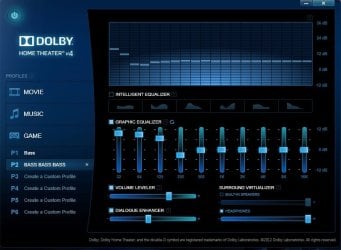
Okay, I'm gonna try to get to all your questions. Please let me know if I didn't address them all. First off, I attached an image of my Dolby profile. I'm somewhat of a bass freak. So I made a profile for max bass. But it also increases the clarity, and overall volume of the sound. This is one of the ways I can tell Dolby is only working with one program at a time. Teamspeak is loud and clear, iTunes is flat, and quiet. The other way I can tell is when I have Dolby open (the attached picture) I watch the graph move while listening to my friend talk, and I have iTunes going. The bars only move with his voice, and not with the rhythm of the song playing.

And this brings me back to my point about IDT. It would enhance the sound of everything playing at once, if I was so inclined to have Teamspeak, iTunes, and YouTube running at the same time (like some kind of crazy person) it would enhance them all. I disabled the option for letting programs take exclusive control to try and get this same effect from Dolby, thinking that one of the programs is taking control, and not letting the others work simultaneously. But it works this way whether that box is checked or not.

So I was hoping you could bring up your Dolby profile (it can be found in the start menu) run two sound programs, and watching the graph and see if it is enhancing the sound for both.

Another thing I've noticed that leads me to believe my sound is not working correctly is notification noises I get for emails, Steam, or Windows don't play fully. The "ding" noise is distorted, and doesn't play correctly. Again, I hope I answered all of your questions. Let me know if I missed anything.
 

My Computer My Computer

At a glance

Windows 7 Professional 64bitIntel Core i7-4810mq32gb ddr3x2 Nvidia Geforce GTX 880m
Computer type
PC/Desktop
Computer Manufacturer/Model Number
Alienware 18
OS
Windows 7 Professional 64bit
CPU
Intel Core i7-4810mq
Motherboard
Unsure
Memory
32gb ddr3
Graphics Card(s)
x2 Nvidia Geforce GTX 880m
Hard Drives
x1 Samsung 256GB SSD
x1 5400rpm 1TB
Antivirus
AVG 2015
Browser
Firefox
I hope I answered all of your questions. Let me know if I missed anything.
I think you've given me enough to experiment.

Not that it really matters, but your attempt to attach a screenshot of your Dolby profile failed. Your post has no attachments.

I'll let you know what happens when I play with multiple audio apps running simultaneously on my W530, and whether the Dolby spectrum analyzer displays audio from them all at one time, or just from one.
 

My Computer My Computer

At a glance

Windows 7 Pro x64 (1), Win7 Pro X64 (2)i5-3350p 3.1Ghz/6MB-cache (1); E8400 3.0Ghz/6...8GB PC3-12800 DDR3 (1); 4GB PC3-10600 DDR3 (2)ATI HD7750 (1), (see TV cards); ATI R7 250 (2)
Computer type
PC/Desktop
Computer Manufacturer/Model Number
Home-built, two systems (1) and (2)
OS
Windows 7 Pro x64 (1), Win7 Pro X64 (2)
CPU
i5-3350p 3.1Ghz/6MB-cache (1); E8400 3.0Ghz/6MB-cache (2)
Motherboard
ASUS P8Z77-V Pro (1); ASUS P5Q3 (2)
Memory
8GB PC3-12800 DDR3 (1); 4GB PC3-10600 DDR3 (2)
Graphics Card(s)
ATI HD7750 (1), (see TV cards); ATI R7 250 (2)
Sound Card
Realtek ALC892 HD Audio (1); Realtek ALC1200 HD Audio (2)
Monitor(s) Displays
Eizo HD2441W LCD, Eizo S2433W (1); Eizo 24" S2433W (2)
Screen Resolution
1920x1200, 1920x1200 (1); 1920x1200 (2)
Hard Drives
(1) 1TB SATA-II (7200RPM), 2x2TB SATA-III (7200RPM), 250GB SATA-III (10000RPM) for OS; 2x2TB external USB 3.0

(2) 320GB SATA-II (7200RPM), 750GB SATA-II (7200RPM), 150GB SATA-II (10000RPM) for OS; 2TB external USB 3.0
PSU
Nesteq ECS-6001 600W (1); Nesteq ECS-5001 500W (2)
Case
Acousti-Case 360 (1) and (2)
Cooling
Noctua NH-U12P SE2 for CPU, 2x120mm case fans (1) and (2)
Keyboard
IBM PS/2 (1) and (2)
Mouse
Logitech MX Revolution wireless (1); Microsoft wired (2)
Internet Speed
100mbps down / 10mbps up
Antivirus
Microsoft Security Essentials; Malwarebyte Anti-Malware Pro
Browser
Firefox
Other Info
Ceton InfiniTV 4-tuner cablecard-enabled TV card as well as Hauppauge HVR-2250 OTA/ATSC 2-tuner TV card in (1), running under Win7 WMC
Thanks man, I really appreciate it. Like you said, not that it really matters, but I'm gonna try attaching it again in this post.
 

Attachments

  • dolby.jpg
    dolby.jpg
    52.6 KB · Views: 1

My Computer My Computer

At a glance

Windows 7 Professional 64bitIntel Core i7-4810mq32gb ddr3x2 Nvidia Geforce GTX 880m
Computer type
PC/Desktop
Computer Manufacturer/Model Number
Alienware 18
OS
Windows 7 Professional 64bit
CPU
Intel Core i7-4810mq
Motherboard
Unsure
Memory
32gb ddr3
Graphics Card(s)
x2 Nvidia Geforce GTX 880m
Hard Drives
x1 Samsung 256GB SSD
x1 5400rpm 1TB
Antivirus
AVG 2015
Browser
Firefox
Well, I experimented using two simultaneously running media player programs (PotPlayer and Windows Media Player), each playing its own HDTV clip video, one a slow Rachel ballad performance from Glee, and the other an upbeat rock musical number from SNL. Both musical selections have their own easy-to-recognize differences in rhythm and frequency, and can also be easily heard when they're both playing together. Very different patterns on the Dolby Home Theater spectrum analyzer graph.

And I'm playing sound out through the laptop speakers, not from the headphone jack. Properties have both "exclusive mode" checkboxes checked, so in theory if one app were to want to take over the speakers uniquely I believe it could.

I'd have to say that on my own Lenovo W530 it does appear that BOTH of the media apps are feeding Dolby Home Theater at the same time, no matter which window has the focus. It's not just the player with the focus whose music appears actively displayed in the Dolby Home Theater spectrum analyzer graph. It certainly looks (and sounds) as if DHT is being applied to BOTH at the same time.

Again, as best I can tell I do NOT detect any audible difference when playing both simultaneously and then pressing PAUSE on one or the other. The video allowed to continue sounds the same through the speakers, so it's not like DHT suddenly kicked in for that source whereas before that it was not active with MS audio previously handling that source while it was in the background. Same with the clues from the graph, which do appear to be the "sum" of two sources rather than one source or the other exclusively. The graph very definitely does not appear to be just one source or the other, whichever is in the foreground focus.

In other words, it looks like the implementation of Realtek plus DHT as provided by Lenovo does indeed provide the DHT audio enhancement to whatever one or more simultaneously sound sources are feeding it, all together rather than uniquely.

The drivers for the Realtek ALC3202 chip in my W530 show as Realtek 6.0.1.7188 (3/4/2014), although in theory this Lenovo-provided 7188 driver package version (which obviously also includes Dolby Home Theater) shows support for the W540 and not the W530. The actual "most current" version on the Lenovo site for the W530 is 6.0.1.7040 from 11/2013, but in fact I'm using the more recent 7188 version and it obviously works fine.

I'm thinking of suggesting you at least try using this Lenovo driver package on your Dell machine, first taking a "system image" backup so you can easily revert back to what you have if your experiment breaks something. I would normally never recommend this (certainly because the Realtek hardware chip in your Dell machine is not likely to be the same ALC3202 chip I have in my W530, and the Dell-certified driver installer package is almost certain to be correct for your machine whereas the Lenovo package is clearly intended for my Lenovo Thinkpad), but it might be an interesting experiment. I suspect there's clearly a common "universal" Realtek driver under the covers that supports virtually (if not entirely) all of their chips, with Dolby Home Theater added in. But there also might be some type of proprietary double-checks that prevents the licensed software from running on "foreign" hardware from another vendor.

Anyway, that's my story. You're certainly free to try that Lenovo 7188 audio installer file, although it very likely won't work on your Dell machine. Just be sure you have first taken a "system restore point", and also a "system image backup", just to ensure you can conveniently and reliably revert back to what you currently have in the event of total failure or other disaster.
 

My Computer My Computer

At a glance

Windows 7 Pro x64 (1), Win7 Pro X64 (2)i5-3350p 3.1Ghz/6MB-cache (1); E8400 3.0Ghz/6...8GB PC3-12800 DDR3 (1); 4GB PC3-10600 DDR3 (2)ATI HD7750 (1), (see TV cards); ATI R7 250 (2)
Computer type
PC/Desktop
Computer Manufacturer/Model Number
Home-built, two systems (1) and (2)
OS
Windows 7 Pro x64 (1), Win7 Pro X64 (2)
CPU
i5-3350p 3.1Ghz/6MB-cache (1); E8400 3.0Ghz/6MB-cache (2)
Motherboard
ASUS P8Z77-V Pro (1); ASUS P5Q3 (2)
Memory
8GB PC3-12800 DDR3 (1); 4GB PC3-10600 DDR3 (2)
Graphics Card(s)
ATI HD7750 (1), (see TV cards); ATI R7 250 (2)
Sound Card
Realtek ALC892 HD Audio (1); Realtek ALC1200 HD Audio (2)
Monitor(s) Displays
Eizo HD2441W LCD, Eizo S2433W (1); Eizo 24" S2433W (2)
Screen Resolution
1920x1200, 1920x1200 (1); 1920x1200 (2)
Hard Drives
(1) 1TB SATA-II (7200RPM), 2x2TB SATA-III (7200RPM), 250GB SATA-III (10000RPM) for OS; 2x2TB external USB 3.0

(2) 320GB SATA-II (7200RPM), 750GB SATA-II (7200RPM), 150GB SATA-II (10000RPM) for OS; 2TB external USB 3.0
PSU
Nesteq ECS-6001 600W (1); Nesteq ECS-5001 500W (2)
Case
Acousti-Case 360 (1) and (2)
Cooling
Noctua NH-U12P SE2 for CPU, 2x120mm case fans (1) and (2)
Keyboard
IBM PS/2 (1) and (2)
Mouse
Logitech MX Revolution wireless (1); Microsoft wired (2)
Internet Speed
100mbps down / 10mbps up
Antivirus
Microsoft Security Essentials; Malwarebyte Anti-Malware Pro
Browser
Firefox
Other Info
Ceton InfiniTV 4-tuner cablecard-enabled TV card as well as Hauppauge HVR-2250 OTA/ATSC 2-tuner TV card in (1), running under Win7 WMC
You rock dude. Thank you for testing that out for me, at least now I know it SHOULD be able to work with all programs.

I'm going to do a lot of troubleshooting this weekend. I'm gonna try uninstalling and reinstalling my driver, try the Windows 8 version of the same driver. And if that doesn't work, I'll give your driver a go. All of this after a system image of course. I'm also gonna be flashing my bios to a newer version with Alienware's assistance (mine is A07, A10 is available on the driver page), I don't know if that would affect my sound, but it'll be good to do regardless. I'll come back and post my results.

But for now, just wanted to thank you and fireberd one more time for helping me.
 

My Computer My Computer

At a glance

Windows 7 Professional 64bitIntel Core i7-4810mq32gb ddr3x2 Nvidia Geforce GTX 880m
Computer type
PC/Desktop
Computer Manufacturer/Model Number
Alienware 18
OS
Windows 7 Professional 64bit
CPU
Intel Core i7-4810mq
Motherboard
Unsure
Memory
32gb ddr3
Graphics Card(s)
x2 Nvidia Geforce GTX 880m
Hard Drives
x1 Samsung 256GB SSD
x1 5400rpm 1TB
Antivirus
AVG 2015
Browser
Firefox
Okay, well the first thing I did has it working better. I went to Dell's driver page and got the correct driver for my system and ran the installer. I didn't uninstall the driver first, I let the installer do that for me. Now, while it's not working perfectly, it's working better than it was before. It will now enhance audio for 2 programs. So talking to my buddy in Teamspeak, I can listen to iTunes, or watch YouTube and have them both work, but not all 3.

The only instance I can see this being a problem, is when we're gaming. If we're playing a mellow game like Civilization V, or Age of Empires, I like to listen to music. So that's 3 programs: Teamspeak, iTunes, and whichever game we're playing. So one of those will sound low, and flat relative to the others.

dsperber, you've done more than enough for me thus far.. But if I could just ask one more favor of you bud. Could you try running 3 programs, and seeing if your Dolby is working for all 3? I would like to know if I still have some work to do, or if I just have to accept this Dolby software as is.

Let me know if you're feeling up to it. Either way, thanks for your time man.
 

My Computer My Computer

At a glance

Windows 7 Professional 64bitIntel Core i7-4810mq32gb ddr3x2 Nvidia Geforce GTX 880m
Computer type
PC/Desktop
Computer Manufacturer/Model Number
Alienware 18
OS
Windows 7 Professional 64bit
CPU
Intel Core i7-4810mq
Motherboard
Unsure
Memory
32gb ddr3
Graphics Card(s)
x2 Nvidia Geforce GTX 880m
Hard Drives
x1 Samsung 256GB SSD
x1 5400rpm 1TB
Antivirus
AVG 2015
Browser
Firefox
Back
Top