What is the Best Hard Drive?

They aren't designed to park every 8 seconds. They are designed to park 8 seconds after they become inactive.

What does "inactive" mean in that context?

Heads not spinning?

Not overtly accessed as when opening a file through Windows Explorer?

Powered off?

Not overtly accessed as when opening a file through Windows Explorer.


Hmmmm..............you may well be right. I've wondered about that for some time.

My 3 TB Green drive is my "backup" drive.

The LLC count, which I have been led to believe is related to head parking, goes up roughly once an hour.

The drive is overtly accessed when I run my Full File Sync backup routine.

That might be twice a day.

I don't often otherwise open, delete, or modify files on that drive. Most days not at all.

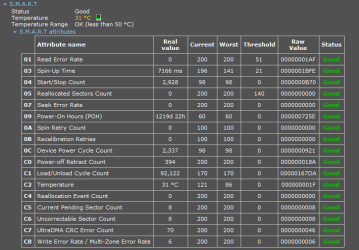
I'm just trying to understand the SMART LLC metric/head count issue in a real world scenario--what makes that LLC count rise, by how much, and when.

LLC per SMART at this moment is 3492.

I'm going to refrain from running FFS or deliberately accessing the drive for at least the next 24 hours or so and will report back.
 

My Computer My Computer

At a glance

Windows 7 Home Premium SP1, 64-bitIntel Skylake i5-6600K, not overclocked8 GB HyperX DDR4-2666 (2 x 4 GB)none; graphics are integrated on CPU
Computer type
PC/Desktop
Computer Manufacturer/Model Number
Ignatz Special; 4 speed manual gearbox; factory air conditioning; one of one
OS
Windows 7 Home Premium SP1, 64-bit
CPU
Intel Skylake i5-6600K, not overclocked
Motherboard
AsRock Z170M Extreme 4, micro ATX
Memory
8 GB HyperX DDR4-2666 (2 x 4 GB)
Graphics Card(s)
none; graphics are integrated on CPU
Sound Card
onboard: Realtek ALC1150; external: USB Behringer UF0-202
Monitor(s) Displays
Dell S2340M 23 inch IPS
Screen Resolution
1600 x 900
Hard Drives
System: Crucial MX100 series SSD, 128 GB;
Data: Samsung Spinpoint 103SJ, 1 TB;
Backup: WD Caviar Green WD30EZRX-00D8PB0, 3 TB
PSU
Rosewill SilentNight 500 watt fanless, semi-modular
Case
Antec Solo II
Cooling
Noctua NH-U12S; Noctua F12 intake, Noctua S12A exhaust
Keyboard
Microsoft 200 6JH-00001 USB
Mouse
Dell or Microsoft optical wired; USB
Antivirus
Microsoft Security Essentials and Malwarebytes Premium
Browser
Pale Moon
Other Info
All fans PWM; speeds at idle: CPU circa 500 rpm; intake circa 600 rpm; exhaust circa 600 rpm; CPU temps 27 idle and 47 C load in a warm room (27 C/81 F) when running Intel Extreme Tuning Utility stress test.
Can anyone tell me if my Hitachi 320GB Hard Drive is reliable? I've been using it since last year after my Samsung HD251HJ Hard Drive died after 8 years.
 

My Computer My Computer

At a glance

Windows 7 Home Premium 64-BITAMD A8 7200P8GB 1600mhzRadeon R5 (APU) + Radeon R5 M230 2GB Dual Gra...
Computer type
PC/Desktop
Computer Manufacturer/Model Number
ASUS X550ZE
OS
Windows 7 Home Premium 64-BIT
CPU
AMD A8 7200P
Motherboard
N/A
Memory
8GB 1600mhz
Graphics Card(s)
Radeon R5 (APU) + Radeon R5 M230 2GB Dual Graphics
Sound Card
Realtek ALC269 with SonicMaster
Monitor(s) Displays
Laptop Display
Screen Resolution
1920 x 1080 @60hz
Hard Drives
WDC WD50 00LPVX-80V0TT0 (500GB)
PSU
Laptop Charger
Mouse
ARMAGGEDON TEXTRON SCORPION 7
Internet Speed
100 mbps DOWN / 50 mbps UP
Antivirus
Windows Defender
Browser
Mozzila FireFox, Valve Steam in-game internet browser
Can anyone tell me if my Hitachi 320GB Hard Drive is reliable? I've been using it since last year after my Samsung HD251HJ Hard Drive died after 8 years.

It's reliable until it fails completely or has a serious performance issue.

That may happen before sunup or not for 10 years. Or more.

About all you can do is treat them as fallible commodities, make backups, and maybe keep an eye on SMART warnings, particularly growth in the reallocated sector count. And hope you are not unlucky.

There may be some vague correlation with temperature, but as far as I've read, it doesn't matter much unless the temp is quite extreme.

As far as I know, the bathtub curve is somewhat accurate--a tendency to fail early in life or late. Kinda like humans.

Occasionally, a drive model will have design defects, but that's uncommon.

Seagates have been getting a bad rap for the last few years, but obviously millions of them are reliable.

Offhand, I can't recall anything about Hitachis other than anecdotal comments that they are at least average and the recent Backblaze reports saying that certain large capacity models have low failure rates. I know nothing at all about the 320 GB models.
 

My Computer My Computer

At a glance

Windows 7 Home Premium SP1, 64-bitIntel Skylake i5-6600K, not overclocked8 GB HyperX DDR4-2666 (2 x 4 GB)none; graphics are integrated on CPU
Computer type
PC/Desktop
Computer Manufacturer/Model Number
Ignatz Special; 4 speed manual gearbox; factory air conditioning; one of one
OS
Windows 7 Home Premium SP1, 64-bit
CPU
Intel Skylake i5-6600K, not overclocked
Motherboard
AsRock Z170M Extreme 4, micro ATX
Memory
8 GB HyperX DDR4-2666 (2 x 4 GB)
Graphics Card(s)
none; graphics are integrated on CPU
Sound Card
onboard: Realtek ALC1150; external: USB Behringer UF0-202
Monitor(s) Displays
Dell S2340M 23 inch IPS
Screen Resolution
1600 x 900
Hard Drives
System: Crucial MX100 series SSD, 128 GB;
Data: Samsung Spinpoint 103SJ, 1 TB;
Backup: WD Caviar Green WD30EZRX-00D8PB0, 3 TB
PSU
Rosewill SilentNight 500 watt fanless, semi-modular
Case
Antec Solo II
Cooling
Noctua NH-U12S; Noctua F12 intake, Noctua S12A exhaust
Keyboard
Microsoft 200 6JH-00001 USB
Mouse
Dell or Microsoft optical wired; USB
Antivirus
Microsoft Security Essentials and Malwarebytes Premium
Browser
Pale Moon
Other Info
All fans PWM; speeds at idle: CPU circa 500 rpm; intake circa 600 rpm; exhaust circa 600 rpm; CPU temps 27 idle and 47 C load in a warm room (27 C/81 F) when running Intel Extreme Tuning Utility stress test.
Can anyone tell me if my Hitachi 320GB Hard Drive is reliable? I've been using it since last year after my Samsung HD251HJ Hard Drive died after 8 years.
First try Hitachi HDD (taken over by WD) diagnostics
Downloads | HGST Storage
Also, CrystalDiskInfo gives you usefull information on your SSD/HHD health status (go for the portable option - no adds)
Download Center - Crystal Dew World
If you have no reallocated sectors and your temperatures are reasonable then you are ok for the time being. However, HDDs can fail without notice. It only takes some of your HDD interface electronics to fail.

So assume your HDD one day will be totally dead and rely on a backup.
 

My Computer My Computer

At a glance

Windows 7x64 Home Premium SP1Intel i7 2600kG.Skill Ripjaws (DDR3-1600) 2x4GBNvidia GeForce GTS 450; Intel HD Graphics 300...
Computer type
PC/Desktop
Computer Manufacturer/Model Number
Own build
OS
Windows 7x64 Home Premium SP1
CPU
Intel i7 2600k
Motherboard
ASUS P8Z68 Deluxe
Memory
G.Skill Ripjaws (DDR3-1600) 2x4GB
Graphics Card(s)
Nvidia GeForce GTS 450; Intel HD Graphics 3000(GT2+)
Monitor(s) Displays
Dell Ultrasharp IPS panel U2311H, Samsung SyncMaster P2350
Screen Resolution
1920x1080
Hard Drives
Samsung 850 Pro SSD 256GB, Samsung SSD 840 120GB, Seagates 1TB Barracuda ST31000528AS x2
PSU
Seasonic M12II 520W
Case
Lian Li Lancool PC-K60
Cooling
Case: 1x120mm, 3x140mm CPU: Hyper 212+
Keyboard
Logitech MK520 (wireless)
Mouse
Logitech MK520
Internet Speed
6-7 Mbps
Antivirus
Norton Security Premium, Malwarebytes on 2 (MSE on 3rd PC)
Browser
FireFox
Other Info
Audio: Logitech Z523 2.1
Speccy

True. They are designed to park the heads and spin down when not in use to reduce power consumption. That, along with the slower top rpm, is what makes them green. The problem with the early Greens was the heads would park, then unpark, then repeat that cycle continuously until they reached their maximum cycle rating; they would fail shortly after that. As I said before, that was fixed a long time ago. It's also one reason why these drives are unsuitable for use as a boot drive; too much on and off activity.
On my PC, Windows (almost) constantly accesses (reads from & writes to) the OS partition.
I doubt my OS HDD ever gets the chance to park.

In fact the Speccy data seems to indicate that this is true.
Here is a Speccy screenshot from last month for the WD Green 1.5 TB EARS HDD.
WD15EARS (2014-12-24).png
I installed the HDD in August 2010.
I disabled the timer in May 2011 (by that time it had racked up close to 90,000 parks).
The LLC count has increased at ~60/month since then.

According to WD, these HDDs are supposed to survive 300,000 parks.
WD HDD Specs (2013 December).png
Someone on TenForums mentioned a program called "KeepAliveHD".
I'm using that on my WD Green 2 TB & 3 TB ERZX HDDs.

It must work as I have noticed that the LLC count increase faster when I run Linux Mint.
I should write a CRON job to probe those EZRX drives every 5 minutes.
 

My Computer My Computer

At a glance

W7 Ultimate SP1, LM19.2 MATE, W10 Home 1703, ...AMD Phenom II x6 1100T, 3.3 GHz12GB DDR3 1333 G-Skill (4GB x 2), G-Skill (2G...NVIDIA GeForce GTX 660
Computer type
PC/Desktop
Computer Manufacturer/Model Number
n/a
OS
W7 Ultimate SP1, LM19.2 MATE, W10 Home 1703, W10 Pro 1703 VM, #All 64 bit
CPU
AMD Phenom II x6 1100T, 3.3 GHz
Motherboard
ASUS M4A88T-M/USB3 (AM3)
Memory
12GB DDR3 1333 G-Skill (4GB x 2), G-Skill (2GB x 2)
Graphics Card(s)
NVIDIA GeForce GTX 660
Sound Card
Realtek?
Monitor(s) Displays
Samsung S23B350
Screen Resolution
1920x1080
Hard Drives
WD Green 2TB (SATA), WD Green 3TB (SATA), WD Blue 4TB (SATA), WD Blue 6TB (SATA)
PSU
Cooler Master
Case
Antec GX300 Tower
Cooling
3x Antec TRICOOL 120mm Fans
Mouse
Wired Optical
Internet Speed
DSL
Antivirus
Avast
Browser
Pale Moon (64 bit)
Other Info
2018-12-27 Upgraded HDDs
2015-12-10 Upgraded case, graphics card, storage
2015-08-15 Upgraded motherboard & RAM
2015-07-15 Upgraded LM17.1 to LM17.2
KeepAliveHD keeps a HDD from spinning down by writing a tiny amount to it every few minutes. This is handy if you have a large number of drives you want the OS to spin down when inactive but have one or more you want to not spin down. Since Win 7, etc. can only tell all or none to spin down when inactive, using something to access a drive before it can be spun down will keep it spinning. Since the WD Greens are designed to park their heads after 8 seconds of inactivity (longer if WDidle has been applied), then spin down, using KeepAliveHD will have the Greens spinning up, unparking the heads, then 8 seconds after the .txt file has been written, the heads will park and the drive will spin down again until KeepAliveHD wakes it up again.

Since the OS will frequently access the drive it is installed on, that can cause frequent triggering of the head parking and unparking cycle on a WD Green. This makes WD Greens unsuitable for use with an OS. If you have your OS installed on a Green, you would be much better off moving your OS to a 7200rpm spinner (you would get slightly better performance) or, better yet, a SSD (you would considerably better performance, especially for boot time and program loading time). For internal storage drives, they are OK but I still prefer the WD Blacks since my machine runs 24/7. When using a Green for internal storage, it's best to just let them spin down when idle on their own rather than try keeping them spinning with KeepAlive HD (which can actually increase the number of head parks in a given amount of time).

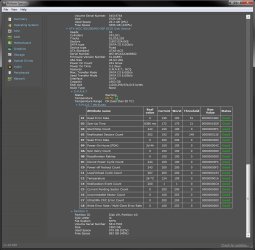
This is the SMART on my oldest 2TB WD Green:

2TB SMART.jpg

This drive has been connected to my machine an average of only 10 minutes a day every other month and is roughly 3.5 years old. When I connect it to the machine, I wait until it spins up and gets indexed, then I run my backup program, which keeps it spinning until the backup is finished, then I give it a few seconds to park the heads and spin down, then remove the drive from the machine.

Now, this is the SMART from a new 4TB WD Green:

4TB SMART.jpg

The only thing I have done with it so far was to "torture" test it by repeatedly wiping the drive with CCleaner to force a possible early failure. Notice how low the load/unload cycle is compared to the power on hours (although I tested it only a few days; I don't know why the power on count is so high). The drive was spinning constantly so it didn't have the chance to park the heads any. This drive (and the other three I got with it) will be used to backup the 4TB Black I "recently" installed in my machine (it was shut down for a bit over seven weeks while I was out of town recently; I "borrowed" the 2TB Greens I use to backup another 2TB WD Black I have in my machine but wasn't using much to backup the new 4TB black until I could get the 4TB Greens on sale, then test them).

This is the 2TB WD Green I recently had replaced under warranty:

Smart.jpg

It was a little less than two years old so I was able to get it replaced under warranty from WD (a pleasant experience, btw). I had purchased a three year extended warranty from Newegg when I bought the drive but I was able to get it transferred to the replacement drive. This drive started throwing sector reallocation errors and, since it was still under warranty, I went ahead and had it replaced.

I check the SMART attributes on my drives only once in a while just to see if anything might show up but, otherwise, I don't depend on them. Instead, I backup the snot out of them, essentially backing up the backups, so, if a drive should fail without warning, I won't lose any data and will have time to get it replaced under warranty or buy a replacement (I don't keep spare drives since an unused drive is burning off warranty plus the longer I wait to buy a drive, the lower the prices on them become; I can get a replacement within two or three days).
 

My Computer My Computer

At a glance

Win 7 Ultimate 64 bitIntel i7-3930KKingston HyperX Genesis 32GB Kit (8x4GB Modul...MSI R7850 Twin Frozr 2GD5/OC Radeon HD 7850 2...
Computer type
PC/Desktop
Computer Manufacturer/Model Number
Custom Build
OS
Win 7 Ultimate 64 bit
CPU
Intel i7-3930K
Motherboard
ASUS P9X79 WS
Memory
Kingston HyperX Genesis 32GB Kit (8x4GB Modules) 1600MHz DDR
Graphics Card(s)
MSI R7850 Twin Frozr 2GD5/OC Radeon HD 7850 2GB 256-bit GDDR
Sound Card
Asus Xonar Essence STX
Monitor(s) Displays
3x Asus VG248QE 24", Vizio 32" TV
Screen Resolution
1920 x 1080, ?
Hard Drives
Samsung 128GB 840 Pro SSD (1),
Samsung 4TB 850 EVO SSDs (4)
Samsung 4TB 850 EVO SSDs (16) external backup drives used in 2.5" hot swap bays in the computer.
PSU
Corsair HX750w
Case
Antec Two Hundred v2 (modified)
Cooling
Cooler Master GeminII S524 120mm (fan replaced with a 140mm)
Keyboard
Logitech G510s
Mouse
Logitech M525 (two in use)
Internet Speed
=< 32Mbps down, 8Mbps up
Antivirus
AVAST!, MBAM, SAS, Spybot S&D (all but MBAM free) Glary Util
Browser
IE11
Other Info
LSI 9211-8i HBA card (8 SATA III ports), 2.5" & 3.5" Hot Swap Bays, HooToo HT-CR001 PCI-E to USB 3.0 Internal Hub + 6 Slot Card Reader, and LG Model CH12LS28 BD-ROM Optical Drive. Also, ScanSnap S1500 ADF duplexing scanner, Canon 9000F flat bed scanner, Corsair SP2500 2.1 speakers, Samsung CLP 415nw laser color printer, Cyberpower PP2200SW UPS
KeepAliveHD keeps a HDD from spinning down by writing a tiny amount to it every few minutes. This is handy if you have a large number of drives you want the OS to spin down when inactive but have one or more you want to not spin down. Since Win 7, etc. can only tell all or none to spin down when inactive, using something to access a drive before it can be spun down will keep it spinning. Since the WD Greens are designed to park their heads after 8 seconds of inactivity (longer if WDidle has been applied), then spin down, using KeepAliveHD will have the Greens spinning up, unparking the heads, then 8 seconds after the .txt file has been written, the heads will park and the drive will spin down again until KeepAliveHD wakes it up again.
I have my HDD timer set and KeepAliveHD set to 5 minutes. :)

I was considering setting KeepAliveHD to 2.5 minutes, but 5 minutes seems to be working out OK.

Since the OS will frequently access the drive it is installed on, that can cause frequent triggering of the head parking and unparking cycle on a WD Green. This makes WD Greens unsuitable for use with an OS.
You have to change the default HDD timer setting.

The HDD does slow down to lower RPM due to "IntelliPower" though.

If you have your OS installed on a Green, you would be much better off moving your OS to a 7200rpm spinner (you would get slightly better performance) or, better yet, a SSD (you would considerably better performance, especially for boot time and program loading time). For internal storage drives, they are OK but I still prefer the WD Blacks since my machine runs 24/7.
I can't justify the extra cost.

It's a good year if I can afford to spend more than $150 on my PC (and related items).
This year I spent $180 and I ended up with a 3 TB internal HDD and a 3 TB external HDD. :party:

Arguably I should have bought a 240 GB SSD and a 2 TB HDD.
I would have avoided the "hilarity" the 3 TB HDD caused.

However that would have cost me twice as much. :eek:

When using a Green for internal storage, it's best to just let them spin down when idle on their own rather than try keeping them spinning with KeepAlive HD (which can actually increase the number of head parks in a given amount of time).
You have to match the time intervals.

Since I installed KeepAliveHD my parks have dropped to ~10/day on my 2 TB & 3 TB HDDs.
In fact, the majority of parks now occur when I'm using Linux Mint.

I usually leave LM running overnight.
Even though LM shouldn't need to access the 3 TB HDD, its park count increases (~20/session).

Modern operating systems (Windows & Linux) seem to constantly interrogate attached hardware.

It was a little less than two years old so I was able to get it replaced under warranty from WD (a pleasant experience, btw).
I didn't send my HDD back because of the over-the-top packaging specifications WD listed on their website.
I didn't want to spend a stack of cash shipping it to WD, only to have them say the warranty had been voided due to some packaging oversight/violation.
 

My Computer My Computer

At a glance

W7 Ultimate SP1, LM19.2 MATE, W10 Home 1703, ...AMD Phenom II x6 1100T, 3.3 GHz12GB DDR3 1333 G-Skill (4GB x 2), G-Skill (2G...NVIDIA GeForce GTX 660
Computer type
PC/Desktop
Computer Manufacturer/Model Number
n/a
OS
W7 Ultimate SP1, LM19.2 MATE, W10 Home 1703, W10 Pro 1703 VM, #All 64 bit
CPU
AMD Phenom II x6 1100T, 3.3 GHz
Motherboard
ASUS M4A88T-M/USB3 (AM3)
Memory
12GB DDR3 1333 G-Skill (4GB x 2), G-Skill (2GB x 2)
Graphics Card(s)
NVIDIA GeForce GTX 660
Sound Card
Realtek?
Monitor(s) Displays
Samsung S23B350
Screen Resolution
1920x1080
Hard Drives
WD Green 2TB (SATA), WD Green 3TB (SATA), WD Blue 4TB (SATA), WD Blue 6TB (SATA)
PSU
Cooler Master
Case
Antec GX300 Tower
Cooling
3x Antec TRICOOL 120mm Fans
Mouse
Wired Optical
Internet Speed
DSL
Antivirus
Avast
Browser
Pale Moon (64 bit)
Other Info
2018-12-27 Upgraded HDDs
2015-12-10 Upgraded case, graphics card, storage
2015-08-15 Upgraded motherboard & RAM
2015-07-15 Upgraded LM17.1 to LM17.2
Well crud, now y'all have me second guessing my plan to replace the 4 2TB WD Greens that I've had in software RAID 5 (Ubuntu 10.04) since late 2010 (24/7 service). One of the drives is starting to act weird so I want to replace them all and also install a hardware RAID controller.

I'd seen far too many bad reviews of the WD Reds (my first choice) and had settled on the Seagate NAS drives (3 TB capacity on either brand).

Yes, I realize that the WD Green wasn't the best choice for RAID, but they've run the past 4 years without problems, and at the time they were fairly inexpensive.

So, WD Red or Seagate NAS HDD? I'm open to suggestions. Price is not terribly important but it is a factor.

Port multiplier/RAID Controller


Have I missed anything?
 

My Computer My Computer

At a glance

Windows 7 Home Premium x64Intel Core i7 5960X @3.0 GHz4 x 4 GB G.Skill Ripjaws4 DDR4-2400PNY GTX 780
Computer type
PC/Desktop
Computer Manufacturer/Model Number
Custom Build
OS
Windows 7 Home Premium x64
CPU
Intel Core i7 5960X @3.0 GHz
Motherboard
Gigabyte GA-X99-SOC Force
Memory
4 x 4 GB G.Skill Ripjaws4 DDR4-2400
Graphics Card(s)
PNY GTX 780
Sound Card
Realtek on-board ALC1150
Monitor(s) Displays
HP Z30i + Asus PA246Q + Dell U2412M
Screen Resolution
2560x1600 + 1920x1200 + 1920x1200
Hard Drives
Samsung 830 256GB
PSU
Antec EarthWatts 650W
Case
Cooler Master HAF 932
Cooling
Corsair Hydro Series H105
Keyboard
Razer BlackWidow Tournament Edition Stealth
Mouse
Razer Naga
...
It was a little less than two years old so I was able to get it replaced under warranty from WD (a pleasant experience, btw).
I didn't send my HDD back because of the over-the-top packaging specifications WD listed on their website.
I didn't want to spend a stack of cash shipping it to WD, only to have them say the warranty had been voided due to some packaging oversight/violation.

WD has to list those stringent packaging requirements to prevent people from shipping a possibly good drive knocking about loose in a flimsy box with inadequate padding, ensuring the HDD will arrive in worse condition than it was when it shipped. I keep the best HDD packaging I receive so I can safely ship drives if I ever need to. However, I cheated a bit when I returned the WD Green. I arranged for cross shipping. After telling them the SMART attributes causing the warning and they approved an RMA based on that, I had to give them a credit/debit card number, then they immediately shipped me a replacement HDD and put a $125 USD hold on my card (this could be a problem for you if cash is tight; fortunately, I was able to afford it). I tested the replacement drive, then transferred the data on the dying drive to the replacement. I then used WD's packaging they had used to ship the replacement drive to me to send the dying drive back. I only had to ship from a UPS pickup point in Tempe, AZ to Riverside, CA so, when I purchased a UPS shipping label at a discount through WD, it only cost me only $5.50 (I don't know if WD has a receiving hub near you or not). Except for shipping (and could have found that out easily enough if I wanted to), I knew all costs upfront. The hold on my card was removed shortly (within 24 hours) after they received the dying drive. Since I used WD's packaging, there was no way they could deny my claim due to poor packaging. Everything went smoothly except WD transposed the lines with the street address and box number of my mailing service (ironically, a UPS Store) and it took the idiots at the UPS hub in Tempe two days to figure out the "problem" (I had been following the tracking number). They sorted it out just before I was ready to call them and rip them a new one or two (one for each day?).
 

My Computer My Computer

At a glance

Win 7 Ultimate 64 bitIntel i7-3930KKingston HyperX Genesis 32GB Kit (8x4GB Modul...MSI R7850 Twin Frozr 2GD5/OC Radeon HD 7850 2...
Computer type
PC/Desktop
Computer Manufacturer/Model Number
Custom Build
OS
Win 7 Ultimate 64 bit
CPU
Intel i7-3930K
Motherboard
ASUS P9X79 WS
Memory
Kingston HyperX Genesis 32GB Kit (8x4GB Modules) 1600MHz DDR
Graphics Card(s)
MSI R7850 Twin Frozr 2GD5/OC Radeon HD 7850 2GB 256-bit GDDR
Sound Card
Asus Xonar Essence STX
Monitor(s) Displays
3x Asus VG248QE 24", Vizio 32" TV
Screen Resolution
1920 x 1080, ?
Hard Drives
Samsung 128GB 840 Pro SSD (1),
Samsung 4TB 850 EVO SSDs (4)
Samsung 4TB 850 EVO SSDs (16) external backup drives used in 2.5" hot swap bays in the computer.
PSU
Corsair HX750w
Case
Antec Two Hundred v2 (modified)
Cooling
Cooler Master GeminII S524 120mm (fan replaced with a 140mm)
Keyboard
Logitech G510s
Mouse
Logitech M525 (two in use)
Internet Speed
=< 32Mbps down, 8Mbps up
Antivirus
AVAST!, MBAM, SAS, Spybot S&D (all but MBAM free) Glary Util
Browser
IE11
Other Info
LSI 9211-8i HBA card (8 SATA III ports), 2.5" & 3.5" Hot Swap Bays, HooToo HT-CR001 PCI-E to USB 3.0 Internal Hub + 6 Slot Card Reader, and LG Model CH12LS28 BD-ROM Optical Drive. Also, ScanSnap S1500 ADF duplexing scanner, Canon 9000F flat bed scanner, Corsair SP2500 2.1 speakers, Samsung CLP 415nw laser color printer, Cyberpower PP2200SW UPS
Well crud, now y'all have me second guessing my plan to replace the 4 2TB WD Greens that I've had in software RAID 5 (Ubuntu 10.04) since late 2010 (24/7 service). One of the drives is starting to act weird so I want to replace them all and also install a hardware RAID controller.

I'd seen far too many bad reviews of the WD Reds (my first choice) and had settled on the Seagate NAS drives (3 TB capacity on either brand).

Yes, I realize that the WD Green wasn't the best choice for RAID, but they've run the past 4 years without problems, and at the time they were fairly inexpensive.

So, WD Red or Seagate NAS HDD? I'm open to suggestions. Price is not terribly important but it is a factor.

Port multiplier/RAID Controller


Have I missed anything?

I'm not a fan of Seagate (to put it politely) but you would be better of getting a Seagate NAS drive instead of a WD RED. While I normally favor WD over Seagate, the REDs have had a poor track record. One of WDs enterprise NAS drives would be better but they also cost more.

As you admitted, the WD Greens are poorly suited for use in a NAS (WD openly admits that) mostly due to not having TLR. Many people have gotten away with using Greens in a RAID environment for a while but that was due more to luck than anything else. The Reds were developed to be the NAS equivalent of the Greens but, so far, are not working out as well as hoped so I do not recommend them to anyone. I also do not recommend the WD Purples since they are designed for video surveillance storage (and apparently do that job well) and have no error correction. Most of the complaints I've seen for the Purples have been from people using them for desktop and NAS drives.

I recommend the Greens for data storage and normal use only (not 24/7 operation; normal use for most people—not just people here—is no more than 8 hours a day), Blacks for heavier use, such as running 24/7 but not being continually written to (and not for NAS; an enterprise drive should be used for that), and Blues for normal use. Greens aren't suitable for running an OS (though many people get away with it) but the Blues and Blacks are. It's a pity the Blues have apparently topped out at only 1 TB and, per WD when I asked them, the Blacks will never exceed 4TB. Apparently, WD feels their new Helium technology is the only way to go with 7200 rpm HDDs; I feel it is too new to trust yet.
 

My Computer My Computer

At a glance

Win 7 Ultimate 64 bitIntel i7-3930KKingston HyperX Genesis 32GB Kit (8x4GB Modul...MSI R7850 Twin Frozr 2GD5/OC Radeon HD 7850 2...
Computer type
PC/Desktop
Computer Manufacturer/Model Number
Custom Build
OS
Win 7 Ultimate 64 bit
CPU
Intel i7-3930K
Motherboard
ASUS P9X79 WS
Memory
Kingston HyperX Genesis 32GB Kit (8x4GB Modules) 1600MHz DDR
Graphics Card(s)
MSI R7850 Twin Frozr 2GD5/OC Radeon HD 7850 2GB 256-bit GDDR
Sound Card
Asus Xonar Essence STX
Monitor(s) Displays
3x Asus VG248QE 24", Vizio 32" TV
Screen Resolution
1920 x 1080, ?
Hard Drives
Samsung 128GB 840 Pro SSD (1),
Samsung 4TB 850 EVO SSDs (4)
Samsung 4TB 850 EVO SSDs (16) external backup drives used in 2.5" hot swap bays in the computer.
PSU
Corsair HX750w
Case
Antec Two Hundred v2 (modified)
Cooling
Cooler Master GeminII S524 120mm (fan replaced with a 140mm)
Keyboard
Logitech G510s
Mouse
Logitech M525 (two in use)
Internet Speed
=< 32Mbps down, 8Mbps up
Antivirus
AVAST!, MBAM, SAS, Spybot S&D (all but MBAM free) Glary Util
Browser
IE11
Other Info
LSI 9211-8i HBA card (8 SATA III ports), 2.5" & 3.5" Hot Swap Bays, HooToo HT-CR001 PCI-E to USB 3.0 Internal Hub + 6 Slot Card Reader, and LG Model CH12LS28 BD-ROM Optical Drive. Also, ScanSnap S1500 ADF duplexing scanner, Canon 9000F flat bed scanner, Corsair SP2500 2.1 speakers, Samsung CLP 415nw laser color printer, Cyberpower PP2200SW UPS
Cunning

WD has to list those stringent packaging requirements to prevent people from shipping a possibly good drive knocking about loose in a flimsy box with inadequate padding, ensuring the HDD will arrive in worse condition than it was when it shipped.
Which is fair enough. :)

However, I cheated a bit when I returned the WD Green. I arranged for cross shipping. After telling them the SMART attributes causing the warning and they approved an RMA based on that, I had to give them a credit/debit card number, then they immediately shipped me a replacement HDD and put a $125 USD hold on my card (this could be a problem for you if cash is tight; fortunately, I was able to afford it). I tested the replacement drive, then transferred the data on the dying drive to the replacement. I then used WD's packaging they had used to ship the replacement drive to me to send the dying drive back.
Cunning. :)

I was going to say that WD should ship you "appropriate packaging" when they approve your RMA request.

I don't have a credit card and I refuse to tell people my bank account details (if it can be avoided).

BTW, did you notice that in your last Speccy screenshot the HDD temperatures didn't match?

It seems to be a bug in the latest version (v1.28.708).
After I updated to it, I noticed that my HDD temperatures don't match.

I was going to report it, but like most companies these days, you can't even contact Piriform without signing up. :mad:
 
Last edited:

My Computer My Computer

At a glance

W7 Ultimate SP1, LM19.2 MATE, W10 Home 1703, ...AMD Phenom II x6 1100T, 3.3 GHz12GB DDR3 1333 G-Skill (4GB x 2), G-Skill (2G...NVIDIA GeForce GTX 660
Computer type
PC/Desktop
Computer Manufacturer/Model Number
n/a
OS
W7 Ultimate SP1, LM19.2 MATE, W10 Home 1703, W10 Pro 1703 VM, #All 64 bit
CPU
AMD Phenom II x6 1100T, 3.3 GHz
Motherboard
ASUS M4A88T-M/USB3 (AM3)
Memory
12GB DDR3 1333 G-Skill (4GB x 2), G-Skill (2GB x 2)
Graphics Card(s)
NVIDIA GeForce GTX 660
Sound Card
Realtek?
Monitor(s) Displays
Samsung S23B350
Screen Resolution
1920x1080
Hard Drives
WD Green 2TB (SATA), WD Green 3TB (SATA), WD Blue 4TB (SATA), WD Blue 6TB (SATA)
PSU
Cooler Master
Case
Antec GX300 Tower
Cooling
3x Antec TRICOOL 120mm Fans
Mouse
Wired Optical
Internet Speed
DSL
Antivirus
Avast
Browser
Pale Moon (64 bit)
Other Info
2018-12-27 Upgraded HDDs
2015-12-10 Upgraded case, graphics card, storage
2015-08-15 Upgraded motherboard & RAM
2015-07-15 Upgraded LM17.1 to LM17.2
WD has to list those stringent packaging requirements to prevent people from shipping a possibly good drive knocking about loose in a flimsy box with inadequate padding, ensuring the HDD will arrive in worse condition than it was when it shipped.
Which is fair enough. :)

However, I cheated a bit when I returned the WD Green. I arranged for cross shipping. After telling them the SMART attributes causing the warning and they approved an RMA based on that, I had to give them a credit/debit card number, then they immediately shipped me a replacement HDD and put a $125 USD hold on my card (this could be a problem for you if cash is tight; fortunately, I was able to afford it). I tested the replacement drive, then transferred the data on the dying drive to the replacement. I then used WD's packaging they had used to ship the replacement drive to me to send the dying drive back.
Cunning. :)

I was going to say that WD should ship you "appropriate packaging" when they approve your RMA request.

I don't have a credit card and I refuse to tell people my bank account details (if it can be avoided).

BTW, did you notice that in your last Speccy screenshot the HDD temperatures didn't match?

It seems to be a bug in the latest version (v1.28.708).
After I updated to it, I noticed that my HDD temperatures don't match.

I was going to report it, but like most companies these days, you can't even contact Piriform without signing up. :mad:

I have a card that is used only for internet purchases. I only put enough money in it to cover purchases I'm going to make and put it there only just before I make the purchase.

I didn't notice the temperature difference on the last screen shot. The curious thing is I made that screen shot back in early November; the latter two I made yesterday. I have updated Speccy once or twice since November. Oh well, it was only a one degree difference, not enough to worry about.
 

My Computer My Computer

At a glance

Win 7 Ultimate 64 bitIntel i7-3930KKingston HyperX Genesis 32GB Kit (8x4GB Modul...MSI R7850 Twin Frozr 2GD5/OC Radeon HD 7850 2...
Computer type
PC/Desktop
Computer Manufacturer/Model Number
Custom Build
OS
Win 7 Ultimate 64 bit
CPU
Intel i7-3930K
Motherboard
ASUS P9X79 WS
Memory
Kingston HyperX Genesis 32GB Kit (8x4GB Modules) 1600MHz DDR
Graphics Card(s)
MSI R7850 Twin Frozr 2GD5/OC Radeon HD 7850 2GB 256-bit GDDR
Sound Card
Asus Xonar Essence STX
Monitor(s) Displays
3x Asus VG248QE 24", Vizio 32" TV
Screen Resolution
1920 x 1080, ?
Hard Drives
Samsung 128GB 840 Pro SSD (1),
Samsung 4TB 850 EVO SSDs (4)
Samsung 4TB 850 EVO SSDs (16) external backup drives used in 2.5" hot swap bays in the computer.
PSU
Corsair HX750w
Case
Antec Two Hundred v2 (modified)
Cooling
Cooler Master GeminII S524 120mm (fan replaced with a 140mm)
Keyboard
Logitech G510s
Mouse
Logitech M525 (two in use)
Internet Speed
=< 32Mbps down, 8Mbps up
Antivirus
AVAST!, MBAM, SAS, Spybot S&D (all but MBAM free) Glary Util
Browser
IE11
Other Info
LSI 9211-8i HBA card (8 SATA III ports), 2.5" & 3.5" Hot Swap Bays, HooToo HT-CR001 PCI-E to USB 3.0 Internal Hub + 6 Slot Card Reader, and LG Model CH12LS28 BD-ROM Optical Drive. Also, ScanSnap S1500 ADF duplexing scanner, Canon 9000F flat bed scanner, Corsair SP2500 2.1 speakers, Samsung CLP 415nw laser color printer, Cyberpower PP2200SW UPS
What does "inactive" mean in that context?

Heads not spinning?

Not overtly accessed as when opening a file through Windows Explorer?

Powered off?

Not overtly accessed as when opening a file through Windows Explorer.


Hmmmm..............you may well be right. I've wondered about that for some time.

My 3 TB Green drive is my "backup" drive.

The LLC count, which I have been led to believe is related to head parking, goes up roughly once an hour.

The drive is overtly accessed when I run my Full File Sync backup routine.

That might be twice a day.

I don't often otherwise open, delete, or modify files on that drive. Most days not at all.

I'm just trying to understand the SMART LLC metric/head count issue in a real world scenario--what makes that LLC count rise, by how much, and when.

LLC per SMART at this moment is 3492.

I'm going to refrain from running FFS or deliberately accessing the drive for at least the next 24 hours or so and will report back.


OK. LLC count now 3509, about 30 hours after it was 3492.

During that time, I shut down once at bedtime and restarted when I awoke.

I did not run Free File Sync during that time.

The E drive remained totally collapsed and unaccessed in Windows Explorer.

I did not knowingly access the E drive at all until I began this post, at which time I ran the Intel SSD toolbox to obtain SMART data. I assume the drive is accessed to get that report.

What caused those 17 upticks in the LLC count in that interim?
 

My Computer My Computer

At a glance

Windows 7 Home Premium SP1, 64-bitIntel Skylake i5-6600K, not overclocked8 GB HyperX DDR4-2666 (2 x 4 GB)none; graphics are integrated on CPU
Computer type
PC/Desktop
Computer Manufacturer/Model Number
Ignatz Special; 4 speed manual gearbox; factory air conditioning; one of one
OS
Windows 7 Home Premium SP1, 64-bit
CPU
Intel Skylake i5-6600K, not overclocked
Motherboard
AsRock Z170M Extreme 4, micro ATX
Memory
8 GB HyperX DDR4-2666 (2 x 4 GB)
Graphics Card(s)
none; graphics are integrated on CPU
Sound Card
onboard: Realtek ALC1150; external: USB Behringer UF0-202
Monitor(s) Displays
Dell S2340M 23 inch IPS
Screen Resolution
1600 x 900
Hard Drives
System: Crucial MX100 series SSD, 128 GB;
Data: Samsung Spinpoint 103SJ, 1 TB;
Backup: WD Caviar Green WD30EZRX-00D8PB0, 3 TB
PSU
Rosewill SilentNight 500 watt fanless, semi-modular
Case
Antec Solo II
Cooling
Noctua NH-U12S; Noctua F12 intake, Noctua S12A exhaust
Keyboard
Microsoft 200 6JH-00001 USB
Mouse
Dell or Microsoft optical wired; USB
Antivirus
Microsoft Security Essentials and Malwarebytes Premium
Browser
Pale Moon
Other Info
All fans PWM; speeds at idle: CPU circa 500 rpm; intake circa 600 rpm; exhaust circa 600 rpm; CPU temps 27 idle and 47 C load in a warm room (27 C/81 F) when running Intel Extreme Tuning Utility stress test.
Back
Top