

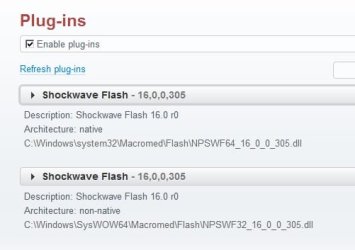
I have my Flash set to notify me when an update is available, as opposed to the alternatives which are (1) allow it to update automatically and (2) don't ever check for updates. Despite this, the only notification I ever get of a new update is this thread.  At least SOME things in this world work as they're supposed to.
At least SOME things in this world work as they're supposed to.My Computer
- Computer type
- PC/Desktop
- Computer Manufacturer/Model Number
- ASUS (assembled myself)
- OS
- Windows 7 Professional 64-bit
- CPU
- Intel Core i7-4790K Quad CPU @ 4.00 GHz
- Motherboard
- ASUS Z97-AR, Intel Z97 Express chipset, ATX form factor
- Memory
- 2x4G DDR3 1600MHz DIMMs
- Graphics Card(s)
- Intel HD Graphics 4600 on mobo; NVidia GeForce GT 710 PCI-E
- Sound Card
- Realtek High Definition Audio, integrated on mobo
- Monitor(s) Displays
- Dell SE2417HGX, 20.5"x11.5" viewable area; 32" Toshiba HDTV
- Screen Resolution
- 1920 x 1080 @ 60 Hz, 32-bit color depth
- Hard Drives
- Western Digital 500G SATA
Seagate 150G SATA
2 x Seagate 6T SATA
2 x Seagate 18T SATA
- PSU
- EVGA 500B (500 Watts)
- Case
- NZXT H230 mid-tower
- Cooling
- CPU fan, PSU fan, 2 case fans, NVidia fan
- Keyboard
- Perixx 513H
- Mouse
- Touch pad integrated into keyboard
- Internet Speed
- Intel Ethernet Conn(2)I218-V, on mobo, ISP=cableTV 400Mbps
- Antivirus
- Comodo
- Browser
- Firefox
- Other Info
- Ext'l DVD rec: LG HL-DT-ST DVDRAM GP10NB20 USB
Monitor conn to VideoPort via HDMI-to-VideoPort adap
Realtek ALC892 8-channel High Definition Audio CODEC featuring Crystal Sound 2
Audio conn to surr recv via 25' optical S/PDIF TOSLINK audio cable
SYSINFO: 11 NIC ports but only 1 actively conn via DHCP to ISP
ISP bundled w/ cable TV+cell, claims 400Mbps,
but really 50 million bytes/sec


 Why? Because their &#(Q@#()%^ installer then packs it in saying the installation failed! What, you couldn't resume from where you were? No, it offers to let me (how magnanimous of them) START OVER FROM THE BEGINNING!!! You bleepity bleepity bleep MORONS!!!!!

