Logical Drives disappear - how does this happen?

I'm still thinking-thinking-thinking about this....

Suppose she had the folder open on the remote computer in Windows Explorer over the LAN, and shut down the PC without closing Explorer.
How would Windows handle closing down those open disks/drives/folders on shutdown? Would Explorer "flush" the network disks so as not to be looking for them at startup?
Maybe the Extended Partition got caught up in the "flushing"?

What do you think?
 

My Computer My Computer

Computer type
PC/Desktop
Computer Manufacturer/Model Number
Home Built - Jan 2013
OS
Windows 7 64 Bit Home Premium SP1
CPU
i7-3820
Motherboard
Asus P9X79-PRO - Bios 4608
Memory
GSkill F3-14900CL9Q - 16GB
Graphics Card(s)
EVGA GeForce GTX660 - Driver 352.86
Sound Card
On board Realtek ALC898
Monitor(s) Displays
Acer S271HL
Screen Resolution
1920 x 1080
Hard Drives
#1- Samsung 840 Pro Series
#2- Western Digital WD1002FAEX Sata3 Black
#3- Western Digital WD1002FAEX Sata3 Black
PSU
Corsair CMPSU-850TX-V2 - 850 watt (by Seasonic)
Case
Corsair Obsidian 550D
Cooling
Standard 3 120mm case fans, Cooler Master Hyper 212 EVO
Keyboard
MS KC-0405
Mouse
Intellimouse 5-button
Internet Speed
56 Mbits/Sec (on a good day)
Antivirus
Avast & Malwarebytes
Browser
Firefox
Other Info
Asus DVD - DRW-24B1ST 24X
I would check whether it can be opened from the remote computer. Normally it should properly close explorer when you shut down. But maybe the remote computer has a handle on it.
 

My Computer My Computer

Computer Manufacturer/Model Number
HP, Dell, Gateway, Toshiba - 4 laptops and 2 desktops
OS
Vista, Windows7, Mint Mate, Zorin, Windows 8
CPU
from 1.6GHz Duo to i7
Monitor(s) Displays
2x HP w2207
Hard Drives
5x HDD, 7x SSD, 12x Externals
Keyboard
with trackball - no mices
Mouse
Trackball mice
Internet Speed
DSL 6000
I will hold my breath and try that!
 

My Computer My Computer

Computer type
PC/Desktop
Computer Manufacturer/Model Number
Home Built - Jan 2013
OS
Windows 7 64 Bit Home Premium SP1
CPU
i7-3820
Motherboard
Asus P9X79-PRO - Bios 4608
Memory
GSkill F3-14900CL9Q - 16GB
Graphics Card(s)
EVGA GeForce GTX660 - Driver 352.86
Sound Card
On board Realtek ALC898
Monitor(s) Displays
Acer S271HL
Screen Resolution
1920 x 1080
Hard Drives
#1- Samsung 840 Pro Series
#2- Western Digital WD1002FAEX Sata3 Black
#3- Western Digital WD1002FAEX Sata3 Black
PSU
Corsair CMPSU-850TX-V2 - 850 watt (by Seasonic)
Case
Corsair Obsidian 550D
Cooling
Standard 3 120mm case fans, Cooler Master Hyper 212 EVO
Keyboard
MS KC-0405
Mouse
Intellimouse 5-button
Internet Speed
56 Mbits/Sec (on a good day)
Antivirus
Avast & Malwarebytes
Browser
Firefox
Other Info
Asus DVD - DRW-24B1ST 24X
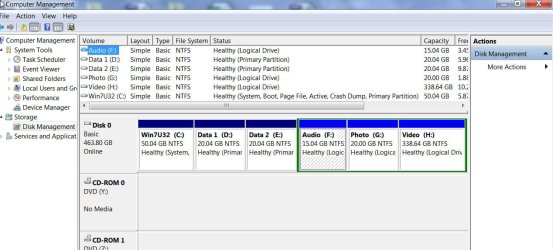
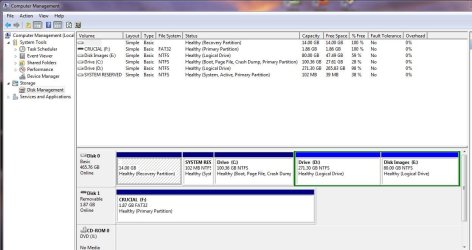
OK. The screenshot below shows my system drive. It has three primary partitions and the fourth primary is the extended partition holding three logical drives.

C01-02-2015 19-06-50.jpg

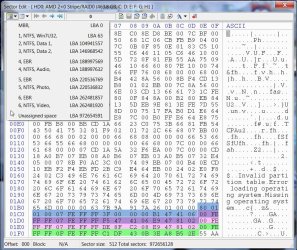
Below is what Bootice shows in the MBR sector (sector 0).The number of byte assigned to the partition Table in MBR is 64 bytes each partition data being a 16 byte string. The four partition data strings are highlighted in different colours. The 16 byte string highlighted in green is the fourth primary extended partition.

A101-02-2015 18-55-29.jpg

If this fourth string gets corrupted for any reason, all the logical drives contained in it will become inaccessible.

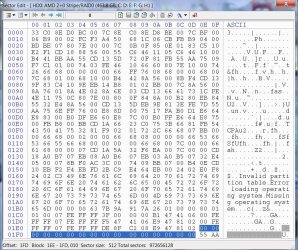
Below I had deliberately written zeroes in that 16Byte string and saved it to the disk as shown and I lost access to all the three logical drives.

D01-02-2015 19-27-39.jpg

e01-02-2015 19-38-07.jpg

This,I presume is what exactly happened in this case.

Partition Recovery Wizard when run, will find the beginning of the fourth partition and rewrite that partition string in its assigned space and all the logical drives in it will become accessible.

What is the reason for that sudden collapse of that fourth partition string? ( Well, what I did is just an experiment writing zeroes and corrupting that16 bytes to make it lose its identity.)

I wouldn't say it came upon suddenly out of the blue. It has been happening gradually over the period of the last four years or so and the final day came on this day when those content just became unreadable and unfortunately it happened in the first sector..When it happens in other places the files become unreadable, the drivers get corrupted, audio and video misses here and there but on the first sector you lose access to the drive.

That particular spot has been losing its magnetism and the signal level has gone below the detection level.Rewrite the data and it will hold on for some more time.Spinrite to a large extent tries to rejuvenate the bad sectors by repeatedly reading and writing into it and many believe that using spinrite periodically reading and writing each sector will prolong the longevity of a hard drive and good for maintenance rather than data recovery from bad seectors.

Now an analogy: People more often these days backup their data and archive it on to a new pendrive. Five years later they take it one day and try to access the data. To their chagrin they find that here and there the data is missing just like the dropouts in the oft used magnetic tape.And the pen drive was not used at all unlike the magnetic tape. The data on the pen drive is stored as charges and over a period the charge has dissipated and the data here and there has become unreadable. Write the data again and it will hold it for another few years.
 

My Computer My Computer

OS
Windows 7 Home Premium 32 bit
Wow, great stuff Jumanji! That explains a lot. Thanks.

Now what is interesting is that when you zeroed out that string the Extended Partition became Unallocated in a Black outlined box in Disk Management, as we would expect.
In this case, the Extended Partition became "Free Space" in a Green outlined box. Do you see any significance to that? Or is it just computer semantics?

There is another wrinkle too, which I will post next in response to WHS.
 

My Computer My Computer

Computer type
PC/Desktop
Computer Manufacturer/Model Number
Home Built - Jan 2013
OS
Windows 7 64 Bit Home Premium SP1
CPU
i7-3820
Motherboard
Asus P9X79-PRO - Bios 4608
Memory
GSkill F3-14900CL9Q - 16GB
Graphics Card(s)
EVGA GeForce GTX660 - Driver 352.86
Sound Card
On board Realtek ALC898
Monitor(s) Displays
Acer S271HL
Screen Resolution
1920 x 1080
Hard Drives
#1- Samsung 840 Pro Series
#2- Western Digital WD1002FAEX Sata3 Black
#3- Western Digital WD1002FAEX Sata3 Black
PSU
Corsair CMPSU-850TX-V2 - 850 watt (by Seasonic)
Case
Corsair Obsidian 550D
Cooling
Standard 3 120mm case fans, Cooler Master Hyper 212 EVO
Keyboard
MS KC-0405
Mouse
Intellimouse 5-button
Internet Speed
56 Mbits/Sec (on a good day)
Antivirus
Avast & Malwarebytes
Browser
Firefox
Other Info
Asus DVD - DRW-24B1ST 24X
I would check whether it can be opened from the remote computer. Normally it should properly close explorer when you shut down. But maybe the remote computer has a handle on it.

Well this brought up my first real clue as to what may have happened, possibly even explaining how that string got corrupted.

I fired up the laptop (KLap) and the desktop (CHLOE) that she was getting files from, plus my personal desktop (AS) was on anyway.

CHLOE did not show up as a Computer in the Network on the laptop (KLap), nor did it show in the Homegroup. (AS did). CHLOE did show up as a Media Device however.

Going to CHLOE, I could see KLap in the Network but when I clicked to access it I got the message: "Windows Cannot Access KLap".

Back to KLap, I restarted. Now CHLOE shows up and all shared folders are accessible.

Back to CHLOE, and KLap is still not accessible. I restart CHLOE and I can see it rebuilding the Network Shares with KLap (green progress bar). Now KLap is accessible and all shared folders too.

And all is back to normal.

So that raises the question: if KLap was connected to CHLOE and accessing a shared folder on it, and KLap was shut down without closing Windows Explorer, could that action cause the corruption that messed up the File Table?
 

My Computer My Computer

Computer type
PC/Desktop
Computer Manufacturer/Model Number
Home Built - Jan 2013
OS
Windows 7 64 Bit Home Premium SP1
CPU
i7-3820
Motherboard
Asus P9X79-PRO - Bios 4608
Memory
GSkill F3-14900CL9Q - 16GB
Graphics Card(s)
EVGA GeForce GTX660 - Driver 352.86
Sound Card
On board Realtek ALC898
Monitor(s) Displays
Acer S271HL
Screen Resolution
1920 x 1080
Hard Drives
#1- Samsung 840 Pro Series
#2- Western Digital WD1002FAEX Sata3 Black
#3- Western Digital WD1002FAEX Sata3 Black
PSU
Corsair CMPSU-850TX-V2 - 850 watt (by Seasonic)
Case
Corsair Obsidian 550D
Cooling
Standard 3 120mm case fans, Cooler Master Hyper 212 EVO
Keyboard
MS KC-0405
Mouse
Intellimouse 5-button
Internet Speed
56 Mbits/Sec (on a good day)
Antivirus
Avast & Malwarebytes
Browser
Firefox
Other Info
Asus DVD - DRW-24B1ST 24X
Yep, I had seen you saying that it looked as a free space and here in this experiment it became unallocated . In fact I would have loved to see the Windows Disk Management picture. Have no idea as to what could have made it as a free space.

I have to go deeper into the 16byte string and understand how different byte groups affect the outcome. Too much to my already overloaded brain cells.:)

Hitting my sack now.
 

My Computer My Computer

OS
Windows 7 Home Premium 32 bit
Unfortunately I did not have the presence of mind to snip that screenshot- it was crisis mode with a distraught wife!

Have a good night!
 

My Computer My Computer

Computer type
PC/Desktop
Computer Manufacturer/Model Number
Home Built - Jan 2013
OS
Windows 7 64 Bit Home Premium SP1
CPU
i7-3820
Motherboard
Asus P9X79-PRO - Bios 4608
Memory
GSkill F3-14900CL9Q - 16GB
Graphics Card(s)
EVGA GeForce GTX660 - Driver 352.86
Sound Card
On board Realtek ALC898
Monitor(s) Displays
Acer S271HL
Screen Resolution
1920 x 1080
Hard Drives
#1- Samsung 840 Pro Series
#2- Western Digital WD1002FAEX Sata3 Black
#3- Western Digital WD1002FAEX Sata3 Black
PSU
Corsair CMPSU-850TX-V2 - 850 watt (by Seasonic)
Case
Corsair Obsidian 550D
Cooling
Standard 3 120mm case fans, Cooler Master Hyper 212 EVO
Keyboard
MS KC-0405
Mouse
Intellimouse 5-button
Internet Speed
56 Mbits/Sec (on a good day)
Antivirus
Avast & Malwarebytes
Browser
Firefox
Other Info
Asus DVD - DRW-24B1ST 24X
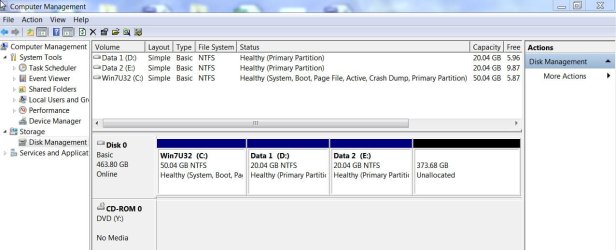
This is what the disk looks like in it's normal condition (current, repaired):

Actual.JPG

And this is similar to what it looked like when it had the problem:

Similar.JPG

The only difference was the first 14GB Recovery Partition was there, and the Free Space box listed 351.30GB of free space.
 

My Computer My Computer

Computer type
PC/Desktop
Computer Manufacturer/Model Number
Home Built - Jan 2013
OS
Windows 7 64 Bit Home Premium SP1
CPU
i7-3820
Motherboard
Asus P9X79-PRO - Bios 4608
Memory
GSkill F3-14900CL9Q - 16GB
Graphics Card(s)
EVGA GeForce GTX660 - Driver 352.86
Sound Card
On board Realtek ALC898
Monitor(s) Displays
Acer S271HL
Screen Resolution
1920 x 1080
Hard Drives
#1- Samsung 840 Pro Series
#2- Western Digital WD1002FAEX Sata3 Black
#3- Western Digital WD1002FAEX Sata3 Black
PSU
Corsair CMPSU-850TX-V2 - 850 watt (by Seasonic)
Case
Corsair Obsidian 550D
Cooling
Standard 3 120mm case fans, Cooler Master Hyper 212 EVO
Keyboard
MS KC-0405
Mouse
Intellimouse 5-button
Internet Speed
56 Mbits/Sec (on a good day)
Antivirus
Avast & Malwarebytes
Browser
Firefox
Other Info
Asus DVD - DRW-24B1ST 24X
So that raises the question: if KLap was connected to CHLOE and accessing a shared folder on it, and KLap was shut down without closing Windows Explorer, could that action cause the corruption that messed up the File Table?
A shutdown from another system should not corrupt the MBR - even if the drive was open. It is supposed to be an orderly process. But then you never know. We'll have to find someone who is familiar with the disk management internals.
 

My Computer My Computer

Computer Manufacturer/Model Number
HP, Dell, Gateway, Toshiba - 4 laptops and 2 desktops
OS
Vista, Windows7, Mint Mate, Zorin, Windows 8
CPU
from 1.6GHz Duo to i7
Monitor(s) Displays
2x HP w2207
Hard Drives
5x HDD, 7x SSD, 12x Externals
Keyboard
with trackball - no mices
Mouse
Trackball mice
Internet Speed
DSL 6000
This is what the disk looks like in it's normal condition (current, repaired):

View attachment 348358

And this is similar to what it looked like when it had the problem:

View attachment 348359

The only difference was the first 14GB Recovery Partition was there, and the Free Space box listed 351.30GB of free space.
Doesn't really shed any more light on exactly how it happened, but the second screenshot shows that the extended partition's boundary was recognized (note the dark green outline around the bright green "free space"). The extended partition is one of the possible max of four primary partitions defined through the "boundary box" at the front of the drive, so this suggests there was no damage done to the low/high sector values in the "boundary box" for this partition. It's still defined, and it's still recognized as an extended partition, and it's still there.

But since there are no logical partitions shown inside of that dark green extended partition, and that the entire area is shown as bright green "free space", if this is where the two previously known logical partitions used to live, it suggests that the corruption (or damage or reset or whatever caused it) was to the internal logical partition definition area inside of the extended partition itself. Somehow, the low/high limits of the two logical partitions inside the extended partition got erased or reset to the same initial state it would have when no logical partitions have been defined but one or more actually did exist at one time (so that the extended partition would have been created).

Anyway, still very interesting. Can't imagine how this type of very specific reset/delete of the very specific previously existing logical partition boundary definitions could occur "naturally" on its own without the involvement of some program (like DISKMGMT or Partition Wizard) that understands about partitions and how/where the low/high limits are specified.

Very odd.
 

My Computer My Computer

Computer type
PC/Desktop
Computer Manufacturer/Model Number
Home-built, two systems (1) and (2)
OS
Windows 7 Pro x64 (1), Win7 Pro X64 (2)
CPU
i5-3350p 3.1Ghz/6MB-cache (1); E8400 3.0Ghz/6MB-cache (2)
Motherboard
ASUS P8Z77-V Pro (1); ASUS P5Q3 (2)
Memory
8GB PC3-12800 DDR3 (1); 4GB PC3-10600 DDR3 (2)
Graphics Card(s)
ATI HD7750 (1), (see TV cards); ATI R7 250 (2)
Sound Card
Realtek ALC892 HD Audio (1); Realtek ALC1200 HD Audio (2)
Monitor(s) Displays
Eizo HD2441W LCD, Eizo S2433W (1); Eizo 24" S2433W (2)
Screen Resolution
1920x1200, 1920x1200 (1); 1920x1200 (2)
Hard Drives
(1) 1TB SATA-II (7200RPM), 2x2TB SATA-III (7200RPM), 250GB SATA-III (10000RPM) for OS; 2x2TB external USB 3.0

(2) 320GB SATA-II (7200RPM), 750GB SATA-II (7200RPM), 150GB SATA-II (10000RPM) for OS; 2TB external USB 3.0
PSU
Nesteq ECS-6001 600W (1); Nesteq ECS-5001 500W (2)
Case
Acousti-Case 360 (1) and (2)
Cooling
Noctua NH-U12P SE2 for CPU, 2x120mm case fans (1) and (2)
Keyboard
IBM PS/2 (1) and (2)
Mouse
Logitech MX Revolution wireless (1); Microsoft wired (2)
Internet Speed
100mbps down / 10mbps up
Antivirus
Microsoft Security Essentials; Malwarebyte Anti-Malware Pro
Browser
Firefox
Other Info
Ceton InfiniTV 4-tuner cablecard-enabled TV card as well as Hauppauge HVR-2250 OTA/ATSC 2-tuner TV card in (1), running under Win7 WMC
Odd indeed!

I must admit that I've seen folks post similar problems where I have been guilty of thinking: "well, you had to have done something. These things don't just happen".
Now I know better!
 

My Computer My Computer

Computer type
PC/Desktop
Computer Manufacturer/Model Number
Home Built - Jan 2013
OS
Windows 7 64 Bit Home Premium SP1
CPU
i7-3820
Motherboard
Asus P9X79-PRO - Bios 4608
Memory
GSkill F3-14900CL9Q - 16GB
Graphics Card(s)
EVGA GeForce GTX660 - Driver 352.86
Sound Card
On board Realtek ALC898
Monitor(s) Displays
Acer S271HL
Screen Resolution
1920 x 1080
Hard Drives
#1- Samsung 840 Pro Series
#2- Western Digital WD1002FAEX Sata3 Black
#3- Western Digital WD1002FAEX Sata3 Black
PSU
Corsair CMPSU-850TX-V2 - 850 watt (by Seasonic)
Case
Corsair Obsidian 550D
Cooling
Standard 3 120mm case fans, Cooler Master Hyper 212 EVO
Keyboard
MS KC-0405
Mouse
Intellimouse 5-button
Internet Speed
56 Mbits/Sec (on a good day)
Antivirus
Avast & Malwarebytes
Browser
Firefox
Other Info
Asus DVD - DRW-24B1ST 24X
So that raises the question: if KLap was connected to CHLOE and accessing a shared folder on it, and KLap was shut down without closing Windows Explorer, could that action cause the corruption that messed up the File Table?
A shutdown from another system should not corrupt the MBR - even if the drive was open. It is supposed to be an orderly process. But then you never know. We'll have to find someone who is familiar with the disk management internals.

Granted.

The system also should not lose the connections to network computers and shared folders in the Homegroup either.
Both problems happening so close to one another leads me to conclude that they must be related. Just can't think of how.
 

My Computer My Computer

Computer type
PC/Desktop
Computer Manufacturer/Model Number
Home Built - Jan 2013
OS
Windows 7 64 Bit Home Premium SP1
CPU
i7-3820
Motherboard
Asus P9X79-PRO - Bios 4608
Memory
GSkill F3-14900CL9Q - 16GB
Graphics Card(s)
EVGA GeForce GTX660 - Driver 352.86
Sound Card
On board Realtek ALC898
Monitor(s) Displays
Acer S271HL
Screen Resolution
1920 x 1080
Hard Drives
#1- Samsung 840 Pro Series
#2- Western Digital WD1002FAEX Sata3 Black
#3- Western Digital WD1002FAEX Sata3 Black
PSU
Corsair CMPSU-850TX-V2 - 850 watt (by Seasonic)
Case
Corsair Obsidian 550D
Cooling
Standard 3 120mm case fans, Cooler Master Hyper 212 EVO
Keyboard
MS KC-0405
Mouse
Intellimouse 5-button
Internet Speed
56 Mbits/Sec (on a good day)
Antivirus
Avast & Malwarebytes
Browser
Firefox
Other Info
Asus DVD - DRW-24B1ST 24X
Well, homegroup is another iffy area. With homegroup and on the high seas you never know what happens, LOL.
 

My Computer My Computer

Computer Manufacturer/Model Number
HP, Dell, Gateway, Toshiba - 4 laptops and 2 desktops
OS
Vista, Windows7, Mint Mate, Zorin, Windows 8
CPU
from 1.6GHz Duo to i7
Monitor(s) Displays
2x HP w2207
Hard Drives
5x HDD, 7x SSD, 12x Externals
Keyboard
with trackball - no mices
Mouse
Trackball mice
Internet Speed
DSL 6000
Back
Top