Solved Windows 7 Update Servers down? Error 8024402c on 7 machines today

mohavepc

Mohave PC Computers
Guru
VIP
Local time
9:51 AM
Messages
559
Location
Lake Havasu City, Arizona
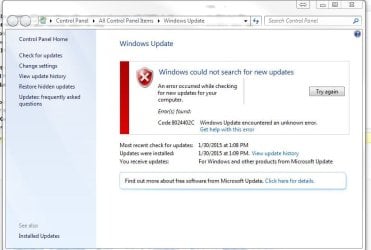
Anyone else getting the 8024402c error while trying to update? All the machines in my shop are getting this error as well as 6 machines I am working on at the moment. Both Windows 7 and 8.1 are failing with the error

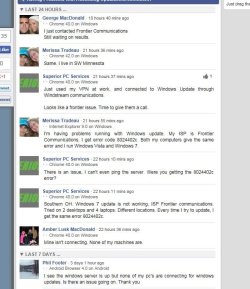
Found this on isitdownrightnow.com. Perhaps it is Frontier that's the issue but would like to know if it is others as well.
 

Attachments
  • updtfail.JPG
    updtfail.JPG
    55.7 KB · Views: 0
  • frontier error.JPG
    frontier error.JPG
    77.6 KB · Views: 0
Last edited:

My Computer My Computer

At a glance

Windows 7 Professional x64AMD Athlon II x4 3.00 GHz16GB Kingston DDR3Nvidia 8600 (dual DVI out for 2 monitors)
Computer type
PC/Desktop
Computer Manufacturer/Model Number
Custom Build MPCBS AMII
OS
Windows 7 Professional x64
CPU
AMD Athlon II x4 3.00 GHz
Motherboard
MSI GF615M-p33
Memory
16GB Kingston DDR3
Graphics Card(s)
Nvidia 8600 (dual DVI out for 2 monitors)
Sound Card
Onboard
Monitor(s) Displays
Acer H233H 23", ASUS 23"
Screen Resolution
1366 x 768
Hard Drives
(2) WD Blue 1 TB 3 partitions, (1) Seagate 7200 500GB with 2 partitions for useless and frequently deleted data Looking forward do an ssd for os soon.
PSU
Corsair 1100Watt
Case
Apevia HAF
Cooling
HAF AMD High Profile Heat sink and fan
Keyboard
wireless Logitech
Mouse
wireless Logitech
Internet Speed
16 mbps
Antivirus
eSet, AVG, Clam and Clamwin (depends on machine)
Browser
Firefox
Other Info
(9) Win 7 machines all x64 (POS Updated to Windows 7 pro YEA), (4) Linux machines x64 and x86 including a v3000 compaq lappy brought back to life with Mint 9 used to scan drives, (1) Linux Machine dual boot XP Pro (for testing and destroying), (1) Win 7 pro x64/Win 8.1 Lenovo Laptop Dual Boot.
Same here

I have several machines that give error 8024402C on Frontier DSL. I thought at first it was my laptop with a problem and I tried all kinds of fix it stuff. Now other machines behind the same router are giving the same message.

None of the machines that fail will check for updates. If they have an update waiting they will install it. The Microsoft Security Essentials won't download updates either.

I just figured something out while posting: I have one machine that works, the only difference I found was the DNS server. My router was set to: 74.40.74.40 which is Frontier DNS. The machine that works had an OpenDNS IP's set. I changed one of the laptops to open DNS IPs and and it is getting updates just fine.

So Frontier has a DNS server problem. Swicth to OpenDNS and forget about it!
 

My Computer My Computer

At a glance

Windows 7 64 bit
Computer type
PC/Desktop
OS
Windows 7 64 bit
I have several machines that give error 8024402C on Frontier DSL. I thought at first it was my laptop with a problem and I tried all kinds of fix it stuff. Now other machines behind the same router are giving the same message.

None of the machines that fail will check for updates. If they have an update waiting they will install it. The Microsoft Security Essentials won't download updates either.

I just figured something out while posting: I have one machine that works, the only difference I found was the DNS server. My router was set to: 74.40.74.40 which is Frontier DNS. The machine that works had an OpenDNS IP's set. I changed one of the laptops to open DNS IPs and and it is getting updates just fine.

So Frontier has a DNS server problem. Swicth to OpenDNS and forget about it!

Is indeed the issue. So if your on frontier, change the DNS. I changed mine in the modem as I have 12 machines to monitor and that solved the issue for all 12 in one shot.
 

My Computer My Computer

At a glance

Windows 7 Professional x64AMD Athlon II x4 3.00 GHz16GB Kingston DDR3Nvidia 8600 (dual DVI out for 2 monitors)
Computer type
PC/Desktop
Computer Manufacturer/Model Number
Custom Build MPCBS AMII
OS
Windows 7 Professional x64
CPU
AMD Athlon II x4 3.00 GHz
Motherboard
MSI GF615M-p33
Memory
16GB Kingston DDR3
Graphics Card(s)
Nvidia 8600 (dual DVI out for 2 monitors)
Sound Card
Onboard
Monitor(s) Displays
Acer H233H 23", ASUS 23"
Screen Resolution
1366 x 768
Hard Drives
(2) WD Blue 1 TB 3 partitions, (1) Seagate 7200 500GB with 2 partitions for useless and frequently deleted data Looking forward do an ssd for os soon.
PSU
Corsair 1100Watt
Case
Apevia HAF
Cooling
HAF AMD High Profile Heat sink and fan
Keyboard
wireless Logitech
Mouse
wireless Logitech
Internet Speed
16 mbps
Antivirus
eSet, AVG, Clam and Clamwin (depends on machine)
Browser
Firefox
Other Info
(9) Win 7 machines all x64 (POS Updated to Windows 7 pro YEA), (4) Linux machines x64 and x86 including a v3000 compaq lappy brought back to life with Mint 9 used to scan drives, (1) Linux Machine dual boot XP Pro (for testing and destroying), (1) Win 7 pro x64/Win 8.1 Lenovo Laptop Dual Boot.

My Computer My Computer

At a glance

Win 7 x64 Home Premium (and x86 VirtualBox VM...i3 370M/i7 6500U8GB - finally :)/8GBit's an i3, dude!/dual Intel&nVidia
Computer type
Laptop
Computer Manufacturer/Model Number
Asus K52F or Lenovo B51-80
OS
Win 7 x64 Home Premium (and x86 VirtualBox VM)/Win10
CPU
i3 370M/i7 6500U
Motherboard
Asus/Lenovo
Memory
8GB - finally :)/8GB
Graphics Card(s)
it's an i3, dude!/dual Intel&nVidia
Sound Card
onboard
Monitor(s) Displays
15.6" built-in
Screen Resolution
1366x768/1920x1080
Hard Drives
750GB Seagate internal
Sundry external drives attached to other computers on the local network
1TB SSD on the Lenovo
PSU
n/a
Internet Speed
as much as I can get - usually on a dongle/phone, so <1MB/s
Antivirus
MSE/Defender
Browser
IE11/12/Edge/Chrome/FF(if I must)
Back
Top