
Hello and thanks from the mountain hermit!

Telich

New member
Local time
7:52 AM
Messages
6
Location
a shack on Blue Mtn range, PA
Hey, I just wanted to quickly introduce myself (assuming this is the proper subforum to do it) briefly and indicate how great this forum has been to me as a new Win7 inductee. I have yet to post any questions since every question I've had has already been addressed and solved by the existing knowledge base. Please allow me to pass on kudos to the membership for responding so quickly to all inquiries so quickly and concisely. As a former Win3.1/Win95/Win98/WinXP user, I've been postponing the migration to a newer OS partly because becoming familiar and comfortable with a new system of organization seemed an unnecessary investment of the extra effort to achieve a comparable level of efficiency that existed in the former system. But you folks are making the transition MUCH MUCH easier and less painful.

I suppose I am a senior member (the Win3.1 experience should be one obvious indicator) struggling to keep pace with technology while needing to be able to seamlessly perform computing tasks, some legacy and others quite new. I am sharing the current Win7 box with a few nephews who stop by the shack occasionally to visit and game. So, although I'm really not into those kinds of diversions, it's best to have the machine configured for their entertainment in those situations.

As a retired optoelectronics engineer, my computer needs are far more technical in nature, though I do have some graphics and accounting/office needs that must be addressed. Lots of MS software being used on the machine I just procured. That can be considered good or bad depending on the perspective, when being considered by what used to be a Unix-based company employee (umm... that would be AT&T/Western Electric btw) recalling when the company migrated over to Microsoft products and the associated user/networking support circa the mid-to-late 1990's (all issues used to be addressed and resolved in-house by Unix specialists prior to that event). Linux was only conceptual at that time.

Anyhoo, that's a quick glimpse for those keeping a score card.

It's very comforting to see that the forum is still very active and comprised of helpful contributors. Keep up the great work! ;) See ya' around!
 

My Computer My Computer

At a glance

Windows 7 Pro 64-bit SP1AMD A4-5300B 3.4GHz8 GbNVIDIA NVS 315
Computer type
PC/Desktop
Computer Manufacturer/Model Number
HP Compaq Pro 6305 MT (build 12WWKCKW601#SABA#DABA) refurbished
OS
Windows 7 Pro 64-bit SP1
CPU
AMD A4-5300B 3.4GHz
Motherboard
Unknown
Memory
8 Gb
Graphics Card(s)
NVIDIA NVS 315
Monitor(s) Displays
HP E190i LED Backlit
Screen Resolution
1280 x 1024 (landscape)
Hard Drives
500Gb
Keyboard
HP Standard PS/2
Mouse
HP Standard Corded 2-button/wheel optical
Internet Speed
1.5 Mb/s DSL
Antivirus
MSE
Browser
Firefox, Opera
Welcome aboard Telich

I would recommend using a better anti virus. Windows 7 built in Defender is not enough for todays internet.

From your specs.

Antivirus Default

I use MSE and Malwarebytes Premium.

Microsoft Security Essentials - Microsoft Windows


https://www.malwarebytes.org/lp/lp4/02_r/?gclid=CJ-J2a-Yx8MCFaHm7AodxDAABA


Here is a couple of tutorials that will help you fill in your (My System Specs) completely.

By Brink:
http://www.sevenforums.com/tutorials/180324-system-info-see-your-system-specs.html

By Kari:
http://www.sevenforums.com/tutorials/311593-speccy-publish-snapshot-your-system-specs.html
 

My Computer My Computer

At a glance

Windows 10 Pro. 64/ version 1709 Windows 7 Pr...Intel i7-6800K @ 4.3Corsair Platinum 16 gig @2400EVGA GTX 1070 OC
Computer type
PC/Desktop
Computer Manufacturer/Model Number
Home made Desktop
OS
Windows 10 Pro. 64/ version 1709 Windows 7 Pro/64
CPU
Intel i7-6800K @ 4.3
Motherboard
ASUS X-99 Deluxe II
Memory
Corsair Platinum 16 gig @2400
Graphics Card(s)
EVGA GTX 1070 OC
Monitor(s) Displays
Asus 27" LED LCD/VE278Q
Screen Resolution
1920-1080 or 1280-720 HDMI
Hard Drives
INTEL SSD 730-240 Gb Sata 3.0/
PSU
EVGA Platium 1200W
Case
Phanteks Luxe Tempered Glass 8 fans/ one radiator
Cooling
XSPC/ Water Cooled CPU
Keyboard
Das 4 Professional
Mouse
Logitech M705/MX Anywhere 2-S
Internet Speed
100 mbits
Antivirus
Microsoft Security Essentials/ Malwarebytes Premium 3.0/ SAS
Browser
I.E. 11 default/Firefox/ ISP Time Warner Cable/Spectrum
Other Info
LG BluRay Burner/
Sound system-KLipsch-THX/
Icy Dock ssd Hot Swap bays.
Welcome to SF Telich,
regarding
I have yet to post any questions since every question I've had has already been addressed and solved by the existing knowledge base.
That says a lot to me, to show your ability and willingness to search for answers and use the knowledge shared here.
I do the same thing when i have a question or issue.
The SF Tutorials are a wealth of knowledge ...
;)

As far as the "Antivirus Default"
That could mean something different if you purchased a new PC with Win 7 installed, or upgraded your current PC to Win 7 ...
A new PC probably has a trial period (90 days?) AV, such as McA... or Nor..., and then you have to pay to keep protected.

For folks I help with a new PC, i recommend uninstalling the "default trial AV", and using a free AV such MSE or Panda.

From what i found for your PC make/model, it sounds like you purchased a new PC with Win 7 pre-installed ?
 

My Computer My Computer

At a glance

Multi-Boot W7_Pro_x64 W8.1_Pro_x64 W10_Pro_x6...AMD Athlon II x4 6206GB GSkill DDR2 800AMD 4670 GPU + AMD 4200 IGP
Computer type
PC/Desktop
Computer Manufacturer/Model Number
home built
OS
Multi-Boot W7_Pro_x64 W8.1_Pro_x64 W10_Pro_x64 +Linux_VMs +Chromium_VM
CPU
AMD Athlon II x4 620
Motherboard
Gigabyte GA-MA785G-UD3H
Memory
6GB GSkill DDR2 800
Graphics Card(s)
AMD 4670 GPU + AMD 4200 IGP
Sound Card
on board Realtek ALC889A
Monitor(s) Displays
RCA 40" LCD TV, Insignia 32" LCD TV, HP 15" LCD monitor
Screen Resolution
1680 x 1050
Hard Drives
OCZ Vertex 3 120GB,
Samsung F3 1TB (3),
Several others - WD, Seagate, Hitachi, ...
PSU
Corsair 500 W
Case
Rosewill mid tower
Cooling
CM 90mm rifle
Keyboard
Gyration wireless, Logitech wireless, Dell USB wired
Mouse
Gyration wireless, Logitech wireless, V7 USB wired
Internet Speed
Spectrum - 100Mbps D / 10Mbps U
Antivirus
Avast, MBAM3, EMET, WinPatrol
Browser
Pale Moon, Firefox, IE
Other Info
2 multi-boot PC's
Mainly HTPC/Office/Gen purpose (no gaming).
Trendnet USB KVM.
LG DVD burner/Blue Ray Player.
Tray system for removable SATA backup drives.

Not currently OCd, under-volted.
I use Hybrid sleep, rarely re-boot or shutdown.

Hauppauge HD-PVR, Avermedia PCIe TV Tuner, Hauppauge PCI TV Tuner.
Gradual conversion

I do appreciate the security software recommendations and must admit that I've had mixed enthusiasm with several antivirus programs that I had invested in on previous machines. Several titles pulled the support cord by introducing new market versions (usually to keep pace with newer processors I suppose) that left my own installations languishing, unless I was to essentially buy the upgrade.

Yes, this is currently Defender so far and this HP box is a refurb which means I have no installation disc (like I did with my WinXP Pro) to rely on should things corrupt to that extent. I was considering, should something as drastic as a full reformat ever be warranted, to purchase Win8 rather than Win7, though TBH I am not privy as to whether the processor and architecture if even suitable for that OS. But that issue is a hypothetical at this juncture, anyway.

At the moment, I am installing all my legacy software, none of which is current (as one example... the version of MS Office is 2003) so it can force me into some research and experimentation to establish full functionality since legacy .dll files were not always carried forward. And I have been "fixing" some other applications due to changes in DirectDraw architecture, DirectX version, OpenGL version, etc. But I had anticipated as much, judging from the documentation of how others have coped with their own software migrations... not specifically on this forum but on those dedicated to the app in consideration. All my legacy virus/malware apps are just too old and I'm betting are not suitable for 64-bit anyway which means shaking the mattress again, hoping something significant falls out. :P

So, it is a slow process to: install each, patch (if needed), test and search for fixes if full functionality is not there by default. Plus, I am disabling all security apps during install and testing, then re-enabling once the software just installed appears to be working at status quo. It's important for a confirmed neurotic like me to eliminate as many variables as possible so diagnosis somewhat controlled. But I digress...

Thanks for the formal welcome, guys! I expect you will be seeing me more often as I press ahead into unfamiliar territory.
 

My Computer My Computer

At a glance

Windows 7 Pro 64-bit SP1AMD A4-5300B 3.4GHz8 GbNVIDIA NVS 315
Computer type
PC/Desktop
Computer Manufacturer/Model Number
HP Compaq Pro 6305 MT (build 12WWKCKW601#SABA#DABA) refurbished
OS
Windows 7 Pro 64-bit SP1
CPU
AMD A4-5300B 3.4GHz
Motherboard
Unknown
Memory
8 Gb
Graphics Card(s)
NVIDIA NVS 315
Monitor(s) Displays
HP E190i LED Backlit
Screen Resolution
1280 x 1024 (landscape)
Hard Drives
500Gb
Keyboard
HP Standard PS/2
Mouse
HP Standard Corded 2-button/wheel optical
Internet Speed
1.5 Mb/s DSL
Antivirus
MSE
Browser
Firefox, Opera
Yes, this is currently Defender so far and this HP box is a refurb which means I have no installation disc (like I did with my WinXP Pro) to rely on should things corrupt to that extent. I was considering, should something as drastic as a full reformat ever be warranted, to purchase Win8 rather than Win7, though TBH I am not privy as to whether the processor and architecture if even suitable for that OS. But that issue is a hypothetical at this juncture, anyway.

Now that we know it is a refurb, do you have a COA sticker with a valid and readable license key ?
If you do, you can do a clean re-install with gregrocker's tutorial:
http://www.sevenforums.com/tutorials/219487-clean-reinstall-factory-oem-windows-7-a.html

If you have a valid W7 key, you can create a legal/official W7 installation disc.

fyi (imho) ...
Windows 7 / Windows Defender is NOT an anti-virus program
At best, it's a weak Anti-malware solution ...

I have several systems and use different AV programs and real-time security ... see my specs
For me, any AV works, but i don't visit the dodgy sites that "corrupts the OS" that i see for some people i help.

MY PERSONAL FAVORITE NOW is Panda free ...
For people I help, MY PERSONAL RECOMMENDATION NOW is MSE, ...
If MSE doesn't protect them well enough, i re-visit, and try and find a better solution for them.
 

My Computer My Computer

At a glance

Multi-Boot W7_Pro_x64 W8.1_Pro_x64 W10_Pro_x6...AMD Athlon II x4 6206GB GSkill DDR2 800AMD 4670 GPU + AMD 4200 IGP
Computer type
PC/Desktop
Computer Manufacturer/Model Number
home built
OS
Multi-Boot W7_Pro_x64 W8.1_Pro_x64 W10_Pro_x64 +Linux_VMs +Chromium_VM
CPU
AMD Athlon II x4 620
Motherboard
Gigabyte GA-MA785G-UD3H
Memory
6GB GSkill DDR2 800
Graphics Card(s)
AMD 4670 GPU + AMD 4200 IGP
Sound Card
on board Realtek ALC889A
Monitor(s) Displays
RCA 40" LCD TV, Insignia 32" LCD TV, HP 15" LCD monitor
Screen Resolution
1680 x 1050
Hard Drives
OCZ Vertex 3 120GB,
Samsung F3 1TB (3),
Several others - WD, Seagate, Hitachi, ...
PSU
Corsair 500 W
Case
Rosewill mid tower
Cooling
CM 90mm rifle
Keyboard
Gyration wireless, Logitech wireless, Dell USB wired
Mouse
Gyration wireless, Logitech wireless, V7 USB wired
Internet Speed
Spectrum - 100Mbps D / 10Mbps U
Antivirus
Avast, MBAM3, EMET, WinPatrol
Browser
Pale Moon, Firefox, IE
Other Info
2 multi-boot PC's
Mainly HTPC/Office/Gen purpose (no gaming).
Trendnet USB KVM.
LG DVD burner/Blue Ray Player.
Tray system for removable SATA backup drives.

Not currently OCd, under-volted.
I use Hybrid sleep, rarely re-boot or shutdown.

Hauppauge HD-PVR, Avermedia PCIe TV Tuner, Hauppauge PCI TV Tuner.
Now that we know it is a refurb, do you have a COA sticker with a valid and readable license key ?
If you do, you can do a clean re-install with gregrocker's tutorial:
http://www.sevenforums.com/tutorials/219487-clean-reinstall-factory-oem-windows-7-a.html

If you have a valid W7 key, you can create a legal/official W7 installation disc.
Oops! Another acronym to bedevil my poor, tired mind. What does "C-O-A" stand for, please?

Two stickers can be read on this box.

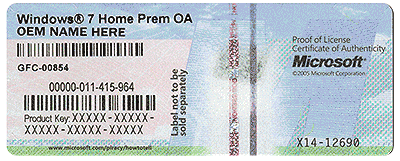
There's a multicolored sticker (the newer-looking of the two) entitled "Microsoft® 7 Pro OA" on the top of the case just above the white one that displays HP machine model, serial# and product ID (the machine sticker is only readable using a mag glass, however, so badly rubbed).

On the colored sticker are two bar codes, one labeled "HP" and the other "Product Key:".

  • The first bar code (HP) lists a 9-digit numeric code in the format xxxxxx-xxx just to the right of the bar.
  • The product key, a 25-digit alphanumeric code in the format xxxxx-xxxxx-xxxxx-xxxxx-xxxxx, is printed just above the second bar code.
  • Directly to the right of bar code #2 is an alphanumeric 8-digit code in the format xxx-xxxxx.
  • Just below bar code #2 is a numeric 14-digit code in the format xxxxx-xxx-xxx-xxx.
All codes printed on the colored sticker are easily read.

BTW, two questions related boot alternatives...

1. Would the Win7 OS fit onto a single CD? a single DVD? I assume the fianl disc would be boot-able, no?
2. How many boot options are there in the Win7 universe? Obviously, they no longer support floppy boot, but could one boot through USB via flash? Please bear with me. I've been away from the cutting edge so long that I am no longer aware of the new features and limitations.

fyi (imho) ...
Windows 7 / Windows Defender is NOT an anti-virus program
At best, it's a weak Anti-malware solution ...
I see. Thanks for the heads up, David.
I have several systems and use different AV programs and real-time security ... see my specs
For me, any AV works, but i don't visit the dodgy sites that "corrupts the OS" that i see for some people i help.

MY PERSONAL FAVORITE NOW is Panda free ...
For people I help, MY PERSONAL RECOMMENDATION NOW is MSE, ...
If MSE doesn't protect them well enough, i re-visit, and try and find a better solution for them.
Will do.

My browsing is limited only to authenticated sites where I regularly do business with an occasional stop off for weather and email checks.

My email is solely interfaced via freebie web sites now since I've had problems in the past with those email servers provided by the web provider. Apparently, the trend has been moved away from a dedicated email-only server towards a web-based one... which is really asking for trouble IMHO. My last account got hacked ("magically", the support folks seemed to infer *sigh*) and caused me weeks of horror just trying to run normal communications, hence, now I stick with "disposable" email and discard if there's any major issue. They are slower, naturally, devour bandwidth with all the ad content, get spammed at an insane rate (though filtering allows better management) and I can't use my favorite Outlook organizer interface :( , but I still feel it is the path of least danger and potential for service interruption.
That said, even with my limited browsing history (the kids just use this machine for gaming while the modem is disabled for their sessions (love 'em... but I was young once and very resourceful ;) )), I will take your advice and try out those mentioned.

Not sure if our technical discussion qualifies as "Chill out" but the topic seems to have grown its own legs innately. Ahh, well...
 

My Computer My Computer

At a glance

Windows 7 Pro 64-bit SP1AMD A4-5300B 3.4GHz8 GbNVIDIA NVS 315
Computer type
PC/Desktop
Computer Manufacturer/Model Number
HP Compaq Pro 6305 MT (build 12WWKCKW601#SABA#DABA) refurbished
OS
Windows 7 Pro 64-bit SP1
CPU
AMD A4-5300B 3.4GHz
Motherboard
Unknown
Memory
8 Gb
Graphics Card(s)
NVIDIA NVS 315
Monitor(s) Displays
HP E190i LED Backlit
Screen Resolution
1280 x 1024 (landscape)
Hard Drives
500Gb
Keyboard
HP Standard PS/2
Mouse
HP Standard Corded 2-button/wheel optical
Internet Speed
1.5 Mb/s DSL
Antivirus
MSE
Browser
Firefox, Opera
COA

What is the Windows Certificate of Authenticity?

COA-Certificate-of-Authenticity.gif
 

My Computer My Computer

At a glance

Windows 10 Pro. 64/ version 1709 Windows 7 Pr...Intel i7-6800K @ 4.3Corsair Platinum 16 gig @2400EVGA GTX 1070 OC
Computer type
PC/Desktop
Computer Manufacturer/Model Number
Home made Desktop
OS
Windows 10 Pro. 64/ version 1709 Windows 7 Pro/64
CPU
Intel i7-6800K @ 4.3
Motherboard
ASUS X-99 Deluxe II
Memory
Corsair Platinum 16 gig @2400
Graphics Card(s)
EVGA GTX 1070 OC
Monitor(s) Displays
Asus 27" LED LCD/VE278Q
Screen Resolution
1920-1080 or 1280-720 HDMI
Hard Drives
INTEL SSD 730-240 Gb Sata 3.0/
PSU
EVGA Platium 1200W
Case
Phanteks Luxe Tempered Glass 8 fans/ one radiator
Cooling
XSPC/ Water Cooled CPU
Keyboard
Das 4 Professional
Mouse
Logitech M705/MX Anywhere 2-S
Internet Speed
100 mbits
Antivirus
Microsoft Security Essentials/ Malwarebytes Premium 3.0/ SAS
Browser
I.E. 11 default/Firefox/ ISP Time Warner Cable/Spectrum
Other Info
LG BluRay Burner/
Sound system-KLipsch-THX/
Icy Dock ssd Hot Swap bays.
You ought to write down that 25 character Product Key in case that sticker is defaced. The Product Key is what you need to activate Windows and what you pay for when you buy a Windows disk. The Windows installation files are a dime a dozen. Anyone can download them for no charge.

Yes. The Windows installation files will fit on a single DVD, not a CD. Yes, it's a bootable disk. You'd download the ISO and burn it to a disk with any old burning program.
 

My Computer My Computer

At a glance

Windows 7 Home Premium SP1, 64-bitIntel Skylake i5-6600K, not overclocked8 GB HyperX DDR4-2666 (2 x 4 GB)none; graphics are integrated on CPU
Computer type
PC/Desktop
Computer Manufacturer/Model Number
Ignatz Special; 4 speed manual gearbox; factory air conditioning; one of one
OS
Windows 7 Home Premium SP1, 64-bit
CPU
Intel Skylake i5-6600K, not overclocked
Motherboard
AsRock Z170M Extreme 4, micro ATX
Memory
8 GB HyperX DDR4-2666 (2 x 4 GB)
Graphics Card(s)
none; graphics are integrated on CPU
Sound Card
onboard: Realtek ALC1150; external: USB Behringer UF0-202
Monitor(s) Displays
Dell S2340M 23 inch IPS
Screen Resolution
1600 x 900
Hard Drives
System: Crucial MX100 series SSD, 128 GB;
Data: Samsung Spinpoint 103SJ, 1 TB;
Backup: WD Caviar Green WD30EZRX-00D8PB0, 3 TB
PSU
Rosewill SilentNight 500 watt fanless, semi-modular
Case
Antec Solo II
Cooling
Noctua NH-U12S; Noctua F12 intake, Noctua S12A exhaust
Keyboard
Microsoft 200 6JH-00001 USB
Mouse
Dell or Microsoft optical wired; USB
Antivirus
Microsoft Security Essentials and Malwarebytes Premium
Browser
Pale Moon
Other Info
All fans PWM; speeds at idle: CPU circa 500 rpm; intake circa 600 rpm; exhaust circa 600 rpm; CPU temps 27 idle and 47 C load in a warm room (27 C/81 F) when running Intel Extreme Tuning Utility stress test.
Ahhh... Certificate of Authority. Thanks, Layback Bear! On the left side of this label, just about impossible to read with the nasty gold flake finish almost concealing the printing are those exact words. Also checked out the MS howtotell URL once I cleaned my eye loop better and deciphered the printing.

I installed the MSE app so I'll make that profile change now. Pretty straight-forward and easy to set/reset at first glance.

And yes, I've learned to copy all installation keys to a flash file which I print out as a hard copy. Now that I know what to looki for, it's done. ;)
 

My Computer My Computer

At a glance

Windows 7 Pro 64-bit SP1AMD A4-5300B 3.4GHz8 GbNVIDIA NVS 315
Computer type
PC/Desktop
Computer Manufacturer/Model Number
HP Compaq Pro 6305 MT (build 12WWKCKW601#SABA#DABA) refurbished
OS
Windows 7 Pro 64-bit SP1
CPU
AMD A4-5300B 3.4GHz
Motherboard
Unknown
Memory
8 Gb
Graphics Card(s)
NVIDIA NVS 315
Monitor(s) Displays
HP E190i LED Backlit
Screen Resolution
1280 x 1024 (landscape)
Hard Drives
500Gb
Keyboard
HP Standard PS/2
Mouse
HP Standard Corded 2-button/wheel optical
Internet Speed
1.5 Mb/s DSL
Antivirus
MSE
Browser
Firefox, Opera

My Computer My Computer

At a glance

Windows 10 Pro. 64/ version 1709 Windows 7 Pr...Intel i7-6800K @ 4.3Corsair Platinum 16 gig @2400EVGA GTX 1070 OC
Computer type
PC/Desktop
Computer Manufacturer/Model Number
Home made Desktop
OS
Windows 10 Pro. 64/ version 1709 Windows 7 Pro/64
CPU
Intel i7-6800K @ 4.3
Motherboard
ASUS X-99 Deluxe II
Memory
Corsair Platinum 16 gig @2400
Graphics Card(s)
EVGA GTX 1070 OC
Monitor(s) Displays
Asus 27" LED LCD/VE278Q
Screen Resolution
1920-1080 or 1280-720 HDMI
Hard Drives
INTEL SSD 730-240 Gb Sata 3.0/
PSU
EVGA Platium 1200W
Case
Phanteks Luxe Tempered Glass 8 fans/ one radiator
Cooling
XSPC/ Water Cooled CPU
Keyboard
Das 4 Professional
Mouse
Logitech M705/MX Anywhere 2-S
Internet Speed
100 mbits
Antivirus
Microsoft Security Essentials/ Malwarebytes Premium 3.0/ SAS
Browser
I.E. 11 default/Firefox/ ISP Time Warner Cable/Spectrum
Other Info
LG BluRay Burner/
Sound system-KLipsch-THX/
Icy Dock ssd Hot Swap bays.
Back
Top