Solved AOMEI Are there any hidden, known issues when using it?

XP VM User

New member
Member
VIP
Local time
2:52 PM
Messages
279
Hi everyone!

Since I'm now purchasing AOMEI because of the VSS issue with Macrium...

(for those new here to my problem, see prior questions here:

http://www.sevenforums.com/backup-r...ect-backup-aborted-error-code-0x8004230f.html

http://www.sevenforums.com/backup-r...how-avoid-cnet-virus-adware-malware-prog.html

and

http://www.sevenforums.com/backup-restore/357684-need-new-backup-storage-program.html )

For the person who is paying for their laptop to have a Backup through a paid, "Professional" $49 version of AOMEI to avoid any possible adware, spyware, toolbars, candy stuff, etc etc with the "Free" ware version of AOMEI Standard,

Question: They would like to know with 100% certainty (I know impossible but as close as we can do here!), that some hidden, (i.e. Hidden to my limited knowledge), unknown issue might pop up and there goes another $50 wasted on a backup program that still is not successful in copying the 1 yr behind the times Hard Drive to brand new, WD HDD (after having also spent $100 for that one!)

So what pre-purchase testing can be done to make certain AOMEI will work on this laptop??

Simple question! I'm certain knowing more about computers than they do, its fraught with potential conflicts and stuations depending upon which 205 programs installed would have interfered with something it should not have....

Thanks again! (Kept it short!)

XP VM USER (Sorry got stuck with name on first posting)
 

My Computer My Computer

Computer type
Laptop
Computer Manufacturer/Model Number
SONY VAIO VPCS111FM
OS
Windows7 Professional 64bit
CPU
Intel(R) Core (TM) i5 CPU M 430 @2.27 Ghz
Memory
8.0 GB
Hard Drives
Seagate 500GB Momentus
Cooling
Internal fan
Mouse
Logitech bluetooth trackball
Browser
Pale Moon Browser for x64

My Computer My Computer

Computer type
PC/Desktop
Computer Manufacturer/Model Number
home built
OS
Multi-Boot W7_Pro_x64 W8.1_Pro_x64 W10_Pro_x64 +Linux_VMs +Chromium_VM
CPU
AMD Athlon II x4 620
Motherboard
Gigabyte GA-MA785G-UD3H
Memory
6GB GSkill DDR2 800
Graphics Card(s)
AMD 4670 GPU + AMD 4200 IGP
Sound Card
on board Realtek ALC889A
Monitor(s) Displays
RCA 40" LCD TV, Insignia 32" LCD TV, HP 15" LCD monitor
Screen Resolution
1680 x 1050
Hard Drives
OCZ Vertex 3 120GB,
Samsung F3 1TB (3),
Several others - WD, Seagate, Hitachi, ...
PSU
Corsair 500 W
Case
Rosewill mid tower
Cooling
CM 90mm rifle
Keyboard
Gyration wireless, Logitech wireless, Dell USB wired
Mouse
Gyration wireless, Logitech wireless, V7 USB wired
Internet Speed
Spectrum - 100Mbps D / 10Mbps U
Antivirus
Avast, MBAM3, EMET, WinPatrol
Browser
Pale Moon, Firefox, IE
Other Info
2 multi-boot PC's
Mainly HTPC/Office/Gen purpose (no gaming).
Trendnet USB KVM.
LG DVD burner/Blue Ray Player.
Tray system for removable SATA backup drives.

Not currently OCd, under-volted.
I use Hybrid sleep, rarely re-boot or shutdown.

Hauppauge HD-PVR, Avermedia PCIe TV Tuner, Hauppauge PCI TV Tuner.
Thanks for reading my posting and replying!

Hi DavidE!

Thanks for taking the positive steps to show me (again) the way.

I will be downloading the "free" Trial version today.

Why? Because unlike the others, this is the Free version of the same Professional that I would purchase later on if it works....

Why? Because of this "sign" "notice" that none of the other top Backup software recommended for use by the members of Windows Seven Forum happened to have (I did not look at EVERY one on the Top Ten listing so might have been one or two there with the same notice---but again that was "one" commercial company reviews, not actual "users" like I find here on Windows Seven Forum...

The link DavidE provided (I went to the paid site immediately so I missed this one)... says:
100% Clean Installation
No SPYWARE, NO ADWARE, NO VIRUSES! Certified by Softpedia - Free Downloads Encyclopedia. Please set your mind at rest.

Nice!

I thank you for the "link" again (as sorry I lost all my Opera History, and don't know how to find the name of that "total virus" link unless I remembered its name, which (as you see I did not and could not while typing this!) --I had the "window" open in the Opera, which I lost the history of in the crash......

Link I got again now to open the window:

Scan the download at VirusTotal
https://www.virustotal.com/en/

AND of course, at the end of everything, (a proper Backup is only a means to get to the end) I do want to fix what is wrong with computer=clean system again....so VSS etc will be fixed (I have the steps posted by whs ["to reregister the VSS.dlls"] printed out so I saved it from losing it on History), and will follow them once I have the "two" AOMEI backups to get to use Macrium product as well since I now have 2TB drive plenty of space to hold everything!

Finally, I do appreciate the help here---once I get a good copy, you'll see I'll be more willing to follow Reg Edit etc cures knowing that I have ERUNT etc backups in case something goes wrong and a friendly forum here where I can write (albeit long) for some answers!

Thanks again DavidE and everyone!

P.S. Made a Restore Point before beginning the download of 30 day trial version of Professional 2.2 today---I'm Learning!
 

My Computer My Computer

Computer type
Laptop
Computer Manufacturer/Model Number
SONY VAIO VPCS111FM
OS
Windows7 Professional 64bit
CPU
Intel(R) Core (TM) i5 CPU M 430 @2.27 Ghz
Memory
8.0 GB
Hard Drives
Seagate 500GB Momentus
Cooling
Internal fan
Mouse
Logitech bluetooth trackball
Browser
Pale Moon Browser for x64
I hate to throw a monkey wrench into the discussion, but AOMEI is work in progress. I tried to use the Backupper and their OneKey products and had some problems with both of them.

AOMEI is not as stable as e.g Macrium and whether it is reliable like Macrium needs to be seen. Their user interface is simple but hard to read in that little Window.

Here are the problems I had:

1. The backupper did not work correctly on one of my 32bit systems
2. Imaging a partition that was encrypted at a previous time but is now decrypted does not work
3. OneKey does not write a BCD for recovery if the bootmgr is on C rather than in the system partition.

I have corresponded several times with the AOMEI developers but the feedback is meager. At least they answer (saying nothing).
 

My Computer My Computer

Computer Manufacturer/Model Number
HP, Dell, Gateway, Toshiba - 4 laptops and 2 desktops
OS
Vista, Windows7, Mint Mate, Zorin, Windows 8
CPU
from 1.6GHz Duo to i7
Monitor(s) Displays
2x HP w2207
Hard Drives
5x HDD, 7x SSD, 12x Externals
Keyboard
with trackball - no mices
Mouse
Trackball mice
Internet Speed
DSL 6000
Thank you for your research whs

Hi whs!

Thank you for doing the extra steps in researching this issue!

Perfect! You said:

I hate to throw a monkey wrench into the discussion, but AOMEI is work in progress. I tried to use the Backupper and their OneKey products and had some problems with both of them.

AOMEI is not as stable as e.g Macrium and whether it is reliable like Macrium needs to be seen. Their user interface is simple but hard to read in that little Window.

Yes! Thanks for checking! I know its a work in progress by seeing all the "beta" choices and its only "version 2.2" so far... relatively brand new backup program to put my "faith" in .... (some here want me to just blindly follow instructions "on faith" nothing more.... I need proof that is all I ask before placing trust in backup programs for all my hard hard worked data!!! (and programs without any current Product Keys!)

If you remember..... I'm using AOMEI to get ONE or TWO perfectly working (i.e. recoverable backups) on external Hard Drives, before attempting to FIX the VSS problem (I might lose computer doing Reg Edit commands you suggested in Post #8 elsewhere to me..... so before I can use Macrium, I need to fix the VSS, but ENRUT is too small a save to risk ruining everything else while I try to follow the instructions and not make a worse problem attempting to get the "better" backup program i.e. Macrium working ) sorry for longer description----I just felt I did not explain it in a few words above.

Also (yes longer typing) I had to enlarge!!!! the little window image to present it in my post below of the success (?) of my first AOMEI backup.

Here are the problems I had:

1. The backupper did not work correctly on one of my 32bit systems

Yes, If it works I'd be considering using it to help my older XP system have a "second" type of backup to the old (legacy help only) Norton Ghost---I have both x32 and x64 bootable HDD's there.. (Of course I can use Macrium too... but so far not yet successful on that so not willing to trust it on XP until it works somewhere else first)

2. Imaging a partition that was encrypted at a previous time but is now decrypted does not work

I have this only with the XP system (a program or two uses encryption.... Norton copies exactly what it sees, so never had to unencrypt it..... are you saying it must be unencrypted for AOMEI to actually copy it? Might be a difficult or impossible program to use in my XP system with various scattered FILES or partitions encrypted and not encrypted... its a mess due to program saved stuff everywhere until I learned how to use it properly (a few years!)

3. OneKey does not write a BCD for recovery if the bootmgr is on C rather than in the system partition.

Question: Is OneKey part of AOMEI? Is it something I have not used as I never recovered from AOMEI backup copy (as see below I just did my first one???)

I have corresponded several times with the AOMEI developers but the feedback is meager. At least they answer (saying nothing).

I assumed as much from the poor English translations of their (Chinese I assumed is native language) manual.... and the fact NO telephone support at all just long distance Email support (somewhat poor given my slow methods of thinking out any problems I have with programs/computers as you see this could take me months to get messages back and forth if I have any problems I need to ask them about!!!)

Thank you and see the post below for where I am with the AOMEI backup and some questions too!
 

My Computer My Computer

Computer type
Laptop
Computer Manufacturer/Model Number
SONY VAIO VPCS111FM
OS
Windows7 Professional 64bit
CPU
Intel(R) Core (TM) i5 CPU M 430 @2.27 Ghz
Memory
8.0 GB
Hard Drives
Seagate 500GB Momentus
Cooling
Internal fan
Mouse
Logitech bluetooth trackball
Browser
Pale Moon Browser for x64
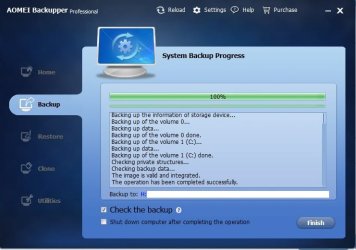
AOMEI Backup was Successful!

Hi Everyone!

Thanks go to everyone who helped me! (Reps will go around as soon as I give 10 others--up to 8 now).
Also here is a final Screenshot for anyone who is considering purchasing/using AOMEI (just trying to be complete in my threads!)

AOMEI First Backup Successful pic PS17599.jpg

Now one question is left... difficult one!

How do I make certain the copy is 100%???

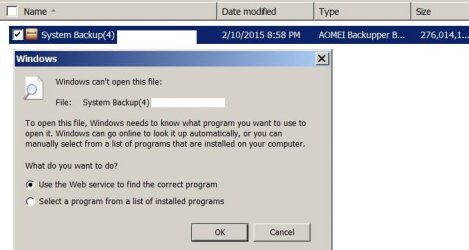
Norton Ghost let me SEE inside the copy... using Ghost or Windows Explorer!

Of course I can't do it with modern Backup programs like AOMEI

See result below:

AOMEI Windows Explorer cant use it PS17605.jpg

So now how do I make certain this is a RECOVERABLE/RESTORABILITY of this copy.... without actually doing the restoration? I don't have a lose drive to try it as I don't know if Windows 7 allows for external booting tests while hooked up to a laptop (On a desktop I go into the BIOS and use settings there to allow this external boot.....as a test for Norton stuff.... I've NEVER found or seen (probably I should not) the "bios" on a laptop anywhere.... they just "work" without showing that Bios Step that all my Desktops always ask me to "press F1 to continue or Press F2 to enter Set up" (at least the DELL ones do that).......

Thanks for figuring out next steps for me to take to test this.

The reason I ask, is that I want to test AOMEI somehow....... BEFORE I make the second backup copy that will erase all my OLD NORTON copies on the other external Hard Drive.
 

My Computer My Computer

Computer type
Laptop
Computer Manufacturer/Model Number
SONY VAIO VPCS111FM
OS
Windows7 Professional 64bit
CPU
Intel(R) Core (TM) i5 CPU M 430 @2.27 Ghz
Memory
8.0 GB
Hard Drives
Seagate 500GB Momentus
Cooling
Internal fan
Mouse
Logitech bluetooth trackball
Browser
Pale Moon Browser for x64
I don't think aomei allows you open backup file in Windows Explorer
 

My Computer My Computer

Computer type
PC/Desktop
Computer Manufacturer/Model Number
custom build
OS
Windows 8.1 x64
You already checked the image. You can look at the contents with Explore Image.

EXPLORE.jpg
 

My Computers My Computers

System One System Two

  • Computer type
    PC/Desktop
    OS
    7 X64
    CPU
    i5 8400
    Motherboard
    gigabyte b365m ds3h
    Memory
    2x8gb 3200mhz
    Hard Drives
    various
    PSU
    pure power 11 400w cm
    Case
    Coolermaster
    Cooling
    cryorig m9i
  • Computer type
    PC/Desktop
    OS
    7x64
    CPU
    g5400
    Motherboard
    ga b365m ds3h
    Memory
    8gb ddr4 2400
    PSU
    xfx pro 450w
Thank you SWI2

Hi SWI2 and others here:

Thank you for that in Post #8.

So Image(s) have been checked/verified by my checking the box on advanced settings....

I can use Windows Explorer to actually "view" a image once I mount the drive.......

This is important as various times I've had one or more programs/files corrupted, but not enough to want to do a WHOLE Drive, Format/wipe/Restore everything process---and possibly mess things up worse... so Ghost and these programs I see all allow me the option to restore just folders, or files.. which seeing their original "size" comparing to what I see on the computer is the only way to make the decision to do this drastic restoration step.

Thanks for the information!
 

My Computer My Computer

Computer type
Laptop
Computer Manufacturer/Model Number
SONY VAIO VPCS111FM
OS
Windows7 Professional 64bit
CPU
Intel(R) Core (TM) i5 CPU M 430 @2.27 Ghz
Memory
8.0 GB
Hard Drives
Seagate 500GB Momentus
Cooling
Internal fan
Mouse
Logitech bluetooth trackball
Browser
Pale Moon Browser for x64
Yes, if you mount the image, you can view the contents and copy out any individual files/folders if you like.
 

My Computers My Computers

System One System Two

  • Computer type
    PC/Desktop
    OS
    7 X64
    CPU
    i5 8400
    Motherboard
    gigabyte b365m ds3h
    Memory
    2x8gb 3200mhz
    Hard Drives
    various
    PSU
    pure power 11 400w cm
    Case
    Coolermaster
    Cooling
    cryorig m9i
  • Computer type
    PC/Desktop
    OS
    7x64
    CPU
    g5400
    Motherboard
    ga b365m ds3h
    Memory
    8gb ddr4 2400
    PSU
    xfx pro 450w
Aomei Backupper Pro 2.2 is free for a couple of days at Windows Deal.
AOMEI Backupper Professional 2.2 (100% Discount)

You do have to download, install, and activate it before the end of the free offer, or the key is no good.
You MIGHT be able to just activate your trial version with the free key, without reinstalling...i don't know for sure...

You do have to enter an email address to get the freebie.
I get a daily email sales flyer from Windows Deal because I have downloaded some freebies.
That doesn't bother me, it's how i learned about this free offer.
I've never had any problems with downloads from Windows Deal.

I downloaded it and the installer scans clean at VirusTotal.
https://www.virustotal.com/en/file/...6cce123bf5c26e44bb61cebf83e09702732/analysis/
 

My Computer My Computer

Computer type
PC/Desktop
Computer Manufacturer/Model Number
home built
OS
Multi-Boot W7_Pro_x64 W8.1_Pro_x64 W10_Pro_x64 +Linux_VMs +Chromium_VM
CPU
AMD Athlon II x4 620
Motherboard
Gigabyte GA-MA785G-UD3H
Memory
6GB GSkill DDR2 800
Graphics Card(s)
AMD 4670 GPU + AMD 4200 IGP
Sound Card
on board Realtek ALC889A
Monitor(s) Displays
RCA 40" LCD TV, Insignia 32" LCD TV, HP 15" LCD monitor
Screen Resolution
1680 x 1050
Hard Drives
OCZ Vertex 3 120GB,
Samsung F3 1TB (3),
Several others - WD, Seagate, Hitachi, ...
PSU
Corsair 500 W
Case
Rosewill mid tower
Cooling
CM 90mm rifle
Keyboard
Gyration wireless, Logitech wireless, Dell USB wired
Mouse
Gyration wireless, Logitech wireless, V7 USB wired
Internet Speed
Spectrum - 100Mbps D / 10Mbps U
Antivirus
Avast, MBAM3, EMET, WinPatrol
Browser
Pale Moon, Firefox, IE
Other Info
2 multi-boot PC's
Mainly HTPC/Office/Gen purpose (no gaming).
Trendnet USB KVM.
LG DVD burner/Blue Ray Player.
Tray system for removable SATA backup drives.

Not currently OCd, under-volted.
I use Hybrid sleep, rarely re-boot or shutdown.

Hauppauge HD-PVR, Avermedia PCIe TV Tuner, Hauppauge PCI TV Tuner.
Whats the difference between the standard (free version) and the professional? I have backed up and restored my entire c drive twice with no issues whatsoever with the free version. Also cloned one of my SSD's to HD. Works great.
 

My Computer My Computer

Computer type
PC/Desktop
Computer Manufacturer/Model Number
Asrock
OS
Win 7 64 Ultimate
CPU
I7 2600K
Motherboard
Asrock Professional
Memory
32 GB
Graphics Card(s)
Gigabyte R9 290
Sound Card
Internal
Monitor(s) Displays
Samsung 27in
Hard Drives
1 Samsung 256 GB SSD. 1 WD Velociraptor 300 and 1 WD 2 TB

My Computer My Computer

Computer type
PC/Desktop
Computer Manufacturer/Model Number
home built
OS
Multi-Boot W7_Pro_x64 W8.1_Pro_x64 W10_Pro_x64 +Linux_VMs +Chromium_VM
CPU
AMD Athlon II x4 620
Motherboard
Gigabyte GA-MA785G-UD3H
Memory
6GB GSkill DDR2 800
Graphics Card(s)
AMD 4670 GPU + AMD 4200 IGP
Sound Card
on board Realtek ALC889A
Monitor(s) Displays
RCA 40" LCD TV, Insignia 32" LCD TV, HP 15" LCD monitor
Screen Resolution
1680 x 1050
Hard Drives
OCZ Vertex 3 120GB,
Samsung F3 1TB (3),
Several others - WD, Seagate, Hitachi, ...
PSU
Corsair 500 W
Case
Rosewill mid tower
Cooling
CM 90mm rifle
Keyboard
Gyration wireless, Logitech wireless, Dell USB wired
Mouse
Gyration wireless, Logitech wireless, V7 USB wired
Internet Speed
Spectrum - 100Mbps D / 10Mbps U
Antivirus
Avast, MBAM3, EMET, WinPatrol
Browser
Pale Moon, Firefox, IE
Other Info
2 multi-boot PC's
Mainly HTPC/Office/Gen purpose (no gaming).
Trendnet USB KVM.
LG DVD burner/Blue Ray Player.
Tray system for removable SATA backup drives.

Not currently OCd, under-volted.
I use Hybrid sleep, rarely re-boot or shutdown.

Hauppauge HD-PVR, Avermedia PCIe TV Tuner, Hauppauge PCI TV Tuner.
Just a comment

Hi Steath2920:

(First thanks to DavidE for helping him with the link)

In my totally non-professional computer helper ability...... I was only concerned as in researching some of the products mentioned in my other thread about I need a backup system to replace my lost Norton Ghost, I encountered some negatives... Mostly I avoided these as they mentioned various losses due to either, when a paid or free version was upgraded and the images were lost or corrupted, causing one to have to erase everything and make a brand new basic save of everything again for the first time. As I cannot foresee the future, I would have no idea of the condition or health of computer and its HDD at the time I'm forced to upgrade (either to paid, or free new model, or even from a free version to its paid version), and with all the complaints I have listed here... I did not want a known issue of having difficulty in losing any saved images or accessing any saved images in the future if that should occur (i.e. assuming it would be fixed by then is riding false hope).

Thanks for allowing me to express my opinion on how to choose safely a backup.

Good Luck Stealth2920.
 

My Computer My Computer

Computer type
Laptop
Computer Manufacturer/Model Number
SONY VAIO VPCS111FM
OS
Windows7 Professional 64bit
CPU
Intel(R) Core (TM) i5 CPU M 430 @2.27 Ghz
Memory
8.0 GB
Hard Drives
Seagate 500GB Momentus
Cooling
Internal fan
Mouse
Logitech bluetooth trackball
Browser
Pale Moon Browser for x64
Great! Now I have one copy I'm going for it

Hi DavidE!

Great information in Post #11! (I still can't Rep you for this one, until I rep others!---2 short--I won't forget!!)
I'll try it right now that I have 2 copies made One each with AOMEI and Macrium.
Did a Restore point before proceeding any further just in case.

Thanks for checking the VirusTotal and Email links out for me first.... I'll trust you have done everything right and just download it now to get the key...

I'll let you know shortly if it works or not (if not I'll go through steps to remove and replace my AOMEI Trial version before attempting to do that so I don't get like Norton, pieces left over ruining the computer's registry and VSS etc)

Thanks again!
 

My Computer My Computer

Computer type
Laptop
Computer Manufacturer/Model Number
SONY VAIO VPCS111FM
OS
Windows7 Professional 64bit
CPU
Intel(R) Core (TM) i5 CPU M 430 @2.27 Ghz
Memory
8.0 GB
Hard Drives
Seagate 500GB Momentus
Cooling
Internal fan
Mouse
Logitech bluetooth trackball
Browser
Pale Moon Browser for x64
oops

Hi DavidE:

Guess the code I was given (copied and pasted it so typed correctly) failed ..
Message in AOMEI "Register" box said "Invalid Code"

Its ok, I know what comes next...

Just haven't done it myself for over 2-3 years since a new version of IE came out whenever it did for Windows 7.....

QUESTIONS! (Sorry)

Do I ERASE the Existing AOMEI program FIRST?

OR

Do I DOWNLOAD (I did it already) and INSTALL the AOMEI (2) copy of program 2.2? (Seems to be same size of the one I have as trial version.

What happens to the backup?

Do I erase the backup first? or leave it and see if the new one detects it???
After loading the new one, do I then Erase the Existing AOMEI before running the new one so no shortcut conflicts?

OR Do I wait until I run it and made a new copy using the program???

And....

Hate to ask this since you're been so helpful...

What if......

What If this fails..... Do I get a second chance on the "Trial Version " in my computer?

Or did the AOMEI company record the serial number (hidden on INTEL CHIP? I read years ago) (or inside the Windows program) to make certain I cannot keep downloading the "Trial Version" over and over and never need to buy or register a copy of AOMEI...

So thanks for the answers so far!

I'll not do anything (so I won't do anything wrong) until I hear back from you!

Have a great day! (I see you're offline, its ok whenever you get back its fine!)

I'm appreciative of everyone's and your efforts.
 

My Computer My Computer

Computer type
Laptop
Computer Manufacturer/Model Number
SONY VAIO VPCS111FM
OS
Windows7 Professional 64bit
CPU
Intel(R) Core (TM) i5 CPU M 430 @2.27 Ghz
Memory
8.0 GB
Hard Drives
Seagate 500GB Momentus
Cooling
Internal fan
Mouse
Logitech bluetooth trackball
Browser
Pale Moon Browser for x64
I updated AOMEI pro 2.0 to AOMEI pro 2.2.

I downloaded AOMEI from AOMEI Backupper Professional 2.2 (100% Discount)

When installing 2.2 it asked to uninstall 2.0 so I let it, then continued installing 2.2.

The first time opening 2.2 it asked for a key so I entered the new one from WindowsDeal.com.

The newer version also saw all the images made by 2.0.
 

My Computer My Computer

Computer type
PC/Desktop
Computer Manufacturer/Model Number
Dell Inspiron 530
OS
Windows 7 Professional SP1 64-bit
CPU
Intel Core 2 Duo Processor E8300 @ 2.83GHz
Motherboard
Dell Inc. 0RY007 (Socket 775)
Memory
4.00 GB Dual-Channel DDR2 @ 332MHz (5-5-5-15)
Graphics Card(s)
Intel(R) G33/G31 Express Chipset Family
Sound Card
Integrated 7.1 Channel Audio
Monitor(s) Displays
Acer G245HQL 23.6" LED(1920x1080@60Hz)
Screen Resolution
1920 x 1080
Hard Drives
Disk 0 HITACHI 1TB OS Installed - Disk 1 HITACHI 1TB For Backups
Keyboard
Dell USB Keyboard
Mouse
Dell Optical USB Mouse
Internet Speed
DSL 10 meg
Antivirus
Symantec(SEP)
Browser
Pale Moon
I installed the Pro 2.2 from Windows Deal and the free key works for me.
Do as C-11 suggested and run the installer downloaded from Windows Deal.
 

My Computer My Computer

Computer type
PC/Desktop
Computer Manufacturer/Model Number
home built
OS
Multi-Boot W7_Pro_x64 W8.1_Pro_x64 W10_Pro_x64 +Linux_VMs +Chromium_VM
CPU
AMD Athlon II x4 620
Motherboard
Gigabyte GA-MA785G-UD3H
Memory
6GB GSkill DDR2 800
Graphics Card(s)
AMD 4670 GPU + AMD 4200 IGP
Sound Card
on board Realtek ALC889A
Monitor(s) Displays
RCA 40" LCD TV, Insignia 32" LCD TV, HP 15" LCD monitor
Screen Resolution
1680 x 1050
Hard Drives
OCZ Vertex 3 120GB,
Samsung F3 1TB (3),
Several others - WD, Seagate, Hitachi, ...
PSU
Corsair 500 W
Case
Rosewill mid tower
Cooling
CM 90mm rifle
Keyboard
Gyration wireless, Logitech wireless, Dell USB wired
Mouse
Gyration wireless, Logitech wireless, V7 USB wired
Internet Speed
Spectrum - 100Mbps D / 10Mbps U
Antivirus
Avast, MBAM3, EMET, WinPatrol
Browser
Pale Moon, Firefox, IE
Other Info
2 multi-boot PC's
Mainly HTPC/Office/Gen purpose (no gaming).
Trendnet USB KVM.
LG DVD burner/Blue Ray Player.
Tray system for removable SATA backup drives.

Not currently OCd, under-volted.
I use Hybrid sleep, rarely re-boot or shutdown.

Hauppauge HD-PVR, Avermedia PCIe TV Tuner, Hauppauge PCI TV Tuner.
I installed the Pro 2.2 from Windows Deal and the free key works for me.
Do as C-11 suggested and run the installer downloaded from Windows Deal.

Totally agree. I did the same thing and my previous backups work fine. I have been running the Malwarebytes free version on my pc with no issues. I upgraded to the premium and something didn't agree with the windows boot process and the network process lagged horribly. I uninstalled Malwarebytes premium but something was still wrong. The long version of this story is I used AOMEI to restore my previous backup and it worked perfect and my pc is back to normal again.
 

My Computer My Computer

Computer type
PC/Desktop
Computer Manufacturer/Model Number
Asrock
OS
Win 7 64 Ultimate
CPU
I7 2600K
Motherboard
Asrock Professional
Memory
32 GB
Graphics Card(s)
Gigabyte R9 290
Sound Card
Internal
Monitor(s) Displays
Samsung 27in
Hard Drives
1 Samsung 256 GB SSD. 1 WD Velociraptor 300 and 1 WD 2 TB
Three great postings with answers Thanks!

Hi Everyone!

Thanks to C-11, Stealth2920 , and of course DavidE for your postings!
I appreciate the detail and confidence you have in the process and explaining everything so clearly for me.
I will follow what C-11 said to do and delete my Trial version and use the Windows Deal version with its code instead..

For anyone else reading along:

And I better make certain I contain in a "Do not use" folder, or erase the AOMEI site downloads of the Paid Professional 2.2 version.... so if I find myself with a future problem I don't try installing the Trial one again as I won't have a Key for that one!

Thanks again!
 

My Computer My Computer

Computer type
Laptop
Computer Manufacturer/Model Number
SONY VAIO VPCS111FM
OS
Windows7 Professional 64bit
CPU
Intel(R) Core (TM) i5 CPU M 430 @2.27 Ghz
Memory
8.0 GB
Hard Drives
Seagate 500GB Momentus
Cooling
Internal fan
Mouse
Logitech bluetooth trackball
Browser
Pale Moon Browser for x64
Back
Top