
Trying to do a Windows install, Have partitions question

dmurph

New member
Local time
10:33 AM
Messages
8
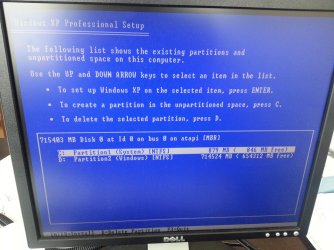
I am having some major problems with a computer at work. While trying to solve the 'black screen of death' problem, Windows (7 Professional 64bit) decided to fail. It wont boot so I decided to try a repair with the original disc to no avail as I can not recover the admin password. So now I figured I would just re-install it..? My question I guess is can I/should I delete both partitions so I can move forward in the process?
 

Attachments
  • 20150224_131535.jpg
    20150224_131535.jpg
    695.4 KB · Views: 1

My Computer My Computer

Computer type
PC/Desktop
Computer Manufacturer/Model Number
HP
OS
64 bit. Windows 7 Professional SP1
It should be taken to the IT department.
 

My Computer My Computer

Computer type
PC/Desktop
Computer Manufacturer/Model Number
Skylake Special #666
OS
Windows 10 Pro x64
CPU
Intel Core i7 6700K
Motherboard
Asus Sabertooth Z170 Mark 1
Memory
GSkill TridentZ RGB 16GB 3600 16-16-16-36
Graphics Card(s)
EVGA GTX 980 Ti SC x2
Sound Card
Realtek High Definition
Monitor(s) Displays
AOC G2460PG
Screen Resolution
1920 x 1080 144Hz
Hard Drives
Samsung 860 Pro 256GB, Seagate Barracuda 4TB x2
PSU
EVGA 1000 P2, EVGA White Custom Braided Cables
Case
Corsair Vengeance C70 Gunmetal Black
Cooling
Corsair H100i v2, Corsair ML120 x2, Thermal Grizzly Kryonaut
Keyboard
Logitech G910 Orion Spectrum
Mouse
Logitech G700s
Internet Speed
Verizon Fios Quantum Gateway 75/75
Antivirus
Windows Defender, Malwarebytes Free 3.8.3
Browser
Chrome
Other Info
Corsair SP120 x4, LG Blu-ray Drive, Durabrand HT-395 100 Watt Dolby Digital Amp, Corsair H2100 Wireless 7.1 Headset

My Computer My Computer

Computer type
PC/Desktop
Computer Manufacturer/Model Number
Home made Desktop
OS
Windows 10 Pro. 64/ version 1709 Windows 7 Pro/64
CPU
Intel i7-6800K @ 4.3
Motherboard
ASUS X-99 Deluxe II
Memory
Corsair Platinum 16 gig @2400
Graphics Card(s)
EVGA GTX 1070 OC
Monitor(s) Displays
Asus 27" LED LCD/VE278Q
Screen Resolution
1920-1080 or 1280-720 HDMI
Hard Drives
INTEL SSD 730-240 Gb Sata 3.0/
PSU
EVGA Platium 1200W
Case
Phanteks Luxe Tempered Glass 8 fans/ one radiator
Cooling
XSPC/ Water Cooled CPU
Keyboard
Das 4 Professional
Mouse
Logitech M705/MX Anywhere 2-S
Internet Speed
100 mbits
Antivirus
Microsoft Security Essentials/ Malwarebytes Premium 3.0/ SAS
Browser
I.E. 11 default/Firefox/ ISP Time Warner Cable/Spectrum
Other Info
LG BluRay Burner/
Sound system-KLipsch-THX/
Icy Dock ssd Hot Swap bays.
That picture isn't a windows 7 screen...
 

My Computer My Computer

Computer type
PC/Desktop
Computer Manufacturer/Model Number
Self Built
OS
Win 10 Pro x64
CPU
Intel I5-2500K @3.3GHz
Motherboard
Asrock P67 Extreme4
Memory
16GB G.Skill Ripjaws X (4x4GB)
Graphics Card(s)
EVGA GeForce 750 Ti SC 2GB
Sound Card
ASUS Xonar DG 5.1 Channels 24-bit 96KHz PCI Interface Sound
Monitor(s) Displays
auria eq2367
Screen Resolution
1920 x 1080
Hard Drives
250GB Samsung 850 EVO SSD
1TB WD Blue
1TB Hitachi
PSU
SeaSonic X 650W 80 Plus Gold
Case
Corsair Obsidian 750D
Cooling
Corsair H60, Three 140mm case fans
Keyboard
Logitech Wireless Keyboard K520
Mouse
Logitech Wireless Mouse M310
Internet Speed
Wave Broadband ~ 100 dn 5 up
Antivirus
Windows Defender, Malwarebytes Premium
Browser
Edge, IE11, Chrome
Other Info
Laptop specs: HP g7-1365dx /
CPU: AMD A6-3420M APU with Radeon(tm) HD Graphics /
RAM: Crucial 8Gb (2x4Gb) /
SSD: Crucial M4-CT128M4SSD2 ATA Device/ FW 000F /
GFX: AMD Radeon HD 6520G /
OS: Windows 10 Pro x64
It's XP.
 

My Computer My Computer

Computer Manufacturer/Model Number
HP, Dell, Gateway, Toshiba - 4 laptops and 2 desktops
OS
Vista, Windows7, Mint Mate, Zorin, Windows 8
CPU
from 1.6GHz Duo to i7
Monitor(s) Displays
2x HP w2207
Hard Drives
5x HDD, 7x SSD, 12x Externals
Keyboard
with trackball - no mices
Mouse
Trackball mice
Internet Speed
DSL 6000

My Computer My Computer

Computer type
PC/Desktop
Computer Manufacturer/Model Number
Self Built
OS
Win 10 Pro x64
CPU
Intel I5-2500K @3.3GHz
Motherboard
Asrock P67 Extreme4
Memory
16GB G.Skill Ripjaws X (4x4GB)
Graphics Card(s)
EVGA GeForce 750 Ti SC 2GB
Sound Card
ASUS Xonar DG 5.1 Channels 24-bit 96KHz PCI Interface Sound
Monitor(s) Displays
auria eq2367
Screen Resolution
1920 x 1080
Hard Drives
250GB Samsung 850 EVO SSD
1TB WD Blue
1TB Hitachi
PSU
SeaSonic X 650W 80 Plus Gold
Case
Corsair Obsidian 750D
Cooling
Corsair H60, Three 140mm case fans
Keyboard
Logitech Wireless Keyboard K520
Mouse
Logitech Wireless Mouse M310
Internet Speed
Wave Broadband ~ 100 dn 5 up
Antivirus
Windows Defender, Malwarebytes Premium
Browser
Edge, IE11, Chrome
Other Info
Laptop specs: HP g7-1365dx /
CPU: AMD A6-3420M APU with Radeon(tm) HD Graphics /
RAM: Crucial 8Gb (2x4Gb) /
SSD: Crucial M4-CT128M4SSD2 ATA Device/ FW 000F /
GFX: AMD Radeon HD 6520G /
OS: Windows 10 Pro x64
That picture isn't a windows 7 screen...

Yes I see that it says XP...however the disc that was used reads Windows 7 Professional SP1 and is the same program on the rest of the computers..I dont know anything about computers, however we do not have an IT department. Im just trying to salvage this before they junk it...so any helpful suggestions would be appreciated :)
 

My Computer My Computer

Computer type
PC/Desktop
Computer Manufacturer/Model Number
HP
OS
64 bit. Windows 7 Professional SP1
Also, the company we called to purchase and set up the computers were a little questionable.. im not entirely convinced they weren't refurbished, and we have had multiple issues with a couple of them from the beginning so my employers at this point dont want to 'waste' anymore $$ on them..
 

My Computer My Computer

Computer type
PC/Desktop
Computer Manufacturer/Model Number
HP
OS
64 bit. Windows 7 Professional SP1
But we first should straighten out what disc you have. The one you show is clearly an XP installation disc, regardless what it says on the outside.
 

My Computer My Computer

Computer Manufacturer/Model Number
HP, Dell, Gateway, Toshiba - 4 laptops and 2 desktops
OS
Vista, Windows7, Mint Mate, Zorin, Windows 8
CPU
from 1.6GHz Duo to i7
Monitor(s) Displays
2x HP w2207
Hard Drives
5x HDD, 7x SSD, 12x Externals
Keyboard
with trackball - no mices
Mouse
Trackball mice
Internet Speed
DSL 6000
That picture isn't a windows 7 screen...

Yes I see that it says XP...however the disc that was used reads Windows 7 Professional SP1 and is the same program on the rest of the computers..I dont know anything about computers, however we do not have an IT department. Im just trying to salvage this before they junk it...so any helpful suggestions would be appreciated :)

Just because the disk says "Windows 7" doesn't mean that's what's on there. Is it a legitimate disk or is it a copied disk? Can you take a picture of the disk so we can tell? If that screen is what came up, this is not a Windows 7 disk.
 

My Computer My Computer

Computer type
PC/Desktop
Computer Manufacturer/Model Number
Dell XPS 8700
OS
Microsoft Windows 10 Professional 64-bit
CPU
Intel(R) Core(TM) i7-4790 CPU @ 3.60GHz
Motherboard
Dell Inc.
Memory
8.00 GB
Graphics Card(s)
NVIDIA GeForce GT 720
Monitor(s) Displays
3 x LG Flatron E2350
Screen Resolution
1920 x 1080 x 32 bits (4294967296 colors) @ 60 Hz
Hard Drives
1 TB Seagate
Keyboard
Dell Wired Keyboard
Mouse
Logitech M705
Antivirus
Trend Micro
But if that`s the disc you want to use, then yes delete both partitions.

But it`s definetly a Windows XP Pro install disc, and that`s what will be on the laptop when you`re done.
 

My Computer My Computer

Computer type
PC/Desktop
Computer Manufacturer/Model Number
Skylake Special #666
OS
Windows 10 Pro x64
CPU
Intel Core i7 6700K
Motherboard
Asus Sabertooth Z170 Mark 1
Memory
GSkill TridentZ RGB 16GB 3600 16-16-16-36
Graphics Card(s)
EVGA GTX 980 Ti SC x2
Sound Card
Realtek High Definition
Monitor(s) Displays
AOC G2460PG
Screen Resolution
1920 x 1080 144Hz
Hard Drives
Samsung 860 Pro 256GB, Seagate Barracuda 4TB x2
PSU
EVGA 1000 P2, EVGA White Custom Braided Cables
Case
Corsair Vengeance C70 Gunmetal Black
Cooling
Corsair H100i v2, Corsair ML120 x2, Thermal Grizzly Kryonaut
Keyboard
Logitech G910 Orion Spectrum
Mouse
Logitech G700s
Internet Speed
Verizon Fios Quantum Gateway 75/75
Antivirus
Windows Defender, Malwarebytes Free 3.8.3
Browser
Chrome
Other Info
Corsair SP120 x4, LG Blu-ray Drive, Durabrand HT-395 100 Watt Dolby Digital Amp, Corsair H2100 Wireless 7.1 Headset
Sorry for the delay! You know what... it was an XP disc.. we actually dont have the Windows 7 disc here... :-( Im at a loss!... Windows 7 was installed on the computer but xp was on the screen shot because that was the disc that I had put in. .
 

My Computer My Computer

Computer type
PC/Desktop
Computer Manufacturer/Model Number
HP
OS
64 bit. Windows 7 Professional SP1

My Computer My Computer

Computer type
PC/Desktop
Computer Manufacturer/Model Number
Dell XPS 8700
OS
Microsoft Windows 10 Professional 64-bit
CPU
Intel(R) Core(TM) i7-4790 CPU @ 3.60GHz
Motherboard
Dell Inc.
Memory
8.00 GB
Graphics Card(s)
NVIDIA GeForce GT 720
Monitor(s) Displays
3 x LG Flatron E2350
Screen Resolution
1920 x 1080 x 32 bits (4294967296 colors) @ 60 Hz
Hard Drives
1 TB Seagate
Keyboard
Dell Wired Keyboard
Mouse
Logitech M705
Antivirus
Trend Micro
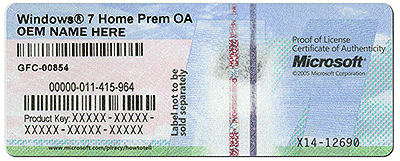
So what do you want to install. And what does the COA sticker on the back of the box say - XP or Windows 7.

This is how a COA sticker looks like:
 

Attachments

  • coa-stickers.gif
    coa-stickers.gif
    495.9 KB · Views: 13

My Computer My Computer

Computer Manufacturer/Model Number
HP, Dell, Gateway, Toshiba - 4 laptops and 2 desktops
OS
Vista, Windows7, Mint Mate, Zorin, Windows 8
CPU
from 1.6GHz Duo to i7
Monitor(s) Displays
2x HP w2207
Hard Drives
5x HDD, 7x SSD, 12x Externals
Keyboard
with trackball - no mices
Mouse
Trackball mice
Internet Speed
DSL 6000
Ive searched through everything..the IT guys who set up the computers did not leave a disc, a box or any information.. Ive tried contacting them twice since my original post and no response.. :-( Im not sure there is anything left to be done other than junk it or take it to a different company....right?
 

My Computer My Computer

Computer type
PC/Desktop
Computer Manufacturer/Model Number
HP
OS
64 bit. Windows 7 Professional SP1
No need to junk it. A reinstall is possible but we need to know what's on the COA sticker - see my post above.
 

My Computer My Computer

Computer Manufacturer/Model Number
HP, Dell, Gateway, Toshiba - 4 laptops and 2 desktops
OS
Vista, Windows7, Mint Mate, Zorin, Windows 8
CPU
from 1.6GHz Duo to i7
Monitor(s) Displays
2x HP w2207
Hard Drives
5x HDD, 7x SSD, 12x Externals
Keyboard
with trackball - no mices
Mouse
Trackball mice
Internet Speed
DSL 6000
Is this verifying my thoughts on it being refurbished? :confused:
 

My Computer My Computer

Computer type
PC/Desktop
Computer Manufacturer/Model Number
HP
OS
64 bit. Windows 7 Professional SP1
Hmm you have choices:

1. You can install XP with the installation disc you have and activate it with the key on the COA sticker

2. Find a Windows 7 Pro installation disc or .iso and use the Windows 7 key on the other sticker

3. Install Windows 10 TP. That is free until about October this year

https://www.tenforums.com/windows-10-news/1946-download-windows-10-technical-preview.html

And if none of that works, you can always put Linux on the box. They have fine systems.
Watch one of my demos
.

But scrapping a good computer would be ashame.
 

My Computer My Computer

Computer Manufacturer/Model Number
HP, Dell, Gateway, Toshiba - 4 laptops and 2 desktops
OS
Vista, Windows7, Mint Mate, Zorin, Windows 8
CPU
from 1.6GHz Duo to i7
Monitor(s) Displays
2x HP w2207
Hard Drives
5x HDD, 7x SSD, 12x Externals
Keyboard
with trackball - no mices
Mouse
Trackball mice
Internet Speed
DSL 6000
Thanks for your help, I'll update you as I go along.. do you know why there would be 2 stickers on it? All of our other computers have Windows7Pro so why would an XP sticker be on it?
 

My Computer My Computer

Computer type
PC/Desktop
Computer Manufacturer/Model Number
HP
OS
64 bit. Windows 7 Professional SP1
Thanks for your help, I'll update you as I go along.. do you know why there would be 2 stickers on it? All of our other computers have Windows7Pro so why would an XP sticker be on it?

This was originally an XP system and then it was refurbished and Windows 7 was installed. They were good people and put the Windows 7 sticker on the box. You are lucky.

You may want to have a look at Step 1 of this tutorial:
http://www.sevenforums.com/tutorials/219487-clean-reinstall-factory-oem-windows-7-a.html#step1
 

My Computer My Computer

Computer Manufacturer/Model Number
HP, Dell, Gateway, Toshiba - 4 laptops and 2 desktops
OS
Vista, Windows7, Mint Mate, Zorin, Windows 8
CPU
from 1.6GHz Duo to i7
Monitor(s) Displays
2x HP w2207
Hard Drives
5x HDD, 7x SSD, 12x Externals
Keyboard
with trackball - no mices
Mouse
Trackball mice
Internet Speed
DSL 6000
Back
Top