Migrating Data to D: and then cloning OS from C: to new SSD

Guys, Good News!

All the time and effort invested in prepping up my aging Seagate HDD for cloning finally paid off last night..

After trying the SSD included 'Samsung Migration' software one last time last night without success, I then decided to leave 'AOMEI Partition Assistant Standard' running over night, and this morning to my surprise it cloned everything from my drive C:\ [OS] without any errors what so ever, swapped out the old Seagate HDD and installed the SSD on the same SATA Port and everything works without any issues, all Libraries are located on drive D:\ as before and the boot-up takes about 30 seconds now, one a good day it took this PC at least 5 minutes to boot before; This PC only supports SATA 2, I wonder how much faster this SSD would be running on a a SATA 3 port.

All I need to do now is clean-up all the testing log files left behind from the old HDD recovery, etc, and look into upgrading the memory on this PC, after that this PC should be good to go until Windows 10 comes around...:D

I want to thank you all for the help and input, especially Gregrocker for pointing me to the Seagate's 'Seatools for DOS' tool, I think that scan is what saved the day for me, I'll also keep the Win7 reinstall tutorial link handy in a bookmark just in case..LOL. and thanks to VerKy for turning me on to that AOMEI Cloning software that was able to read the repaired HDD.

:)
 

My Computer My Computer

At a glance

Windows 7 Home Premium Edition SP1 64 bitIntel i7-920 2.66 GHZ6 Gig DDR3 @ 1066 MHZATi Radeon HD 5770 - 1GB GDDR5
Computer type
PC/Desktop
Computer Manufacturer/Model Number
Dell Studio XPS 9000
OS
Windows 7 Home Premium Edition SP1 64 bit
CPU
Intel i7-920 2.66 GHZ
Motherboard
Intel
Memory
6 Gig DDR3 @ 1066 MHZ
Graphics Card(s)
ATi Radeon HD 5770 - 1GB GDDR5
Sound Card
M-Audio AudioPhile 24/96
Monitor(s) Displays
Dell_ST2310_Digital
Screen Resolution
1920 x 1080(p) (60.000Hz)
Hard Drives
Samsung 250 Gb SDD 850 EVO,
Hitachi 1TB 7200/RPM, External Seagate 1TB 7200 RPM
PSU
Corsair 650 Watt
Mouse
Logitech Wireless MX Revolution
Antivirus
Windows Defender
Browser
Firefox
Thanks, I'll look into that, I read a 2012 tutorial for alignment but skipped it thinking the article only applied to first Generations SSDs...:confused:
 

My Computer My Computer

At a glance

Windows 7 Home Premium Edition SP1 64 bitIntel i7-920 2.66 GHZ6 Gig DDR3 @ 1066 MHZATi Radeon HD 5770 - 1GB GDDR5
Computer type
PC/Desktop
Computer Manufacturer/Model Number
Dell Studio XPS 9000
OS
Windows 7 Home Premium Edition SP1 64 bit
CPU
Intel i7-920 2.66 GHZ
Motherboard
Intel
Memory
6 Gig DDR3 @ 1066 MHZ
Graphics Card(s)
ATi Radeon HD 5770 - 1GB GDDR5
Sound Card
M-Audio AudioPhile 24/96
Monitor(s) Displays
Dell_ST2310_Digital
Screen Resolution
1920 x 1080(p) (60.000Hz)
Hard Drives
Samsung 250 Gb SDD 850 EVO,
Hitachi 1TB 7200/RPM, External Seagate 1TB 7200 RPM
PSU
Corsair 650 Watt
Mouse
Logitech Wireless MX Revolution
Antivirus
Windows Defender
Browser
Firefox
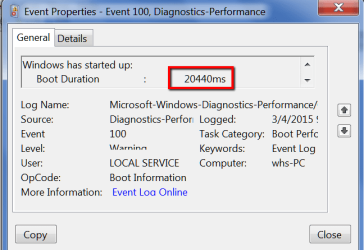
30 sec boot is a bit long but 10 sec is ambitious. On my 7 systems that all have SSDs, the boot times vary between 15 sec and 25 sec. And over time it degrades a bit. Like on this system boot time is up to 20 sec from 3 years ago when it was 18 seconds. But that is an older Crucial M4.
 

Attachments

  • 2015-03-08_1757.png
    2015-03-08_1757.png
    19.4 KB · Views: 17

My Computer My Computer

At a glance

Vista, Windows7, Mint Mate, Zorin, Windows 8from 1.6GHz Duo to i7
Computer Manufacturer/Model Number
HP, Dell, Gateway, Toshiba - 4 laptops and 2 desktops
OS
Vista, Windows7, Mint Mate, Zorin, Windows 8
CPU
from 1.6GHz Duo to i7
Monitor(s) Displays
2x HP w2207
Hard Drives
5x HDD, 7x SSD, 12x Externals
Keyboard
with trackball - no mices
Mouse
Trackball mice
Internet Speed
DSL 6000
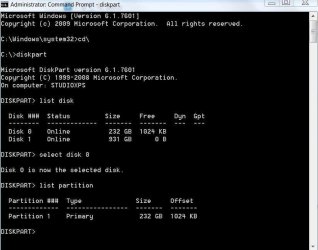
This is what I get ..remember my PC is only able to do 3 Gb/s (SATA 2)plus it was just a calculation..never tried to exactly measure the boot time..
 

Attachments

  • diskpart.jpg
    diskpart.jpg
    43.2 KB · Views: 1

My Computer My Computer

At a glance

Windows 7 Home Premium Edition SP1 64 bitIntel i7-920 2.66 GHZ6 Gig DDR3 @ 1066 MHZATi Radeon HD 5770 - 1GB GDDR5
Computer type
PC/Desktop
Computer Manufacturer/Model Number
Dell Studio XPS 9000
OS
Windows 7 Home Premium Edition SP1 64 bit
CPU
Intel i7-920 2.66 GHZ
Motherboard
Intel
Memory
6 Gig DDR3 @ 1066 MHZ
Graphics Card(s)
ATi Radeon HD 5770 - 1GB GDDR5
Sound Card
M-Audio AudioPhile 24/96
Monitor(s) Displays
Dell_ST2310_Digital
Screen Resolution
1920 x 1080(p) (60.000Hz)
Hard Drives
Samsung 250 Gb SDD 850 EVO,
Hitachi 1TB 7200/RPM, External Seagate 1TB 7200 RPM
PSU
Corsair 650 Watt
Mouse
Logitech Wireless MX Revolution
Antivirus
Windows Defender
Browser
Firefox
That alignment is OK.
 

My Computer My Computer

At a glance

Vista, Windows7, Mint Mate, Zorin, Windows 8from 1.6GHz Duo to i7
Computer Manufacturer/Model Number
HP, Dell, Gateway, Toshiba - 4 laptops and 2 desktops
OS
Vista, Windows7, Mint Mate, Zorin, Windows 8
CPU
from 1.6GHz Duo to i7
Monitor(s) Displays
2x HP w2207
Hard Drives
5x HDD, 7x SSD, 12x Externals
Keyboard
with trackball - no mices
Mouse
Trackball mice
Internet Speed
DSL 6000
30 sec boot is a bit long but 10 sec is ambitious. On my 7 systems that all have SSDs, the boot times vary between 15 sec and 25 sec. And over time it degrades a bit. Like on this system boot time is up to 20 sec from 3 years ago when it was 18 seconds. But that is an older Crucial M4.

My laptop is 5-10 seconds.
 
I guess if everything is really tops, you can get there. But I am cheap and have cheap equipment, LOL

Did you ever look into Event 100 - what does that say, like in my post #26 ?
 

My Computer My Computer

At a glance

Vista, Windows7, Mint Mate, Zorin, Windows 8from 1.6GHz Duo to i7
Computer Manufacturer/Model Number
HP, Dell, Gateway, Toshiba - 4 laptops and 2 desktops
OS
Vista, Windows7, Mint Mate, Zorin, Windows 8
CPU
from 1.6GHz Duo to i7
Monitor(s) Displays
2x HP w2207
Hard Drives
5x HDD, 7x SSD, 12x Externals
Keyboard
with trackball - no mices
Mouse
Trackball mice
Internet Speed
DSL 6000
where can I reach "diagnostic performance" logs?

this folder doesn't show up in my 'Event viewer'..

Also, should I delete all the old previous log files/folders (ccleaner) like 'Windows error reporting' 'windows log files" etc and start new logs ?
 

My Computer My Computer

At a glance

Windows 7 Home Premium Edition SP1 64 bitIntel i7-920 2.66 GHZ6 Gig DDR3 @ 1066 MHZATi Radeon HD 5770 - 1GB GDDR5
Computer type
PC/Desktop
Computer Manufacturer/Model Number
Dell Studio XPS 9000
OS
Windows 7 Home Premium Edition SP1 64 bit
CPU
Intel i7-920 2.66 GHZ
Motherboard
Intel
Memory
6 Gig DDR3 @ 1066 MHZ
Graphics Card(s)
ATi Radeon HD 5770 - 1GB GDDR5
Sound Card
M-Audio AudioPhile 24/96
Monitor(s) Displays
Dell_ST2310_Digital
Screen Resolution
1920 x 1080(p) (60.000Hz)
Hard Drives
Samsung 250 Gb SDD 850 EVO,
Hitachi 1TB 7200/RPM, External Seagate 1TB 7200 RPM
PSU
Corsair 650 Watt
Mouse
Logitech Wireless MX Revolution
Antivirus
Windows Defender
Browser
Firefox
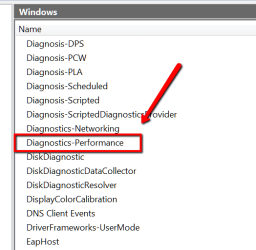
If you want to go to the Events, drill down this chain:

Eventvwr
Applications and Service Logs
Microsoft
Windows
Diagnostics - performance
Operational
Event ID 100

After 'Windows' you find Diagnostic-Performance here:


2015-03-08_2029.png
 

My Computer My Computer

At a glance

Vista, Windows7, Mint Mate, Zorin, Windows 8from 1.6GHz Duo to i7
Computer Manufacturer/Model Number
HP, Dell, Gateway, Toshiba - 4 laptops and 2 desktops
OS
Vista, Windows7, Mint Mate, Zorin, Windows 8
CPU
from 1.6GHz Duo to i7
Monitor(s) Displays
2x HP w2207
Hard Drives
5x HDD, 7x SSD, 12x Externals
Keyboard
with trackball - no mices
Mouse
Trackball mice
Internet Speed
DSL 6000
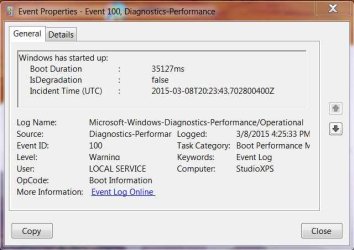
WHS, that folder was buried deep in there, I never knew those tools were available...I need to remove a few programs running at boot, I believe Avast is the most resource hog for me according to Soluto a 'boot up monitor' program I used to run here to keep track until a few months back.

I was about right, as it is configured right now [same as before the SDD] it takes this PC around 35 seconds to boot up with the new SDD at 3 Gb/s rate...a huge improvement.
 

Attachments

  • Boot-up-3815.jpg
    Boot-up-3815.jpg
    35.3 KB · Views: 30

My Computer My Computer

At a glance

Windows 7 Home Premium Edition SP1 64 bitIntel i7-920 2.66 GHZ6 Gig DDR3 @ 1066 MHZATi Radeon HD 5770 - 1GB GDDR5
Computer type
PC/Desktop
Computer Manufacturer/Model Number
Dell Studio XPS 9000
OS
Windows 7 Home Premium Edition SP1 64 bit
CPU
Intel i7-920 2.66 GHZ
Motherboard
Intel
Memory
6 Gig DDR3 @ 1066 MHZ
Graphics Card(s)
ATi Radeon HD 5770 - 1GB GDDR5
Sound Card
M-Audio AudioPhile 24/96
Monitor(s) Displays
Dell_ST2310_Digital
Screen Resolution
1920 x 1080(p) (60.000Hz)
Hard Drives
Samsung 250 Gb SDD 850 EVO,
Hitachi 1TB 7200/RPM, External Seagate 1TB 7200 RPM
PSU
Corsair 650 Watt
Mouse
Logitech Wireless MX Revolution
Antivirus
Windows Defender
Browser
Firefox
35sec is still a tad slow for a SSD. You are right, check the startups. But disabling the AV program is not such a good idea. This is the only one that should not be disabled. ALL the others can be disabled.
 

My Computer My Computer

At a glance

Vista, Windows7, Mint Mate, Zorin, Windows 8from 1.6GHz Duo to i7
Computer Manufacturer/Model Number
HP, Dell, Gateway, Toshiba - 4 laptops and 2 desktops
OS
Vista, Windows7, Mint Mate, Zorin, Windows 8
CPU
from 1.6GHz Duo to i7
Monitor(s) Displays
2x HP w2207
Hard Drives
5x HDD, 7x SSD, 12x Externals
Keyboard
with trackball - no mices
Mouse
Trackball mice
Internet Speed
DSL 6000
I'd test with a lightweight AV like MSE or Panda cloud to compare the difference.
 
Yes Guys, I'm thinking of using MSE and removing Avast, it has become too bloated with extra features that are duplicated in my SYS, and since discovering the 'Diagnostics -performance ' with event 100, I discovered both Avast and my old backup software [Cobian] are triggering shutdown delays, also with the help of Glary Utilities, I believe finally traced the issues I've been having with Explorer.EXE for close to a year now also to Avast, apparently is not loading the "context menu' correctly.
Another boot resource hog is Zone Alarm, not sure if I should keep it..
 

My Computer My Computer

At a glance

Windows 7 Home Premium Edition SP1 64 bitIntel i7-920 2.66 GHZ6 Gig DDR3 @ 1066 MHZATi Radeon HD 5770 - 1GB GDDR5
Computer type
PC/Desktop
Computer Manufacturer/Model Number
Dell Studio XPS 9000
OS
Windows 7 Home Premium Edition SP1 64 bit
CPU
Intel i7-920 2.66 GHZ
Motherboard
Intel
Memory
6 Gig DDR3 @ 1066 MHZ
Graphics Card(s)
ATi Radeon HD 5770 - 1GB GDDR5
Sound Card
M-Audio AudioPhile 24/96
Monitor(s) Displays
Dell_ST2310_Digital
Screen Resolution
1920 x 1080(p) (60.000Hz)
Hard Drives
Samsung 250 Gb SDD 850 EVO,
Hitachi 1TB 7200/RPM, External Seagate 1TB 7200 RPM
PSU
Corsair 650 Watt
Mouse
Logitech Wireless MX Revolution
Antivirus
Windows Defender
Browser
Firefox
I would not have Glary Utilties or Zone Alarm, nor any backup software other than a lightweight Sync like OneDrive or Dropbox running. If it ran any of these I would expect boot delays and multiple other problems.
 
Last night after some cleaning bootup was down to 28 seconds, today I removed Avast and Zone Alarm, and installed MSE, boot up was up and down after that, reached 46 seconds after a MS upgrade, last one was down to 30 seconds, I'm hoping numbers will improve after a few days, now trying to figure out what to use for local backup software..

Do you know were the Win7 SSD Optimization control/Menu is located, 'Samsung magician' is handling it now but I want to remove it from the boot too.
 

My Computer My Computer

At a glance

Windows 7 Home Premium Edition SP1 64 bitIntel i7-920 2.66 GHZ6 Gig DDR3 @ 1066 MHZATi Radeon HD 5770 - 1GB GDDR5
Computer type
PC/Desktop
Computer Manufacturer/Model Number
Dell Studio XPS 9000
OS
Windows 7 Home Premium Edition SP1 64 bit
CPU
Intel i7-920 2.66 GHZ
Motherboard
Intel
Memory
6 Gig DDR3 @ 1066 MHZ
Graphics Card(s)
ATi Radeon HD 5770 - 1GB GDDR5
Sound Card
M-Audio AudioPhile 24/96
Monitor(s) Displays
Dell_ST2310_Digital
Screen Resolution
1920 x 1080(p) (60.000Hz)
Hard Drives
Samsung 250 Gb SDD 850 EVO,
Hitachi 1TB 7200/RPM, External Seagate 1TB 7200 RPM
PSU
Corsair 650 Watt
Mouse
Logitech Wireless MX Revolution
Antivirus
Windows Defender
Browser
Firefox

My Computer My Computer

At a glance

Vista, Windows7, Mint Mate, Zorin, Windows 8from 1.6GHz Duo to i7
Computer Manufacturer/Model Number
HP, Dell, Gateway, Toshiba - 4 laptops and 2 desktops
OS
Vista, Windows7, Mint Mate, Zorin, Windows 8
CPU
from 1.6GHz Duo to i7
Monitor(s) Displays
2x HP w2207
Hard Drives
5x HDD, 7x SSD, 12x Externals
Keyboard
with trackball - no mices
Mouse
Trackball mice
Internet Speed
DSL 6000
Not sure what you mean by "Win7 SSD optimization control".

You should confirm that defrag is off and that the drive is properly aligned. That's about it unless you have known issues.

Run a benchmark to confirm performance is within the norm. Most of the variation in benchmarks matters little---you'd be hard pressed to tell the difference among most SSDs in real world use.

I've heard both good and bad about Samsung Magician.
 

My Computer My Computer

At a glance

Windows 7 Home Premium SP1, 64-bitIntel Skylake i5-6600K, not overclocked8 GB HyperX DDR4-2666 (2 x 4 GB)none; graphics are integrated on CPU
Computer type
PC/Desktop
Computer Manufacturer/Model Number
Ignatz Special; 4 speed manual gearbox; factory air conditioning; one of one
OS
Windows 7 Home Premium SP1, 64-bit
CPU
Intel Skylake i5-6600K, not overclocked
Motherboard
AsRock Z170M Extreme 4, micro ATX
Memory
8 GB HyperX DDR4-2666 (2 x 4 GB)
Graphics Card(s)
none; graphics are integrated on CPU
Sound Card
onboard: Realtek ALC1150; external: USB Behringer UF0-202
Monitor(s) Displays
Dell S2340M 23 inch IPS
Screen Resolution
1600 x 900
Hard Drives
System: Crucial MX100 series SSD, 128 GB;
Data: Samsung Spinpoint 103SJ, 1 TB;
Backup: WD Caviar Green WD30EZRX-00D8PB0, 3 TB
PSU
Rosewill SilentNight 500 watt fanless, semi-modular
Case
Antec Solo II
Cooling
Noctua NH-U12S; Noctua F12 intake, Noctua S12A exhaust
Keyboard
Microsoft 200 6JH-00001 USB
Mouse
Dell or Microsoft optical wired; USB
Antivirus
Microsoft Security Essentials and Malwarebytes Premium
Browser
Pale Moon
Other Info
All fans PWM; speeds at idle: CPU circa 500 rpm; intake circa 600 rpm; exhaust circa 600 rpm; CPU temps 27 idle and 47 C load in a warm room (27 C/81 F) when running Intel Extreme Tuning Utility stress test.
Samsung Magician reports OS Optimization =Not configured, and mentions to use the OS Optimization menu, Samsung has a performance optimization tab that one can use if your "OS lacks TRIM support for SSD", I used it before, but the setting disappeared after reboots, and apparently I would have to keep Magician running at boot up to apply the settings, I never heard of this OS Optimization menu either, but maybe it was an Win7 utility hidden some where?
 

My Computer My Computer

At a glance

Windows 7 Home Premium Edition SP1 64 bitIntel i7-920 2.66 GHZ6 Gig DDR3 @ 1066 MHZATi Radeon HD 5770 - 1GB GDDR5
Computer type
PC/Desktop
Computer Manufacturer/Model Number
Dell Studio XPS 9000
OS
Windows 7 Home Premium Edition SP1 64 bit
CPU
Intel i7-920 2.66 GHZ
Motherboard
Intel
Memory
6 Gig DDR3 @ 1066 MHZ
Graphics Card(s)
ATi Radeon HD 5770 - 1GB GDDR5
Sound Card
M-Audio AudioPhile 24/96
Monitor(s) Displays
Dell_ST2310_Digital
Screen Resolution
1920 x 1080(p) (60.000Hz)
Hard Drives
Samsung 250 Gb SDD 850 EVO,
Hitachi 1TB 7200/RPM, External Seagate 1TB 7200 RPM
PSU
Corsair 650 Watt
Mouse
Logitech Wireless MX Revolution
Antivirus
Windows Defender
Browser
Firefox
Use this for backup - it's the best, seriously.

http://www.sevenforums.com/tutorials/73828-imaging-free-macrium.html?ltr=I

And forget SSD optimization. As long as the SSD is aligned, there is nothing to optimize.

Thanks WHS, didn't see this reply until now, I downloaded Macrium before as recommended by you guys here to do an Image of the old HDD that didn't work because of the disc errors, I will try it out for regular back ups and see...I was also recommended Todo Backup..
 

My Computer My Computer

At a glance

Windows 7 Home Premium Edition SP1 64 bitIntel i7-920 2.66 GHZ6 Gig DDR3 @ 1066 MHZATi Radeon HD 5770 - 1GB GDDR5
Computer type
PC/Desktop
Computer Manufacturer/Model Number
Dell Studio XPS 9000
OS
Windows 7 Home Premium Edition SP1 64 bit
CPU
Intel i7-920 2.66 GHZ
Motherboard
Intel
Memory
6 Gig DDR3 @ 1066 MHZ
Graphics Card(s)
ATi Radeon HD 5770 - 1GB GDDR5
Sound Card
M-Audio AudioPhile 24/96
Monitor(s) Displays
Dell_ST2310_Digital
Screen Resolution
1920 x 1080(p) (60.000Hz)
Hard Drives
Samsung 250 Gb SDD 850 EVO,
Hitachi 1TB 7200/RPM, External Seagate 1TB 7200 RPM
PSU
Corsair 650 Watt
Mouse
Logitech Wireless MX Revolution
Antivirus
Windows Defender
Browser
Firefox
Back
Top