upsidedown8
New member
- Local time
- 1:47 PM
- Messages
- 6
Specs are HP ProBook G1 with i5 processor and 8gb ram.
Running Windows 7 Pro
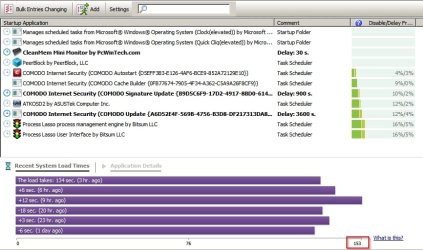
I bought this for my mom and it was an open box. Didn't seem to run real smooth out of the box but it's been months and can't return it and it's a sharp unit but the boot was slow. Ran great after fully booted. Went ahead and did a clean install but I'm still getting a slow boot time. I used Soluto and this is what I'm seeing and I don't know where to go from here. They all look like system files that can't be removed.
I've already disabled all I can from MS Config (services, startup and boot)
Soluto shows 37 "REQUIRED" at 1:35 seconds
Windows Services Group (svchost -netsvcs) sec22.5
System sec16.7
Windows Services Group (svchost -localsystemnetworkrestricted)sec10.1
Windows Services Group (svchost -networkservice)sec6.3
Windows Explorersec5.9
Client Server Runtime Process (csrss.exe)sec4.5
Solutosec4.0
Presentation Font Cache (presentationfontcache.exe)sec3.5
Services and Controller appsec3.5
Windows Services Group (svchost -localservicenetworkrestricted)sec2.8
Windows NT Logon Applicationsec1.7
Windows Start-Up Application (wininit.exe)sec1.2
Windows Wireless LAN 802.11 Extensibility Framework (wlanext.exe)sec1.2
Windows Services Group (svchost -DCOMLaunch)sec1.1
Desktop Window Manager (dwm.exe)sec1.0
Windows Modules Installer (trustedinstaller.exe)sec0.9
Windows Problem Reporting (wermgr.exe)sec0.8
Windows Services Group (svchost -localservice)sec0.8
Windows Services Group (svchost -localserviceandnoimpersonation)sec0.6
Windows Services Group (svchost -localservicenonetwork)sec0.6
WMI Provider Host (wmiprvse.exe)sec0.5
Print Spoolersec0.4
Host Process for Windows Taskssec0.4
Microsoft Windows Search Protocol Host (searchprotocolhost.exe)sec0.3
Visual C# Command Line Compiler (csc.exe)sec0.3
Windows Services Group (svchost -DCOMLaunch)sec0.3
DCOM DLL host processsec0.3
Microsoft Windows Search Filter Host (searchfilterhost.exe)sec0.2
Console Window Host (conhost.exe)sec0.2
CTF Loader (ctfmon.exe)sec0.2
Microsoft Synchronization Manager (mobsync.exe)sec0.2
Bluetooth Support Servicesec0.1
Windows Error Reporting Servicesec0.1
Task Scheduler Engine (taskeng.exe)sec< 0.1
Local Session Manager Service (lsm.exe)sec< 0.1
WMI (unsecapp.exe)sec< 0.1
Microsoft Resource File To COFF Object Conversion Utility (cvtres.exe)sec
Running Windows 7 Pro
I bought this for my mom and it was an open box. Didn't seem to run real smooth out of the box but it's been months and can't return it and it's a sharp unit but the boot was slow. Ran great after fully booted. Went ahead and did a clean install but I'm still getting a slow boot time. I used Soluto and this is what I'm seeing and I don't know where to go from here. They all look like system files that can't be removed.
I've already disabled all I can from MS Config (services, startup and boot)
Soluto shows 37 "REQUIRED" at 1:35 seconds
Windows Services Group (svchost -netsvcs) sec22.5
System sec16.7
Windows Services Group (svchost -localsystemnetworkrestricted)sec10.1
Windows Services Group (svchost -networkservice)sec6.3
Windows Explorersec5.9
Client Server Runtime Process (csrss.exe)sec4.5
Solutosec4.0
Presentation Font Cache (presentationfontcache.exe)sec3.5
Services and Controller appsec3.5
Windows Services Group (svchost -localservicenetworkrestricted)sec2.8
Windows NT Logon Applicationsec1.7
Windows Start-Up Application (wininit.exe)sec1.2
Windows Wireless LAN 802.11 Extensibility Framework (wlanext.exe)sec1.2
Windows Services Group (svchost -DCOMLaunch)sec1.1
Desktop Window Manager (dwm.exe)sec1.0
Windows Modules Installer (trustedinstaller.exe)sec0.9
Windows Problem Reporting (wermgr.exe)sec0.8
Windows Services Group (svchost -localservice)sec0.8
Windows Services Group (svchost -localserviceandnoimpersonation)sec0.6
Windows Services Group (svchost -localservicenonetwork)sec0.6
WMI Provider Host (wmiprvse.exe)sec0.5
Print Spoolersec0.4
Host Process for Windows Taskssec0.4
Microsoft Windows Search Protocol Host (searchprotocolhost.exe)sec0.3
Visual C# Command Line Compiler (csc.exe)sec0.3
Windows Services Group (svchost -DCOMLaunch)sec0.3
DCOM DLL host processsec0.3
Microsoft Windows Search Filter Host (searchfilterhost.exe)sec0.2
Console Window Host (conhost.exe)sec0.2
CTF Loader (ctfmon.exe)sec0.2
Microsoft Synchronization Manager (mobsync.exe)sec0.2
Bluetooth Support Servicesec0.1
Windows Error Reporting Servicesec0.1
Task Scheduler Engine (taskeng.exe)sec< 0.1
Local Session Manager Service (lsm.exe)sec< 0.1
WMI (unsecapp.exe)sec< 0.1
Microsoft Resource File To COFF Object Conversion Utility (cvtres.exe)sec
My Computer
- Computer type
- PC/Desktop
- OS
- 64