wondering how to set up

mn9500

New member
Local time
10:26 AM
Messages
58
so right now i have a 250 gb hdd, which came with my computer, and i just bought a 1tb hdd recently, and moved all my videos and music to the new hdd, now have 107 gb free on my old hdd. Should i make a partition on my old hdd for windows 7 and dualboot with my existing windows xp installation, or install windows 7 on the new hdd and dualboot?

i heard the MBR will be on the first hdd no matter what, so i was originally thinking to make a partition on the old hdd and install all my games and apps on the new hdd.
 

My Computer My Computer

Computer Manufacturer/Model Number
HP
OS
XP
CPU
AMD Athlon 3500+ Venice Socket 939
Motherboard
MSI Albacore RS480
Memory
3 GB PC3200 DDR SDRAM
Graphics Card(s)
nVIDIA GeForce 9600GT 512MB
Sound Card
Realtek AC97
Monitor(s) Displays
HP vs17
Screen Resolution
1280x1024
Hard Drives
Seagate ST3250823AS 250 GB 7200 RPM SATA 8MB Cache
Samsung HD103SJ Spinpoint F3 1 TB 7200 RPM SATA 32MB Cache
PSU
Antec TruePower 500W
Keyboard
Standard HP Keyboard
Mouse
Logitech MX518
I would put Windows on whichever disk performs the fastest, on a partition at the very beginning of the disk.
 

My Computer My Computer

Computer Manufacturer/Model Number
Too many to list.
OS
XP, Seven, 2008R2
CPU
AMD, Intel, VIA
Motherboard
Various
Memory
Corsair, Kingston, etc.
Graphics Card(s)
ATI, NVIDIA
Monitor(s) Displays
Samsung
Hard Drives
Maxtor, Western Digital
Keyboard
qwerty
Internet Speed
22 Mb/s @ home, 1 Gb/s @ server
Other Info
All of my systems still run fastest on XP 32-bit for the most part. Win7 is fun to play with, but I still prefer XP for raw speed, security, and functionality.
could i just use the new hard drive to install on, or would it be better to make a partition on it just for windows 7?
 

My Computer My Computer

Computer Manufacturer/Model Number
HP
OS
XP
CPU
AMD Athlon 3500+ Venice Socket 939
Motherboard
MSI Albacore RS480
Memory
3 GB PC3200 DDR SDRAM
Graphics Card(s)
nVIDIA GeForce 9600GT 512MB
Sound Card
Realtek AC97
Monitor(s) Displays
HP vs17
Screen Resolution
1280x1024
Hard Drives
Seagate ST3250823AS 250 GB 7200 RPM SATA 8MB Cache
Samsung HD103SJ Spinpoint F3 1 TB 7200 RPM SATA 32MB Cache
PSU
Antec TruePower 500W
Keyboard
Standard HP Keyboard
Mouse
Logitech MX518
Why dual boot? Put a VM on W7 if you have programs that require XP, but it makes no sense to dual boot any longer.

I always prefer having a partition for just the OS. This way, if the partition goes bad, or I need to reinstall the OS (Yearly Digital Enema) I don't have to worry about all of my data as it is on a different disc/partition.

Always do frequent backup's of your data, and always wear clean underwear! :)
 

My Computer My Computer

Computer Manufacturer/Model Number
Home Built
OS
Win 7 Ultimate x64 & x86
CPU
AMD Anthalon 64 XT 6000+ 3.0Ghz
Motherboard
Asus M2N-eE
Memory
4 GB
Graphics Card(s)
Nvidia GeForce 8500 GT
Why dual boot?

In my case I do it mostly to play around with Windows 7, and to help people on the forum. I still use Windows XP as my primary OS.

I agree that he should at least create a separate partition for data. I would never recommend storing lots of important data on the same partition that Windows is installed to.
 

My Computer My Computer

Computer Manufacturer/Model Number
Too many to list.
OS
XP, Seven, 2008R2
CPU
AMD, Intel, VIA
Motherboard
Various
Memory
Corsair, Kingston, etc.
Graphics Card(s)
ATI, NVIDIA
Monitor(s) Displays
Samsung
Hard Drives
Maxtor, Western Digital
Keyboard
qwerty
Internet Speed
22 Mb/s @ home, 1 Gb/s @ server
Other Info
All of my systems still run fastest on XP 32-bit for the most part. Win7 is fun to play with, but I still prefer XP for raw speed, security, and functionality.
In my case I do it mostly to play around with Windows 7, and to help people on the forum. I still use Windows XP as my primary OS.

But why not just create a virtual machine? So much easier if you ask me. You can be in both OS's at the same time.
 

My Computer My Computer

Computer Manufacturer/Model Number
Home Built
OS
Win 7 Ultimate x64 & x86
CPU
AMD Anthalon 64 XT 6000+ 3.0Ghz
Motherboard
Asus M2N-eE
Memory
4 GB
Graphics Card(s)
Nvidia GeForce 8500 GT
In my case I do it mostly to play around with Windows 7, and to help people on the forum. I still use Windows XP as my primary OS.

But why not just create a virtual machine? So much easier if you ask me. You can be in both OS's at the same time.

I would love to VM but cant.
 

My Computer My Computer

Computer Manufacturer/Model Number
HP Pavillion dv-7 1005 Tx
OS
Win 8 Release candidate 8400
CPU
[email protected]
Memory
4 gigs
Graphics Card(s)
Nvidia 9600M
Sound Card
HD built-in
Monitor(s) Displays
17" Wxga
Screen Resolution
1440x900
Cooling
none
Internet Speed
45Mb down 5Mb up

My Computer My Computer

Computer Manufacturer/Model Number
Home Built
OS
Win 7 Ultimate x64 & x86
CPU
AMD Anthalon 64 XT 6000+ 3.0Ghz
Motherboard
Asus M2N-eE
Memory
4 GB
Graphics Card(s)
Nvidia GeForce 8500 GT
In my case I do it mostly to play around with Windows 7, and to help people on the forum. I still use Windows XP as my primary OS.

But why not just create a virtual machine? So much easier if you ask me. You can be in both OS's at the same time.

I would love to VM but cant.
yea i think i wont be able to vm either, at least what that little app tells me. my cpu must be too old to virtualize.
 

My Computer My Computer

Computer Manufacturer/Model Number
HP
OS
XP
CPU
AMD Athlon 3500+ Venice Socket 939
Motherboard
MSI Albacore RS480
Memory
3 GB PC3200 DDR SDRAM
Graphics Card(s)
nVIDIA GeForce 9600GT 512MB
Sound Card
Realtek AC97
Monitor(s) Displays
HP vs17
Screen Resolution
1280x1024
Hard Drives
Seagate ST3250823AS 250 GB 7200 RPM SATA 8MB Cache
Samsung HD103SJ Spinpoint F3 1 TB 7200 RPM SATA 32MB Cache
PSU
Antec TruePower 500W
Keyboard
Standard HP Keyboard
Mouse
Logitech MX518

My Computer My Computer

Computer Manufacturer/Model Number
HP Pavillion dv-7 1005 Tx
OS
Win 8 Release candidate 8400
CPU
[email protected]
Memory
4 gigs
Graphics Card(s)
Nvidia 9600M
Sound Card
HD built-in
Monitor(s) Displays
17" Wxga
Screen Resolution
1440x900
Cooling
none
Internet Speed
45Mb down 5Mb up
You can even download microsoft's virtual pc 2007 if you wanted to... it's not that bad. ;)
 

My Computer My Computer

Computer type
PC/Desktop
Computer Manufacturer/Model Number
Custom Built
OS
Windows 7 Enterprise x64
CPU
i7-5820K
Motherboard
Asus X99 A
Memory
16GB DDR4
Graphics Card(s)
ASUS 2GB Nvidia 960GTX OC'd
Monitor(s) Displays
24"
Screen Resolution
1920x1080
Hard Drives
Samsung 1TB 840 SSD
Western Digital 1TB Black Drive
Seagate 2TB NAS Drive
PSU
Antec Earthwatts 650w
Case
Antec DF-85
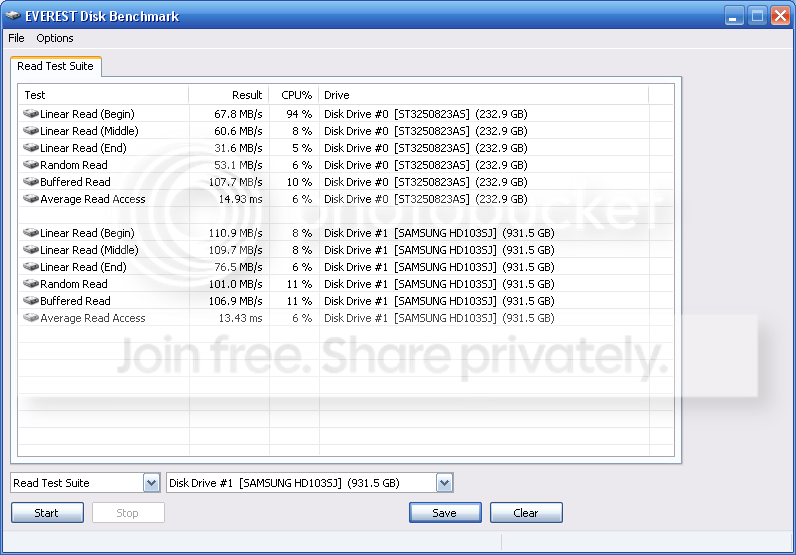
would installing it on a faster hard drive make the boot faster, if the mbr is on the slower hard drive?

here are the speeds for the hard drives.
results.png
 

My Computer My Computer

Computer Manufacturer/Model Number
HP
OS
XP
CPU
AMD Athlon 3500+ Venice Socket 939
Motherboard
MSI Albacore RS480
Memory
3 GB PC3200 DDR SDRAM
Graphics Card(s)
nVIDIA GeForce 9600GT 512MB
Sound Card
Realtek AC97
Monitor(s) Displays
HP vs17
Screen Resolution
1280x1024
Hard Drives
Seagate ST3250823AS 250 GB 7200 RPM SATA 8MB Cache
Samsung HD103SJ Spinpoint F3 1 TB 7200 RPM SATA 32MB Cache
PSU
Antec TruePower 500W
Keyboard
Standard HP Keyboard
Mouse
Logitech MX518
I would put Windows on whichever disk performs the fastest, on a partition at the very beginning of the disk.

Why dual boot? Put a VM on W7 if you have programs that require XP, but it makes no sense to dual boot any longer.

I always prefer having a partition for just the OS. This way, if the partition goes bad, or I need to reinstall the OS (Yearly Digital Enema) I don't have to worry about all of my data as it is on a different disc/partition.

Always do frequent backup's of your data, and always wear clean underwear! :)

so i think im going to make a partition on the new 1tb hdd (its the second set of results) and use it for windows 7.

Good advice.

I always use one partition for the OS and another partition for data/files. Makes it easier to re-install.

Your new 1tb hdd with the 32mb cache will be the fastest (which you proved already), as sup3rsprt mentioned, be sure to put it as the first usable partition on the disc.
 

My Computer My Computer

Computer type
PC/Desktop
Computer Manufacturer/Model Number
76~2.0
OS
Windows 7 Ult x64 - SP1/ Windows 8 Pro x64
CPU
Intel Core i5-3570K 4.6GHz
Motherboard
Gigabyte GA-Z77X UD3H, f18
Memory
8GB (2X4GB) DDR3 1600 Corsair Vengeance CL8 1.5v
Graphics Card(s)
Sapphire HD 7770 Vapor-X OC 1GB DDR5
Sound Card
Onboard VIA VT2021
Monitor(s) Displays
22" LCD Dell
Screen Resolution
1680x1050
Hard Drives
Samsung 840Pro 128GB SSD,
Seagate Barracuda 500GB SATA2 7200rpm 32MB cache, Seagate Barracuda 1TB SATA2 7200rpm 32MB cache,
PSU
Corsair HX650W
Case
Cooler Master Storm Scout
Cooling
Corsair H80 2x12cm Noctua NF P12 , 2x14cm case fans
Keyboard
Logitech Wave
Mouse
CM Sentinel
Internet Speed
Dismal
Antivirus
Avast
Browser
Opera Next
Other Info
Haswell laptop: HP Envy 17t-j, i7-4700MQ, GeForce 740M 2GB DDR3, 17.3" Full HD 1920x1080, 16GB RAM, Samsung 840 Pro 128GB, 1TB Hitachi 7200 HDD,
Desktop: eSATA ports,
External eSATA Seagate 500GB SATA2 7200rpm,
External WD USB 500GB
I would put Windows on whichever disk performs the fastest, on a partition at the very beginning of the disk.

Why dual boot? Put a VM on W7 if you have programs that require XP, but it makes no sense to dual boot any longer.

I always prefer having a partition for just the OS. This way, if the partition goes bad, or I need to reinstall the OS (Yearly Digital Enema) I don't have to worry about all of my data as it is on a different disc/partition.

Always do frequent backup's of your data, and always wear clean underwear! :)

so i think im going to make a partition on the new 1tb hdd (its the second set of results) and use it for windows 7.

Good advice.

I always use one partition for the OS and another partition for data/files. Makes it easier to re-install.

Your new 1tb hdd with the 32mb cache will be the fastest (which you proved already), as sup3rsprt mentioned, be sure to put it as the first usable partition on the disc.
how do i make sure its the first usuable partition? and can i do that if i already have it formatted with files on it?

edit: okay, im in acronis disk director, do i make the new partition active, primary, or logical? im guessing either active or primary.
 

My Computer My Computer

Computer Manufacturer/Model Number
HP
OS
XP
CPU
AMD Athlon 3500+ Venice Socket 939
Motherboard
MSI Albacore RS480
Memory
3 GB PC3200 DDR SDRAM
Graphics Card(s)
nVIDIA GeForce 9600GT 512MB
Sound Card
Realtek AC97
Monitor(s) Displays
HP vs17
Screen Resolution
1280x1024
Hard Drives
Seagate ST3250823AS 250 GB 7200 RPM SATA 8MB Cache
Samsung HD103SJ Spinpoint F3 1 TB 7200 RPM SATA 32MB Cache
PSU
Antec TruePower 500W
Keyboard
Standard HP Keyboard
Mouse
Logitech MX518
can i make a second partition on the 1 tb hdd for windows to use? the hdd is already formatted with files on it, can i just make another partition in acronis disk director and use it for windows 7, or does it have to be the first partition on the disk?
 

My Computer My Computer

Computer Manufacturer/Model Number
HP
OS
XP
CPU
AMD Athlon 3500+ Venice Socket 939
Motherboard
MSI Albacore RS480
Memory
3 GB PC3200 DDR SDRAM
Graphics Card(s)
nVIDIA GeForce 9600GT 512MB
Sound Card
Realtek AC97
Monitor(s) Displays
HP vs17
Screen Resolution
1280x1024
Hard Drives
Seagate ST3250823AS 250 GB 7200 RPM SATA 8MB Cache
Samsung HD103SJ Spinpoint F3 1 TB 7200 RPM SATA 32MB Cache
PSU
Antec TruePower 500W
Keyboard
Standard HP Keyboard
Mouse
Logitech MX518
can i make a second partition on the 1 tb hdd for windows to use? the hdd is already formatted with files on it, can i just make another partition in acronis disk director and use it for windows 7, or does it have to be the first partition on the disk?
mn, I am confused. You will make one partition to install the OS, right? I think you want to make a partion for the OS and wants to know if it can be the second one (since you have the data on the first).
Answer is Yes.
Some people say it will be faster if the OS is in the first partition (logic tells you so, the access times to those sectors should be faster, I just don't know how much difference it really makes. Before I get spanked, I have not researched either, so there might be tons of evidence to it).
One think to consider: if you have teh OS on teh second partition and you need to expand it to the left, you might need to do a repair install, since you wil be moving the whole installation on the disk and Windows does nto always like it. Expanding to the right can be done easily.
 

My Computer My Computer

Computer Manufacturer/Model Number
Wally, Innc.
OS
Windows 7 x64 finally!
CPU
AMD Athlon II X2 240
Motherboard
Biostar TA790GX XE
Memory
OCZ Platinum 4GB DDR2 1066 (will not work past 800MHz)
Graphics Card(s)
MSI R4670-MD1G Radeon HD 4670 1GB 128-bit GDDR3
Sound Card
ATI High Definition Audio Device Realtek ALC888
Monitor(s) Displays
HP w19e
Screen Resolution
1440x900
Hard Drives
Western Digital Caviar Green WD5000AADS 500GB SATA
Western Digital Caviar Blue WD5000AAKS 500GB SATA
PSU
Athena Power Micro ATX 400W
Case
HEC 6T 6T10BB Black MicroATX Mini Tower
Cooling
stock
Keyboard
wired, many keys
Mouse
HP wireless, 2 buttons, 1 wheel
Internet Speed
DSL 2Mb (recently getting 1.65M!)
can i make a second partition on the 1 tb hdd for windows to use? the hdd is already formatted with files on it, can i just make another partition in acronis disk director and use it for windows 7, or does it have to be the first partition on the disk?
mn, I am confused. You will make one partition to install the OS, right? I think you want to make a partion for the OS and wants to know if it can be the second one (since you have the data on the first).
Answer is Yes.
Some people say it will be faster if the OS is in the first partition (logic tells you so, the access times to those sectors should be faster, I just don't know how much difference it really makes. Before I get spanked, I have not researched either, so there might be tons of evidence to it).
One think to consider: if you have teh OS on teh second partition and you need to expand it to the left, you might need to do a repair install, since you wil be moving the whole installation on the disk and Windows does nto always like it. Expanding to the right can be done easily.
yea, thats i was thinking, how much faster can it be. and i will have no problem expanding to the right, theres a whole lot of space free on the hard drive.
 

My Computer My Computer

Computer Manufacturer/Model Number
HP
OS
XP
CPU
AMD Athlon 3500+ Venice Socket 939
Motherboard
MSI Albacore RS480
Memory
3 GB PC3200 DDR SDRAM
Graphics Card(s)
nVIDIA GeForce 9600GT 512MB
Sound Card
Realtek AC97
Monitor(s) Displays
HP vs17
Screen Resolution
1280x1024
Hard Drives
Seagate ST3250823AS 250 GB 7200 RPM SATA 8MB Cache
Samsung HD103SJ Spinpoint F3 1 TB 7200 RPM SATA 32MB Cache
PSU
Antec TruePower 500W
Keyboard
Standard HP Keyboard
Mouse
Logitech MX518

My Computer My Computer

Computer Manufacturer/Model Number
Dell XPS 15 L502x
OS
Windows 7 Ultimate x64 SP1
CPU
Core i7-2670QM
Memory
8GB DDR3 PC3-10600
Graphics Card(s)
Intel HD Graphics 3000 + GeForce GT 540M
Screen Resolution
1920x1080
Hard Drives
1TB 5400RPM Seagate
so can anyone tell me how much faster it would be to have windows on the first partition of a hard drive rather than on the second partition?
 

My Computer My Computer

Computer Manufacturer/Model Number
HP
OS
XP
CPU
AMD Athlon 3500+ Venice Socket 939
Motherboard
MSI Albacore RS480
Memory
3 GB PC3200 DDR SDRAM
Graphics Card(s)
nVIDIA GeForce 9600GT 512MB
Sound Card
Realtek AC97
Monitor(s) Displays
HP vs17
Screen Resolution
1280x1024
Hard Drives
Seagate ST3250823AS 250 GB 7200 RPM SATA 8MB Cache
Samsung HD103SJ Spinpoint F3 1 TB 7200 RPM SATA 32MB Cache
PSU
Antec TruePower 500W
Keyboard
Standard HP Keyboard
Mouse
Logitech MX518
so can anyone tell me how much faster it would be to have windows on the first partition of a hard drive rather than on the second partition?

You probably won't notice much of a difference, it's a generally accepted practice and less work for the HD.

Acronis Disk Director can add that partition as the first on the disk easily and with no problems affecting your files that are there, even if you had an OS there it won't affect it's ability to function.

I have done this several times, all files are intact and the OS just keeps on going...
 

My Computer My Computer

Computer type
PC/Desktop
Computer Manufacturer/Model Number
76~2.0
OS
Windows 7 Ult x64 - SP1/ Windows 8 Pro x64
CPU
Intel Core i5-3570K 4.6GHz
Motherboard
Gigabyte GA-Z77X UD3H, f18
Memory
8GB (2X4GB) DDR3 1600 Corsair Vengeance CL8 1.5v
Graphics Card(s)
Sapphire HD 7770 Vapor-X OC 1GB DDR5
Sound Card
Onboard VIA VT2021
Monitor(s) Displays
22" LCD Dell
Screen Resolution
1680x1050
Hard Drives
Samsung 840Pro 128GB SSD,
Seagate Barracuda 500GB SATA2 7200rpm 32MB cache, Seagate Barracuda 1TB SATA2 7200rpm 32MB cache,
PSU
Corsair HX650W
Case
Cooler Master Storm Scout
Cooling
Corsair H80 2x12cm Noctua NF P12 , 2x14cm case fans
Keyboard
Logitech Wave
Mouse
CM Sentinel
Internet Speed
Dismal
Antivirus
Avast
Browser
Opera Next
Other Info
Haswell laptop: HP Envy 17t-j, i7-4700MQ, GeForce 740M 2GB DDR3, 17.3" Full HD 1920x1080, 16GB RAM, Samsung 840 Pro 128GB, 1TB Hitachi 7200 HDD,
Desktop: eSATA ports,
External eSATA Seagate 500GB SATA2 7200rpm,
External WD USB 500GB
Back
Top