Solved Fans might not be working properly? Sudden motherboard cooling issues

Horrible4

New member
Local time
1:50 PM
Messages
7
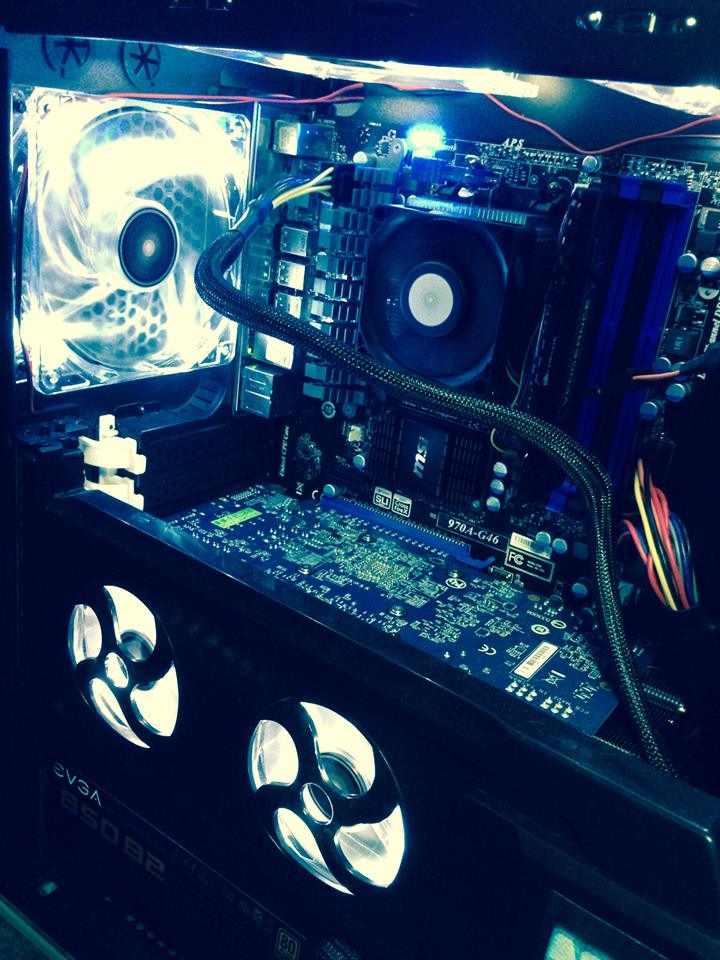
I've had this build for nearly a year now with no issues. However, as of late, my motherboard has been getting overly hot (using Piriform Speccy to measure). My computer case came with 4 fans but it effectively has 6; one in the rear of the case, two at the top of the case, and another in front of the hard drive mounts. It also has a plastic flap with 2 fans attached to it. When closed, it acts as extra cooling for the graphics card.


I need to stress that I've had no cooling issues until recently.

While playing any game my motherboard nearly peaks out at 70 degrees Celsius. From past experience, my fans USED to accelerate in rotations per minute during gameplay. I've observed that they no longer do this. :confused: In the mean time, I'm taking the side panel off my rig and blowing a fan into it :cool:. This brings temperatures down to 60 degrees Celsius. Other than the motherboard, everything else stays cool.

Is it a fan issue?
Are these bad temperatures to begin with?
How much space do you recommend for ventilation?
How would you recommend a fix in general?

Thanks!
 

My Computer My Computer

At a glance

Windows 7 64 bitAMD FX-63008.00GB Dual Channel DDR3 @ 666MHz (9-9-9-24)AMD Radeon HD 7870 (Gigabyte)
Computer type
PC/Desktop
Computer Manufacturer/Model Number
Custum Build
OS
Windows 7 64 bit
CPU
AMD FX-6300
Motherboard
MSI 970A-G46
Memory
8.00GB Dual Channel DDR3 @ 666MHz (9-9-9-24)
Graphics Card(s)
AMD Radeon HD 7870 (Gigabyte)
Monitor(s) Displays
Main:Compaq WF1907 Secondary: SANYO LCD (1440x900 @29Hz)
Screen Resolution
1440x900 (@60Hz)
Hard Drives
931GB Seagate
Internet Speed
60 Mbps (download) 4 Mbps (upload)
Antivirus
Avast!
Browser
Google Chrome
What specifically is getting warm?

Is it the CPU? if so there are a couple of quick fixes you may want to look at, such as:
- reapply the thermal paste
- upgrade the stock cooler (this is an assumption on you having stock)
- ensure that in the UEFI, the fan speeds are set to automatic and not fixed speeds.

If it's the GPU generating the heat, make sure that the airflow in your case is push the hot air out the top and back panels, whilst drawing in through the front (and bottom if possible).

You may also want to check that your fan speeds are set to automaticly speed up when the temp gets higher, this can be done again in the UEFI.

You may be able to push the fan speed on the graphics card by using AMD Control center or by downloading and using MSI Afterburner (Be carefull using this, as you will only want to change the fan speeds).

If all else fails, make sure your cables are tidied!
This isn't just a case of making the inside look pretty, tieing up the cables and putting them in the back panel / out of the way will improve airflow in the case and mean less heat is contained within the tower unit.


Also, welcome to Seveforums!
 

My Computer My Computer

At a glance

Windows 8.1Intel i5 3750k OC'd 4.0Ghz16GB Vengence CorsairGTX 770 OC 2GB Windforce
Computer type
PC/Desktop
Computer Manufacturer/Model Number
Custom Build
OS
Windows 8.1
CPU
Intel i5 3750k OC'd 4.0Ghz
Motherboard
P8Z77-V LX3
Memory
16GB Vengence Corsair
Graphics Card(s)
GTX 770 OC 2GB Windforce
Sound Card
C-Media 7.1 Surround Card
Monitor(s) Displays
Asus 3D 23" & BenQ 24" & LG 19"
Screen Resolution
1920*1080, 1920*1080, 1440*900
Hard Drives
Crucial 512GB SSD
WD 1.5 TB
WD 500Gb
PSU
850MW Silverstone
Case
inWin DragonRider
Cooling
4 * 140mm LED Akasa, One 140mm Fan Akasa
Keyboard
Corsair k95
Mouse
R.A.T 7 Contagion
Internet Speed
152 Mb Fiber Optic
Antivirus
ESET Nod32
Browser
Waterfox x64 / Chrome x64
Other Info
Freenas / Plex Media server
Q6600
6Gb DDR3
6TB ZFS Raid
500W PSu
2 x Intel NIC's
What specifically is getting warm?

Is it the CPU? if so there are a couple of quick fixes you may want to look at, such as:
- reapply the thermal paste
- upgrade the stock cooler (this is an assumption on you having stock)
- ensure that in the UEFI, the fan speeds are set to automatic and not fixed speeds.

If it's the GPU generating the heat, make sure that the airflow in your case is push the hot air out the top and back panels, whilst drawing in through the front (and bottom if possible).

You may also want to check that your fan speeds are set to automaticly speed up when the temp gets higher, this can be done again in the UEFI.

You may be able to push the fan speed on the graphics card by using AMD Control center or by downloading and using MSI Afterburner (Be carefull using this, as you will only want to change the fan speeds).

If all else fails, make sure your cables are tidied!
This isn't just a case of making the inside look pretty, tieing up the cables and putting them in the back panel / out of the way will improve airflow in the case and mean less heat is contained within the tower unit.


Also, welcome to Seveforums!

Nope, just the motherboard is having high temps. The Graphics Card has windforce technology along with 5 fans blowing on it at any given time. I've never seen temps on it go over 60 degrees Celsius. The CPU is the one thing that stays the coolest in the case. It's abnormal for it to stay above 40 degrees Celsius.

The motherboard has always been generating the most heat out of everything, and average temperatures during gameplay peaked at no more than 64 degrees. If they make software that allows you to control the fan speed, I'll definitely look into and report back. Thank you for the welcome!
 

My Computer My Computer

At a glance

Windows 7 64 bitAMD FX-63008.00GB Dual Channel DDR3 @ 666MHz (9-9-9-24)AMD Radeon HD 7870 (Gigabyte)
Computer type
PC/Desktop
Computer Manufacturer/Model Number
Custum Build
OS
Windows 7 64 bit
CPU
AMD FX-6300
Motherboard
MSI 970A-G46
Memory
8.00GB Dual Channel DDR3 @ 666MHz (9-9-9-24)
Graphics Card(s)
AMD Radeon HD 7870 (Gigabyte)
Monitor(s) Displays
Main:Compaq WF1907 Secondary: SANYO LCD (1440x900 @29Hz)
Screen Resolution
1440x900 (@60Hz)
Hard Drives
931GB Seagate
Internet Speed
60 Mbps (download) 4 Mbps (upload)
Antivirus
Avast!
Browser
Google Chrome
Nope, just the motherboard is having high temps. The Graphics Card has windforce technology along with 5 fans blowing on it at any given time. I've never seen temps on it go over 60 degrees Celsius. The CPU is the one thing that stays the coolest in the case. It's abnormal for it to stay above 40 degrees Celsius.

The motherboard has always been generating the most heat out of everything, and average temperatures during gameplay peaked at no more than 64 degrees. If they make software that allows you to control the fan speed, I'll definitely look into and report back. Thank you for the welcome!

Sounds like your motherboard has a problem with the thermal detection on it if your GPU and CPU are within decent ranges, or the northbridge is getting abnormally hot?

Get a thermometer(if you can) and place it inside whilst your benchmarking to see what the actual internal temps are. Also can you post a screenshot of speccy?
 

My Computer My Computer

At a glance

Windows 8.1Intel i5 3750k OC'd 4.0Ghz16GB Vengence CorsairGTX 770 OC 2GB Windforce
Computer type
PC/Desktop
Computer Manufacturer/Model Number
Custom Build
OS
Windows 8.1
CPU
Intel i5 3750k OC'd 4.0Ghz
Motherboard
P8Z77-V LX3
Memory
16GB Vengence Corsair
Graphics Card(s)
GTX 770 OC 2GB Windforce
Sound Card
C-Media 7.1 Surround Card
Monitor(s) Displays
Asus 3D 23" & BenQ 24" & LG 19"
Screen Resolution
1920*1080, 1920*1080, 1440*900
Hard Drives
Crucial 512GB SSD
WD 1.5 TB
WD 500Gb
PSU
850MW Silverstone
Case
inWin DragonRider
Cooling
4 * 140mm LED Akasa, One 140mm Fan Akasa
Keyboard
Corsair k95
Mouse
R.A.T 7 Contagion
Internet Speed
152 Mb Fiber Optic
Antivirus
ESET Nod32
Browser
Waterfox x64 / Chrome x64
Other Info
Freenas / Plex Media server
Q6600
6Gb DDR3
6TB ZFS Raid
500W PSu
2 x Intel NIC's
Sounds like your motherboard has a problem with the thermal detection on it if your GPU and CPU are within decent ranges, or the northbridge is getting abnormally hot?

Get a thermometer(if you can) and place it inside whilst your benchmarking to see what the actual internal temps are. Also can you post a screenshot of speccy?

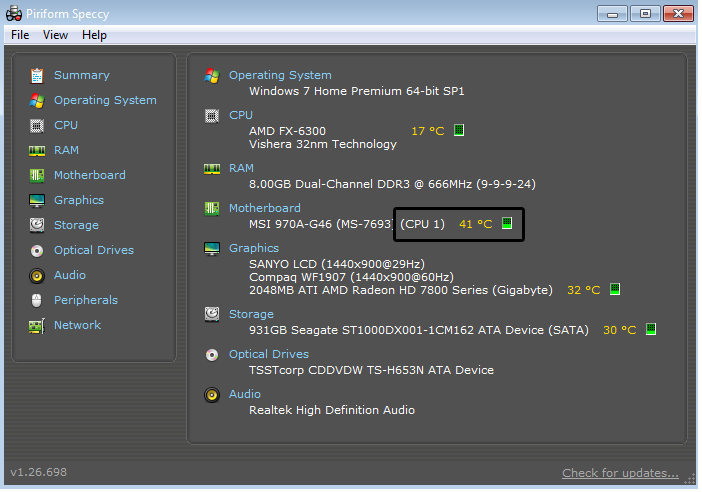
This is a screenshot of the temps while idle.

KSj4ZSm.png


Screenshot of the temps in-game.

ToqwITc.png
 

My Computer My Computer

At a glance

Windows 7 64 bitAMD FX-63008.00GB Dual Channel DDR3 @ 666MHz (9-9-9-24)AMD Radeon HD 7870 (Gigabyte)
Computer type
PC/Desktop
Computer Manufacturer/Model Number
Custum Build
OS
Windows 7 64 bit
CPU
AMD FX-6300
Motherboard
MSI 970A-G46
Memory
8.00GB Dual Channel DDR3 @ 666MHz (9-9-9-24)
Graphics Card(s)
AMD Radeon HD 7870 (Gigabyte)
Monitor(s) Displays
Main:Compaq WF1907 Secondary: SANYO LCD (1440x900 @29Hz)
Screen Resolution
1440x900 (@60Hz)
Hard Drives
931GB Seagate
Internet Speed
60 Mbps (download) 4 Mbps (upload)
Antivirus
Avast!
Browser
Google Chrome
Sounds like your motherboard has a problem with the thermal detection on it if your GPU and CPU are within decent ranges, or the northbridge is getting abnormally hot?

Get a thermometer(if you can) and place it inside whilst your benchmarking to see what the actual internal temps are. Also can you post a screenshot of speccy?

This is a screenshot of the temps while idle.

KSj4ZSm.png


Screenshot of the temps in-game.

ToqwITc.png

Ok I have major issues with what you're showing here!

Firstly, that temp for the Motherboard is based from CPU #1 and not from the actual motherboard monitor. The fact that it's going that high indicates that the CPU is underload.

Can you change to using HWiNFO64 (Basically the same thing but slightly more in depth. And a good comparison).

It also appears as though your BIOS defaults are incorrect, since it's set your RAM speed to 666MHz..
 

My Computer My Computer

At a glance

Windows 8.1Intel i5 3750k OC'd 4.0Ghz16GB Vengence CorsairGTX 770 OC 2GB Windforce
Computer type
PC/Desktop
Computer Manufacturer/Model Number
Custom Build
OS
Windows 8.1
CPU
Intel i5 3750k OC'd 4.0Ghz
Motherboard
P8Z77-V LX3
Memory
16GB Vengence Corsair
Graphics Card(s)
GTX 770 OC 2GB Windforce
Sound Card
C-Media 7.1 Surround Card
Monitor(s) Displays
Asus 3D 23" & BenQ 24" & LG 19"
Screen Resolution
1920*1080, 1920*1080, 1440*900
Hard Drives
Crucial 512GB SSD
WD 1.5 TB
WD 500Gb
PSU
850MW Silverstone
Case
inWin DragonRider
Cooling
4 * 140mm LED Akasa, One 140mm Fan Akasa
Keyboard
Corsair k95
Mouse
R.A.T 7 Contagion
Internet Speed
152 Mb Fiber Optic
Antivirus
ESET Nod32
Browser
Waterfox x64 / Chrome x64
Other Info
Freenas / Plex Media server
Q6600
6Gb DDR3
6TB ZFS Raid
500W PSu
2 x Intel NIC's
Sounds like your motherboard has a problem with the thermal detection on it if your GPU and CPU are within decent ranges, or the northbridge is getting abnormally hot?

Get a thermometer(if you can) and place it inside whilst your benchmarking to see what the actual internal temps are. Also can you post a screenshot of speccy?

This is a screenshot of the temps while idle.

KSj4ZSm.png


Screenshot of the temps in-game.

ToqwITc.png

Ok I have major issues with what you're showing here!

Firstly, that temp for the Motherboard is based from CPU #1 and not from the actual motherboard monitor. The fact that it's going that high indicates that the CPU is underload.

Can you change to using HWiNFO64 (Basically the same thing but slightly more in depth. And a good comparison).

It also appears as though your BIOS defaults are incorrect, since it's set your RAM speed to 666MHz..

So I can see why you prefer this, lol.

Idle screenshot

BiR0I62.png


In-game screenshot

FTT0MXJ.png


Obviously this points out that the motherboard is NOT what's generating heat. x.x
 

My Computer My Computer

At a glance

Windows 7 64 bitAMD FX-63008.00GB Dual Channel DDR3 @ 666MHz (9-9-9-24)AMD Radeon HD 7870 (Gigabyte)
Computer type
PC/Desktop
Computer Manufacturer/Model Number
Custum Build
OS
Windows 7 64 bit
CPU
AMD FX-6300
Motherboard
MSI 970A-G46
Memory
8.00GB Dual Channel DDR3 @ 666MHz (9-9-9-24)
Graphics Card(s)
AMD Radeon HD 7870 (Gigabyte)
Monitor(s) Displays
Main:Compaq WF1907 Secondary: SANYO LCD (1440x900 @29Hz)
Screen Resolution
1440x900 (@60Hz)
Hard Drives
931GB Seagate
Internet Speed
60 Mbps (download) 4 Mbps (upload)
Antivirus
Avast!
Browser
Google Chrome
So I can see why you prefer this, lol.

Idle screenshot

BiR0I62.png


In-game screenshot

FTT0MXJ.png


Obviously this points out that the motherboard is NOT what's generating heat. x.x

Yeah thats why i asked you to use different software, it looks like speccy can't read your BIOS setup correctly.

Is there anything you're worried about? If not you can mark the thread as solved in the top right :)
 

My Computer My Computer

At a glance

Windows 8.1Intel i5 3750k OC'd 4.0Ghz16GB Vengence CorsairGTX 770 OC 2GB Windforce
Computer type
PC/Desktop
Computer Manufacturer/Model Number
Custom Build
OS
Windows 8.1
CPU
Intel i5 3750k OC'd 4.0Ghz
Motherboard
P8Z77-V LX3
Memory
16GB Vengence Corsair
Graphics Card(s)
GTX 770 OC 2GB Windforce
Sound Card
C-Media 7.1 Surround Card
Monitor(s) Displays
Asus 3D 23" & BenQ 24" & LG 19"
Screen Resolution
1920*1080, 1920*1080, 1440*900
Hard Drives
Crucial 512GB SSD
WD 1.5 TB
WD 500Gb
PSU
850MW Silverstone
Case
inWin DragonRider
Cooling
4 * 140mm LED Akasa, One 140mm Fan Akasa
Keyboard
Corsair k95
Mouse
R.A.T 7 Contagion
Internet Speed
152 Mb Fiber Optic
Antivirus
ESET Nod32
Browser
Waterfox x64 / Chrome x64
Other Info
Freenas / Plex Media server
Q6600
6Gb DDR3
6TB ZFS Raid
500W PSu
2 x Intel NIC's
Lets get back to basics.

1. Any time a fan isn't working properly you are going to have problems.
That problem needs fixed as fast as possible.

2. If you have to put a fan blowing into the case with the side panel off you have a air flow problem with your case.

Could you post a picture of your case with the side panel off?

Could you also put what case you are using in your My System Specs?

When was the last time you did a complete cleaning of the inside of your case?

Do all your intake fans have filters?

Your motherboard temps at 68C is way to hot. I prefer to use Speccy reading because here lately those that use HWMonitor are having problems getting correct accurate readings.
 

My Computer My Computer

At a glance

Windows 10 Pro. 64/ version 1709 Windows 7 Pr...Intel i7-6800K @ 4.3Corsair Platinum 16 gig @2400EVGA GTX 1070 OC
Computer type
PC/Desktop
Computer Manufacturer/Model Number
Home made Desktop
OS
Windows 10 Pro. 64/ version 1709 Windows 7 Pro/64
CPU
Intel i7-6800K @ 4.3
Motherboard
ASUS X-99 Deluxe II
Memory
Corsair Platinum 16 gig @2400
Graphics Card(s)
EVGA GTX 1070 OC
Monitor(s) Displays
Asus 27" LED LCD/VE278Q
Screen Resolution
1920-1080 or 1280-720 HDMI
Hard Drives
INTEL SSD 730-240 Gb Sata 3.0/
PSU
EVGA Platium 1200W
Case
Phanteks Luxe Tempered Glass 8 fans/ one radiator
Cooling
XSPC/ Water Cooled CPU
Keyboard
Das 4 Professional
Mouse
Logitech M705/MX Anywhere 2-S
Internet Speed
100 mbits
Antivirus
Microsoft Security Essentials/ Malwarebytes Premium 3.0/ SAS
Browser
I.E. 11 default/Firefox/ ISP Time Warner Cable/Spectrum
Other Info
LG BluRay Burner/
Sound system-KLipsch-THX/
Icy Dock ssd Hot Swap bays.
Yeah thats why i asked you to use different software, it looks like speccy can't read your BIOS setup correctly.

Is there anything you're worried about? If not you can mark the thread as solved in the top right :)

Ummm, other than if you think the CPU underload temperature is a problem? :)

Could you post a picture of your case with the side panel off?

To the right is just hard drive and CD drive mounts

SthqNHI.jpg


Could you also put what case you are using in your My System Specs?

This is a tricky one, in ordering the parts for my build, the company got in contact with me saying they were out of stock of the case I ordered. So they sent me a substitute (because I had already payed) that had better cooling and more venting. So I don't have the name of the case on file. :(

When was the last time you did a complete cleaning of the inside of your case?

I dusted it out about 4 weeks ago, and went around the entire case about 2 months ago.
 

My Computer My Computer

At a glance

Windows 7 64 bitAMD FX-63008.00GB Dual Channel DDR3 @ 666MHz (9-9-9-24)AMD Radeon HD 7870 (Gigabyte)
Computer type
PC/Desktop
Computer Manufacturer/Model Number
Custum Build
OS
Windows 7 64 bit
CPU
AMD FX-6300
Motherboard
MSI 970A-G46
Memory
8.00GB Dual Channel DDR3 @ 666MHz (9-9-9-24)
Graphics Card(s)
AMD Radeon HD 7870 (Gigabyte)
Monitor(s) Displays
Main:Compaq WF1907 Secondary: SANYO LCD (1440x900 @29Hz)
Screen Resolution
1440x900 (@60Hz)
Hard Drives
931GB Seagate
Internet Speed
60 Mbps (download) 4 Mbps (upload)
Antivirus
Avast!
Browser
Google Chrome
Are all the fans working as they should?

Are their any name plates or stickers on the case?
Can you find your case online?
This information is helpful to understand the air flow of the case.
 

My Computer My Computer

At a glance

Windows 10 Pro. 64/ version 1709 Windows 7 Pr...Intel i7-6800K @ 4.3Corsair Platinum 16 gig @2400EVGA GTX 1070 OC
Computer type
PC/Desktop
Computer Manufacturer/Model Number
Home made Desktop
OS
Windows 10 Pro. 64/ version 1709 Windows 7 Pro/64
CPU
Intel i7-6800K @ 4.3
Motherboard
ASUS X-99 Deluxe II
Memory
Corsair Platinum 16 gig @2400
Graphics Card(s)
EVGA GTX 1070 OC
Monitor(s) Displays
Asus 27" LED LCD/VE278Q
Screen Resolution
1920-1080 or 1280-720 HDMI
Hard Drives
INTEL SSD 730-240 Gb Sata 3.0/
PSU
EVGA Platium 1200W
Case
Phanteks Luxe Tempered Glass 8 fans/ one radiator
Cooling
XSPC/ Water Cooled CPU
Keyboard
Das 4 Professional
Mouse
Logitech M705/MX Anywhere 2-S
Internet Speed
100 mbits
Antivirus
Microsoft Security Essentials/ Malwarebytes Premium 3.0/ SAS
Browser
I.E. 11 default/Firefox/ ISP Time Warner Cable/Spectrum
Other Info
LG BluRay Burner/
Sound system-KLipsch-THX/
Icy Dock ssd Hot Swap bays.
To clarify, is it the CPU temperature you're worried about? I'm looking at that CPU cooler and thinking that 66°C under load is probably to be expected with a cooler of that size. The fan isn't huge and it's running directly on top of the heatsink, even a cheap triple copper heatpipe cooler would improve your CPU temperatures I'd have thought.
 

My Computer My Computer

At a glance

W7 Pro x64 SP1 | W10 Pro IP x64 | W8.1 Pro x6...i7-4790k @ 4GHz (4.4GHz Boost)16GB DDR3 Kingston HyperX Fury @ 1600MHz CL 9...EVGA GTX 980 Classified
Computer type
PC/Desktop
Computer Manufacturer/Model Number
Custom Build
OS
W7 Pro x64 SP1 | W10 Pro IP x64 | W8.1 Pro x64 VM | Linux Mint VM
CPU
i7-4790k @ 4GHz (4.4GHz Boost)
Motherboard
ASUS Sabertooth Z87 (BIOS Rev 2004)
Memory
16GB DDR3 Kingston HyperX Fury @ 1600MHz CL 9-9-9-27
Graphics Card(s)
EVGA GTX 980 Classified
Sound Card
Realtek Onboard
Monitor(s) Displays
Samsung S27D390
Screen Resolution
1920 x 1080
Hard Drives
240GB Intel 520 Series SSD |
Samsung 850 EVO 120GB SSD |
2TB WD Caviar Black |
2TB WD Caviar Green
PSU
Corsair HX850-80 Gold Modular
Case
Cooler Master Silencio 650
Cooling
Corsair H80i w/2 x Corsair SP120 | 2 x 120mm Noctua NF-S12B
Keyboard
Microsoft Sidewinder X4
Mouse
Gigabyte M6900 optical
Internet Speed
152mb
Antivirus
F-Secure
Browser
Firefox 38.0
Other Info
Backup Rig: Win 7 Pro 64-bit | AMD A10-5800k | ASUS F2A85-V Pro | 8GB Samsung DDR3 @1600MHz | 120GB Toshiba SDD | 2TB Seagate HDD | Cooler Master Silencio 550
The OP is worried about the motherboard temp at 68C and the front fans when turned up in speed it causes a BSOD.
 

My Computer My Computer

At a glance

Windows 10 Pro. 64/ version 1709 Windows 7 Pr...Intel i7-6800K @ 4.3Corsair Platinum 16 gig @2400EVGA GTX 1070 OC
Computer type
PC/Desktop
Computer Manufacturer/Model Number
Home made Desktop
OS
Windows 10 Pro. 64/ version 1709 Windows 7 Pro/64
CPU
Intel i7-6800K @ 4.3
Motherboard
ASUS X-99 Deluxe II
Memory
Corsair Platinum 16 gig @2400
Graphics Card(s)
EVGA GTX 1070 OC
Monitor(s) Displays
Asus 27" LED LCD/VE278Q
Screen Resolution
1920-1080 or 1280-720 HDMI
Hard Drives
INTEL SSD 730-240 Gb Sata 3.0/
PSU
EVGA Platium 1200W
Case
Phanteks Luxe Tempered Glass 8 fans/ one radiator
Cooling
XSPC/ Water Cooled CPU
Keyboard
Das 4 Professional
Mouse
Logitech M705/MX Anywhere 2-S
Internet Speed
100 mbits
Antivirus
Microsoft Security Essentials/ Malwarebytes Premium 3.0/ SAS
Browser
I.E. 11 default/Firefox/ ISP Time Warner Cable/Spectrum
Other Info
LG BluRay Burner/
Sound system-KLipsch-THX/
Icy Dock ssd Hot Swap bays.
To clarify, is it the CPU temperature you're worried about? I'm looking at that CPU cooler and thinking that 66°C under load is probably to be expected with a cooler of that size. The fan isn't huge and it's running directly on top of the heatsink, even a cheap triple copper heatpipe cooler would improve your CPU temperatures I'd have thought.

His original question was about the Motherboard temp.

Nope, just the motherboard is having high temps. The Graphics Card has windforce technology along with 5 fans blowing on it at any given time. I've never seen temps on it go over 60 degrees Celsius. The CPU is the one thing that stays the coolest in the case. It's abnormal for it to stay above 40 degrees Celsius.

The motherboard has always been generating the most heat out of everything, and average temperatures during gameplay peaked at no more than 64 degrees. If they make software that allows you to control the fan speed, I'll definitely look into and report back. Thank you for the welcome!


AU5u84b.png
which i've shown here that Speccy is picking it up wrong.

Using stock cooling and getting 66*c whilst gaming is not bad at all!
 

My Computer My Computer

At a glance

Windows 8.1Intel i5 3750k OC'd 4.0Ghz16GB Vengence CorsairGTX 770 OC 2GB Windforce
Computer type
PC/Desktop
Computer Manufacturer/Model Number
Custom Build
OS
Windows 8.1
CPU
Intel i5 3750k OC'd 4.0Ghz
Motherboard
P8Z77-V LX3
Memory
16GB Vengence Corsair
Graphics Card(s)
GTX 770 OC 2GB Windforce
Sound Card
C-Media 7.1 Surround Card
Monitor(s) Displays
Asus 3D 23" & BenQ 24" & LG 19"
Screen Resolution
1920*1080, 1920*1080, 1440*900
Hard Drives
Crucial 512GB SSD
WD 1.5 TB
WD 500Gb
PSU
850MW Silverstone
Case
inWin DragonRider
Cooling
4 * 140mm LED Akasa, One 140mm Fan Akasa
Keyboard
Corsair k95
Mouse
R.A.T 7 Contagion
Internet Speed
152 Mb Fiber Optic
Antivirus
ESET Nod32
Browser
Waterfox x64 / Chrome x64
Other Info
Freenas / Plex Media server
Q6600
6Gb DDR3
6TB ZFS Raid
500W PSu
2 x Intel NIC's

My Computer My Computer

At a glance

W7 Pro x64 SP1 | W10 Pro IP x64 | W8.1 Pro x6...i7-4790k @ 4GHz (4.4GHz Boost)16GB DDR3 Kingston HyperX Fury @ 1600MHz CL 9...EVGA GTX 980 Classified
Computer type
PC/Desktop
Computer Manufacturer/Model Number
Custom Build
OS
W7 Pro x64 SP1 | W10 Pro IP x64 | W8.1 Pro x64 VM | Linux Mint VM
CPU
i7-4790k @ 4GHz (4.4GHz Boost)
Motherboard
ASUS Sabertooth Z87 (BIOS Rev 2004)
Memory
16GB DDR3 Kingston HyperX Fury @ 1600MHz CL 9-9-9-27
Graphics Card(s)
EVGA GTX 980 Classified
Sound Card
Realtek Onboard
Monitor(s) Displays
Samsung S27D390
Screen Resolution
1920 x 1080
Hard Drives
240GB Intel 520 Series SSD |
Samsung 850 EVO 120GB SSD |
2TB WD Caviar Black |
2TB WD Caviar Green
PSU
Corsair HX850-80 Gold Modular
Case
Cooler Master Silencio 650
Cooling
Corsair H80i w/2 x Corsair SP120 | 2 x 120mm Noctua NF-S12B
Keyboard
Microsoft Sidewinder X4
Mouse
Gigabyte M6900 optical
Internet Speed
152mb
Antivirus
F-Secure
Browser
Firefox 38.0
Other Info
Backup Rig: Win 7 Pro 64-bit | AMD A10-5800k | ASUS F2A85-V Pro | 8GB Samsung DDR3 @1600MHz | 120GB Toshiba SDD | 2TB Seagate HDD | Cooler Master Silencio 550
My brain is getting confungalated.

We have two motherboard temp problems in two different threads by two different members. I think I have been getting things mixed up between the two.

That being said; motherboard temps should not be 68C if that is a correct reading. If this is a correct reading I'm thinking case air flow problems.

Because of the problems members have been having with HWMonitor in the last week or so I choose to use Speccy readings.
 

My Computer My Computer

At a glance

Windows 10 Pro. 64/ version 1709 Windows 7 Pr...Intel i7-6800K @ 4.3Corsair Platinum 16 gig @2400EVGA GTX 1070 OC
Computer type
PC/Desktop
Computer Manufacturer/Model Number
Home made Desktop
OS
Windows 10 Pro. 64/ version 1709 Windows 7 Pro/64
CPU
Intel i7-6800K @ 4.3
Motherboard
ASUS X-99 Deluxe II
Memory
Corsair Platinum 16 gig @2400
Graphics Card(s)
EVGA GTX 1070 OC
Monitor(s) Displays
Asus 27" LED LCD/VE278Q
Screen Resolution
1920-1080 or 1280-720 HDMI
Hard Drives
INTEL SSD 730-240 Gb Sata 3.0/
PSU
EVGA Platium 1200W
Case
Phanteks Luxe Tempered Glass 8 fans/ one radiator
Cooling
XSPC/ Water Cooled CPU
Keyboard
Das 4 Professional
Mouse
Logitech M705/MX Anywhere 2-S
Internet Speed
100 mbits
Antivirus
Microsoft Security Essentials/ Malwarebytes Premium 3.0/ SAS
Browser
I.E. 11 default/Firefox/ ISP Time Warner Cable/Spectrum
Other Info
LG BluRay Burner/
Sound system-KLipsch-THX/
Icy Dock ssd Hot Swap bays.
My brain is getting confungalated.

We have two motherboard temp problems in two different threads by two different members. I think I have been getting things mixed up between the two.

That being said; motherboard temps should not be 68C if that is a correct reading. If this is a correct reading I'm thinking case air flow problems.

Because of the problems members have been having with HWMonitor in the last week or so I choose to use Speccy readings.

That picture DID prove that it wasn't the motherboard generating heat. The motherboard stays cool while the CPU is getting temperatures in excess of 66+ degrees. I DID download MSI afterburner as WindowsSniper suggested, and fans now run correctly when the CPU gets over 60 degrees.

I also took the following steps;
1. I moved the computer into a room that I can keep cool at all times
2. I moved the computer onto an elevated area to get maximum ventilation (it was originally under a desk)
3. I completely cleaned the inside of the rig out again.

I should be good to go for now!

Thanks everyone for the suggestions!

Rep for you all!
 

My Computer My Computer

At a glance

Windows 7 64 bitAMD FX-63008.00GB Dual Channel DDR3 @ 666MHz (9-9-9-24)AMD Radeon HD 7870 (Gigabyte)
Computer type
PC/Desktop
Computer Manufacturer/Model Number
Custum Build
OS
Windows 7 64 bit
CPU
AMD FX-6300
Motherboard
MSI 970A-G46
Memory
8.00GB Dual Channel DDR3 @ 666MHz (9-9-9-24)
Graphics Card(s)
AMD Radeon HD 7870 (Gigabyte)
Monitor(s) Displays
Main:Compaq WF1907 Secondary: SANYO LCD (1440x900 @29Hz)
Screen Resolution
1440x900 (@60Hz)
Hard Drives
931GB Seagate
Internet Speed
60 Mbps (download) 4 Mbps (upload)
Antivirus
Avast!
Browser
Google Chrome
Glad things are working properly now.

I personally never put a computer tower in a enclosed space.
I only put a town on the flood if it is raised to it can get clean air.

Here is a little trick you might be able to use later. It all depends on the quality of your fans.

I run all my fans with full voltage which means they run at 100% max speed all the time. I run them off of a fan hub with direct connection to the power supply. If you choose the right fans this can be done without a lot of noise. If one chooses the wrong fans your computer will sound like a old prop air plain trying to take off with a heavy load.

My system in My System Specs has 14 fans at 100% and two water pumps and runs quite and very cool.
 

My Computer My Computer

At a glance

Windows 10 Pro. 64/ version 1709 Windows 7 Pr...Intel i7-6800K @ 4.3Corsair Platinum 16 gig @2400EVGA GTX 1070 OC
Computer type
PC/Desktop
Computer Manufacturer/Model Number
Home made Desktop
OS
Windows 10 Pro. 64/ version 1709 Windows 7 Pro/64
CPU
Intel i7-6800K @ 4.3
Motherboard
ASUS X-99 Deluxe II
Memory
Corsair Platinum 16 gig @2400
Graphics Card(s)
EVGA GTX 1070 OC
Monitor(s) Displays
Asus 27" LED LCD/VE278Q
Screen Resolution
1920-1080 or 1280-720 HDMI
Hard Drives
INTEL SSD 730-240 Gb Sata 3.0/
PSU
EVGA Platium 1200W
Case
Phanteks Luxe Tempered Glass 8 fans/ one radiator
Cooling
XSPC/ Water Cooled CPU
Keyboard
Das 4 Professional
Mouse
Logitech M705/MX Anywhere 2-S
Internet Speed
100 mbits
Antivirus
Microsoft Security Essentials/ Malwarebytes Premium 3.0/ SAS
Browser
I.E. 11 default/Firefox/ ISP Time Warner Cable/Spectrum
Other Info
LG BluRay Burner/
Sound system-KLipsch-THX/
Icy Dock ssd Hot Swap bays.
Glad things are working properly now.

I personally never put a computer tower in a enclosed space.
I only put a town on the flood if it is raised to it can get clean air.

Here is a little trick you might be able to use later. It all depends on the quality of your fans.

I run all my fans with full voltage which means they run at 100% max speed all the time. I run them off of a fan hub with direct connection to the power supply. If you choose the right fans this can be done without a lot of noise. If one chooses the wrong fans your computer will sound like a old prop air plain trying to take off with a heavy load.

My system in My System Specs has 14 fans at 100% and two water pumps and runs quite and very cool.

I might go with liquid cooling once I upgrade my graphics card, just so I can almost guarantee it will be kept cool. The only reason why I didn't get a lot of cooling from the start was because I was on a budget. Being my first build and all, I didn't want to bite off more than I could chew. :p
 

My Computer My Computer

At a glance

Windows 7 64 bitAMD FX-63008.00GB Dual Channel DDR3 @ 666MHz (9-9-9-24)AMD Radeon HD 7870 (Gigabyte)
Computer type
PC/Desktop
Computer Manufacturer/Model Number
Custum Build
OS
Windows 7 64 bit
CPU
AMD FX-6300
Motherboard
MSI 970A-G46
Memory
8.00GB Dual Channel DDR3 @ 666MHz (9-9-9-24)
Graphics Card(s)
AMD Radeon HD 7870 (Gigabyte)
Monitor(s) Displays
Main:Compaq WF1907 Secondary: SANYO LCD (1440x900 @29Hz)
Screen Resolution
1440x900 (@60Hz)
Hard Drives
931GB Seagate
Internet Speed
60 Mbps (download) 4 Mbps (upload)
Antivirus
Avast!
Browser
Google Chrome
I fully understand. My cooling cost a lot of money. Just the damn fittings mount up quickly.

Building your own water cooling system takes a lot of home work first and for most. You don't want to buy parts that don't work with the other parts.

Building your own water cooling system is kind of like over clock.
You do it more because you want to rather than you need to.
 

My Computer My Computer

At a glance

Windows 10 Pro. 64/ version 1709 Windows 7 Pr...Intel i7-6800K @ 4.3Corsair Platinum 16 gig @2400EVGA GTX 1070 OC
Computer type
PC/Desktop
Computer Manufacturer/Model Number
Home made Desktop
OS
Windows 10 Pro. 64/ version 1709 Windows 7 Pro/64
CPU
Intel i7-6800K @ 4.3
Motherboard
ASUS X-99 Deluxe II
Memory
Corsair Platinum 16 gig @2400
Graphics Card(s)
EVGA GTX 1070 OC
Monitor(s) Displays
Asus 27" LED LCD/VE278Q
Screen Resolution
1920-1080 or 1280-720 HDMI
Hard Drives
INTEL SSD 730-240 Gb Sata 3.0/
PSU
EVGA Platium 1200W
Case
Phanteks Luxe Tempered Glass 8 fans/ one radiator
Cooling
XSPC/ Water Cooled CPU
Keyboard
Das 4 Professional
Mouse
Logitech M705/MX Anywhere 2-S
Internet Speed
100 mbits
Antivirus
Microsoft Security Essentials/ Malwarebytes Premium 3.0/ SAS
Browser
I.E. 11 default/Firefox/ ISP Time Warner Cable/Spectrum
Other Info
LG BluRay Burner/
Sound system-KLipsch-THX/
Icy Dock ssd Hot Swap bays.
Back
Top