Solved Ext HD Installs But Cant See It.

rybosix

New member
Member
Local time
6:00 PM
Messages
88
Hi, I have a 2007{?} TOSHIBA Satellite L45 PSL48U-013005 adn it has 2.0 USB ports. I have and older Western digital HD that when I connected to my PC laptop window opened and said installing driver software.

It finished and I have icon that shows when clic on the ^ arrow on right side of my taskbar and if I click on the icon it asks eject ext HD safely.

Problem is, if I open explorer, the WD HD is not shown under computer. It does show in divices and printers but from there I can only view some of its properties or eject it.

So strange it installed software, but no can see or open HD in explorer i.e. I cant really see anything on HD or format it or do anything with it.

Thx for any ideas, but I'm think this WD HD is to old?

rsix


My Computer My Computer

Computer Manufacturer/Model Number
Toshiba Satelite
OS
Windows 7 ultimate 32
CPU
1.73 T2080 intel
Memory
2Ghz
Hard Drives
60GB
External HDDs sometimes need to be Partitioned followed by Formatting, usually done in Disk Management. Right-click Computer/My Computer/This PC and choose Manage then look in the Disk Management section. After an HDD is formatted a drive letter has to be assigned or the drive will not show in Windows Explorer/File Explorer.
 

My Computer My Computer

Computer type
PC/Desktop
Computer Manufacturer/Model Number
Customs, Dell, Gateway, HP, Toshiba, Acer, ASUS
OS
Windows 7 Ultimate 64-bit, Windows 8.1 64-bit, Mac OS X 10.10, Linux Mint 17, Windows 10 Pro TP
Keyboard
Microsoft
Mouse
Microsoft
With only your problem external HDD connected, post a screenshot of Windows Disk Management.
 

My Computer My Computer

OS
Windows 7 Home Premium 32 bit
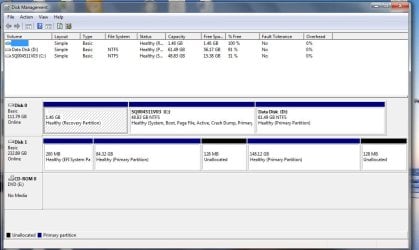
Thanks to Berton and Jumanji. I did not know or remmmeber there exists a disk managment program/app. I'm attaching screen shot of the disk management. I believe the first on is the Ext. HD and it has no name altho it says only 1.46 GB and I think this Ext HD is 300 or 500 GB. Cant recall exactly.

the 2nd and 3rd are my internal HD partitioned.

So maybe from disk managment I can access the ext HD to format it but I dont yet see that ability.

Oh wait now I see it must be disk 1 on left side lower and it is 232GB or if I chagen to list view it appears above also now.

I see I can right click on disk 1 make it dyamic disk from disk management but I dont know if that is going to get me formatting it. I dont understand why I cannot see this Ext Disk 1 in explorer-folder window on side bar under computer as is the two partitions internal HD.

EXt HD image.jpg


With only your problem external HDD connected, post a screenshot of Windows Disk Management.
 

My Computer My Computer

Computer Manufacturer/Model Number
Toshiba Satelite
OS
Windows 7 ultimate 32
CPU
1.73 T2080 intel
Memory
2Ghz
Hard Drives
60GB
What I see is Disk 0 is you bootable/system drive, leave it alone. Disk 1 appears to be partitioned but since nothing is mentioned about whether each partition is NTFS or FAT32, they are not yet Formatted. Format the 2 largest partitions then you can assign a drive letter. I wouldn't worry about the smaller partitions. Or you could simply delete ALL the partitions and create one full-size or split the drive as desired.
 

My Computer My Computer

Computer type
PC/Desktop
Computer Manufacturer/Model Number
Customs, Dell, Gateway, HP, Toshiba, Acer, ASUS
OS
Windows 7 Ultimate 64-bit, Windows 8.1 64-bit, Mac OS X 10.10, Linux Mint 17, Windows 10 Pro TP
Keyboard
Microsoft
Mouse
Microsoft
Thx Bert, but as previously stated I see no place to click format and that includes in the Disk Managemnet window.

Again, the HD should appear in explorer folder window on left in side-bar under computer, and it does not.

All properties of the HD say it is functioning but there is nothing for me to click on right click on to get menu with format function. Never seen this happen before in my 18 years of working with computers, mac and PC in last 5 years.

I repeat, in disk mangament the only function I get ifrom right-click is 'convert to dynamic disk' that be significant to me appears to be, no format function listed anywhere Ive looked.
rsix

What I see is Disk 0 is you bootable/system drive, leave it alone. Disk 1 appears to be partitioned but since nothing is mentioned about whether each partition is NTFS or FAT32, they are not yet Formatted. Format the 2 largest partitions then you can assign a drive letter. I wouldn't worry about the smaller partitions. Or you could simply delete ALL the partitions and create one full-size or split the drive as desired.
 
Last edited:

My Computer My Computer

Computer Manufacturer/Model Number
Toshiba Satelite
OS
Windows 7 ultimate 32
CPU
1.73 T2080 intel
Memory
2Ghz
Hard Drives
60GB
There's commands available when right-clicking on a drive or partition. If a partition is formatted it should show as what format it is. If it's RAW there is a problem but usually should be NTFS or FAT32 if the drive is working properly. I have seen a partition formatted as EXT3 but it was unusable.
 

My Computer My Computer

Computer type
PC/Desktop
Computer Manufacturer/Model Number
Customs, Dell, Gateway, HP, Toshiba, Acer, ASUS
OS
Windows 7 Ultimate 64-bit, Windows 8.1 64-bit, Mac OS X 10.10, Linux Mint 17, Windows 10 Pro TP
Keyboard
Microsoft
Mouse
Microsoft
Bert, thx, however, there is no format option in any menu in disk manager, there is no format option anywhere when I right click on anything that is disk 1 in disk manager or devices etc...

I'm thinking now, that the last time I used this it was with mac, so, even tho I should be able to format with my PC, maybe if delete all files and format with the mac it will then appear on PC as it should with icon and right click to a format option.

Thx again for your attempts to help and advise.

rsix


There's commands available when right-clicking on a drive or partition. If a partition is formatted it should show as what format it is. If it's RAW there is a problem but usually should be NTFS or FAT32 if the drive is working properly. I have seen a partition formatted as EXT3 but it was unusable.
 

My Computer My Computer

Computer Manufacturer/Model Number
Toshiba Satelite
OS
Windows 7 ultimate 32
CPU
1.73 T2080 intel
Memory
2Ghz
Hard Drives
60GB
DON'T reformat on a Mac if going to use it on a Windows computer, Windows can't read Mac HFS+ formatting.
HFS Plus - Wikipedia, the free encyclopedia
Some later versions of Mac OS X can read NTFS but not write, haven't found suitable third-party software yet that works good. I use a Mac and Linux computers with my NAS/Network Attached Storage drive plugged into my Router.

In a case like yours I'd download GPARTED, create the bootable CD, boot to it with the drive attached and delete the partitions to get a clean drive then create suitable partitions on it, every drive needs at least one.
 

My Computer My Computer

Computer type
PC/Desktop
Computer Manufacturer/Model Number
Customs, Dell, Gateway, HP, Toshiba, Acer, ASUS
OS
Windows 7 Ultimate 64-bit, Windows 8.1 64-bit, Mac OS X 10.10, Linux Mint 17, Windows 10 Pro TP
Keyboard
Microsoft
Mouse
Microsoft
Thx, bert but that sounds a more complicated than I want to get into. rsix

DON'T reformat on a Mac if going to use it on a Windows computer, Windows can't read Mac HFS+ formatting.
HFS Plus - Wikipedia, the free encyclopedia
Some later versions of Mac OS X can read NTFS but not write, haven't found suitable third-party software yet that works good. I use a Mac and Linux computers with my NAS/Network Attached Storage drive plugged into my Router.

In a case like yours I'd download GPARTED, create the bootable CD, boot to it with the drive attached and delete the partitions to get a clean drive then create suitable partitions on it, every drive needs at least one.
 

My Computer My Computer

Computer Manufacturer/Model Number
Toshiba Satelite
OS
Windows 7 ultimate 32
CPU
1.73 T2080 intel
Memory
2Ghz
Hard Drives
60GB
@rybosix,

I have some basic doubts now. Its a guessing game for me. :D

Is Disk 1 your 250GB external drive? The drive it shows seems to be a internal system drive that was UEFI (GPT)

You have to give us a complete history as to where it came from, what OS that system was using, how you made that internal drive into an external drive, What is the OS in the system on which you have taken the screenshot etc.,

You must also tell why that drive was removed from the original system and what exactly you want to do from the drive so removed.

I mean the complete history from A to Z.
 

My Computer My Computer

OS
Windows 7 Home Premium 32 bit
Juman, this ext. HD came to me used. I formatted on my old Toshibal W7 PC and used Macrium to attempt backup.

Then I used it on my mac as backup and could boot from etc.....

I got new ext. HD for my mac so I finally got around to trying to use it on this new used PC I have.

Again, in task bar ^ it shows little icon and allows me to eject Ext HD oropen in devices. Opening in devices does do much. Allows me to see properities but nothing there allows me find a format option.

So I sent you image of disk manager, and yes the ext HD to best of my knowledge has always been and ext. HD. It shows on disk manager as 'disk 1' just as bert stated. But the in the list at top of idsk manager you can see it has no name.

I think I had it in 3 partitiions---1 was bootable clone of mac, other was backup clone and 3rd was for some movies.

What should happen is a window on desk top should notify me of this ext HD, instean all that I got was installing software drivers completed successfully.

But there is no icon for the Ext HD anywhere except in ^ in task bar mentioned above, and in disk manager that leads to no format options, and devices and only leads to properties.

Maybe if I hoook it back onto mac and delete filess. Maybe the mac will allow me to format as FAt whatever.

rsix


@rybosix,

I have some basic doubts now. Its a guessing game for me. :D

Is Disk 1 your 250GB external drive? The drive it shows seems to be a internal system drive that was UEFI (GPT)

You have to give us a complete history as to where it came from, what OS that system was using, how you made that internal drive into an external drive, What is the OS in the system on which you have taken the screenshot etc.,

You must also tell why that drive was removed from the original system and what exactly you want to do from the drive so removed.

I mean the complete history from A to Z.
 

My Computer My Computer

Computer Manufacturer/Model Number
Toshiba Satelite
OS
Windows 7 ultimate 32
CPU
1.73 T2080 intel
Memory
2Ghz
Hard Drives
60GB
I still cannot quite make out how your external drive shows a 200MB EFI System partition.I am Mac-unaware.:) Windows 7 may not recognize a bootable EFI external drive I presume.Since you had cloned your mac drive this is what happened , I presume again.;)

OK, try it again on your Mac and if need be copy all the files to another location..

Then we shall try to write zeros to all sectors and format it as an MBR drive on your Windows 7 machine. Is that OK for you?
 

My Computer My Computer

OS
Windows 7 Home Premium 32 bit
Hi Juman, maybe EFI is electronic fuel Injection ;--)

I do not need to save any files on the HD--- its western digital ---. I have to wait now til my wife finnishes her beauty sleep. Then I will delete files and see if the mac offers a FAT fromatting option.

To be clear, on the PC I can see the format option when I right-click in disk manager, but it is grayed out so not available. Not sure if that helps or tells you anything of significances.

Again this is strangest thing that I haver encountered with et HD, as it is seen just no acccessable to format or anything except to eject or make dyamnic or a few other options in disk managger.

Thx again, rsix

I still cannot quite make out how your external drive shows a 200MB EFI System partition.I am Mac-unaware.:) Windows 7 may not recognize a bootable EFI external drive I presume.Since you had cloned your mac drive this is what happened , I presume again.;)

OK, try it again on your Mac and if need be copy all the files to another location..

Then we shall try to write zeros to all sectors and format it as an MBR drive on your Windows 7 machine. Is that OK for you?
 

My Computer My Computer

Computer Manufacturer/Model Number
Toshiba Satelite
OS
Windows 7 ultimate 32
CPU
1.73 T2080 intel
Memory
2Ghz
Hard Drives
60GB
goto registry and remove the lower limt and upper limit
 

My Computer My Computer

Computer type
PC/Desktop
OS
win 7 64 bit

My Computer My Computer

Computer Manufacturer/Model Number
Toshiba Satelite
OS
Windows 7 ultimate 32
CPU
1.73 T2080 intel
Memory
2Ghz
Hard Drives
60GB
Yep, that was it. You used Diskpart Clean command to effectively zero the first 2048 sectors wiping the bootable EFI system partition. I would have preferred a cleanall command to zero all sectors, so that you start with an an entirely clean slate. That was what I meant by zeroing all sectors.

Glad you resolved your problem. Good going.
 

My Computer My Computer

OS
Windows 7 Home Premium 32 bit
Yeah, worked and refroomatted in lest than a 2nd. I didn't see option to zero out vectors but I know, that, on my mac, there are 3 versions of passes--- 1 pas, 3, passes, 7 passes --- to do best job zeroing out but I always have chosen the fastest cleaning method.

Ive inloaded Macrium, to I briefly consider Todus Easus.

Getting ready to clone. Yay!

Yep, that was it. You used Diskpart Clean command to effectively zero the first 2048 sectors wiping the bootable EFI system partition. I would have preferred a cleanall command to zero all sectors, so that you start with an an entirely clean slate. That was what I meant by zeroing all sectors.

Glad you resolved your problem. Good going.
 

My Computer My Computer

Computer Manufacturer/Model Number
Toshiba Satelite
OS
Windows 7 ultimate 32
CPU
1.73 T2080 intel
Memory
2Ghz
Hard Drives
60GB
Back
Top