Solved Data Recovery after Diskpart cleaned and created new partition

MycroftHolmes

New member
Member
Local time
8:58 PM
Messages
24
This is a life-destroying moment for me. I have a 2TB External Hard drive, with 2 partitions. The first one is 50 MB (actually ~48.5MB) UDF containing setup files for veracrypt and truecrypt, and keyfiles. The second partition is a Veracrypt-encrypted partition of size 1.8TB, which was quick formatted by Veracrypt. The drive was GUID -based, and the first partition was made an OEM partition using Diskpart and the second one an EFI partition in order to prevent accidental formatting by the system. However, a sudden accidental right click has pasted this script in diskpart and ran it before I could halt it. Diskpart doesn't even ask for confirmation before cleaning a drive.

Code:
select disk 0
clean
convert gpt
create partition primary size=300
format quick fs=ntfs label="Windows RE tools"
assign letter="T"

The new partition has a 300MB partition called Windows RE tools, and the rest is unallocated. I assigned a letter to the unallocated drive without formatting, hence it's a RAW partition, but Veracrypt couldn't open it. Is there any way to recover the previous data. It is extremely important for me and my job depends on it. The disk containing the backup of the data crashed last week and I had sent it to RMA. Hence I'm left with no backups.


I have opened the disk using WINHEX and I have seen the contents of the 50MB UDF partition, the keyfiles and the setup files. They are intact. Then there is a whole lot of gibberish, which I believe is the Veracrypt partition. And at the end of the disk there are thousands of zeroes, which I believe is there because the partition was quick formatted with Veracrypt. Now, could anyone tell me how to recover data from this? Is it at all possible?
 

My Computer My Computer

At a glance

Windows 7 Professional 32-BitIntel i3-5304GB DDR3XFX Radeon 5770 1GB DDR5
Computer type
PC/Desktop
Computer Manufacturer/Model Number
Custom Build
OS
Windows 7 Professional 32-Bit
CPU
Intel i3-530
Motherboard
Intel DH55TC
Memory
4GB DDR3
Graphics Card(s)
XFX Radeon 5770 1GB DDR5
Hard Drives
1TB WD Caviar Blue,
2TB WD Elements Portable USB3,
1TB WD Elements Portable USB3,
1TB WD My Passport USB3,
500GB WD Elements USB2,
1TB Seagate Expansion Portable
Antivirus
MS Security Essentials
Browser
Chrome, Mozilla Firefox, Opera
UDF, GPT, veracrypt - Plus you ran diskpart clean. All too complicated.

Anyway, post a screenshot of your external drive in Windows Disk Management.(Please remove all other external storage devices.)

Also a screenshot of how Minitools Partition Wizard sees it.

Third run the Partition Recovery Wizard on the external drive, do a Quick Scan. Let Quick scan complete.Post a screenshot of the Partitions shown. (See my post here for reference http://www.sevenforums.com/hardware-devices/366797-raid-5-became-unallocated.html#post3045528)

Once you have snapped it, click on Cancel and close the Partition Wizard.

Let us see whether at all we can see any light at the end of the tunnel.

You said using WinHex you were able to see the contents of the UDF partition.Are you sure that all the data in the full 50MB are intact? Even if part of that partition at the beginning has been zeroed by diskpart clean I would think that even if we manage to recover the gibberish data in the other partition,it cannot be decrypted.

Post these three screenshots. Even if not me, some other member with more insight on veracrypt may chip in with some ideas.
 

My Computer My Computer

At a glance

Windows 7 Home Premium 32 bit
OS
Windows 7 Home Premium 32 bit
Thank you for your kind reply. However, WinHex came to my rescue this time. I was able to locate the end of UDF partition, by comparing to other UDF partitions I have. Then I was able to copy the first few random sectors to a file. I could not copy all due to dearth of space. However, Veracrypt could mount it, though the mounted volume was corrupted. However, the fact that it was opened by Veracrypt is a success, I believe.
 

My Computer My Computer

At a glance

Windows 7 Professional 32-BitIntel i3-5304GB DDR3XFX Radeon 5770 1GB DDR5
Computer type
PC/Desktop
Computer Manufacturer/Model Number
Custom Build
OS
Windows 7 Professional 32-Bit
CPU
Intel i3-530
Motherboard
Intel DH55TC
Memory
4GB DDR3
Graphics Card(s)
XFX Radeon 5770 1GB DDR5
Hard Drives
1TB WD Caviar Blue,
2TB WD Elements Portable USB3,
1TB WD Elements Portable USB3,
1TB WD My Passport USB3,
500GB WD Elements USB2,
1TB Seagate Expansion Portable
Antivirus
MS Security Essentials
Browser
Chrome, Mozilla Firefox, Opera
"However, Veracrypt could mount it, though the mounted volume was corrupted."

I don't know much about veracrypt and from what little I read veracrypt creates the UDF partition and puts all the data including the key in it.

I also believe that diskpart clean would not have touched the UDF partition.(People were having trouble deleting the Virtual CD UDF partition created by Western Digital's Smartware. Windows could not delete the partition.)

So your effort should be to find out the start point of the UDF partition and then copy all data from the start of the partition to the end of the partition.

That is the reason why I wanted you to run the Partition Recovery Wizard.. If quick scan does not find the partitions then run the Full Scan. If the UDF partition is found, the Found Partitions window at the end of the quick scan or full scan will show you the start and end sectors of that UDF partitions.That will facilitate to recover the complete veracrypt file and if no data in it was lost you should be able to mount and open the files.

I presume you are trying to copy in the same drive.What I was thinking was if we know the original disk structure from the Partition Recovery Wizard then you can create the same partition structure on another drive and copy the sectors to the appropriate partitions.I do think you are capable of doing these things.I can only analyse the situation and give you the ideas from the "armchair" :).

While I have used WinHex on a few occasions on my desktop in India, I am more than happy with bootice when it comes to copying and restoring sectors.You can have a look at bootice in my post here http://www.sevenforums.com/hardware-devices/310295-lost-partitions.html#post2584426
It can copy single sectors or a block of sectors and then restore it.

Please keep us posted on your adventure.:)
 

My Computer My Computer

At a glance

Windows 7 Home Premium 32 bit
OS
Windows 7 Home Premium 32 bit
I don't know much about veracrypt and from what little I read veracrypt creates the UDF partition and puts all the data including the key in it.

Sir, veracrypt works exactly like Truecrypt. It creates an encrypted NTFS (or Fat, if anyone wants) partition. The first few sectors of the partition is the encryption header which, if damaged, will render the entire partition useless. There's also a backup header somewhere else in the partition, but that's another story.

I also believe that diskpart clean would not have touched the UDF partition.(People were having trouble deleting the Virtual CD UDF partition created by Western Digital's Smartware. Windows could not delete the partition.)

That is true in case of WD My Passport which comes with a Virtual CD in UDF format. That is probably embedded in the firmware and hence cannot be erased. However, the UDF in my case is made by me. And so it has been erased by Diskpart.

So your effort should be to find out the start point of the UDF partition and then copy all data from the start of the partition to the end of the partition.
That is exactly what I did with WinHex, Sir. I found out the starting point of the encrypted partition.

That is the reason why I wanted you to run the Partition Recovery Wizard.. If quick scan does not find the partitions then run the Full Scan. If the UDF partition is found, the Found Partitions window at the end of the quick scan or full scan will show you the start and end sectors of that UDF partitions.That will facilitate to recover the complete veracrypt file and if no data in it was lost you should be able to mount and open the files.
Unfortunately, as the GPT has been rewritten, the lost partitions cannot be found. And as there is no way any of the recovery systems will recognise the encrypted partition, as it looks gibberish. The only way is to mark the beginning of the partition using WinHex manually. I've attached a picture depicting the scenario.

I presume you are trying to copy in the same drive.What I was thinking was if we know the original disk structure from the Partition Recovery Wizard then you can create the same partition structure on another drive and copy the sectors to the appropriate partitions.I do think you are capable of doing these things.I can only analyse the situation and give you the ideas from the "armchair" .

Oh no. I have tried my best not to overwrite any data on the original drive. All I have done is to open it in Winhex in read-only mode. I've just copied the first few sectors of the encrypted drive and saved it to a file in my internal hard drive, just to check if the header is intact. Thankfully, it is.

While I have used WinHex on a few occasions on my desktop in India, I am more than happy with bootice when it comes to copying and restoring sectors.You can have a look at bootice in my post here Lost partitions!
It can copy single sectors or a block of sectors and then restore it.

Ok. I'll definitely try to use it. I've ordered another 2 TB hard disk yesterday. I'll clone the original one, and start working with the copy.


Please keep us posted on your adventure.

Sure. I also live in India, Kolkata to be precise, and I mailed one of the companies providing data recovery services. They estimated that the charge for recovering the data would amount to Rs. 40000. Hence, I'm trying my best to do it on my own.
 

My Computer My Computer

At a glance

Windows 7 Professional 32-BitIntel i3-5304GB DDR3XFX Radeon 5770 1GB DDR5
Computer type
PC/Desktop
Computer Manufacturer/Model Number
Custom Build
OS
Windows 7 Professional 32-Bit
CPU
Intel i3-530
Motherboard
Intel DH55TC
Memory
4GB DDR3
Graphics Card(s)
XFX Radeon 5770 1GB DDR5
Hard Drives
1TB WD Caviar Blue,
2TB WD Elements Portable USB3,
1TB WD Elements Portable USB3,
1TB WD My Passport USB3,
500GB WD Elements USB2,
1TB Seagate Expansion Portable
Antivirus
MS Security Essentials
Browser
Chrome, Mozilla Firefox, Opera
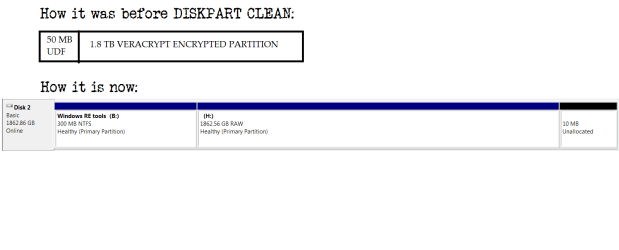
Here's a comparison of the partitions before and after the DISKPART fiasco.
 

Attachments

  • Untitled.png
    Untitled.png
    12.1 KB · Views: 3

My Computer My Computer

At a glance

Windows 7 Professional 32-BitIntel i3-5304GB DDR3XFX Radeon 5770 1GB DDR5
Computer type
PC/Desktop
Computer Manufacturer/Model Number
Custom Build
OS
Windows 7 Professional 32-Bit
CPU
Intel i3-530
Motherboard
Intel DH55TC
Memory
4GB DDR3
Graphics Card(s)
XFX Radeon 5770 1GB DDR5
Hard Drives
1TB WD Caviar Blue,
2TB WD Elements Portable USB3,
1TB WD Elements Portable USB3,
1TB WD My Passport USB3,
500GB WD Elements USB2,
1TB Seagate Expansion Portable
Antivirus
MS Security Essentials
Browser
Chrome, Mozilla Firefox, Opera

My Computer My Computer

At a glance

Win-7-Pro64bit 7-H-Prem-64biti7-5930K 2nd i9-9940x both water blocked VRM'...Trident-z 3200C14 2nd Trident-z 3600C16EVGA 1080ti ftw3 2nd Titan Xp both water blocked
Computer type
PC/Desktop
Computer Manufacturer/Model Number
Custom assembled by me :}
OS
Win-7-Pro64bit 7-H-Prem-64bit
CPU
i7-5930K 2nd i9-9940x both water blocked VRM's too
Motherboard
ASUS SABERTOOTH X99 2nd ASUS x299 Apex
Memory
Trident-z 3200C14 2nd Trident-z 3600C16
Graphics Card(s)
EVGA 1080ti ftw3 2nd Titan Xp both water blocked
Sound Card
Built-in Realtek
Monitor(s) Displays
1-AOC G2460PG 24"G-Sync 144Hz/ 2nd 1-ASUS VG248QE 24" 144Hz
Screen Resolution
1920 x 1080 144Hz
Hard Drives
2-Samsung M.2 Evo & Evo Plus
2-Samsung 850 EVO 500GB SSD's/ 3-2.5 W.D. Black 1tb-&3-1tb/3-3.5 WD Black 1tb hdd's
PSU
EVGA SuperNOVA 1000-P2 2nd 1200-P2
Case
2-Corsair Obsidian Series 450D Black ATX Mid Tower
Cooling
Custom water loops
Keyboard
Logitech G710+/ 2nd Logitech G910
Mouse
2-RedDragon M901 Perdition 16400 dpi Gaming mouse = wired
Internet Speed
Comcast Ping 19ms 89.31mbps download speed 6.12mbps upload
Antivirus
Malwarebytes Pro/ Superantispyware Pro
Browser
FireFox & Pale moon
Other Info
2nd ASUS X299 Apex/Intel i9-9940x with Custom water loop/7H-Prem-x64/Corsair 450D case/Ram Trident-z 3600C16 4x8gb / Samsung970Evo plus 500gb SSD/Dual ssd EZ swap evo/PSU EVGA SuperNova 1200w-P2 80+Platinum/GPU Titan Xp /8-ML-140 on push-pull on 2-280GTX rads
Here's a comparison of the partitions before and after the DISKPART fiasco.

OK, how was it before in Windows Disk Management?

Have you seen it show the 50MB UDF partition anytime before?

Now the 615MB UDF Read only Virtual CDROM partition in WD Passport will only show up as a separate CDROM device. The other partition was shown as a HDD and only this partition could be manipulated by Windows Disk Management.It could not delete the 615 MB UDF Partition. How to remove hidden Virtual CD (VCD) partitions on your Western Digital external disks

So, what matters now is whether your 50 MB UDF Partition was shown in Windows Disk management in one disk. If it was, then diskpart Clean would have wiped it.

If it was not shown in Windows Disk Management at all earlier then perhaps not.

That is how I see it.

The fact that you can see the UDF data with WinHex makes me believe that your UDF data is still there.

I may be wrong. I am just thinking aloud.:)

And you said that you could find the start as well as the end sector.Can you specify the exact sector Numbers?

If these are within the first 2048 sectors, then diskpart clean did not write zeroes to it. (DiskPart clean writes zeros to sectors 0 to 2047 and like last sectors.)
 

My Computer My Computer

At a glance

Windows 7 Home Premium 32 bit
OS
Windows 7 Home Premium 32 bit
Here's a comparison of the partitions before and after the DISKPART fiasco.

OK, how was it before in Windows Disk Management?

Have you seen it show the 50MB UDF partition anytime before?
Windows Disk Management showed the partition just as I sketched it.

Now the 615MB UDF Read only Virtual CDROM partition in WD Passport will only show up as a separate CDROM device. The other partition was shown as a HDD and only this partition could be manipulated by Windows Disk Management.It could not delete the 615 MB UDF Partition. How to remove hidden Virtual CD (VCD) partitions on your Western Digital external disks

This isnt that Virtual Drive. Virtual Drives only comes with WD MY Passport series, not Elements. My HDD is WD Elements. I made a 50MB Partition and made it UDF by using the following command:
format <Driveletter> /fs: UDF /q
You may try it too, if you have any spare memory card. It'll become UDF.


So, what matters now is whether your 50 MB UDF Partition was shown in Windows Disk management in one disk. If it was, then diskpart Clean would have wiped it.

If it was not shown in Windows Disk Management at all earlier then perhaps not.

That is how I see it.


Correct. Diskpart has cleared the first part of the UDF partition. However, it didn't overwrite the data in it, as the command used in Diskpart was clean and not clean all

The fact that you can see the UDF data with WinHex makes me believe that your UDF data is still there.

I may be wrong. I am just thinking aloud.:)


Data is there. Partition is lost. Only way of recovering data is by using a data recovery software that can recover raw data.

And you said that you could find the start as well as the end sector.Can you specify the exact sector Numbers?

If these are within the first 2048 sectors, then diskpart clean did not write zeroes to it. (DiskPart clean writes zeros to sectors 0 to 2047 and like last sectors.)


Sure. The encrypted partition starts at offset 3300000(Hex) and ends 4 sectors before the end of disk.
 

My Computer My Computer

At a glance

Windows 7 Professional 32-BitIntel i3-5304GB DDR3XFX Radeon 5770 1GB DDR5
Computer type
PC/Desktop
Computer Manufacturer/Model Number
Custom Build
OS
Windows 7 Professional 32-Bit
CPU
Intel i3-530
Motherboard
Intel DH55TC
Memory
4GB DDR3
Graphics Card(s)
XFX Radeon 5770 1GB DDR5
Hard Drives
1TB WD Caviar Blue,
2TB WD Elements Portable USB3,
1TB WD Elements Portable USB3,
1TB WD My Passport USB3,
500GB WD Elements USB2,
1TB Seagate Expansion Portable
Antivirus
MS Security Essentials
Browser
Chrome, Mozilla Firefox, Opera
....Rest assured you are in the best possible hands with Jumanji.

Not infallible though as greg seems to imply :). We are also learning from user experiences and our mistakes and becoming wiser by the day :D.

Anyway @MycroftHolmes, thank you for your inputs in posts #5 and 9.

I agree totally with your idea of cloning the drive and making the data recovery effort on the cloned drive.

What software are you going to use to clone the drive? ddrescue???

After cloning run the Partition Recovery Wizard in Partition Wizard as indicated earlier and check whether it can pull out the lost/deleted partitions.

(Running a Quick Scan / Full Scan on the current drive also will in no way affect your data as long as you do not give a write command by cancelling and closing the PW after posting the Found Partitions Window.)

Things would have been simpler if you had immediately after partitioning ( the UDF and the encrypted partitions) saved the GPT data in Sectors 0 (the protective MBR), 1 (the GPT header), 2 (the GPT Partition Table ), LBA n ( the last sector - the GPT header backup) and n-32 ( backup of GPT Partition table)

And as Greg said all data which is your bread and butter should have not just one but two backups.( I know you lost the only backup)

Keep us posted.
 

My Computer My Computer

At a glance

Windows 7 Home Premium 32 bit
OS
Windows 7 Home Premium 32 bit
....Rest assured you are in the best possible hands with Jumanji.

Not infallible though as greg seems to imply :). We are also learning from user experiences and our mistakes and becoming wiser by the day :D.

Anyway @MycroftHolmes, thank you for your inputs in posts #5 and 9.

I agree totally with your idea of cloning the drive and making the data recovery effort on the cloned drive.

What software are you going to use to clone the drive? ddrescue???

After cloning run the Partition Recovery Wizard in Partition Wizard as indicated earlier and check whether it can pull out the lost/deleted partitions.

(Running a Quick Scan / Full Scan on the current drive also will in no way affect your data as long as you do not give a write command by cancelling and closing the PW after posting the Found Partitions Window.)

Things would have been simpler if you had immediately after partitioning ( the UDF and the encrypted partitions) saved the GPT data in Sectors 0 (the protective MBR), 1 (the GPT header), 2 (the GPT Partition Table ), LBA n ( the last sector - the GPT header backup) and n-32 ( backup of GPT Partition table)

And as Greg said all data which is your bread and butter should have not just one but two backups.( I know you lost the only backup)

Keep us posted.

Well, Sir, I cloned the hard drive using WinHex. And then I saved the Veracrypt Partition using WinHex to a file. Actually VeraCrypt (or even Truecrypt) doesnot have a header,rather the header is encrypted. Hence normal data recovery softwares could not detech it. I saved the sectors of the Veracrypt Partition manually, by selected the sectors, and then using Copy Block (to a File) in WinHex. I could then mount the file using Veracrypt. The data, thankfully, is intact, save one 1GB file. Thankfully I have other backup of that file. It was an illuminating experience for me.
 

My Computer My Computer

At a glance

Windows 7 Professional 32-BitIntel i3-5304GB DDR3XFX Radeon 5770 1GB DDR5
Computer type
PC/Desktop
Computer Manufacturer/Model Number
Custom Build
OS
Windows 7 Professional 32-Bit
CPU
Intel i3-530
Motherboard
Intel DH55TC
Memory
4GB DDR3
Graphics Card(s)
XFX Radeon 5770 1GB DDR5
Hard Drives
1TB WD Caviar Blue,
2TB WD Elements Portable USB3,
1TB WD Elements Portable USB3,
1TB WD My Passport USB3,
500GB WD Elements USB2,
1TB Seagate Expansion Portable
Antivirus
MS Security Essentials
Browser
Chrome, Mozilla Firefox, Opera
So finally you got everything done with your own efforts. Well done. If in future less knowledgeable folks come out with similar problems, we know whom to call :). So hang around.

I just have one doubt. What is that UDF partition, why did you create it and what data is in there??
 

My Computer My Computer

At a glance

Windows 7 Home Premium 32 bit
OS
Windows 7 Home Premium 32 bit
So finally you got everything done with your own efforts. Well done. If in future less knowledgeable folks come out with similar problems, we know whom to call :). So hang around.

Sure. I've tasted the despair of losing data, and will help anyone to alleviate it in future.
 

My Computer My Computer

At a glance

Windows 7 Professional 32-BitIntel i3-5304GB DDR3XFX Radeon 5770 1GB DDR5
Computer type
PC/Desktop
Computer Manufacturer/Model Number
Custom Build
OS
Windows 7 Professional 32-Bit
CPU
Intel i3-530
Motherboard
Intel DH55TC
Memory
4GB DDR3
Graphics Card(s)
XFX Radeon 5770 1GB DDR5
Hard Drives
1TB WD Caviar Blue,
2TB WD Elements Portable USB3,
1TB WD Elements Portable USB3,
1TB WD My Passport USB3,
500GB WD Elements USB2,
1TB Seagate Expansion Portable
Antivirus
MS Security Essentials
Browser
Chrome, Mozilla Firefox, Opera
I just have one doubt. What is that UDF partition, why did you create it and what data is in there??

That UDF Partition contained Portable versions of TrueCrypt and VeraCrypt, and the keyfile, so that I could mount it in systems which does not have the keyfile, or TrueCrypt or VeraCrypt installed. I made it UDF as it was better suited for a mere 50MB partition than NTFS. UDF is actually like the successor of FAT32. I'd never trust it to make my principal file system though, as it's not as robust as NTFS.
 

My Computer My Computer

At a glance

Windows 7 Professional 32-BitIntel i3-5304GB DDR3XFX Radeon 5770 1GB DDR5
Computer type
PC/Desktop
Computer Manufacturer/Model Number
Custom Build
OS
Windows 7 Professional 32-Bit
CPU
Intel i3-530
Motherboard
Intel DH55TC
Memory
4GB DDR3
Graphics Card(s)
XFX Radeon 5770 1GB DDR5
Hard Drives
1TB WD Caviar Blue,
2TB WD Elements Portable USB3,
1TB WD Elements Portable USB3,
1TB WD My Passport USB3,
500GB WD Elements USB2,
1TB Seagate Expansion Portable
Antivirus
MS Security Essentials
Browser
Chrome, Mozilla Firefox, Opera
OK, again well done. And one rep goes here.

This definitely requires familiarity with Sector Editors and knowledge of how a particular encryption works.( which I lacked :D)

Here is an expert who can get into sector level copying and accomplish things where lesser mortals would have given up.

You may mark this thread as solved and that may help others looking for a solution in similar conditions.
 

My Computer My Computer

At a glance

Windows 7 Home Premium 32 bit
OS
Windows 7 Home Premium 32 bit
OK, again well done. And one rep goes here.

This definitely requires familiarity with Sector Editors and knowledge of how a particular encryption works.( which I lacked :D)

Here is an expert who can get into sector level copying and accomplish things where lesser mortals would have given up.

You may mark this thread as solved and that may help others looking for a solution in similar conditions.

Thank you. You're too kind. Actually, luck was on my side as the hard disk was factory-fresh and was zero-filled. This made finding the starting sector of the partition easier.
 

My Computer My Computer

At a glance

Windows 7 Professional 32-BitIntel i3-5304GB DDR3XFX Radeon 5770 1GB DDR5
Computer type
PC/Desktop
Computer Manufacturer/Model Number
Custom Build
OS
Windows 7 Professional 32-Bit
CPU
Intel i3-530
Motherboard
Intel DH55TC
Memory
4GB DDR3
Graphics Card(s)
XFX Radeon 5770 1GB DDR5
Hard Drives
1TB WD Caviar Blue,
2TB WD Elements Portable USB3,
1TB WD Elements Portable USB3,
1TB WD My Passport USB3,
500GB WD Elements USB2,
1TB Seagate Expansion Portable
Antivirus
MS Security Essentials
Browser
Chrome, Mozilla Firefox, Opera
Hello,

sorry for bringing up this post after several years now, but I'm having the same troubles, and it seems MycroftHolmes found the solution for this. I'd appreciate if you can assist me further.
In my case, diskpart clean (not clean all) was applied to the wrong disk, partition got removed, and now appears as unallocated space.
No further partition was created or formatted afterwards.
On the drive I had an unencrypted partition and another Veracrypt encrypted one.
The files outside the encrypted area already were recovered successfully, but now I'm stuck finding the right sectors on Winhex to get it loaded successfully into Veracrypt.
A .dd image was done of the drive, and trying to work with the image file to not touch the HDD that much.
MycroftHolmes, if you're still around, please hit me up, or somebody who could take a look into this.
Thanks!
 

My Computers My Computers

  • At a glance

    Windows 10
    OS
    Windows 10
  • Computer type
    PC/Desktop
Hello,

sorry for bringing up this post after several years now, but I'm having the same troubles, and it seems @MycroftHolmes found the solution for this. I'd appreciate if you can assist me further.
In my case, diskpart clean (not clean all) was applied to the wrong disk, partition got removed, and now appears as unallocated space.
No further partition was created or formatted afterwards.
On the drive I had an unencrypted partition and another Veracrypt encrypted one.
The files outside the encrypted area already were recovered successfully, but now I'm stuck finding the right sectors on Winhex to get it loaded successfully into Veracrypt.
A .dd image was done of the drive, and trying to work with the image file to not touch the HDD that much.
@MycroftHolmes, if you're still around, please hit me up, or somebody who could take a look into this.
Thanks!
Thankfully, there are tools that exist now that makes recovery a lot easier. I will suggest you take a look at DMDE or R-Studio data recovery solutions. You can also check r/DataRecovery sub on Reddit for expert advice. But DMDE is perfect for recovering your partition.
 

My Computer My Computer

At a glance

Windows 7 Professional 32-BitIntel i3-5304GB DDR3XFX Radeon 5770 1GB DDR5
Computer type
PC/Desktop
Computer Manufacturer/Model Number
Custom Build
OS
Windows 7 Professional 32-Bit
CPU
Intel i3-530
Motherboard
Intel DH55TC
Memory
4GB DDR3
Graphics Card(s)
XFX Radeon 5770 1GB DDR5
Hard Drives
1TB WD Caviar Blue,
2TB WD Elements Portable USB3,
1TB WD Elements Portable USB3,
1TB WD My Passport USB3,
500GB WD Elements USB2,
1TB Seagate Expansion Portable
Antivirus
MS Security Essentials
Browser
Chrome, Mozilla Firefox, Opera
Hey thanks for getting back that quick! Yes I also tried with DMDE already, as the easiest way would be just to restore the lost partitions, but I'm a bit lost on the scan results of partitions/tables, and not sure which one has to be restored. You can see here how it looks after the last scan:
464f8a46-738e-4941-825d-68a85b93f701 hosted at ImgBB — ImgBB
2d4e169f-1a71-4e21-853d-8b810e01acc5 hosted at ImgBB — ImgBB

It's a 2TB disk, which I think was divided to leave around 500GB on the encrypted partition.
 

My Computers My Computers

  • At a glance

    Windows 10
    OS
    Windows 10
  • Computer type
    PC/Desktop
Back
Top