I reinstalled Windows 7 from the DVD, having problems

funkyguitar

New member
Local time
10:06 PM
Messages
4
I have a Dell N5110 laptop that came with Windows 7 Home Premium SP1, 64 bit. Since the computer is over three years old now, and have been experiencing a handful of issues, I decided to reinstall Windows 7. The only way I was able to do it was through the DVDs I got when I bought the laptop. And the only way I was able to get the DVD to reinstall was to click on My Computer and select the C drive (rather than by pressing F12 as the computer is booting up, which is what the online tutorial said to do).

I don't remember the exact option I chose, but after the reinstall, I don't have access to my library items (music, videos, pictures, documents), even though all those files are apparently still on the hard drive since I have the same amount of free space as I did before the reinstall (250 MB. The drive has 750 MB capacity). Additionally, after I installed some drivers from the included drivers disk, I am able to connect to the Internet, but it's moving really slowly and isn't always connecting to webpages.

I have backed up all of my files, so my goal with the reinstall was to get rid of everything on the hard drive and have a speedy, like new laptop, then pick and choose which files and programs I wanted to put back on, starting with a clean slate. But I seem to be having some problems. What should my next step be? Any help would be much appreciated!
 

My Computer My Computer

Computer type
Laptop
Computer Manufacturer/Model Number
Dell Inspiron N5110 laptop
OS
Windows 7 Home Premium 64 bit, Service Pack 1
Memory
6 GB
Antivirus
AVG, Sophos
Browser
Chrome
I have a Dell N5110 laptop that came with Windows 7 Home Premium SP1, 64 bit. Since the computer is over three years old now, and have been experiencing a handful of issues, I decided to reinstall Windows 7. The only way I was able to do it was through the DVDs I got when I bought the laptop. And the only way I was able to get the DVD to reinstall was to click on My Computer and select the C drive (rather than by pressing F12 as the computer is booting up, which is what the online tutorial said to do).

I don't remember the exact option I chose, but after the reinstall, I don't have access to my library items (music, videos, pictures, documents), even though all those files are apparently still on the hard drive since I have the same amount of free space as I did before the reinstall (250 MB. The drive has 750 MB capacity). Additionally, after I installed some drivers from the included drivers disk, I am able to connect to the Internet, but it's moving really slowly and isn't always connecting to webpages.

I have backed up all of my files, so my goal with the reinstall was to get rid of everything on the hard drive and have a speedy, like new laptop, then pick and choose which files and programs I wanted to put back on, starting with a clean slate. But I seem to be having some problems. What should my next step be? Any help would be much appreciated!

Hello Funkyguitar,
I had to do one too, a while back.
The experts here can probably help you more than I can but I'll give you a couple links to
Tutorials on how to do it correctly. Hope this helps. Cheers.
This one by Brink.
http://www.sevenforums.com/tutorials/1649-clean-install-windows-7-a.html
This one by gregrocker.
http://www.sevenforums.com/tutorials/219487-clean-reinstall-factory-oem-windows-7-a.html
 

My Computer My Computer

Computer type
Laptop
Computer Manufacturer/Model Number
HP 2000-150CA Notebook
OS
Windows 7 Home Premium (x64) Service Pack 1 (build 7601)
CPU
Intel Pentium P6200 2.13 GHz
Motherboard
HP 3674 28.49 1066 MH / BIOS: HP F.34
Memory
4.00 GB
Graphics Card(s)
Intel HD Graphics
Sound Card
Multimedia HD
Monitor(s) Displays
15.3
Screen Resolution
1366X768
Hard Drives
Hitachi HTS545050B9A300 ATA
(500.11 GB)
Keyboard
Standard PS2
Mouse
Synaptics PS2 Port Touch Pad / Microsoft HID-compliant mouse
Internet Speed
100 Mbps
Antivirus
MSE
Browser
PaleMoon / Fire Fox
Other Info
Purchased 2011
Thanks for the response Elljay. Since I've already done the reinstall, I'm hoping there's something else I can do at this point rather than do it a second time.
 

My Computer My Computer

Computer type
Laptop
Computer Manufacturer/Model Number
Dell Inspiron N5110 laptop
OS
Windows 7 Home Premium 64 bit, Service Pack 1
Memory
6 GB
Antivirus
AVG, Sophos
Browser
Chrome
Thanks for the response Elljay. Since I've already done the reinstall, I'm hoping there's something else I can do at this point rather than do it a second time.
Ya OK. I hear you. I doesn't hurt to check the Tutorials out though. Might find give you some info. Maybe someone here can help you. Good Luck. :)
 
Last edited:

My Computer My Computer

Computer type
Laptop
Computer Manufacturer/Model Number
HP 2000-150CA Notebook
OS
Windows 7 Home Premium (x64) Service Pack 1 (build 7601)
CPU
Intel Pentium P6200 2.13 GHz
Motherboard
HP 3674 28.49 1066 MH / BIOS: HP F.34
Memory
4.00 GB
Graphics Card(s)
Intel HD Graphics
Sound Card
Multimedia HD
Monitor(s) Displays
15.3
Screen Resolution
1366X768
Hard Drives
Hitachi HTS545050B9A300 ATA
(500.11 GB)
Keyboard
Standard PS2
Mouse
Synaptics PS2 Port Touch Pad / Microsoft HID-compliant mouse
Internet Speed
100 Mbps
Antivirus
MSE
Browser
PaleMoon / Fire Fox
Other Info
Purchased 2011
Well if you want a speedy new laptop like when you 1st got it you have to do a clean install, it will never be right until you do :)
 

My Computer My Computer

Computer type
PC/Desktop
Computer Manufacturer/Model Number
Skylake Special #666
OS
Windows 10 Pro x64
CPU
Intel Core i7 6700K
Motherboard
Asus Sabertooth Z170 Mark 1
Memory
GSkill TridentZ RGB 16GB 3600 16-16-16-36
Graphics Card(s)
EVGA GTX 980 Ti SC x2
Sound Card
Realtek High Definition
Monitor(s) Displays
AOC G2460PG
Screen Resolution
1920 x 1080 144Hz
Hard Drives
Samsung 860 Pro 256GB, Seagate Barracuda 4TB x2
PSU
EVGA 1000 P2, EVGA White Custom Braided Cables
Case
Corsair Vengeance C70 Gunmetal Black
Cooling
Corsair H100i v2, Corsair ML120 x2, Thermal Grizzly Kryonaut
Keyboard
Logitech G910 Orion Spectrum
Mouse
Logitech G700s
Internet Speed
Verizon Fios Quantum Gateway 75/75
Antivirus
Windows Defender, Malwarebytes Free 3.8.3
Browser
Chrome
Other Info
Corsair SP120 x4, LG Blu-ray Drive, Durabrand HT-395 100 Watt Dolby Digital Amp, Corsair H2100 Wireless 7.1 Headset
And the only way I was able to get the DVD to reinstall was to click on My Computer and select the C drive (rather than by pressing F12 as the computer is booting up, which is what the online tutorial said to do).

My guess would be that you didn't do a clean install and didn't do the necessary to bring up the menu to choose the DVD as the boot device.

Maybe F12 doesn't apply to your PC; maybe F12 does apply but you didn't manipulate the key correctly to bring up the menu. That can be tricky and might call for holding the key down, pressing it once per second, twice per second, etc. Cranky and finicky. Try and try again, with varying sequences.
 

My Computer My Computer

Computer type
PC/Desktop
Computer Manufacturer/Model Number
Ignatz Special; 4 speed manual gearbox; factory air conditioning; one of one
OS
Windows 7 Home Premium SP1, 64-bit
CPU
Intel Skylake i5-6600K, not overclocked
Motherboard
AsRock Z170M Extreme 4, micro ATX
Memory
8 GB HyperX DDR4-2666 (2 x 4 GB)
Graphics Card(s)
none; graphics are integrated on CPU
Sound Card
onboard: Realtek ALC1150; external: USB Behringer UF0-202
Monitor(s) Displays
Dell S2340M 23 inch IPS
Screen Resolution
1600 x 900
Hard Drives
System: Crucial MX100 series SSD, 128 GB;
Data: Samsung Spinpoint 103SJ, 1 TB;
Backup: WD Caviar Green WD30EZRX-00D8PB0, 3 TB
PSU
Rosewill SilentNight 500 watt fanless, semi-modular
Case
Antec Solo II
Cooling
Noctua NH-U12S; Noctua F12 intake, Noctua S12A exhaust
Keyboard
Microsoft 200 6JH-00001 USB
Mouse
Dell or Microsoft optical wired; USB
Antivirus
Microsoft Security Essentials and Malwarebytes Premium
Browser
Pale Moon
Other Info
All fans PWM; speeds at idle: CPU circa 500 rpm; intake circa 600 rpm; exhaust circa 600 rpm; CPU temps 27 idle and 47 C load in a warm room (27 C/81 F) when running Intel Extreme Tuning Utility stress test.
From post #1

The only way I was able to do it was through the DVDs I got when I bought the laptop. And the only way I was able to get the DVD to reinstall was to click on My Computer and select the C drive
If you were in Windows 7 you did not do a Clean Install. You might of done a Repair Install but it all depends on the DVD you used.

Exactly what DVD did you use. What did the DVD label indicate. Please give complete name on the DVD and who made the DVD.
 

My Computer My Computer

Computer type
PC/Desktop
Computer Manufacturer/Model Number
Home made Desktop
OS
Windows 10 Pro. 64/ version 1709 Windows 7 Pro/64
CPU
Intel i7-6800K @ 4.3
Motherboard
ASUS X-99 Deluxe II
Memory
Corsair Platinum 16 gig @2400
Graphics Card(s)
EVGA GTX 1070 OC
Monitor(s) Displays
Asus 27" LED LCD/VE278Q
Screen Resolution
1920-1080 or 1280-720 HDMI
Hard Drives
INTEL SSD 730-240 Gb Sata 3.0/
PSU
EVGA Platium 1200W
Case
Phanteks Luxe Tempered Glass 8 fans/ one radiator
Cooling
XSPC/ Water Cooled CPU
Keyboard
Das 4 Professional
Mouse
Logitech M705/MX Anywhere 2-S
Internet Speed
100 mbits
Antivirus
Microsoft Security Essentials/ Malwarebytes Premium 3.0/ SAS
Browser
I.E. 11 default/Firefox/ ISP Time Warner Cable/Spectrum
Other Info
LG BluRay Burner/
Sound system-KLipsch-THX/
Icy Dock ssd Hot Swap bays.
He is most likely talking about his Recovery Discs, and as Ignatz says, he did not boot from them.
 

My Computer My Computer

Computer type
PC/Desktop
Computer Manufacturer/Model Number
Skylake Special #666
OS
Windows 10 Pro x64
CPU
Intel Core i7 6700K
Motherboard
Asus Sabertooth Z170 Mark 1
Memory
GSkill TridentZ RGB 16GB 3600 16-16-16-36
Graphics Card(s)
EVGA GTX 980 Ti SC x2
Sound Card
Realtek High Definition
Monitor(s) Displays
AOC G2460PG
Screen Resolution
1920 x 1080 144Hz
Hard Drives
Samsung 860 Pro 256GB, Seagate Barracuda 4TB x2
PSU
EVGA 1000 P2, EVGA White Custom Braided Cables
Case
Corsair Vengeance C70 Gunmetal Black
Cooling
Corsair H100i v2, Corsair ML120 x2, Thermal Grizzly Kryonaut
Keyboard
Logitech G910 Orion Spectrum
Mouse
Logitech G700s
Internet Speed
Verizon Fios Quantum Gateway 75/75
Antivirus
Windows Defender, Malwarebytes Free 3.8.3
Browser
Chrome
Other Info
Corsair SP120 x4, LG Blu-ray Drive, Durabrand HT-395 100 Watt Dolby Digital Amp, Corsair H2100 Wireless 7.1 Headset
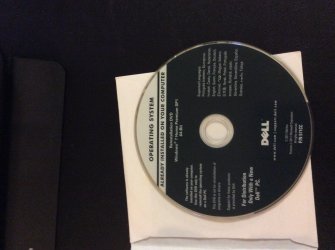
I used the reinstallation DVD that came with my Dell laptop. See the attached photo.
 

Attachments

  • image.jpg
    image.jpg
    376.4 KB · Views: 1

My Computer My Computer

Computer type
Laptop
Computer Manufacturer/Model Number
Dell Inspiron N5110 laptop
OS
Windows 7 Home Premium 64 bit, Service Pack 1
Memory
6 GB
Antivirus
AVG, Sophos
Browser
Chrome
Then do it right this time following Clean Reinstall Windows 7.

Read the Special Note for Dell Owners at the end to understand which partitions to keep, something you didnt even consider when running the install from Win7 incorrectly.

Please don't ask us how to save an install that was done abjectly wrong to begin wtih. We specialize in the best installs in the world here, something which that tutorial alone has accomplished for over 1.5 million consumers who haven't had a single complaint or return here with problems.

Proceed.
 
That install DVD is fine if that`s all you have, but you have to boot from it, you can`t run it from within windows, there should be no reason you can`t bring up the boot menu to boot from the optical drive with the disc inside.

Either that or change the boot order in the bios to boot from the dvd drive 1st and the hard drive/ssd 2nd.

Don`t forget to save changes and exit.

When you reboot, you have to see the words "Press any key to boot from dvd/cd" when you see that, hit any key on the keyboard to start the install process.
 

My Computer My Computer

Computer type
PC/Desktop
Computer Manufacturer/Model Number
Skylake Special #666
OS
Windows 10 Pro x64
CPU
Intel Core i7 6700K
Motherboard
Asus Sabertooth Z170 Mark 1
Memory
GSkill TridentZ RGB 16GB 3600 16-16-16-36
Graphics Card(s)
EVGA GTX 980 Ti SC x2
Sound Card
Realtek High Definition
Monitor(s) Displays
AOC G2460PG
Screen Resolution
1920 x 1080 144Hz
Hard Drives
Samsung 860 Pro 256GB, Seagate Barracuda 4TB x2
PSU
EVGA 1000 P2, EVGA White Custom Braided Cables
Case
Corsair Vengeance C70 Gunmetal Black
Cooling
Corsair H100i v2, Corsair ML120 x2, Thermal Grizzly Kryonaut
Keyboard
Logitech G910 Orion Spectrum
Mouse
Logitech G700s
Internet Speed
Verizon Fios Quantum Gateway 75/75
Antivirus
Windows Defender, Malwarebytes Free 3.8.3
Browser
Chrome
Other Info
Corsair SP120 x4, LG Blu-ray Drive, Durabrand HT-395 100 Watt Dolby Digital Amp, Corsair H2100 Wireless 7.1 Headset
Back
Top