System Restore - Enable or Disable

How to Enable or Disable System Restore in Windows 7 and Windows 8

   Information
This tutorial will show you how to enable or disable System Restore for all users in Windows 7 and Windows 8.

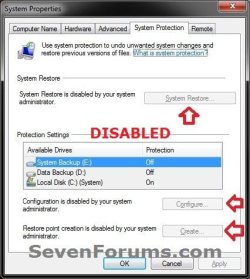
System Restore is enabled by default in Windows. If this is disabled, System Restore is turned off, and the System Restore Wizard cannot be accessed. The option to configure System Restore or create a restore point through System Protection is also disabled and grayed out.

You must be logged in as an administrator to be able to do this tutorial.


EXAMPLE: System Restore Enabled and Disabled
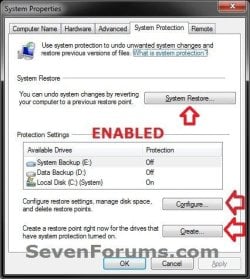
Enabled.jpgDisabled.jpg


OPTION ONE

Using a REG File Download

1. To Enable System Restore A) Click/tap on the Download button below to download the file below, and go to step 3 below.
NOTE: This is the default setting.
Enable_System_Restore.reg

Download


2. To Disable System Restore A) Click/tap on the Download button below to download the file below, and go to step 3 below. Disable_System_Restore.reg

Download


3. Save the .reg file to your desktop.

4. Double click/tap the downloaded .reg file to merge it.

5. If prompted, click/tap on Run, Yes (UAC), Yes, and OK to approve the merge.

6. When finished, you can delete the downloaded .reg file if you like.

7. If the Configure button is still grayed out, then see: http://www.sevenforums.com/tutorials/81499-system-restore-configuration-enable-disable.html

8. If enabled, you can now turn on system protection for restore points.


OPTION TWO

Through the Local Group Policy Editor

1. Open the Local Group Policy Editor.
2. In the left pane, double click/tap on to expand Computer Configuration, Administrative Templates, System, and System Restore. (see screenshot below) GPEDIT-1.jpg
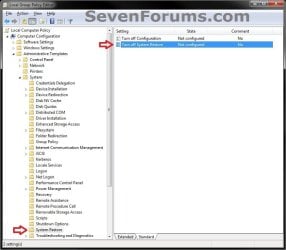
3. In the right pane, double click/tap on Turn off System Restore to edit it. (see screenshot above)

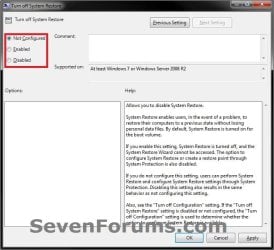
4. To Enable System Restore A) Select (dot) either Not Configured or Disabled, and go to step 6 below. (see screenshot below step 6)
NOTE: The default setting is Not Configured.5. To Disable System Restore A) Select (dot) Enabled, and go to step 6 below. (see screenshot below step 6)
6. Click/tap on OK. (see screenshot below) GPEDIT-2.jpg
7. Close the Local Group Policy Editor window.

8. If the Configure button is still grayed out, then see: http://www.sevenforums.com/tutorials/81499-system-restore-configuration-enable-disable.html

9. If enabled, you can now turn on system protection for restore points.
That's it,
Shawn


Attachments

Last edited:
Thanks

This site is freaking awesome each and every possiable problem I come across this site has a solution !!
 

My Computer

Computer type
PC/Desktop
Computer Manufacturer/Model Number
CLONE
OS
Win 7 x64
CPU
Intel i7 920
Motherboard
EX 58
Memory
8 x 4GB DDR3
Graphics Card(s)
ATI
Hard Drives
A FEW :-)
Does the process in this tutorial result in the deletion of all previous RESTORE PTS? If not, is the process pertinent to WINDOWS 7 HOME? I do not think LOCAL GROUP POLICY editor is available in WIN7 HOME.

I need to install a bunch of drivers for LabVIEW & all of the intermediate RESTORE PTS are unnecessary so I want to create 1 & then disable SYS PROTECTION.
 

My Computer

Computer type
PC/Desktop
OS
Windows 7 Home Prem 32 bit
Hello betaupsilon,

This will disable system protection without deleting your current restore points.

Since you have the Home Premium edition of Windows 7, you would have to use OPTION ONE to set the policy in Registry Editor instead of in OPTION TWO with Group Policy.

If you wanted to delete all restore points, then you could use the tutorial below to turn off system protection instead.

http://www.sevenforums.com/tutorials/330-system-protection-turn-off.html

Hope this helps, :)
Shawn
 

My Computer

Computer type
PC/Desktop
Computer Manufacturer/Model Number
Self built custom
OS
64-bit Windows 11 Pro for Workstations
CPU
Intel i7-8700K OC'd to 5 GHz
Motherboard
ASUS ROG Maximus XI Formula Z390
Memory
64 GB (4x16GB) G.SKILL TridentZ RGB DDR4 3600 MHz
Graphics Card(s)
ASUS ROG-STRIX-GTX1080TI-O11G-GAMING
Sound Card
Integrated
Monitor(s) Displays
2 x Samsung Odyssey G7 27"
Screen Resolution
2560x1440
Hard Drives
1TB Samsung 990 PRO M.2,
4TB Samsung 990 PRO PRO M.2,
TerraMaster F8 SSD Plus NAS
PSU
Seasonic Prime Titanium 850W
Case
Thermaltake Core P3
Cooling
Corsair Hydro H115i
Keyboard
Logitech wireless K800
Mouse
Logitech MX Master 4
Internet Speed
2 Gb/s Download and 100 Mb/s Upload
Antivirus
Malwarebyte Anti-Malware Premium
Browser
Google Chrome
Other Info
Logitech Z625 speaker system,
Logitech BRIO 4K Pro webcam,
HP Color LaserJet Pro MFP M477fdn,
APC SMART-UPS RT 1000 XL - SURT1000XLI,
Galaxy S23 Plus phone
Hello betaupsilon,

This will disable system protection without deleting your current restore points.

Since you have the Home Premium edition of Windows 7, you would have to use OPTION ONE to set the policy in Registry Editor instead of in OPTION TWO with Group Policy.

If you wanted to delete all restore points, then you could use the tutorial below to turn off system protection instead.

http://www.sevenforums.com/tutorials/330-system-protection-turn-off.html

Hope this helps, :)
Shawn
Thanks, I will give this a shot & report back. I was about to abandon hope & proceed to install all of the drivers & simply turn off SYS PROTECTION if all of my previous RESTORE PTS were going to be written over.
 

My Computer

Computer type
PC/Desktop
OS
Windows 7 Home Prem 32 bit
BRINK,

Well I did give it a try & it seemed to have worked. But another question I have is about system imaging & the RESTORE PTS. The RESTOR PTS are not preserved when reconstructing a system image, correct?
 

My Computer

Computer type
PC/Desktop
OS
Windows 7 Home Prem 32 bit
Correct. Restore points are not included in a system image.
 

My Computer

Computer type
PC/Desktop
Computer Manufacturer/Model Number
Self built custom
OS
64-bit Windows 11 Pro for Workstations
CPU
Intel i7-8700K OC'd to 5 GHz
Motherboard
ASUS ROG Maximus XI Formula Z390
Memory
64 GB (4x16GB) G.SKILL TridentZ RGB DDR4 3600 MHz
Graphics Card(s)
ASUS ROG-STRIX-GTX1080TI-O11G-GAMING
Sound Card
Integrated
Monitor(s) Displays
2 x Samsung Odyssey G7 27"
Screen Resolution
2560x1440
Hard Drives
1TB Samsung 990 PRO M.2,
4TB Samsung 990 PRO PRO M.2,
TerraMaster F8 SSD Plus NAS
PSU
Seasonic Prime Titanium 850W
Case
Thermaltake Core P3
Cooling
Corsair Hydro H115i
Keyboard
Logitech wireless K800
Mouse
Logitech MX Master 4
Internet Speed
2 Gb/s Download and 100 Mb/s Upload
Antivirus
Malwarebyte Anti-Malware Premium
Browser
Google Chrome
Other Info
Logitech Z625 speaker system,
Logitech BRIO 4K Pro webcam,
HP Color LaserJet Pro MFP M477fdn,
APC SMART-UPS RT 1000 XL - SURT1000XLI,
Galaxy S23 Plus phone
Correct. Restore points are not included in a system image.

BRINK,

Well I did give it a try & it seemed to have worked. But another question I have is about system imaging & the RESTORE PTS. The RESTOR PTS are not preserved when reconstructing a system image, correct?

Hi Shawn,
You answered the above few months ago correctly. As a follow on to this subject I noticed a peculiarity about the "SYSTEM VOLUME INFORMATION" directory in which all of the restore points reside. I recently did a fresh system image using the WIN7 backup utility (not a RESTORE) & noticed that the "SYSTEM VOLUME INFORMATION" directory got modified with what I am guessing is attributed to the backup image. It is quite large > 0.5 Gb. Is this redundant?

If I create a system image on an external drive what is the point of including any information in the "SYSTEM VOLUME INFORMATION" on the system partition that I imaged? Can I delete that large file safely?

The file is identified as:
{34933f4d-3fd1-11e5-991c-00219xxxxxx}{3808836b-c176-4e48-b7ae-04046xxxxxx}
I substituted in x's for safeguards.

I am not sure how to read the contents, but I imagine it is jibberish to me. Is this file necessary? If the system fails I restore the image by booting from a WIN7 CD & execute the image reconstruction. I can even do that if I actually wipe the hard drive prior to reconstruction.

Your thoughts?
 

My Computer

Computer type
PC/Desktop
OS
Windows 7 Home Prem 32 bit
Hello betaupsilon,

Personally, I would not recommend to try to open or delete "SYSTEM VOLUME INFORMATION". Doing so will cause issues.

What's the deal with the System Volume Information folder? - The Old New Thing - Site Home - MSDN Blogs

In the root of every drive is a folder called "System Volume Information". If your drive is NTFS, the permissions on the folder are set so not even administrators can get in there. What's the big secret?

The folder contains information that casual interference could cause problems with proper system functioning. Here are some of the things kept in that folder. (This list is not comprehensive.)

• System Restore points. You can disable System Restore from the "System" control panel.
• Distributed Link Tracking Service databases for repairing your shortcuts and linked documents.
• Content Indexing Service databases for fast file searches. This is also the source of the cidaemon.exe process: That is the content indexer itself, busy scanning your files and building its database so you can search for them quickly. (If you created a lot of data in a short time, the content indexer service gets all excited trying to index it.)
• Information used by the Volume Snapshot Service (also known as "Volume Shadow Copy") so you can back up files on a live system.
• Longhorn systems keep WinFS databases here.
 

My Computer

Computer type
PC/Desktop
Computer Manufacturer/Model Number
Self built custom
OS
64-bit Windows 11 Pro for Workstations
CPU
Intel i7-8700K OC'd to 5 GHz
Motherboard
ASUS ROG Maximus XI Formula Z390
Memory
64 GB (4x16GB) G.SKILL TridentZ RGB DDR4 3600 MHz
Graphics Card(s)
ASUS ROG-STRIX-GTX1080TI-O11G-GAMING
Sound Card
Integrated
Monitor(s) Displays
2 x Samsung Odyssey G7 27"
Screen Resolution
2560x1440
Hard Drives
1TB Samsung 990 PRO M.2,
4TB Samsung 990 PRO PRO M.2,
TerraMaster F8 SSD Plus NAS
PSU
Seasonic Prime Titanium 850W
Case
Thermaltake Core P3
Cooling
Corsair Hydro H115i
Keyboard
Logitech wireless K800
Mouse
Logitech MX Master 4
Internet Speed
2 Gb/s Download and 100 Mb/s Upload
Antivirus
Malwarebyte Anti-Malware Premium
Browser
Google Chrome
Other Info
Logitech Z625 speaker system,
Logitech BRIO 4K Pro webcam,
HP Color LaserJet Pro MFP M477fdn,
APC SMART-UPS RT 1000 XL - SURT1000XLI,
Galaxy S23 Plus phone
Interesting. It is dated & time stamped exactly at the completion of image creation. I suppose if I have time to burn I could delete it & see if the system reboots. If it does not I can simply reconstruct the image.

So this directory is analogous to a living organ with the host body? It changes as the system is used & evolves?
 

My Computer

Computer type
PC/Desktop
OS
Windows 7 Home Prem 32 bit
Correct. :)
 

My Computer

Computer type
PC/Desktop
Computer Manufacturer/Model Number
Self built custom
OS
64-bit Windows 11 Pro for Workstations
CPU
Intel i7-8700K OC'd to 5 GHz
Motherboard
ASUS ROG Maximus XI Formula Z390
Memory
64 GB (4x16GB) G.SKILL TridentZ RGB DDR4 3600 MHz
Graphics Card(s)
ASUS ROG-STRIX-GTX1080TI-O11G-GAMING
Sound Card
Integrated
Monitor(s) Displays
2 x Samsung Odyssey G7 27"
Screen Resolution
2560x1440
Hard Drives
1TB Samsung 990 PRO M.2,
4TB Samsung 990 PRO PRO M.2,
TerraMaster F8 SSD Plus NAS
PSU
Seasonic Prime Titanium 850W
Case
Thermaltake Core P3
Cooling
Corsair Hydro H115i
Keyboard
Logitech wireless K800
Mouse
Logitech MX Master 4
Internet Speed
2 Gb/s Download and 100 Mb/s Upload
Antivirus
Malwarebyte Anti-Malware Premium
Browser
Google Chrome
Other Info
Logitech Z625 speaker system,
Logitech BRIO 4K Pro webcam,
HP Color LaserJet Pro MFP M477fdn,
APC SMART-UPS RT 1000 XL - SURT1000XLI,
Galaxy S23 Plus phone
Hello betaupsilon,

This will disable system protection without deleting your current restore points.


Hope this helps, :)
Shawn

Hi Shawn,
I have another follow up on this disabling of SYS RESTORE. Disabling this utility prevents the user from creating RESTORE PTS manually. What about RESTORE PTS created by the system when a backup is initiated or defragmenting occurs? It appears that a new RESTORE PT was created when I recently backed up my system by creating a system image even though I had the SYS RESTORE utility disabled (I thought I had disabled it). I did not restore a past image I simply created a new one. As a consequence of this new RESTORE PT, older restore pts got eliminated.

By the way why is a RESTORE PT created when creating a SYS IMAGE? The IMAGE should suffice, correct?

Curious on what you know.
 

My Computer

Computer type
PC/Desktop
OS
Windows 7 Home Prem 32 bit
Hello betaupsilon,

The "system image restore point" is part of shadow copy for "previous version" and system restore.
 

My Computer

Computer type
PC/Desktop
Computer Manufacturer/Model Number
Self built custom
OS
64-bit Windows 11 Pro for Workstations
CPU
Intel i7-8700K OC'd to 5 GHz
Motherboard
ASUS ROG Maximus XI Formula Z390
Memory
64 GB (4x16GB) G.SKILL TridentZ RGB DDR4 3600 MHz
Graphics Card(s)
ASUS ROG-STRIX-GTX1080TI-O11G-GAMING
Sound Card
Integrated
Monitor(s) Displays
2 x Samsung Odyssey G7 27"
Screen Resolution
2560x1440
Hard Drives
1TB Samsung 990 PRO M.2,
4TB Samsung 990 PRO PRO M.2,
TerraMaster F8 SSD Plus NAS
PSU
Seasonic Prime Titanium 850W
Case
Thermaltake Core P3
Cooling
Corsair Hydro H115i
Keyboard
Logitech wireless K800
Mouse
Logitech MX Master 4
Internet Speed
2 Gb/s Download and 100 Mb/s Upload
Antivirus
Malwarebyte Anti-Malware Premium
Browser
Google Chrome
Other Info
Logitech Z625 speaker system,
Logitech BRIO 4K Pro webcam,
HP Color LaserJet Pro MFP M477fdn,
APC SMART-UPS RT 1000 XL - SURT1000XLI,
Galaxy S23 Plus phone
Hello betaupsilon,

The "system image restore point" is part of shadow copy for "previous version" and system restore.

I don't quite understand. Creating a SYS IMAGE is a snapshot of the system. Are you saying that the "system image restore point" is a snapshot of the system at the time the last RESTORE PT was created?

Also, what about the disabling of SYS RESTORE, does that prevent the system from creating RESTORE PTS? I thought I conducted an experiment in the past when I was installing LabView to prevent automatic RESTORE PTS from being created. If I recall correctly, I disabled the SYS RESTORE & avoided the dozens of automatic RESTORE PTS that would have been created by the dozens of driver installations that accompany LabView.
 

My Computer

Computer type
PC/Desktop
OS
Windows 7 Home Prem 32 bit
No. Just that when you create a system image, it also creates a special "system image restore point" that can be used as a restore point, and also used with previous versions for your system files.

Disabling system restore will only prevent Windows and users from creating restore points. It won't stop the creation of "system image restore points" and Windows Backup restore points.
 

My Computer

Computer type
PC/Desktop
Computer Manufacturer/Model Number
Self built custom
OS
64-bit Windows 11 Pro for Workstations
CPU
Intel i7-8700K OC'd to 5 GHz
Motherboard
ASUS ROG Maximus XI Formula Z390
Memory
64 GB (4x16GB) G.SKILL TridentZ RGB DDR4 3600 MHz
Graphics Card(s)
ASUS ROG-STRIX-GTX1080TI-O11G-GAMING
Sound Card
Integrated
Monitor(s) Displays
2 x Samsung Odyssey G7 27"
Screen Resolution
2560x1440
Hard Drives
1TB Samsung 990 PRO M.2,
4TB Samsung 990 PRO PRO M.2,
TerraMaster F8 SSD Plus NAS
PSU
Seasonic Prime Titanium 850W
Case
Thermaltake Core P3
Cooling
Corsair Hydro H115i
Keyboard
Logitech wireless K800
Mouse
Logitech MX Master 4
Internet Speed
2 Gb/s Download and 100 Mb/s Upload
Antivirus
Malwarebyte Anti-Malware Premium
Browser
Google Chrome
Other Info
Logitech Z625 speaker system,
Logitech BRIO 4K Pro webcam,
HP Color LaserJet Pro MFP M477fdn,
APC SMART-UPS RT 1000 XL - SURT1000XLI,
Galaxy S23 Plus phone
Disabling system restore will only prevent Windows and users from creating restore points. It won't stop the creation of "system image restore points" and Windows Backup restore points.

So if I want to preserve old RESTORE PTS I need to allocate more disk space via the SYS PROTECTION utility? By doing such does that increase the size of the image vhd file? If so, does that increase by 1:1 ratio or something less?
 

My Computer

Computer type
PC/Desktop
OS
Windows 7 Home Prem 32 bit
It would be best to increase the max storage size to be able to keep more restore points saved before they get replaced when space runs out.

However, restore points are only meant for a quick short term recovery. For long term recovery options, it's best to rely on system images.
 

My Computer

Computer type
PC/Desktop
Computer Manufacturer/Model Number
Self built custom
OS
64-bit Windows 11 Pro for Workstations
CPU
Intel i7-8700K OC'd to 5 GHz
Motherboard
ASUS ROG Maximus XI Formula Z390
Memory
64 GB (4x16GB) G.SKILL TridentZ RGB DDR4 3600 MHz
Graphics Card(s)
ASUS ROG-STRIX-GTX1080TI-O11G-GAMING
Sound Card
Integrated
Monitor(s) Displays
2 x Samsung Odyssey G7 27"
Screen Resolution
2560x1440
Hard Drives
1TB Samsung 990 PRO M.2,
4TB Samsung 990 PRO PRO M.2,
TerraMaster F8 SSD Plus NAS
PSU
Seasonic Prime Titanium 850W
Case
Thermaltake Core P3
Cooling
Corsair Hydro H115i
Keyboard
Logitech wireless K800
Mouse
Logitech MX Master 4
Internet Speed
2 Gb/s Download and 100 Mb/s Upload
Antivirus
Malwarebyte Anti-Malware Premium
Browser
Google Chrome
Other Info
Logitech Z625 speaker system,
Logitech BRIO 4K Pro webcam,
HP Color LaserJet Pro MFP M477fdn,
APC SMART-UPS RT 1000 XL - SURT1000XLI,
Galaxy S23 Plus phone
Figure between 500MB to 1GB per restore point. But I would not keep more than 3 to 5 restore points. They also have the habit of mysteriously disappearing. Brink is right, images are a better vehicle because that's what you control.
 

My Computer

Computer Manufacturer/Model Number
HP, Dell, Gateway, Toshiba - 4 laptops and 2 desktops
OS
Vista, Windows7, Mint Mate, Zorin, Windows 8
CPU
from 1.6GHz Duo to i7
Monitor(s) Displays
2x HP w2207
Hard Drives
5x HDD, 7x SSD, 12x Externals
Keyboard
with trackball - no mices
Mouse
Trackball mice
Internet Speed
DSL 6000
Hello betaupsilon,

This will disable system protection without deleting your current restore points.
Shawn

Disabling system restore will only prevent Windows and users from creating restore points. It won't stop the creation of "system image restore points" and Windows Backup restore points.

I have another ? on this matter:

It is not clear to me if the WIN 7 defrag utility overwrites existing RESTORE PTS. I had the defrag on auto schedule & noticed my RESTORE PTS missing the next day. Whether the defrag utility was responsible, I am not sure. Anyway, I copied a bunch of files from another drive & performed a defrag once again. However, prior to the defrag I employed your OPTION #1 to disable SYS RESTORE. After completion of the defrag I then enabled SYS RESTORE.

ALL RESTORE PTS vanished. I do not know the nuts & bolts of SYS VOL INFO & the VSS, but is this to be expected? If so, how can I defrag without risking RESTORE PTS?
 

My Computer

Computer type
PC/Desktop
OS
Windows 7 Home Prem 32 bit
Back
Top