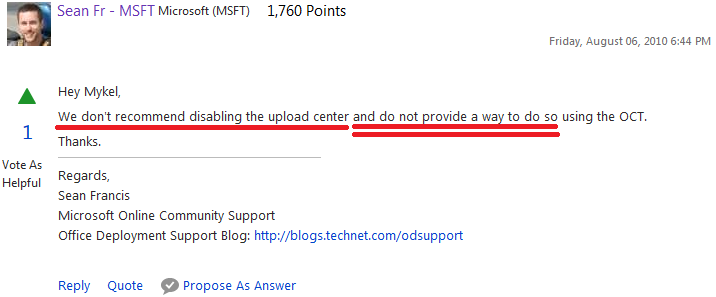
What is this annoying Office Upload Center?!

jlcame

New member
Local time
4:59 PM
Messages
4
And why can't i F* disable or remove it?
Why'O why is Mr. Gates forcing me to have this useless piece of software that requires me to hack my own computer in order to REMOVE this. I can't seem to find help with removing and it tells me i can only disable it, but still, i've tried so many guides on the interweb and it keeps coming back like a crazy mad ex-girlfriend.
Renaming or removing the .exe file is useless, after reboot, this... Virus software (Yeah, i consider this a malware) will just pop back a new .exe like nothing happened. There also no entry on boot programs in order to disable. I don't want to keep closing the process on task manager, i want to get rid of it!! Its MY computer, not Bill's.
This bull appeared after installing windows updates and now i can't get rid of it, just like a trojan. Plus, whats the thing with this? Why do they need to force me to have this cloud service? This is fishy and it just fuels my paranoid that im being watched.
Can someone please help me? Im about to restore my Windows and never, EVER, installing updates again.
If someone could help me removing this instead of disable it, it would make my day. Hell, it would make my month!
 

My Computer My Computer

At a glance

Windows 7 Ultimate 64 bits
Computer type
Laptop
Computer Manufacturer/Model Number
Toshiba Qosmio X870
OS
Windows 7 Ultimate 64 bits
Browser
Chrome
Hi jlcame, welcome to Windows Seven Forums.

You have not mentioned which version of Office you are using.

The website below shows how to disable the Office Upload Centre icon from displaying on the Task Bar in Office 2010, so it might help you.

Stop Office 2010 Upload Center Icon from Displaying in the Taskbar

MS is not forcing you to use the cloud service, it's just an option in case you need more storage, or you want to be able to access your uploaded files from another location or be able to share them with someone else.
I use Office 2013 & while the cloud service is available I do not use it.
 

My Computer My Computer

At a glance

Windows 7 Home Premium 64 bit sp1Intel i5 3570 3.4Ghz Ivy Bridge SKT 1155 quad...G-Skill Rip Jaws 16Gb (8x2) DDR3 -1600 PC3 12...Gigabyte NVIDIA GT610 1Gb DDR3 810/1200 PCI-E...
Computer type
PC/Desktop
Computer Manufacturer/Model Number
Self built using existing case
OS
Windows 7 Home Premium 64 bit sp1
CPU
Intel i5 3570 3.4Ghz Ivy Bridge SKT 1155 quad core
Motherboard
Gigabyte Z77-HD3 SKT 1155 2xSata 3, 4x USB 3.0
Memory
G-Skill Rip Jaws 16Gb (8x2) DDR3 -1600 PC3 12800 CL 10 red
Graphics Card(s)
Gigabyte NVIDIA GT610 1Gb DDR3 810/1200 PCI-E 2.0 Silent
Sound Card
NVIDIA High Definition & Realtech High Definition Audio
Monitor(s) Displays
2 x Philips 226V4L 16:9 aspect ratio
Screen Resolution
1920 x 1080 HD
Hard Drives
Samsung 840 Pro 256gb SSD, SATA 3.
Hitachi Touro Portable 1tb, USB 3.0 HDD used for image b/ups.
PSU
Corsair VS450
Case
Codeng
Cooling
PSU fan & CPU fan
Keyboard
Logitech
Mouse
Logitech Wireless trackball M570
Internet Speed
Wireless 3G. 3mg down & 550kb up.
Antivirus
Bitdefender Internet Security 2020
Browser
Opera (Current Version) & Firefox
Other Info
MS Office 2013 Pro. Davis weather station software. MGE Nova 600 avr UPS.
Excuse me? How in the world is MS not forcing me to use (have=use) if it won't go away?
Im using 2013 and i was living the happy giggity life before this thing appear out of nowhere. I didn't download anything and didn't approve any installations besides windows updates.
This "malware" isin't listed on the start up options and i refuse to task kill it every time i boot my pc. I want it to go away from everywere, simple as that. This wasn't here, after a year of use on the Office 2013 and i don't want it now. I want a way to remove this from my computron, i hate knowing that i have a task open that its communicating with the internet without my permission. I did try uninstalling the office, but its still there!

By the way, what is this supposed to mean?!
unrUE.png
 

My Computer My Computer

At a glance

Windows 7 Ultimate 64 bits
Computer type
Laptop
Computer Manufacturer/Model Number
Toshiba Qosmio X870
OS
Windows 7 Ultimate 64 bits
Browser
Chrome
Let's relax a bit here, we aren't Microsoft, just some volunteers that like helping people out.
 

My Computer My Computer

At a glance

Win 10 Pro x64Intel I5-2500K @3.3GHz16GB G.Skill Ripjaws X (4x4GB)EVGA GeForce 750 Ti SC 2GB
Computer type
PC/Desktop
Computer Manufacturer/Model Number
Self Built
OS
Win 10 Pro x64
CPU
Intel I5-2500K @3.3GHz
Motherboard
Asrock P67 Extreme4
Memory
16GB G.Skill Ripjaws X (4x4GB)
Graphics Card(s)
EVGA GeForce 750 Ti SC 2GB
Sound Card
ASUS Xonar DG 5.1 Channels 24-bit 96KHz PCI Interface Sound
Monitor(s) Displays
auria eq2367
Screen Resolution
1920 x 1080
Hard Drives
250GB Samsung 850 EVO SSD
1TB WD Blue
1TB Hitachi
PSU
SeaSonic X 650W 80 Plus Gold
Case
Corsair Obsidian 750D
Cooling
Corsair H60, Three 140mm case fans
Keyboard
Logitech Wireless Keyboard K520
Mouse
Logitech Wireless Mouse M310
Internet Speed
Wave Broadband ~ 100 dn 5 up
Antivirus
Windows Defender, Malwarebytes Premium
Browser
Edge, IE11, Chrome
Other Info
Laptop specs: HP g7-1365dx /
CPU: AMD A6-3420M APU with Radeon(tm) HD Graphics /
RAM: Crucial 8Gb (2x4Gb) /
SSD: Crucial M4-CT128M4SSD2 ATA Device/ FW 000F /
GFX: AMD Radeon HD 6520G /
OS: Windows 10 Pro x64
Let's relax a bit here, we aren't Microsoft, just some volunteers that like helping people out.

I guess you're right... But doesn't anyone here know how to remove this? Seriously, this is grinding my nerves to the root. Because, as i stated, removing the Office didn't made the Upload Center go away, so does this mean that im stuck with this program for ever? Because, if it means, then its goodbye Microsoft, and hello Apple corp.
 

My Computer My Computer

At a glance

Windows 7 Ultimate 64 bits
Computer type
Laptop
Computer Manufacturer/Model Number
Toshiba Qosmio X870
OS
Windows 7 Ultimate 64 bits
Browser
Chrome
Derekimo is right, no guessing required.

Perhaps someone does know, but they haven't had a chance to respond yet. I recommend being a little patient and visiting back in a while to see if someone has. A general change in "attitude" will also help your cause - our volunteers tend to ignore people who don't realize that the help they get here is freely volunteered, or if responses are perceived as ungrateful.
 

My Computer My Computer

At a glance

Windows 10 Pro x64 ; Xubuntu x64Intel i7 860 @ 2.80 GHz O/C'ed to 4.0GHz16GB Corsair Vengance DDR3 @ 661 MHz Dual Cha...EVGA NVidia GTX 560 1024MB
Computer type
PC/Desktop
Computer Manufacturer/Model Number
Golden Mk. I.4
OS
Windows 10 Pro x64 ; Xubuntu x64
CPU
Intel i7 860 @ 2.80 GHz O/C'ed to 4.0GHz
Motherboard
Gigabyte P55A-UD3R Rev.1. Award BIOS F13
Memory
16GB Corsair Vengance DDR3 @ 661 MHz Dual Channel (9-9-9-24)
Graphics Card(s)
EVGA NVidia GTX 560 1024MB
Sound Card
Realtek Integrated
Monitor(s) Displays
Dual Samsung SyncMaster 2494HS
Screen Resolution
1920*1080 and 1920*1080
Hard Drives
1*Samsung 840 EVO 120GB SSD;
1*OCZ Vertex 2 60GB SSD;
2*Samsung F3 SpinPoint 1TB in RAID0;
1*Samsung F1 SpinPoint 1TB;
2*Western Digital 1TB External USB 3.0
1*Western Digital 500GB External USB 3.0
1*Seagate 500GB External USB 2.0
PSU
Thermaltake ToughPower QFan 750W
Case
Thermaltake Element S VK60001W2Z
Cooling
Corsair H60 Water Cooling, 2*230mm and 2*80mm case fans
Keyboard
Logitech G110
Mouse
Logitech MX518
Excuse me? How in the world is MS not forcing me to use (have=use) if it won't go away?
If you can save files locally to your own computer, then you are not being forced to use the service.
Have≠use. Just because you have something does not mean that you are forced to use it. It's optional.
 

My Computer My Computer

At a glance

Win10 Pro 64-bitAMD Ryzen 7 3800X32 GB Kingston DDR4-2666MSI nVidia GT 710 (2GB)
Computer type
PC/Desktop
Computer Manufacturer/Model Number
Self-Built
OS
Win10 Pro 64-bit
CPU
AMD Ryzen 7 3800X
Motherboard
Gigabyte X570 UD
Memory
32 GB Kingston DDR4-2666
Graphics Card(s)
MSI nVidia GT 710 (2GB)
Sound Card
Creative Audigy FX 5.1
Monitor(s) Displays
ViewSonic VG2439Smh 24"
Screen Resolution
1920x1080
Hard Drives
3xWD1TB; 1xSeagate 1TB... all spinning rust
PSU
EVGA 100-W1-0500-KR (500w)
Case
SilverStone PS10 (modified)
Cooling
CPU:AMD Wraith Prism. Case:3x Noctua 120mm
Keyboard
Compaq Professional PS/2
Mouse
Microsoft Basic Optical Mouse 2.0
Internet Speed
Fiber 1Gbit/sec down/up
Antivirus
Avast Free
Browser
FF, Chrome
Other Info
2x LG GH24NSC0 DVD burners, Mackie CR3 monitor speakers
But problem is, i don't want this on my computer, Why do i have to have this? Why do they need me to have this thing? And how come even uninstalling Office, will not make this thing go away? It just keeps the process open on task manager and using internet traffic for something unauthorized by me. I did manage to block the traffic on my AV, but this shouldn't be necessary and should have a remove option, i just don't get why do they think i need this... by force.
I apologize for any "attitude" demonstrated by me. Im just steaming because i feel my PC was raped by MS... And im thankful to any help i can get.
 

My Computer My Computer

At a glance

Windows 7 Ultimate 64 bits
Computer type
Laptop
Computer Manufacturer/Model Number
Toshiba Qosmio X870
OS
Windows 7 Ultimate 64 bits
Browser
Chrome

My Computer My Computer

At a glance

Windows 7 Home Premium 64 bit sp1Intel i5 3570 3.4Ghz Ivy Bridge SKT 1155 quad...G-Skill Rip Jaws 16Gb (8x2) DDR3 -1600 PC3 12...Gigabyte NVIDIA GT610 1Gb DDR3 810/1200 PCI-E...
Computer type
PC/Desktop
Computer Manufacturer/Model Number
Self built using existing case
OS
Windows 7 Home Premium 64 bit sp1
CPU
Intel i5 3570 3.4Ghz Ivy Bridge SKT 1155 quad core
Motherboard
Gigabyte Z77-HD3 SKT 1155 2xSata 3, 4x USB 3.0
Memory
G-Skill Rip Jaws 16Gb (8x2) DDR3 -1600 PC3 12800 CL 10 red
Graphics Card(s)
Gigabyte NVIDIA GT610 1Gb DDR3 810/1200 PCI-E 2.0 Silent
Sound Card
NVIDIA High Definition & Realtech High Definition Audio
Monitor(s) Displays
2 x Philips 226V4L 16:9 aspect ratio
Screen Resolution
1920 x 1080 HD
Hard Drives
Samsung 840 Pro 256gb SSD, SATA 3.
Hitachi Touro Portable 1tb, USB 3.0 HDD used for image b/ups.
PSU
Corsair VS450
Case
Codeng
Cooling
PSU fan & CPU fan
Keyboard
Logitech
Mouse
Logitech Wireless trackball M570
Internet Speed
Wireless 3G. 3mg down & 550kb up.
Antivirus
Bitdefender Internet Security 2020
Browser
Opera (Current Version) & Firefox
Other Info
MS Office 2013 Pro. Davis weather station software. MGE Nova 600 avr UPS.
There must be a way to turn it on/off. I have Office 2013 on my machine and see both the msouc.exe and msosync.exe files on my computer. However, there is nothing in my System Tray and no processes in Task Manager that relate to it. I didn't do anything to "get rid" of Office Upload Center.

I can start it (I never do) via a link under Office 2013 Tools (which simply points to msouc.exe) and exit it simply by clicking the 'X' in the upper right corner. It never starts on it's own.

I have a number of both personal and work machines that run Office 2010 & 2013 and none of them have the Upload Center running.

Have you checked msconfig to see if it's configured to start automatically?
 

My Computer My Computer

At a glance

W10 Pro desktop, W11 laptop, W11 Pro tablet (...3.7Ghz 8700K i7, i7-11800H, i7-1065G716G desktop, 16G laptop, 4G tabletAMD Radeon RX580, RTX 3060, Intel Iris Plus
Computer type
PC/Desktop
Computer Manufacturer/Model Number
Home Built desktop, Dell G15 5511 Gaming laptop,MS Surface Pro 7 tablet
OS
W10 Pro desktop, W11 laptop, W11 Pro tablet (all 64-bit)
CPU
3.7Ghz 8700K i7, i7-11800H, i7-1065G7
Motherboard
ASUS TUF Z370-Pro Gaming in desktop
Memory
16G desktop, 16G laptop, 4G tablet
Graphics Card(s)
AMD Radeon RX580, RTX 3060, Intel Iris Plus
Sound Card
High Definition Audio (Built-in to mobo)
Monitor(s) Displays
Samsung U32J59 32" (2x), 15.6", 12"
Screen Resolution
3840x2160, 3840x2160, 1920x1080, 2160x1440
Hard Drives
500G SSD for OS; 2T, 10T & 15T HDDs for Data on Desktop, 1TB SSD laptop, 128G SSD tablet.
PSU
Corsair CX 750M
Case
Antec 100
Cooling
CM 212+
Keyboard
IBM Model M - used continuously since 1986
Mouse
Microsoft Pro IntelliMouse
Internet Speed
400M down 8M up
Antivirus
Windows Defender
Browser
FireFox
Other Info
Built my first computer (8Mhz 8088cpu, 640K RAM, 20MB HDD, 2 360K floppy drives) in 1985 and have been building them for myself, relatives and friends ever since.
@ strollin, it could have something to do with having installed SkyDrive app (maybe called OneDrive now). This is a copy of a reply on a MS website to do with the Office Upload Centre disabling.

"Do you have SkyDrive desktop app installed? If so, it will have become integrated with this Upload Center. To disable SkyDrive for use with Office 2013, follow these steps:
Right-click the SkyDrive icon in the notification area, at the far right of the taskbar. (You might need to click Show hidden icons first to see the icon.) Then click Settings.
On the Settings tab, under General, deselect Use Office to sync files faster and work on files with other people at the same time, and then click OK."

I have Office 2013 Pro installed & I don't get the Office Upload Centre icon either. I do not use OneDrive & I don't have the OneDrive app installed either.
 

My Computer My Computer

At a glance

Windows 7 Home Premium 64 bit sp1Intel i5 3570 3.4Ghz Ivy Bridge SKT 1155 quad...G-Skill Rip Jaws 16Gb (8x2) DDR3 -1600 PC3 12...Gigabyte NVIDIA GT610 1Gb DDR3 810/1200 PCI-E...
Computer type
PC/Desktop
Computer Manufacturer/Model Number
Self built using existing case
OS
Windows 7 Home Premium 64 bit sp1
CPU
Intel i5 3570 3.4Ghz Ivy Bridge SKT 1155 quad core
Motherboard
Gigabyte Z77-HD3 SKT 1155 2xSata 3, 4x USB 3.0
Memory
G-Skill Rip Jaws 16Gb (8x2) DDR3 -1600 PC3 12800 CL 10 red
Graphics Card(s)
Gigabyte NVIDIA GT610 1Gb DDR3 810/1200 PCI-E 2.0 Silent
Sound Card
NVIDIA High Definition & Realtech High Definition Audio
Monitor(s) Displays
2 x Philips 226V4L 16:9 aspect ratio
Screen Resolution
1920 x 1080 HD
Hard Drives
Samsung 840 Pro 256gb SSD, SATA 3.
Hitachi Touro Portable 1tb, USB 3.0 HDD used for image b/ups.
PSU
Corsair VS450
Case
Codeng
Cooling
PSU fan & CPU fan
Keyboard
Logitech
Mouse
Logitech Wireless trackball M570
Internet Speed
Wireless 3G. 3mg down & 550kb up.
Antivirus
Bitdefender Internet Security 2020
Browser
Opera (Current Version) & Firefox
Other Info
MS Office 2013 Pro. Davis weather station software. MGE Nova 600 avr UPS.
I think you may be on to something there. On this computer, I'm running Win 8.1 with a local account which does not allow me to connect directly to OneDrive. I use a 3rd party app (syncDriver for OneDrive) to sync OneDrive.
 

My Computer My Computer

At a glance

W10 Pro desktop, W11 laptop, W11 Pro tablet (...3.7Ghz 8700K i7, i7-11800H, i7-1065G716G desktop, 16G laptop, 4G tabletAMD Radeon RX580, RTX 3060, Intel Iris Plus
Computer type
PC/Desktop
Computer Manufacturer/Model Number
Home Built desktop, Dell G15 5511 Gaming laptop,MS Surface Pro 7 tablet
OS
W10 Pro desktop, W11 laptop, W11 Pro tablet (all 64-bit)
CPU
3.7Ghz 8700K i7, i7-11800H, i7-1065G7
Motherboard
ASUS TUF Z370-Pro Gaming in desktop
Memory
16G desktop, 16G laptop, 4G tablet
Graphics Card(s)
AMD Radeon RX580, RTX 3060, Intel Iris Plus
Sound Card
High Definition Audio (Built-in to mobo)
Monitor(s) Displays
Samsung U32J59 32" (2x), 15.6", 12"
Screen Resolution
3840x2160, 3840x2160, 1920x1080, 2160x1440
Hard Drives
500G SSD for OS; 2T, 10T & 15T HDDs for Data on Desktop, 1TB SSD laptop, 128G SSD tablet.
PSU
Corsair CX 750M
Case
Antec 100
Cooling
CM 212+
Keyboard
IBM Model M - used continuously since 1986
Mouse
Microsoft Pro IntelliMouse
Internet Speed
400M down 8M up
Antivirus
Windows Defender
Browser
FireFox
Other Info
Built my first computer (8Mhz 8088cpu, 640K RAM, 20MB HDD, 2 360K floppy drives) in 1985 and have been building them for myself, relatives and friends ever since.
Back
Top