Solved How to increase RAM speed in BIOS ?

Niioxce

New member
Local time
11:00 PM
Messages
13
Location
Sweden
Hey SevenForums veteran overclockers,

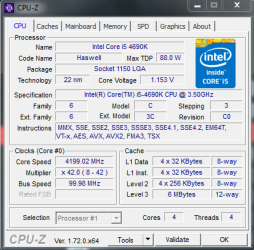
I'm a complete noob but willing to learn, i'm concerend about my ram speed and it's locked at 666 MHz (Or is it just because i'm idle?)and i currently do have 16GB 2400MHz. Is there anyway i can boost this? My bios is Republic of gamers own but it's based around asus.

So i'm asking this, can i boost my ram performance and are you willing to help a fellow computer enthusiast out?

Regards, Dennis
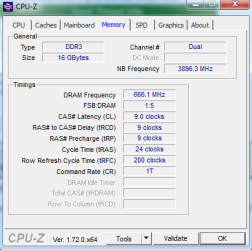
ss+(2015-05-23+at+05.54.41).png

PC specs:
Computer Manufacturer/Model Number: Custom build
OS: Windows 7 ultimate 64-Bit
CPU: i5-4690k 3.5GHz
Motherboard: Republic of gamers Maximus vii ranger (asus)
Memory: Corsair V Pro 16GB DDR3 Red 2x240, 2400MHz
Graphics: Card Gigabyte 770 4GB
Hard Drives: Samsung SSD 850 Evo 250GB
Green HDD 1TB
 

My Computer My Computer

Computer type
PC/Desktop
Computer Manufacturer/Model Number
Custom build
OS
Windows 7 ultimate 64-Bit
CPU
i5-4690k 3.5GHz
Motherboard
Republic of gamers Maximus vii ranger (asus)
Memory
Corsair V Pro 16GB DDR3 Red 2x240, 2400MHz
Graphics Card(s)
Gigabyte 770 4GB
Monitor(s) Displays
Acer 24" Predator GN246HLBbid 144Hz Gaming
Screen Resolution
1920x1080
Hard Drives
Samsung SSD 850 Evo 250GB
Green HDD 1TB
Keyboard
Razer blackwidow ultimate 2013
Mouse
Razer ouroboros
Internet Speed
100/100
Antivirus
Kaspersky
Browser
Firefox
Change your computers power profile to High Performance,...you should see a difference... ;)
 

My Computer My Computer

Computer type
Laptop
Computer Manufacturer/Model Number
HP 17-ak0xx, dv7 3173nr
OS
Win7 Home Premium x64 W10Pro&Home
CPU
A12 9720p 4+8 TurionII M520
Motherboard
HP 3839
Memory
6GB 8GB
Graphics Card(s)
R7
Monitor(s) Displays
24" sa550
Screen Resolution
1600x900 1920x1080
Mouse
Logitechx2
Internet Speed
120Mb/s down 12up

My Computer My Computer

Computer type
PC/Desktop
Computer Manufacturer/Model Number
Custom build
OS
Windows 7 ultimate 64-Bit
CPU
i5-4690k 3.5GHz
Motherboard
Republic of gamers Maximus vii ranger (asus)
Memory
Corsair V Pro 16GB DDR3 Red 2x240, 2400MHz
Graphics Card(s)
Gigabyte 770 4GB
Monitor(s) Displays
Acer 24" Predator GN246HLBbid 144Hz Gaming
Screen Resolution
1920x1080
Hard Drives
Samsung SSD 850 Evo 250GB
Green HDD 1TB
Keyboard
Razer blackwidow ultimate 2013
Mouse
Razer ouroboros
Internet Speed
100/100
Antivirus
Kaspersky
Browser
Firefox
I would suggest lowering your OC some. Switch to a balanced profile and use turbo boost. Your specs are a little incomplete, are you using stock cooling? What PSU are you using?
 

My Computer My Computer

Computer type
PC/Desktop
Computer Manufacturer/Model Number
Dude Build
OS
Windows 10 Pro X64
CPU
Intel(R) Core(TM) i5-3570K CPU OC@ 4.5GHZ Turbo
Motherboard
MSI Z77A-G45 Gaming
Memory
8.00 GB DDR3 1600Mhz
Graphics Card(s)
MSI Gaming X GTX 1070
Sound Card
Realtek High Definition
Monitor(s) Displays
Dell S23O9W, HP L1710
Screen Resolution
DELL-1920 x 1080 HP-1280 x1024
Hard Drives
Crucial m4 256 SSD, WD 7200RPM 500GB WD 1TB
PSU
Seasonic X650 GOLD
Case
Zalman Z12
Cooling
Antec Kuhler 920
Keyboard
Logitech
Mouse
MSI DS100 Interceptor
Internet Speed
50 down and 5 up
Antivirus
MSE
Browser
Chrome, IE 11
Other Info
Logitech X-620 Speakers
My psu is Corsair CX750M, and i currently do have a stock cooling yes. I used to have cpu water cooling until i changed my hardware and it didnt fit anymore.
 

My Computer My Computer

Computer type
PC/Desktop
Computer Manufacturer/Model Number
Custom build
OS
Windows 7 ultimate 64-Bit
CPU
i5-4690k 3.5GHz
Motherboard
Republic of gamers Maximus vii ranger (asus)
Memory
Corsair V Pro 16GB DDR3 Red 2x240, 2400MHz
Graphics Card(s)
Gigabyte 770 4GB
Monitor(s) Displays
Acer 24" Predator GN246HLBbid 144Hz Gaming
Screen Resolution
1920x1080
Hard Drives
Samsung SSD 850 Evo 250GB
Green HDD 1TB
Keyboard
Razer blackwidow ultimate 2013
Mouse
Razer ouroboros
Internet Speed
100/100
Antivirus
Kaspersky
Browser
Firefox
If your memory can run at 2400 MHz then you just change the memory frequency in the bios to 2400 MHz.
 

My Computer My Computer

Computer type
PC/Desktop
Computer Manufacturer/Model Number
Skylake Special #666
OS
Windows 10 Pro x64
CPU
Intel Core i7 6700K
Motherboard
Asus Sabertooth Z170 Mark 1
Memory
GSkill TridentZ RGB 16GB 3600 16-16-16-36
Graphics Card(s)
EVGA GTX 980 Ti SC x2
Sound Card
Realtek High Definition
Monitor(s) Displays
AOC G2460PG
Screen Resolution
1920 x 1080 144Hz
Hard Drives
Samsung 860 Pro 256GB, Seagate Barracuda 4TB x2
PSU
EVGA 1000 P2, EVGA White Custom Braided Cables
Case
Corsair Vengeance C70 Gunmetal Black
Cooling
Corsair H100i v2, Corsair ML120 x2, Thermal Grizzly Kryonaut
Keyboard
Logitech G910 Orion Spectrum
Mouse
Logitech G700s
Internet Speed
Verizon Fios Quantum Gateway 75/75
Antivirus
Windows Defender, Malwarebytes Free 3.8.3
Browser
Chrome
Other Info
Corsair SP120 x4, LG Blu-ray Drive, Durabrand HT-395 100 Watt Dolby Digital Amp, Corsair H2100 Wireless 7.1 Headset
Their is a good chance your system will not be able to run at 2400. It all depends on the luck of the cpu draw.

Memory Types DDR3 and DDR3L 1333/1600 at 1.5V

ARK | Intel® Coreâ
 

My Computer My Computer

Computer type
PC/Desktop
Computer Manufacturer/Model Number
Home made Desktop
OS
Windows 10 Pro. 64/ version 1709 Windows 7 Pro/64
CPU
Intel i7-6800K @ 4.3
Motherboard
ASUS X-99 Deluxe II
Memory
Corsair Platinum 16 gig @2400
Graphics Card(s)
EVGA GTX 1070 OC
Monitor(s) Displays
Asus 27" LED LCD/VE278Q
Screen Resolution
1920-1080 or 1280-720 HDMI
Hard Drives
INTEL SSD 730-240 Gb Sata 3.0/
PSU
EVGA Platium 1200W
Case
Phanteks Luxe Tempered Glass 8 fans/ one radiator
Cooling
XSPC/ Water Cooled CPU
Keyboard
Das 4 Professional
Mouse
Logitech M705/MX Anywhere 2-S
Internet Speed
100 mbits
Antivirus
Microsoft Security Essentials/ Malwarebytes Premium 3.0/ SAS
Browser
I.E. 11 default/Firefox/ ISP Time Warner Cable/Spectrum
Other Info
LG BluRay Burner/
Sound system-KLipsch-THX/
Icy Dock ssd Hot Swap bays.
That`s just what Intel writes, it has to. They don`t go saying a cpu will run anything over 1600, or even 1866, they never have.

That way they are never responsible.

The motherboard manufacturers are the ones who tell you what memory speeds will run on a particular board.

Niioxce, could you please post an Asus link to your board.

I don`t come up with anything called Ranger.

http://www.asus.com/us/Search/?SearchKey=Maximus vii
 

My Computer My Computer

Computer type
PC/Desktop
Computer Manufacturer/Model Number
Skylake Special #666
OS
Windows 10 Pro x64
CPU
Intel Core i7 6700K
Motherboard
Asus Sabertooth Z170 Mark 1
Memory
GSkill TridentZ RGB 16GB 3600 16-16-16-36
Graphics Card(s)
EVGA GTX 980 Ti SC x2
Sound Card
Realtek High Definition
Monitor(s) Displays
AOC G2460PG
Screen Resolution
1920 x 1080 144Hz
Hard Drives
Samsung 860 Pro 256GB, Seagate Barracuda 4TB x2
PSU
EVGA 1000 P2, EVGA White Custom Braided Cables
Case
Corsair Vengeance C70 Gunmetal Black
Cooling
Corsair H100i v2, Corsair ML120 x2, Thermal Grizzly Kryonaut
Keyboard
Logitech G910 Orion Spectrum
Mouse
Logitech G700s
Internet Speed
Verizon Fios Quantum Gateway 75/75
Antivirus
Windows Defender, Malwarebytes Free 3.8.3
Browser
Chrome
Other Info
Corsair SP120 x4, LG Blu-ray Drive, Durabrand HT-395 100 Watt Dolby Digital Amp, Corsair H2100 Wireless 7.1 Headset
That`s just what Intel writes, it has to. They don`t go saying a cpu will run anything over 1600, or even 1866, they never have.

That way they are never responsible.

The motherboard manufacturers are the ones who tell you what memory speeds will run on a particular board.

Niioxce, could you please post an Asus link to your board.

I don`t come up with anything called Ranger.

http://www.asus.com/us/Search/?SearchKey=Maximus vii

That's because Ranger only is available in eu. But here's one link: http://www.asus.com/uk/Motherboards/MAXIMUS_VII_RANGER/overview/
 

My Computer My Computer

Computer type
PC/Desktop
Computer Manufacturer/Model Number
Custom build
OS
Windows 7 ultimate 64-Bit
CPU
i5-4690k 3.5GHz
Motherboard
Republic of gamers Maximus vii ranger (asus)
Memory
Corsair V Pro 16GB DDR3 Red 2x240, 2400MHz
Graphics Card(s)
Gigabyte 770 4GB
Monitor(s) Displays
Acer 24" Predator GN246HLBbid 144Hz Gaming
Screen Resolution
1920x1080
Hard Drives
Samsung SSD 850 Evo 250GB
Green HDD 1TB
Keyboard
Razer blackwidow ultimate 2013
Mouse
Razer ouroboros
Internet Speed
100/100
Antivirus
Kaspersky
Browser
Firefox
I'm jealous you have onboard graphic's :p
 

My Computer My Computer

Computer type
PC/Desktop
Computer Manufacturer/Model Number
Custom assembled by me :}
OS
Win-7-Pro64bit 7-H-Prem-64bit
CPU
i7-5930K 2nd i9-9940x both water blocked VRM's too
Motherboard
ASUS SABERTOOTH X99 2nd ASUS x299 Apex
Memory
Trident-z 3200C14 2nd Trident-z 3600C16
Graphics Card(s)
EVGA 1080ti ftw3 2nd Titan Xp both water blocked
Sound Card
Built-in Realtek
Monitor(s) Displays
1-AOC G2460PG 24"G-Sync 144Hz/ 2nd 1-ASUS VG248QE 24" 144Hz
Screen Resolution
1920 x 1080 144Hz
Hard Drives
2-Samsung M.2 Evo & Evo Plus
2-Samsung 850 EVO 500GB SSD's/ 3-2.5 W.D. Black 1tb-&3-1tb/3-3.5 WD Black 1tb hdd's
PSU
EVGA SuperNOVA 1000-P2 2nd 1200-P2
Case
2-Corsair Obsidian Series 450D Black ATX Mid Tower
Cooling
Custom water loops
Keyboard
Logitech G710+/ 2nd Logitech G910
Mouse
2-RedDragon M901 Perdition 16400 dpi Gaming mouse = wired
Internet Speed
Comcast Ping 19ms 89.31mbps download speed 6.12mbps upload
Antivirus
Malwarebytes Pro/ Superantispyware Pro
Browser
FireFox & Pale moon
Other Info
2nd ASUS X299 Apex/Intel i9-9940x with Custom water loop/7H-Prem-x64/Corsair 450D case/Ram Trident-z 3600C16 4x8gb / Samsung970Evo plus 500gb SSD/Dual ssd EZ swap evo/PSU EVGA SuperNova 1200w-P2 80+Platinum/GPU Titan Xp /8-ML-140 on push-pull on 2-280GTX rads
I figured as much, ok 1st off your speed never changes just because the pc is idle, it will stay the same.

Did you try to change the frequency yet in the bios ? Did you enable XMP ? Corsair memory will have a profile or 2 setup already, you have to enable XMP to see them.

Also, you should sync all the cores of the CPU and have them turbo up to at least 4.2 GHz, it`s all done in the Bios.

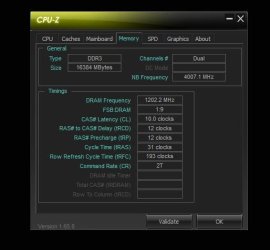
Shot of 2400 MHz speed with CPU-z.
 

Attachments

  • Capture.JPG
    Capture.JPG
    30.8 KB · Views: 56

My Computer My Computer

Computer type
PC/Desktop
Computer Manufacturer/Model Number
Skylake Special #666
OS
Windows 10 Pro x64
CPU
Intel Core i7 6700K
Motherboard
Asus Sabertooth Z170 Mark 1
Memory
GSkill TridentZ RGB 16GB 3600 16-16-16-36
Graphics Card(s)
EVGA GTX 980 Ti SC x2
Sound Card
Realtek High Definition
Monitor(s) Displays
AOC G2460PG
Screen Resolution
1920 x 1080 144Hz
Hard Drives
Samsung 860 Pro 256GB, Seagate Barracuda 4TB x2
PSU
EVGA 1000 P2, EVGA White Custom Braided Cables
Case
Corsair Vengeance C70 Gunmetal Black
Cooling
Corsair H100i v2, Corsair ML120 x2, Thermal Grizzly Kryonaut
Keyboard
Logitech G910 Orion Spectrum
Mouse
Logitech G700s
Internet Speed
Verizon Fios Quantum Gateway 75/75
Antivirus
Windows Defender, Malwarebytes Free 3.8.3
Browser
Chrome
Other Info
Corsair SP120 x4, LG Blu-ray Drive, Durabrand HT-395 100 Watt Dolby Digital Amp, Corsair H2100 Wireless 7.1 Headset

My Computer My Computer

Computer type
PC/Desktop
Computer Manufacturer/Model Number
Skylake Special #666
OS
Windows 10 Pro x64
CPU
Intel Core i7 6700K
Motherboard
Asus Sabertooth Z170 Mark 1
Memory
GSkill TridentZ RGB 16GB 3600 16-16-16-36
Graphics Card(s)
EVGA GTX 980 Ti SC x2
Sound Card
Realtek High Definition
Monitor(s) Displays
AOC G2460PG
Screen Resolution
1920 x 1080 144Hz
Hard Drives
Samsung 860 Pro 256GB, Seagate Barracuda 4TB x2
PSU
EVGA 1000 P2, EVGA White Custom Braided Cables
Case
Corsair Vengeance C70 Gunmetal Black
Cooling
Corsair H100i v2, Corsair ML120 x2, Thermal Grizzly Kryonaut
Keyboard
Logitech G910 Orion Spectrum
Mouse
Logitech G700s
Internet Speed
Verizon Fios Quantum Gateway 75/75
Antivirus
Windows Defender, Malwarebytes Free 3.8.3
Browser
Chrome
Other Info
Corsair SP120 x4, LG Blu-ray Drive, Durabrand HT-395 100 Watt Dolby Digital Amp, Corsair H2100 Wireless 7.1 Headset
I figured as much, ok 1st off your speed never changes just because the pc is idle, it will stay the same.

Did you try to change the frequency yet in the bios ? Did you enable XMP ? Corsair memory will have a profile or 2 setup already, you have to enable XMP to see them.

Also, you should sync all the cores of the CPU and have them turbo up to at least 4.2 GHz, it`s all done in the Bios.

Shot of 2400 MHz speed with CPU-z.

I'll give it a shot as soon as i get to my pc and i will give you a report if i succeded ot failed thanks!
 

My Computer My Computer

Computer type
PC/Desktop
Computer Manufacturer/Model Number
Custom build
OS
Windows 7 ultimate 64-Bit
CPU
i5-4690k 3.5GHz
Motherboard
Republic of gamers Maximus vii ranger (asus)
Memory
Corsair V Pro 16GB DDR3 Red 2x240, 2400MHz
Graphics Card(s)
Gigabyte 770 4GB
Monitor(s) Displays
Acer 24" Predator GN246HLBbid 144Hz Gaming
Screen Resolution
1920x1080
Hard Drives
Samsung SSD 850 Evo 250GB
Green HDD 1TB
Keyboard
Razer blackwidow ultimate 2013
Mouse
Razer ouroboros
Internet Speed
100/100
Antivirus
Kaspersky
Browser
Firefox
I figured as much, ok 1st off your speed never changes just because the pc is idle, it will stay the same.

Did you try to change the frequency yet in the bios ? Did you enable XMP ? Corsair memory will have a profile or 2 setup already, you have to enable XMP to see them.

Also, you should sync all the cores of the CPU and have them turbo up to at least 4.2 GHz, it`s all done in the Bios.

Shot of 2400 MHz speed with CPU-z.

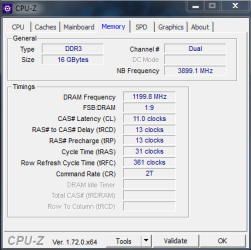
I changed it to XMP Profile #1 and this is the results,
ss+(2015-05-24+at+02.24.15).png
And can i increase it even further?

By the way, should i sync my cores to 4.2GHz even though my CPU only has 3.5GHz?

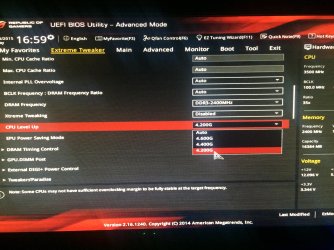
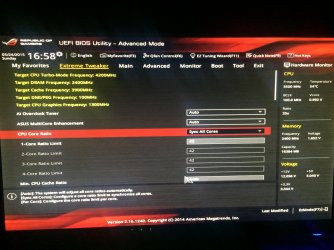
EDIT: I went to my bios and found something called "CPU Level Up" and there was a drop down box with options Auto, 4.600G, 4.400G and finally 4.200G so i asume the G is GHz? So i picked 4.200G as you said. (PS: The CPU Core Ratio was already on Sync All Cores, and Core Ratio Limit set on 42.) Is this looking good and do you approve??
IMG_0179.jpg
IMG_0177.jpg

And CPU-Z images:
ss+(2015-05-24+at+02.24.15).png
wdasdwa.png

Another Edit: While playing CSGO my monitor went black and restarted... any clues?
 
Last edited:

My Computer My Computer

Computer type
PC/Desktop
Computer Manufacturer/Model Number
Custom build
OS
Windows 7 ultimate 64-Bit
CPU
i5-4690k 3.5GHz
Motherboard
Republic of gamers Maximus vii ranger (asus)
Memory
Corsair V Pro 16GB DDR3 Red 2x240, 2400MHz
Graphics Card(s)
Gigabyte 770 4GB
Monitor(s) Displays
Acer 24" Predator GN246HLBbid 144Hz Gaming
Screen Resolution
1920x1080
Hard Drives
Samsung SSD 850 Evo 250GB
Green HDD 1TB
Keyboard
Razer blackwidow ultimate 2013
Mouse
Razer ouroboros
Internet Speed
100/100
Antivirus
Kaspersky
Browser
Firefox
In your 2nd shot of the bios, change 42 to 40 and try again.

You have a K chip, which means it`s unlocked, stock it turbos up from 3.5 GHz to 3.9 GHz, but all cores don`t go up to 3.9 out of the box.

We are just making sure all cores do and we are just raising the stock core turbo speed to get more performance out of the chip.

I have no idea what CPU Level up does, that could be making your CPU run at a constant 4.2 Over Clock, we don`t want that.

Just change each of the core limits to 40

Also download and install Intel Turbo Boost Technology Monitor 2.6, it shows you what your cpu is running at, it should go up and down.

Intel Turbo Boost Technology Monitor 2.6 Download - TechSpot

https://www.youtube.com/watch?v=GOninr4ddg0
 
Last edited:

My Computer My Computer

Computer type
PC/Desktop
Computer Manufacturer/Model Number
Skylake Special #666
OS
Windows 10 Pro x64
CPU
Intel Core i7 6700K
Motherboard
Asus Sabertooth Z170 Mark 1
Memory
GSkill TridentZ RGB 16GB 3600 16-16-16-36
Graphics Card(s)
EVGA GTX 980 Ti SC x2
Sound Card
Realtek High Definition
Monitor(s) Displays
AOC G2460PG
Screen Resolution
1920 x 1080 144Hz
Hard Drives
Samsung 860 Pro 256GB, Seagate Barracuda 4TB x2
PSU
EVGA 1000 P2, EVGA White Custom Braided Cables
Case
Corsair Vengeance C70 Gunmetal Black
Cooling
Corsair H100i v2, Corsair ML120 x2, Thermal Grizzly Kryonaut
Keyboard
Logitech G910 Orion Spectrum
Mouse
Logitech G700s
Internet Speed
Verizon Fios Quantum Gateway 75/75
Antivirus
Windows Defender, Malwarebytes Free 3.8.3
Browser
Chrome
Other Info
Corsair SP120 x4, LG Blu-ray Drive, Durabrand HT-395 100 Watt Dolby Digital Amp, Corsair H2100 Wireless 7.1 Headset
In your 2nd shot of the bios, change 42 to 40 and try again.

You have a K chip, which means it`s unlocked, stock it turbos up from 3.5 GHz to 3.9 GHz, but all cores don`t go up to 3.9 out of the box.

We are just making sure all cores do and we are just raising the stock core turbo speed to get more performance out of the chip.

I have no idea what CPU Level up does, that could be making your CPU run at a constant 4.2 Over Clock, we don`t want that.

Just change each of the core limits to 40

Also download and install Intel Turbo Boost Technology Monitor 2.6, it shows you what your cpu is running at, it should go up and down.

Intel Turbo Boost Technology Monitor 2.6 Download - TechSpot

https://www.youtube.com/watch?v=GOninr4ddg0
So core limit ratio is basically the overclock? So if i change that to 40 then it will run in 4000mhz which is ecual to 4GHz am i right? And i should change "sync all cores" to manual and just type in from core limit ratio #1 to #4 value 40 instead of 42?
 
Last edited:

My Computer My Computer

Computer type
PC/Desktop
Computer Manufacturer/Model Number
Custom build
OS
Windows 7 ultimate 64-Bit
CPU
i5-4690k 3.5GHz
Motherboard
Republic of gamers Maximus vii ranger (asus)
Memory
Corsair V Pro 16GB DDR3 Red 2x240, 2400MHz
Graphics Card(s)
Gigabyte 770 4GB
Monitor(s) Displays
Acer 24" Predator GN246HLBbid 144Hz Gaming
Screen Resolution
1920x1080
Hard Drives
Samsung SSD 850 Evo 250GB
Green HDD 1TB
Keyboard
Razer blackwidow ultimate 2013
Mouse
Razer ouroboros
Internet Speed
100/100
Antivirus
Kaspersky
Browser
Firefox
You can leave sync all cores enabled, it saves time, just type 40 in the 1st box, when you hit enter all the rest should go to 40.

All cores should then Turbo up to 4.0 GHz when needed.
 

My Computer My Computer

Computer type
PC/Desktop
Computer Manufacturer/Model Number
Skylake Special #666
OS
Windows 10 Pro x64
CPU
Intel Core i7 6700K
Motherboard
Asus Sabertooth Z170 Mark 1
Memory
GSkill TridentZ RGB 16GB 3600 16-16-16-36
Graphics Card(s)
EVGA GTX 980 Ti SC x2
Sound Card
Realtek High Definition
Monitor(s) Displays
AOC G2460PG
Screen Resolution
1920 x 1080 144Hz
Hard Drives
Samsung 860 Pro 256GB, Seagate Barracuda 4TB x2
PSU
EVGA 1000 P2, EVGA White Custom Braided Cables
Case
Corsair Vengeance C70 Gunmetal Black
Cooling
Corsair H100i v2, Corsair ML120 x2, Thermal Grizzly Kryonaut
Keyboard
Logitech G910 Orion Spectrum
Mouse
Logitech G700s
Internet Speed
Verizon Fios Quantum Gateway 75/75
Antivirus
Windows Defender, Malwarebytes Free 3.8.3
Browser
Chrome
Other Info
Corsair SP120 x4, LG Blu-ray Drive, Durabrand HT-395 100 Watt Dolby Digital Amp, Corsair H2100 Wireless 7.1 Headset
You can leave sync all cores enabled, it saves time, just type 40 in the 1st box, when you hit enter all the rest should go to 40.

All cores should then Turbo up to 4.0 GHz when needed.

Yep, done that it goes up and down from "Energy saving " to 4,0GHz with intel turbo boost so i think it's working, do i have to leave the intel turbo boost open or can i execute it? :p
 

My Computer My Computer

Computer type
PC/Desktop
Computer Manufacturer/Model Number
Custom build
OS
Windows 7 ultimate 64-Bit
CPU
i5-4690k 3.5GHz
Motherboard
Republic of gamers Maximus vii ranger (asus)
Memory
Corsair V Pro 16GB DDR3 Red 2x240, 2400MHz
Graphics Card(s)
Gigabyte 770 4GB
Monitor(s) Displays
Acer 24" Predator GN246HLBbid 144Hz Gaming
Screen Resolution
1920x1080
Hard Drives
Samsung SSD 850 Evo 250GB
Green HDD 1TB
Keyboard
Razer blackwidow ultimate 2013
Mouse
Razer ouroboros
Internet Speed
100/100
Antivirus
Kaspersky
Browser
Firefox
You mean the Gadget, you can have it run with windows or not, it`s up to you. :)

I only put it up there when I`m benchmarking.
 

Attachments

  • Capture.JPG
    Capture.JPG
    11 KB · Views: 17

My Computer My Computer

Computer type
PC/Desktop
Computer Manufacturer/Model Number
Skylake Special #666
OS
Windows 10 Pro x64
CPU
Intel Core i7 6700K
Motherboard
Asus Sabertooth Z170 Mark 1
Memory
GSkill TridentZ RGB 16GB 3600 16-16-16-36
Graphics Card(s)
EVGA GTX 980 Ti SC x2
Sound Card
Realtek High Definition
Monitor(s) Displays
AOC G2460PG
Screen Resolution
1920 x 1080 144Hz
Hard Drives
Samsung 860 Pro 256GB, Seagate Barracuda 4TB x2
PSU
EVGA 1000 P2, EVGA White Custom Braided Cables
Case
Corsair Vengeance C70 Gunmetal Black
Cooling
Corsair H100i v2, Corsair ML120 x2, Thermal Grizzly Kryonaut
Keyboard
Logitech G910 Orion Spectrum
Mouse
Logitech G700s
Internet Speed
Verizon Fios Quantum Gateway 75/75
Antivirus
Windows Defender, Malwarebytes Free 3.8.3
Browser
Chrome
Other Info
Corsair SP120 x4, LG Blu-ray Drive, Durabrand HT-395 100 Watt Dolby Digital Amp, Corsair H2100 Wireless 7.1 Headset
You mean the Gadget, you can have it run with windows or not, it`s up to you. :)

I only put it up there when I`m benchmarking.

Oh cool, then you solved all of my problems,

as i gift i'll +rep you!

Thanks alot AddRAM!

Regards, Niioxce
 

My Computer My Computer

Computer type
PC/Desktop
Computer Manufacturer/Model Number
Custom build
OS
Windows 7 ultimate 64-Bit
CPU
i5-4690k 3.5GHz
Motherboard
Republic of gamers Maximus vii ranger (asus)
Memory
Corsair V Pro 16GB DDR3 Red 2x240, 2400MHz
Graphics Card(s)
Gigabyte 770 4GB
Monitor(s) Displays
Acer 24" Predator GN246HLBbid 144Hz Gaming
Screen Resolution
1920x1080
Hard Drives
Samsung SSD 850 Evo 250GB
Green HDD 1TB
Keyboard
Razer blackwidow ultimate 2013
Mouse
Razer ouroboros
Internet Speed
100/100
Antivirus
Kaspersky
Browser
Firefox
Back
Top