Can't delete or open folder that end with a dot

madmax2

New member
Member
Local time
11:54 PM
Messages
96
I extracted some RAR files and it created a folder with a name ended with a "."

foldername.


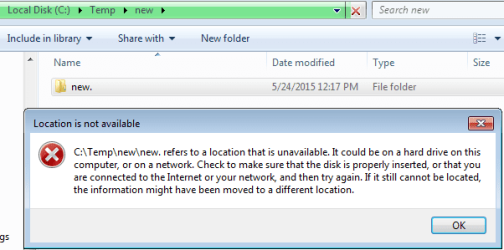
Now I can't open or delete that folder.
If I try, then it would give an error message.

Why does this happen?

How do I fix this?

Note:
Here are the errors for future reference

Open the folder
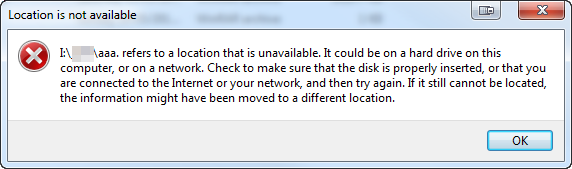
DbnbJCo.png


Delete the folder
JXlxW0H.png


Rename folder or remove the "." at the end
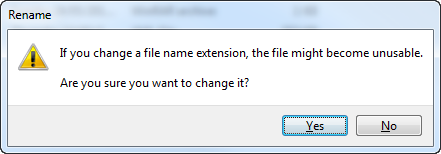
pAlQcjn.png


JXlxW0H.png


Update:
For anyone having the same problem..
This problem has been solved by doing this..

Open a cmd, preferably with Administrator access

Type this..
Code:
rd /q /s "\\?\[path]\Annoying Folder."

e.g.
rd /q /s "\\?\C:\Documents and Settings\User\Desktop\Annoying Folder."
 
Last edited:

My Computer

OS
Microsoft Windows 7 Ultimate 64-bit 7601 Multiprocessor Free Service Pack 1
CPU
Intel(R) Core(TM) i5-2500K CPU @ 3.30GHz
Motherboard
ASUSTeK Computer INC. P8Z68-V PRO
Memory
16.00 GB
Graphics Card(s)
AMD Radeon HD 6950
Sound Card
(1) AMD High Definition Audio Device (2) Webcam 250 (3)
Screen Resolution
1920 x 1080 x 32 bits (4294967296 colors) @ 60 Hz
Hard Drives
(1) M4-CT064M4SSD2 ATA Device (2) M4-CT128M4SSD2 ATA Device (3) SAMSUNG HD103SJ ATA Device (4) WDC WD20EARX-00PASB0 ATA Device (5) WDC WD20EARX-00PASB0 ATA Device (6) WDC WD20 EARS-00MVWB0 SCSI Disk Device (7) Generic USB CF Reader USB De
PSU
Corsair HX 650
Put in in another folder, try to delete that.
 

My Computer

Computer type
PC/Desktop
Computer Manufacturer/Model Number
Skylake Special #666
OS
Windows 10 Pro x64
CPU
Intel Core i7 6700K
Motherboard
Asus Sabertooth Z170 Mark 1
Memory
GSkill TridentZ RGB 16GB 3600 16-16-16-36
Graphics Card(s)
EVGA GTX 980 Ti SC x2
Sound Card
Realtek High Definition
Monitor(s) Displays
AOC G2460PG
Screen Resolution
1920 x 1080 144Hz
Hard Drives
Samsung 860 Pro 256GB, Seagate Barracuda 4TB x2
PSU
EVGA 1000 P2, EVGA White Custom Braided Cables
Case
Corsair Vengeance C70 Gunmetal Black
Cooling
Corsair H100i v2, Corsair ML120 x2, Thermal Grizzly Kryonaut
Keyboard
Logitech G910 Orion Spectrum
Mouse
Logitech G700s
Internet Speed
Verizon Fios Quantum Gateway 75/75
Antivirus
Windows Defender, Malwarebytes Free 3.8.3
Browser
Chrome
Other Info
Corsair SP120 x4, LG Blu-ray Drive, Durabrand HT-395 100 Watt Dolby Digital Amp, Corsair H2100 Wireless 7.1 Headset

My Computer

OS
Microsoft Windows 7 Ultimate 64-bit 7601 Multiprocessor Free Service Pack 1
CPU
Intel(R) Core(TM) i5-2500K CPU @ 3.30GHz
Motherboard
ASUSTeK Computer INC. P8Z68-V PRO
Memory
16.00 GB
Graphics Card(s)
AMD Radeon HD 6950
Sound Card
(1) AMD High Definition Audio Device (2) Webcam 250 (3)
Screen Resolution
1920 x 1080 x 32 bits (4294967296 colors) @ 60 Hz
Hard Drives
(1) M4-CT064M4SSD2 ATA Device (2) M4-CT128M4SSD2 ATA Device (3) SAMSUNG HD103SJ ATA Device (4) WDC WD20EARX-00PASB0 ATA Device (5) WDC WD20EARX-00PASB0 ATA Device (6) WDC WD20 EARS-00MVWB0 SCSI Disk Device (7) Generic USB CF Reader USB De
PSU
Corsair HX 650
I've tried to create a folder name that ends in a . and I can't, system ignore it.

You may be able to delete it via a Command Prompt window. Change to the folder that foldername. is in then try

ren "foldername." "foldername" to get rid of the period then you can delete it as normal.

If that doesn't work try creating a Linux live CD/DVD or flash drive and boot that then delete the folder from there.
 

My Computer

Computer type
PC/Desktop
Computer Manufacturer/Model Number
Lenovo IdeaCenter 450
OS
Windows 10 Pro X64
CPU
Intel Quad Core i7-4770 @ 3.4Ghz
Memory
16.0GB PC3-12800 DDR3 SDRAM 1600 MHz
Graphics Card(s)
Intel Integrated HD Graphics
Sound Card
Realtek HD Audio
Monitor(s) Displays
HP 22" LCD
Screen Resolution
1680 x 1050
Hard Drives
250GB Samsung EVO SATA-3 SSD
2TB Seagate ST2000DM001 SATA-2
1.5TB Seagate ST3150041AS SATA
Keyboard
Dell USB
Mouse
Lenovo USB
Internet Speed
Cable via Road Runner 3MB Upload, 30MB Download
Antivirus
Windows Defender, MBAM Pro, MBAE
Browser
Seamonkey
Other Info
UEFI/GPT
PLDS DVD-RW DH16AERSH
See this post:
Solved:

Code:
rd /s "\\?\C:\Documents and Settings\User\Desktop\Annoying Folder."
 

My Computer

Computer type
Laptop
Computer Manufacturer/Model Number
Employer provided Dell Latitude
OS
W7 Pro SP1 64bit
CPU
i7
Memory
8GB
Graphics Card(s)
Intel HD Graphics
Hard Drives
crappy SSD
Antivirus
Employer mandated Symantec Endpoint Protection
Browser
Pale Moon 64bit, IE11 64bit & Chrome 64bit
See this post:
Solved:

Code:
rd /s "\\?\C:\Documents and Settings\User\Desktop\Annoying Folder."

Yes, I found a solution in this thread, which basically says same thing like you said.

windows - How to delete a folder that name ended with a dot(".") - Stack Overflow

Thanks for the url link..

It's pretty dumb that windows don't fix this...

Do you know why it allows a dot, when extracting rar, but gives a error, when you delete, open, or move it?

====
The whole mess started because of this..
my rar filename was
e.g.
aaa..rar

Then I using winrar
-extract each archive to separate folders
which produce the folder

aaa.

Now when you delete, open, or move the folder
or the delete/move the parent folder

Windows would give an error message.
 

My Computer

OS
Microsoft Windows 7 Ultimate 64-bit 7601 Multiprocessor Free Service Pack 1
CPU
Intel(R) Core(TM) i5-2500K CPU @ 3.30GHz
Motherboard
ASUSTeK Computer INC. P8Z68-V PRO
Memory
16.00 GB
Graphics Card(s)
AMD Radeon HD 6950
Sound Card
(1) AMD High Definition Audio Device (2) Webcam 250 (3)
Screen Resolution
1920 x 1080 x 32 bits (4294967296 colors) @ 60 Hz
Hard Drives
(1) M4-CT064M4SSD2 ATA Device (2) M4-CT128M4SSD2 ATA Device (3) SAMSUNG HD103SJ ATA Device (4) WDC WD20EARX-00PASB0 ATA Device (5) WDC WD20EARX-00PASB0 ATA Device (6) WDC WD20 EARS-00MVWB0 SCSI Disk Device (7) Generic USB CF Reader USB De
PSU
Corsair HX 650
> It's pretty dumb that windows don't fix this...

Microsoft (Windows) will not be fixing this because it is not broken. MS has file/folder naming rules/reasons. Other operating systems have their file/folder naming rules/reasons.


> Do you know why it allows a dot, when extracting rar,
> but gives a error, when you delete, open, or move it?

Microsoft (Windows) allows* files/folders to be written this way because the Windows operating system can be used to serve up files to computers that use other operating system. In other words, a computer running a Windows operating system can hold files used by a computer running one of Apple's operating systems.


> ...I [was] using winrar
When you used WinRAR to extract the files/folders, the WinRAR app knew that you were writing the files/folders to a computer that is using the Windows operating system. The WinRAR app might have even checked/known that the name was invalid for the Windows OS. But the WinRAR app had no way of knowing what operating system you would use to interact with these files/folders after extraction. (e.g. perhaps you were putting files on your Windows based computer, but you planned on using a Linux Virtual Machine to run those files.) So, the WinRAR app named the files/folders just as they were in the RAR file.


* Microsoft provides APIs (Application Programming Interfaces). An MS API usually has various checks built in to help programmers get things done the way that the Windows OS wants (needs?) them done. The authors of WinRAR probably opted not to use the MS APIs for writing files/folders. Or, the authors of WinRAR called the MS APIs in such a way as to avoid MS's file/folder naming rules. Either way, it was WinRAR that went around Microsoft's normal checks (and that is okay).
 

My Computer

Computer type
Laptop
Computer Manufacturer/Model Number
Employer provided Dell Latitude
OS
W7 Pro SP1 64bit
CPU
i7
Memory
8GB
Graphics Card(s)
Intel HD Graphics
Hard Drives
crappy SSD
Antivirus
Employer mandated Symantec Endpoint Protection
Browser
Pale Moon 64bit, IE11 64bit & Chrome 64bit
Excellent explanation UNI :)
 

My Computer

Computer type
PC/Desktop
Computer Manufacturer/Model Number
Skylake Special #666
OS
Windows 10 Pro x64
CPU
Intel Core i7 6700K
Motherboard
Asus Sabertooth Z170 Mark 1
Memory
GSkill TridentZ RGB 16GB 3600 16-16-16-36
Graphics Card(s)
EVGA GTX 980 Ti SC x2
Sound Card
Realtek High Definition
Monitor(s) Displays
AOC G2460PG
Screen Resolution
1920 x 1080 144Hz
Hard Drives
Samsung 860 Pro 256GB, Seagate Barracuda 4TB x2
PSU
EVGA 1000 P2, EVGA White Custom Braided Cables
Case
Corsair Vengeance C70 Gunmetal Black
Cooling
Corsair H100i v2, Corsair ML120 x2, Thermal Grizzly Kryonaut
Keyboard
Logitech G910 Orion Spectrum
Mouse
Logitech G700s
Internet Speed
Verizon Fios Quantum Gateway 75/75
Antivirus
Windows Defender, Malwarebytes Free 3.8.3
Browser
Chrome
Other Info
Corsair SP120 x4, LG Blu-ray Drive, Durabrand HT-395 100 Watt Dolby Digital Amp, Corsair H2100 Wireless 7.1 Headset
Thanks for the explanation UsernameIssues

I will keep a watchout for RAR that has two dots in it's filename.

e.g. AAA..rar.

I still think Winrar should fix this though.

Since it is a windows app, so it should comply with windows standard.
 

My Computer

OS
Microsoft Windows 7 Ultimate 64-bit 7601 Multiprocessor Free Service Pack 1
CPU
Intel(R) Core(TM) i5-2500K CPU @ 3.30GHz
Motherboard
ASUSTeK Computer INC. P8Z68-V PRO
Memory
16.00 GB
Graphics Card(s)
AMD Radeon HD 6950
Sound Card
(1) AMD High Definition Audio Device (2) Webcam 250 (3)
Screen Resolution
1920 x 1080 x 32 bits (4294967296 colors) @ 60 Hz
Hard Drives
(1) M4-CT064M4SSD2 ATA Device (2) M4-CT128M4SSD2 ATA Device (3) SAMSUNG HD103SJ ATA Device (4) WDC WD20EARX-00PASB0 ATA Device (5) WDC WD20EARX-00PASB0 ATA Device (6) WDC WD20 EARS-00MVWB0 SCSI Disk Device (7) Generic USB CF Reader USB De
PSU
Corsair HX 650
I still think Winrar should fix this though.

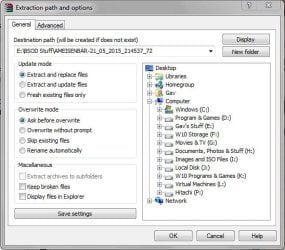
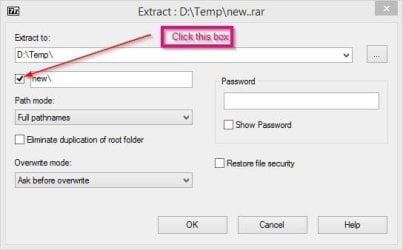
There's nothing to fix. Just click on Extract files... and choose the name of the destination folder.
Capture.JPG
 

My Computer

Computer type
PC/Desktop
Computer Manufacturer/Model Number
Custom Build
OS
W7 Pro x64 SP1 | W10 Pro IP x64 | W8.1 Pro x64 VM | Linux Mint VM
CPU
i7-4790k @ 4GHz (4.4GHz Boost)
Motherboard
ASUS Sabertooth Z87 (BIOS Rev 2004)
Memory
16GB DDR3 Kingston HyperX Fury @ 1600MHz CL 9-9-9-27
Graphics Card(s)
EVGA GTX 980 Classified
Sound Card
Realtek Onboard
Monitor(s) Displays
Samsung S27D390
Screen Resolution
1920 x 1080
Hard Drives
240GB Intel 520 Series SSD |
Samsung 850 EVO 120GB SSD |
2TB WD Caviar Black |
2TB WD Caviar Green
PSU
Corsair HX850-80 Gold Modular
Case
Cooler Master Silencio 650
Cooling
Corsair H80i w/2 x Corsair SP120 | 2 x 120mm Noctua NF-S12B
Keyboard
Microsoft Sidewinder X4
Mouse
Gigabyte M6900 optical
Internet Speed
152mb
Antivirus
F-Secure
Browser
Firefox 38.0
Other Info
Backup Rig: Win 7 Pro 64-bit | AMD A10-5800k | ASUS F2A85-V Pro | 8GB Samsung DDR3 @1600MHz | 120GB Toshiba SDD | 2TB Seagate HDD | Cooler Master Silencio 550
Good point Gav, always create a folder to extract to, don`t just let a folder extract.
 

My Computer

Computer type
PC/Desktop
Computer Manufacturer/Model Number
Skylake Special #666
OS
Windows 10 Pro x64
CPU
Intel Core i7 6700K
Motherboard
Asus Sabertooth Z170 Mark 1
Memory
GSkill TridentZ RGB 16GB 3600 16-16-16-36
Graphics Card(s)
EVGA GTX 980 Ti SC x2
Sound Card
Realtek High Definition
Monitor(s) Displays
AOC G2460PG
Screen Resolution
1920 x 1080 144Hz
Hard Drives
Samsung 860 Pro 256GB, Seagate Barracuda 4TB x2
PSU
EVGA 1000 P2, EVGA White Custom Braided Cables
Case
Corsair Vengeance C70 Gunmetal Black
Cooling
Corsair H100i v2, Corsair ML120 x2, Thermal Grizzly Kryonaut
Keyboard
Logitech G910 Orion Spectrum
Mouse
Logitech G700s
Internet Speed
Verizon Fios Quantum Gateway 75/75
Antivirus
Windows Defender, Malwarebytes Free 3.8.3
Browser
Chrome
Other Info
Corsair SP120 x4, LG Blu-ray Drive, Durabrand HT-395 100 Watt Dolby Digital Amp, Corsair H2100 Wireless 7.1 Headset
I wonder how 7-Zip handles this?

Edit: 7-Zip handles it correctly.
 

My Computer

Computer type
PC/Desktop
Computer Manufacturer/Model Number
Lenovo IdeaCenter 450
OS
Windows 10 Pro X64
CPU
Intel Quad Core i7-4770 @ 3.4Ghz
Memory
16.0GB PC3-12800 DDR3 SDRAM 1600 MHz
Graphics Card(s)
Intel Integrated HD Graphics
Sound Card
Realtek HD Audio
Monitor(s) Displays
HP 22" LCD
Screen Resolution
1680 x 1050
Hard Drives
250GB Samsung EVO SATA-3 SSD
2TB Seagate ST2000DM001 SATA-2
1.5TB Seagate ST3150041AS SATA
Keyboard
Dell USB
Mouse
Lenovo USB
Internet Speed
Cable via Road Runner 3MB Upload, 30MB Download
Antivirus
Windows Defender, MBAM Pro, MBAE
Browser
Seamonkey
Other Info
UEFI/GPT
PLDS DVD-RW DH16AERSH
I still think Winrar should fix this though.

There's nothing to fix. Just click on Extract files... and choose the name of the destination folder.
I must not be following your instructions correctly.

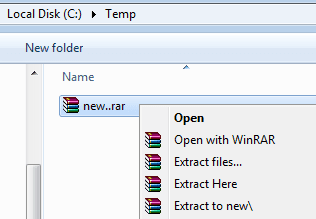
Starting with the sample RAR that I've attached to this post...
...I selected Extract files... from the context menu.
RAR1.PNG

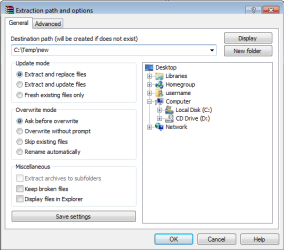
Doing that, offered me this:
RAR2.PNG
Notice that the period after "new" has automatically been removed by WinRAR.

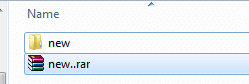
Clicking OK in the screen shown above gets me this:
RAR3.PNG

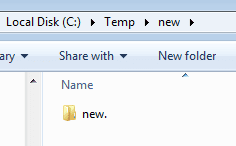
Going inside of "new" shows me this:
RAR4.PNG
A folder with a problematic name for Windows.

RAR5.PNG


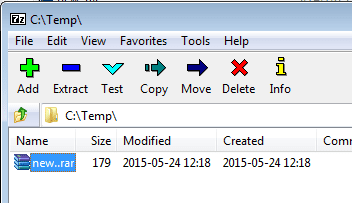
I wonder how 7-Zip handles this?

Edit: 7-Zip handles it correctly.

Selecting Extract...
7ZIP1.PNG

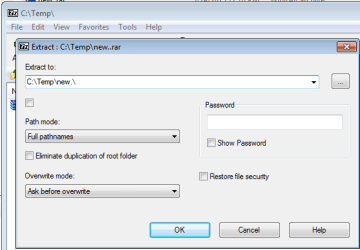
...offers* me this:
7ZIP2.PNG
Notice that the period is there... but it is ignored. The resulting folder will not have a period on the end. However, 7ZIP modifies the names of "invalid" folders, sub-folders and file names as it extracts/writes the contents of the RAR. Such renaming would be a nightmare for my Mac users. Server admins might want to stick with WinRAR - which correctly names things exactly as they exist inside the RAR. I use a Windows based computer to remote into Windows based file server and use WinRAR to extract files to be used by Mac users :-)

*oddly enough, I was only offered that path one time. After that, the path was simply C:\Temp
 

Attachments

Last edited:

My Computer

Computer type
Laptop
Computer Manufacturer/Model Number
Employer provided Dell Latitude
OS
W7 Pro SP1 64bit
CPU
i7
Memory
8GB
Graphics Card(s)
Intel HD Graphics
Hard Drives
crappy SSD
Antivirus
Employer mandated Symantec Endpoint Protection
Browser
Pale Moon 64bit, IE11 64bit & Chrome 64bit
7Zip.jpg

I get:

D:\temp\new.rar
D:\temp\new
D:\temp\new\new_
D:\temp\new\new_\test_
D:\temp\new\new_\test_\test.txt_

so it looks like 7-ZIp replaces . with _. Not sure if that's good or bad.
 

My Computer

Computer type
PC/Desktop
Computer Manufacturer/Model Number
Lenovo IdeaCenter 450
OS
Windows 10 Pro X64
CPU
Intel Quad Core i7-4770 @ 3.4Ghz
Memory
16.0GB PC3-12800 DDR3 SDRAM 1600 MHz
Graphics Card(s)
Intel Integrated HD Graphics
Sound Card
Realtek HD Audio
Monitor(s) Displays
HP 22" LCD
Screen Resolution
1680 x 1050
Hard Drives
250GB Samsung EVO SATA-3 SSD
2TB Seagate ST2000DM001 SATA-2
1.5TB Seagate ST3150041AS SATA
Keyboard
Dell USB
Mouse
Lenovo USB
Internet Speed
Cable via Road Runner 3MB Upload, 30MB Download
Antivirus
Windows Defender, MBAM Pro, MBAE
Browser
Seamonkey
Other Info
UEFI/GPT
PLDS DVD-RW DH16AERSH
The "new." folder had one dot.
The "test.." folder had two dots.
I don't recall how many dots the file had.

Interesting choice by 7ZIP :-)
 

My Computer

Computer type
Laptop
Computer Manufacturer/Model Number
Employer provided Dell Latitude
OS
W7 Pro SP1 64bit
CPU
i7
Memory
8GB
Graphics Card(s)
Intel HD Graphics
Hard Drives
crappy SSD
Antivirus
Employer mandated Symantec Endpoint Protection
Browser
Pale Moon 64bit, IE11 64bit & Chrome 64bit
View attachment 360202

I get:

D:\temp\new.rar
D:\temp\new
D:\temp\new\new_
D:\temp\new\new_\test_
D:\temp\new\new_\test_\test.txt_

so it looks like 7-ZIp replaces . with _. Not sure if that's good or bad.

I think that is good.
Cos if it was extract on windows, there would be no way to open, delete or move that folder

There would be no way for you to read test.txt, since you can't open that folder.
 

My Computer

OS
Microsoft Windows 7 Ultimate 64-bit 7601 Multiprocessor Free Service Pack 1
CPU
Intel(R) Core(TM) i5-2500K CPU @ 3.30GHz
Motherboard
ASUSTeK Computer INC. P8Z68-V PRO
Memory
16.00 GB
Graphics Card(s)
AMD Radeon HD 6950
Sound Card
(1) AMD High Definition Audio Device (2) Webcam 250 (3)
Screen Resolution
1920 x 1080 x 32 bits (4294967296 colors) @ 60 Hz
Hard Drives
(1) M4-CT064M4SSD2 ATA Device (2) M4-CT128M4SSD2 ATA Device (3) SAMSUNG HD103SJ ATA Device (4) WDC WD20EARX-00PASB0 ATA Device (5) WDC WD20EARX-00PASB0 ATA Device (6) WDC WD20 EARS-00MVWB0 SCSI Disk Device (7) Generic USB CF Reader USB De
PSU
Corsair HX 650
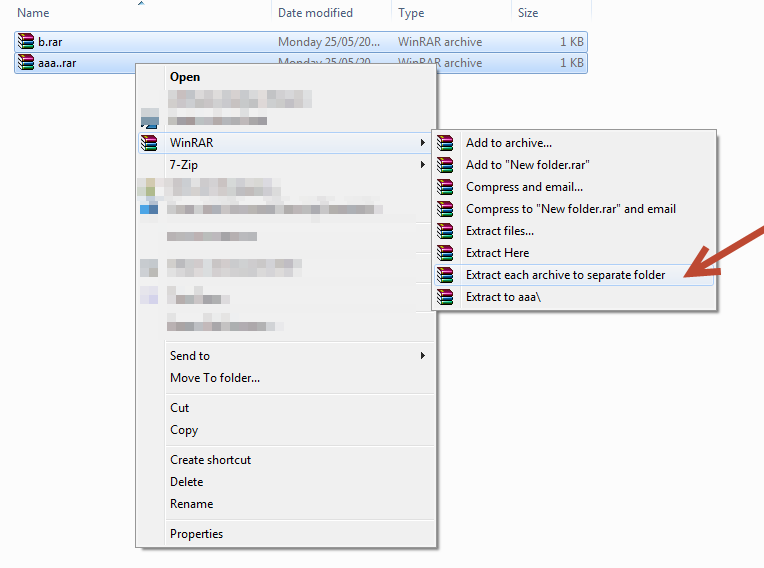
For people wondering how to get this same problem...

You need to have more than one rar file.

With one of the rar file with the offending name..,
e.g.

-aaa..rar
-b.rar

LCpwP53.png


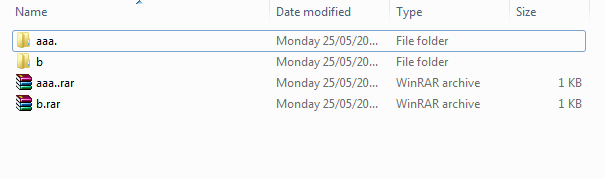
Extracted.
8eZTvsz.png


===
Winrar will happily create folder "aaa."

7z - There's no way to create the aaa. because it does not have that same menu item like winrar.

===

I have attached some sample files, for anyone that wants to test this..
 

Attachments

My Computer

OS
Microsoft Windows 7 Ultimate 64-bit 7601 Multiprocessor Free Service Pack 1
CPU
Intel(R) Core(TM) i5-2500K CPU @ 3.30GHz
Motherboard
ASUSTeK Computer INC. P8Z68-V PRO
Memory
16.00 GB
Graphics Card(s)
AMD Radeon HD 6950
Sound Card
(1) AMD High Definition Audio Device (2) Webcam 250 (3)
Screen Resolution
1920 x 1080 x 32 bits (4294967296 colors) @ 60 Hz
Hard Drives
(1) M4-CT064M4SSD2 ATA Device (2) M4-CT128M4SSD2 ATA Device (3) SAMSUNG HD103SJ ATA Device (4) WDC WD20EARX-00PASB0 ATA Device (5) WDC WD20EARX-00PASB0 ATA Device (6) WDC WD20 EARS-00MVWB0 SCSI Disk Device (7) Generic USB CF Reader USB De
PSU
Corsair HX 650
Madmax2, your screenshots are not shown. Would you re-upload them pleas?
 

My Computer

Computer type
PC/Desktop
Computer Manufacturer/Model Number
Custom Build
OS
Windows 7 Ultimate x64 SP1
CPU
AMD Phenom 2 1090T
Motherboard
Gigabyte GA-890FXA-UD5
Memory
2x8GB Kingston HyperX Fury Black 1600Mhz Unganged
Graphics Card(s)
MSI GTX 970 Gaming 4G
Sound Card
Realtek On-Board HD 7.1 Audio / Logitech G35
Monitor(s) Displays
3xAcer GD245HQ
Screen Resolution
1920x1080
Hard Drives
Samsung 850 Pro 512GB SSD - OS /
WD Caviar Black SATA 3 - 1 TBx2 - Dynamic RAID 0 /
WD Caviar Green SATA 2 - 640GBx2 - Dynamic RAID 0 /
WD Caviar Green SATA 2 - 640GB - Internal Backup /
Seagate Barracude SATA 3 - 3TB - External Backup/ Sync
PSU
HighPower 1000W
Case
Cooler Master HAF 932
Cooling
Noctua NH-D14
Keyboard
Logitech G19
Mouse
Logitech G500
Internet Speed
100/4 Mbit Cable (100GB quota)
Antivirus
ZoneAlarm Extreme Security / MBAM Pro / MBAE Free / SAS Free
Browser
IE 11 - Firefox - Chrome
Other Info
Logitech F710/ G27/ G940/ Z5500 // TrackIR 5 // Nvidia 3D Surround Vision
Madmax2, your screenshots are not shown. Would you re-upload them pleas?

which one?

Here is the direct link

http://i.imgur.com/LCpwP53.png

I can see it on my own computer...

Try refresh the page?

==
if you can't see the image then the instruction is


Select both files RAR files
-aaa..rar
-b.rar

Right click > extract each archive to separate folder
 

My Computer

OS
Microsoft Windows 7 Ultimate 64-bit 7601 Multiprocessor Free Service Pack 1
CPU
Intel(R) Core(TM) i5-2500K CPU @ 3.30GHz
Motherboard
ASUSTeK Computer INC. P8Z68-V PRO
Memory
16.00 GB
Graphics Card(s)
AMD Radeon HD 6950
Sound Card
(1) AMD High Definition Audio Device (2) Webcam 250 (3)
Screen Resolution
1920 x 1080 x 32 bits (4294967296 colors) @ 60 Hz
Hard Drives
(1) M4-CT064M4SSD2 ATA Device (2) M4-CT128M4SSD2 ATA Device (3) SAMSUNG HD103SJ ATA Device (4) WDC WD20EARX-00PASB0 ATA Device (5) WDC WD20EARX-00PASB0 ATA Device (6) WDC WD20 EARS-00MVWB0 SCSI Disk Device (7) Generic USB CF Reader USB De
PSU
Corsair HX 650
View attachment 360202

I get:

D:\temp\new.rar
D:\temp\new
D:\temp\new\new_
D:\temp\new\new_\test_
D:\temp\new\new_\test_\test.txt_

so it looks like 7-ZIp replaces . with _. Not sure if that's good or bad.

I think that is good.
Cos if it was extract on windows, there would be no way to open, delete or move that folder

There would be no way for you to read test.txt, since you can't open that folder.
But it is bad if the application on the Linux box was expecting the files on the Windows file server to be in folders with specific names. Renaming Program Files folder to Program Files_ won't work so well for you on your Windows based computer.

There are lots of companies that use Windows based file servers to serve up files to users on different platforms (e.g. Microsoft OS, Apple OS, Linux/Unix). Even home users have mixed platforms.
 

My Computer

Computer type
Laptop
Computer Manufacturer/Model Number
Employer provided Dell Latitude
OS
W7 Pro SP1 64bit
CPU
i7
Memory
8GB
Graphics Card(s)
Intel HD Graphics
Hard Drives
crappy SSD
Antivirus
Employer mandated Symantec Endpoint Protection
Browser
Pale Moon 64bit, IE11 64bit & Chrome 64bit
Back
Top