Can't delete or open folder that end with a dot

I still think Winrar should fix this though.

There's nothing to fix. Just click on Extract files... and choose the name of the destination folder.
I must not be following your instructions correctly.

Starting with the sample RAR that I've attached to this post...
...I selected Extract files... from the context menu.
View attachment 360139

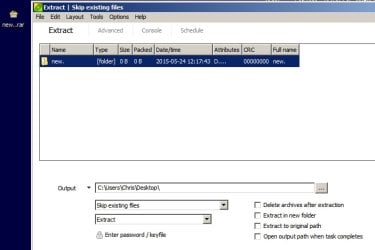
Doing that, offered me this:
View attachment 360140
Notice that the period after "new" has automatically been removed by WinRAR.

Clicking OK in the screen shown above gets me this:
View attachment 360141

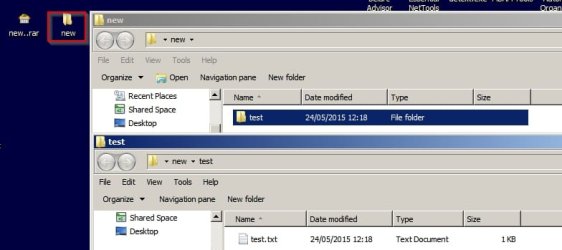
Going inside of "new" shows me this:
View attachment 360142
A folder with a problematic name for Windows.

View attachment 360143

You can create a brand new folder called whatever you want so the new. folder never gets created. No problems for Windows then.
Capture.JPG
 

My Computer My Computer

At a glance

W7 Pro x64 SP1 | W10 Pro IP x64 | W8.1 Pro x6...i7-4790k @ 4GHz (4.4GHz Boost)16GB DDR3 Kingston HyperX Fury @ 1600MHz CL 9...EVGA GTX 980 Classified
Computer type
PC/Desktop
Computer Manufacturer/Model Number
Custom Build
OS
W7 Pro x64 SP1 | W10 Pro IP x64 | W8.1 Pro x64 VM | Linux Mint VM
CPU
i7-4790k @ 4GHz (4.4GHz Boost)
Motherboard
ASUS Sabertooth Z87 (BIOS Rev 2004)
Memory
16GB DDR3 Kingston HyperX Fury @ 1600MHz CL 9-9-9-27
Graphics Card(s)
EVGA GTX 980 Classified
Sound Card
Realtek Onboard
Monitor(s) Displays
Samsung S27D390
Screen Resolution
1920 x 1080
Hard Drives
240GB Intel 520 Series SSD |
Samsung 850 EVO 120GB SSD |
2TB WD Caviar Black |
2TB WD Caviar Green
PSU
Corsair HX850-80 Gold Modular
Case
Cooler Master Silencio 650
Cooling
Corsair H80i w/2 x Corsair SP120 | 2 x 120mm Noctua NF-S12B
Keyboard
Microsoft Sidewinder X4
Mouse
Gigabyte M6900 optical
Internet Speed
152mb
Antivirus
F-Secure
Browser
Firefox 38.0
Other Info
Backup Rig: Win 7 Pro 64-bit | AMD A10-5800k | ASUS F2A85-V Pro | 8GB Samsung DDR3 @1600MHz | 120GB Toshiba SDD | 2TB Seagate HDD | Cooler Master Silencio 550
There's nothing to fix. Just click on Extract files... and choose the name of the destination folder.
I must not be following your instructions correctly.

Starting with the sample RAR that I've attached to this post...
...I selected Extract files... from the context menu.
View attachment 360139

Doing that, offered me this:
View attachment 360140
Notice that the period after "new" has automatically been removed by WinRAR.

Clicking OK in the screen shown above gets me this:
View attachment 360141

Going inside of "new" shows me this:
View attachment 360142
A folder with a problematic name for Windows.

View attachment 360143

You can create a brand new folder called whatever you want so the new. folder never gets created. No problems for Windows then.
What did you find when you went inside of that folder named "new"?
 

My Computer My Computer

At a glance

W7 Pro SP1 64biti78GBIntel HD Graphics
Computer type
Laptop
Computer Manufacturer/Model Number
Employer provided Dell Latitude
OS
W7 Pro SP1 64bit
CPU
i7
Memory
8GB
Graphics Card(s)
Intel HD Graphics
Hard Drives
crappy SSD
Antivirus
Employer mandated Symantec Endpoint Protection
Browser
Pale Moon 64bit, IE11 64bit & Chrome 64bit
Nothing, the folder was created but nothing was placed in it.

EDIT: Sorry, the New Folder was created when I first clicked on new while in Winrar but nothing was placed in there when I changed the save location. If I hadn't expanded the new folder nothing would have been placed in there, there was no option to expand it before I clicked on it.
 

My Computer My Computer

At a glance

W7 Pro x64 SP1 | W10 Pro IP x64 | W8.1 Pro x6...i7-4790k @ 4GHz (4.4GHz Boost)16GB DDR3 Kingston HyperX Fury @ 1600MHz CL 9...EVGA GTX 980 Classified
Computer type
PC/Desktop
Computer Manufacturer/Model Number
Custom Build
OS
W7 Pro x64 SP1 | W10 Pro IP x64 | W8.1 Pro x64 VM | Linux Mint VM
CPU
i7-4790k @ 4GHz (4.4GHz Boost)
Motherboard
ASUS Sabertooth Z87 (BIOS Rev 2004)
Memory
16GB DDR3 Kingston HyperX Fury @ 1600MHz CL 9-9-9-27
Graphics Card(s)
EVGA GTX 980 Classified
Sound Card
Realtek Onboard
Monitor(s) Displays
Samsung S27D390
Screen Resolution
1920 x 1080
Hard Drives
240GB Intel 520 Series SSD |
Samsung 850 EVO 120GB SSD |
2TB WD Caviar Black |
2TB WD Caviar Green
PSU
Corsair HX850-80 Gold Modular
Case
Cooler Master Silencio 650
Cooling
Corsair H80i w/2 x Corsair SP120 | 2 x 120mm Noctua NF-S12B
Keyboard
Microsoft Sidewinder X4
Mouse
Gigabyte M6900 optical
Internet Speed
152mb
Antivirus
F-Secure
Browser
Firefox 38.0
Other Info
Backup Rig: Win 7 Pro 64-bit | AMD A10-5800k | ASUS F2A85-V Pro | 8GB Samsung DDR3 @1600MHz | 120GB Toshiba SDD | 2TB Seagate HDD | Cooler Master Silencio 550
Peazip results?

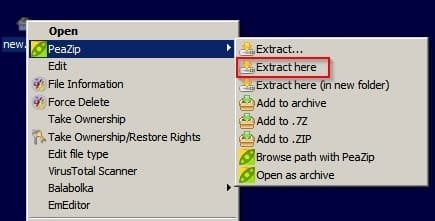
Just to add to the mix. Using PeaZip results in the following:

"Extract here" - original folder saved to desktop
Peazip 1.jpg

results in folder named "new" and no dot. Files inside are correctly named.
Peazip 2.jpg

Using Peazip File Browser gives exactly the same results. No dot in the extracted folder name.
Peazip 3.jpg
 

My Computer My Computer

At a glance

Microsoft Windows 7 Home Premium 64-bit 7601 ...AMD C-60 APU with Radeon(tm) HD Graphics4.00 GBAMD Radeon HD 6290 Graphics
Computer type
Laptop
Computer Manufacturer/Model Number
ASUS
OS
Microsoft Windows 7 Home Premium 64-bit 7601 Multiprocessor Free Service Pack 1
CPU
AMD C-60 APU with Radeon(tm) HD Graphics
Motherboard
ASUSTeK COMPUTER INC. X501U
Memory
4.00 GB
Graphics Card(s)
AMD Radeon HD 6290 Graphics
Sound Card
(1) AMD High Definition Audio Device (2) Realtek High Defi
Screen Resolution
1366 x 768 x 32 bits (4294967296 colors) @ 60 Hz
Hard Drives
Hitachi HTS545050A7E380 SATA Disk Device
Antivirus
Comodo CIS & FW, SecureAplus App Whitelisting, Threatfire
Browser
Cyberfox 64bit, Opera 64bit, Airfox
Other Info
Spy-The-Spy, HitmanPro.Alert, Norton Connect Safe, MJRegWatcher, BitDefender TrafficLight, Voodoo Shield, Zemana AntiMalware
Nothing, the folder was created but nothing was placed in it.

EDIT: Sorry, the New Folder was created when I first clicked on new while in Winrar but nothing was placed in there when I changed the save location. If I hadn't expanded the new folder nothing would have been placed in there, there was no option to expand it before I clicked on it.
Unless you complete the extraction, I don't think that you will see what I'm talking about. So far, I'm not seeing any benefit to adding more folders. I'm not seeing any way to prevent WinRAR from creating folder names and file names that Windows does not like when extracting the new..RAR file that I posted earlier.

The end result of the extraction by WinRAR should be \new.\test..\test.txt.
(that is one dot after new, two dots after the folder named test and one dot after txt)
Those are three "invalid" (but desired) names.

You can add all of the new folders in front of \new. that you want. It does not seem to solve anything. Or maybe I'm doing it wrong.


Just to add to the mix. Using PeaZip results in the following:

"Extract here" - original folder saved to desktop
View attachment 360298

results in folder named "new" and no dot. Files inside are correctly named.
View attachment 360299

Using Peazip File Browser gives exactly the same results. No dot in the extracted folder name.
View attachment 360300
They are not correct if the desired result is the exact path inside the RAR file :-)

The 64bit version of PeaZip 5.6.0 seems to be based on 7ZIP. It changed the trailing dot(s) to underscore(s) for me.
\new_\test__\test.txt_
 

My Computer My Computer

At a glance

W7 Pro SP1 64biti78GBIntel HD Graphics
Computer type
Laptop
Computer Manufacturer/Model Number
Employer provided Dell Latitude
OS
W7 Pro SP1 64bit
CPU
i7
Memory
8GB
Graphics Card(s)
Intel HD Graphics
Hard Drives
crappy SSD
Antivirus
Employer mandated Symantec Endpoint Protection
Browser
Pale Moon 64bit, IE11 64bit & Chrome 64bit
Okay the mystery is solved for me. Using Peazip 5.6.0 64bit I get

\new\test\test.txt - when using Extract or Extract Here

if using "Open As Archive"

I get shown the full paths including dots in Peazip file browser window. However any attempt to move those files into windows (desktop or anywhere else) and the additional dots get removed presumably by Explorer.

I don't see any underscores. I'm not sure why. Reseach suggests that underscores are a result of windows stripping illegal characters from file names. I cannot replicate \new_\test__\test.txt_ for some reason.

WinRAR keeps the file and folder names ending in dot but I cannot view them using Explorer and they can be force deleted.
 

My Computer My Computer

At a glance

Microsoft Windows 7 Home Premium 64-bit 7601 ...AMD C-60 APU with Radeon(tm) HD Graphics4.00 GBAMD Radeon HD 6290 Graphics
Computer type
Laptop
Computer Manufacturer/Model Number
ASUS
OS
Microsoft Windows 7 Home Premium 64-bit 7601 Multiprocessor Free Service Pack 1
CPU
AMD C-60 APU with Radeon(tm) HD Graphics
Motherboard
ASUSTeK COMPUTER INC. X501U
Memory
4.00 GB
Graphics Card(s)
AMD Radeon HD 6290 Graphics
Sound Card
(1) AMD High Definition Audio Device (2) Realtek High Defi
Screen Resolution
1366 x 768 x 32 bits (4294967296 colors) @ 60 Hz
Hard Drives
Hitachi HTS545050A7E380 SATA Disk Device
Antivirus
Comodo CIS & FW, SecureAplus App Whitelisting, Threatfire
Browser
Cyberfox 64bit, Opera 64bit, Airfox
Other Info
Spy-The-Spy, HitmanPro.Alert, Norton Connect Safe, MJRegWatcher, BitDefender TrafficLight, Voodoo Shield, Zemana AntiMalware
For anyone that wants to test this problem in winrar..

Create two rar files
-aaa..rar
-b.rar

Select both files
Right click

Choose
Winrar > extract each archive to separate folder

http://i.imgur.com/LCpwP53.png

I have uploaded some attached files for people to test
 

Attachments

My Computer My Computer

At a glance

Microsoft Windows 7 Ultimate 64-bit 7601 Mult...Intel(R) Core(TM) i5-2500K CPU @ 3.30GHz16.00 GBAMD Radeon HD 6950
OS
Microsoft Windows 7 Ultimate 64-bit 7601 Multiprocessor Free Service Pack 1
CPU
Intel(R) Core(TM) i5-2500K CPU @ 3.30GHz
Motherboard
ASUSTeK Computer INC. P8Z68-V PRO
Memory
16.00 GB
Graphics Card(s)
AMD Radeon HD 6950
Sound Card
(1) AMD High Definition Audio Device (2) Webcam 250 (3)
Screen Resolution
1920 x 1080 x 32 bits (4294967296 colors) @ 60 Hz
Hard Drives
(1) M4-CT064M4SSD2 ATA Device (2) M4-CT128M4SSD2 ATA Device (3) SAMSUNG HD103SJ ATA Device (4) WDC WD20EARX-00PASB0 ATA Device (5) WDC WD20EARX-00PASB0 ATA Device (6) WDC WD20 EARS-00MVWB0 SCSI Disk Device (7) Generic USB CF Reader USB De
PSU
Corsair HX 650
Hello, I came into this thread while I was trying to find a ready solution myself. This issue with the folders can be manually fixed by using the command line console and entering this:

dir /x /ad

What this command does is list all the folders with their short and long names. You can simply check the line with the affected folder and use the short name which is displayed right before the long name and after <Dir>. Then, use this command

ren foldershortname newfoldername

That is it. There is also a similar solution. Though, I decided to automate this since I deal with this issue having to deal with plenty of files. You can use my project to fix the folders issues without any effort. It provides shell extension support. So, you can simply right click the main folder that contains the affected folder(s) then click Fix Folders Names and you are done:

https://github.com/samehb/FoldersFixer

P.S. Sorry for bumping this old thread. I only posted here because I wanted anyone googling the problem to easily find the solution.

Regards.
 

My Computer My Computer

At a glance

Windows 7 x64
Computer type
PC/Desktop
OS
Windows 7 x64
Hello, I came into this thread while I was trying to find a ready solution myself. This issue with the folders can be manually fixed by using the command line console and entering this:

dir /x /ad

What this command does is list all the folders with their short and long names. You can simply check the line with the affected folder and use the short name which is displayed right before the long name and after <Dir>. Then, use this command

ren foldershortname newfoldername

That is it. There is also a similar solution. Though, I decided to automate this since I deal with this issue having to deal with plenty of files. You can use my project to fix the folders issues without any effort. It provides shell extension support. So, you can simply right click the main folder that contains the affected folder(s) then click Fix Folders Names and you are done:

https://github.com/samehb/FoldersFixer

P.S. Sorry for bumping this old thread. I only posted here because I wanted anyone googling the problem to easily find the solution.

Regards.


thanks

but the simple solution is posted on page 1 under my original post
 

My Computer My Computer

At a glance

Microsoft Windows 7 Ultimate 64-bit 7601 Mult...Intel(R) Core(TM) i5-2500K CPU @ 3.30GHz16.00 GBAMD Radeon HD 6950
OS
Microsoft Windows 7 Ultimate 64-bit 7601 Multiprocessor Free Service Pack 1
CPU
Intel(R) Core(TM) i5-2500K CPU @ 3.30GHz
Motherboard
ASUSTeK Computer INC. P8Z68-V PRO
Memory
16.00 GB
Graphics Card(s)
AMD Radeon HD 6950
Sound Card
(1) AMD High Definition Audio Device (2) Webcam 250 (3)
Screen Resolution
1920 x 1080 x 32 bits (4294967296 colors) @ 60 Hz
Hard Drives
(1) M4-CT064M4SSD2 ATA Device (2) M4-CT128M4SSD2 ATA Device (3) SAMSUNG HD103SJ ATA Device (4) WDC WD20EARX-00PASB0 ATA Device (5) WDC WD20EARX-00PASB0 ATA Device (6) WDC WD20 EARS-00MVWB0 SCSI Disk Device (7) Generic USB CF Reader USB De
PSU
Corsair HX 650
thanks

but the simple solution is posted on page 1 under my original post

Hello madmax2, the fix you provided (\\?\ prefix) is what I referred to as similar solution in my post. My project allows you to mass rename all affected folders without having to deal with them one by one. It also allows you to keep the folders in case you need the files inside them. You can use it by right clicking the root folder then clicking Fix Folders Names (after running it once). That is all you need to do.

Best Wishes.
 

My Computer My Computer

At a glance

Windows 7 x64
Computer type
PC/Desktop
OS
Windows 7 x64
I recently was noodling around for a month, decided to try a bunch of "unlockers" for a comparison study.
Even went into the wayback machine and got old freeware.

Made several dummy files and folders with period/dot at the end of name, for testing.

I already knew my oldtimer fix (XP and Win7) I always use would be the easiest and simplest,
Also tried nfts permissions changer on it.

My oldtimer repair worked perfect.
Just use 7zip and navigate / highlight the problem name file or folder, right click and rename...(.or just delete from there)
Works every time......

Done. Never comes back.
 

My Computer My Computer

At a glance

XP Pro-Hm
OS
XP Pro-Hm
You're replying to a thread that is 4 years old. We call it necro posting :D
 

My Computer My Computer

At a glance

Windows 10 Pro X64Intel Quad Core i7-4770 @ 3.4Ghz16.0GB PC3-12800 DDR3 SDRAM 1600 MHzIntel Integrated HD Graphics
Computer type
PC/Desktop
Computer Manufacturer/Model Number
Lenovo IdeaCenter 450
OS
Windows 10 Pro X64
CPU
Intel Quad Core i7-4770 @ 3.4Ghz
Memory
16.0GB PC3-12800 DDR3 SDRAM 1600 MHz
Graphics Card(s)
Intel Integrated HD Graphics
Sound Card
Realtek HD Audio
Monitor(s) Displays
HP 22" LCD
Screen Resolution
1680 x 1050
Hard Drives
250GB Samsung EVO SATA-3 SSD
2TB Seagate ST2000DM001 SATA-2
1.5TB Seagate ST3150041AS SATA
Keyboard
Dell USB
Mouse
Lenovo USB
Internet Speed
Cable via Road Runner 3MB Upload, 30MB Download
Antivirus
Windows Defender, MBAM Pro, MBAE
Browser
Seamonkey
Other Info
UEFI/GPT
PLDS DVD-RW DH16AERSH
You're replying to a thread that is 4 years old. We call it necro posting :D
Glory be praised, the dead are raised to life :)
 

My Computer My Computer

At a glance

Windows 7 Professional 64-bitDesktop i5; Acers i5 & i7desktop 16GB; 1 Acer 8GB & 1 Acer 16GB
Computer type
PC/Desktop
Computer Manufacturer/Model Number
Antec desktop; Acer Aspire laptops
OS
Windows 7 Professional 64-bit
CPU
Desktop i5; Acers i5 & i7
Memory
desktop 16GB; 1 Acer 8GB & 1 Acer 16GB
Hard Drives
1TB split into 2 equal partitions [OS and data] usable by RJS
Internet Speed
AT&T DSL
Browser
FF, GChrome, msIE
Other Info
Windows 7 Firewall, Emsisoft AM/AV, MSE [scan-only], SpywareBlaster, Ruiware/BillP combine
LOL
yes I noticed, but it was not closed thread :)
Good information is still good information! :)
 

My Computer My Computer

At a glance

XP Pro-Hm
OS
XP Pro-Hm
True, I just wasn't sure you noticed the date of the last post before yours.
 

My Computer My Computer

At a glance

Windows 10 Pro X64Intel Quad Core i7-4770 @ 3.4Ghz16.0GB PC3-12800 DDR3 SDRAM 1600 MHzIntel Integrated HD Graphics
Computer type
PC/Desktop
Computer Manufacturer/Model Number
Lenovo IdeaCenter 450
OS
Windows 10 Pro X64
CPU
Intel Quad Core i7-4770 @ 3.4Ghz
Memory
16.0GB PC3-12800 DDR3 SDRAM 1600 MHz
Graphics Card(s)
Intel Integrated HD Graphics
Sound Card
Realtek HD Audio
Monitor(s) Displays
HP 22" LCD
Screen Resolution
1680 x 1050
Hard Drives
250GB Samsung EVO SATA-3 SSD
2TB Seagate ST2000DM001 SATA-2
1.5TB Seagate ST3150041AS SATA
Keyboard
Dell USB
Mouse
Lenovo USB
Internet Speed
Cable via Road Runner 3MB Upload, 30MB Download
Antivirus
Windows Defender, MBAM Pro, MBAE
Browser
Seamonkey
Other Info
UEFI/GPT
PLDS DVD-RW DH16AERSH
Tried apps, tried del CMD line, tried safe mode...nothing. Finally found this post and BOOM! It worked! Thanks so much!
 

My Computer My Computer

At a glance

Windows 7 UltimateP4 3.4Ghz4GBX800XT
Computer Manufacturer/Model Number
Dell XPS Gen 3
OS
Windows 7 Ultimate
CPU
P4 3.4Ghz
Memory
4GB
Graphics Card(s)
X800XT
Sound Card
Audigy 2
Monitor(s) Displays
40" Samsung LCD
Screen Resolution
1920x1080
Back
Top