Close programs to prevent information loss popup?

bal1985

New member
Member
Local time
2:33 PM
Messages
48
A buddy of mine helped me build my first computer a few months ago, a bunch of people from PCPartPicker helped me figure out what components to get. Anyways, I'm not the best with computers, the internals and what not but I'm pretty sure my computer should be able to handle some heavy stress. I just recently I started getting this popup (attached below) which is kind of made me panic.

This time is said to close MB and then other time it would list 2-3 applications at a time. I've never had this problems before with none of my computers. I thought I got a virus as first.

Any idea if this is legit? If so what is going on? My old computer from 3-4 years ago was able to handle Chrome with 20 tabs open, Photoshop going, Word/Excel and 5 other applications opened at the same time. Never got an error like this before. I'm on Windows 7 by the way, if that matters & can post my specs if needed.

Any help would be much appreciated :)
 

Attachments

  • memory.png
    memory.png
    23.5 KB · Views: 17

My Computer My Computer

Computer type
PC/Desktop
Computer Manufacturer/Model Number
Custom build
OS
Windows 7 x64
CPU
Intel Core i5-4440 3.1GHz Quad-Core
Motherboard
ASRock Z97 PRO4 ATX LGA1150
Memory
G.Skill Ripjaws X Series 8GB (2 x 4GB) DDR3-1600
Graphics Card(s)
HIS Radeon R9 270 2GB IceQ X²
Monitor(s) Displays
Asus VE247H 23.6"
Screen Resolution
1920x1080
Hard Drives
Crucial M500 240GB SSD, Western Digital Caviar Blue 1TB HDD & Western Digital My Book Essential 1TB External HDD
PSU
Rosewill 750W
Case
Corsair 200R ATX Mid Tower
Cooling
Cooler Master Hyper 212 EVO 82.9 CFM Sleeve Bearing
Keyboard
Logitech Wireless Illuminated Keyboard K800
Mouse
Logitech Anywhere Mouse MX
Internet Speed
Verizon FiOS 75/75 Mbps
Antivirus
MSE & Malwarebytes
Browser
Chrome 39.0.2171.95 m
Is this the machine in your specs? Post specs if not.

With 8GB of RAM you shouldn't get that warning. Maybe some program is leaking memory. It is a legit warning, not sure the reported program actually responsible.

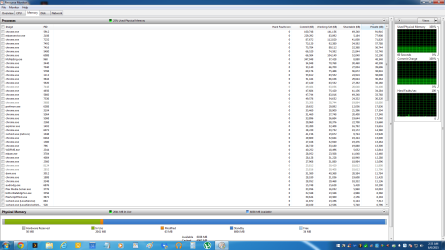
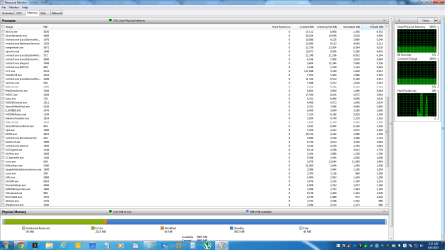
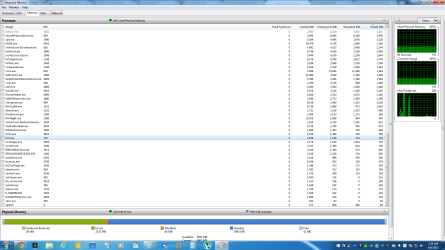
Open Resource Monitor, switch to memory tab and post a screenshot http://www.sevenforums.com/tutorials/9733-screenshots-files-upload-post-seven-forums.html

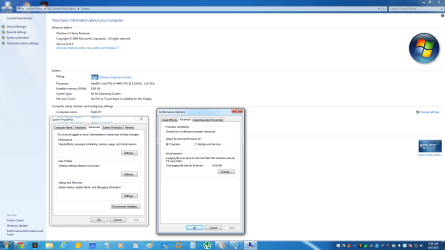
Also check paging file options, right click computer - properties - advanced system settings - performance settings - advanced - change (also post a screenshot of this)
 

My Computer My Computer

Computer type
PC/Desktop
Computer Manufacturer/Model Number
Custom Build
OS
Windows 7 Ultimate x64 SP1
CPU
AMD Phenom 2 1090T
Motherboard
Gigabyte GA-890FXA-UD5
Memory
2x8GB Kingston HyperX Fury Black 1600Mhz Unganged
Graphics Card(s)
MSI GTX 970 Gaming 4G
Sound Card
Realtek On-Board HD 7.1 Audio / Logitech G35
Monitor(s) Displays
3xAcer GD245HQ
Screen Resolution
1920x1080
Hard Drives
Samsung 850 Pro 512GB SSD - OS /
WD Caviar Black SATA 3 - 1 TBx2 - Dynamic RAID 0 /
WD Caviar Green SATA 2 - 640GBx2 - Dynamic RAID 0 /
WD Caviar Green SATA 2 - 640GB - Internal Backup /
Seagate Barracude SATA 3 - 3TB - External Backup/ Sync
PSU
HighPower 1000W
Case
Cooler Master HAF 932
Cooling
Noctua NH-D14
Keyboard
Logitech G19
Mouse
Logitech G500
Internet Speed
100/4 Mbit Cable (100GB quota)
Antivirus
ZoneAlarm Extreme Security / MBAM Pro / MBAE Free / SAS Free
Browser
IE 11 - Firefox - Chrome
Other Info
Logitech F710/ G27/ G940/ Z5500 // TrackIR 5 // Nvidia 3D Surround Vision
Is this the machine in your specs? Post specs if not.

With 8GB of RAM you shouldn't get that warning. Maybe some program is leaking memory. It is a legit warning, not sure the reported program actually responsible.

Open Resource Monitor, switch to memory tab and post a screenshot http://www.sevenforums.com/tutorials/9733-screenshots-files-upload-post-seven-forums.html

Also check paging file options, right click computer - properties - advanced system settings - performance settings - advanced - change (also post a screenshot of this)

Thanks for the quick response. Those specs are correct, I can send you a Speccy snapshot if you need me to. I attached all the screenshots as you asked. I don't know why Chrome shows up so much? I restarted my PC before taking the screenshots. I have 10 tabs currently opened up in Chrome. I don't know if I need to do some maintenance on my PC or what, it does seem a little sluggish. Thanks again for the help!

resource1.png

resource2.png

resource3.png

sysprp.png

Edit: What should I do about that Windows 10 icon below, can I get rid of it? I put 7 on this build because I hated 8, what should I do?
 

My Computer My Computer

Computer type
PC/Desktop
Computer Manufacturer/Model Number
Custom build
OS
Windows 7 x64
CPU
Intel Core i5-4440 3.1GHz Quad-Core
Motherboard
ASRock Z97 PRO4 ATX LGA1150
Memory
G.Skill Ripjaws X Series 8GB (2 x 4GB) DDR3-1600
Graphics Card(s)
HIS Radeon R9 270 2GB IceQ X²
Monitor(s) Displays
Asus VE247H 23.6"
Screen Resolution
1920x1080
Hard Drives
Crucial M500 240GB SSD, Western Digital Caviar Blue 1TB HDD & Western Digital My Book Essential 1TB External HDD
PSU
Rosewill 750W
Case
Corsair 200R ATX Mid Tower
Cooling
Cooler Master Hyper 212 EVO 82.9 CFM Sleeve Bearing
Keyboard
Logitech Wireless Illuminated Keyboard K800
Mouse
Logitech Anywhere Mouse MX
Internet Speed
Verizon FiOS 75/75 Mbps
Antivirus
MSE & Malwarebytes
Browser
Chrome 39.0.2171.95 m
Well, pagefile looks normal and memory usage is fine too.

Try clean startup (keep AV processes and services checked) http://www.sevenforums.com/tutorial...ation-conflicts-performing-clean-startup.html - if MBAM is free, uncheck that as well.

When/if you get the warning again, open the memory tab sort by usage and take a screenshot. Better yet, keep that page open and check every so often if the green bar moves too far to the right side.

You can try scanning with memtest64 before you go to sleep (Memtest86+ - Advanced Memory Diagnostic Tool), at least 8 passes, leave it running overnight. 1 red warning is enough.
 

My Computer My Computer

Computer type
PC/Desktop
Computer Manufacturer/Model Number
Custom Build
OS
Windows 7 Ultimate x64 SP1
CPU
AMD Phenom 2 1090T
Motherboard
Gigabyte GA-890FXA-UD5
Memory
2x8GB Kingston HyperX Fury Black 1600Mhz Unganged
Graphics Card(s)
MSI GTX 970 Gaming 4G
Sound Card
Realtek On-Board HD 7.1 Audio / Logitech G35
Monitor(s) Displays
3xAcer GD245HQ
Screen Resolution
1920x1080
Hard Drives
Samsung 850 Pro 512GB SSD - OS /
WD Caviar Black SATA 3 - 1 TBx2 - Dynamic RAID 0 /
WD Caviar Green SATA 2 - 640GBx2 - Dynamic RAID 0 /
WD Caviar Green SATA 2 - 640GB - Internal Backup /
Seagate Barracude SATA 3 - 3TB - External Backup/ Sync
PSU
HighPower 1000W
Case
Cooler Master HAF 932
Cooling
Noctua NH-D14
Keyboard
Logitech G19
Mouse
Logitech G500
Internet Speed
100/4 Mbit Cable (100GB quota)
Antivirus
ZoneAlarm Extreme Security / MBAM Pro / MBAE Free / SAS Free
Browser
IE 11 - Firefox - Chrome
Other Info
Logitech F710/ G27/ G940/ Z5500 // TrackIR 5 // Nvidia 3D Surround Vision
Well, pagefile looks normal and memory usage is fine too.

Try clean startup (keep AV processes and services checked) http://www.sevenforums.com/tutorial...ation-conflicts-performing-clean-startup.html - if MBAM is free, uncheck that as well.

When/if you get the warning again, open the memory tab sort by usage and take a screenshot. Better yet, keep that page open and check every so often if the green bar moves too far to the right side.

You can try scanning with memtest64 before you go to sleep (Memtest86+ - Advanced Memory Diagnostic Tool), at least 8 passes, leave it running overnight. 1 red warning is enough.


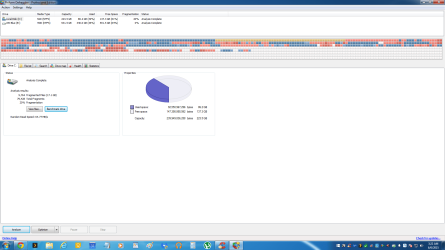
Thank you, I'll get to it. I downloaded Defraggler just to see how my SSD and HDD looked. From the screenshot do you see any issues? I don't understand why the SSD says 20% fragmentation. Since this PC has been built I haven't ran any cleaning programs or done anything to my hard drives except run CCleaner.

Defraggler.png
 

My Computer My Computer

Computer type
PC/Desktop
Computer Manufacturer/Model Number
Custom build
OS
Windows 7 x64
CPU
Intel Core i5-4440 3.1GHz Quad-Core
Motherboard
ASRock Z97 PRO4 ATX LGA1150
Memory
G.Skill Ripjaws X Series 8GB (2 x 4GB) DDR3-1600
Graphics Card(s)
HIS Radeon R9 270 2GB IceQ X²
Monitor(s) Displays
Asus VE247H 23.6"
Screen Resolution
1920x1080
Hard Drives
Crucial M500 240GB SSD, Western Digital Caviar Blue 1TB HDD & Western Digital My Book Essential 1TB External HDD
PSU
Rosewill 750W
Case
Corsair 200R ATX Mid Tower
Cooling
Cooler Master Hyper 212 EVO 82.9 CFM Sleeve Bearing
Keyboard
Logitech Wireless Illuminated Keyboard K800
Mouse
Logitech Anywhere Mouse MX
Internet Speed
Verizon FiOS 75/75 Mbps
Antivirus
MSE & Malwarebytes
Browser
Chrome 39.0.2171.95 m
It is not a good idea to run defrag on SSD. And SSD controller should be doing Wear Leveling (moves the data to other places so all segments wear about the same and no single segment wears much sooner than others)

Wear leveling - Wikipedia, the free encyclopedia
 

My Computer My Computer

Computer type
PC/Desktop
Computer Manufacturer/Model Number
Custom Build
OS
Windows 7 Ultimate x64 SP1
CPU
AMD Phenom 2 1090T
Motherboard
Gigabyte GA-890FXA-UD5
Memory
2x8GB Kingston HyperX Fury Black 1600Mhz Unganged
Graphics Card(s)
MSI GTX 970 Gaming 4G
Sound Card
Realtek On-Board HD 7.1 Audio / Logitech G35
Monitor(s) Displays
3xAcer GD245HQ
Screen Resolution
1920x1080
Hard Drives
Samsung 850 Pro 512GB SSD - OS /
WD Caviar Black SATA 3 - 1 TBx2 - Dynamic RAID 0 /
WD Caviar Green SATA 2 - 640GBx2 - Dynamic RAID 0 /
WD Caviar Green SATA 2 - 640GB - Internal Backup /
Seagate Barracude SATA 3 - 3TB - External Backup/ Sync
PSU
HighPower 1000W
Case
Cooler Master HAF 932
Cooling
Noctua NH-D14
Keyboard
Logitech G19
Mouse
Logitech G500
Internet Speed
100/4 Mbit Cable (100GB quota)
Antivirus
ZoneAlarm Extreme Security / MBAM Pro / MBAE Free / SAS Free
Browser
IE 11 - Firefox - Chrome
Other Info
Logitech F710/ G27/ G940/ Z5500 // TrackIR 5 // Nvidia 3D Surround Vision
It is not a good idea to run defrag on SSD. And SSD controller should be doing Wear Leveling (moves the data to other places so all segments wear about the same and no single segment wears much sooner than others)

Wear leveling - Wikipedia, the free encyclopedia

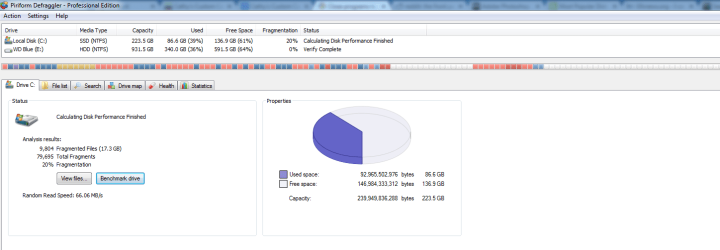
That's the thing I never defragged it. All I did was hit the Analyze and Benchmark buttons. It says the Disk Health of my HDD is "Good" but the SSD doesn't give off any readings.

When I hit the Benchmark button on the SSD I get this:
frag.png

Isn't 9,000 fragmented files bad? And I think that fragmentation % should be 0 right like the HDD? The verification process never completes for some reason. Again, I never defragged it or anything.
 

My Computer My Computer

Computer type
PC/Desktop
Computer Manufacturer/Model Number
Custom build
OS
Windows 7 x64
CPU
Intel Core i5-4440 3.1GHz Quad-Core
Motherboard
ASRock Z97 PRO4 ATX LGA1150
Memory
G.Skill Ripjaws X Series 8GB (2 x 4GB) DDR3-1600
Graphics Card(s)
HIS Radeon R9 270 2GB IceQ X²
Monitor(s) Displays
Asus VE247H 23.6"
Screen Resolution
1920x1080
Hard Drives
Crucial M500 240GB SSD, Western Digital Caviar Blue 1TB HDD & Western Digital My Book Essential 1TB External HDD
PSU
Rosewill 750W
Case
Corsair 200R ATX Mid Tower
Cooling
Cooler Master Hyper 212 EVO 82.9 CFM Sleeve Bearing
Keyboard
Logitech Wireless Illuminated Keyboard K800
Mouse
Logitech Anywhere Mouse MX
Internet Speed
Verizon FiOS 75/75 Mbps
Antivirus
MSE & Malwarebytes
Browser
Chrome 39.0.2171.95 m

My Computer My Computer

Computer type
PC/Desktop
Computer Manufacturer/Model Number
Custom Build
OS
Windows 7 Ultimate x64 SP1
CPU
AMD Phenom 2 1090T
Motherboard
Gigabyte GA-890FXA-UD5
Memory
2x8GB Kingston HyperX Fury Black 1600Mhz Unganged
Graphics Card(s)
MSI GTX 970 Gaming 4G
Sound Card
Realtek On-Board HD 7.1 Audio / Logitech G35
Monitor(s) Displays
3xAcer GD245HQ
Screen Resolution
1920x1080
Hard Drives
Samsung 850 Pro 512GB SSD - OS /
WD Caviar Black SATA 3 - 1 TBx2 - Dynamic RAID 0 /
WD Caviar Green SATA 2 - 640GBx2 - Dynamic RAID 0 /
WD Caviar Green SATA 2 - 640GB - Internal Backup /
Seagate Barracude SATA 3 - 3TB - External Backup/ Sync
PSU
HighPower 1000W
Case
Cooler Master HAF 932
Cooling
Noctua NH-D14
Keyboard
Logitech G19
Mouse
Logitech G500
Internet Speed
100/4 Mbit Cable (100GB quota)
Antivirus
ZoneAlarm Extreme Security / MBAM Pro / MBAE Free / SAS Free
Browser
IE 11 - Firefox - Chrome
Other Info
Logitech F710/ G27/ G940/ Z5500 // TrackIR 5 // Nvidia 3D Surround Vision
Back
Top