
How to remove the 'Get Windows 10' app from your PC

Brink

Administrator
Staff member
Local time
10:45 AM
Messages
74,839
Location
Oklahoma
PCs that Microsoft determines cannot run Windows 10 will not see the Get Windows 10 app before July 29, 2015. After July 29, 2015, Microsoft will enable the icon in the system tray. This is to help ensure that you can easily check your PC’s compatibility if you choose.

The Get Windows 10 (GWX) app helps you understand your Windows 10 upgrade options and device readiness, and gives you the opportunity to get a free copy of Windows 10.

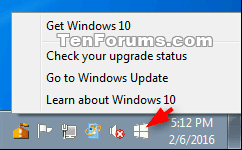
GWX_icon-1.png

GWX_icon_Windows-7.png


See tutorials below:


Last edited:

My Computer My Computer

Computer type
PC/Desktop
Computer Manufacturer/Model Number
Self built custom
OS
64-bit Windows 11 Pro for Workstations
CPU
Intel i7-8700K OC'd to 5 GHz
Motherboard
ASUS ROG Maximus XI Formula Z390
Memory
64 GB (4x16GB) G.SKILL TridentZ RGB DDR4 3600 MHz
Graphics Card(s)
ASUS ROG-STRIX-GTX1080TI-O11G-GAMING
Sound Card
Integrated
Monitor(s) Displays
2 x Samsung Odyssey G7 27"
Screen Resolution
2560x1440
Hard Drives
1TB Samsung 990 PRO M.2,
4TB Samsung 990 PRO PRO M.2,
TerraMaster F8 SSD Plus NAS
PSU
Seasonic Prime Titanium 850W
Case
Thermaltake Core P3
Cooling
Corsair Hydro H115i
Keyboard
Logitech wireless K800
Mouse
Logitech MX Master 4
Internet Speed
2 Gb/s Download and 100 Mb/s Upload
Antivirus
Malwarebyte Anti-Malware Premium
Browser
Google Chrome
Other Info
Logitech Z625 speaker system,
Logitech BRIO 4K Pro webcam,
HP Color LaserJet Pro MFP M477fdn,
APC SMART-UPS RT 1000 XL - SURT1000XLI,
Galaxy S23 Plus phone
This needs stickying to the top of General, it'll save thousands of new threads!
 

My Computer My Computer

Computer type
PC/Desktop
Computer Manufacturer/Model Number
Custom Build
OS
W7 Pro x64 SP1 | W10 Pro IP x64 | W8.1 Pro x64 VM | Linux Mint VM
CPU
i7-4790k @ 4GHz (4.4GHz Boost)
Motherboard
ASUS Sabertooth Z87 (BIOS Rev 2004)
Memory
16GB DDR3 Kingston HyperX Fury @ 1600MHz CL 9-9-9-27
Graphics Card(s)
EVGA GTX 980 Classified
Sound Card
Realtek Onboard
Monitor(s) Displays
Samsung S27D390
Screen Resolution
1920 x 1080
Hard Drives
240GB Intel 520 Series SSD |
Samsung 850 EVO 120GB SSD |
2TB WD Caviar Black |
2TB WD Caviar Green
PSU
Corsair HX850-80 Gold Modular
Case
Cooler Master Silencio 650
Cooling
Corsair H80i w/2 x Corsair SP120 | 2 x 120mm Noctua NF-S12B
Keyboard
Microsoft Sidewinder X4
Mouse
Gigabyte M6900 optical
Internet Speed
152mb
Antivirus
F-Secure
Browser
Firefox 38.0
Other Info
Backup Rig: Win 7 Pro 64-bit | AMD A10-5800k | ASUS F2A85-V Pro | 8GB Samsung DDR3 @1600MHz | 120GB Toshiba SDD | 2TB Seagate HDD | Cooler Master Silencio 550
That's funny they called it the "Hamburger button" on the top left hee-hee :D
 

My Computer My Computer

Computer type
PC/Desktop
Computer Manufacturer/Model Number
Custom assembled by me :}
OS
Win-7-Pro64bit 7-H-Prem-64bit
CPU
i7-5930K 2nd i9-9940x both water blocked VRM's too
Motherboard
ASUS SABERTOOTH X99 2nd ASUS x299 Apex
Memory
Trident-z 3200C14 2nd Trident-z 3600C16
Graphics Card(s)
EVGA 1080ti ftw3 2nd Titan Xp both water blocked
Sound Card
Built-in Realtek
Monitor(s) Displays
1-AOC G2460PG 24"G-Sync 144Hz/ 2nd 1-ASUS VG248QE 24" 144Hz
Screen Resolution
1920 x 1080 144Hz
Hard Drives
2-Samsung M.2 Evo & Evo Plus
2-Samsung 850 EVO 500GB SSD's/ 3-2.5 W.D. Black 1tb-&3-1tb/3-3.5 WD Black 1tb hdd's
PSU
EVGA SuperNOVA 1000-P2 2nd 1200-P2
Case
2-Corsair Obsidian Series 450D Black ATX Mid Tower
Cooling
Custom water loops
Keyboard
Logitech G710+/ 2nd Logitech G910
Mouse
2-RedDragon M901 Perdition 16400 dpi Gaming mouse = wired
Internet Speed
Comcast Ping 19ms 89.31mbps download speed 6.12mbps upload
Antivirus
Malwarebytes Pro/ Superantispyware Pro
Browser
FireFox & Pale moon
Other Info
2nd ASUS X299 Apex/Intel i9-9940x with Custom water loop/7H-Prem-x64/Corsair 450D case/Ram Trident-z 3600C16 4x8gb / Samsung970Evo plus 500gb SSD/Dual ssd EZ swap evo/PSU EVGA SuperNova 1200w-P2 80+Platinum/GPU Titan Xp /8-ML-140 on push-pull on 2-280GTX rads
Thank you very much.
 

My Computer My Computer

Computer type
PC/Desktop
Computer Manufacturer/Model Number
Home made Desktop
OS
Windows 10 Pro. 64/ version 1709 Windows 7 Pro/64
CPU
Intel i7-6800K @ 4.3
Motherboard
ASUS X-99 Deluxe II
Memory
Corsair Platinum 16 gig @2400
Graphics Card(s)
EVGA GTX 1070 OC
Monitor(s) Displays
Asus 27" LED LCD/VE278Q
Screen Resolution
1920-1080 or 1280-720 HDMI
Hard Drives
INTEL SSD 730-240 Gb Sata 3.0/
PSU
EVGA Platium 1200W
Case
Phanteks Luxe Tempered Glass 8 fans/ one radiator
Cooling
XSPC/ Water Cooled CPU
Keyboard
Das 4 Professional
Mouse
Logitech M705/MX Anywhere 2-S
Internet Speed
100 mbits
Antivirus
Microsoft Security Essentials/ Malwarebytes Premium 3.0/ SAS
Browser
I.E. 11 default/Firefox/ ISP Time Warner Cable/Spectrum
Other Info
LG BluRay Burner/
Sound system-KLipsch-THX/
Icy Dock ssd Hot Swap bays.
Is there a list of "Windows 10 prep" updates that I should be aware of? I want to know if they're on my computer already or will be coming so that I can block and/or uninstall them.

I don't want this Microsoft junkware getting into my machine.
 

My Computer My Computer

Computer type
Laptop
Computer Manufacturer/Model Number
HP ProBook 4540s
OS
Windows 7 Professional x64 SP1
CPU
Intel Core i3-3110M @ 2.40GHz
Motherboard
HP 17F6-KBC v58.20 | BIOS rev. F43
Memory
4GB SODIMM 1600MHz
Graphics Card(s)
Intel HD Graphics 4000
Sound Card
Intel Display Audio | IDT High Definition Audio Codec
Monitor(s) Displays
Intel HD Graphics 4000
Screen Resolution
1366x768
Hard Drives
500GB Hitachi GST SATA OEM
Keyboard
IBM Enhanced (101- or 102-key) Keyboard
Mouse
Synaptics PS/2 Port TouchPad
Internet Speed
Verizon DSL 1.5M/768K
Antivirus
MS Security Essentials, Spybot Search & Destroy
Browser
Mozilla Firefox and derivatives (Pale Moon, Waterfox)
Other Info
Printers:
HP Deskjet 3050A J611 series
HP Photosmart C309a series AIO
HP PSC 1210 Printer/Scanner/Copier
Hello HP Win7 User,

The link for the tutorial in the first post will give you more details about this.

Basically, if you have the "Get Windows 10" app icon in your taskbar notification area, then you could reserve a free upgrade to Windows 10 if you like when it is available starting on July 29th 2015. You have until July 29th 2016 (1 year) to reserve.
 

My Computer My Computer

Computer type
PC/Desktop
Computer Manufacturer/Model Number
Self built custom
OS
64-bit Windows 11 Pro for Workstations
CPU
Intel i7-8700K OC'd to 5 GHz
Motherboard
ASUS ROG Maximus XI Formula Z390
Memory
64 GB (4x16GB) G.SKILL TridentZ RGB DDR4 3600 MHz
Graphics Card(s)
ASUS ROG-STRIX-GTX1080TI-O11G-GAMING
Sound Card
Integrated
Monitor(s) Displays
2 x Samsung Odyssey G7 27"
Screen Resolution
2560x1440
Hard Drives
1TB Samsung 990 PRO M.2,
4TB Samsung 990 PRO PRO M.2,
TerraMaster F8 SSD Plus NAS
PSU
Seasonic Prime Titanium 850W
Case
Thermaltake Core P3
Cooling
Corsair Hydro H115i
Keyboard
Logitech wireless K800
Mouse
Logitech MX Master 4
Internet Speed
2 Gb/s Download and 100 Mb/s Upload
Antivirus
Malwarebyte Anti-Malware Premium
Browser
Google Chrome
Other Info
Logitech Z625 speaker system,
Logitech BRIO 4K Pro webcam,
HP Color LaserJet Pro MFP M477fdn,
APC SMART-UPS RT 1000 XL - SURT1000XLI,
Galaxy S23 Plus phone
Is there a list of "Windows 10 prep" updates that I should be aware of? I want to know if they're on my computer already or will be coming so that I can block and/or uninstall them.

I don't want this Microsoft junkware getting into my machine.

Yes...

KB2952664 Compatibility update for upgrading Windows 7
KB2990214 Update that enables... upgrade from Windows 7 to a later version of Windows
KB3021917 Update to Windows 7 SP1 for performance improvements
KB3035583 Update enables additional capabilities for Windows Update notifications...
KB3050265 Windows Update Client for Windows 7: June 2015

KB2952664 adds the "Microsoft Compatibility Appraiser" to Task Scheduler\Microsoft\Windows\Application Experience\ which starts the process.
 

My Computer My Computer

Computer type
Laptop
Computer Manufacturer/Model Number
MSI PE60 6QE
OS
Win 10 Pro x64, Win 7 Pro x64
CPU
Intel Core i7-6700HQ Skylake
Motherboard
MSI MS-16J5
Memory
16gb Crucial DDR4
Graphics Card(s)
NVIDIA GeForce GTX 960M 2 GB
Screen Resolution
1920 x 1080
Hard Drives
Samsung 850 EVO 250 GB M.2 SSD (MZ-N5E250BW)
HGST 1TB @7200 RPM HTS721010A9E630
Case
Plastic
Keyboard
Got one...
Mouse
Yep, one of those too.
Internet Speed
FIOS 75/75
Antivirus
Defender
Browser
Chrome/FFox/Ex-PLODE-r/(L)Edge
Other Info
Defender, Custom Hosts, uBlock, regular backups w/ Macrium (Free)
Beware KB2952664

I updated my PC yesterday and KB2952664 reinstalled itself. :mad:

My W7 "pretended" to be locked up, when I told it to uninstall KB2952664.
It just sat on the configuring updates screen doing nothing.
After 5 minutes I manually restarted my PC and it seems to be working properly (for now).

Update
Something broke (see this post).
 
Last edited:

My Computer My Computer

Computer type
PC/Desktop
Computer Manufacturer/Model Number
n/a
OS
W7 Ultimate SP1, LM19.2 MATE, W10 Home 1703, W10 Pro 1703 VM, #All 64 bit
CPU
AMD Phenom II x6 1100T, 3.3 GHz
Motherboard
ASUS M4A88T-M/USB3 (AM3)
Memory
12GB DDR3 1333 G-Skill (4GB x 2), G-Skill (2GB x 2)
Graphics Card(s)
NVIDIA GeForce GTX 660
Sound Card
Realtek?
Monitor(s) Displays
Samsung S23B350
Screen Resolution
1920x1080
Hard Drives
WD Green 2TB (SATA), WD Green 3TB (SATA), WD Blue 4TB (SATA), WD Blue 6TB (SATA)
PSU
Cooler Master
Case
Antec GX300 Tower
Cooling
3x Antec TRICOOL 120mm Fans
Mouse
Wired Optical
Internet Speed
DSL
Antivirus
Avast
Browser
Pale Moon (64 bit)
Other Info
2018-12-27 Upgraded HDDs
2015-12-10 Upgraded case, graphics card, storage
2015-08-15 Upgraded motherboard & RAM
2015-07-15 Upgraded LM17.1 to LM17.2
Microsoft strikes again!
 

My Computer My Computer

Computer type
Laptop
Computer Manufacturer/Model Number
Dell Inc.
OS
Windows 8.1 (64 bit)
CPU
Intel(R) Core(TM) i5-5200U CPU @ 2.20GHz (4 CPUs), ~2.2GHz
Memory
4096MB RAM
Graphics Card(s)
NVIDIA Geforce 920M
Monitor(s) Displays
DELL
Screen Resolution
1366 x 768
Keyboard
Standard PS/2 Keyboard
Mouse
A4TECH
Antivirus
Malwarebytes
Browser
Google Chrome
Other Info
Hi

My Computer My Computer

Computer type
PC/Desktop
Computer Manufacturer/Model Number
Custom build using Mainly ASUS equipment
OS
Windows 10 Pro x64
CPU
Intel i7 5930k 3.5 O/C @ 4.2ghz
Motherboard
Asus Rampage V Extreme: BIOS 1902
Memory
32Gb Dominator Platinum (4x 8GB) 2666MHz
Graphics Card(s)
Asus GeForce GTX980Ti Matrix Platinum 6Gb
Sound Card
Onboard Realtek HD (SPDIF)
Monitor(s) Displays
Primary: Asus PB287Q 28" 4K, Secondary: Samsung 55" 4k
Screen Resolution
3840 x 2160
Hard Drives
1 x SM-951 .M2 SSD 512Gb (System)
1 x Samsung 850 Pro 256Gb SSD (Games)
1 x OCZ Vector 150 240Gb SSD (Games)
3 x Western Digital Caviar Black 1TB S300 16mb 7200rpm :
1 x 10Gb RamDisk
PSU
Corsair CMPSU-850AX
Case
Coolermaster Stormtrooper
Cooling
Noctua NH-D14 SE2011
Keyboard
Apple Keyboard USB
Mouse
Logitech MX Master
Internet Speed
76mb down /16mb up
Antivirus
ESET NOD V8
Browser
Firefox, Chrome, Opera, IE
Other Info
CPU Idle Temp = 36°
CPU Load Temp = 48° @100% for 40mins

Asus - RT-AC68U Router

My Computer My Computer

Computer type
PC/Desktop
Computer Manufacturer/Model Number
Self built custom
OS
64-bit Windows 11 Pro for Workstations
CPU
Intel i7-8700K OC'd to 5 GHz
Motherboard
ASUS ROG Maximus XI Formula Z390
Memory
64 GB (4x16GB) G.SKILL TridentZ RGB DDR4 3600 MHz
Graphics Card(s)
ASUS ROG-STRIX-GTX1080TI-O11G-GAMING
Sound Card
Integrated
Monitor(s) Displays
2 x Samsung Odyssey G7 27"
Screen Resolution
2560x1440
Hard Drives
1TB Samsung 990 PRO M.2,
4TB Samsung 990 PRO PRO M.2,
TerraMaster F8 SSD Plus NAS
PSU
Seasonic Prime Titanium 850W
Case
Thermaltake Core P3
Cooling
Corsair Hydro H115i
Keyboard
Logitech wireless K800
Mouse
Logitech MX Master 4
Internet Speed
2 Gb/s Download and 100 Mb/s Upload
Antivirus
Malwarebyte Anti-Malware Premium
Browser
Google Chrome
Other Info
Logitech Z625 speaker system,
Logitech BRIO 4K Pro webcam,
HP Color LaserJet Pro MFP M477fdn,
APC SMART-UPS RT 1000 XL - SURT1000XLI,
Galaxy S23 Plus phone
Microsoft strikes again!

Yes, giving free stuff to the masses :sarc:

It's not a matter of giving "free stuff" or even in the quality of Win10, it doesn't matters. What matters is that Microsoft is purposely INFECTING computers with ADWARE though Windows update (a distribution channel that everyone believed was for other purposes). With this move, what MS made is putting themselves at the same level of those pesky installers that bundle "extras" unrelated to the original program.

Even if this update notification would be so important to merit inclussion in Windows update (which is not, of course) it must at the very least be clearly marked as such, instead of being disguised as a random improvement. So, sorry to disagree here, but that's clearly a strike against everyone who trust Microsoft software.
 

My Computer My Computer

Computer type
Laptop
Computer Manufacturer/Model Number
Toshiba Sattelite A665-S6092
OS
Windows 7 Ultimate x64
CPU
Intel Core i7-740QM
Memory
8 GB DDR3
Graphics Card(s)
NVIDIA GeForce 330GT
Screen Resolution
1366x768
Hard Drives
Samsung 840 SSD 500GB
1TB USB3 external HD
Cooling
Coolermaster Notepal U3 notebook cooling pad
Internet Speed
3mbps ASDL
Antivirus
ClamWin 0.98.7
Browser
Opera 12.17 x86 (main), Firefox 38 (sec), IE11 (last resort)
Microsoft strikes again!

Yes, giving free stuff to the masses :sarc:

It's not a matter of giving "free stuff" or even in the quality of Win10, it doesn't matters. What matters is that Microsoft is purposely INFECTING computers with ADWARE though Windows update (a distribution channel that everyone believed was for other purposes). With this move, what MS made is putting themselves at the same level of those pesky installers that bundle "extras" unrelated to the original program.

Even if this update notification would be so important to merit inclussion in Windows update (which is not, of course) it must at the very least be clearly marked as such, instead of being disguised as a random improvement. So, sorry to disagree here, but that's clearly a strike against everyone who trust Microsoft software.

I wouldn't consider letting you know about a free "optional" Windows operating system upgrade adware either. :sarc:
 

My Computer My Computer

Computer type
PC/Desktop
Computer Manufacturer/Model Number
Self built custom
OS
64-bit Windows 11 Pro for Workstations
CPU
Intel i7-8700K OC'd to 5 GHz
Motherboard
ASUS ROG Maximus XI Formula Z390
Memory
64 GB (4x16GB) G.SKILL TridentZ RGB DDR4 3600 MHz
Graphics Card(s)
ASUS ROG-STRIX-GTX1080TI-O11G-GAMING
Sound Card
Integrated
Monitor(s) Displays
2 x Samsung Odyssey G7 27"
Screen Resolution
2560x1440
Hard Drives
1TB Samsung 990 PRO M.2,
4TB Samsung 990 PRO PRO M.2,
TerraMaster F8 SSD Plus NAS
PSU
Seasonic Prime Titanium 850W
Case
Thermaltake Core P3
Cooling
Corsair Hydro H115i
Keyboard
Logitech wireless K800
Mouse
Logitech MX Master 4
Internet Speed
2 Gb/s Download and 100 Mb/s Upload
Antivirus
Malwarebyte Anti-Malware Premium
Browser
Google Chrome
Other Info
Logitech Z625 speaker system,
Logitech BRIO 4K Pro webcam,
HP Color LaserJet Pro MFP M477fdn,
APC SMART-UPS RT 1000 XL - SURT1000XLI,
Galaxy S23 Plus phone
Microsoft strikes again!

Yes, giving free stuff to the masses :sarc:

It's not a matter of giving "free stuff" or even in the quality of Win10, it doesn't matters. What matters is that Microsoft is purposely INFECTING computers with ADWARE though Windows update (a distribution channel that everyone believed was for other purposes). With this move, what MS made is putting themselves at the same level of those pesky installers that bundle "extras" unrelated to the original program.

Absolute nonsense.
 

My Computer My Computer

Computer type
PC/Desktop
OS
Windows 11
I wouldn't consider letting you know about a free "optional" Windows operating system upgrade adware either. :sarc:

They don't only let you know about new Windows versions. They install a piece of software into computers and put it to autorun, giving no clear way of removing it, all this without user knowledge or conscent.
How do you know that this injected program does "only" what you see and not something else?
If you look at the files in the GWX folder you'll see references to "telemetry" or something like that. I can be wrong about this, but has the user explictly given permission for usage metrics to be collected? Moreover, if that data is sent to Microsoft (I don't know if it's actually done, but it might) we would be talking about spyware too. Evidence suggest that.

On the other hand, awareness about Windows 10 could be achieved by other means, advertising on media, websites, Google ads, banners in Bing, though pre-infected computers from OEMs like former versions, there are many advertising options that decent companies can take, but they choose to put a PUP in Windows Update. Should the user explictly given the option and the knowledge of what will happen when they install the "update", then it would be an acceptable business practice.
 

My Computer My Computer

Computer type
Laptop
Computer Manufacturer/Model Number
Toshiba Sattelite A665-S6092
OS
Windows 7 Ultimate x64
CPU
Intel Core i7-740QM
Memory
8 GB DDR3
Graphics Card(s)
NVIDIA GeForce 330GT
Screen Resolution
1366x768
Hard Drives
Samsung 840 SSD 500GB
1TB USB3 external HD
Cooling
Coolermaster Notepal U3 notebook cooling pad
Internet Speed
3mbps ASDL
Antivirus
ClamWin 0.98.7
Browser
Opera 12.17 x86 (main), Firefox 38 (sec), IE11 (last resort)

My Computer My Computer

Computer type
Laptop
Computer Manufacturer/Model Number
Toshiba Sattelite A665-S6092
OS
Windows 7 Ultimate x64
CPU
Intel Core i7-740QM
Memory
8 GB DDR3
Graphics Card(s)
NVIDIA GeForce 330GT
Screen Resolution
1366x768
Hard Drives
Samsung 840 SSD 500GB
1TB USB3 external HD
Cooling
Coolermaster Notepal U3 notebook cooling pad
Internet Speed
3mbps ASDL
Antivirus
ClamWin 0.98.7
Browser
Opera 12.17 x86 (main), Firefox 38 (sec), IE11 (last resort)
I wouldn't consider letting you know about a free "optional" Windows operating system upgrade adware either. :sarc:

They don't only let you know about new Windows versions. They install a piece of software into computers and put it to autorun, giving no clear way of removing it, all this without user knowledge or conscent.
How do you know that this injected program does "only" what you see and not something else?
If you look at the files in the GWX folder you'll see references to "telemetry" or something like that. I can be wrong about this, but has the user explictly given permission for usage metrics to be collected? Moreover, if that data is sent to Microsoft (I don't know if it's actually done, but it might) we would be talking about spyware too. Evidence suggest that.

On the other hand, awareness about Windows 10 could be achieved by other means, advertising on media, websites, Google ads, banners in Bing, though pre-infected computers from OEMs like former versions, there are many advertising options that decent companies can take, but they choose to put a PUP in Windows Update. Should the user explictly given the option and the knowledge of what will happen when they install the "update", then it would be an acceptable business practice.

Incorrect and paranoia.

The telemetry is only used to check for compatibility and if you reserve your free upgrade to Windows 10.

Like any Windows Update, you always have the option to uninstall it.

I would understand this paranoia if it advertised 3rd party products for sale, but it doesn't. It's only to check for compatibility, and offer you a free optional upgrade to Windows 10. That's all.
 

My Computer My Computer

Computer type
PC/Desktop
Computer Manufacturer/Model Number
Self built custom
OS
64-bit Windows 11 Pro for Workstations
CPU
Intel i7-8700K OC'd to 5 GHz
Motherboard
ASUS ROG Maximus XI Formula Z390
Memory
64 GB (4x16GB) G.SKILL TridentZ RGB DDR4 3600 MHz
Graphics Card(s)
ASUS ROG-STRIX-GTX1080TI-O11G-GAMING
Sound Card
Integrated
Monitor(s) Displays
2 x Samsung Odyssey G7 27"
Screen Resolution
2560x1440
Hard Drives
1TB Samsung 990 PRO M.2,
4TB Samsung 990 PRO PRO M.2,
TerraMaster F8 SSD Plus NAS
PSU
Seasonic Prime Titanium 850W
Case
Thermaltake Core P3
Cooling
Corsair Hydro H115i
Keyboard
Logitech wireless K800
Mouse
Logitech MX Master 4
Internet Speed
2 Gb/s Download and 100 Mb/s Upload
Antivirus
Malwarebyte Anti-Malware Premium
Browser
Google Chrome
Other Info
Logitech Z625 speaker system,
Logitech BRIO 4K Pro webcam,
HP Color LaserJet Pro MFP M477fdn,
APC SMART-UPS RT 1000 XL - SURT1000XLI,
Galaxy S23 Plus phone
This is not a reply to any particular post in this thread and I'm not taking sides about how Microsoft chooses to inform users that Windows 10 will be available. Having said that, I went back to the Windows Update Services Privacy Statement. It states, in part:
Choice and control
Update Services are turned on if you choose one of the following settings: (a) install updates automatically; (b) download updates but let me choose whether to install them; or (c) check for updates but let me choose whether to download and install them. The Windows Update service is turned on and set to "Install updates automatically" when you choose the express settings during Windows setup.

If you turn on the Update Services, regardless of which setting you have chosen, required updates to some components of the service will be downloaded and installed automatically without further notice to you. If you would prefer not to receive required updates, turn off the Update Services.
Source: Microsoft Windows Update

To repeat: ...required updates to some components of the service will be downloaded and installed automatically without further notice to you. If you would prefer not to receive required updates, turn off the Update Services.

I'm not a lawyer. Don't even play one on TV. But if Microsoft feels the need to notify users that Windows 10 will soon be available; and if they also feel that placing an icon in everyone's system tray is part of a "...required update to some components of the service..."; then so be it. Microsoft owns the ball, they own the playing field, and they make the rules for the game they own and developed.
 

My Computer My Computer

Computer type
Laptop
Computer Manufacturer/Model Number
Sony Vaio VPCEB47GM Laptop
OS
Win 7 Pro 64-bit
CPU
Intel i5 2.4 Ghz
Memory
8GB DDR3
Graphics Card(s)
Intel HD 3000
Sound Card
IDT High Definition
Monitor(s) Displays
15.6 WGXA Anti-Glare LED
Screen Resolution
1280x800
Hard Drives
640Gb 7200rpm
Antivirus
MSE
Browser
Opera (primary) with IE9 backup
Back
Top