Solved Gigabyte Motherboard GA-8TRC410M-NF (Memory upgrade)

Swiftkidd

New member
Member
Local time
8:22 PM
Messages
72
My computer is low spec and over 8 years old.. I only have 1GB RAM which is beginning to become a problem on Windows 7 so I was thinking of upgrading although it seems my motherboard only has 2 slots so would mean I need to purchase 2x1GB or 2x2GB but is it really worth it to spend the money.. I have always put off and delayed upgrading my PC due to motherboard, processor and ram etc needing to be compatible so is easier to upgrade as a whole but I'm not ready yet and looking to squeeze possibly another 2 years out of my current system.

Where is a cheap place to buy my RAM. I was only looking to spend like £30 or else it seems like a waste especially as my processor is intel pentium 4 (2.93Ghz) should I buy used RAM or buy it new ?

Thanks

I forgot to add. I'm running Windows 7 off Corsair Force 3 120GB SSD. My physical memory is usually always up around 80% (I haven't fully optimized startup programs yet) and I don't game.. mostly just web browse and use pc as entertainment media center occasionally like to edit images, render/create videos, burn cds, convert formats some things that are little processor intense so not sure ram would benefit in those scenario ideally I think an extra GB but I'm guessing it'll be more cost effective and worth it to go 2x2GB for 4GB but will my system only register/show 3.4GB because I'm on 32bit windows ?
 

My Computer My Computer

At a glance

Windows 7 Ultimate 6.1 x842.93Ghz Intel Pentium 41GBNVIDIA GeForce 8400 GS
Computer type
PC/Desktop
Computer Manufacturer/Model Number
Packard Bell NEC PB34305801
OS
Windows 7 Ultimate 6.1 x84
CPU
2.93Ghz Intel Pentium 4
Motherboard
GA-8TRC410M-NF
Memory
1GB
Graphics Card(s)
NVIDIA GeForce 8400 GS
Sound Card
Realtek High Definition Audio
Monitor(s) Displays
Generic PnP Monitor (17.1")
Screen Resolution
1280x1024
Hard Drives
Corsair Force 3 120GB SSD
Western Digital Caviar Green 2TB x 2 (Internal)
Western Digital My Book Live Duo 4TB NAS (2x2TB Greens)
Keyboard
Perixx PERIDUO-701U Wireless RF2 4Ghz USB Keyboard
Mouse
Belkin Optical Glow Mouse
Internet Speed
Advertised 20Meg - Actual 1.4MB/Sec (Sky Broadband)
Antivirus
Avira Internet Security
Browser
Firefox
I really think upgrading your memory now would be a waste of money. You would be better off waiting till you can afford a new motherboard, CPU, etc. & then get the amount of RAM that you would like then.

Your current RAM socket on the motherboard has probably been superseded, so getting new RAM now would mean it would not suit a new motherboard later, so whatever you would spend now would be wasted.
 

My Computer My Computer

At a glance

Windows 7 Home Premium 64 bit sp1Intel i5 3570 3.4Ghz Ivy Bridge SKT 1155 quad...G-Skill Rip Jaws 16Gb (8x2) DDR3 -1600 PC3 12...Gigabyte NVIDIA GT610 1Gb DDR3 810/1200 PCI-E...
Computer type
PC/Desktop
Computer Manufacturer/Model Number
Self built using existing case
OS
Windows 7 Home Premium 64 bit sp1
CPU
Intel i5 3570 3.4Ghz Ivy Bridge SKT 1155 quad core
Motherboard
Gigabyte Z77-HD3 SKT 1155 2xSata 3, 4x USB 3.0
Memory
G-Skill Rip Jaws 16Gb (8x2) DDR3 -1600 PC3 12800 CL 10 red
Graphics Card(s)
Gigabyte NVIDIA GT610 1Gb DDR3 810/1200 PCI-E 2.0 Silent
Sound Card
NVIDIA High Definition & Realtech High Definition Audio
Monitor(s) Displays
2 x Philips 226V4L 16:9 aspect ratio
Screen Resolution
1920 x 1080 HD
Hard Drives
Samsung 840 Pro 256gb SSD, SATA 3.
Hitachi Touro Portable 1tb, USB 3.0 HDD used for image b/ups.
PSU
Corsair VS450
Case
Codeng
Cooling
PSU fan & CPU fan
Keyboard
Logitech
Mouse
Logitech Wireless trackball M570
Internet Speed
Wireless 3G. 3mg down & 550kb up.
Antivirus
Bitdefender Internet Security 2020
Browser
Opera (Current Version) & Firefox
Other Info
MS Office 2013 Pro. Davis weather station software. MGE Nova 600 avr UPS.
Hi, Welcome to Sevenforums.

As per Gigabyte website, your motherboard can be upgraded to 4GB of RAM and it is DDR 2 memory slot. You can upgrade the RAM.

Win 7 itself uses 1 GB RAM to perform. So, go ahead. You can check this page for the options to buy RAM.

Cheers.
 

My Computer My Computer

At a glance

Windows 11 x64i5 2500K @ 3.3 GHz16 GB DDR 3 @ 1600MhzMSI 1050TI 4GB OC version
Computer type
PC/Desktop
Computer Manufacturer/Model Number
Custom Bulid/Self made
OS
Windows 11 x64
CPU
i5 2500K @ 3.3 GHz
Motherboard
ASUS P8 Z77 V pro
Memory
16 GB DDR 3 @ 1600Mhz
Graphics Card(s)
MSI 1050TI 4GB OC version
Sound Card
On Board (Realtek HD audio)
Monitor(s) Displays
Samsung 22" LCD
Screen Resolution
1920*1080
Hard Drives
Seagate 1 TB, WD 1TB, Seagate 2 TB ( I use a lot of space)
PSU
coolermaster 750 W
Case
Coolermaster HAF912
Cooling
Coolermaster hyper 212 EVO
Keyboard
Samsung
Mouse
Dell Wireless
Internet Speed
Wireless 50 Mbps
Antivirus
AVG 2016 Internet Security
Browser
Google Chrome
Hi, Welcome to Sevenforums.

As per Gigabyte website, your motherboard can be upgraded to 4GB of RAM and it is DDR 2 memory slot. You can upgrade the RAM.

Win 7 itself uses 1 GB RAM to perform. So, go ahead. You can check this page for the options to buy RAM.

Cheers.

Hey thanks for your reply, I just purchased these and they're due to arrive tomorrow are they compatible with my computer specs and are they value for money?

Crucial CT2KIT25664AA800 4 GB (2 GB x 2) DDR2 Memory Module

Memory Slots:
DRAM Slot #1 512 MB (DDR2-533 DDR2 SDRAM)
DRAM Slot #2 512 MB (DDR2-533 DDR2 SDRAM)

I recently performed a fresh format of Windows 7 and have started using Microsoft's Bitlocker Full Disk Encryption and have noticed web browsing is unbearably slow so I couldn't hold out any longer
 

My Computer My Computer

At a glance

Windows 7 Ultimate 6.1 x842.93Ghz Intel Pentium 41GBNVIDIA GeForce 8400 GS
Computer type
PC/Desktop
Computer Manufacturer/Model Number
Packard Bell NEC PB34305801
OS
Windows 7 Ultimate 6.1 x84
CPU
2.93Ghz Intel Pentium 4
Motherboard
GA-8TRC410M-NF
Memory
1GB
Graphics Card(s)
NVIDIA GeForce 8400 GS
Sound Card
Realtek High Definition Audio
Monitor(s) Displays
Generic PnP Monitor (17.1")
Screen Resolution
1280x1024
Hard Drives
Corsair Force 3 120GB SSD
Western Digital Caviar Green 2TB x 2 (Internal)
Western Digital My Book Live Duo 4TB NAS (2x2TB Greens)
Keyboard
Perixx PERIDUO-701U Wireless RF2 4Ghz USB Keyboard
Mouse
Belkin Optical Glow Mouse
Internet Speed
Advertised 20Meg - Actual 1.4MB/Sec (Sky Broadband)
Antivirus
Avira Internet Security
Browser
Firefox
I just purchased these and they're due to arrive tomorrow are they compatible with my computer specs and are they value for money?

Crucial CT2KIT25664AA800 4 GB (2 GB x 2) DDR2 Memory Module

What caused you to choose that particular RAM kit?

Crucial is generally a good brand, but it's unclear why you chose that kit.

I looked at Crucial for compatible RAM and did not find your exact Gigabyte motherboard listed.

Maybe you have a Packard Bell PC?

Go here:

Crucial.com - DRAM, solid state drive (SSD) memory upgrades for Dell, Mac, Apple, HP, Compaq, Lenovo, Acer, ASUS

and use the "system scanner". It will tell you what Crucial memory is compatible.
 

My Computer My Computer

At a glance

Windows 7 Home Premium SP1, 64-bitIntel Skylake i5-6600K, not overclocked8 GB HyperX DDR4-2666 (2 x 4 GB)none; graphics are integrated on CPU
Computer type
PC/Desktop
Computer Manufacturer/Model Number
Ignatz Special; 4 speed manual gearbox; factory air conditioning; one of one
OS
Windows 7 Home Premium SP1, 64-bit
CPU
Intel Skylake i5-6600K, not overclocked
Motherboard
AsRock Z170M Extreme 4, micro ATX
Memory
8 GB HyperX DDR4-2666 (2 x 4 GB)
Graphics Card(s)
none; graphics are integrated on CPU
Sound Card
onboard: Realtek ALC1150; external: USB Behringer UF0-202
Monitor(s) Displays
Dell S2340M 23 inch IPS
Screen Resolution
1600 x 900
Hard Drives
System: Crucial MX100 series SSD, 128 GB;
Data: Samsung Spinpoint 103SJ, 1 TB;
Backup: WD Caviar Green WD30EZRX-00D8PB0, 3 TB
PSU
Rosewill SilentNight 500 watt fanless, semi-modular
Case
Antec Solo II
Cooling
Noctua NH-U12S; Noctua F12 intake, Noctua S12A exhaust
Keyboard
Microsoft 200 6JH-00001 USB
Mouse
Dell or Microsoft optical wired; USB
Antivirus
Microsoft Security Essentials and Malwarebytes Premium
Browser
Pale Moon
Other Info
All fans PWM; speeds at idle: CPU circa 500 rpm; intake circa 600 rpm; exhaust circa 600 rpm; CPU temps 27 idle and 47 C load in a warm room (27 C/81 F) when running Intel Extreme Tuning Utility stress test.
I just purchased these and they're due to arrive tomorrow are they compatible with my computer specs and are they value for money?

Crucial CT2KIT25664AA800 4 GB (2 GB x 2) DDR2 Memory Module

What caused you to choose that particular RAM kit?

Crucial is generally a good brand, but it's unclear why you chose that kit.

I looked at Crucial for compatible RAM and did not find your exact Gigabyte motherboard listed.

Maybe you have a Packard Bell PC?

Go here:

Crucial.com - DRAM, solid state drive (SSD) memory upgrades for Dell, Mac, Apple, HP, Compaq, Lenovo, Acer, ASUS

and use the "system scanner". It will tell you what Crucial memory is compatible.

Thanks for the reply,

I think my machine is a Packard Bell iMedia MC 1538 but have since replaced computer case, graphics card, hard drive so no longer remember but all my specs are listed in my profile. I used the Crucial Scanner prior to purchasing but failed to return many suggestions as it claims to only search it's own webstore and suspect in general that system scanners are never really that reliable.

Purchasing ram was a last minute thing as I signed up to Amazon's free 30 day trail to purchase a replacement laptop charger as my computer's web browser has became unbearably slow so wanted to purchase ram that qualified for Amazon Prime did I buy crap? to be honest I plan on replacing CPU, Motherboard, Ram, graphics card etc. with-in the next couple of years as it's coming up to 10 years old as of next week.. I would have settled for a generic brand of ram but because I was limited to DDR2 240pin and the prices were from £35 upwards I just chose lowest cost Crucial that was available for express delivery.. feel free to suggest alternative (I don't know anything about ram just chose based on capacity, compatibility and cost)

qJsndnt.png
 

My Computer My Computer

At a glance

Windows 7 Ultimate 6.1 x842.93Ghz Intel Pentium 41GBNVIDIA GeForce 8400 GS
Computer type
PC/Desktop
Computer Manufacturer/Model Number
Packard Bell NEC PB34305801
OS
Windows 7 Ultimate 6.1 x84
CPU
2.93Ghz Intel Pentium 4
Motherboard
GA-8TRC410M-NF
Memory
1GB
Graphics Card(s)
NVIDIA GeForce 8400 GS
Sound Card
Realtek High Definition Audio
Monitor(s) Displays
Generic PnP Monitor (17.1")
Screen Resolution
1280x1024
Hard Drives
Corsair Force 3 120GB SSD
Western Digital Caviar Green 2TB x 2 (Internal)
Western Digital My Book Live Duo 4TB NAS (2x2TB Greens)
Keyboard
Perixx PERIDUO-701U Wireless RF2 4Ghz USB Keyboard
Mouse
Belkin Optical Glow Mouse
Internet Speed
Advertised 20Meg - Actual 1.4MB/Sec (Sky Broadband)
Antivirus
Avira Internet Security
Browser
Firefox
..........gathered in general that system scanners are never really that reliable.

did I buy crap?

I plan on replacing CPU, Motherboard, Ram, graphics card etc. with-in the next couple of years.........

qJsndnt.png

I still don't know why you bought the RAM you did.

You bought "CT2KIT25664AA800".

Why?

I don't see it on the list of results from the Crucial scanner. Maybe my eyes aren't too good.

Crucial doesn't make crap, but that doesn't mean that RAM is compatible with your motherboard.

Your PC uses DDR2. That's pretty much antique stuff and is NOT usable in a newer PC.

Current PCs use some type of DDR3. DDR4 has just been introduced and will gradually become the standard.

The RAM you ordered may or may not work in your PC. All you can do is try it since you are already committed. If it won't work, try something actually on the Crucial scanner's list.
 

My Computer My Computer

At a glance

Windows 7 Home Premium SP1, 64-bitIntel Skylake i5-6600K, not overclocked8 GB HyperX DDR4-2666 (2 x 4 GB)none; graphics are integrated on CPU
Computer type
PC/Desktop
Computer Manufacturer/Model Number
Ignatz Special; 4 speed manual gearbox; factory air conditioning; one of one
OS
Windows 7 Home Premium SP1, 64-bit
CPU
Intel Skylake i5-6600K, not overclocked
Motherboard
AsRock Z170M Extreme 4, micro ATX
Memory
8 GB HyperX DDR4-2666 (2 x 4 GB)
Graphics Card(s)
none; graphics are integrated on CPU
Sound Card
onboard: Realtek ALC1150; external: USB Behringer UF0-202
Monitor(s) Displays
Dell S2340M 23 inch IPS
Screen Resolution
1600 x 900
Hard Drives
System: Crucial MX100 series SSD, 128 GB;
Data: Samsung Spinpoint 103SJ, 1 TB;
Backup: WD Caviar Green WD30EZRX-00D8PB0, 3 TB
PSU
Rosewill SilentNight 500 watt fanless, semi-modular
Case
Antec Solo II
Cooling
Noctua NH-U12S; Noctua F12 intake, Noctua S12A exhaust
Keyboard
Microsoft 200 6JH-00001 USB
Mouse
Dell or Microsoft optical wired; USB
Antivirus
Microsoft Security Essentials and Malwarebytes Premium
Browser
Pale Moon
Other Info
All fans PWM; speeds at idle: CPU circa 500 rpm; intake circa 600 rpm; exhaust circa 600 rpm; CPU temps 27 idle and 47 C load in a warm room (27 C/81 F) when running Intel Extreme Tuning Utility stress test.
I've had total success with Crucial over the last 20 years. The cost listed on the posted images is much less than a new motherboard which at this time probably will need a new/compatible CPU and compatible RAM, probably DDR3 although there is DDR4 being mentioned now and then. Also of note is the newest computers and Notebooks are starting to use lower-voltage modules, important to check that out to assure the correct ones to get. Bottom line, a RAM upgrade is quite feasible, cost-effective since support for Win7 will be around until early 2020. And you may be offered the free upgrade to Win10 and you'll be better positioned for it.

I have Win10TP on a computer that came with Vista, max. RAM is 4GB. An issue with yours is that it's a 32-bit OS and changing to 64-bit will require a clean install. Either way the RAM will not be a waste, 32-bit will display using about 3.2GB to 3.5GB. It's always best to use matched modules when having 2 or more.

I've got a strange motherboard that has a max. of 2GB RAM but has 3 slots on it, have 2 1GB modules installed.
 

My Computer My Computer

At a glance

Windows 7 Ultimate 64-bit, Windows 8.1 64-bit...
Computer type
PC/Desktop
Computer Manufacturer/Model Number
Customs, Dell, Gateway, HP, Toshiba, Acer, ASUS
OS
Windows 7 Ultimate 64-bit, Windows 8.1 64-bit, Mac OS X 10.10, Linux Mint 17, Windows 10 Pro TP
Keyboard
Microsoft
Mouse
Microsoft
@ignatzatsonic - The system scanner is exclusive to Crucial's stock featured in their webstore.. DDR2 being antique means they only stock one 4GB kit which even if I chose to purchase couldn't find it listed on Amazon UK which I have Amazon Prime membership (24hr delivery).. What would your suggested alternative be in terms of supported capacity,

My current RAM:
DIMM1: SK Hynix HYMP564U64BP8-C4
DIMM2: SK Hynix HYMP564U64BP8-C4

Field Value
Memory Module Properties
Module Name SK Hynix HYMP564U64BP8-C4
Serial Number 00008252h (1384251392)
Manufacture Date Week 16 / 2006
Module Size 512 MB (1 rank, 4 banks)
Module Type Unbuffered DIMM
Memory Type DDR2 SDRAM
Memory Speed DDR2-533 (266 MHz)
Module Width 64 bit
Module Voltage SSTL 1.8
Error Detection Method None
Refresh Rate Reduced (7.8 us)

Memory Timings
@ 266 MHz 5-4-4-12 (CL-RCD-RP-RAS) / 16-28-2-4-2-2 (RC-RFC-RRD-WR-WTR-RTP)
@ 266 MHz 4-4-4-12 (CL-RCD-RP-RAS) / 16-28-2-4-2-2 (RC-RFC-RRD-WR-WTR-RTP)
@ 200 MHz 3-3-3-9 (CL-RCD-RP-RAS) / 12-21-2-3-2-2 (RC-RFC-RRD-WR-WTR-RTP)

Memory Module Features
Analysis Probe Not Present
FET Switch External Disabled
Weak Driver Supported
 

My Computer My Computer

At a glance

Windows 7 Ultimate 6.1 x842.93Ghz Intel Pentium 41GBNVIDIA GeForce 8400 GS
Computer type
PC/Desktop
Computer Manufacturer/Model Number
Packard Bell NEC PB34305801
OS
Windows 7 Ultimate 6.1 x84
CPU
2.93Ghz Intel Pentium 4
Motherboard
GA-8TRC410M-NF
Memory
1GB
Graphics Card(s)
NVIDIA GeForce 8400 GS
Sound Card
Realtek High Definition Audio
Monitor(s) Displays
Generic PnP Monitor (17.1")
Screen Resolution
1280x1024
Hard Drives
Corsair Force 3 120GB SSD
Western Digital Caviar Green 2TB x 2 (Internal)
Western Digital My Book Live Duo 4TB NAS (2x2TB Greens)
Keyboard
Perixx PERIDUO-701U Wireless RF2 4Ghz USB Keyboard
Mouse
Belkin Optical Glow Mouse
Internet Speed
Advertised 20Meg - Actual 1.4MB/Sec (Sky Broadband)
Antivirus
Avira Internet Security
Browser
Firefox
Packard Bell iMedia MC 1538 Specification - iMedia MC 1538 Computer Specs

It says at the above link: “This Packard Bell Computer can take up to 4GB ram, with a fixed amount of 2GB (Removable) installed PC2-5300 DDR2 SDRAM DIMM 240pin memory.”

Specifically, I think you need DDR2-667 PC2-5300, 1.8 volts, 240 pin DIMM unbuffered non-ECC.

It appears that the Crucial scanner has consistently suggested PC2-5300, confirming this.

You appear to have ordered DDR2-800, not DDR2-667, so my guess is that it will fail.

I think your motherboard has 4 RAM slots, so it could take either 2 sticks of 2 GB or 4 sticks of 1 GB, for a total of 4 GB.

You can root around on Amazon UK or maybe try this link:

Packard Bell iMedia MC 1538 Memory RAM Upgrades - FREE Delivery & Guaranteed Compatible | Mr Memory®

You currently have 2 sticks of 512 MB each. There is an excellent chance that you could continue using those 2 sticks and just add 2 more sticks of 1 GB each, for a total of 3 GB, rather than 4. You probably would not notice the difference between 3 and 4. You presumably have a 32-bit system, which won't recognize over about 3.4 GB, regardless. Might save you a little money. If it won't work that way with 3 GB total, then throw out the existing 512 MB sticks and buy 2 more sticks of 1 GB, for a total of 4 GB.

I assume you still have the original motherboard. If not, all bets are off. The type of RAM you need is governed by the motherboard.
 

My Computer My Computer

At a glance

Windows 7 Home Premium SP1, 64-bitIntel Skylake i5-6600K, not overclocked8 GB HyperX DDR4-2666 (2 x 4 GB)none; graphics are integrated on CPU
Computer type
PC/Desktop
Computer Manufacturer/Model Number
Ignatz Special; 4 speed manual gearbox; factory air conditioning; one of one
OS
Windows 7 Home Premium SP1, 64-bit
CPU
Intel Skylake i5-6600K, not overclocked
Motherboard
AsRock Z170M Extreme 4, micro ATX
Memory
8 GB HyperX DDR4-2666 (2 x 4 GB)
Graphics Card(s)
none; graphics are integrated on CPU
Sound Card
onboard: Realtek ALC1150; external: USB Behringer UF0-202
Monitor(s) Displays
Dell S2340M 23 inch IPS
Screen Resolution
1600 x 900
Hard Drives
System: Crucial MX100 series SSD, 128 GB;
Data: Samsung Spinpoint 103SJ, 1 TB;
Backup: WD Caviar Green WD30EZRX-00D8PB0, 3 TB
PSU
Rosewill SilentNight 500 watt fanless, semi-modular
Case
Antec Solo II
Cooling
Noctua NH-U12S; Noctua F12 intake, Noctua S12A exhaust
Keyboard
Microsoft 200 6JH-00001 USB
Mouse
Dell or Microsoft optical wired; USB
Antivirus
Microsoft Security Essentials and Malwarebytes Premium
Browser
Pale Moon
Other Info
All fans PWM; speeds at idle: CPU circa 500 rpm; intake circa 600 rpm; exhaust circa 600 rpm; CPU temps 27 idle and 47 C load in a warm room (27 C/81 F) when running Intel Extreme Tuning Utility stress test.
It "may" be possible if BIOS has option to change RAM multiplier.
 

My Computer My Computer

At a glance

Windows 7 Ultimate x64 SP1AMD Phenom 2 1090T2x8GB Kingston HyperX Fury Black 1600Mhz Unga...MSI GTX 970 Gaming 4G
Computer type
PC/Desktop
Computer Manufacturer/Model Number
Custom Build
OS
Windows 7 Ultimate x64 SP1
CPU
AMD Phenom 2 1090T
Motherboard
Gigabyte GA-890FXA-UD5
Memory
2x8GB Kingston HyperX Fury Black 1600Mhz Unganged
Graphics Card(s)
MSI GTX 970 Gaming 4G
Sound Card
Realtek On-Board HD 7.1 Audio / Logitech G35
Monitor(s) Displays
3xAcer GD245HQ
Screen Resolution
1920x1080
Hard Drives
Samsung 850 Pro 512GB SSD - OS /
WD Caviar Black SATA 3 - 1 TBx2 - Dynamic RAID 0 /
WD Caviar Green SATA 2 - 640GBx2 - Dynamic RAID 0 /
WD Caviar Green SATA 2 - 640GB - Internal Backup /
Seagate Barracude SATA 3 - 3TB - External Backup/ Sync
PSU
HighPower 1000W
Case
Cooler Master HAF 932
Cooling
Noctua NH-D14
Keyboard
Logitech G19
Mouse
Logitech G500
Internet Speed
100/4 Mbit Cable (100GB quota)
Antivirus
ZoneAlarm Extreme Security / MBAM Pro / MBAE Free / SAS Free
Browser
IE 11 - Firefox - Chrome
Other Info
Logitech F710/ G27/ G940/ Z5500 // TrackIR 5 // Nvidia 3D Surround Vision
It "may" be possible if BIOS has option to change RAM multiplier.

I tried installing the new RAM and it makes intermittent beeping noise with no display on monitor.. I do have Microsoft's Full Disk Encryption if that makes a difference to hardware changes if I change ram multiplier is that clocking?

@ignatzatsonic - Motherboard has two bays and is the original that shipped with Packard Bell Imedia, my bad for not listening to you.. and to make things worse the laptop charger I purchased doesn't work either :rolleyes:
 

My Computer My Computer

At a glance

Windows 7 Ultimate 6.1 x842.93Ghz Intel Pentium 41GBNVIDIA GeForce 8400 GS
Computer type
PC/Desktop
Computer Manufacturer/Model Number
Packard Bell NEC PB34305801
OS
Windows 7 Ultimate 6.1 x84
CPU
2.93Ghz Intel Pentium 4
Motherboard
GA-8TRC410M-NF
Memory
1GB
Graphics Card(s)
NVIDIA GeForce 8400 GS
Sound Card
Realtek High Definition Audio
Monitor(s) Displays
Generic PnP Monitor (17.1")
Screen Resolution
1280x1024
Hard Drives
Corsair Force 3 120GB SSD
Western Digital Caviar Green 2TB x 2 (Internal)
Western Digital My Book Live Duo 4TB NAS (2x2TB Greens)
Keyboard
Perixx PERIDUO-701U Wireless RF2 4Ghz USB Keyboard
Mouse
Belkin Optical Glow Mouse
Internet Speed
Advertised 20Meg - Actual 1.4MB/Sec (Sky Broadband)
Antivirus
Avira Internet Security
Browser
Firefox
Well, you can count the beeps and see what that means Computer POST and beep codes.

What I told is downclocking, but 1) your motherboard has to support it 2) you need to be able to go into BIOS

Install your old RAM in and go into BIOS, see what options, if any, are there for RAM. Take photos if necessary and post here.
Please understand that what Ignatz said is true and I only thought there was a slight chance of making them work.

Can you return them and get the properly clocked RAMs? That would be the best solution.
 

My Computer My Computer

At a glance

Windows 7 Ultimate x64 SP1AMD Phenom 2 1090T2x8GB Kingston HyperX Fury Black 1600Mhz Unga...MSI GTX 970 Gaming 4G
Computer type
PC/Desktop
Computer Manufacturer/Model Number
Custom Build
OS
Windows 7 Ultimate x64 SP1
CPU
AMD Phenom 2 1090T
Motherboard
Gigabyte GA-890FXA-UD5
Memory
2x8GB Kingston HyperX Fury Black 1600Mhz Unganged
Graphics Card(s)
MSI GTX 970 Gaming 4G
Sound Card
Realtek On-Board HD 7.1 Audio / Logitech G35
Monitor(s) Displays
3xAcer GD245HQ
Screen Resolution
1920x1080
Hard Drives
Samsung 850 Pro 512GB SSD - OS /
WD Caviar Black SATA 3 - 1 TBx2 - Dynamic RAID 0 /
WD Caviar Green SATA 2 - 640GBx2 - Dynamic RAID 0 /
WD Caviar Green SATA 2 - 640GB - Internal Backup /
Seagate Barracude SATA 3 - 3TB - External Backup/ Sync
PSU
HighPower 1000W
Case
Cooler Master HAF 932
Cooling
Noctua NH-D14
Keyboard
Logitech G19
Mouse
Logitech G500
Internet Speed
100/4 Mbit Cable (100GB quota)
Antivirus
ZoneAlarm Extreme Security / MBAM Pro / MBAE Free / SAS Free
Browser
IE 11 - Firefox - Chrome
Other Info
Logitech F710/ G27/ G940/ Z5500 // TrackIR 5 // Nvidia 3D Surround Vision
@GokAy - I have a Phoenix Bios (very basic with no ram/memory options etc.) I think the beep matches the two-tone siren Low CPU Fan speed, Voltage Level issue? I tried re-seating the RAM prior to switching back to old ram

Is there an easy method to determine the maximum mhz ram my motherboard supports? I can't find a digital manual I know Ignatz states Crucial system scanner returns results for 5300 but little to no emphasis on ram speed compatibility in buying guides some state it should run but just at lower capped speed?

aUD6gXV.png
 

My Computer My Computer

At a glance

Windows 7 Ultimate 6.1 x842.93Ghz Intel Pentium 41GBNVIDIA GeForce 8400 GS
Computer type
PC/Desktop
Computer Manufacturer/Model Number
Packard Bell NEC PB34305801
OS
Windows 7 Ultimate 6.1 x84
CPU
2.93Ghz Intel Pentium 4
Motherboard
GA-8TRC410M-NF
Memory
1GB
Graphics Card(s)
NVIDIA GeForce 8400 GS
Sound Card
Realtek High Definition Audio
Monitor(s) Displays
Generic PnP Monitor (17.1")
Screen Resolution
1280x1024
Hard Drives
Corsair Force 3 120GB SSD
Western Digital Caviar Green 2TB x 2 (Internal)
Western Digital My Book Live Duo 4TB NAS (2x2TB Greens)
Keyboard
Perixx PERIDUO-701U Wireless RF2 4Ghz USB Keyboard
Mouse
Belkin Optical Glow Mouse
Internet Speed
Advertised 20Meg - Actual 1.4MB/Sec (Sky Broadband)
Antivirus
Avira Internet Security
Browser
Firefox
Is there an easy method to determine the maximum mhz ram my motherboard supports? I can't find a digital manual I know Ignatz states Crucial system scanner returns results for 5300 but little to no emphasis on ram speed compatibility in buying guides some state it should run but just at lower capped speed?

You say "Motherboard has two bays". I'm not sure what that means. The Belarc Advisor clearly states you have 4 RAM slots, 2 of which are now unoccupied.

The best information we have is that the maximum mhz RAM supported is 5300, per the link I posted. Crucial also says 5300 is supported.

If you bought RAM slower than 5300, it would likely run, but at the lower speed. But you didn't. The RAM you bought is higher speed.

It's typical that your motherboard BIOS provides very little control and has very few settings. OEM manufacturers normally do that.

Amazon in the US has good return privileges. I'd return the new RAM and buy two 1 GB sticks of the right stuff and go with 3 total. That would likely work. I wouldn't bother with 4 total on a 32 bit system, particularly because you are trying to save money and will be replacing this machine in a couple of years.
 

My Computer My Computer

At a glance

Windows 7 Home Premium SP1, 64-bitIntel Skylake i5-6600K, not overclocked8 GB HyperX DDR4-2666 (2 x 4 GB)none; graphics are integrated on CPU
Computer type
PC/Desktop
Computer Manufacturer/Model Number
Ignatz Special; 4 speed manual gearbox; factory air conditioning; one of one
OS
Windows 7 Home Premium SP1, 64-bit
CPU
Intel Skylake i5-6600K, not overclocked
Motherboard
AsRock Z170M Extreme 4, micro ATX
Memory
8 GB HyperX DDR4-2666 (2 x 4 GB)
Graphics Card(s)
none; graphics are integrated on CPU
Sound Card
onboard: Realtek ALC1150; external: USB Behringer UF0-202
Monitor(s) Displays
Dell S2340M 23 inch IPS
Screen Resolution
1600 x 900
Hard Drives
System: Crucial MX100 series SSD, 128 GB;
Data: Samsung Spinpoint 103SJ, 1 TB;
Backup: WD Caviar Green WD30EZRX-00D8PB0, 3 TB
PSU
Rosewill SilentNight 500 watt fanless, semi-modular
Case
Antec Solo II
Cooling
Noctua NH-U12S; Noctua F12 intake, Noctua S12A exhaust
Keyboard
Microsoft 200 6JH-00001 USB
Mouse
Dell or Microsoft optical wired; USB
Antivirus
Microsoft Security Essentials and Malwarebytes Premium
Browser
Pale Moon
Other Info
All fans PWM; speeds at idle: CPU circa 500 rpm; intake circa 600 rpm; exhaust circa 600 rpm; CPU temps 27 idle and 47 C load in a warm room (27 C/81 F) when running Intel Extreme Tuning Utility stress test.
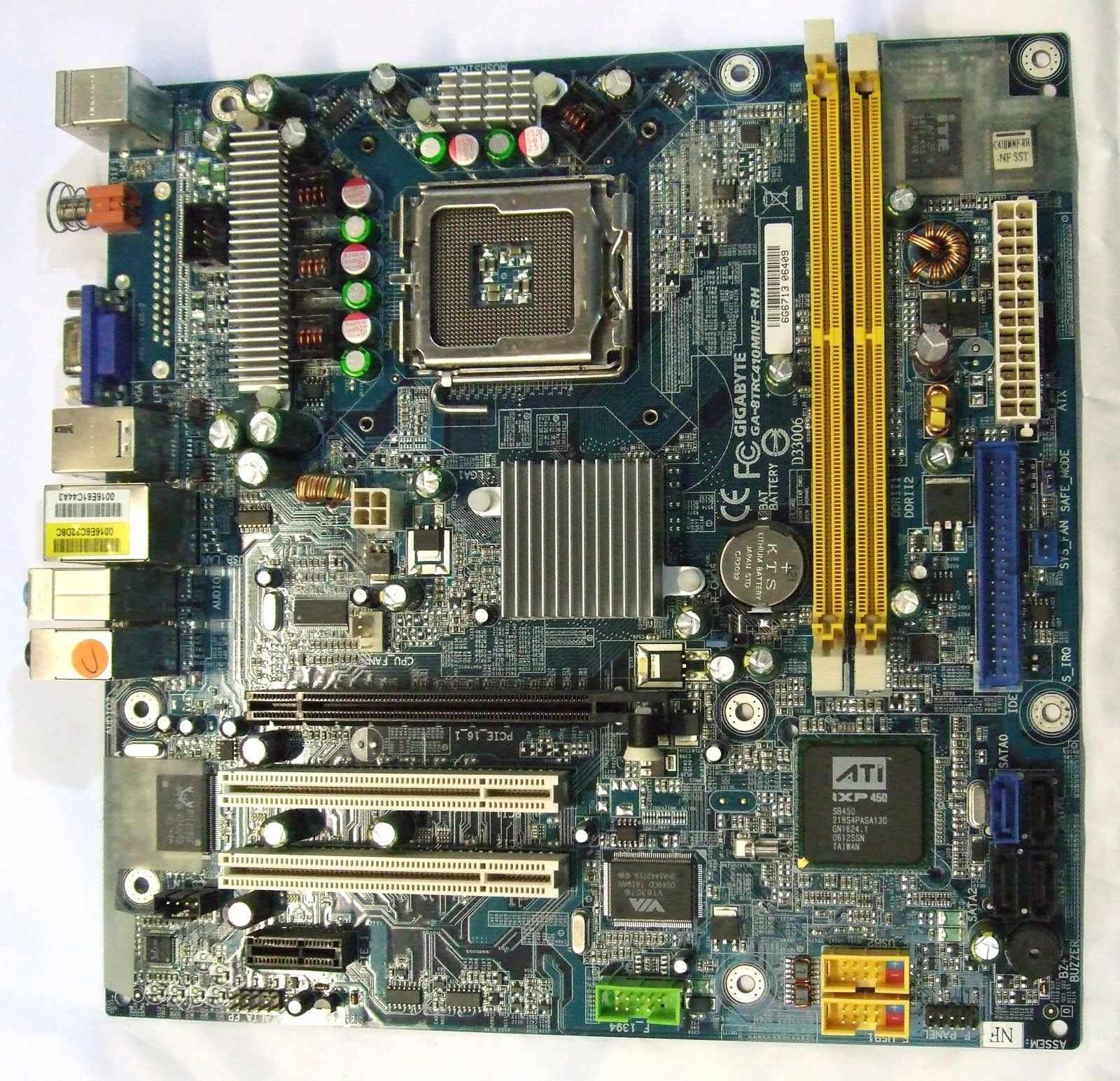
@ignatzatsonic - definitely only supports 2 RAM slots, I've physically checked and here is a picture I found online.. I will send it back to Amazon guilt free as they probably have ridiculous markups on these little circuit chips and just recieved confirmation my laptop charger is faulty (volt tested in computer shop) Do you think I should repurchase from official Crucial if I'm returning one set back as faulty and re-ordering an alternative spec?

I can order this and have it arrive tomorrow
Crucial 4GB Kit (2GBx2) PC2-5300 DDR2 Desktop Memory Upgrade 240-pin Dimm

Also I found motherboard specs: (It says nothing about 667/533 MHz being the max supported or is it common to only support to different speeds?)
Memory
2 * 240-pin DDR2 DIMM slots Supports DDR2 667/533 MHz non-ECC, un-buffered memory (Max 2GB)​
ga-8trc410mnf-rh mainboard specs


UiFYfjG.jpg
 

My Computer My Computer

At a glance

Windows 7 Ultimate 6.1 x842.93Ghz Intel Pentium 41GBNVIDIA GeForce 8400 GS
Computer type
PC/Desktop
Computer Manufacturer/Model Number
Packard Bell NEC PB34305801
OS
Windows 7 Ultimate 6.1 x84
CPU
2.93Ghz Intel Pentium 4
Motherboard
GA-8TRC410M-NF
Memory
1GB
Graphics Card(s)
NVIDIA GeForce 8400 GS
Sound Card
Realtek High Definition Audio
Monitor(s) Displays
Generic PnP Monitor (17.1")
Screen Resolution
1280x1024
Hard Drives
Corsair Force 3 120GB SSD
Western Digital Caviar Green 2TB x 2 (Internal)
Western Digital My Book Live Duo 4TB NAS (2x2TB Greens)
Keyboard
Perixx PERIDUO-701U Wireless RF2 4Ghz USB Keyboard
Mouse
Belkin Optical Glow Mouse
Internet Speed
Advertised 20Meg - Actual 1.4MB/Sec (Sky Broadband)
Antivirus
Avira Internet Security
Browser
Firefox
The model number shown in the picture is GA-8TRC410MNF-RH.

Can you confirm that is EXACTLY, I say EXACTLY what it says on your board?

I can't locate that model number at Gigabyte.com or Packardbell.com.

Gigabyte Technology GA-8TRC410MNF-RH Motherboard (DDR2-533MHz) Specification - GA-8TRC410MNF-RH Motherboard (DDR2-533MHz) Computer Specs

Above is a link to that exact model, which says:

This GigabyteTechnology Computer can take up to 4GB ram, with a fixed amount of 256MB (Removable) installed PC2-6400/5300 DDR2 SDRAM 240pin DIMM.

Memory Upgrade Gigabyte Technology GA-8TRC410MNF-RH Motherboard (DDR2-533MHz) Computer Upgrade Gigabyte Technology Memory RAM

Above is another link about that exact model, which says:

PC2-6400/5300 DDR2 SDRAM 240pin DIMM, with maximum 2GB per slot in 2 Sockets memory slots.

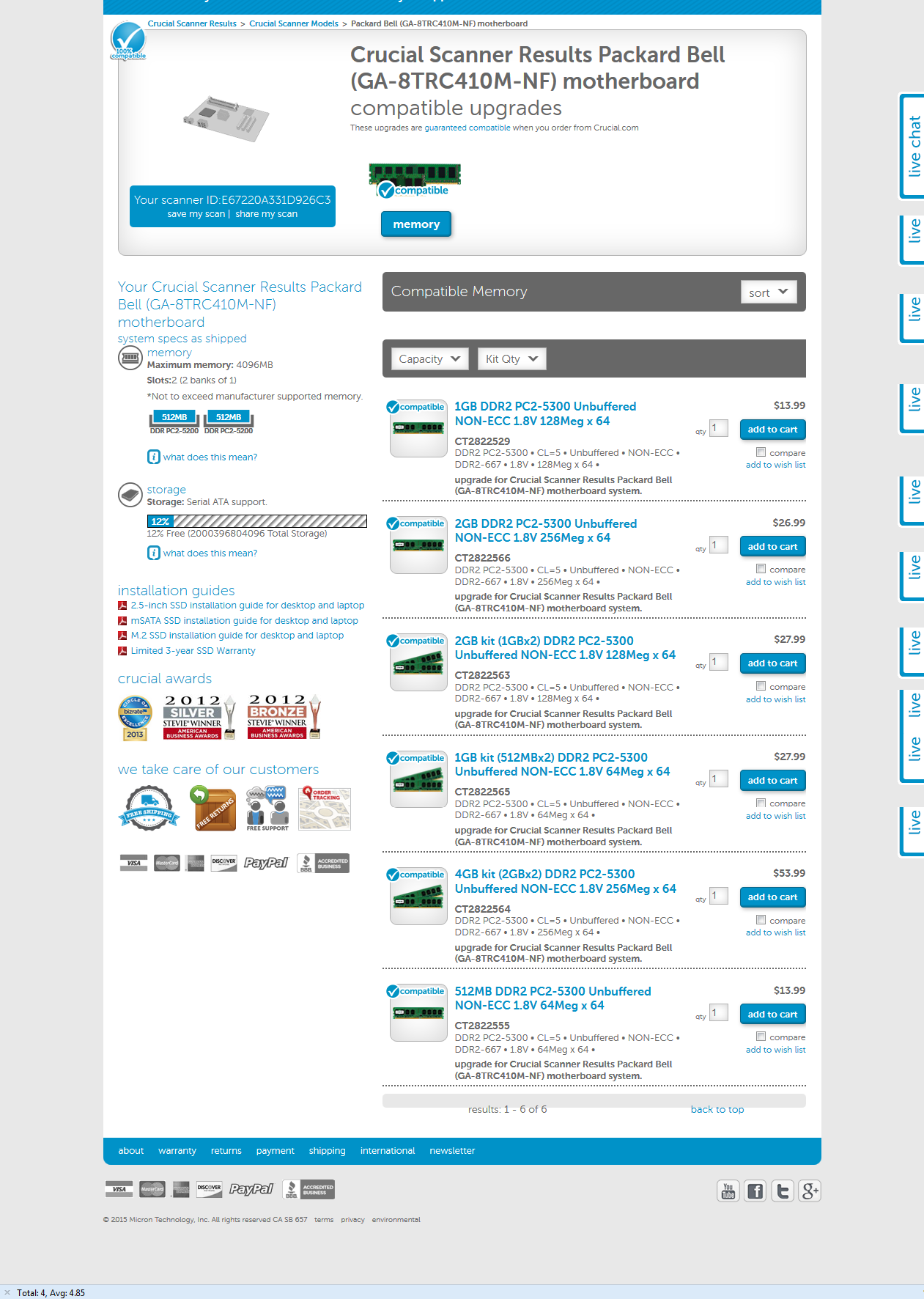
Crucial has RAM for a Packard Bell PC with an almost but not quite identical model number:

GA-8TRC410M-NF

Here:

Computer memory and SSD upgrades for Crucial Scanner Results Crucial Scanner Models Packard Bell (GA-8TRC410M-NF) motherboard from Crucial

The RAM you say you can get tomorrow is CT2CP25664AA667 according to the Amazon details, which could be wrong or a typographical error. I can’t find that part number at Crucial.

What led you to select that RAM as a possible choice?

The only 4 GB RAM kit shown on the Crucial list for the near identical board is

4GB kit (2GBx2) DDR2 PC2-5300 Unbuffered NON-ECC 1.8V 256Meg x 64 upgrades for Packard Bell (GA-8TRC410M-NF) motherboard Scheda Madre, CT2822564 from Crucial.com

which crucial says is CT2822564.

See if you can find that part number at your sources, Amazon or otherwise.

I’m not sure I can help you further.
 

My Computer My Computer

At a glance

Windows 7 Home Premium SP1, 64-bitIntel Skylake i5-6600K, not overclocked8 GB HyperX DDR4-2666 (2 x 4 GB)none; graphics are integrated on CPU
Computer type
PC/Desktop
Computer Manufacturer/Model Number
Ignatz Special; 4 speed manual gearbox; factory air conditioning; one of one
OS
Windows 7 Home Premium SP1, 64-bit
CPU
Intel Skylake i5-6600K, not overclocked
Motherboard
AsRock Z170M Extreme 4, micro ATX
Memory
8 GB HyperX DDR4-2666 (2 x 4 GB)
Graphics Card(s)
none; graphics are integrated on CPU
Sound Card
onboard: Realtek ALC1150; external: USB Behringer UF0-202
Monitor(s) Displays
Dell S2340M 23 inch IPS
Screen Resolution
1600 x 900
Hard Drives
System: Crucial MX100 series SSD, 128 GB;
Data: Samsung Spinpoint 103SJ, 1 TB;
Backup: WD Caviar Green WD30EZRX-00D8PB0, 3 TB
PSU
Rosewill SilentNight 500 watt fanless, semi-modular
Case
Antec Solo II
Cooling
Noctua NH-U12S; Noctua F12 intake, Noctua S12A exhaust
Keyboard
Microsoft 200 6JH-00001 USB
Mouse
Dell or Microsoft optical wired; USB
Antivirus
Microsoft Security Essentials and Malwarebytes Premium
Browser
Pale Moon
Other Info
All fans PWM; speeds at idle: CPU circa 500 rpm; intake circa 600 rpm; exhaust circa 600 rpm; CPU temps 27 idle and 47 C load in a warm room (27 C/81 F) when running Intel Extreme Tuning Utility stress test.
I can confirm it's printed exactly the same in the same location on the motherboard with RH at end, I've ordered the 5300Mhz as suggested from you and the specification guide that states it supports DDR2 667/533 MHz from Crucial Amazon UK and requested return of 6400 (I only had hour left to ensure it arrived tomorrow and it's only compatible ram from Crucial I could find on Amazon
 

My Computer My Computer

At a glance

Windows 7 Ultimate 6.1 x842.93Ghz Intel Pentium 41GBNVIDIA GeForce 8400 GS
Computer type
PC/Desktop
Computer Manufacturer/Model Number
Packard Bell NEC PB34305801
OS
Windows 7 Ultimate 6.1 x84
CPU
2.93Ghz Intel Pentium 4
Motherboard
GA-8TRC410M-NF
Memory
1GB
Graphics Card(s)
NVIDIA GeForce 8400 GS
Sound Card
Realtek High Definition Audio
Monitor(s) Displays
Generic PnP Monitor (17.1")
Screen Resolution
1280x1024
Hard Drives
Corsair Force 3 120GB SSD
Western Digital Caviar Green 2TB x 2 (Internal)
Western Digital My Book Live Duo 4TB NAS (2x2TB Greens)
Keyboard
Perixx PERIDUO-701U Wireless RF2 4Ghz USB Keyboard
Mouse
Belkin Optical Glow Mouse
Internet Speed
Advertised 20Meg - Actual 1.4MB/Sec (Sky Broadband)
Antivirus
Avira Internet Security
Browser
Firefox
Back
Top