Multiple BSOD's playing CS:GO, each one shows a different cause.

Lakupiippu

New member
Local time
8:30 PM
Messages
9
Firstly, thanks for your time and colaboration.

I bought a new PC at the end of the last year, so I have had it for 6 months now, but seems like I am having a lot of problems specially when I'm playing Counter Strike: Global Offensive (CS:GO) and Sniper Elite v2. Most of the time, the problem is that when I'm playing CS:GO, it suddenly "crashes" to desktop (the game simply closes) without giving any crash error or report, which makes extremely difficult the task of finding the reason of it. But sometimes, when I open the game again and I play for minute or two, it freezes and my computer just shows a random BSOD screen (and by random I mean that every time is a different message from the BSOD, a different reason). The BSOD issue happens less often than those crashes, but I have special interest in them because I think is the only way of determine which the problem is. The crashes that I have described usually happens 5 or 6 times in a 30~40 minute game.

I've also had some other problems while gaming, specially Sniper Elite v2. I can't manage to end the first mission of this game (it takes only 10 minutes or so), because I always get an error or a problem:

  • Sometimes the game just stops working (with the "SniperElite.exe stopped working" window afterwards).
  • Sometimes it freezes (sound loops and image freezes) for 10 seconds, and then the game minimizes, but I can still listen to the game but I can't maximize it (the 50% of times that this happens, there's usually a message in the bottom-left part of the screen that states that my nVidia graphic driver stopped working, but that's happens only in the 1% of the crashes I have described up to now)
  • Sometimes the sound just vanishes after a slight "psst" sound (I don't know how to describe it, sorry), and I can't listen to the game sound anymore until I restart the game (windows sounds still work perfectly)
  • Sometimes, it just throws a BSOD, in this case:
    • Sometimes without previosly freezing or anything
    • After a 5~10 seconds freeze


Things I've tried so far:

  • I have run memtest (45 tests in 4 passes, 0 errors)
  • I have reinstalled graphics drivers cleanly (uninstalled the "old" ones before)
    • I have tried up-to-date drivers
    • I have also tried older versions
  • I have disabled visual themes, desktop composition (areo) for the apps in which I'm having problems, i.e. Steam, CS:GO and Sniper Elite v2
  • I have turned off Steam Overlay
  • I reinstalled CS:GO and/or verified game cache
  • I moved CS:GO from SSD to HDD (where Steam is) because I thought it could have been because that Steam and CS:GO were in different drives (still happened after I moved it)


BSODs are showing different kind of errors:

  • IRQL_NOT_LESS_OR_EQUAL
  • dxgmms1.sys
  • PAGE_FAULT_IN_NON_PAGED_AREA
  • "An attempt was made to execute to non-executable memory" (written as that)
Full crashlogs can be found in the attachment


I am not very fond of reading crashlogs and stuff, so I'm an inexperienced guy, but I think that the problem resides in the memory (DRAM). I have been reading a lot before posting here, and I have tried a lot of things, but I can't manage to fix the problem. I have read a lot of people suggesting little tweaks in the memory voltage, but I'm afraid that depends on the memory frequency, and I don't know what values of voltage I can try and which ones should be better, I have absolutely no idea about that.
Anyway, this is only, as I said, the thought of an inexperienced guy. I'm very likely to think that you will have better ideas than me and maybe will drive me to the fix of this insanely disturbing problem.


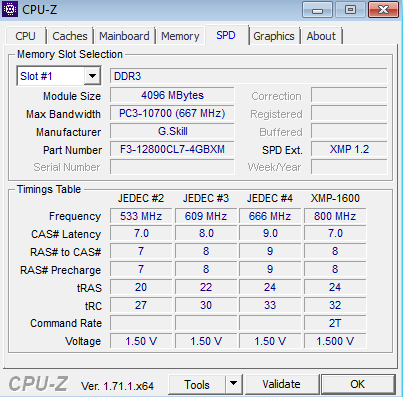
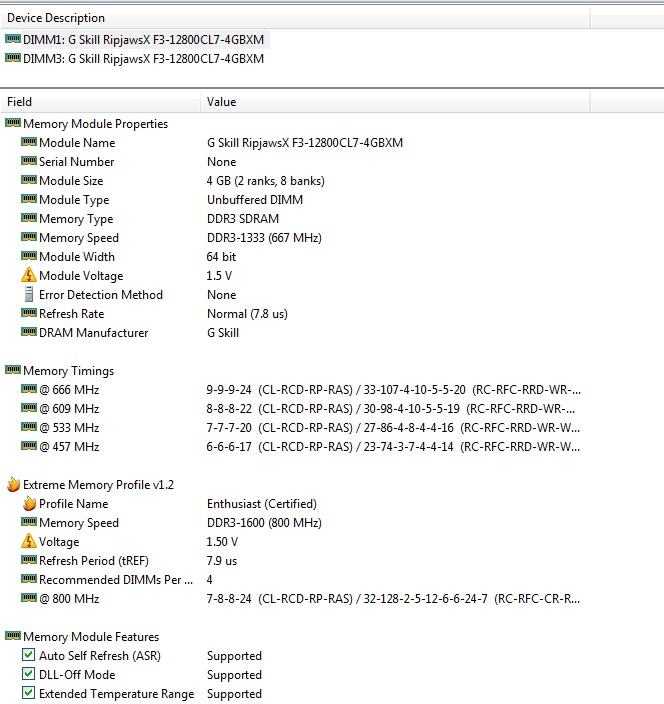
DRAM full Info:

8e57ccd824e99ef907c78c9a9e4b2bad.png


48152f1696f3389dcbe2c2cfec14137b.png


Both sticks have the same exact properties, in CPUZ shows that Slot#2 is empty, and the seconds stick is in the Slot#3. Could that be the problem?


If there's more info you need from the voltages that can only be accessed from the BIOS or by another software, please tell me.


TL;DR. CS:GO crashes a lot, the game just closes and sometimes, when I open it again to keep playing, it just throws a different BSOD. I have some other issues with Sniper Elite v2, crashes, BSODS, sound stops working, etc. I think that the problem is in the DRAM, but I've run memtest and it showed 0 errors in 45 tests (4 passes), it could maybe be the voltages?


Thanks again for reading and helping.
 
Last edited:

My Computer My Computer

At a glance

Windows 7 Professional x64 Service Pack 1QuadCore Intel Core i7-4790, 4000 MHz (40 x 100)DIMM1/DIMM3: (x2) G Skill RipjawsX F3-12800CL...NVIDIA GeForce GTX 970 (4 GB)
Computer type
PC/Desktop
Computer Manufacturer/Model Number
Asus
OS
Windows 7 Professional x64 Service Pack 1
CPU
QuadCore Intel Core i7-4790, 4000 MHz (40 x 100)
Motherboard
Asus H97-Pro (3 PCI, 2 PCI-E x1, 2 PCI-E x16, 1 M.2, 4 DDR3
Memory
DIMM1/DIMM3: (x2) G Skill RipjawsX F3-12800CL7-4GBXM (8GB)
Graphics Card(s)
NVIDIA GeForce GTX 970 (4 GB)
Hard Drives
Samsung SSD 840 EVO 250GB ATA Device (250 GB, SATA-III)
ST2000DM001-1ER164 ATA Device (2000 GB, 7200 RPM, SATA-III)
Antivirus
Windows Defender
Browser
Mozilla Firefox 38.0.5
Hello, Lakupiippu and welcome to the Forum. I will try to help you with this. As far as the slots for the memory, your Motherboard manual will tell you which slots they should be in. I looked at your last 4 dump files. After reading your description of the problem, my initial thoughts were memory. What is typical of bad memory is that the error codes are usually different and the blame is usually put on something different. These are the results of your last 4 dump files.

Code:
[COLOR=red]PAGE_FAULT_IN_NONPAGED_AREA (50)[/COLOR]
Invalid system memory was referenced.  This cannot be protected by try-except,
it must be protected by a Probe.  Typically the address is just plain bad or it
is pointing at freed memory.
Arguments:
Arg1: ffffffffffffff83, memory referenced.
Arg2: 0000000000000001, value 0 = read operation, 1 = write operation.
Arg3: fffff88004239e26, If non-zero, the instruction address which referenced the bad memory
 address.
Arg4: 0000000000000000, (reserved)

Later in the dump, your graphics card was blamed

Code:
fffff880`037884f0  fffff880`049bf4b6Unable to load image \SystemRoot\system32\DRIVERS\nvlddmkm.sys, Win32 error 0n2
*** WARNING: Unable to verify timestamp for nvlddmkm.sys
[COLOR=red]*** ERROR: Module load completed but symbols could not be loaded for nvlddmkm.sys[/COLOR]
 nvlddmkm+0x1194b6

This is your current driver

Code:
nvlddmkm
start             end                 module name
fffff880`048a6000 fffff880`05369000   nvlddmkm T (no symbols)           
    Loaded symbol image file: nvlddmkm.sys
    Image path: \SystemRoot\system32\DRIVERS\nvlddmkm.sys
    Image name: nvlddmkm.sys
    Timestamp:        Wed May 27 21:49:51 2015 (5566824F)
    CheckSum:         00A7E4BD
    ImageSize:        00AC3000
    Translations:     0000.04b0 0000.04e4 0409.04b0 0409.04e4

Code:
Use !analyze -v to get detailed debugging information.
BugCheck FC, {fffff8a005079000, 9020000217c69963, fffff8800aaa5e50, 2}
[COLOR=red]Probably caused by : dxgmms1.sys ( dxgmms1!VidMmBeginCPUAccess+28 )[/COLOR]
Followup: MachineOwner

Code:
Use !analyze -v to get detailed debugging information.
BugCheck A, {fffffa8c012bd878, 2, 1, fffff80002ecef5e}
[COLOR=red]Probably caused by : memory_corruption[/COLOR] ( nt!MiUnlinkPageFromLockedList+36e )
Followup: MachineOwner


Code:
[COLOR=red]MEMORY_MANAGEMENT (1a)[/COLOR]
    # Any other values for parameter 1 must be individually examined.
Arguments:
Arg1: 0000000000003452, The subtype of the bugcheck.
Arg2: 0000000000131000
Arg3: fffff70001084f28
Arg4: 15400001b6d9d424

If you are overclocking anything, please set everything to default levels.

Please Run Memtest86+


picture.php


   Information
Please download from this site only http://www.memtest.org/ in the middle of the page are the Download links, you can download the ISO.zip or the Auto USB Flash Drive installer.zip


Extract the Zip file. If you chose the ISO image, burn it to a CD using Windows Disk Image Burner or any Image burner you may have. If you downloaded the Auto USB installer, extract it, insert your USB 2.0 Flash Drive and take note of the drive letter. Run the installer, select the Flash Drive Letter, check the format box and press next. It will install memtest86+ to a flash drive. You can use either V4.20 or V5.01. Boot from your selected media. If you use V5.01 it will tell you to press certain buttons at the start, please press no buttons. The test will begin on it's own and continue to run until you stop it. It needs to run for 8 complete passes in the same session or until you receive an error. If you receive an error, stop the test. Even 1 error is a fail. Each pass tests a different part of the ram and each of the 10 tests in each pass tests something different. It takes a minimum of 8 passes run in the same session to completely test the ram, more passes are better. It is quite a long test and will take several hours depending on how much ram you have. Due to the time length it is best to run overnight. If you have any questions, please do not hesitate to ask.
 

My Computers My Computers

  • At a glance

    Windows 11 ProRyzen 9 5900X32GB G Skill DDR4-3600EVGA RTX 3080 FTW 3 Ultra
    Computer type
    PC/Desktop
    Computer Manufacturer/Model Number
    ALWAYS UNDER CONSTRUCTION
    OS
    Windows 11 Pro
    CPU
    Ryzen 9 5900X
    Motherboard
    Asus X570 Crosshair Viii Hero
    Memory
    32GB G Skill DDR4-3600
    Graphics Card(s)
    EVGA RTX 3080 FTW 3 Ultra
    Sound Card
    On Board/Sennheiser PC37X Headset
    Monitor(s) Displays
    3 X Asus 27"
    Screen Resolution
    2560x1440
    Hard Drives
    2 X 1 TB NVME drives
    PSU
    EVGA 850
    Case
    Phanteks Eclipse P400A
    Cooling
    EVGA 280 AIO
    Keyboard
    Logitech G510s/ Logitech G13
    Mouse
    Logitech G502
    Internet Speed
    24/1
    Antivirus
    ESET/MBAM Pro/SAS Pro
    Browser
    Chrome/ Firefox/ Edge
  • At a glance

    Windows 11 ProIntel Ultra 9 288V32 GB LPDDR5X 8533
    Computer type
    Laptop
    System Manufacturer/Model Number
    Dell 16 Plus
    OS
    Windows 11 Pro
    CPU
    Intel Ultra 9 288V
    Memory
    32 GB LPDDR5X 8533
    Monitor(s) Displays
    16" Mini-LED HDR600 Touch 90 Hz
    Screen Resolution
    2560X1600
    Hard Drives
    1 TB NVME
Hello essenbe. First of all thanks for replying, I really appreciate the help.

As you can see in my PC specs, my CPU is not overclockeable, so no, it's not overclocked :)

The memtest, well, I'll try to run it again and see if there's any problem regarding to the memory, but I will do overnight, if you don't mind, because 8 passes are going to take several hours.

I will let you know tomorrow.
 

My Computer My Computer

At a glance

Windows 7 Professional x64 Service Pack 1QuadCore Intel Core i7-4790, 4000 MHz (40 x 100)DIMM1/DIMM3: (x2) G Skill RipjawsX F3-12800CL...NVIDIA GeForce GTX 970 (4 GB)
Computer type
PC/Desktop
Computer Manufacturer/Model Number
Asus
OS
Windows 7 Professional x64 Service Pack 1
CPU
QuadCore Intel Core i7-4790, 4000 MHz (40 x 100)
Motherboard
Asus H97-Pro (3 PCI, 2 PCI-E x1, 2 PCI-E x16, 1 M.2, 4 DDR3
Memory
DIMM1/DIMM3: (x2) G Skill RipjawsX F3-12800CL7-4GBXM (8GB)
Graphics Card(s)
NVIDIA GeForce GTX 970 (4 GB)
Hard Drives
Samsung SSD 840 EVO 250GB ATA Device (250 GB, SATA-III)
ST2000DM001-1ER164 ATA Device (2000 GB, 7200 RPM, SATA-III)
Antivirus
Windows Defender
Browser
Mozilla Firefox 38.0.5
OK, just let me know whenever you get time.
 

My Computers My Computers

  • At a glance

    Windows 11 ProRyzen 9 5900X32GB G Skill DDR4-3600EVGA RTX 3080 FTW 3 Ultra
    Computer type
    PC/Desktop
    Computer Manufacturer/Model Number
    ALWAYS UNDER CONSTRUCTION
    OS
    Windows 11 Pro
    CPU
    Ryzen 9 5900X
    Motherboard
    Asus X570 Crosshair Viii Hero
    Memory
    32GB G Skill DDR4-3600
    Graphics Card(s)
    EVGA RTX 3080 FTW 3 Ultra
    Sound Card
    On Board/Sennheiser PC37X Headset
    Monitor(s) Displays
    3 X Asus 27"
    Screen Resolution
    2560x1440
    Hard Drives
    2 X 1 TB NVME drives
    PSU
    EVGA 850
    Case
    Phanteks Eclipse P400A
    Cooling
    EVGA 280 AIO
    Keyboard
    Logitech G510s/ Logitech G13
    Mouse
    Logitech G502
    Internet Speed
    24/1
    Antivirus
    ESET/MBAM Pro/SAS Pro
    Browser
    Chrome/ Firefox/ Edge
  • At a glance

    Windows 11 ProIntel Ultra 9 288V32 GB LPDDR5X 8533
    Computer type
    Laptop
    System Manufacturer/Model Number
    Dell 16 Plus
    OS
    Windows 11 Pro
    CPU
    Intel Ultra 9 288V
    Memory
    32 GB LPDDR5X 8533
    Monitor(s) Displays
    16" Mini-LED HDR600 Touch 90 Hz
    Screen Resolution
    2560X1600
    Hard Drives
    1 TB NVME
Okay, so memtest86+ 5.01 has been running during all night, and now shows this:

IMG_20150614_134526.jpg


Should I stop it already or should I wait for it to do more passes?


Edit: I stopped it. It's been running for eleven and a half hours with no errors. I guess that's enough, since you said that 8 passes are the minimum needed to see if the RAM has errors. If you think i should run it again but with more passes, just tell me, but I don't think it's going to find any error if it has not encountered them already.
 
Last edited:

My Computer My Computer

At a glance

Windows 7 Professional x64 Service Pack 1QuadCore Intel Core i7-4790, 4000 MHz (40 x 100)DIMM1/DIMM3: (x2) G Skill RipjawsX F3-12800CL...NVIDIA GeForce GTX 970 (4 GB)
Computer type
PC/Desktop
Computer Manufacturer/Model Number
Asus
OS
Windows 7 Professional x64 Service Pack 1
CPU
QuadCore Intel Core i7-4790, 4000 MHz (40 x 100)
Motherboard
Asus H97-Pro (3 PCI, 2 PCI-E x1, 2 PCI-E x16, 1 M.2, 4 DDR3
Memory
DIMM1/DIMM3: (x2) G Skill RipjawsX F3-12800CL7-4GBXM (8GB)
Graphics Card(s)
NVIDIA GeForce GTX 970 (4 GB)
Hard Drives
Samsung SSD 840 EVO 250GB ATA Device (250 GB, SATA-III)
ST2000DM001-1ER164 ATA Device (2000 GB, 7200 RPM, SATA-III)
Antivirus
Windows Defender
Browser
Mozilla Firefox 38.0.5
No, What you did should be sufficient. How many passes did you do? The image you posted didn't show.
 

My Computers My Computers

  • At a glance

    Windows 11 ProRyzen 9 5900X32GB G Skill DDR4-3600EVGA RTX 3080 FTW 3 Ultra
    Computer type
    PC/Desktop
    Computer Manufacturer/Model Number
    ALWAYS UNDER CONSTRUCTION
    OS
    Windows 11 Pro
    CPU
    Ryzen 9 5900X
    Motherboard
    Asus X570 Crosshair Viii Hero
    Memory
    32GB G Skill DDR4-3600
    Graphics Card(s)
    EVGA RTX 3080 FTW 3 Ultra
    Sound Card
    On Board/Sennheiser PC37X Headset
    Monitor(s) Displays
    3 X Asus 27"
    Screen Resolution
    2560x1440
    Hard Drives
    2 X 1 TB NVME drives
    PSU
    EVGA 850
    Case
    Phanteks Eclipse P400A
    Cooling
    EVGA 280 AIO
    Keyboard
    Logitech G510s/ Logitech G13
    Mouse
    Logitech G502
    Internet Speed
    24/1
    Antivirus
    ESET/MBAM Pro/SAS Pro
    Browser
    Chrome/ Firefox/ Edge
  • At a glance

    Windows 11 ProIntel Ultra 9 288V32 GB LPDDR5X 8533
    Computer type
    Laptop
    System Manufacturer/Model Number
    Dell 16 Plus
    OS
    Windows 11 Pro
    CPU
    Intel Ultra 9 288V
    Memory
    32 GB LPDDR5X 8533
    Monitor(s) Displays
    16" Mini-LED HDR600 Touch 90 Hz
    Screen Resolution
    2560X1600
    Hard Drives
    1 TB NVME
No, What you did should be sufficient. How many passes did you do? The image you posted didn't show.

I stopped it at the 80% of the 10th pass. I thought it would show a summany when I pressed Esc, but it just rebooted.
 

My Computer My Computer

At a glance

Windows 7 Professional x64 Service Pack 1QuadCore Intel Core i7-4790, 4000 MHz (40 x 100)DIMM1/DIMM3: (x2) G Skill RipjawsX F3-12800CL...NVIDIA GeForce GTX 970 (4 GB)
Computer type
PC/Desktop
Computer Manufacturer/Model Number
Asus
OS
Windows 7 Professional x64 Service Pack 1
CPU
QuadCore Intel Core i7-4790, 4000 MHz (40 x 100)
Motherboard
Asus H97-Pro (3 PCI, 2 PCI-E x1, 2 PCI-E x16, 1 M.2, 4 DDR3
Memory
DIMM1/DIMM3: (x2) G Skill RipjawsX F3-12800CL7-4GBXM (8GB)
Graphics Card(s)
NVIDIA GeForce GTX 970 (4 GB)
Hard Drives
Samsung SSD 840 EVO 250GB ATA Device (250 GB, SATA-III)
ST2000DM001-1ER164 ATA Device (2000 GB, 7200 RPM, SATA-III)
Antivirus
Windows Defender
Browser
Mozilla Firefox 38.0.5
Yea, that's what it does. No problem as long as it showed no errors.
 

My Computers My Computers

  • At a glance

    Windows 11 ProRyzen 9 5900X32GB G Skill DDR4-3600EVGA RTX 3080 FTW 3 Ultra
    Computer type
    PC/Desktop
    Computer Manufacturer/Model Number
    ALWAYS UNDER CONSTRUCTION
    OS
    Windows 11 Pro
    CPU
    Ryzen 9 5900X
    Motherboard
    Asus X570 Crosshair Viii Hero
    Memory
    32GB G Skill DDR4-3600
    Graphics Card(s)
    EVGA RTX 3080 FTW 3 Ultra
    Sound Card
    On Board/Sennheiser PC37X Headset
    Monitor(s) Displays
    3 X Asus 27"
    Screen Resolution
    2560x1440
    Hard Drives
    2 X 1 TB NVME drives
    PSU
    EVGA 850
    Case
    Phanteks Eclipse P400A
    Cooling
    EVGA 280 AIO
    Keyboard
    Logitech G510s/ Logitech G13
    Mouse
    Logitech G502
    Internet Speed
    24/1
    Antivirus
    ESET/MBAM Pro/SAS Pro
    Browser
    Chrome/ Firefox/ Edge
  • At a glance

    Windows 11 ProIntel Ultra 9 288V32 GB LPDDR5X 8533
    Computer type
    Laptop
    System Manufacturer/Model Number
    Dell 16 Plus
    OS
    Windows 11 Pro
    CPU
    Intel Ultra 9 288V
    Memory
    32 GB LPDDR5X 8533
    Monitor(s) Displays
    16" Mini-LED HDR600 Touch 90 Hz
    Screen Resolution
    2560X1600
    Hard Drives
    1 TB NVME

My Computers My Computers

  • At a glance

    Windows 11 ProRyzen 9 5900X32GB G Skill DDR4-3600EVGA RTX 3080 FTW 3 Ultra
    Computer type
    PC/Desktop
    Computer Manufacturer/Model Number
    ALWAYS UNDER CONSTRUCTION
    OS
    Windows 11 Pro
    CPU
    Ryzen 9 5900X
    Motherboard
    Asus X570 Crosshair Viii Hero
    Memory
    32GB G Skill DDR4-3600
    Graphics Card(s)
    EVGA RTX 3080 FTW 3 Ultra
    Sound Card
    On Board/Sennheiser PC37X Headset
    Monitor(s) Displays
    3 X Asus 27"
    Screen Resolution
    2560x1440
    Hard Drives
    2 X 1 TB NVME drives
    PSU
    EVGA 850
    Case
    Phanteks Eclipse P400A
    Cooling
    EVGA 280 AIO
    Keyboard
    Logitech G510s/ Logitech G13
    Mouse
    Logitech G502
    Internet Speed
    24/1
    Antivirus
    ESET/MBAM Pro/SAS Pro
    Browser
    Chrome/ Firefox/ Edge
  • At a glance

    Windows 11 ProIntel Ultra 9 288V32 GB LPDDR5X 8533
    Computer type
    Laptop
    System Manufacturer/Model Number
    Dell 16 Plus
    OS
    Windows 11 Pro
    CPU
    Intel Ultra 9 288V
    Memory
    32 GB LPDDR5X 8533
    Monitor(s) Displays
    16" Mini-LED HDR600 Touch 90 Hz
    Screen Resolution
    2560X1600
    Hard Drives
    1 TB NVME
Alright, I'll try to do that, thanks for the link!

Please note that just because these errors/crashes aren't trivially reproducible (they happen quite often, yet randomly), it may take some time for me to determine if it has been fixed, so I'll probably answer tomorrow, I hope you don't mind :)
 

My Computer My Computer

At a glance

Windows 7 Professional x64 Service Pack 1QuadCore Intel Core i7-4790, 4000 MHz (40 x 100)DIMM1/DIMM3: (x2) G Skill RipjawsX F3-12800CL...NVIDIA GeForce GTX 970 (4 GB)
Computer type
PC/Desktop
Computer Manufacturer/Model Number
Asus
OS
Windows 7 Professional x64 Service Pack 1
CPU
QuadCore Intel Core i7-4790, 4000 MHz (40 x 100)
Motherboard
Asus H97-Pro (3 PCI, 2 PCI-E x1, 2 PCI-E x16, 1 M.2, 4 DDR3
Memory
DIMM1/DIMM3: (x2) G Skill RipjawsX F3-12800CL7-4GBXM (8GB)
Graphics Card(s)
NVIDIA GeForce GTX 970 (4 GB)
Hard Drives
Samsung SSD 840 EVO 250GB ATA Device (250 GB, SATA-III)
ST2000DM001-1ER164 ATA Device (2000 GB, 7200 RPM, SATA-III)
Antivirus
Windows Defender
Browser
Mozilla Firefox 38.0.5
Not a problem at all. Just whenever you want to.
 

My Computers My Computers

  • At a glance

    Windows 11 ProRyzen 9 5900X32GB G Skill DDR4-3600EVGA RTX 3080 FTW 3 Ultra
    Computer type
    PC/Desktop
    Computer Manufacturer/Model Number
    ALWAYS UNDER CONSTRUCTION
    OS
    Windows 11 Pro
    CPU
    Ryzen 9 5900X
    Motherboard
    Asus X570 Crosshair Viii Hero
    Memory
    32GB G Skill DDR4-3600
    Graphics Card(s)
    EVGA RTX 3080 FTW 3 Ultra
    Sound Card
    On Board/Sennheiser PC37X Headset
    Monitor(s) Displays
    3 X Asus 27"
    Screen Resolution
    2560x1440
    Hard Drives
    2 X 1 TB NVME drives
    PSU
    EVGA 850
    Case
    Phanteks Eclipse P400A
    Cooling
    EVGA 280 AIO
    Keyboard
    Logitech G510s/ Logitech G13
    Mouse
    Logitech G502
    Internet Speed
    24/1
    Antivirus
    ESET/MBAM Pro/SAS Pro
    Browser
    Chrome/ Firefox/ Edge
  • At a glance

    Windows 11 ProIntel Ultra 9 288V32 GB LPDDR5X 8533
    Computer type
    Laptop
    System Manufacturer/Model Number
    Dell 16 Plus
    OS
    Windows 11 Pro
    CPU
    Intel Ultra 9 288V
    Memory
    32 GB LPDDR5X 8533
    Monitor(s) Displays
    16" Mini-LED HDR600 Touch 90 Hz
    Screen Resolution
    2560X1600
    Hard Drives
    1 TB NVME
Okay, seems like I was having some multiple problems there, that's why I was getting all those different BSODs.

I've tried to install an older nVidia driver (version 344.11) with the method you shared, but I still had BSODs and crashes.

Then, reading further info, I found here that some devices may have problems if their nVidia settings are configured to adjust the power state of the GPU according to the current/previewed load it's experiencing. I set that to max performance and the crashes disminshed a lot. For example, I haven't had any of those crashes-without-info yet. Although I'm still geting crashes, but now all show the same exception error: 0xc0000005, which seems to be that the application has tried to write in a part of the memory which is not allowed to be used by normal apps. Now I don't know if it's an OS problem or it's that any RAM stick is faulty. I have thought about taking one of the two RAM sticks out, and try to play, and if it still happens, then try the another onle but solo, which is quicker than a full Windows reinstall.

Anyway, if you have any idea, I will apreciate it so much.


EDIT: I uploaded an attachment to this post with the last BSOD which indicates the 0xc0000005 exception, but I can't fully understand it.
 

My Computer My Computer

At a glance

Windows 7 Professional x64 Service Pack 1QuadCore Intel Core i7-4790, 4000 MHz (40 x 100)DIMM1/DIMM3: (x2) G Skill RipjawsX F3-12800CL...NVIDIA GeForce GTX 970 (4 GB)
Computer type
PC/Desktop
Computer Manufacturer/Model Number
Asus
OS
Windows 7 Professional x64 Service Pack 1
CPU
QuadCore Intel Core i7-4790, 4000 MHz (40 x 100)
Motherboard
Asus H97-Pro (3 PCI, 2 PCI-E x1, 2 PCI-E x16, 1 M.2, 4 DDR3
Memory
DIMM1/DIMM3: (x2) G Skill RipjawsX F3-12800CL7-4GBXM (8GB)
Graphics Card(s)
NVIDIA GeForce GTX 970 (4 GB)
Hard Drives
Samsung SSD 840 EVO 250GB ATA Device (250 GB, SATA-III)
ST2000DM001-1ER164 ATA Device (2000 GB, 7200 RPM, SATA-III)
Antivirus
Windows Defender
Browser
Mozilla Firefox 38.0.5
I really don't believe that post has anything to do with your problem. The post is 3 years old and the poster was running a 460. The cards today and the drivers are a different animal, plus his post was about a specific game.

Please open an elevated command prompt ( click start, type cmd in the search box, right click on the cmd entry and select run as administrator) in the black box that opens, copy/paste sfc /scannow. If you decide to type it, notice the space between the sfc and the /. It is a system file checker which will scan your system files and attempt to correct any missing or corrupt files. What we want are the results to say windows found no integrity violations. If it says files were found but could not be repaired, close the box, reboot and run it again, after opening the administrative command prompt. You may have to reboot and run it three times for it to repair all system files. If it can't repair them after 3 reboots, let us know.
 

My Computers My Computers

  • At a glance

    Windows 11 ProRyzen 9 5900X32GB G Skill DDR4-3600EVGA RTX 3080 FTW 3 Ultra
    Computer type
    PC/Desktop
    Computer Manufacturer/Model Number
    ALWAYS UNDER CONSTRUCTION
    OS
    Windows 11 Pro
    CPU
    Ryzen 9 5900X
    Motherboard
    Asus X570 Crosshair Viii Hero
    Memory
    32GB G Skill DDR4-3600
    Graphics Card(s)
    EVGA RTX 3080 FTW 3 Ultra
    Sound Card
    On Board/Sennheiser PC37X Headset
    Monitor(s) Displays
    3 X Asus 27"
    Screen Resolution
    2560x1440
    Hard Drives
    2 X 1 TB NVME drives
    PSU
    EVGA 850
    Case
    Phanteks Eclipse P400A
    Cooling
    EVGA 280 AIO
    Keyboard
    Logitech G510s/ Logitech G13
    Mouse
    Logitech G502
    Internet Speed
    24/1
    Antivirus
    ESET/MBAM Pro/SAS Pro
    Browser
    Chrome/ Firefox/ Edge
  • At a glance

    Windows 11 ProIntel Ultra 9 288V32 GB LPDDR5X 8533
    Computer type
    Laptop
    System Manufacturer/Model Number
    Dell 16 Plus
    OS
    Windows 11 Pro
    CPU
    Intel Ultra 9 288V
    Memory
    32 GB LPDDR5X 8533
    Monitor(s) Displays
    16" Mini-LED HDR600 Touch 90 Hz
    Screen Resolution
    2560X1600
    Hard Drives
    1 TB NVME
I've ran it 4 times, and every time I did, it showed in the ending message that there was some files could not be repaired. And games, audio driver (AUDIODG.EXE, audioeng.dll), still crash because of 0xc0000005 exception. Last log is attached (I think the CBS.txt file was acumulating the logs).
 

My Computer My Computer

At a glance

Windows 7 Professional x64 Service Pack 1QuadCore Intel Core i7-4790, 4000 MHz (40 x 100)DIMM1/DIMM3: (x2) G Skill RipjawsX F3-12800CL...NVIDIA GeForce GTX 970 (4 GB)
Computer type
PC/Desktop
Computer Manufacturer/Model Number
Asus
OS
Windows 7 Professional x64 Service Pack 1
CPU
QuadCore Intel Core i7-4790, 4000 MHz (40 x 100)
Motherboard
Asus H97-Pro (3 PCI, 2 PCI-E x1, 2 PCI-E x16, 1 M.2, 4 DDR3
Memory
DIMM1/DIMM3: (x2) G Skill RipjawsX F3-12800CL7-4GBXM (8GB)
Graphics Card(s)
NVIDIA GeForce GTX 970 (4 GB)
Hard Drives
Samsung SSD 840 EVO 250GB ATA Device (250 GB, SATA-III)
ST2000DM001-1ER164 ATA Device (2000 GB, 7200 RPM, SATA-III)
Antivirus
Windows Defender
Browser
Mozilla Firefox 38.0.5
I don't want to celebrate it too quickly, but I think I have managed to fix it, I will report in when I'm sure about it
 

My Computer My Computer

At a glance

Windows 7 Professional x64 Service Pack 1QuadCore Intel Core i7-4790, 4000 MHz (40 x 100)DIMM1/DIMM3: (x2) G Skill RipjawsX F3-12800CL...NVIDIA GeForce GTX 970 (4 GB)
Computer type
PC/Desktop
Computer Manufacturer/Model Number
Asus
OS
Windows 7 Professional x64 Service Pack 1
CPU
QuadCore Intel Core i7-4790, 4000 MHz (40 x 100)
Motherboard
Asus H97-Pro (3 PCI, 2 PCI-E x1, 2 PCI-E x16, 1 M.2, 4 DDR3
Memory
DIMM1/DIMM3: (x2) G Skill RipjawsX F3-12800CL7-4GBXM (8GB)
Graphics Card(s)
NVIDIA GeForce GTX 970 (4 GB)
Hard Drives
Samsung SSD 840 EVO 250GB ATA Device (250 GB, SATA-III)
ST2000DM001-1ER164 ATA Device (2000 GB, 7200 RPM, SATA-III)
Antivirus
Windows Defender
Browser
Mozilla Firefox 38.0.5
OK, let us know. I hope whatever you did works. I would like to know what fixed it.
 

My Computers My Computers

  • At a glance

    Windows 11 ProRyzen 9 5900X32GB G Skill DDR4-3600EVGA RTX 3080 FTW 3 Ultra
    Computer type
    PC/Desktop
    Computer Manufacturer/Model Number
    ALWAYS UNDER CONSTRUCTION
    OS
    Windows 11 Pro
    CPU
    Ryzen 9 5900X
    Motherboard
    Asus X570 Crosshair Viii Hero
    Memory
    32GB G Skill DDR4-3600
    Graphics Card(s)
    EVGA RTX 3080 FTW 3 Ultra
    Sound Card
    On Board/Sennheiser PC37X Headset
    Monitor(s) Displays
    3 X Asus 27"
    Screen Resolution
    2560x1440
    Hard Drives
    2 X 1 TB NVME drives
    PSU
    EVGA 850
    Case
    Phanteks Eclipse P400A
    Cooling
    EVGA 280 AIO
    Keyboard
    Logitech G510s/ Logitech G13
    Mouse
    Logitech G502
    Internet Speed
    24/1
    Antivirus
    ESET/MBAM Pro/SAS Pro
    Browser
    Chrome/ Firefox/ Edge
  • At a glance

    Windows 11 ProIntel Ultra 9 288V32 GB LPDDR5X 8533
    Computer type
    Laptop
    System Manufacturer/Model Number
    Dell 16 Plus
    OS
    Windows 11 Pro
    CPU
    Intel Ultra 9 288V
    Memory
    32 GB LPDDR5X 8533
    Monitor(s) Displays
    16" Mini-LED HDR600 Touch 90 Hz
    Screen Resolution
    2560X1600
    Hard Drives
    1 TB NVME
I would also like to know what fix the problem.
Plus that information could help many others.
 

My Computer My Computer

At a glance

Windows 10 Pro. 64/ version 1709 Windows 7 Pr...Intel i7-6800K @ 4.3Corsair Platinum 16 gig @2400EVGA GTX 1070 OC
Computer type
PC/Desktop
Computer Manufacturer/Model Number
Home made Desktop
OS
Windows 10 Pro. 64/ version 1709 Windows 7 Pro/64
CPU
Intel i7-6800K @ 4.3
Motherboard
ASUS X-99 Deluxe II
Memory
Corsair Platinum 16 gig @2400
Graphics Card(s)
EVGA GTX 1070 OC
Monitor(s) Displays
Asus 27" LED LCD/VE278Q
Screen Resolution
1920-1080 or 1280-720 HDMI
Hard Drives
INTEL SSD 730-240 Gb Sata 3.0/
PSU
EVGA Platium 1200W
Case
Phanteks Luxe Tempered Glass 8 fans/ one radiator
Cooling
XSPC/ Water Cooled CPU
Keyboard
Das 4 Professional
Mouse
Logitech M705/MX Anywhere 2-S
Internet Speed
100 mbits
Antivirus
Microsoft Security Essentials/ Malwarebytes Premium 3.0/ SAS
Browser
I.E. 11 default/Firefox/ ISP Time Warner Cable/Spectrum
Other Info
LG BluRay Burner/
Sound system-KLipsch-THX/
Icy Dock ssd Hot Swap bays.
OK, let us know. I hope whatever you did works. I would like to know what fixed it.

I would also like to know what fix the problem.
Plus that information could help many others.
Of course, I was waiting to make sure that the problem was solved, since I couldn't play CS:GO since I fixed it (?), I've only tested it with Sniper Elite v2, and I have been able to pass the first mission two times without any crash or error.

I thought I could search these errors with that exception code (0xc0000005) from the oldest entries in the event viewer (I never deleted them, so I could see all the info since I had the PC) to see if I could determine if I had installed anything that was causing the error or if any other thing happened. I saw that the errors started to happen December 8th of 2014 (08/12/2014), and I went to Programs and Features to see what was installed in that day, and the apps I installed that day were:

  • Fraps (remove only)
  • Crysis
  • GamespyComrade
  • .NET Framework 1.1
But it was so strange, because I could also see that there was installed the Microsoft .NET Framework 4.5.2 on December 6th (06/08/2014, 2 days before). Also, when uninstalling .NET Framework 1.1, the uninstaller asked me for admin privileges, so it popped the window to ask me for those privileges, and I saw that the Verified Publisher field showed that the application's publisher was unknown, so I suspect that application was either:

  1. a very old version of .NET Framework that was either in conflict with the newer one or that was deprecated and didn't work well
  2. an illegitimate version of the software
  3. simply malware
I also uninstalled GamespyComrade, but I don't think it was the problem of it, because it's simply a client for Crysis to be able to play online. The .NET Framework fact was more weird.


Summary


ISSUE 1:


The CTD that didn't show the app-stopped-working message was caused, very probabily, by the nVidia driver setting that was letting the applications to change the performance and power
consumption dinamically, because it's likely that if it was being changed a lot of times ingame, it eventually crashed with no reason, apparently.

Setting (sorry, it's in spanish, if you know how to change the language to english, I'd upload another image in english):


80df60b574ce4392ab33695c3d6cd3c5.png


ISSUE 2:

The problem that caused SOME BSODS (I couldn't determine if all the BSODS were because of the first issue or the second one) with that famous exception code (0xc0000005), along with all the dozens of crashes per day showing the exact same exception code seemed to be that .NET Framework 1.1. I found out because it was installed the same day the errors started to happen (I emphasize on this because I think it could be useful for someone who's having similar problems, but the reasons are not the same), and all that was diagnosticated starting from the very beginning of the event viewer logs.
I can't take a screenshot of the errors of that day because it seems like the registers were deleted along with the .NET Framework installation, I'm sorry for that, but I can say there were like 5 or 6 errors showing different app crashes with the same exception code


Now I have to be sure if the problem has been completely fixed, and try to restore/revert all the changes back (the things I said I did, in the OP, that weren't successful) I did and see if the problems are gone just because of these two reasons I posted in the end. I'll mark as solved when I do so, if you don't mind :)


Sorry for my horrible english and many thanks to essenbe for the patience and for helping me.
 

My Computer My Computer

At a glance

Windows 7 Professional x64 Service Pack 1QuadCore Intel Core i7-4790, 4000 MHz (40 x 100)DIMM1/DIMM3: (x2) G Skill RipjawsX F3-12800CL...NVIDIA GeForce GTX 970 (4 GB)
Computer type
PC/Desktop
Computer Manufacturer/Model Number
Asus
OS
Windows 7 Professional x64 Service Pack 1
CPU
QuadCore Intel Core i7-4790, 4000 MHz (40 x 100)
Motherboard
Asus H97-Pro (3 PCI, 2 PCI-E x1, 2 PCI-E x16, 1 M.2, 4 DDR3
Memory
DIMM1/DIMM3: (x2) G Skill RipjawsX F3-12800CL7-4GBXM (8GB)
Graphics Card(s)
NVIDIA GeForce GTX 970 (4 GB)
Hard Drives
Samsung SSD 840 EVO 250GB ATA Device (250 GB, SATA-III)
ST2000DM001-1ER164 ATA Device (2000 GB, 7200 RPM, SATA-III)
Antivirus
Windows Defender
Browser
Mozilla Firefox 38.0.5
No problem at all, but you seem to be the one who did the work. That is an extremely common error code. Good investigative work. I think your English is very good. Please do mark it solved whenever you think it is. I look forward to hearing from you.
 

My Computers My Computers

  • At a glance

    Windows 11 ProRyzen 9 5900X32GB G Skill DDR4-3600EVGA RTX 3080 FTW 3 Ultra
    Computer type
    PC/Desktop
    Computer Manufacturer/Model Number
    ALWAYS UNDER CONSTRUCTION
    OS
    Windows 11 Pro
    CPU
    Ryzen 9 5900X
    Motherboard
    Asus X570 Crosshair Viii Hero
    Memory
    32GB G Skill DDR4-3600
    Graphics Card(s)
    EVGA RTX 3080 FTW 3 Ultra
    Sound Card
    On Board/Sennheiser PC37X Headset
    Monitor(s) Displays
    3 X Asus 27"
    Screen Resolution
    2560x1440
    Hard Drives
    2 X 1 TB NVME drives
    PSU
    EVGA 850
    Case
    Phanteks Eclipse P400A
    Cooling
    EVGA 280 AIO
    Keyboard
    Logitech G510s/ Logitech G13
    Mouse
    Logitech G502
    Internet Speed
    24/1
    Antivirus
    ESET/MBAM Pro/SAS Pro
    Browser
    Chrome/ Firefox/ Edge
  • At a glance

    Windows 11 ProIntel Ultra 9 288V32 GB LPDDR5X 8533
    Computer type
    Laptop
    System Manufacturer/Model Number
    Dell 16 Plus
    OS
    Windows 11 Pro
    CPU
    Intel Ultra 9 288V
    Memory
    32 GB LPDDR5X 8533
    Monitor(s) Displays
    16" Mini-LED HDR600 Touch 90 Hz
    Screen Resolution
    2560X1600
    Hard Drives
    1 TB NVME
Back
Top