Change Start Menu

Well, actually I knew abt pinning items to taskbar. But pressing Win+number simultaneously won't launch anything pinned to the taskbar (or start menu).:(

Try Winkey+number on the keyboard (not on the Numpad) :geek:
 

My Computer

OS
Dual boot XP Pro and Seven/7127
Try Winkey+number on the keyboard (not on the Numpad) :geek:

Thanks Anykey!
That's it! I was always hammering the Numpad keys with no result :o. I'm ashamed I didn't try the obvious alternative ie. keyboard numbers (flogging myself :mad:).
Anyway, I'm glad it works now, for up to 9 taskbar pinned items. :)
Sad it doesn't work likewhise for items pinned to the start menu. :(
 

My Computer

Computer Manufacturer/Model Number
Selfmade
OS
Win 7 x64 Ultimate
CPU
E8500 @ 4005 MHz
Motherboard
Asus Rampage Formula
Memory
4 GB Corsair 8500
Graphics Card(s)
Geforce 275 @ 715 MHz
Sound Card
X-Fi Fatal1ty Extreme Gamer
Monitor(s) Displays
LG Flatron Wide 22" LCD
Screen Resolution
1680 x 1050
Hard Drives
2 @ totally 1.75 TB internal
1 @ 1 TB external eSata
2 @ 0.9 TB external USB
PSU
BeQuiet 600W
Case
Antec P182
Cooling
5x120mm fans (3 in & 2 out), Zalman CNPS9700 NT
Keyboard
Logitech G15
Mouse
Logitech MX Revolution
Internet Speed
24 MB/s D/L
Try this. It's almost the same as long as you don't have a lot of junk on your desktop.

1. Make the Desktop taskbar active.
2. Put all your program shortcuts on the destop.
3. Right click on the desktop and hide desktop icons.

It's almost identical to the XP start menu.
And you can have any other handy stuff in there as well.
 

My Computer

OS
win 7
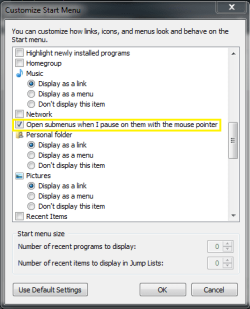
I found an option under properties for the start menu. If you click on customization in the properties box, and scroll down some ways, there is a box that has an option for opening sub-menus when you hover your mouse over them. Here is a picture:
start menu stuff.PNG
 

My Computer

Computer Manufacturer/Model Number
Hewlett Packard / Dv4-1120us
OS
Windows 7 Final
CPU
Intel Core 2 Duo @ 2.0Ghz
Memory
4GB DDR2 @ 800Mhz
Graphics Card(s)
Mobile Intel(R) 4 Series Express Chipset Family
Monitor(s) Displays
Generic PnP Monitor
Screen Resolution
1280 x 800
PSU
6-Cell Battery
Keyboard
Standard PS/2 Keyboard
Mouse
Synaptics PS/2 Port Touchpad
Internet Speed
Anywhere Between 11.0 and 48.0 Mbps
Back
Top