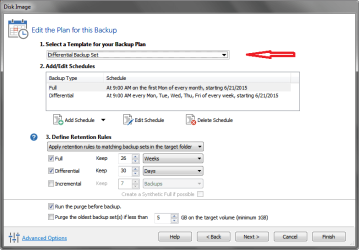
A big change in V6 is the "Edit the Plan for this Backup" screen - see screen prints below.
This is a significant change in V6, and may cause confusion, and testing is needed to make sure the settings work for each person's choices.
The first screen print is how I want MY backups created
- I use None for the template
- I have everything cleared for Retention Rules, so hopefully Macrium never deletes any of my existing backups
- I cleared "Run the purge before backup"
The second screen print is what i see if i select "Differential Backup Set" as the template.
- This is not what i want, so i won't use it.
I want to manually control how long and which of my backup images are kept.
I manually delete individual backup images as needed.
I use Full backups.
I played with Incrementals and Differentials years ago with Acronis, i decided to not use them.
I found i had to edit the Macrium defaults to have things set the way i want them, to be applied to all new backups i create.
There are a lot of settings available in the "Reflect Defaults".
I suggest anyone switching to V6 review and adjust the default settings as desired.
Yes, i did restore backup images created in V5 and V6 with Macrium V6.
This was the most important test for me - knowing V6 can restore V5 images.
I understand the reluctance to use a new version of an Imaging program.
I'm still using an old version of Acronis paid on my primary PC.
I've been using Acronis for so many years, i know it's reliable for me and how i use it ...
Now that i might add Win 10 to that box, i have to consider a newer Imaging program ...
I've been testing Macrium (v5) for a year or so on my test box, and now testing V6.
For 6 months or more i created Acronis and Macrium backups on my test box, just in case i ran into some gotcha where Macrium didn't work for me ...
What gave me the "kick in the butt" to start seriously testing Macrium on my Test box was when i added Win 8.x to the mix...
I wasn't really comfortable/confident that my old Acronis would work reliably with W8.x images...
I can't test every possibility for every option in V6.
Each person needs to test V6 for how they use Macrium to make sure the new version works as needed.
I know my situation with a triple boot PC is "not normal", and how i use imaging is probably "not normal".
But it's what i have and how i use it, and so far v6 works for me, better than v5!
I don't know if i ever used PE3 for recovery media, probably not...
For me the Recovery disc is "close enough" to the Windows Macrium UI that i can easily use it.
I normally use Windows Macrium to restore an image.
i.e. I can boot Win 8.1 or Win 7-32 to restore a Win 7-64 image...
It's only when i want to restore Win 8.1, i have to boot with Macrium Recovery "media", because Win 8.1 is my System/Active partition (contains boot code).
I mostly test new things in a Win 7 OS, so i often restore those OS's to back things out.
@Lady Fitzgerald
Also, are the predefined templates the same as using XML files to make an image?
No, not from what i've seen.
I can use backup XML files in v6 without using a template.
I don't know if you can use a backup XML file with a template, i haven't tried that.
Here's my screen print with NONE as the template, this is the way i want it.
 Here's a screen print where I selected "Differential Backup Set" as the template - this is NOT what i want.
Notice the difference in Retention Rules and Schedules ...