
Solved Problem after having cloned drive. (showing incorrect space on drive)

DarkRider2k3

New member
Local time
12:17 PM
Messages
12
First off PC specs:

AMD Phenom II x4 processor - 3.4 Ghz
8GB DDR3 RAM
Nvidia N460 GTX GFX card
240GB SanDisk SSD
Windows 7 64 bit

So here is the problem. I had a Western Digital 300 GB SATA drive that was starting to quit on me. So using an Ubuntu live CD I cloned the 300 gig drive onto the 240 gig drive (I only had used approx. 120 GB on the old drive so had LOTS of free space). It seemed to clone fine, and after removing the old drive the computer booted up fine (no errors, running super fast). Windows 7 also recognizes it as a solid state drive (it doesn't show up in the defrag list). However, I just noticed that it's showing the space on the drive as incorrect. It shows up as 126GB free of 297 GB (so pretty much the same size as the old drive). the motherboard's bios shows it correctly, and my linux CD shows it correct as well.

Any way I can fix this in windows without a reinstall of the OS?
 

My Computer My Computer

At a glance

Windows 7 Ultimate x64AMD Athlon x2 @ 3.2 Ghz4 GB DDR2Nvidia GeForce 8800 GTS
Computer Manufacturer/Model Number
Custom built computer
OS
Windows 7 Ultimate x64
CPU
AMD Athlon x2 @ 3.2 Ghz
Motherboard
DFI LanParty DK 790 FX
Memory
4 GB DDR2
Graphics Card(s)
Nvidia GeForce 8800 GTS
Sound Card
Onboard sound
Monitor(s) Displays
eMachines CRT monitor
Screen Resolution
1024x768
Hard Drives
Western Digital Raptor SATA @ 70 GB
Western Digital Caviar SATA @ 120 GB
Western Digital IDE Drive @ 160 GB
PSU
Thermaltake Modular PSU @ 600 watts
Case
X-Inifity case (it's older so don't know a model number)
Cooling
Lots of fans!
Keyboard
Logitech G15 Gaming Keyboard
Mouse
Basic corded optical mouse
Internet Speed
Verizon Fios 15 MB download, 5 (i think) MB upload
Maybe you can try to clone with Macrium free
Try loading defaults in BIOS
 

My Computer My Computer

At a glance

Windows 7 Ultimate x64 SP1AMD Phenom 2 1090T2x8GB Kingston HyperX Fury Black 1600Mhz Unga...MSI GTX 970 Gaming 4G
Computer type
PC/Desktop
Computer Manufacturer/Model Number
Custom Build
OS
Windows 7 Ultimate x64 SP1
CPU
AMD Phenom 2 1090T
Motherboard
Gigabyte GA-890FXA-UD5
Memory
2x8GB Kingston HyperX Fury Black 1600Mhz Unganged
Graphics Card(s)
MSI GTX 970 Gaming 4G
Sound Card
Realtek On-Board HD 7.1 Audio / Logitech G35
Monitor(s) Displays
3xAcer GD245HQ
Screen Resolution
1920x1080
Hard Drives
Samsung 850 Pro 512GB SSD - OS /
WD Caviar Black SATA 3 - 1 TBx2 - Dynamic RAID 0 /
WD Caviar Green SATA 2 - 640GBx2 - Dynamic RAID 0 /
WD Caviar Green SATA 2 - 640GB - Internal Backup /
Seagate Barracude SATA 3 - 3TB - External Backup/ Sync
PSU
HighPower 1000W
Case
Cooler Master HAF 932
Cooling
Noctua NH-D14
Keyboard
Logitech G19
Mouse
Logitech G500
Internet Speed
100/4 Mbit Cable (100GB quota)
Antivirus
ZoneAlarm Extreme Security / MBAM Pro / MBAE Free / SAS Free
Browser
IE 11 - Firefox - Chrome
Other Info
Logitech F710/ G27/ G940/ Z5500 // TrackIR 5 // Nvidia 3D Surround Vision
Post a snapshot of a fullscreen Disk Management Window:

To open Disk Management, press Windows key+r, type diskmgmt.msc and press Enter or click GO. Make it full screen. Expand the fields as necessary so everything can be seen.

Vista and Windows 7: How to Use the Snipping Tool in Vista - Vista Forums (says it's for Vista but also works with Win 7/8).

Once you have the image saved, click the Go Advanced button then click on the Paperclip Icon next to the Smiley Icon. In the Manage Attachments window, click Browse and navigate to where you saved the image and select it.
Click the Upload button.
Close the Manage Attachments window.
Click on the Paperclip Icon again and select the image you uploaded. It will be placed in your post.
 

My Computer My Computer

At a glance

Windows 10 Pro X64Intel Quad Core i7-4770 @ 3.4Ghz16.0GB PC3-12800 DDR3 SDRAM 1600 MHzIntel Integrated HD Graphics
Computer type
PC/Desktop
Computer Manufacturer/Model Number
Lenovo IdeaCenter 450
OS
Windows 10 Pro X64
CPU
Intel Quad Core i7-4770 @ 3.4Ghz
Memory
16.0GB PC3-12800 DDR3 SDRAM 1600 MHz
Graphics Card(s)
Intel Integrated HD Graphics
Sound Card
Realtek HD Audio
Monitor(s) Displays
HP 22" LCD
Screen Resolution
1680 x 1050
Hard Drives
250GB Samsung EVO SATA-3 SSD
2TB Seagate ST2000DM001 SATA-2
1.5TB Seagate ST3150041AS SATA
Keyboard
Dell USB
Mouse
Lenovo USB
Internet Speed
Cable via Road Runner 3MB Upload, 30MB Download
Antivirus
Windows Defender, MBAM Pro, MBAE
Browser
Seamonkey
Other Info
UEFI/GPT
PLDS DVD-RW DH16AERSH
disk management.PNG

The first drive is my old Western Digital drive. The second drive is my SSD drive.
 

My Computer My Computer

At a glance

Windows 7 Ultimate x64AMD Athlon x2 @ 3.2 Ghz4 GB DDR2Nvidia GeForce 8800 GTS
Computer Manufacturer/Model Number
Custom built computer
OS
Windows 7 Ultimate x64
CPU
AMD Athlon x2 @ 3.2 Ghz
Motherboard
DFI LanParty DK 790 FX
Memory
4 GB DDR2
Graphics Card(s)
Nvidia GeForce 8800 GTS
Sound Card
Onboard sound
Monitor(s) Displays
eMachines CRT monitor
Screen Resolution
1024x768
Hard Drives
Western Digital Raptor SATA @ 70 GB
Western Digital Caviar SATA @ 120 GB
Western Digital IDE Drive @ 160 GB
PSU
Thermaltake Modular PSU @ 600 watts
Case
X-Inifity case (it's older so don't know a model number)
Cooling
Lots of fans!
Keyboard
Logitech G15 Gaming Keyboard
Mouse
Basic corded optical mouse
Internet Speed
Verizon Fios 15 MB download, 5 (i think) MB upload
What is the model number of the SanDisk SSD? Sure looks like it's 300GB.

Try resetting the BIOS on the Lenovo.

Power down
Unplug from power
Remove the Cr2032 CMOS battery
Press and hold the power button for 10 seconds
Put the CMOS battery back in
Plug in the power
Power up

You should get a message about CMOS being corrupted, press F1 to continue, Press F2 to enter Setup.
Press F2.
Set date and time
Load defaults
Save and exit

See what the SSD looks like now.
 

My Computer My Computer

At a glance

Windows 10 Pro X64Intel Quad Core i7-4770 @ 3.4Ghz16.0GB PC3-12800 DDR3 SDRAM 1600 MHzIntel Integrated HD Graphics
Computer type
PC/Desktop
Computer Manufacturer/Model Number
Lenovo IdeaCenter 450
OS
Windows 10 Pro X64
CPU
Intel Quad Core i7-4770 @ 3.4Ghz
Memory
16.0GB PC3-12800 DDR3 SDRAM 1600 MHz
Graphics Card(s)
Intel Integrated HD Graphics
Sound Card
Realtek HD Audio
Monitor(s) Displays
HP 22" LCD
Screen Resolution
1680 x 1050
Hard Drives
250GB Samsung EVO SATA-3 SSD
2TB Seagate ST2000DM001 SATA-2
1.5TB Seagate ST3150041AS SATA
Keyboard
Dell USB
Mouse
Lenovo USB
Internet Speed
Cable via Road Runner 3MB Upload, 30MB Download
Antivirus
Windows Defender, MBAM Pro, MBAE
Browser
Seamonkey
Other Info
UEFI/GPT
PLDS DVD-RW DH16AERSH

My Computer My Computer

At a glance

Windows 7 x64 Ultimate and numerous virtual m...AMD FX-8350 Vishera 32nm Technology @ 4.2 GHz...G Skill 32.0GB Dual-Channel DDR3 @ 1204MHz (1...EVGA GeForce GTX 960 4GB Super SC ACX 2.0+ wi...
Computer type
PC/Desktop
Computer Manufacturer/Model Number
Bluethunder II
OS
Windows 7 x64 Ultimate and numerous virtual machines
CPU
AMD FX-8350 Vishera 32nm Technology @ 4.2 GHz default
Motherboard
ASUSTeK COMPUTER INC. SABERTOOTH 990FX R2.0 (Socket 942)
Memory
G Skill 32.0GB Dual-Channel DDR3 @ 1204MHz (11-13-13-31)
Graphics Card(s)
EVGA GeForce GTX 960 4GB Super SC ACX 2.0+ with Back Plate
Sound Card
Creative X-Fi Titanium HD Audiophile PCIe
Monitor(s) Displays
LG L227WTG x 3
Screen Resolution
1680 x 1050 16:10
Hard Drives
238GB Samsung850 PRO SATA Disk Device (SSD)
1863GB Seagate ST2000DM 001-1CH164 (SATA)
1397GB Seagate ST1500DL 003-9VT16L(SATA)
466GB Western Digital WDC WD50 03AZEX-00K1GA0 (SATA) x 2
932GB Seagate ST310005 28AS SATA Disk Device (SATA)
PSU
Enermax Revolution87+ 1000 Watts Gold Certified Power Supply
Case
Rocketfish Full Tower
Cooling
Cooler Master Hyper 212 EVO Push Pull 120mm Fans
Keyboard
Logitech K740
Mouse
Logitech G100S Laser LED + Logitech Gamepad F310
Internet Speed
500 mbs down and 30mbs up
Antivirus
Malwarebytes Pro & Avast and MSE on certain Virtual Machines
Browser
Firefox (Main) Chrome, Internet Explorer (Back Up)
Other Info
Logitech X 230 2.1 Stereo System and 5.1 Yamaha RX V2090
B&W DM6 Monitor Speakers + Center and Surround Speakers
Using Mouse Without Borders (Google it)

My Computer My Computer

At a glance

Windows 7 Ultimate x64AMD Athlon x2 @ 3.2 Ghz4 GB DDR2Nvidia GeForce 8800 GTS
Computer Manufacturer/Model Number
Custom built computer
OS
Windows 7 Ultimate x64
CPU
AMD Athlon x2 @ 3.2 Ghz
Motherboard
DFI LanParty DK 790 FX
Memory
4 GB DDR2
Graphics Card(s)
Nvidia GeForce 8800 GTS
Sound Card
Onboard sound
Monitor(s) Displays
eMachines CRT monitor
Screen Resolution
1024x768
Hard Drives
Western Digital Raptor SATA @ 70 GB
Western Digital Caviar SATA @ 120 GB
Western Digital IDE Drive @ 160 GB
PSU
Thermaltake Modular PSU @ 600 watts
Case
X-Inifity case (it's older so don't know a model number)
Cooling
Lots of fans!
Keyboard
Logitech G15 Gaming Keyboard
Mouse
Basic corded optical mouse
Internet Speed
Verizon Fios 15 MB download, 5 (i think) MB upload
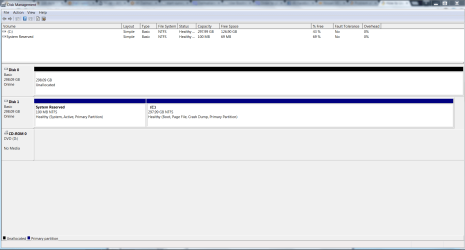
Disk Check finished (had to do the check upon windows startup). Don't know if it found any errors (it was on step 4 and no errors at that point), but booted back up into windows 7 and still reading incorrect..
 

My Computer My Computer

At a glance

Windows 7 Ultimate x64AMD Athlon x2 @ 3.2 Ghz4 GB DDR2Nvidia GeForce 8800 GTS
Computer Manufacturer/Model Number
Custom built computer
OS
Windows 7 Ultimate x64
CPU
AMD Athlon x2 @ 3.2 Ghz
Motherboard
DFI LanParty DK 790 FX
Memory
4 GB DDR2
Graphics Card(s)
Nvidia GeForce 8800 GTS
Sound Card
Onboard sound
Monitor(s) Displays
eMachines CRT monitor
Screen Resolution
1024x768
Hard Drives
Western Digital Raptor SATA @ 70 GB
Western Digital Caviar SATA @ 120 GB
Western Digital IDE Drive @ 160 GB
PSU
Thermaltake Modular PSU @ 600 watts
Case
X-Inifity case (it's older so don't know a model number)
Cooling
Lots of fans!
Keyboard
Logitech G15 Gaming Keyboard
Mouse
Basic corded optical mouse
Internet Speed
Verizon Fios 15 MB download, 5 (i think) MB upload
That is really weird. Try posting int he SanDisk SSD forum, see if anyone there has seen this before:

SanDisk® SSD
 

My Computer My Computer

At a glance

Windows 10 Pro X64Intel Quad Core i7-4770 @ 3.4Ghz16.0GB PC3-12800 DDR3 SDRAM 1600 MHzIntel Integrated HD Graphics
Computer type
PC/Desktop
Computer Manufacturer/Model Number
Lenovo IdeaCenter 450
OS
Windows 10 Pro X64
CPU
Intel Quad Core i7-4770 @ 3.4Ghz
Memory
16.0GB PC3-12800 DDR3 SDRAM 1600 MHz
Graphics Card(s)
Intel Integrated HD Graphics
Sound Card
Realtek HD Audio
Monitor(s) Displays
HP 22" LCD
Screen Resolution
1680 x 1050
Hard Drives
250GB Samsung EVO SATA-3 SSD
2TB Seagate ST2000DM001 SATA-2
1.5TB Seagate ST3150041AS SATA
Keyboard
Dell USB
Mouse
Lenovo USB
Internet Speed
Cable via Road Runner 3MB Upload, 30MB Download
Antivirus
Windows Defender, MBAM Pro, MBAE
Browser
Seamonkey
Other Info
UEFI/GPT
PLDS DVD-RW DH16AERSH
Did you try booting with only SSD connected? Did you try loading BIOS defaults as I suggested in post 2?
 

My Computer My Computer

At a glance

Windows 7 Ultimate x64 SP1AMD Phenom 2 1090T2x8GB Kingston HyperX Fury Black 1600Mhz Unga...MSI GTX 970 Gaming 4G
Computer type
PC/Desktop
Computer Manufacturer/Model Number
Custom Build
OS
Windows 7 Ultimate x64 SP1
CPU
AMD Phenom 2 1090T
Motherboard
Gigabyte GA-890FXA-UD5
Memory
2x8GB Kingston HyperX Fury Black 1600Mhz Unganged
Graphics Card(s)
MSI GTX 970 Gaming 4G
Sound Card
Realtek On-Board HD 7.1 Audio / Logitech G35
Monitor(s) Displays
3xAcer GD245HQ
Screen Resolution
1920x1080
Hard Drives
Samsung 850 Pro 512GB SSD - OS /
WD Caviar Black SATA 3 - 1 TBx2 - Dynamic RAID 0 /
WD Caviar Green SATA 2 - 640GBx2 - Dynamic RAID 0 /
WD Caviar Green SATA 2 - 640GB - Internal Backup /
Seagate Barracude SATA 3 - 3TB - External Backup/ Sync
PSU
HighPower 1000W
Case
Cooler Master HAF 932
Cooling
Noctua NH-D14
Keyboard
Logitech G19
Mouse
Logitech G500
Internet Speed
100/4 Mbit Cable (100GB quota)
Antivirus
ZoneAlarm Extreme Security / MBAM Pro / MBAE Free / SAS Free
Browser
IE 11 - Firefox - Chrome
Other Info
Logitech F710/ G27/ G940/ Z5500 // TrackIR 5 // Nvidia 3D Surround Vision
yup tried both. same result (minus my second hard drive now not showing up)
 

My Computer My Computer

At a glance

Windows 7 Ultimate x64AMD Athlon x2 @ 3.2 Ghz4 GB DDR2Nvidia GeForce 8800 GTS
Computer Manufacturer/Model Number
Custom built computer
OS
Windows 7 Ultimate x64
CPU
AMD Athlon x2 @ 3.2 Ghz
Motherboard
DFI LanParty DK 790 FX
Memory
4 GB DDR2
Graphics Card(s)
Nvidia GeForce 8800 GTS
Sound Card
Onboard sound
Monitor(s) Displays
eMachines CRT monitor
Screen Resolution
1024x768
Hard Drives
Western Digital Raptor SATA @ 70 GB
Western Digital Caviar SATA @ 120 GB
Western Digital IDE Drive @ 160 GB
PSU
Thermaltake Modular PSU @ 600 watts
Case
X-Inifity case (it's older so don't know a model number)
Cooling
Lots of fans!
Keyboard
Logitech G15 Gaming Keyboard
Mouse
Basic corded optical mouse
Internet Speed
Verizon Fios 15 MB download, 5 (i think) MB upload
So here is the problem. I had a Western Digital 300 GB SATA drive that was starting to quit on me. So using an Ubuntu live CD I cloned the 300 gig drive onto the 240 gig drive (I only had used approx. 120 GB on the old drive so had LOTS of free space).

However, I just noticed that it's showing the space on the drive as incorrect. It shows up as 126GB free of 297 GB (so pretty much the same size as the old drive). the motherboard's bios shows it correctly, and my linux CD shows it correct as well.

Any way I can fix this in windows without a reinstall of the OS?
As was already suggested, your use of Ubunto Live CD is probably at fault as the "culprit" here. And the likely best solution would be to re-clone from your original spinner to the SSD, using Macrium Reflect assuming you have the original spinner in its original format. Of course if your DISK0 is that spinner, now wiped clean, well it looks like this re-clone using Macrium option is no longer an option.

From your DISKMGMT screenshot we can see the inconsistent numbers, where it shows (a) 43% free (which does correspond to your approximate in-use number on the original 300GB spinner vs. the new 240GB capacity of the SSD), and yet (b) also shows 298GB of capacity which is clearly just a copied value from the old spinner MBR rather than a newly set value from the new SSD.

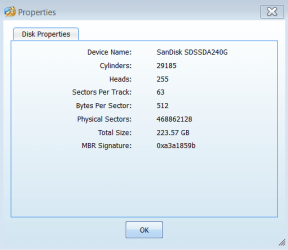
I'd like to see what Partition Wizard shows as "Disk Properties" (right-click on the SSD in the GUI, and select "Properties"). Same for "Partition properties" (right-click on the C-partition in the GUI, and select "Properties").

Now both Macrium Reflect and Partition Wizard have standalone boot CD versions of themselves, so you don't need to be booted to Windows and running the products under Windows in order to use them. In fact using the standalone boot CD versions of either product allows you to perform all functions fully and completely right then and there, instead of forcing a re-boot from Windows to complete any functions which require that you not be operating under Windows at the moment so that the C-partition can be adjusted as required for your operations.

Partition Wizard has "copy partition" functions, from a current allocated partition to an unallocated free space on the same or other drive. And Macrium Reflect can also "clone partition" to achieve the same "copy" result.

So, I'd use your now totally free spinner as an intermediate storage "backup" drive, to perform an "out and back" sequence of COPY PARTITION operations (probably using Partition Wizard) for BOTH partitions currently on your SSD (a) from SSD (as mal-partitioned as it appears to be, with a larger capacity showing in DISKMGMT than it truly has) to spinner using Partition Wizard, (b) then delete all partitions on the SSD using Partition Wizard, then (a) copy BOTH copied partitions back from spinner to SSD. The SSD should now show as 240GB, not 300GB in its capacity.

Then confirm with Partition Wizard that the 100MB "system reserved" partition is still marked "active" (since that's where Boot Manager lives). You should now be able to boot to the SSD, and use Partition Wizard to delete the temporary copied partitions on your spinner, to make it re-available for use as a second internal drive (and ready for any partitioning you might want to do).

I've never used Partition Wizard's "Rebuild MBR" function, but that may be all it takes to recreate the correct "total disk capacity" value which is currently incorrect as shown by DISKMGMT. But I can't be sure.

WORD TO THE WISE: you should have a reliable "backup" (i.e. "system image" taken with Macrium Reflect, to a usable backup drive... like an external USB 3.0 drive), anytime you perform "radical" operations such as you're now about to try. You don't want to require a full reinstall if something goes wrong, although your heart was in the best place. Having a proper "system image" backup is your insurance against this, also providing an opportunity to have a second try at the recovery you're attempting.
 

My Computer My Computer

At a glance

Windows 7 Pro x64 (1), Win7 Pro X64 (2)i5-3350p 3.1Ghz/6MB-cache (1); E8400 3.0Ghz/6...8GB PC3-12800 DDR3 (1); 4GB PC3-10600 DDR3 (2)ATI HD7750 (1), (see TV cards); ATI R7 250 (2)
Computer type
PC/Desktop
Computer Manufacturer/Model Number
Home-built, two systems (1) and (2)
OS
Windows 7 Pro x64 (1), Win7 Pro X64 (2)
CPU
i5-3350p 3.1Ghz/6MB-cache (1); E8400 3.0Ghz/6MB-cache (2)
Motherboard
ASUS P8Z77-V Pro (1); ASUS P5Q3 (2)
Memory
8GB PC3-12800 DDR3 (1); 4GB PC3-10600 DDR3 (2)
Graphics Card(s)
ATI HD7750 (1), (see TV cards); ATI R7 250 (2)
Sound Card
Realtek ALC892 HD Audio (1); Realtek ALC1200 HD Audio (2)
Monitor(s) Displays
Eizo HD2441W LCD, Eizo S2433W (1); Eizo 24" S2433W (2)
Screen Resolution
1920x1200, 1920x1200 (1); 1920x1200 (2)
Hard Drives
(1) 1TB SATA-II (7200RPM), 2x2TB SATA-III (7200RPM), 250GB SATA-III (10000RPM) for OS; 2x2TB external USB 3.0

(2) 320GB SATA-II (7200RPM), 750GB SATA-II (7200RPM), 150GB SATA-II (10000RPM) for OS; 2TB external USB 3.0
PSU
Nesteq ECS-6001 600W (1); Nesteq ECS-5001 500W (2)
Case
Acousti-Case 360 (1) and (2)
Cooling
Noctua NH-U12P SE2 for CPU, 2x120mm case fans (1) and (2)
Keyboard
IBM PS/2 (1) and (2)
Mouse
Logitech MX Revolution wireless (1); Microsoft wired (2)
Internet Speed
100mbps down / 10mbps up
Antivirus
Microsoft Security Essentials; Malwarebyte Anti-Malware Pro
Browser
Firefox
Other Info
Ceton InfiniTV 4-tuner cablecard-enabled TV card as well as Hauppauge HVR-2250 OTA/ATSC 2-tuner TV card in (1), running under Win7 WMC
Before I go ahead and shut down windows to do all this here is the screenshot of the drive in partition wizard:

disk properties.PNG
 

My Computer My Computer

At a glance

Windows 7 Ultimate x64AMD Athlon x2 @ 3.2 Ghz4 GB DDR2Nvidia GeForce 8800 GTS
Computer Manufacturer/Model Number
Custom built computer
OS
Windows 7 Ultimate x64
CPU
AMD Athlon x2 @ 3.2 Ghz
Motherboard
DFI LanParty DK 790 FX
Memory
4 GB DDR2
Graphics Card(s)
Nvidia GeForce 8800 GTS
Sound Card
Onboard sound
Monitor(s) Displays
eMachines CRT monitor
Screen Resolution
1024x768
Hard Drives
Western Digital Raptor SATA @ 70 GB
Western Digital Caviar SATA @ 120 GB
Western Digital IDE Drive @ 160 GB
PSU
Thermaltake Modular PSU @ 600 watts
Case
X-Inifity case (it's older so don't know a model number)
Cooling
Lots of fans!
Keyboard
Logitech G15 Gaming Keyboard
Mouse
Basic corded optical mouse
Internet Speed
Verizon Fios 15 MB download, 5 (i think) MB upload
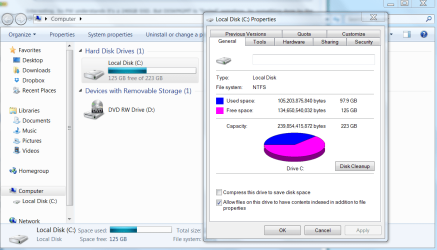
Before I go ahead and shut down windows to do all this here is the screenshot of the drive in partition wizard:

View attachment 363784
Interesting. So PW understands it's a 240GB SSD. But DISKMGMT is "fooled" somehow, by something done by the Ubunto copying.

Anyway, I suspect the copy-out and copy-back with PW should cure things. Good luck.
 

My Computer My Computer

At a glance

Windows 7 Pro x64 (1), Win7 Pro X64 (2)i5-3350p 3.1Ghz/6MB-cache (1); E8400 3.0Ghz/6...8GB PC3-12800 DDR3 (1); 4GB PC3-10600 DDR3 (2)ATI HD7750 (1), (see TV cards); ATI R7 250 (2)
Computer type
PC/Desktop
Computer Manufacturer/Model Number
Home-built, two systems (1) and (2)
OS
Windows 7 Pro x64 (1), Win7 Pro X64 (2)
CPU
i5-3350p 3.1Ghz/6MB-cache (1); E8400 3.0Ghz/6MB-cache (2)
Motherboard
ASUS P8Z77-V Pro (1); ASUS P5Q3 (2)
Memory
8GB PC3-12800 DDR3 (1); 4GB PC3-10600 DDR3 (2)
Graphics Card(s)
ATI HD7750 (1), (see TV cards); ATI R7 250 (2)
Sound Card
Realtek ALC892 HD Audio (1); Realtek ALC1200 HD Audio (2)
Monitor(s) Displays
Eizo HD2441W LCD, Eizo S2433W (1); Eizo 24" S2433W (2)
Screen Resolution
1920x1200, 1920x1200 (1); 1920x1200 (2)
Hard Drives
(1) 1TB SATA-II (7200RPM), 2x2TB SATA-III (7200RPM), 250GB SATA-III (10000RPM) for OS; 2x2TB external USB 3.0

(2) 320GB SATA-II (7200RPM), 750GB SATA-II (7200RPM), 150GB SATA-II (10000RPM) for OS; 2TB external USB 3.0
PSU
Nesteq ECS-6001 600W (1); Nesteq ECS-5001 500W (2)
Case
Acousti-Case 360 (1) and (2)
Cooling
Noctua NH-U12P SE2 for CPU, 2x120mm case fans (1) and (2)
Keyboard
IBM PS/2 (1) and (2)
Mouse
Logitech MX Revolution wireless (1); Microsoft wired (2)
Internet Speed
100mbps down / 10mbps up
Antivirus
Microsoft Security Essentials; Malwarebyte Anti-Malware Pro
Browser
Firefox
Other Info
Ceton InfiniTV 4-tuner cablecard-enabled TV card as well as Hauppauge HVR-2250 OTA/ATSC 2-tuner TV card in (1), running under Win7 WMC
dsperber that worked!

Windows is now showing correctly!

drive_fixed.PNG

Thank you all for the help!! Problem is solved!

edit:

to note for others, I used the "out and back" sequence. Rebuild MBR did not solve the issue.
 

My Computer My Computer

At a glance

Windows 7 Ultimate x64AMD Athlon x2 @ 3.2 Ghz4 GB DDR2Nvidia GeForce 8800 GTS
Computer Manufacturer/Model Number
Custom built computer
OS
Windows 7 Ultimate x64
CPU
AMD Athlon x2 @ 3.2 Ghz
Motherboard
DFI LanParty DK 790 FX
Memory
4 GB DDR2
Graphics Card(s)
Nvidia GeForce 8800 GTS
Sound Card
Onboard sound
Monitor(s) Displays
eMachines CRT monitor
Screen Resolution
1024x768
Hard Drives
Western Digital Raptor SATA @ 70 GB
Western Digital Caviar SATA @ 120 GB
Western Digital IDE Drive @ 160 GB
PSU
Thermaltake Modular PSU @ 600 watts
Case
X-Inifity case (it's older so don't know a model number)
Cooling
Lots of fans!
Keyboard
Logitech G15 Gaming Keyboard
Mouse
Basic corded optical mouse
Internet Speed
Verizon Fios 15 MB download, 5 (i think) MB upload
Terrific!! Glad it all got resolved.

Partition Wizard is a terrific tool, as is Macrium Reflect. They do have some overlapping functionality, but independently they're both superb products.

Don't know what you plan to do with the spinner now, but as I mentioned earlier if you don't already have an existing external USB 3.0 backup drive and a regimen of automatic "system image" backups (say taken every week), you really might consider using a portion of the spinner (say to a partition that you create on it with PW) for use as as a target "backup drive" for Macrium Reflect "system image" backups, scheduled to run automatically each week (or more frequently if it's critical).

Note that the non-free version of Macrium Reflect also has "folder/file DATA backup" capability, in addition to the "system image" functionality that is part of the free version. Taking regular folder/file DATA backup (say monthly FULL and daily INCREMENTAL) guarantees you'll never lose any data, and you could set up the same suggested "backup partition" on the spinner for the target of these DATA backups. This would put that spinner to good use, and also protect you fully against future disasters so that you would never be exposed to irreplaceable data loss.


Anyway, current case closed. You have emerged victorious.
 

My Computer My Computer

At a glance

Windows 7 Pro x64 (1), Win7 Pro X64 (2)i5-3350p 3.1Ghz/6MB-cache (1); E8400 3.0Ghz/6...8GB PC3-12800 DDR3 (1); 4GB PC3-10600 DDR3 (2)ATI HD7750 (1), (see TV cards); ATI R7 250 (2)
Computer type
PC/Desktop
Computer Manufacturer/Model Number
Home-built, two systems (1) and (2)
OS
Windows 7 Pro x64 (1), Win7 Pro X64 (2)
CPU
i5-3350p 3.1Ghz/6MB-cache (1); E8400 3.0Ghz/6MB-cache (2)
Motherboard
ASUS P8Z77-V Pro (1); ASUS P5Q3 (2)
Memory
8GB PC3-12800 DDR3 (1); 4GB PC3-10600 DDR3 (2)
Graphics Card(s)
ATI HD7750 (1), (see TV cards); ATI R7 250 (2)
Sound Card
Realtek ALC892 HD Audio (1); Realtek ALC1200 HD Audio (2)
Monitor(s) Displays
Eizo HD2441W LCD, Eizo S2433W (1); Eizo 24" S2433W (2)
Screen Resolution
1920x1200, 1920x1200 (1); 1920x1200 (2)
Hard Drives
(1) 1TB SATA-II (7200RPM), 2x2TB SATA-III (7200RPM), 250GB SATA-III (10000RPM) for OS; 2x2TB external USB 3.0

(2) 320GB SATA-II (7200RPM), 750GB SATA-II (7200RPM), 150GB SATA-II (10000RPM) for OS; 2TB external USB 3.0
PSU
Nesteq ECS-6001 600W (1); Nesteq ECS-5001 500W (2)
Case
Acousti-Case 360 (1) and (2)
Cooling
Noctua NH-U12P SE2 for CPU, 2x120mm case fans (1) and (2)
Keyboard
IBM PS/2 (1) and (2)
Mouse
Logitech MX Revolution wireless (1); Microsoft wired (2)
Internet Speed
100mbps down / 10mbps up
Antivirus
Microsoft Security Essentials; Malwarebyte Anti-Malware Pro
Browser
Firefox
Other Info
Ceton InfiniTV 4-tuner cablecard-enabled TV card as well as Hauppauge HVR-2250 OTA/ATSC 2-tuner TV card in (1), running under Win7 WMC
Is Marcum Reflect better to use for backups then windows backup? I currently have windows backup set to backup to that old drive...
 

My Computer My Computer

At a glance

Windows 7 Ultimate x64AMD Athlon x2 @ 3.2 Ghz4 GB DDR2Nvidia GeForce 8800 GTS
Computer Manufacturer/Model Number
Custom built computer
OS
Windows 7 Ultimate x64
CPU
AMD Athlon x2 @ 3.2 Ghz
Motherboard
DFI LanParty DK 790 FX
Memory
4 GB DDR2
Graphics Card(s)
Nvidia GeForce 8800 GTS
Sound Card
Onboard sound
Monitor(s) Displays
eMachines CRT monitor
Screen Resolution
1024x768
Hard Drives
Western Digital Raptor SATA @ 70 GB
Western Digital Caviar SATA @ 120 GB
Western Digital IDE Drive @ 160 GB
PSU
Thermaltake Modular PSU @ 600 watts
Case
X-Inifity case (it's older so don't know a model number)
Cooling
Lots of fans!
Keyboard
Logitech G15 Gaming Keyboard
Mouse
Basic corded optical mouse
Internet Speed
Verizon Fios 15 MB download, 5 (i think) MB upload
Is Macrium Reflect better to use for backups then windows backup? I currently have windows backup set to backup to that old drive...
No comparison.

For example, Windows can only take store "system image" per target drive, and it is in the root directory of the drive. Macrium Reflect takes its "system image" backup as individual files, stored in any folder you want, with as many versions/generations as you want, with "automatic pruning" of older generations (either by maximum count or maximum age) when you create new generations.

Plus, Macrium is a superb software company that stands behind their superb "active" product and provides superb support if you need it.

Plus, for the modest price of the non-free version you also get "selective folder/file DATA backup/restore" capability which really is a whole different kind of backup functionality that is invaluable.
 

My Computer My Computer

At a glance

Windows 7 Pro x64 (1), Win7 Pro X64 (2)i5-3350p 3.1Ghz/6MB-cache (1); E8400 3.0Ghz/6...8GB PC3-12800 DDR3 (1); 4GB PC3-10600 DDR3 (2)ATI HD7750 (1), (see TV cards); ATI R7 250 (2)
Computer type
PC/Desktop
Computer Manufacturer/Model Number
Home-built, two systems (1) and (2)
OS
Windows 7 Pro x64 (1), Win7 Pro X64 (2)
CPU
i5-3350p 3.1Ghz/6MB-cache (1); E8400 3.0Ghz/6MB-cache (2)
Motherboard
ASUS P8Z77-V Pro (1); ASUS P5Q3 (2)
Memory
8GB PC3-12800 DDR3 (1); 4GB PC3-10600 DDR3 (2)
Graphics Card(s)
ATI HD7750 (1), (see TV cards); ATI R7 250 (2)
Sound Card
Realtek ALC892 HD Audio (1); Realtek ALC1200 HD Audio (2)
Monitor(s) Displays
Eizo HD2441W LCD, Eizo S2433W (1); Eizo 24" S2433W (2)
Screen Resolution
1920x1200, 1920x1200 (1); 1920x1200 (2)
Hard Drives
(1) 1TB SATA-II (7200RPM), 2x2TB SATA-III (7200RPM), 250GB SATA-III (10000RPM) for OS; 2x2TB external USB 3.0

(2) 320GB SATA-II (7200RPM), 750GB SATA-II (7200RPM), 150GB SATA-II (10000RPM) for OS; 2TB external USB 3.0
PSU
Nesteq ECS-6001 600W (1); Nesteq ECS-5001 500W (2)
Case
Acousti-Case 360 (1) and (2)
Cooling
Noctua NH-U12P SE2 for CPU, 2x120mm case fans (1) and (2)
Keyboard
IBM PS/2 (1) and (2)
Mouse
Logitech MX Revolution wireless (1); Microsoft wired (2)
Internet Speed
100mbps down / 10mbps up
Antivirus
Microsoft Security Essentials; Malwarebyte Anti-Malware Pro
Browser
Firefox
Other Info
Ceton InfiniTV 4-tuner cablecard-enabled TV card as well as Hauppauge HVR-2250 OTA/ATSC 2-tuner TV card in (1), running under Win7 WMC
That's awesome to know! Thanks a lot for the help!!
 

My Computer My Computer

At a glance

Windows 7 Ultimate x64AMD Athlon x2 @ 3.2 Ghz4 GB DDR2Nvidia GeForce 8800 GTS
Computer Manufacturer/Model Number
Custom built computer
OS
Windows 7 Ultimate x64
CPU
AMD Athlon x2 @ 3.2 Ghz
Motherboard
DFI LanParty DK 790 FX
Memory
4 GB DDR2
Graphics Card(s)
Nvidia GeForce 8800 GTS
Sound Card
Onboard sound
Monitor(s) Displays
eMachines CRT monitor
Screen Resolution
1024x768
Hard Drives
Western Digital Raptor SATA @ 70 GB
Western Digital Caviar SATA @ 120 GB
Western Digital IDE Drive @ 160 GB
PSU
Thermaltake Modular PSU @ 600 watts
Case
X-Inifity case (it's older so don't know a model number)
Cooling
Lots of fans!
Keyboard
Logitech G15 Gaming Keyboard
Mouse
Basic corded optical mouse
Internet Speed
Verizon Fios 15 MB download, 5 (i think) MB upload
Back
Top