Solved Need help with Paragon software. Messed up my drive.

Bob Marley

New member
Local time
11:18 AM
Messages
6
Hello,

I'm using Paragon hard disk manager 15
I was merging 3 partitions into one. 2 were empty and the third was full of very important data (not OS).
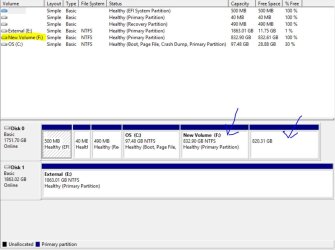
I was asked to reboot so I authorized it. The operation went on and then windows was booted. But obviously something went wrong. The hard disk when viewed through windows appears empty and all the data is gone. See screenshots below. We're talking about the last two partitions which are in red. They were supposed to be one partition and the size should be 830GB.
Please help me!

http://s9.postimg.org/mvrtg4cof/image.jpg

http://s11.postimg.org/dr1k25ioz/image.jpg

http://s2.postimg.org/9f5nkj6x5/image.jpg

It says at the end that a restart is required but I restarted and nothing happened.
 

My Computer My Computer

At a glance

Windows 8.1 x64
Computer type
PC/Desktop
OS
Windows 8.1 x64
Did you try restarting a second time?
 

My Computer My Computer

At a glance

Windows 7 Ultimate x64 SP1AMD Phenom 2 1090T2x8GB Kingston HyperX Fury Black 1600Mhz Unga...MSI GTX 970 Gaming 4G
Computer type
PC/Desktop
Computer Manufacturer/Model Number
Custom Build
OS
Windows 7 Ultimate x64 SP1
CPU
AMD Phenom 2 1090T
Motherboard
Gigabyte GA-890FXA-UD5
Memory
2x8GB Kingston HyperX Fury Black 1600Mhz Unganged
Graphics Card(s)
MSI GTX 970 Gaming 4G
Sound Card
Realtek On-Board HD 7.1 Audio / Logitech G35
Monitor(s) Displays
3xAcer GD245HQ
Screen Resolution
1920x1080
Hard Drives
Samsung 850 Pro 512GB SSD - OS /
WD Caviar Black SATA 3 - 1 TBx2 - Dynamic RAID 0 /
WD Caviar Green SATA 2 - 640GBx2 - Dynamic RAID 0 /
WD Caviar Green SATA 2 - 640GB - Internal Backup /
Seagate Barracude SATA 3 - 3TB - External Backup/ Sync
PSU
HighPower 1000W
Case
Cooler Master HAF 932
Cooling
Noctua NH-D14
Keyboard
Logitech G19
Mouse
Logitech G500
Internet Speed
100/4 Mbit Cable (100GB quota)
Antivirus
ZoneAlarm Extreme Security / MBAM Pro / MBAE Free / SAS Free
Browser
IE 11 - Firefox - Chrome
Other Info
Logitech F710/ G27/ G940/ Z5500 // TrackIR 5 // Nvidia 3D Surround Vision
Yes, I restarted a few times.
The partition table seems to have gotten messed up. I'm wondering how to repair it now...
 

My Computer My Computer

At a glance

Windows 8.1 x64
Computer type
PC/Desktop
OS
Windows 8.1 x64
Be patient and don't do anything hasty.

I will PM an experienced person (he may not be checking this section).
 

My Computer My Computer

At a glance

Windows 7 Ultimate x64 SP1AMD Phenom 2 1090T2x8GB Kingston HyperX Fury Black 1600Mhz Unga...MSI GTX 970 Gaming 4G
Computer type
PC/Desktop
Computer Manufacturer/Model Number
Custom Build
OS
Windows 7 Ultimate x64 SP1
CPU
AMD Phenom 2 1090T
Motherboard
Gigabyte GA-890FXA-UD5
Memory
2x8GB Kingston HyperX Fury Black 1600Mhz Unganged
Graphics Card(s)
MSI GTX 970 Gaming 4G
Sound Card
Realtek On-Board HD 7.1 Audio / Logitech G35
Monitor(s) Displays
3xAcer GD245HQ
Screen Resolution
1920x1080
Hard Drives
Samsung 850 Pro 512GB SSD - OS /
WD Caviar Black SATA 3 - 1 TBx2 - Dynamic RAID 0 /
WD Caviar Green SATA 2 - 640GBx2 - Dynamic RAID 0 /
WD Caviar Green SATA 2 - 640GB - Internal Backup /
Seagate Barracude SATA 3 - 3TB - External Backup/ Sync
PSU
HighPower 1000W
Case
Cooler Master HAF 932
Cooling
Noctua NH-D14
Keyboard
Logitech G19
Mouse
Logitech G500
Internet Speed
100/4 Mbit Cable (100GB quota)
Antivirus
ZoneAlarm Extreme Security / MBAM Pro / MBAE Free / SAS Free
Browser
IE 11 - Firefox - Chrome
Other Info
Logitech F710/ G27/ G940/ Z5500 // TrackIR 5 // Nvidia 3D Surround Vision

My Computers My Computers

  • At a glance

    7 X64i5 84002x8gb 3200mhz
    Computer type
    PC/Desktop
    OS
    7 X64
    CPU
    i5 8400
    Motherboard
    gigabyte b365m ds3h
    Memory
    2x8gb 3200mhz
    Hard Drives
    various
    PSU
    pure power 11 400w cm
    Case
    Coolermaster
    Cooling
    cryorig m9i
  • At a glance

    7x64g54008gb ddr4 2400
    Computer type
    PC/Desktop
    OS
    7x64
    CPU
    g5400
    Motherboard
    ga b365m ds3h
    Memory
    8gb ddr4 2400
    PSU
    xfx pro 450w
I was merging 3 partitions into one. 2 were empty and the third was full of very important data (not OS).
It's too late for you, but -maybe- for other people... Disk partitions, in Windows... The basic types are: Primary and Extended (Logical). The Extended partition is, like, a container that sits within the Primary (& in turn, logical drives are containers in the Extended). Usually there will be, there is, a limit or four (4) Primaries...
Code:
https://en.wikipedia.org/wiki/Disk_partitioning
Before moving, resizing, merging or splitting partitions - you gotta make sure that the disks are defragmented, no special Services /tasks are running /scheduled, and so on... Basically (next time, heh), take it one operation at a time - only! Mitigate the risk(s). :)

Unfortunately, like people said: there's probably isn't much /anything else that you can do, other than try to undelete /recover the data; & on top of that, because physical sectors were moved, rewritten /deleted /whatever - your chances are slim, next-to-none. Whatever is there, to get picked up... & nothing much -else- that you'll be able to do (about it, meh).

Only thing is, might wanna try a couple /few different recovery software programs!.. Because some will have different algorithms... The most important thing will be to use a different /external drive to write the (recovery) info and try to IMMEDIATELY disable /stop /remove any-and-all startup programs, stop whatever Services you can - disable the Windows Defender, your antivirus... Whatever you can do, the better! =)

Edit: ^^ You know, anything that's writing to the drives... There's a LOT that has to be done, but for example:

AND, actually, if you can unplug the drive and use it w/another Windows (system) OS drive - to recover it that way... Might be the best way 2 go.
IDK why I hadn't said this first!! ^^
 

My Computer My Computer

At a glance

Windows 7 Professional x64 Service Pack 1i7-3770 Ivy, MSI OC genie OC'd (default)Vengeance 2x4GB 2133MHz (OC'd)GTX 650 Gainward
Computer type
PC/Desktop
Computer Manufacturer/Model Number
Custom
OS
Windows 7 Professional x64 Service Pack 1
CPU
i7-3770 Ivy, MSI OC genie OC'd (default)
Motherboard
Z68A-G43 (G3), MSI
Memory
Vengeance 2x4GB 2133MHz (OC'd)
Graphics Card(s)
GTX 650 Gainward
Monitor(s) Displays
BenQ E2200HD
Screen Resolution
1920x1080
Hard Drives
WD 1TB 64MB sATA; LC-Power LC-PRO-25WU; IT-350SA
PSU
LC7600v2.3
Case
ALTO winwin.rs/
Cooling
Stock / standard
Keyboard
Logitech Alto
Mouse
Genius DeathTaker
Internet Speed
25 (megabits / second) = 3125 KBps = (25.600/2.048)
Antivirus
Comodo
Browser
Mozilla
Other Info
http://valid.canardpc.com/mcdty0
MiniTool Power Data Recovery free, along with its Partition management/recovery might be able to recover some of your important files [and folders] -- up to 1GB. Pro version will do its best, unlimited GB recovering what is recoverable. If your data is very valuable, you may have to bring your computer to a restore specialist somewhere near you.
 

My Computer My Computer

At a glance

Windows 7 Professional 64-bitDesktop i5; Acers i5 & i7desktop 16GB; 1 Acer 8GB & 1 Acer 16GB
Computer type
PC/Desktop
Computer Manufacturer/Model Number
Antec desktop; Acer Aspire laptops
OS
Windows 7 Professional 64-bit
CPU
Desktop i5; Acers i5 & i7
Memory
desktop 16GB; 1 Acer 8GB & 1 Acer 16GB
Hard Drives
1TB split into 2 equal partitions [OS and data] usable by RJS
Internet Speed
AT&T DSL
Browser
FF, GChrome, msIE
Other Info
Windows 7 Firewall, Emsisoft AM/AV, MSE [scan-only], SpywareBlaster, Ruiware/BillP combine
If your data is very valuable, you may have to bring your computer to a restore specialist somewhere near you.
And/or invest in - something like - the Ontrack EasyRecovery Professional; which is RLY good (in many /most cases. :))

Edit: PM me, if you see this, you're seemingly not allowing sending of messages.
 

My Computer My Computer

At a glance

Windows 7 Professional x64 Service Pack 1i7-3770 Ivy, MSI OC genie OC'd (default)Vengeance 2x4GB 2133MHz (OC'd)GTX 650 Gainward
Computer type
PC/Desktop
Computer Manufacturer/Model Number
Custom
OS
Windows 7 Professional x64 Service Pack 1
CPU
i7-3770 Ivy, MSI OC genie OC'd (default)
Motherboard
Z68A-G43 (G3), MSI
Memory
Vengeance 2x4GB 2133MHz (OC'd)
Graphics Card(s)
GTX 650 Gainward
Monitor(s) Displays
BenQ E2200HD
Screen Resolution
1920x1080
Hard Drives
WD 1TB 64MB sATA; LC-Power LC-PRO-25WU; IT-350SA
PSU
LC7600v2.3
Case
ALTO winwin.rs/
Cooling
Stock / standard
Keyboard
Logitech Alto
Mouse
Genius DeathTaker
Internet Speed
25 (megabits / second) = 3125 KBps = (25.600/2.048)
Antivirus
Comodo
Browser
Mozilla
Other Info
http://valid.canardpc.com/mcdty0
For a better understanding of your problem, I would suggest that you post the following screenshots.

1. Screenshot of Windows Disk Management showing that drive. (Please remove all other external drives, pendrives, Card Readers, USB Printers - in short anything connected to the USB ports except your USB Keyboard and USB mouse)

Please read through the following tutorial and adhere to all points therein to upload an untruncated WDM screenshot.

http://www.sevenforums.com/tutorials/274797-disk-management-post-screen-capture-image.html

Also upload all your screenshots to Seven Forum Servers and not to any third-party servers.

http://www.sevenforums.com/tutorials/9733-screenshots-files-upload-post-seven-forums.html

2. A screenshot how your drive appears in Partition Wizard. Download and install Partition Wizard Free Edition Version 9 from here Best Free Partition Manager for Windows | MiniTool Partition Free
 

My Computer My Computer

At a glance

Windows 7 Home Premium 32 bit
OS
Windows 7 Home Premium 32 bit
Edit: PM me, if you see this, you're seemingly not allowing sending of messages.

New members can't send and receive PM unless an Admin set them up.
 

My Computer My Computer

At a glance

Windows 7 Ultimate x64 SP1AMD Phenom 2 1090T2x8GB Kingston HyperX Fury Black 1600Mhz Unga...MSI GTX 970 Gaming 4G
Computer type
PC/Desktop
Computer Manufacturer/Model Number
Custom Build
OS
Windows 7 Ultimate x64 SP1
CPU
AMD Phenom 2 1090T
Motherboard
Gigabyte GA-890FXA-UD5
Memory
2x8GB Kingston HyperX Fury Black 1600Mhz Unganged
Graphics Card(s)
MSI GTX 970 Gaming 4G
Sound Card
Realtek On-Board HD 7.1 Audio / Logitech G35
Monitor(s) Displays
3xAcer GD245HQ
Screen Resolution
1920x1080
Hard Drives
Samsung 850 Pro 512GB SSD - OS /
WD Caviar Black SATA 3 - 1 TBx2 - Dynamic RAID 0 /
WD Caviar Green SATA 2 - 640GBx2 - Dynamic RAID 0 /
WD Caviar Green SATA 2 - 640GB - Internal Backup /
Seagate Barracude SATA 3 - 3TB - External Backup/ Sync
PSU
HighPower 1000W
Case
Cooler Master HAF 932
Cooling
Noctua NH-D14
Keyboard
Logitech G19
Mouse
Logitech G500
Internet Speed
100/4 Mbit Cable (100GB quota)
Antivirus
ZoneAlarm Extreme Security / MBAM Pro / MBAE Free / SAS Free
Browser
IE 11 - Firefox - Chrome
Other Info
Logitech F710/ G27/ G940/ Z5500 // TrackIR 5 // Nvidia 3D Surround Vision
SIW2,

I can't undelete, it doesn't allow it. Partitions are not deleted, just invalid.

jumanji,

Here's a screenshot of disk manager:

*Size of DISK0 is actually 1TB

4.JPG
 

My Computer My Computer

At a glance

Windows 8.1 x64
Computer type
PC/Desktop
OS
Windows 8.1 x64
You will not believe this!!!!!!!
I deleted the bigger invalid partition which was 830GB. The partitions appeared exactly as they were before I merged them with the only difference that the 820GB was still invalid.
Then I restarted and an automatic repair by Paragon launched at boot... AND FIXED THE WHOLE THING!!! Everything is in its place, nothing missing. There were literally tears of joy in my eyes!
 

My Computer My Computer

At a glance

Windows 8.1 x64
Computer type
PC/Desktop
OS
Windows 8.1 x64
That is good to know. Well done. Please mark the thread as solved and it may help others.

You have a GPT drive. Please save all the important sectors as shown by bootice and it may help restore the Protective MBR, GPT header, and Partition Table in case of any partition related problems. In your case you may additionally need to save the backup sectors n ( last sector which is the backup of the GPT Header at LBA1) and n-4 ( the backup of the partition table at LBA2.)

http://www.sevenforums.com/performa...ary-mbr-logical-partitions-3.html#post2693984

Saving and restoring with bootice http://www.sevenforums.com/hardware-devices/310295-lost-partitions.html#post2584426

( You have to download your OS bit version of bootice )
 

My Computer My Computer

At a glance

Windows 7 Home Premium 32 bit
OS
Windows 7 Home Premium 32 bit
1. Made backups (as much as I can considering the huge size)
2. Reinstalled Paragon to make sure there are no corrupted files
3. Merged 12GB partition to its left-standing 820GB - SUCCESS!
4. Attempted to merge 350 MB partition to its right-standing 832 GB - Failed - Left-standing partition needs to have enough disk space to contain data of right one. Probably the reason for the previous drama.
5. Merged 350 MB one to left-standing OS partition - SUCCESS!

Thanks for everybody's help!!!!!!!
 

My Computer My Computer

At a glance

Windows 8.1 x64
Computer type
PC/Desktop
OS
Windows 8.1 x64
OK, here's a weird one for you:
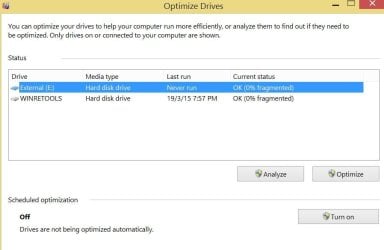
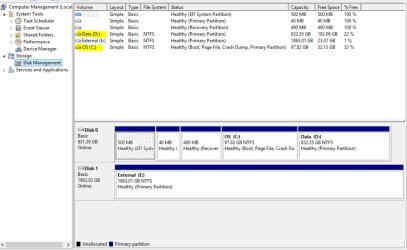
Drives are not showing up in windows 8.1 defragmenter ever since I merged them. When I launched optimizer it said something about drives being optimized by another program (which is a message that I have never seen before), and I clicked on discarding those settings and managing them through windows. I can see them perfectly fine in Ashampoo win optimizer and can defragment them, just not in windows.
Screenshots:

Drive Optimizer:

1.JPG

Disk Management:

2.JPG

Paragon:

3.JPG


I have no idea what caused this. The only thing that I can think of is that I deleted a folder which was generated by the merge process and it contained the information from the merged drives (which were empty). This folder was locked but I unlocked it and deleted it. Later I noticed that in the recycle bin I had with that folder a folder named System Volume Information, which was not visible when I deleted those folders, and I figured it's information about the partitions before they were merged so I don't need it and deleted it. I don't know if that has anything to do with this.
 

My Computer My Computer

At a glance

Windows 8.1 x64
Computer type
PC/Desktop
OS
Windows 8.1 x64
I think meddling with System Volume Information can often lead to reaching for either one's restorable OS image, or, for the repair/restore/reinstall Windows OS DVD.
 

My Computer My Computer

At a glance

Windows 7 Professional 64-bitDesktop i5; Acers i5 & i7desktop 16GB; 1 Acer 8GB & 1 Acer 16GB
Computer type
PC/Desktop
Computer Manufacturer/Model Number
Antec desktop; Acer Aspire laptops
OS
Windows 7 Professional 64-bit
CPU
Desktop i5; Acers i5 & i7
Memory
desktop 16GB; 1 Acer 8GB & 1 Acer 16GB
Hard Drives
1TB split into 2 equal partitions [OS and data] usable by RJS
Internet Speed
AT&T DSL
Browser
FF, GChrome, msIE
Other Info
Windows 7 Firewall, Emsisoft AM/AV, MSE [scan-only], SpywareBlaster, Ruiware/BillP combine
Back
Top