Poor Performance and driver failing on 970

kory360

New member
Local time
4:50 PM
Messages
56
Over the last couple of weeks my GPU has been performing way below what it should(like 10ish fps on a game I used to run at over 200). I am also getting spikes where everything goes slow, audio messes up sounding staticy and slowed down,, lasts for about 10 -60 seconds sometimes resulting with a message that my driver failed but recovered it happens even when doing nothing high performance like watching YouTube videos with no other programs open. Also my start up seems to be slowed down a lot, it used to take about 5 seconds now it takes about 30. Also no BSoD yet. Also card has not been overclocked at all.

Here is a list of what I have tried:
-clean install of old drivers(tried 3 different ones[352.86/350.12/347.88])
-Turned Link state power management off in advanced power settings
-hardware acceleration off in chrome
-did a system restore to before the problem began
-clean start up

when I was in safe mode and when i had the driver uninstalled I noticed no problems although it is hard to tell like that so I could be wrong.

I read that perhaps it is a voltage problem (P00 power state)that can be fixed by changing the bios with a bios tweaker but I have no idea how to do that.

files that showed up on the driver failed and recovered message
WD-20150603-0523.dmp
Sysdata.xml
WerInternalMetadata.Xml
 

My Computer My Computer

Computer type
PC/Desktop
Computer Manufacturer/Model Number
Custom Built
OS
Windows 7 Home Premium 64bit
CPU
Intel Core i3 CPU 550 @3.20Ghz
Graphics Card(s)
Ati Radeon HD 5700 Series
Browser
Mozilla Firefox
Try loading defaults in BIOS.

Also:
Graphic Card Driver Clean Installation (Belongs to MistUnleashed):
1.Run the Guru3D Display Driver Removal Tool: Display Driver Uninstaller Download version 15.3.0.0 Display Driver Uninstaller Download version 15.3.0.2
2.Download CCleaner here (CCleaner - Download) and run both the Cleaner and the Registry Cleaner to remove left-over keys.
3.Go into C:\Program Files & C:\Program Files (x86) & C:\ProgramData and delete any leftover Nvidia files.
4.Disable automatic driver installation: https://support.microsoft.com/en-us/kb/2500967
5.Restart Computer.
6.After restart go to: Drivers - Download NVIDIA Drivers and install the latest Nvidia Package (Including the 3D Vision Drivers - Install it all). Drivers - Download NVIDIA Drivers
7.Re-enable the automatic driver installation: https://support.microsoft.com/en-us/kb/2500967
8.Run CCleaner again (as instructed in Step 2).
9.Restart Computer.
 

My Computer My Computer

Computer type
PC/Desktop
Computer Manufacturer/Model Number
Custom Build
OS
Windows 7 Ultimate x64 SP1
CPU
AMD Phenom 2 1090T
Motherboard
Gigabyte GA-890FXA-UD5
Memory
2x8GB Kingston HyperX Fury Black 1600Mhz Unganged
Graphics Card(s)
MSI GTX 970 Gaming 4G
Sound Card
Realtek On-Board HD 7.1 Audio / Logitech G35
Monitor(s) Displays
3xAcer GD245HQ
Screen Resolution
1920x1080
Hard Drives
Samsung 850 Pro 512GB SSD - OS /
WD Caviar Black SATA 3 - 1 TBx2 - Dynamic RAID 0 /
WD Caviar Green SATA 2 - 640GBx2 - Dynamic RAID 0 /
WD Caviar Green SATA 2 - 640GB - Internal Backup /
Seagate Barracude SATA 3 - 3TB - External Backup/ Sync
PSU
HighPower 1000W
Case
Cooler Master HAF 932
Cooling
Noctua NH-D14
Keyboard
Logitech G19
Mouse
Logitech G500
Internet Speed
100/4 Mbit Cable (100GB quota)
Antivirus
ZoneAlarm Extreme Security / MBAM Pro / MBAE Free / SAS Free
Browser
IE 11 - Firefox - Chrome
Other Info
Logitech F710/ G27/ G940/ Z5500 // TrackIR 5 // Nvidia 3D Surround Vision
that seemed to help alot but I am still getting the performance spikes that mess. Also I know it is not an issue with heat, dust or virus's.
 

My Computer My Computer

Computer type
PC/Desktop
Computer Manufacturer/Model Number
Custom Built
OS
Windows 7 Home Premium 64bit
CPU
Intel Core i3 CPU 550 @3.20Ghz
Graphics Card(s)
Ati Radeon HD 5700 Series
Browser
Mozilla Firefox
It was better for about a day now it's back to just as bad as before, also I got a bsod on startup today.
 

My Computer My Computer

Computer type
PC/Desktop
Computer Manufacturer/Model Number
Custom Built
OS
Windows 7 Home Premium 64bit
CPU
Intel Core i3 CPU 550 @3.20Ghz
Graphics Card(s)
Ati Radeon HD 5700 Series
Browser
Mozilla Firefox

My Computer My Computer

Computer type
PC/Desktop
Computer Manufacturer/Model Number
Custom Build
OS
W7 Pro x64 SP1 | W10 Pro IP x64 | W8.1 Pro x64 VM | Linux Mint VM
CPU
i7-4790k @ 4GHz (4.4GHz Boost)
Motherboard
ASUS Sabertooth Z87 (BIOS Rev 2004)
Memory
16GB DDR3 Kingston HyperX Fury @ 1600MHz CL 9-9-9-27
Graphics Card(s)
EVGA GTX 980 Classified
Sound Card
Realtek Onboard
Monitor(s) Displays
Samsung S27D390
Screen Resolution
1920 x 1080
Hard Drives
240GB Intel 520 Series SSD |
Samsung 850 EVO 120GB SSD |
2TB WD Caviar Black |
2TB WD Caviar Green
PSU
Corsair HX850-80 Gold Modular
Case
Cooler Master Silencio 650
Cooling
Corsair H80i w/2 x Corsair SP120 | 2 x 120mm Noctua NF-S12B
Keyboard
Microsoft Sidewinder X4
Mouse
Gigabyte M6900 optical
Internet Speed
152mb
Antivirus
F-Secure
Browser
Firefox 38.0
Other Info
Backup Rig: Win 7 Pro 64-bit | AMD A10-5800k | ASUS F2A85-V Pro | 8GB Samsung DDR3 @1600MHz | 120GB Toshiba SDD | 2TB Seagate HDD | Cooler Master Silencio 550
The problem seems to have gotten worse I had one of the spikes that lasted over 30 mins, intell I restarted. Also it seems to be messing with my monitor the logo for my monitor and its menus have a corrupted look to them as in its all white squares and unreadable text.
 

My Computer My Computer

Computer type
PC/Desktop
Computer Manufacturer/Model Number
Custom Built
OS
Windows 7 Home Premium 64bit
CPU
Intel Core i3 CPU 550 @3.20Ghz
Graphics Card(s)
Ati Radeon HD 5700 Series
Browser
Mozilla Firefox
Are you monitoring temps by the way? Get HWInfo and check the temps for both GPU and CPU.
 

My Computer My Computer

Computer type
PC/Desktop
Computer Manufacturer/Model Number
Custom Build
OS
Windows 7 Ultimate x64 SP1
CPU
AMD Phenom 2 1090T
Motherboard
Gigabyte GA-890FXA-UD5
Memory
2x8GB Kingston HyperX Fury Black 1600Mhz Unganged
Graphics Card(s)
MSI GTX 970 Gaming 4G
Sound Card
Realtek On-Board HD 7.1 Audio / Logitech G35
Monitor(s) Displays
3xAcer GD245HQ
Screen Resolution
1920x1080
Hard Drives
Samsung 850 Pro 512GB SSD - OS /
WD Caviar Black SATA 3 - 1 TBx2 - Dynamic RAID 0 /
WD Caviar Green SATA 2 - 640GBx2 - Dynamic RAID 0 /
WD Caviar Green SATA 2 - 640GB - Internal Backup /
Seagate Barracude SATA 3 - 3TB - External Backup/ Sync
PSU
HighPower 1000W
Case
Cooler Master HAF 932
Cooling
Noctua NH-D14
Keyboard
Logitech G19
Mouse
Logitech G500
Internet Speed
100/4 Mbit Cable (100GB quota)
Antivirus
ZoneAlarm Extreme Security / MBAM Pro / MBAE Free / SAS Free
Browser
IE 11 - Firefox - Chrome
Other Info
Logitech F710/ G27/ G940/ Z5500 // TrackIR 5 // Nvidia 3D Surround Vision
I am monitoring temps and they seem good, I'm at about 35ish for everything other than GPU which is about 45ish. Also how do I load defaults in bios?
 

My Computer My Computer

Computer type
PC/Desktop
Computer Manufacturer/Model Number
Custom Built
OS
Windows 7 Home Premium 64bit
CPU
Intel Core i3 CPU 550 @3.20Ghz
Graphics Card(s)
Ati Radeon HD 5700 Series
Browser
Mozilla Firefox
Temps are good, yes.

Enter BIOS as usual and it should be either in the first screen or the exit menu. If you have changed boot orders and other settings yourself, then those will revert to factory defaults. So you will have to re-do them, takes 5 minutes tops.

Also while you are in BIOS, try:
- disable C1E and Intel SpeedStep (IEST) and see if that will help, turn them back to defaults if it doesn't help.

Are you on a high performance power plan? And is minimum processor state at 100%?

Also try turning off Core parking (may or may not help, have to see):

Enter the following two commands at the command prompt (run as administrator) and press enter after each: (you may need to restart for changes to take effect)
powercfg -attributes SUB_PROCESSOR 0cc5b647-c1df-4637-891a-dec35c318583 -ATTRIB_HIDE
powercfg -attributes SUB_PROCESSOR ea062031-0e34-4ff1-9b6d-eb1059334028 -ATTRIB_HIDE

Then open power options, under processor change min/max cores to 100%.
 
Last edited:

My Computer My Computer

Computer type
PC/Desktop
Computer Manufacturer/Model Number
Custom Build
OS
Windows 7 Ultimate x64 SP1
CPU
AMD Phenom 2 1090T
Motherboard
Gigabyte GA-890FXA-UD5
Memory
2x8GB Kingston HyperX Fury Black 1600Mhz Unganged
Graphics Card(s)
MSI GTX 970 Gaming 4G
Sound Card
Realtek On-Board HD 7.1 Audio / Logitech G35
Monitor(s) Displays
3xAcer GD245HQ
Screen Resolution
1920x1080
Hard Drives
Samsung 850 Pro 512GB SSD - OS /
WD Caviar Black SATA 3 - 1 TBx2 - Dynamic RAID 0 /
WD Caviar Green SATA 2 - 640GBx2 - Dynamic RAID 0 /
WD Caviar Green SATA 2 - 640GB - Internal Backup /
Seagate Barracude SATA 3 - 3TB - External Backup/ Sync
PSU
HighPower 1000W
Case
Cooler Master HAF 932
Cooling
Noctua NH-D14
Keyboard
Logitech G19
Mouse
Logitech G500
Internet Speed
100/4 Mbit Cable (100GB quota)
Antivirus
ZoneAlarm Extreme Security / MBAM Pro / MBAE Free / SAS Free
Browser
IE 11 - Firefox - Chrome
Other Info
Logitech F710/ G27/ G940/ Z5500 // TrackIR 5 // Nvidia 3D Surround Vision
The dump files from the BSOD may give some idea of what the problem is but seeing as the request for the logs was ignored then who knows.
 

My Computer My Computer

Computer type
PC/Desktop
Computer Manufacturer/Model Number
Custom Build
OS
W7 Pro x64 SP1 | W10 Pro IP x64 | W8.1 Pro x64 VM | Linux Mint VM
CPU
i7-4790k @ 4GHz (4.4GHz Boost)
Motherboard
ASUS Sabertooth Z87 (BIOS Rev 2004)
Memory
16GB DDR3 Kingston HyperX Fury @ 1600MHz CL 9-9-9-27
Graphics Card(s)
EVGA GTX 980 Classified
Sound Card
Realtek Onboard
Monitor(s) Displays
Samsung S27D390
Screen Resolution
1920 x 1080
Hard Drives
240GB Intel 520 Series SSD |
Samsung 850 EVO 120GB SSD |
2TB WD Caviar Black |
2TB WD Caviar Green
PSU
Corsair HX850-80 Gold Modular
Case
Cooler Master Silencio 650
Cooling
Corsair H80i w/2 x Corsair SP120 | 2 x 120mm Noctua NF-S12B
Keyboard
Microsoft Sidewinder X4
Mouse
Gigabyte M6900 optical
Internet Speed
152mb
Antivirus
F-Secure
Browser
Firefox 38.0
Other Info
Backup Rig: Win 7 Pro 64-bit | AMD A10-5800k | ASUS F2A85-V Pro | 8GB Samsung DDR3 @1600MHz | 120GB Toshiba SDD | 2TB Seagate HDD | Cooler Master Silencio 550
Here is the dump file, so far I have only had the one BSoD and that was on start up, most of the time it is just bad performance and the spikes that make it unusable.
 

Attachments

My Computer My Computer

Computer type
PC/Desktop
Computer Manufacturer/Model Number
Custom Built
OS
Windows 7 Home Premium 64bit
CPU
Intel Core i3 CPU 550 @3.20Ghz
Graphics Card(s)
Ati Radeon HD 5700 Series
Browser
Mozilla Firefox
There are no dump files in your logs, can you check to see if you're set to record Small Memory Dumps in the event of any subsequent BSODs.

  1. Open Advanced System Settings
  2. Click on Settings in Startup & Recovery
  3. Make sure both boxes indicated below are checked
  4. In the dropdown box ensure you're set to record Small Memory Dumps
picture.php

Do you use nVidia HD Audio at all?
Code:
Event[35723]:
  Log Name: System
  Source: Service Control Manager
  Date: 2015-06-26T06:05:38.583
  Event ID: 7040
  Task: N/A
  Level: Information
  Opcode: N/A
  Keyword: Classic
  User: S-1-5-18
  User Name: NT AUTHORITY\SYSTEM
  Computer: Kory-PC
  Description: 
The start type of the Service for NVIDIA High Definition Audio Driver service was changed from disabled to demand start.

Event[35724]:
  Log Name: System
  Source: Microsoft-Windows-UserPnp
  Date: 2015-06-26T06:05:39.129
  Event ID: 20003
  Task: N/A
  Level: Information
  Opcode: Info
  Keyword: N/A
  User: S-1-5-18
  User Name: NT AUTHORITY\SYSTEM
  Computer: Kory-PC
  Description: 
Driver Management has concluded the process to add Service NVHDA for Device Instance ID HDAUDIO\FUNC_01&VEN_10DE&DEV_0071&SUBSYS_14623160&REV_1001\5&285FD0CA&0&0001 with the following status: 0.

Event[35725]:
  Log Name: System
  Source: Microsoft-Windows-UserPnp
  Date: 2015-06-26T06:05:39.456
  Event ID: 20001
  Task: N/A
  Level: Information
  Opcode: Info
  Keyword: N/A
  User: S-1-5-18
  User Name: NT AUTHORITY\SYSTEM
  Computer: Kory-PC
  Description: 
Driver Management concluded the process to install driver FileRepository\nvhda.inf_amd64_neutral_e740823a2a518865\nvhda.inf for Device Instance ID HDAUDIO\FUNC_01&VEN_10DE&DEV_0071&SUBSYS_14623160&REV_1001\5&285FD0CA&0&0001 with the following status: 0x0.
 

My Computer My Computer

Computer type
PC/Desktop
Computer Manufacturer/Model Number
Custom Build
OS
W7 Pro x64 SP1 | W10 Pro IP x64 | W8.1 Pro x64 VM | Linux Mint VM
CPU
i7-4790k @ 4GHz (4.4GHz Boost)
Motherboard
ASUS Sabertooth Z87 (BIOS Rev 2004)
Memory
16GB DDR3 Kingston HyperX Fury @ 1600MHz CL 9-9-9-27
Graphics Card(s)
EVGA GTX 980 Classified
Sound Card
Realtek Onboard
Monitor(s) Displays
Samsung S27D390
Screen Resolution
1920 x 1080
Hard Drives
240GB Intel 520 Series SSD |
Samsung 850 EVO 120GB SSD |
2TB WD Caviar Black |
2TB WD Caviar Green
PSU
Corsair HX850-80 Gold Modular
Case
Cooler Master Silencio 650
Cooling
Corsair H80i w/2 x Corsair SP120 | 2 x 120mm Noctua NF-S12B
Keyboard
Microsoft Sidewinder X4
Mouse
Gigabyte M6900 optical
Internet Speed
152mb
Antivirus
F-Secure
Browser
Firefox 38.0
Other Info
Backup Rig: Win 7 Pro 64-bit | AMD A10-5800k | ASUS F2A85-V Pro | 8GB Samsung DDR3 @1600MHz | 120GB Toshiba SDD | 2TB Seagate HDD | Cooler Master Silencio 550
OK I've set up for small memory dumps if I get another blue screen. Yes I use Nvidea HD audio, should I not? Last time i didn't have it installed I got no audio for my speakers, is there a work around?
 

My Computer My Computer

Computer type
PC/Desktop
Computer Manufacturer/Model Number
Custom Built
OS
Windows 7 Home Premium 64bit
CPU
Intel Core i3 CPU 550 @3.20Ghz
Graphics Card(s)
Ati Radeon HD 5700 Series
Browser
Mozilla Firefox
It's not a problem if you're using it, I was just wondering whether it was conflicting with the onboard sound drivers. Just to rule it out could you use the onboard sound temporarily?
 

My Computer My Computer

Computer type
PC/Desktop
Computer Manufacturer/Model Number
Custom Build
OS
W7 Pro x64 SP1 | W10 Pro IP x64 | W8.1 Pro x64 VM | Linux Mint VM
CPU
i7-4790k @ 4GHz (4.4GHz Boost)
Motherboard
ASUS Sabertooth Z87 (BIOS Rev 2004)
Memory
16GB DDR3 Kingston HyperX Fury @ 1600MHz CL 9-9-9-27
Graphics Card(s)
EVGA GTX 980 Classified
Sound Card
Realtek Onboard
Monitor(s) Displays
Samsung S27D390
Screen Resolution
1920 x 1080
Hard Drives
240GB Intel 520 Series SSD |
Samsung 850 EVO 120GB SSD |
2TB WD Caviar Black |
2TB WD Caviar Green
PSU
Corsair HX850-80 Gold Modular
Case
Cooler Master Silencio 650
Cooling
Corsair H80i w/2 x Corsair SP120 | 2 x 120mm Noctua NF-S12B
Keyboard
Microsoft Sidewinder X4
Mouse
Gigabyte M6900 optical
Internet Speed
152mb
Antivirus
F-Secure
Browser
Firefox 38.0
Other Info
Backup Rig: Win 7 Pro 64-bit | AMD A10-5800k | ASUS F2A85-V Pro | 8GB Samsung DDR3 @1600MHz | 120GB Toshiba SDD | 2TB Seagate HDD | Cooler Master Silencio 550
I don't know how to switch to onboard sound.
 

My Computer My Computer

Computer type
PC/Desktop
Computer Manufacturer/Model Number
Custom Built
OS
Windows 7 Home Premium 64bit
CPU
Intel Core i3 CPU 550 @3.20Ghz
Graphics Card(s)
Ati Radeon HD 5700 Series
Browser
Mozilla Firefox
OK Gokay I reset my bios to default, disabled C1E and SpeedStep. I am on high performance power plan, my minimum/maximum processor state are 100%(when I can see them I have to put in the command prompt lines every time I restart), and I have two options for core parking under processor power management core parking min cores and max cores both I set to 0%.
 

My Computer My Computer

Computer type
PC/Desktop
Computer Manufacturer/Model Number
Custom Built
OS
Windows 7 Home Premium 64bit
CPU
Intel Core i3 CPU 550 @3.20Ghz
Graphics Card(s)
Ati Radeon HD 5700 Series
Browser
Mozilla Firefox

My Computer My Computer

Computer type
PC/Desktop
Computer Manufacturer/Model Number
Home made Desktop
OS
Windows 10 Pro. 64/ version 1709 Windows 7 Pro/64
CPU
Intel i7-6800K @ 4.3
Motherboard
ASUS X-99 Deluxe II
Memory
Corsair Platinum 16 gig @2400
Graphics Card(s)
EVGA GTX 1070 OC
Monitor(s) Displays
Asus 27" LED LCD/VE278Q
Screen Resolution
1920-1080 or 1280-720 HDMI
Hard Drives
INTEL SSD 730-240 Gb Sata 3.0/
PSU
EVGA Platium 1200W
Case
Phanteks Luxe Tempered Glass 8 fans/ one radiator
Cooling
XSPC/ Water Cooled CPU
Keyboard
Das 4 Professional
Mouse
Logitech M705/MX Anywhere 2-S
Internet Speed
100 mbits
Antivirus
Microsoft Security Essentials/ Malwarebytes Premium 3.0/ SAS
Browser
I.E. 11 default/Firefox/ ISP Time Warner Cable/Spectrum
Other Info
LG BluRay Burner/
Sound system-KLipsch-THX/
Icy Dock ssd Hot Swap bays.
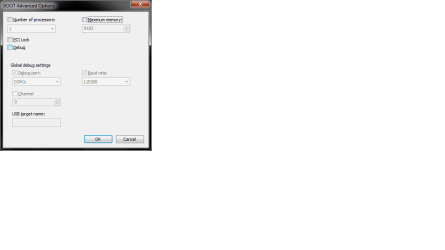
You mean like this?
 

Attachments

  • BAO01.png
    BAO01.png
    9.9 KB · Views: 0

My Computer My Computer

Computer type
PC/Desktop
Computer Manufacturer/Model Number
Custom Built
OS
Windows 7 Home Premium 64bit
CPU
Intel Core i3 CPU 550 @3.20Ghz
Graphics Card(s)
Ati Radeon HD 5700 Series
Browser
Mozilla Firefox
OK Gokay I reset my bios to default, disabled C1E and SpeedStep. I am on high performance power plan, my minimum/maximum processor state are 100%(when I can see them I have to put in the command prompt lines every time I restart), and I have two options for core parking under processor power management core parking min cores and max cores both I set to 0%.

Processor state should be there by default. The commands I gave are to show cores options. Anyway :)

Min/max cores, set to 100%. (Default for min is 10%, max is 100%)
 

My Computer My Computer

Computer type
PC/Desktop
Computer Manufacturer/Model Number
Custom Build
OS
Windows 7 Ultimate x64 SP1
CPU
AMD Phenom 2 1090T
Motherboard
Gigabyte GA-890FXA-UD5
Memory
2x8GB Kingston HyperX Fury Black 1600Mhz Unganged
Graphics Card(s)
MSI GTX 970 Gaming 4G
Sound Card
Realtek On-Board HD 7.1 Audio / Logitech G35
Monitor(s) Displays
3xAcer GD245HQ
Screen Resolution
1920x1080
Hard Drives
Samsung 850 Pro 512GB SSD - OS /
WD Caviar Black SATA 3 - 1 TBx2 - Dynamic RAID 0 /
WD Caviar Green SATA 2 - 640GBx2 - Dynamic RAID 0 /
WD Caviar Green SATA 2 - 640GB - Internal Backup /
Seagate Barracude SATA 3 - 3TB - External Backup/ Sync
PSU
HighPower 1000W
Case
Cooler Master HAF 932
Cooling
Noctua NH-D14
Keyboard
Logitech G19
Mouse
Logitech G500
Internet Speed
100/4 Mbit Cable (100GB quota)
Antivirus
ZoneAlarm Extreme Security / MBAM Pro / MBAE Free / SAS Free
Browser
IE 11 - Firefox - Chrome
Other Info
Logitech F710/ G27/ G940/ Z5500 // TrackIR 5 // Nvidia 3D Surround Vision
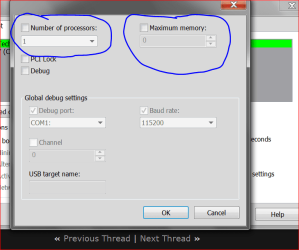
They are not there by default and I don't know why, but I did set them both to 100% so hopefully that stuck. Unfortunately the problem persists. Can you tell me how to switch to onboard sound? when i uninstall Nvideas hd audio i just have nothing coming from my speaker(headset still works). Also in Advanced boot options should I change number of processors from 1 to 4?
 

My Computer My Computer

Computer type
PC/Desktop
Computer Manufacturer/Model Number
Custom Built
OS
Windows 7 Home Premium 64bit
CPU
Intel Core i3 CPU 550 @3.20Ghz
Graphics Card(s)
Ati Radeon HD 5700 Series
Browser
Mozilla Firefox
Back
Top