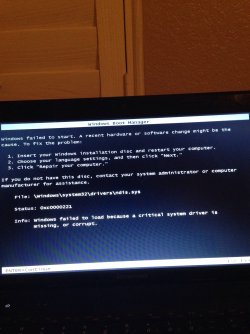
Ndis.sys is corrupted or missing, can't boot windows at all

Nightdash

New member
Local time
8:49 AM
Messages
93
i tried everything I can find. The bootrec in command prompt, chkdsk, startup repair, no system restore possible, safe mode Dosent work. Please help I try to start windows and I get the following picture everytime.
 

Attachments

  • image.jpg
    image.jpg
    244.9 KB · Views: 1

My Computer My Computer

Computer type
Laptop
Computer Manufacturer/Model Number
Lenovo G470
OS
Windows 7 Home Premium x64
CPU
Intel 2nd Gen 2.30GHz
Graphics Card(s)
Intell Graphics 3000
Screen Resolution
1366x700
Internet Speed
30mbs
Antivirus
Norton 360
Browser
Google Chrome

My Computer My Computer

Computer type
PC/Desktop
Computer Manufacturer/Model Number
Custom Build
OS
Windows 7 Ultimate x64 SP1
CPU
AMD Phenom 2 1090T
Motherboard
Gigabyte GA-890FXA-UD5
Memory
2x8GB Kingston HyperX Fury Black 1600Mhz Unganged
Graphics Card(s)
MSI GTX 970 Gaming 4G
Sound Card
Realtek On-Board HD 7.1 Audio / Logitech G35
Monitor(s) Displays
3xAcer GD245HQ
Screen Resolution
1920x1080
Hard Drives
Samsung 850 Pro 512GB SSD - OS /
WD Caviar Black SATA 3 - 1 TBx2 - Dynamic RAID 0 /
WD Caviar Green SATA 2 - 640GBx2 - Dynamic RAID 0 /
WD Caviar Green SATA 2 - 640GB - Internal Backup /
Seagate Barracude SATA 3 - 3TB - External Backup/ Sync
PSU
HighPower 1000W
Case
Cooler Master HAF 932
Cooling
Noctua NH-D14
Keyboard
Logitech G19
Mouse
Logitech G500
Internet Speed
100/4 Mbit Cable (100GB quota)
Antivirus
ZoneAlarm Extreme Security / MBAM Pro / MBAE Free / SAS Free
Browser
IE 11 - Firefox - Chrome
Other Info
Logitech F710/ G27/ G940/ Z5500 // TrackIR 5 // Nvidia 3D Surround Vision

My Computer My Computer

Computer type
Laptop
Computer Manufacturer/Model Number
Lenovo G470
OS
Windows 7 Home Premium x64
CPU
Intel 2nd Gen 2.30GHz
Graphics Card(s)
Intell Graphics 3000
Screen Resolution
1366x700
Internet Speed
30mbs
Antivirus
Norton 360
Browser
Google Chrome
For an update, I somehow got my computer to boot up by getting the ndis.sys file from another pc and making a copy on mine. I can now boot up to safe mode normally. Although, normal mode, my desktop is corrupted. I ran sfc /scannow and it says it can not fix the corrupted stuff. Ran chkdsk, it fixed some sectors, not everything though. Any one know why on earth the sfc /scannow can not fix the corrupted files?
 

My Computer My Computer

Computer type
Laptop
Computer Manufacturer/Model Number
Lenovo G470
OS
Windows 7 Home Premium x64
CPU
Intel 2nd Gen 2.30GHz
Graphics Card(s)
Intell Graphics 3000
Screen Resolution
1366x700
Internet Speed
30mbs
Antivirus
Norton 360
Browser
Google Chrome

My Computer My Computer

Computer type
PC/Desktop
Computer Manufacturer/Model Number
Custom Build
OS
Windows 7 Ultimate x64 SP1
CPU
AMD Phenom 2 1090T
Motherboard
Gigabyte GA-890FXA-UD5
Memory
2x8GB Kingston HyperX Fury Black 1600Mhz Unganged
Graphics Card(s)
MSI GTX 970 Gaming 4G
Sound Card
Realtek On-Board HD 7.1 Audio / Logitech G35
Monitor(s) Displays
3xAcer GD245HQ
Screen Resolution
1920x1080
Hard Drives
Samsung 850 Pro 512GB SSD - OS /
WD Caviar Black SATA 3 - 1 TBx2 - Dynamic RAID 0 /
WD Caviar Green SATA 2 - 640GBx2 - Dynamic RAID 0 /
WD Caviar Green SATA 2 - 640GB - Internal Backup /
Seagate Barracude SATA 3 - 3TB - External Backup/ Sync
PSU
HighPower 1000W
Case
Cooler Master HAF 932
Cooling
Noctua NH-D14
Keyboard
Logitech G19
Mouse
Logitech G500
Internet Speed
100/4 Mbit Cable (100GB quota)
Antivirus
ZoneAlarm Extreme Security / MBAM Pro / MBAE Free / SAS Free
Browser
IE 11 - Firefox - Chrome
Other Info
Logitech F710/ G27/ G940/ Z5500 // TrackIR 5 // Nvidia 3D Surround Vision
Enter this at cmd:
findstr /c:"[SR]" %windir%\logs\cbs\cbs.log >sfcdetails.txt

and attach sfcdetails.txt here

Also check the drive health with HDD manufacturer's tools to make sure.
Try another user account and see if it is corrupted too. http://www.sevenforums.com/tutorials/181024-user-account-create.html

HDD health is good, i checked. Account, will have to still check out. Do you want me to make an account and run it in normal windows mode? And here is the sfcdetails.txt file.
 

Attachments

My Computer My Computer

Computer type
Laptop
Computer Manufacturer/Model Number
Lenovo G470
OS
Windows 7 Home Premium x64
CPU
Intel 2nd Gen 2.30GHz
Graphics Card(s)
Intell Graphics 3000
Screen Resolution
1366x700
Internet Speed
30mbs
Antivirus
Norton 360
Browser
Google Chrome

My Computer My Computer

Computer type
PC/Desktop
Computer Manufacturer/Model Number
Custom Build
OS
W7 Pro x64 SP1 | W10 Pro IP x64 | W8.1 Pro x64 VM | Linux Mint VM
CPU
i7-4790k @ 4GHz (4.4GHz Boost)
Motherboard
ASUS Sabertooth Z87 (BIOS Rev 2004)
Memory
16GB DDR3 Kingston HyperX Fury @ 1600MHz CL 9-9-9-27
Graphics Card(s)
EVGA GTX 980 Classified
Sound Card
Realtek Onboard
Monitor(s) Displays
Samsung S27D390
Screen Resolution
1920 x 1080
Hard Drives
240GB Intel 520 Series SSD |
Samsung 850 EVO 120GB SSD |
2TB WD Caviar Black |
2TB WD Caviar Green
PSU
Corsair HX850-80 Gold Modular
Case
Cooler Master Silencio 650
Cooling
Corsair H80i w/2 x Corsair SP120 | 2 x 120mm Noctua NF-S12B
Keyboard
Microsoft Sidewinder X4
Mouse
Gigabyte M6900 optical
Internet Speed
152mb
Antivirus
F-Secure
Browser
Firefox 38.0
Other Info
Backup Rig: Win 7 Pro 64-bit | AMD A10-5800k | ASUS F2A85-V Pro | 8GB Samsung DDR3 @1600MHz | 120GB Toshiba SDD | 2TB Seagate HDD | Cooler Master Silencio 550
There are a host of .dll entries in the sfcdetails.txt that can't be repaired. Have a read through this to see if any steps are an option. https://msdn.microsoft.com/en-us/library/windows/hardware/ff560180%28v=vs.85%29.aspx

How did you check the HDD?

Used the microsoft diagnosis for hard drive including a WD program that tests it. Both came out clean, The hard drive is only a few months old, HDD btw

I looked at the sfc details file, yes I can see dll files that it can't repair. Also my anti virus software, Kaspersky, says it is corrupted, Almost positive now that a virus did this. For the .dll files, can I just go to another windows 7 computers I have, make a copy of those dll files and pate them in my system32 drivers folder? It seemed to work for ndis.sys one pretty well

This is an update, I restarted my computer, replaced the files and everything was fine. Then I had to install my anti virus and I had to go to safe mode first to completely remove it, so when I boot into safe mode, all my network drivers are gone. Have no internet access, I had like 4 adapters, all gone, I check device manger, all of the drivers a are missing, they all have the yellow "!" What do I do now? Troubleshooting DOSENT work sfc either

 
Last edited:

My Computer My Computer

Computer type
Laptop
Computer Manufacturer/Model Number
Lenovo G470
OS
Windows 7 Home Premium x64
CPU
Intel 2nd Gen 2.30GHz
Graphics Card(s)
Intell Graphics 3000
Screen Resolution
1366x700
Internet Speed
30mbs
Antivirus
Norton 360
Browser
Google Chrome
Try Update Driver in Device Manager, if not download from Internet and carry with a USB stick.
 

My Computer My Computer

Computer type
PC/Desktop
Computer Manufacturer/Model Number
Custom Build
OS
Windows 7 Ultimate x64 SP1
CPU
AMD Phenom 2 1090T
Motherboard
Gigabyte GA-890FXA-UD5
Memory
2x8GB Kingston HyperX Fury Black 1600Mhz Unganged
Graphics Card(s)
MSI GTX 970 Gaming 4G
Sound Card
Realtek On-Board HD 7.1 Audio / Logitech G35
Monitor(s) Displays
3xAcer GD245HQ
Screen Resolution
1920x1080
Hard Drives
Samsung 850 Pro 512GB SSD - OS /
WD Caviar Black SATA 3 - 1 TBx2 - Dynamic RAID 0 /
WD Caviar Green SATA 2 - 640GBx2 - Dynamic RAID 0 /
WD Caviar Green SATA 2 - 640GB - Internal Backup /
Seagate Barracude SATA 3 - 3TB - External Backup/ Sync
PSU
HighPower 1000W
Case
Cooler Master HAF 932
Cooling
Noctua NH-D14
Keyboard
Logitech G19
Mouse
Logitech G500
Internet Speed
100/4 Mbit Cable (100GB quota)
Antivirus
ZoneAlarm Extreme Security / MBAM Pro / MBAE Free / SAS Free
Browser
IE 11 - Firefox - Chrome
Other Info
Logitech F710/ G27/ G940/ Z5500 // TrackIR 5 // Nvidia 3D Surround Vision
This is an update, I restarted my computer, replaced the files and everything was fine. Then I had to install my anti virus and I had to go to safe mode first to completely remove it, so when I boot into safe mode, all my network drivers are gone. Have no internet access, I had like 4 adapters, all gone, I check device manger, all of the drivers a are missing, they all have the yellow "!" What do I do now? Troubleshooting DOSENT work sfc either

Please clarify the bolded part, were you installing it or reinstalling it? What AV is it?
 

My Computer My Computer

Computer type
PC/Desktop
Computer Manufacturer/Model Number
Custom Build
OS
W7 Pro x64 SP1 | W10 Pro IP x64 | W8.1 Pro x64 VM | Linux Mint VM
CPU
i7-4790k @ 4GHz (4.4GHz Boost)
Motherboard
ASUS Sabertooth Z87 (BIOS Rev 2004)
Memory
16GB DDR3 Kingston HyperX Fury @ 1600MHz CL 9-9-9-27
Graphics Card(s)
EVGA GTX 980 Classified
Sound Card
Realtek Onboard
Monitor(s) Displays
Samsung S27D390
Screen Resolution
1920 x 1080
Hard Drives
240GB Intel 520 Series SSD |
Samsung 850 EVO 120GB SSD |
2TB WD Caviar Black |
2TB WD Caviar Green
PSU
Corsair HX850-80 Gold Modular
Case
Cooler Master Silencio 650
Cooling
Corsair H80i w/2 x Corsair SP120 | 2 x 120mm Noctua NF-S12B
Keyboard
Microsoft Sidewinder X4
Mouse
Gigabyte M6900 optical
Internet Speed
152mb
Antivirus
F-Secure
Browser
Firefox 38.0
Other Info
Backup Rig: Win 7 Pro 64-bit | AMD A10-5800k | ASUS F2A85-V Pro | 8GB Samsung DDR3 @1600MHz | 120GB Toshiba SDD | 2TB Seagate HDD | Cooler Master Silencio 550
There are a host of .dll entries in the sfcdetails.txt that can't be repaired. Have a read through this to see if any steps are an option. https://msdn.microsoft.com/en-us/library/windows/hardware/ff560180%28v=vs.85%29.aspx

How did you check the HDD?

Used the microsoft diagnosis for hard drive including a WD program that tests it. Both came out clean, The hard drive is only a few months old, HDD btw

I looked at the sfc details file, yes I can see dll files that it can't repair. Also my anti virus software, Kaspersky, says it is corrupted, Almost positive now that a virus did this. For the .dll files, can I just go to another windows 7 computers I have, make a copy of those dll files and pate them in my system32 drivers folder? It seemed to work for ndis.sys one pretty well

This is an update, I restarted my computer, replaced the files and everything was fine. Then I had to install my anti virus and I had to go to safe mode first to completely remove it, so when I boot into safe mode, all my network drivers are gone. Have no internet access, I had like 4 adapters, all gone, I check device manger, all of the drivers a are missing, they all have the yellow "!" What do I do now? Troubleshooting DOSENT work sfc either

This is an update, I restarted my computer, replaced the files and everything was fine. Then I had to install my anti virus and I had to go to safe mode first to completely remove it, so when I boot into safe mode, all my network drivers are gone. Have no internet access, I had like 4 adapters, all gone, I check device manger, all of the drivers a are missing, they all have the yellow "!" What do I do now? Troubleshooting DOSENT work sfc either

Please clarify the bolded part, were you installing it or reinstalling it? What AV is it?
Kaspersky 2015 Anti-Virus, Reinstalling
 

My Computer My Computer

Computer type
Laptop
Computer Manufacturer/Model Number
Lenovo G470
OS
Windows 7 Home Premium x64
CPU
Intel 2nd Gen 2.30GHz
Graphics Card(s)
Intell Graphics 3000
Screen Resolution
1366x700
Internet Speed
30mbs
Antivirus
Norton 360
Browser
Google Chrome
Download, install, decline trial, update and run a full scan with Malwarebytes and AdwCleaner. Then run a full scan with ESET online scanner.

Once it's confirmed clean with another scan, you can try SFC again. If files won't repair then you can try a Repair Install - all linked in Troubleshooting Windows 7

Any install that continues to grapple with infection needs to be reinstalled following the steps to get and keep a perfect Clean Reinstall Windows 7. None of the 1.5 million who followed that tutorial and who have perfect installs has ever come back to report problems or being reinfected.
 
Back
Top