SSD Prices In A Free Fall

Multipass deletions are no longer considered necessary even for HDDs. The Secure Erase utility that is on pretty much all SSD support software is all you need to completely wipe an SSD (once you remove the charge from a cell, it's totally kaput).

I don't see why you would need to encrypt an OS only SSD. For that matter, I would think encrypting even an OS HDD would either cripple it or prevent it from working, period. All that would really need encrypting would be data folders only. Also, can you cite a source that supports encryption raising Cain with TRIM? This is the first I've heard of that
Well, here's a common example. After using Firefox on my boot HDD for an hour, using Recuva I can get a few hundred images and documents that were written to FF's cache that FF allegedly "deleted" when it was shut down. Oops. Using Recuva to multi-pass erase those items wipes them clean. I can't do that on a SSD.

I'm aware of the Secure Erase utility for the entire drive that's used on SSDs. I am interested in multiple-pass erasing free space and chosen files and folders only. Say some undesirable entity enters my home - a criminal, the government (ahem) - and gets their hands on my hard drive. Unless I multipass erase empty space or deleted files on my HDD, they're retrieveable. This can't be done on a SSD. To me, that's a huge security dealbreaker.

I did read at least two articles saying that completely encrypting a SSD causes trouble with TRIM because there are no "empty" blocks of memory to work with... TRIM sees the entire drive as filled to the brim with data. If or when I can find the articles again, I'll gladly post the link(s).

I do realize that most people don't think of this, don't really care, think they have nothing to hide, and that I seem to be the only one bleating about it. That's fine.
 

My Computer My Computer

At a glance

Win10 Pro 64-bitAMD Ryzen 7 3800X32 GB Kingston DDR4-2666MSI nVidia GT 710 (2GB)
Computer type
PC/Desktop
Computer Manufacturer/Model Number
Self-Built
OS
Win10 Pro 64-bit
CPU
AMD Ryzen 7 3800X
Motherboard
Gigabyte X570 UD
Memory
32 GB Kingston DDR4-2666
Graphics Card(s)
MSI nVidia GT 710 (2GB)
Sound Card
Creative Audigy FX 5.1
Monitor(s) Displays
ViewSonic VG2439Smh 24"
Screen Resolution
1920x1080
Hard Drives
3xWD1TB; 1xSeagate 1TB... all spinning rust
PSU
EVGA 100-W1-0500-KR (500w)
Case
SilverStone PS10 (modified)
Cooling
CPU:AMD Wraith Prism. Case:3x Noctua 120mm
Keyboard
Compaq Professional PS/2
Mouse
Microsoft Basic Optical Mouse 2.0
Internet Speed
Fiber 1Gbit/sec down/up
Antivirus
Avast Free
Browser
FF, Chrome
Other Info
2x LG GH24NSC0 DVD burners, Mackie CR3 monitor speakers
Again, multi-pass wiping is no longer considered necessary for wiping a HDD; one pass of writing ones and/or zeros to the HDD is all that is necessary. The only thing I use multi-pass wiping for anymore is torture testing new HDDs.

You do not want to do multi-pass, or even single pass, wiping by writing ones and/or zeroes on a SSD because that will unnecessarily use up some of the SSD's finite number of write cycles. Secure Erase is sufficient for ensuring all data has been completely removed from an SSD.
 

My Computer My Computer

At a glance

Win 7 Ultimate 64 bitIntel i7-3930KKingston HyperX Genesis 32GB Kit (8x4GB Modul...MSI R7850 Twin Frozr 2GD5/OC Radeon HD 7850 2...
Computer type
PC/Desktop
Computer Manufacturer/Model Number
Custom Build
OS
Win 7 Ultimate 64 bit
CPU
Intel i7-3930K
Motherboard
ASUS P9X79 WS
Memory
Kingston HyperX Genesis 32GB Kit (8x4GB Modules) 1600MHz DDR
Graphics Card(s)
MSI R7850 Twin Frozr 2GD5/OC Radeon HD 7850 2GB 256-bit GDDR
Sound Card
Asus Xonar Essence STX
Monitor(s) Displays
3x Asus VG248QE 24", Vizio 32" TV
Screen Resolution
1920 x 1080, ?
Hard Drives
Samsung 128GB 840 Pro SSD (1),
Samsung 4TB 850 EVO SSDs (4)
Samsung 4TB 850 EVO SSDs (16) external backup drives used in 2.5" hot swap bays in the computer.
PSU
Corsair HX750w
Case
Antec Two Hundred v2 (modified)
Cooling
Cooler Master GeminII S524 120mm (fan replaced with a 140mm)
Keyboard
Logitech G510s
Mouse
Logitech M525 (two in use)
Internet Speed
=< 32Mbps down, 8Mbps up
Antivirus
AVAST!, MBAM, SAS, Spybot S&D (all but MBAM free) Glary Util
Browser
IE11
Other Info
LSI 9211-8i HBA card (8 SATA III ports), 2.5" & 3.5" Hot Swap Bays, HooToo HT-CR001 PCI-E to USB 3.0 Internal Hub + 6 Slot Card Reader, and LG Model CH12LS28 BD-ROM Optical Drive. Also, ScanSnap S1500 ADF duplexing scanner, Canon 9000F flat bed scanner, Corsair SP2500 2.1 speakers, Samsung CLP 415nw laser color printer, Cyberpower PP2200SW UPS
If I had a hard drive or SSD that had secret, super secret things on it I would not wipe it at all.

I would use a saw and cut them up in pieces and then melt them. Then take the puddles of plastic and metal after cooling and run them through a tree limb grinder that the tree removal people use.
Then I would be 80% sure the information on them could not be retrieved. :D
 

My Computer My Computer

At a glance

Windows 10 Pro. 64/ version 1709 Windows 7 Pr...Intel i7-6800K @ 4.3Corsair Platinum 16 gig @2400EVGA GTX 1070 OC
Computer type
PC/Desktop
Computer Manufacturer/Model Number
Home made Desktop
OS
Windows 10 Pro. 64/ version 1709 Windows 7 Pro/64
CPU
Intel i7-6800K @ 4.3
Motherboard
ASUS X-99 Deluxe II
Memory
Corsair Platinum 16 gig @2400
Graphics Card(s)
EVGA GTX 1070 OC
Monitor(s) Displays
Asus 27" LED LCD/VE278Q
Screen Resolution
1920-1080 or 1280-720 HDMI
Hard Drives
INTEL SSD 730-240 Gb Sata 3.0/
PSU
EVGA Platium 1200W
Case
Phanteks Luxe Tempered Glass 8 fans/ one radiator
Cooling
XSPC/ Water Cooled CPU
Keyboard
Das 4 Professional
Mouse
Logitech M705/MX Anywhere 2-S
Internet Speed
100 mbits
Antivirus
Microsoft Security Essentials/ Malwarebytes Premium 3.0/ SAS
Browser
I.E. 11 default/Firefox/ ISP Time Warner Cable/Spectrum
Other Info
LG BluRay Burner/
Sound system-KLipsch-THX/
Icy Dock ssd Hot Swap bays.
TRIM will erase cells that contained deleted date on an internal SSD. When the OS deletes a file from an internal SSD, it sends the TRIM command and the drive immediately clears the sectors. This also makes it almost impossible to recover deleted data. Therefore there would be no reason to do secure erase only for deleted files. A Guy
 

My Computer My Computer

At a glance

Windows 10 Home x64INTEL Core i5-750 Quad-Core 3.37GHzHyperX Fury Black Series 8GB (2 x 4GB) 1866MhzEVGA GeForce GTX 750 Superclocked 1GB 128-Bit...
Computer type
PC/Desktop
OS
Windows 10 Home x64
CPU
INTEL Core i5-750 Quad-Core 3.37GHz
Motherboard
ASUS P7P55D
Memory
HyperX Fury Black Series 8GB (2 x 4GB) 1866Mhz
Graphics Card(s)
EVGA GeForce GTX 750 Superclocked 1GB 128-Bit GDDR5
Monitor(s) Displays
LG 32MA68HY 32" IPS
Screen Resolution
1920 x 1080
Hard Drives
Samsung 840 Evo 120GB, SEAGATE 500GB Barracuda® 7200.12, SATA 3 Gb/s, 7200 RPM, 16MB cache
PSU
ANTEC TruePower New TP-550, 80 PLUS, 550W
Case
ANTEC Three Hundred Illusion
Cooling
COOLER MASTER Hyper 212 Plus, 4 x 120mm 1 x 140mm Noctua's
Internet Speed
85 + Mbps
Antivirus
Avast
Browser
Vivaldi
TRIM will erase cells that contained deleted date on an internal SSD. When the OS deletes a file from an internal SSD, it sends the TRIM command and the drive immediately clears the sectors. This also makes it almost impossible to recover deleted data. Therefore there would be no reason to do secure erase only for deleted files. A Guy

The key thing to remember here is internal SSDs. TRIM commands can't be sent to external drives over USB so external SSDs can get "cluttered". It's one reason why the backup drives I carry in my notebook case are still spinners.
 

My Computer My Computer

At a glance

Win 7 Ultimate 64 bitIntel i7-3930KKingston HyperX Genesis 32GB Kit (8x4GB Modul...MSI R7850 Twin Frozr 2GD5/OC Radeon HD 7850 2...
Computer type
PC/Desktop
Computer Manufacturer/Model Number
Custom Build
OS
Win 7 Ultimate 64 bit
CPU
Intel i7-3930K
Motherboard
ASUS P9X79 WS
Memory
Kingston HyperX Genesis 32GB Kit (8x4GB Modules) 1600MHz DDR
Graphics Card(s)
MSI R7850 Twin Frozr 2GD5/OC Radeon HD 7850 2GB 256-bit GDDR
Sound Card
Asus Xonar Essence STX
Monitor(s) Displays
3x Asus VG248QE 24", Vizio 32" TV
Screen Resolution
1920 x 1080, ?
Hard Drives
Samsung 128GB 840 Pro SSD (1),
Samsung 4TB 850 EVO SSDs (4)
Samsung 4TB 850 EVO SSDs (16) external backup drives used in 2.5" hot swap bays in the computer.
PSU
Corsair HX750w
Case
Antec Two Hundred v2 (modified)
Cooling
Cooler Master GeminII S524 120mm (fan replaced with a 140mm)
Keyboard
Logitech G510s
Mouse
Logitech M525 (two in use)
Internet Speed
=< 32Mbps down, 8Mbps up
Antivirus
AVAST!, MBAM, SAS, Spybot S&D (all but MBAM free) Glary Util
Browser
IE11
Other Info
LSI 9211-8i HBA card (8 SATA III ports), 2.5" & 3.5" Hot Swap Bays, HooToo HT-CR001 PCI-E to USB 3.0 Internal Hub + 6 Slot Card Reader, and LG Model CH12LS28 BD-ROM Optical Drive. Also, ScanSnap S1500 ADF duplexing scanner, Canon 9000F flat bed scanner, Corsair SP2500 2.1 speakers, Samsung CLP 415nw laser color printer, Cyberpower PP2200SW UPS
As far as I know:

External SSDs will still get cleaned if you let them idle over-night (no need to even connect to a PC, just attach to a power source). Garbage collection is independent of TRIM.
 

My Computer My Computer

At a glance

Windows 7 Ultimate x64 SP1AMD Phenom 2 1090T2x8GB Kingston HyperX Fury Black 1600Mhz Unga...MSI GTX 970 Gaming 4G
Computer type
PC/Desktop
Computer Manufacturer/Model Number
Custom Build
OS
Windows 7 Ultimate x64 SP1
CPU
AMD Phenom 2 1090T
Motherboard
Gigabyte GA-890FXA-UD5
Memory
2x8GB Kingston HyperX Fury Black 1600Mhz Unganged
Graphics Card(s)
MSI GTX 970 Gaming 4G
Sound Card
Realtek On-Board HD 7.1 Audio / Logitech G35
Monitor(s) Displays
3xAcer GD245HQ
Screen Resolution
1920x1080
Hard Drives
Samsung 850 Pro 512GB SSD - OS /
WD Caviar Black SATA 3 - 1 TBx2 - Dynamic RAID 0 /
WD Caviar Green SATA 2 - 640GBx2 - Dynamic RAID 0 /
WD Caviar Green SATA 2 - 640GB - Internal Backup /
Seagate Barracude SATA 3 - 3TB - External Backup/ Sync
PSU
HighPower 1000W
Case
Cooler Master HAF 932
Cooling
Noctua NH-D14
Keyboard
Logitech G19
Mouse
Logitech G500
Internet Speed
100/4 Mbit Cable (100GB quota)
Antivirus
ZoneAlarm Extreme Security / MBAM Pro / MBAE Free / SAS Free
Browser
IE 11 - Firefox - Chrome
Other Info
Logitech F710/ G27/ G940/ Z5500 // TrackIR 5 // Nvidia 3D Surround Vision
As far as I know:

External SSDs will still get cleaned if you let them idle over-night (no need to even connect to a PC, just attach to a power source). Garbage collection is independent of TRIM.

That sounds familiar. My Kingston SSD had built in software to automatically recondition deletions. It worked on Vista in a USB docking station. When deleting files the space would not be added to the free space until it was processed. I did not have to take any manual action.
 

My Computer My Computer

At a glance

Windows 7 32 bitAMD 5200+ dual core2 GBNVidia GeForce 6150SE 128 MB
Computer Manufacturer/Model Number
HP Media Center
OS
Windows 7 32 bit
CPU
AMD 5200+ dual core
Memory
2 GB
Graphics Card(s)
NVidia GeForce 6150SE 128 MB
Monitor(s) Displays
CRT
Screen Resolution
1280x1024
Hard Drives
500 GB Sata internal :

SIIG USB 3.0 docking stations w/WD Caviar Black 6 Gb/s drives
Keyboard
PS/2
Mouse
PS/2 Wheel Mouse
Other Info
SIIG USB 3.0 PCIexpress card.
But the reliability of SSDs has been questioned.
http://www.sevenforums.com/news/373040-when-ssds-not-solid.html
Around 120GB SSD seems a good size for me (installed programs, some data and efficient imaging). Maybe I'll consider them disposable items provided I have recent system images and the price drops even further.

That was the news of the month, just for not getting too boored.

If certain SSD were failing there would be many complaints on the internet since long time ago....there aren't...

Regarding the prices well yes they are falling little by little each year of course (nothing drastic) but the technology is still expensive (try buying 1Tb) unless you buy a Kingston one. :p
 
Last edited:

My Computer My Computer

At a glance

Microsoft Windows 7 Ultimate 64 bits 7601 Mul...Intel(R) Core(TM) i7-3770K CPU @ 3.50GHz8.00 GBNVIDIA GeForce GTX 670
Computer type
PC/Desktop
Computer Manufacturer/Model Number
Custom Build
OS
Microsoft Windows 7 Ultimate 64 bits 7601 Multiprocessor Free Service Pack 1
CPU
Intel(R) Core(TM) i7-3770K CPU @ 3.50GHz
Motherboard
ASUSTeK Computer INC. P8Z68-V PRO GEN3
Memory
8.00 GB
Graphics Card(s)
NVIDIA GeForce GTX 670
Sound Card
Omega Striker
Monitor(s) Displays
Viewsonic vx2250wm
Screen Resolution
1920 x 1080 x 32 bits (4294967296 colors) @ 60 Hz
Hard Drives
V9CPETXT
Seagate 1TB.
PSU
Corsair Gold Series AX850
Case
nvidia 690 advanced II
Cooling
Air
I don't understand why people are so concerned about SSDs. My Samsung 840 Pro has been running pretty much 24/7 for about 2 1/2 years without any problems. SSDLife projects its life to be another 11 years (granted, it's no guarantee but it does indicate how good it is). I also have two Samsung 840 EVOs in my note books and they are doing just fine (granted, they do get light usage).

I've said this before and I will say it again; all drives, be they HDD, SSD, flash, whatever, will eventually fail. The only way to ensure the safety of your data is to have a good backup scheme in place. The recent report of the Samsung 850 PROs having issues with data loss were from a commercial server using them in a situation they were not designed for. Windows systems were not affected. The recent brouhaha over SSDs losing data while setting on a shelf turned out to have been exaggerated.

Consumer reviews of SSDs have been just as good, often better, as those for HDDs. Eschewing SSDs because of some questionable reports of problems with them is like not buying a car for a commuter or a grocery getter because of reports some of them had their engines fail after they had been used for drag racing or were used for pulling oversized trailers.

I'm usually slow to adopt new technology, especially if it isn't cost effective for me or the present technology is meeting my needs. Still, I will not hesitate to use SSDs in my machines. They have been well worth the money for me (and the prices have been plummeting lately). I'm looking forward to when it will be cost effective for me to nothing but SSDs, including for mass storage.

Having a 256gb Samsung 840 pro which has been working like a drover's dog since I had it I can only say

:ditto:
 

My Computer My Computer

At a glance

Windows 7 home premium 64bitintel Core i7 4790 3.6Ghz16Gb G.Skill SniperNvidia GTX 760
Computer type
PC/Desktop
Computer Manufacturer/Model Number
Self built
OS
Windows 7 home premium 64bit
CPU
intel Core i7 4790 3.6Ghz
Motherboard
Gigabyte H97-D3H
Memory
16Gb G.Skill Sniper
Graphics Card(s)
Nvidia GTX 760
Sound Card
Realtek ALC1150 115dB SNR HD Audio
Monitor(s) Displays
LG 32" TV as monitor
Screen Resolution
1920 x 1080
Hard Drives
Samsung 840 PRO series SATA3 256Gb SSD.
Western Digital Black SATA3 -1Tb.
Western Digital external HDD-1TB.

Pioneer DVD-RW.
PSU
Antec HCG 620w
Case
Thermaltake A41
Cooling
Stock fans x 3. After market Arctic Freezer i11 cpu cooler
Keyboard
Logitech M520r wireless
Mouse
Logitech M310t wireless
Internet Speed
Fair to middlin'
Antivirus
Avast free
Browser
Firefox
Other Info
MBAM Pro
SuperAntiSpyware free edition
AdwCleaner
Ccleaner
Revo uninstaller Pro
But the reliability of SSDs has been questioned.
http://www.sevenforums.com/news/373040-when-ssds-not-solid.html
Around 120GB SSD seems a good size for me (installed programs, some data and efficient imaging). Maybe I'll consider them disposable items provided I have recent system images and the price drops even further.

That was the news of the month, just for not getting too boored.
"boored":). If you're that boored bored maybe read a dictionary.

I haven't had a problem personally with SSDs apart from the Samsung rubbish connectors. Touch wood my internal HDDs on 3 PCs haven't failed. I would have expected solid state devices to be more reliable and any indication that they may have a problem is worth noting. That's why I guess it's a useful NEWS post.
 

My Computer My Computer

At a glance

Windows 7x64 Home Premium SP1Intel i7 2600kG.Skill Ripjaws (DDR3-1600) 2x4GBNvidia GeForce GTS 450; Intel HD Graphics 300...
Computer type
PC/Desktop
Computer Manufacturer/Model Number
Own build
OS
Windows 7x64 Home Premium SP1
CPU
Intel i7 2600k
Motherboard
ASUS P8Z68 Deluxe
Memory
G.Skill Ripjaws (DDR3-1600) 2x4GB
Graphics Card(s)
Nvidia GeForce GTS 450; Intel HD Graphics 3000(GT2+)
Monitor(s) Displays
Dell Ultrasharp IPS panel U2311H, Samsung SyncMaster P2350
Screen Resolution
1920x1080
Hard Drives
Samsung 850 Pro SSD 256GB, Samsung SSD 840 120GB, Seagates 1TB Barracuda ST31000528AS x2
PSU
Seasonic M12II 520W
Case
Lian Li Lancool PC-K60
Cooling
Case: 1x120mm, 3x140mm CPU: Hyper 212+
Keyboard
Logitech MK520 (wireless)
Mouse
Logitech MK520
Internet Speed
6-7 Mbps
Antivirus
Norton Security Premium, Malwarebytes on 2 (MSE on 3rd PC)
Browser
FireFox
Other Info
Audio: Logitech Z523 2.1
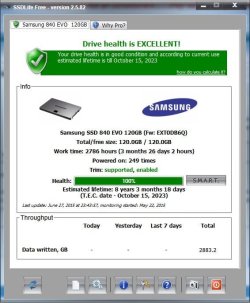
Haven't been using this drive that long, curious what numbers others may have

2.8832 terabytes

ssd.jpg

SSDLife Free

A Guy
 

My Computer My Computer

At a glance

Windows 10 Home x64INTEL Core i5-750 Quad-Core 3.37GHzHyperX Fury Black Series 8GB (2 x 4GB) 1866MhzEVGA GeForce GTX 750 Superclocked 1GB 128-Bit...
Computer type
PC/Desktop
OS
Windows 10 Home x64
CPU
INTEL Core i5-750 Quad-Core 3.37GHz
Motherboard
ASUS P7P55D
Memory
HyperX Fury Black Series 8GB (2 x 4GB) 1866Mhz
Graphics Card(s)
EVGA GeForce GTX 750 Superclocked 1GB 128-Bit GDDR5
Monitor(s) Displays
LG 32MA68HY 32" IPS
Screen Resolution
1920 x 1080
Hard Drives
Samsung 840 Evo 120GB, SEAGATE 500GB Barracuda® 7200.12, SATA 3 Gb/s, 7200 RPM, 16MB cache
PSU
ANTEC TruePower New TP-550, 80 PLUS, 550W
Case
ANTEC Three Hundred Illusion
Cooling
COOLER MASTER Hyper 212 Plus, 4 x 120mm 1 x 140mm Noctua's
Internet Speed
85 + Mbps
Antivirus
Avast
Browser
Vivaldi
I don't think SSLife is worth much. It makes some sort of estimate based on the amount of writes you've done.

I had an 80 GB Intel SSD which SSDLife said had an estimated lifetime of 6 or 8 years for the first 2 or 3 years of ownership. It then inexplicably jumped to over 150 years remaining--late in the next century. My usage pattern had not changed. Did my drive suddenly get "healthier" or did the NAND change? I don't think so.

You can track the necessary, with greater detail, with other tools--such as Crystal Disk Mark portable version.

That's probably a normal amount of writes IF "work time" means hours powered on. I've written 617 GB in 1329 hours powered on---this is on a Crucial MX100 that I bought not quite 3 months ago. Roughly 1/2 GB per hour. You're about double that, which I doubt is significant.


But I don't know how you are using your drive or any details of your usage pattern.

You might want to calculate the WAF (write amplification factor). It's said to have a reasonable correlation to remaining life. You can do it from certain SMART data, if they are revealed to you. I've heard average WAF is maybe between 3 and 5. This Crucial of mine is sitting at 1.71, rising slowly--to what eventual level I don't know.

The formula is 1 plus (background program page count/host program page count), at least on a Crucial. And your SMART data would have to reveal those 2 parameters or their equivalents. I guess what's revealed in SMART depends on the SSD manufacturer.
 
Last edited:

My Computer My Computer

At a glance

Windows 7 Home Premium SP1, 64-bitIntel Skylake i5-6600K, not overclocked8 GB HyperX DDR4-2666 (2 x 4 GB)none; graphics are integrated on CPU
Computer type
PC/Desktop
Computer Manufacturer/Model Number
Ignatz Special; 4 speed manual gearbox; factory air conditioning; one of one
OS
Windows 7 Home Premium SP1, 64-bit
CPU
Intel Skylake i5-6600K, not overclocked
Motherboard
AsRock Z170M Extreme 4, micro ATX
Memory
8 GB HyperX DDR4-2666 (2 x 4 GB)
Graphics Card(s)
none; graphics are integrated on CPU
Sound Card
onboard: Realtek ALC1150; external: USB Behringer UF0-202
Monitor(s) Displays
Dell S2340M 23 inch IPS
Screen Resolution
1600 x 900
Hard Drives
System: Crucial MX100 series SSD, 128 GB;
Data: Samsung Spinpoint 103SJ, 1 TB;
Backup: WD Caviar Green WD30EZRX-00D8PB0, 3 TB
PSU
Rosewill SilentNight 500 watt fanless, semi-modular
Case
Antec Solo II
Cooling
Noctua NH-U12S; Noctua F12 intake, Noctua S12A exhaust
Keyboard
Microsoft 200 6JH-00001 USB
Mouse
Dell or Microsoft optical wired; USB
Antivirus
Microsoft Security Essentials and Malwarebytes Premium
Browser
Pale Moon
Other Info
All fans PWM; speeds at idle: CPU circa 500 rpm; intake circa 600 rpm; exhaust circa 600 rpm; CPU temps 27 idle and 47 C load in a warm room (27 C/81 F) when running Intel Extreme Tuning Utility stress test.
It isn't the estimated life I was referring to, but rather the amount of data written ;)


A Guy
 

My Computer My Computer

At a glance

Windows 10 Home x64INTEL Core i5-750 Quad-Core 3.37GHzHyperX Fury Black Series 8GB (2 x 4GB) 1866MhzEVGA GeForce GTX 750 Superclocked 1GB 128-Bit...
Computer type
PC/Desktop
OS
Windows 10 Home x64
CPU
INTEL Core i5-750 Quad-Core 3.37GHz
Motherboard
ASUS P7P55D
Memory
HyperX Fury Black Series 8GB (2 x 4GB) 1866Mhz
Graphics Card(s)
EVGA GeForce GTX 750 Superclocked 1GB 128-Bit GDDR5
Monitor(s) Displays
LG 32MA68HY 32" IPS
Screen Resolution
1920 x 1080
Hard Drives
Samsung 840 Evo 120GB, SEAGATE 500GB Barracuda® 7200.12, SATA 3 Gb/s, 7200 RPM, 16MB cache
PSU
ANTEC TruePower New TP-550, 80 PLUS, 550W
Case
ANTEC Three Hundred Illusion
Cooling
COOLER MASTER Hyper 212 Plus, 4 x 120mm 1 x 140mm Noctua's
Internet Speed
85 + Mbps
Antivirus
Avast
Browser
Vivaldi
It isn't the estimated life I was referring to, but rather the amount of data written ;)

I don't see anything remarkable in the amount of data written to your drive.

If excessive, it could last a very long time rather than a very, very long time.

Or fail tomorrow for reasons unrelated to the amount of data written.

I'd probably try to resist any impulse to upgrade firmware, barring a strong and over-riding reason why you have to have the upgrade.
 

My Computer My Computer

At a glance

Windows 7 Home Premium SP1, 64-bitIntel Skylake i5-6600K, not overclocked8 GB HyperX DDR4-2666 (2 x 4 GB)none; graphics are integrated on CPU
Computer type
PC/Desktop
Computer Manufacturer/Model Number
Ignatz Special; 4 speed manual gearbox; factory air conditioning; one of one
OS
Windows 7 Home Premium SP1, 64-bit
CPU
Intel Skylake i5-6600K, not overclocked
Motherboard
AsRock Z170M Extreme 4, micro ATX
Memory
8 GB HyperX DDR4-2666 (2 x 4 GB)
Graphics Card(s)
none; graphics are integrated on CPU
Sound Card
onboard: Realtek ALC1150; external: USB Behringer UF0-202
Monitor(s) Displays
Dell S2340M 23 inch IPS
Screen Resolution
1600 x 900
Hard Drives
System: Crucial MX100 series SSD, 128 GB;
Data: Samsung Spinpoint 103SJ, 1 TB;
Backup: WD Caviar Green WD30EZRX-00D8PB0, 3 TB
PSU
Rosewill SilentNight 500 watt fanless, semi-modular
Case
Antec Solo II
Cooling
Noctua NH-U12S; Noctua F12 intake, Noctua S12A exhaust
Keyboard
Microsoft 200 6JH-00001 USB
Mouse
Dell or Microsoft optical wired; USB
Antivirus
Microsoft Security Essentials and Malwarebytes Premium
Browser
Pale Moon
Other Info
All fans PWM; speeds at idle: CPU circa 500 rpm; intake circa 600 rpm; exhaust circa 600 rpm; CPU temps 27 idle and 47 C load in a warm room (27 C/81 F) when running Intel Extreme Tuning Utility stress test.
Again, I wasn't seeking if my data was remarkable, or anything else about it. I was just curious what numbers people would have that have been using their drives for a long time ;)

A Guy
 

My Computer My Computer

At a glance

Windows 10 Home x64INTEL Core i5-750 Quad-Core 3.37GHzHyperX Fury Black Series 8GB (2 x 4GB) 1866MhzEVGA GeForce GTX 750 Superclocked 1GB 128-Bit...
Computer type
PC/Desktop
OS
Windows 10 Home x64
CPU
INTEL Core i5-750 Quad-Core 3.37GHz
Motherboard
ASUS P7P55D
Memory
HyperX Fury Black Series 8GB (2 x 4GB) 1866Mhz
Graphics Card(s)
EVGA GeForce GTX 750 Superclocked 1GB 128-Bit GDDR5
Monitor(s) Displays
LG 32MA68HY 32" IPS
Screen Resolution
1920 x 1080
Hard Drives
Samsung 840 Evo 120GB, SEAGATE 500GB Barracuda® 7200.12, SATA 3 Gb/s, 7200 RPM, 16MB cache
PSU
ANTEC TruePower New TP-550, 80 PLUS, 550W
Case
ANTEC Three Hundred Illusion
Cooling
COOLER MASTER Hyper 212 Plus, 4 x 120mm 1 x 140mm Noctua's
Internet Speed
85 + Mbps
Antivirus
Avast
Browser
Vivaldi
Didn't those torture tests get into the petabyte region?
 

My Computer My Computer

At a glance

Windows 7 Home Premium SP1, 64-bitIntel Skylake i5-6600K, not overclocked8 GB HyperX DDR4-2666 (2 x 4 GB)none; graphics are integrated on CPU
Computer type
PC/Desktop
Computer Manufacturer/Model Number
Ignatz Special; 4 speed manual gearbox; factory air conditioning; one of one
OS
Windows 7 Home Premium SP1, 64-bit
CPU
Intel Skylake i5-6600K, not overclocked
Motherboard
AsRock Z170M Extreme 4, micro ATX
Memory
8 GB HyperX DDR4-2666 (2 x 4 GB)
Graphics Card(s)
none; graphics are integrated on CPU
Sound Card
onboard: Realtek ALC1150; external: USB Behringer UF0-202
Monitor(s) Displays
Dell S2340M 23 inch IPS
Screen Resolution
1600 x 900
Hard Drives
System: Crucial MX100 series SSD, 128 GB;
Data: Samsung Spinpoint 103SJ, 1 TB;
Backup: WD Caviar Green WD30EZRX-00D8PB0, 3 TB
PSU
Rosewill SilentNight 500 watt fanless, semi-modular
Case
Antec Solo II
Cooling
Noctua NH-U12S; Noctua F12 intake, Noctua S12A exhaust
Keyboard
Microsoft 200 6JH-00001 USB
Mouse
Dell or Microsoft optical wired; USB
Antivirus
Microsoft Security Essentials and Malwarebytes Premium
Browser
Pale Moon
Other Info
All fans PWM; speeds at idle: CPU circa 500 rpm; intake circa 600 rpm; exhaust circa 600 rpm; CPU temps 27 idle and 47 C load in a warm room (27 C/81 F) when running Intel Extreme Tuning Utility stress test.
Yeah, the numbers were ridiculous, and that was constant use, not the low use most will actually get. I have reimaged my drive numerous times after experiments and such. Thus what I assume are higher then "normal" numbers on my drive. But I am not going to baby it, as it is apparent that they will last a long time barring any unexpected failures that can occur with any electronic device.

I am just curious what numbers some have on long used drives. A Guy
 

My Computer My Computer

At a glance

Windows 10 Home x64INTEL Core i5-750 Quad-Core 3.37GHzHyperX Fury Black Series 8GB (2 x 4GB) 1866MhzEVGA GeForce GTX 750 Superclocked 1GB 128-Bit...
Computer type
PC/Desktop
OS
Windows 10 Home x64
CPU
INTEL Core i5-750 Quad-Core 3.37GHz
Motherboard
ASUS P7P55D
Memory
HyperX Fury Black Series 8GB (2 x 4GB) 1866Mhz
Graphics Card(s)
EVGA GeForce GTX 750 Superclocked 1GB 128-Bit GDDR5
Monitor(s) Displays
LG 32MA68HY 32" IPS
Screen Resolution
1920 x 1080
Hard Drives
Samsung 840 Evo 120GB, SEAGATE 500GB Barracuda® 7200.12, SATA 3 Gb/s, 7200 RPM, 16MB cache
PSU
ANTEC TruePower New TP-550, 80 PLUS, 550W
Case
ANTEC Three Hundred Illusion
Cooling
COOLER MASTER Hyper 212 Plus, 4 x 120mm 1 x 140mm Noctua's
Internet Speed
85 + Mbps
Antivirus
Avast
Browser
Vivaldi
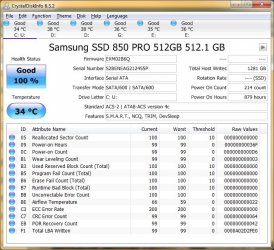
Bill, I wonder the same about Total Bytes Written. I started using my 850 pro at 8th of April (80 days or so usage). 100GB of data on it (which 60GB is GTA V, but I haven't really played it). CrystalMark DiskInfo shows like this:

SSD total bytes written.jpg

What I noticed was, with a pagefile set to 10GB each restart increased bytes written with that amount.
 

My Computer My Computer

At a glance

Windows 7 Ultimate x64 SP1AMD Phenom 2 1090T2x8GB Kingston HyperX Fury Black 1600Mhz Unga...MSI GTX 970 Gaming 4G
Computer type
PC/Desktop
Computer Manufacturer/Model Number
Custom Build
OS
Windows 7 Ultimate x64 SP1
CPU
AMD Phenom 2 1090T
Motherboard
Gigabyte GA-890FXA-UD5
Memory
2x8GB Kingston HyperX Fury Black 1600Mhz Unganged
Graphics Card(s)
MSI GTX 970 Gaming 4G
Sound Card
Realtek On-Board HD 7.1 Audio / Logitech G35
Monitor(s) Displays
3xAcer GD245HQ
Screen Resolution
1920x1080
Hard Drives
Samsung 850 Pro 512GB SSD - OS /
WD Caviar Black SATA 3 - 1 TBx2 - Dynamic RAID 0 /
WD Caviar Green SATA 2 - 640GBx2 - Dynamic RAID 0 /
WD Caviar Green SATA 2 - 640GB - Internal Backup /
Seagate Barracude SATA 3 - 3TB - External Backup/ Sync
PSU
HighPower 1000W
Case
Cooler Master HAF 932
Cooling
Noctua NH-D14
Keyboard
Logitech G19
Mouse
Logitech G500
Internet Speed
100/4 Mbit Cable (100GB quota)
Antivirus
ZoneAlarm Extreme Security / MBAM Pro / MBAE Free / SAS Free
Browser
IE 11 - Firefox - Chrome
Other Info
Logitech F710/ G27/ G940/ Z5500 // TrackIR 5 // Nvidia 3D Surround Vision
I don't think SSLife is worth much. It makes some sort of estimate based on the amount of writes you've done.

I had an 80 GB Intel SSD which SSDLife said had an estimated lifetime of 6 or 8 years for the first 2 or 3 years of ownership. It then inexplicably jumped to over 150 years remaining--late in the next century. My usage pattern had not changed. Did my drive suddenly get "healthier" or did the NAND change? I don't think so...

I keep the free version of SSDLife on my machines simply it's a quick and dirty way to check to see if TRIM is available and enabled and to get a general idea of the SSD's condition. It's worth far more than what I paid for it. It has limited use and gets used very infrequently but it's still useful.

Keep in mind the estimated life remaining is just that, an estimate. It's based on the volume of writes, the amount of time those writes occurred in and the estimated amount of writes available as provided by the manufacturer. The latter may explain the jump in expected life on your SSD. Some manufacturer's make conservative estimates on how long their SSDs will last; others, not so much. It's possible Intel upped their life expectancy estimate.
 

My Computer My Computer

At a glance

Win 7 Ultimate 64 bitIntel i7-3930KKingston HyperX Genesis 32GB Kit (8x4GB Modul...MSI R7850 Twin Frozr 2GD5/OC Radeon HD 7850 2...
Computer type
PC/Desktop
Computer Manufacturer/Model Number
Custom Build
OS
Win 7 Ultimate 64 bit
CPU
Intel i7-3930K
Motherboard
ASUS P9X79 WS
Memory
Kingston HyperX Genesis 32GB Kit (8x4GB Modules) 1600MHz DDR
Graphics Card(s)
MSI R7850 Twin Frozr 2GD5/OC Radeon HD 7850 2GB 256-bit GDDR
Sound Card
Asus Xonar Essence STX
Monitor(s) Displays
3x Asus VG248QE 24", Vizio 32" TV
Screen Resolution
1920 x 1080, ?
Hard Drives
Samsung 128GB 840 Pro SSD (1),
Samsung 4TB 850 EVO SSDs (4)
Samsung 4TB 850 EVO SSDs (16) external backup drives used in 2.5" hot swap bays in the computer.
PSU
Corsair HX750w
Case
Antec Two Hundred v2 (modified)
Cooling
Cooler Master GeminII S524 120mm (fan replaced with a 140mm)
Keyboard
Logitech G510s
Mouse
Logitech M525 (two in use)
Internet Speed
=< 32Mbps down, 8Mbps up
Antivirus
AVAST!, MBAM, SAS, Spybot S&D (all but MBAM free) Glary Util
Browser
IE11
Other Info
LSI 9211-8i HBA card (8 SATA III ports), 2.5" & 3.5" Hot Swap Bays, HooToo HT-CR001 PCI-E to USB 3.0 Internal Hub + 6 Slot Card Reader, and LG Model CH12LS28 BD-ROM Optical Drive. Also, ScanSnap S1500 ADF duplexing scanner, Canon 9000F flat bed scanner, Corsair SP2500 2.1 speakers, Samsung CLP 415nw laser color printer, Cyberpower PP2200SW UPS
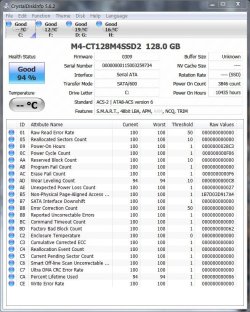
I much prefer Crystal Disk Info (portable). AS SSD will also allow you to easily check that alignment is ok.
Also, if you have more than one SSD installed SSDLife spits the dummy and says you need to buy the pro version.

I don't know the drop in "Health Status" to 94% is to be expected given the SSD usage.
Capture.JPG
 
Last edited:

My Computer My Computer

At a glance

Windows 7x64 Home Premium SP1Intel i7 2600kG.Skill Ripjaws (DDR3-1600) 2x4GBNvidia GeForce GTS 450; Intel HD Graphics 300...
Computer type
PC/Desktop
Computer Manufacturer/Model Number
Own build
OS
Windows 7x64 Home Premium SP1
CPU
Intel i7 2600k
Motherboard
ASUS P8Z68 Deluxe
Memory
G.Skill Ripjaws (DDR3-1600) 2x4GB
Graphics Card(s)
Nvidia GeForce GTS 450; Intel HD Graphics 3000(GT2+)
Monitor(s) Displays
Dell Ultrasharp IPS panel U2311H, Samsung SyncMaster P2350
Screen Resolution
1920x1080
Hard Drives
Samsung 850 Pro SSD 256GB, Samsung SSD 840 120GB, Seagates 1TB Barracuda ST31000528AS x2
PSU
Seasonic M12II 520W
Case
Lian Li Lancool PC-K60
Cooling
Case: 1x120mm, 3x140mm CPU: Hyper 212+
Keyboard
Logitech MK520 (wireless)
Mouse
Logitech MK520
Internet Speed
6-7 Mbps
Antivirus
Norton Security Premium, Malwarebytes on 2 (MSE on 3rd PC)
Browser
FireFox
Other Info
Audio: Logitech Z523 2.1
Back
Top