Why does my cpu goes go high for no reason

ImBluffin

New member
Local time
3:57 PM
Messages
11
i have nothing running to cause it and when i run steam games my frames will go from 60 to 20 for like 5 secs and it will happen again and again every like 30 secs

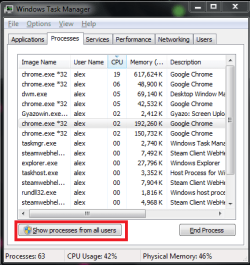
Caught it while just running agar.io -> Gyazo - 1aa8de9d87d59e1025ef66f023ecc73c.png <- as you can see nothing shows what is causing it to spike Please Help!
 

My Computer My Computer

Computer type
Laptop
Computer Manufacturer/Model Number
Dell
OS
Windows 7 Home Premium 64bit
CPU
i5
Motherboard
Dell inc Inspiron n5110
Memory
6gb
Graphics Card(s)
Intel(R) HD Ghraphics Family
Hard Drives
Drive C:
Description Local Fixed Disk
Compressed No
File System NTFS
Size 451.01 GB (484,272,263,168 bytes)
Free Space 241.25 GB (259,043,958,784 bytes)
Volume Name OS
Volume Serial Number 7C4E86D4

Drive D:
Description CD-ROM Disc
Browser
Google Chrome
You are not showing processes from other users (i.e. SYSTEM, LOCAL SERVICE, NETWORK SERVICE...)

Capture.PNG
 

My Computer My Computer

Computer type
Laptop
Computer Manufacturer/Model Number
Employer provided Dell Latitude
OS
W7 Pro SP1 64bit
CPU
i7
Memory
8GB
Graphics Card(s)
Intel HD Graphics
Hard Drives
crappy SSD
Antivirus
Employer mandated Symantec Endpoint Protection
Browser
Pale Moon 64bit, IE11 64bit & Chrome 64bit

My Computer My Computer

Computer type
Laptop
Computer Manufacturer/Model Number
Dell
OS
Windows 7 Home Premium 64bit
CPU
i5
Motherboard
Dell inc Inspiron n5110
Memory
6gb
Graphics Card(s)
Intel(R) HD Ghraphics Family
Hard Drives
Drive C:
Description Local Fixed Disk
Compressed No
File System NTFS
Size 451.01 GB (484,272,263,168 bytes)
Free Space 241.25 GB (259,043,958,784 bytes)
Volume Name OS
Volume Serial Number 7C4E86D4

Drive D:
Description CD-ROM Disc
Browser
Google Chrome

My Computer My Computer

Computer type
PC/Desktop
Computer Manufacturer/Model Number
Custom Build
OS
W7 Pro x64 SP1 | W10 Pro IP x64 | W8.1 Pro x64 VM | Linux Mint VM
CPU
i7-4790k @ 4GHz (4.4GHz Boost)
Motherboard
ASUS Sabertooth Z87 (BIOS Rev 2004)
Memory
16GB DDR3 Kingston HyperX Fury @ 1600MHz CL 9-9-9-27
Graphics Card(s)
EVGA GTX 980 Classified
Sound Card
Realtek Onboard
Monitor(s) Displays
Samsung S27D390
Screen Resolution
1920 x 1080
Hard Drives
240GB Intel 520 Series SSD |
Samsung 850 EVO 120GB SSD |
2TB WD Caviar Black |
2TB WD Caviar Green
PSU
Corsair HX850-80 Gold Modular
Case
Cooler Master Silencio 650
Cooling
Corsair H80i w/2 x Corsair SP120 | 2 x 120mm Noctua NF-S12B
Keyboard
Microsoft Sidewinder X4
Mouse
Gigabyte M6900 optical
Internet Speed
152mb
Antivirus
F-Secure
Browser
Firefox 38.0
Other Info
Backup Rig: Win 7 Pro 64-bit | AMD A10-5800k | ASUS F2A85-V Pro | 8GB Samsung DDR3 @1600MHz | 120GB Toshiba SDD | 2TB Seagate HDD | Cooler Master Silencio 550
Set Windows Update to "Check for updates, but let me choose whether to download and install them".
This is the first thing I do after installing Windows. It is prone to run the CPU at 100% if you let it download updates automatically.
 

My Computer My Computer

Computer type
Laptop
Computer Manufacturer/Model Number
HP
OS
Windows 7 Professional 64 bit
CPU
IB Intel Core i3-3110M
Memory
6GB 1333 Mhz
Graphics Card(s)
-
Screen Resolution
1366*768
Hard Drives
Samsung 840 EVO 120 GB
Internet Speed
20/1
Browser
Chrome
it wont let me upload the gyazo picture url so i post in reply and i did as you said coyote but my frames still drop in game for no reason but not only in game something is spiking it to go so high but i cant find out what thats what i need help on willing to use teamviewer if anyone can help?
 

My Computer My Computer

Computer type
Laptop
Computer Manufacturer/Model Number
Dell
OS
Windows 7 Home Premium 64bit
CPU
i5
Motherboard
Dell inc Inspiron n5110
Memory
6gb
Graphics Card(s)
Intel(R) HD Ghraphics Family
Hard Drives
Drive C:
Description Local Fixed Disk
Compressed No
File System NTFS
Size 451.01 GB (484,272,263,168 bytes)
Free Space 241.25 GB (259,043,958,784 bytes)
Volume Name OS
Volume Serial Number 7C4E86D4

Drive D:
Description CD-ROM Disc
Browser
Google Chrome
Try a different browser. Chrome can cause this kind of problem sometimes.

Try Firefox, IE, Opera, Bluemoon, Waterfox .....

To test, close all Chrome windows so it's not running or better yet, uninstall it.
 

My Computer My Computer

Computer type
PC/Desktop
Computer Manufacturer/Model Number
Lenovo IdeaCenter 450
OS
Windows 10 Pro X64
CPU
Intel Quad Core i7-4770 @ 3.4Ghz
Memory
16.0GB PC3-12800 DDR3 SDRAM 1600 MHz
Graphics Card(s)
Intel Integrated HD Graphics
Sound Card
Realtek HD Audio
Monitor(s) Displays
HP 22" LCD
Screen Resolution
1680 x 1050
Hard Drives
250GB Samsung EVO SATA-3 SSD
2TB Seagate ST2000DM001 SATA-2
1.5TB Seagate ST3150041AS SATA
Keyboard
Dell USB
Mouse
Lenovo USB
Internet Speed
Cable via Road Runner 3MB Upload, 30MB Download
Antivirus
Windows Defender, MBAM Pro, MBAE
Browser
Seamonkey
Other Info
UEFI/GPT
PLDS DVD-RW DH16AERSH

it wont let me upload the gyazo picture url so i post in reply and i did as you said coyote but my frames still drop in game for no reason but not only in game something is spiking it to go so high but i cant find out what thats what i need help on willing to use teamviewer if anyone can help?
http://www.sevenforums.com/tutorials/9733-screenshots-files-upload-post-seven-forums.html

The tutorial walks you thru the steps needed to save a screenshot to a file and upload that file to these forums as an attachment to your posts. There is no need to involve gyazo in that process. Some forum members are not comfortable visiting image hosting websites. In some cases, images hosting websites are blocked by antivirus apps.

Here is your latest screenshot as an attachment to this forum:

Capture.PNG

That screenshot shows only 5% of the CPU is being used. All that I can suggest is to always keep Task Manager running. Have Task Manager set to always show tasks from all users. Then wait for the high CPU usage to occur again. Grab a screenshot of that high usage and maybe we can help you spot the cause.
 

My Computer My Computer

Computer type
Laptop
Computer Manufacturer/Model Number
Employer provided Dell Latitude
OS
W7 Pro SP1 64bit
CPU
i7
Memory
8GB
Graphics Card(s)
Intel HD Graphics
Hard Drives
crappy SSD
Antivirus
Employer mandated Symantec Endpoint Protection
Browser
Pale Moon 64bit, IE11 64bit & Chrome 64bit

My Computer My Computer

Computer type
Laptop
Computer Manufacturer/Model Number
Employer provided Dell Latitude
OS
W7 Pro SP1 64bit
CPU
i7
Memory
8GB
Graphics Card(s)
Intel HD Graphics
Hard Drives
crappy SSD
Antivirus
Employer mandated Symantec Endpoint Protection
Browser
Pale Moon 64bit, IE11 64bit & Chrome 64bit
Yes, I did. Isn't Bluemoon an IPA?
 

My Computer My Computer

Computer type
PC/Desktop
Computer Manufacturer/Model Number
Lenovo IdeaCenter 450
OS
Windows 10 Pro X64
CPU
Intel Quad Core i7-4770 @ 3.4Ghz
Memory
16.0GB PC3-12800 DDR3 SDRAM 1600 MHz
Graphics Card(s)
Intel Integrated HD Graphics
Sound Card
Realtek HD Audio
Monitor(s) Displays
HP 22" LCD
Screen Resolution
1680 x 1050
Hard Drives
250GB Samsung EVO SATA-3 SSD
2TB Seagate ST2000DM001 SATA-2
1.5TB Seagate ST3150041AS SATA
Keyboard
Dell USB
Mouse
Lenovo USB
Internet Speed
Cable via Road Runner 3MB Upload, 30MB Download
Antivirus
Windows Defender, MBAM Pro, MBAE
Browser
Seamonkey
Other Info
UEFI/GPT
PLDS DVD-RW DH16AERSH

My Computer My Computer

Computer type
Laptop
Computer Manufacturer/Model Number
Employer provided Dell Latitude
OS
W7 Pro SP1 64bit
CPU
i7
Memory
8GB
Graphics Card(s)
Intel HD Graphics
Hard Drives
crappy SSD
Antivirus
Employer mandated Symantec Endpoint Protection
Browser
Pale Moon 64bit, IE11 64bit & Chrome 64bit
what ya dont get is that a program isnt causing it to spike so no point in taking pictures of processes ive starred at it long enough to conclude it
 

My Computer My Computer

Computer type
Laptop
Computer Manufacturer/Model Number
Dell
OS
Windows 7 Home Premium 64bit
CPU
i5
Motherboard
Dell inc Inspiron n5110
Memory
6gb
Graphics Card(s)
Intel(R) HD Ghraphics Family
Hard Drives
Drive C:
Description Local Fixed Disk
Compressed No
File System NTFS
Size 451.01 GB (484,272,263,168 bytes)
Free Space 241.25 GB (259,043,958,784 bytes)
Volume Name OS
Volume Serial Number 7C4E86D4

Drive D:
Description CD-ROM Disc
Browser
Google Chrome
From your System Specs.

Hard Drives Drive C: Description Local Fixed Disk Compressed No File System NTFS Size 451.01 GB (484,272,263,168 bytes) Free Space 241.25 GB (259,043,958,784 bytes) Volume Name OS Volume

Could you explain what is Compressed and why?
 

My Computer My Computer

Computer type
PC/Desktop
Computer Manufacturer/Model Number
Home made Desktop
OS
Windows 10 Pro. 64/ version 1709 Windows 7 Pro/64
CPU
Intel i7-6800K @ 4.3
Motherboard
ASUS X-99 Deluxe II
Memory
Corsair Platinum 16 gig @2400
Graphics Card(s)
EVGA GTX 1070 OC
Monitor(s) Displays
Asus 27" LED LCD/VE278Q
Screen Resolution
1920-1080 or 1280-720 HDMI
Hard Drives
INTEL SSD 730-240 Gb Sata 3.0/
PSU
EVGA Platium 1200W
Case
Phanteks Luxe Tempered Glass 8 fans/ one radiator
Cooling
XSPC/ Water Cooled CPU
Keyboard
Das 4 Professional
Mouse
Logitech M705/MX Anywhere 2-S
Internet Speed
100 mbits
Antivirus
Microsoft Security Essentials/ Malwarebytes Premium 3.0/ SAS
Browser
I.E. 11 default/Firefox/ ISP Time Warner Cable/Spectrum
Other Info
LG BluRay Burner/
Sound system-KLipsch-THX/
Icy Dock ssd Hot Swap bays.
You stated in your original post that you "have nothing running to cause it". But then you posted a screenshot of Task Manager which showed relatively high CPU usage and an incomplete list of processes. I was suggesting that you show us the complete list when the CPU usage is high.

You are convinced that Task Manager shows this CPU usage on the tab named Performance without showing you the image that is causing the high usage on the tab named Processes. I've never seen such. I'm not saying that it does not happen. I'm just saying that I've never seen that happen.

There are infections that can hide themselves from Task Manager, but I would think that these infections would not show up on any tab within Task Manager. Their CPU usage would be hidden from Task Manager. But I could be wrong about that.

Layback Bear raises an excellent question about compressed files. I wonder what process would show a high CPU usage while it was decompressing files to be used or compressing files after they are written to.
 

My Computer My Computer

Computer type
Laptop
Computer Manufacturer/Model Number
Employer provided Dell Latitude
OS
W7 Pro SP1 64bit
CPU
i7
Memory
8GB
Graphics Card(s)
Intel HD Graphics
Hard Drives
crappy SSD
Antivirus
Employer mandated Symantec Endpoint Protection
Browser
Pale Moon 64bit, IE11 64bit & Chrome 64bit
no idk what but if it is causing this and doesnt have any use in the computer ill delete it
 

My Computer My Computer

Computer type
Laptop
Computer Manufacturer/Model Number
Dell
OS
Windows 7 Home Premium 64bit
CPU
i5
Motherboard
Dell inc Inspiron n5110
Memory
6gb
Graphics Card(s)
Intel(R) HD Ghraphics Family
Hard Drives
Drive C:
Description Local Fixed Disk
Compressed No
File System NTFS
Size 451.01 GB (484,272,263,168 bytes)
Free Space 241.25 GB (259,043,958,784 bytes)
Volume Name OS
Volume Serial Number 7C4E86D4

Drive D:
Description CD-ROM Disc
Browser
Google Chrome
ImBluffin,
Can you please answer Layback Bear's question?

From your System Specs.

Hard Drives Drive C: Description Local Fixed Disk Compressed No File System NTFS Size 451.01 GB (484,272,263,168 bytes) Free Space 241.25 GB (259,043,958,784 bytes) Volume Name OS Volume
Could you explain what is Compressed and why?
 

My Computer My Computer

Computer type
Laptop
Computer Manufacturer/Model Number
Employer provided Dell Latitude
OS
W7 Pro SP1 64bit
CPU
i7
Memory
8GB
Graphics Card(s)
Intel HD Graphics
Hard Drives
crappy SSD
Antivirus
Employer mandated Symantec Endpoint Protection
Browser
Pale Moon 64bit, IE11 64bit & Chrome 64bit
no i cant because i dont know how to figure out how to know it
 

My Computer My Computer

Computer type
Laptop
Computer Manufacturer/Model Number
Dell
OS
Windows 7 Home Premium 64bit
CPU
i5
Motherboard
Dell inc Inspiron n5110
Memory
6gb
Graphics Card(s)
Intel(R) HD Ghraphics Family
Hard Drives
Drive C:
Description Local Fixed Disk
Compressed No
File System NTFS
Size 451.01 GB (484,272,263,168 bytes)
Free Space 241.25 GB (259,043,958,784 bytes)
Volume Name OS
Volume Serial Number 7C4E86D4

Drive D:
Description CD-ROM Disc
Browser
Google Chrome
By default, Windows Explorer should show compressed folders and compressed files using blue letters. Folders/files that are not compressed are normally labeled with black letters. Are most of the folders and files on your C drive compressed? Are the two Program Files folders compressed? How about the Windows folders and its sub-folders?
 

My Computer My Computer

Computer type
Laptop
Computer Manufacturer/Model Number
Employer provided Dell Latitude
OS
W7 Pro SP1 64bit
CPU
i7
Memory
8GB
Graphics Card(s)
Intel HD Graphics
Hard Drives
crappy SSD
Antivirus
Employer mandated Symantec Endpoint Protection
Browser
Pale Moon 64bit, IE11 64bit & Chrome 64bit
how bout we skype and i screen share and you can see for yourself
 

My Computer My Computer

Computer type
Laptop
Computer Manufacturer/Model Number
Dell
OS
Windows 7 Home Premium 64bit
CPU
i5
Motherboard
Dell inc Inspiron n5110
Memory
6gb
Graphics Card(s)
Intel(R) HD Ghraphics Family
Hard Drives
Drive C:
Description Local Fixed Disk
Compressed No
File System NTFS
Size 451.01 GB (484,272,263,168 bytes)
Free Space 241.25 GB (259,043,958,784 bytes)
Volume Name OS
Volume Serial Number 7C4E86D4

Drive D:
Description CD-ROM Disc
Browser
Google Chrome
Perhaps others can take you up on the offer to Skype. I don't have/want that on this company owned laptop.
 

My Computer My Computer

Computer type
Laptop
Computer Manufacturer/Model Number
Employer provided Dell Latitude
OS
W7 Pro SP1 64bit
CPU
i7
Memory
8GB
Graphics Card(s)
Intel HD Graphics
Hard Drives
crappy SSD
Antivirus
Employer mandated Symantec Endpoint Protection
Browser
Pale Moon 64bit, IE11 64bit & Chrome 64bit
Back
Top