
svchost.exe (netsvcs) draining all my memory

Okay so the OP's problem is related to windows updates. Svchost high memory usage that returns to normal if windows updates and BITS service are stopped. Looking at NSI service is another matter entirely and I don't know much about it. If it helps - here's memory usage by that service on my machine:
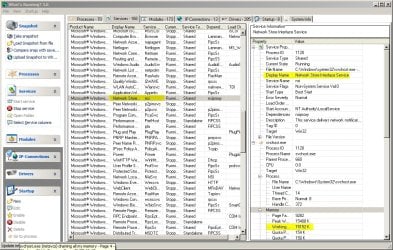
Whats Running.jpg

Here's the other services runiing under the same instance of svchost.
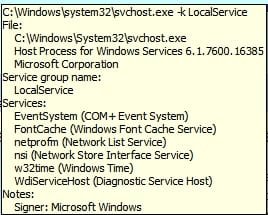
Svchost.jpg

A complete shot in the dark here. Check your system clock?

Accurate Time
 

My Computer My Computer

At a glance

Microsoft Windows 7 Home Premium 64-bit 7601 ...AMD C-60 APU with Radeon(tm) HD Graphics4.00 GBAMD Radeon HD 6290 Graphics
Computer type
Laptop
Computer Manufacturer/Model Number
ASUS
OS
Microsoft Windows 7 Home Premium 64-bit 7601 Multiprocessor Free Service Pack 1
CPU
AMD C-60 APU with Radeon(tm) HD Graphics
Motherboard
ASUSTeK COMPUTER INC. X501U
Memory
4.00 GB
Graphics Card(s)
AMD Radeon HD 6290 Graphics
Sound Card
(1) AMD High Definition Audio Device (2) Realtek High Defi
Screen Resolution
1366 x 768 x 32 bits (4294967296 colors) @ 60 Hz
Hard Drives
Hitachi HTS545050A7E380 SATA Disk Device
Antivirus
Comodo CIS & FW, SecureAplus App Whitelisting, Threatfire
Browser
Cyberfox 64bit, Opera 64bit, Airfox
Other Info
Spy-The-Spy, HitmanPro.Alert, Norton Connect Safe, MJRegWatcher, BitDefender TrafficLight, Voodoo Shield, Zemana AntiMalware
Working with Windows makes me reminisce in times when I tried to understand women. I prepped for the A+ and have been all through W down to the CMD. For now I keep it around for when I have some class that wants me working in VB, but I end up flustered with the big W after using Linux for so long. It just seems to make every computer run like a gimped rabbit.
 

My Computer My Computer

At a glance

Debian CustomI5 / I7Never enough
Computer type
Laptop
Computer Manufacturer/Model Number
Thinkpad'
OS
Debian Custom
CPU
I5 / I7
Memory
Never enough
Monitor(s) Displays
4+
Hard Drives
SSD
Internet Speed
NOS
Antivirus
What?
Browser
Mozilla
@ Nedly. To answer your earlier question. Yes mine was a windows updates issue like the OP's.

@ripsaw. See if youi can work out which service running under svchost is using lots of memory like my screenshot in Post #41 that shows (normal) memory usage for NSI Service.

Will be offline for a while (getting some food) but I'd be really interested to learn how you manage to track this down if uou can.
 

My Computer My Computer

At a glance

Microsoft Windows 7 Home Premium 64-bit 7601 ...AMD C-60 APU with Radeon(tm) HD Graphics4.00 GBAMD Radeon HD 6290 Graphics
Computer type
Laptop
Computer Manufacturer/Model Number
ASUS
OS
Microsoft Windows 7 Home Premium 64-bit 7601 Multiprocessor Free Service Pack 1
CPU
AMD C-60 APU with Radeon(tm) HD Graphics
Motherboard
ASUSTeK COMPUTER INC. X501U
Memory
4.00 GB
Graphics Card(s)
AMD Radeon HD 6290 Graphics
Sound Card
(1) AMD High Definition Audio Device (2) Realtek High Defi
Screen Resolution
1366 x 768 x 32 bits (4294967296 colors) @ 60 Hz
Hard Drives
Hitachi HTS545050A7E380 SATA Disk Device
Antivirus
Comodo CIS & FW, SecureAplus App Whitelisting, Threatfire
Browser
Cyberfox 64bit, Opera 64bit, Airfox
Other Info
Spy-The-Spy, HitmanPro.Alert, Norton Connect Safe, MJRegWatcher, BitDefender TrafficLight, Voodoo Shield, Zemana AntiMalware
@ Nedly. To answer your earlier question. Yes mine was a windows updates issue like the OP's.

@ripsaw. See if youi can work out which service running under svchost is using lots of memory like my screenshot in Post #41 that shows (normal) memory usage for NSI Service.

Will be offline for a while (getting some food) but I'd be really interested to learn how you manage to track this down if uou can.

@Calender i'll do that problem is the rate of consumption of memory is very slow at times where others it just takes off.
 

My Computer My Computer

At a glance

windows 7 professional 64 bit
Computer type
PC/Desktop
OS
windows 7 professional 64 bit
Take a look at this page for example. Scroll down to the bottom in the right pane you will see "Related Searches" and buttons "top / Rising". If you click Rising in the right pane you will find it is considered a "breakout" for Windows 7 and Vista....

https://www.google.com/trends/explore#q=svchost.exe
 

My Computer My Computer

At a glance

Debian CustomI5 / I7Never enough
Computer type
Laptop
Computer Manufacturer/Model Number
Thinkpad'
OS
Debian Custom
CPU
I5 / I7
Memory
Never enough
Monitor(s) Displays
4+
Hard Drives
SSD
Internet Speed
NOS
Antivirus
What?
Browser
Mozilla
It seems there have been malware reports in the past with these results. Kaspersky has reported on it as well. We should check for that in the infected computers. It is titled malware, and according to others there is one way to check by going to the svchost.exe service | right click and select "open file location". If you find it is in a dir other than C:\\Windows\System32, then it could be malware based. When it is malware based it is worm/trojan based and it replicates itself and lives in the 'temp' dir.

It would be great if we could check this just to mark it off of the list.

Memory leaks is an issue that has happened before.. Though this doc is outdated, it is an example of where the issue probably is if it is not malware.

"Application popup: svchost.exe - Application Error : The instruction at "0x745f2780" referenced memory at "0x00000070". The memory could not be "read"."

https://support.microsoft.com/en-us/kb/916089/en-us


One bug forum had a post regarding some shop with 30+ infected computers with the same issue, all running auto updates. If we can concentrate the problem updates we can uninstall the specific ones, or find patches for them.
 

My Computer My Computer

At a glance

Debian CustomI5 / I7Never enough
Computer type
Laptop
Computer Manufacturer/Model Number
Thinkpad'
OS
Debian Custom
CPU
I5 / I7
Memory
Never enough
Monitor(s) Displays
4+
Hard Drives
SSD
Internet Speed
NOS
Antivirus
What?
Browser
Mozilla
Okay Nedly from what you said earlier it's not malware disguising itself as svchost.exe as it would appear that you have legitimate services running under that particular svcost instance. You can check running processes against VirusTotal using ProcessExplorer. There's a tutorial here:

Process Explorer + VirusTotal (to check all processes with 50+ AV's)

You can probaly ignore process with only one or two detections.

I also made a post a while back on SigCheckGUI which can do the same thing but in addition scan all executables in any directory specified. The admins must have deleted it. Probably got a complaint from a user who didn't like what they were reading!

Here's an article about it instead:

Check Windows folders for file signatures with SigcheckGUI - gHacks Tech News
 

My Computer My Computer

At a glance

Microsoft Windows 7 Home Premium 64-bit 7601 ...AMD C-60 APU with Radeon(tm) HD Graphics4.00 GBAMD Radeon HD 6290 Graphics
Computer type
Laptop
Computer Manufacturer/Model Number
ASUS
OS
Microsoft Windows 7 Home Premium 64-bit 7601 Multiprocessor Free Service Pack 1
CPU
AMD C-60 APU with Radeon(tm) HD Graphics
Motherboard
ASUSTeK COMPUTER INC. X501U
Memory
4.00 GB
Graphics Card(s)
AMD Radeon HD 6290 Graphics
Sound Card
(1) AMD High Definition Audio Device (2) Realtek High Defi
Screen Resolution
1366 x 768 x 32 bits (4294967296 colors) @ 60 Hz
Hard Drives
Hitachi HTS545050A7E380 SATA Disk Device
Antivirus
Comodo CIS & FW, SecureAplus App Whitelisting, Threatfire
Browser
Cyberfox 64bit, Opera 64bit, Airfox
Other Info
Spy-The-Spy, HitmanPro.Alert, Norton Connect Safe, MJRegWatcher, BitDefender TrafficLight, Voodoo Shield, Zemana AntiMalware
Can we check this on the infected computers? -- I am still working on setting up a system so I am not up to par yet. If this update is installed, I would wonder if removing this specific update for a test would yield results...

https://support.microsoft.com/en-us/kb/3050265

My other theory: when I look at updates available now compared to what updates were available "#" long ago, there is a differentiation. I think it is possible that Microsoft bundled up some of their older updates and changed things a bit. How easy would it be to remove all of the installed updates in a PC? - , and then scan for new updates -- reinstall.

I am going through various updates now, I will post as soon as I have some leads.
 

My Computer My Computer

At a glance

Debian CustomI5 / I7Never enough
Computer type
Laptop
Computer Manufacturer/Model Number
Thinkpad'
OS
Debian Custom
CPU
I5 / I7
Memory
Never enough
Monitor(s) Displays
4+
Hard Drives
SSD
Internet Speed
NOS
Antivirus
What?
Browser
Mozilla
Are we back on windows upates again. I thought we had moved on tp a different problem with a different svchost process. Anyway for me the problem svchost process was running the windows update service. I can't answer your question on that specific update. All I can say is that I have previously blocked some windows 10 upgrade updates and installed others before removing them.

Here's the ones I didn't install and also the ones I removed. The ones marked xx were removed and the others not installed and hidden.

KB:2876229
KB:2923545
KB:2970228 xx
KB:3035583
KB:2990214
KB:3021917
KB:3068708
KB:2592687
KB:2660075 xx
KB:2506928 xx
KB:2952664
KB:3050265
KB:2726535 xx
KB:2994023
KB:3022345 xx
KB:3068708 xx

If you want to remove any you can check this post:

http://www.sevenforums.com/general-...windows-10-upgrade-updates-windows-7-8-a.html

Note the colon is needed if using the unistall command but not when checking which ones are installed.
 
Last edited:

My Computer My Computer

At a glance

Microsoft Windows 7 Home Premium 64-bit 7601 ...AMD C-60 APU with Radeon(tm) HD Graphics4.00 GBAMD Radeon HD 6290 Graphics
Computer type
Laptop
Computer Manufacturer/Model Number
ASUS
OS
Microsoft Windows 7 Home Premium 64-bit 7601 Multiprocessor Free Service Pack 1
CPU
AMD C-60 APU with Radeon(tm) HD Graphics
Motherboard
ASUSTeK COMPUTER INC. X501U
Memory
4.00 GB
Graphics Card(s)
AMD Radeon HD 6290 Graphics
Sound Card
(1) AMD High Definition Audio Device (2) Realtek High Defi
Screen Resolution
1366 x 768 x 32 bits (4294967296 colors) @ 60 Hz
Hard Drives
Hitachi HTS545050A7E380 SATA Disk Device
Antivirus
Comodo CIS & FW, SecureAplus App Whitelisting, Threatfire
Browser
Cyberfox 64bit, Opera 64bit, Airfox
Other Info
Spy-The-Spy, HitmanPro.Alert, Norton Connect Safe, MJRegWatcher, BitDefender TrafficLight, Voodoo Shield, Zemana AntiMalware
Aslo note: They will download and re-install if you set windows updates to autocheck and autoinstall.
 

My Computer My Computer

At a glance

Microsoft Windows 7 Home Premium 64-bit 7601 ...AMD C-60 APU with Radeon(tm) HD Graphics4.00 GBAMD Radeon HD 6290 Graphics
Computer type
Laptop
Computer Manufacturer/Model Number
ASUS
OS
Microsoft Windows 7 Home Premium 64-bit 7601 Multiprocessor Free Service Pack 1
CPU
AMD C-60 APU with Radeon(tm) HD Graphics
Motherboard
ASUSTeK COMPUTER INC. X501U
Memory
4.00 GB
Graphics Card(s)
AMD Radeon HD 6290 Graphics
Sound Card
(1) AMD High Definition Audio Device (2) Realtek High Defi
Screen Resolution
1366 x 768 x 32 bits (4294967296 colors) @ 60 Hz
Hard Drives
Hitachi HTS545050A7E380 SATA Disk Device
Antivirus
Comodo CIS & FW, SecureAplus App Whitelisting, Threatfire
Browser
Cyberfox 64bit, Opera 64bit, Airfox
Other Info
Spy-The-Spy, HitmanPro.Alert, Norton Connect Safe, MJRegWatcher, BitDefender TrafficLight, Voodoo Shield, Zemana AntiMalware
Thanks. The issue no doubt rolled in on an update whenever it is not a malware. The question is which component, and which set of hardware. If I can narrow that down I can do more verbose logging to figure out why. At the least, if updates are removed, in theory, the problem will be too (given that all 'installed' components through updates are removed).

I have found reports of 100+ systems of the same kind (companies etc) coming across this issue over night. Thing is too if it persists, Microsoft will out out the patch in another months updates...
 

My Computer My Computer

At a glance

Debian CustomI5 / I7Never enough
Computer type
Laptop
Computer Manufacturer/Model Number
Thinkpad'
OS
Debian Custom
CPU
I5 / I7
Memory
Never enough
Monitor(s) Displays
4+
Hard Drives
SSD
Internet Speed
NOS
Antivirus
What?
Browser
Mozilla
Can we check this on the infected computers? -- I am still working on setting up a system so I am not up to par yet. If this update is installed, I would wonder if removing this specific update for a test would yield results...

https://support.microsoft.com/en-us/kb/3050265

My other theory: when I look at updates available now compared to what updates were available "#" long ago, there is a differentiation. I think it is possible that Microsoft bundled up some of their older updates and changed things a bit. How easy would it be to remove all of the installed updates in a PC? - , and then scan for new updates -- reinstall.

I am going through various updates now, I will post as soon as I have some leads.

@nedly, I assure you that I have eliminated the possiblity of a virus. The svchost that is running in not a copy and it resides in the correct directory and all that good stuff. As far as removing all updates man it takes forever to add them all back in, been there done that too many time before.
The biggest problem I have in trying to figure out which of the processes is comsuming the memory. All I know is it is one of the services that svchost starts that has the nsi service. There are 8 services that spawn for this one svchost process, the one I think it is is the NSI service. If someone can tell me how to get the memory usage for a single running service please tell me, that way I can at least figure out which service is running amuck. Whatsrunning 3 (beta) does not give a memory per service usage at least not that I can tell.
 

My Computer My Computer

At a glance

windows 7 professional 64 bit
Computer type
PC/Desktop
OS
windows 7 professional 64 bit
Have you checked your update log? I would like to check that out if possible so I may compare. Some of these machines I have here are being difficult with creating the issue. You can click start | type: run | type: windowsupdate.log

Once in notepad, you can do Edit: search, type in 'svc' and search through the ties and processes...
 

My Computer My Computer

At a glance

Debian CustomI5 / I7Never enough
Computer type
Laptop
Computer Manufacturer/Model Number
Thinkpad'
OS
Debian Custom
CPU
I5 / I7
Memory
Never enough
Monitor(s) Displays
4+
Hard Drives
SSD
Internet Speed
NOS
Antivirus
What?
Browser
Mozilla
The biggest problem I have in trying to figure out which of the processes is comsuming the memory. All I know is it is one of the services that svchost starts that has the nsi service. There are 8 services that spawn for this one svchost process, the one I think it is is the NSI service. If someone can tell me how to get the memory usage for a single running service please tell me, that way I can at least figure out which service is running amuck. Whatsrunning 3 (beta) does not give a memory per service usage at least not that I can tell.

This will be difficult without trial and error if it is a memory leak, because the glitch nature of a memory leak will not properly log the process. This is why it seems to be 'hidden' or make no sense, it is a spill quite literally.

Right now we need to figure out how to reverse specific components in suspicion to figure out which one is in conflict. If you have a specific service in mind, we need to find the updates related to that service and then remove it in hopes that one we find will be it.
 

My Computer My Computer

At a glance

Debian CustomI5 / I7Never enough
Computer type
Laptop
Computer Manufacturer/Model Number
Thinkpad'
OS
Debian Custom
CPU
I5 / I7
Memory
Never enough
Monitor(s) Displays
4+
Hard Drives
SSD
Internet Speed
NOS
Antivirus
What?
Browser
Mozilla
My gut says it's the nsi service. Problem is if you disable it most of anything to do with networking won't work.
 

My Computer My Computer

At a glance

windows 7 professional 64 bit
Computer type
PC/Desktop
OS
windows 7 professional 64 bit
If you want, I have the virtual machine up, I will try disabling that service and log the process to see what happens. I know it will kick you off the network but it might not be bad enough to run a test with it.

You can stop it, and you will lose your network, but quickly after you stop it some other service relaunches it. At this point the network services that you need to connect are 50/50 running and not. For now you could run this process - while logging your resources - to see if there is a moment while the services are stopped that your memory drops.

It is easy to get back on, mine gathered its services after poking in the network section of the control panel. The services resolved themselves before I could troubleshoot. You can set default launch to disable manual etc it is persistent.
 

My Computer My Computer

At a glance

Debian CustomI5 / I7Never enough
Computer type
Laptop
Computer Manufacturer/Model Number
Thinkpad'
OS
Debian Custom
CPU
I5 / I7
Memory
Never enough
Monitor(s) Displays
4+
Hard Drives
SSD
Internet Speed
NOS
Antivirus
What?
Browser
Mozilla
Hey - it seems that utilities only report memory usage for svchost and not the services running under it. If you are sure that there are no critical services running try stopping one rather than setting it to disabled. Give me a minute and I'll try stopping and restarting NSI service and see what happens.
 

My Computer My Computer

At a glance

Microsoft Windows 7 Home Premium 64-bit 7601 ...AMD C-60 APU with Radeon(tm) HD Graphics4.00 GBAMD Radeon HD 6290 Graphics
Computer type
Laptop
Computer Manufacturer/Model Number
ASUS
OS
Microsoft Windows 7 Home Premium 64-bit 7601 Multiprocessor Free Service Pack 1
CPU
AMD C-60 APU with Radeon(tm) HD Graphics
Motherboard
ASUSTeK COMPUTER INC. X501U
Memory
4.00 GB
Graphics Card(s)
AMD Radeon HD 6290 Graphics
Sound Card
(1) AMD High Definition Audio Device (2) Realtek High Defi
Screen Resolution
1366 x 768 x 32 bits (4294967296 colors) @ 60 Hz
Hard Drives
Hitachi HTS545050A7E380 SATA Disk Device
Antivirus
Comodo CIS & FW, SecureAplus App Whitelisting, Threatfire
Browser
Cyberfox 64bit, Opera 64bit, Airfox
Other Info
Spy-The-Spy, HitmanPro.Alert, Norton Connect Safe, MJRegWatcher, BitDefender TrafficLight, Voodoo Shield, Zemana AntiMalware
The only thing in my update log was windows defender updates, I thought I had turned that off as well but missed it. It is now off.
 

My Computer My Computer

At a glance

windows 7 professional 64 bit
Computer type
PC/Desktop
OS
windows 7 professional 64 bit
Hey - it seems that utilities only report memory usage for svchost and not the services running under it. If you are sure that there are no critical services running try stopping one rather than setting it to disabled. Give me a minute and I'll try stopping and restarting NSI service and see what happens.

System won't let you stop the nsi service, tried that
 

My Computer My Computer

At a glance

windows 7 professional 64 bit
Computer type
PC/Desktop
OS
windows 7 professional 64 bit
Service cannot be stopped. If you disable it entirely it's possible that you will end up with a non booting machine.
 

My Computer My Computer

At a glance

Microsoft Windows 7 Home Premium 64-bit 7601 ...AMD C-60 APU with Radeon(tm) HD Graphics4.00 GBAMD Radeon HD 6290 Graphics
Computer type
Laptop
Computer Manufacturer/Model Number
ASUS
OS
Microsoft Windows 7 Home Premium 64-bit 7601 Multiprocessor Free Service Pack 1
CPU
AMD C-60 APU with Radeon(tm) HD Graphics
Motherboard
ASUSTeK COMPUTER INC. X501U
Memory
4.00 GB
Graphics Card(s)
AMD Radeon HD 6290 Graphics
Sound Card
(1) AMD High Definition Audio Device (2) Realtek High Defi
Screen Resolution
1366 x 768 x 32 bits (4294967296 colors) @ 60 Hz
Hard Drives
Hitachi HTS545050A7E380 SATA Disk Device
Antivirus
Comodo CIS & FW, SecureAplus App Whitelisting, Threatfire
Browser
Cyberfox 64bit, Opera 64bit, Airfox
Other Info
Spy-The-Spy, HitmanPro.Alert, Norton Connect Safe, MJRegWatcher, BitDefender TrafficLight, Voodoo Shield, Zemana AntiMalware
Back
Top