svchost.exe (netsvcs) draining all my memory

wlowewalker

New member
Local time
12:34 AM
Messages
7
Hi everyone, first time poster, hope you can help me out. I've looked everywhere for a solution to this but so far no joy...

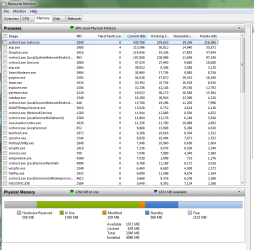
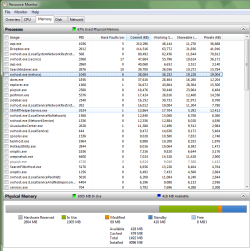
A few weeks ago my computer started randomly slowing down and freezing. No hardware/software changes. I checked on Resource Monitor and found svchost.exe (netsvcs) gradually start to eat up memory after startup. I also noticed that the "Hardware Reserved" portion of my memory was suspiciously huge (2GB out of 4 total).

I thought I had a solution when I uninstalled a cheap Belkin USB wifi adapter that I had been using, and plugged in cabled internet instead. The Hardware Reserved dropped to a more reasonable 556 MB and the computer worked normally for a few days. But now I have restarted again and the problem is back. Done full scans with Kaspersky and Malware-Bytes = nothing. I also downloaded and ran CPU-Z and it came up with a error message on startup. I will attach that, along with screens from resource monitor.

Right now I'm running just fine as long as I'm not connected to the internet. We'll see if I can get online long enough to post this...

If anyone can help, please let me know!
 

Attachments
  • DAUPHINATOR.txt
    DAUPHINATOR.txt
    15.1 KB · Views: 9
  • cpuz_driver_2432.log
    cpuz_driver_2432.log
    1.2 KB · Views: 5
  • resmon Hardware Reserved normal.png
    resmon Hardware Reserved normal.png
    38.6 KB · Views: 4
  • resmon svchost high memory Hardware Reserved normal.png
    resmon svchost high memory Hardware Reserved normal.png
    39.2 KB · Views: 3

My Computer My Computer

Computer type
PC/Desktop
Computer Manufacturer/Model Number
Acer Aspire X3470
OS
Windows 7 Home Premium 64 bit
CPU
AMD A6-3620 APU with Radeon(tm) HD Graphics 2.20 GHz
Memory
4.00 GB
Antivirus
Kaspersky
That hardware reserved seems too much, just checked mine and it is at 4MB. Hopefully, someone more knowledgable will reply.

Hmm, some googling, it may be your integrated GPU's dedicated memory. Check in BIOS and change it to see if it changes the hardware reserved amount.

Also from another thread:
Activate memory hole remapping in BIOS and you will get your "harware reserved" memory back.[/QUOTE]"]
Activate memory hole remapping in BIOS and you will get your "harware reserved" memory back.
 

My Computer My Computer

Computer type
PC/Desktop
Computer Manufacturer/Model Number
Custom Build
OS
Windows 7 Ultimate x64 SP1
CPU
AMD Phenom 2 1090T
Motherboard
Gigabyte GA-890FXA-UD5
Memory
2x8GB Kingston HyperX Fury Black 1600Mhz Unganged
Graphics Card(s)
MSI GTX 970 Gaming 4G
Sound Card
Realtek On-Board HD 7.1 Audio / Logitech G35
Monitor(s) Displays
3xAcer GD245HQ
Screen Resolution
1920x1080
Hard Drives
Samsung 850 Pro 512GB SSD - OS /
WD Caviar Black SATA 3 - 1 TBx2 - Dynamic RAID 0 /
WD Caviar Green SATA 2 - 640GBx2 - Dynamic RAID 0 /
WD Caviar Green SATA 2 - 640GB - Internal Backup /
Seagate Barracude SATA 3 - 3TB - External Backup/ Sync
PSU
HighPower 1000W
Case
Cooler Master HAF 932
Cooling
Noctua NH-D14
Keyboard
Logitech G19
Mouse
Logitech G500
Internet Speed
100/4 Mbit Cable (100GB quota)
Antivirus
ZoneAlarm Extreme Security / MBAM Pro / MBAE Free / SAS Free
Browser
IE 11 - Firefox - Chrome
Other Info
Logitech F710/ G27/ G940/ Z5500 // TrackIR 5 // Nvidia 3D Surround Vision
Thanks for the suggestion GokAy - I'm not sure how to change my GPU's dedicated memory, but I will look into it.

That doesn't account for the memory being gobbled by svchost though. I feel like they're connected in some way. My hardware reserved has flip flopped between 556 MB and 2604 MB, both of which seem huge. My work computer and laptop both have 100 MB or less reserved. My research mostly came up with people who have recently upgraded their RAM, but I haven't made any hardware changes at all (besides removing that USB wifi adapter to try to fix it).

The memory leak for svchost is the real problem though - the change in hardware reserved just means it takes longer for it to freeze up my system.

Any help is appreciated!
 

My Computer My Computer

Computer type
PC/Desktop
Computer Manufacturer/Model Number
Acer Aspire X3470
OS
Windows 7 Home Premium 64 bit
CPU
AMD A6-3620 APU with Radeon(tm) HD Graphics 2.20 GHz
Memory
4.00 GB
Antivirus
Kaspersky
I've included a snip of my resmon with the hardware reserved at 2604 MB, before svchost ate up the remaining...
 

Attachments

  • resmon1.png
    resmon1.png
    37.9 KB · Views: 3

My Computer My Computer

Computer type
PC/Desktop
Computer Manufacturer/Model Number
Acer Aspire X3470
OS
Windows 7 Home Premium 64 bit
CPU
AMD A6-3620 APU with Radeon(tm) HD Graphics 2.20 GHz
Memory
4.00 GB
Antivirus
Kaspersky
Hey, maybe you can try this: make sure you backup, system restore point etc

Last post - svchost.exe (netsvcs) using 80% of ram and most of my cpu - Page 2 - Tech Support Guy

"Hey guys, i too had this problem, i did consult various forums before ending up on microsoft support agents, i got the information that this was indeed a known bug that bundled itself up on windows 7 and probably 8 win(management) framework 3.0 & ^ update and involves handle leakages{ more casual : resource/memory leakage} so that this "super process" svchost(ntsvc) only acquires memory and fails to let go once done using it, there is presently a fix to this issue inform of a hotfix that you download and install onto your computer, it did help but afterwards you gotta be careful with you updates or the bug will show up again.

have a look at this link : microsoft community.
https://support.microsoft.com/en-us/kb/2889748

I did risk applying the hotfix because they said it should only be applied by those who are greatly affected by the bug, it worked like a charm and now this "process" only uses {3-5}% of my R.A.M while previously it could use upto 70% memory."
 

My Computer My Computer

Computer type
PC/Desktop
Computer Manufacturer/Model Number
Custom Build
OS
Windows 7 Ultimate x64 SP1
CPU
AMD Phenom 2 1090T
Motherboard
Gigabyte GA-890FXA-UD5
Memory
2x8GB Kingston HyperX Fury Black 1600Mhz Unganged
Graphics Card(s)
MSI GTX 970 Gaming 4G
Sound Card
Realtek On-Board HD 7.1 Audio / Logitech G35
Monitor(s) Displays
3xAcer GD245HQ
Screen Resolution
1920x1080
Hard Drives
Samsung 850 Pro 512GB SSD - OS /
WD Caviar Black SATA 3 - 1 TBx2 - Dynamic RAID 0 /
WD Caviar Green SATA 2 - 640GBx2 - Dynamic RAID 0 /
WD Caviar Green SATA 2 - 640GB - Internal Backup /
Seagate Barracude SATA 3 - 3TB - External Backup/ Sync
PSU
HighPower 1000W
Case
Cooler Master HAF 932
Cooling
Noctua NH-D14
Keyboard
Logitech G19
Mouse
Logitech G500
Internet Speed
100/4 Mbit Cable (100GB quota)
Antivirus
ZoneAlarm Extreme Security / MBAM Pro / MBAE Free / SAS Free
Browser
IE 11 - Firefox - Chrome
Other Info
Logitech F710/ G27/ G940/ Z5500 // TrackIR 5 // Nvidia 3D Surround Vision
Thanks, that definitely sounds like what I'm dealing with!

I will give it a try.
 

My Computer My Computer

Computer type
PC/Desktop
Computer Manufacturer/Model Number
Acer Aspire X3470
OS
Windows 7 Home Premium 64 bit
CPU
AMD A6-3620 APU with Radeon(tm) HD Graphics 2.20 GHz
Memory
4.00 GB
Antivirus
Kaspersky
I tried the hotfix but it says it's not applicable to my computer. I checked through Windows Update and I haven't installed the update for Windows Management Framework 3.0 (update 2506143), so I don't think this is the fix I need.

I'm finding it tough to diagnose because as soon as svchost starts grabbing memory it goes pretty quickly, so I can't get an idea of what's taking the memory before everything freezes completely.
 

My Computer My Computer

Computer type
PC/Desktop
Computer Manufacturer/Model Number
Acer Aspire X3470
OS
Windows 7 Home Premium 64 bit
CPU
AMD A6-3620 APU with Radeon(tm) HD Graphics 2.20 GHz
Memory
4.00 GB
Antivirus
Kaspersky
Oh well, it was worth the try.

From what I have read they were talking about Windows Update and background intelligent transfer service (BITS) is causing this behavior. At least for some people.

Now I don't advice turning Windows Update off as a solution but you might temporarily disable it and see if the problem continues. Just restart windows afterwards.

Not sure if BITS will start with WU off. If it does start and the problem arise again, you can temporarily change the service to Disabled (should be Manual atm) and see if stops the memory problem.

So, 2 things to try for you! :)
 

My Computer My Computer

Computer type
PC/Desktop
Computer Manufacturer/Model Number
Custom Build
OS
Windows 7 Ultimate x64 SP1
CPU
AMD Phenom 2 1090T
Motherboard
Gigabyte GA-890FXA-UD5
Memory
2x8GB Kingston HyperX Fury Black 1600Mhz Unganged
Graphics Card(s)
MSI GTX 970 Gaming 4G
Sound Card
Realtek On-Board HD 7.1 Audio / Logitech G35
Monitor(s) Displays
3xAcer GD245HQ
Screen Resolution
1920x1080
Hard Drives
Samsung 850 Pro 512GB SSD - OS /
WD Caviar Black SATA 3 - 1 TBx2 - Dynamic RAID 0 /
WD Caviar Green SATA 2 - 640GBx2 - Dynamic RAID 0 /
WD Caviar Green SATA 2 - 640GB - Internal Backup /
Seagate Barracude SATA 3 - 3TB - External Backup/ Sync
PSU
HighPower 1000W
Case
Cooler Master HAF 932
Cooling
Noctua NH-D14
Keyboard
Logitech G19
Mouse
Logitech G500
Internet Speed
100/4 Mbit Cable (100GB quota)
Antivirus
ZoneAlarm Extreme Security / MBAM Pro / MBAE Free / SAS Free
Browser
IE 11 - Firefox - Chrome
Other Info
Logitech F710/ G27/ G940/ Z5500 // TrackIR 5 // Nvidia 3D Surround Vision
Next time it happens try this:

Start > Run

then type

services.msc

Press Enter

Scroll down to BITS service and start it if it's not running.

Scroll down to Windows Updates and either restart the service or stop it then start it.

Notice any difference?

Also if problems persist try resetting IE via Control Panel > Internet Options > Advanced > Reset. A reboot will be required.

Run IE 64 bit and reset your add ons. Close IE and run IE 32bit and check the same.

If problems perist try getting help in the Windows Update section. High svchost usage (netsvcs) is usually down to windows updates and problems with internet explorer.
 

My Computer My Computer

Computer type
Laptop
Computer Manufacturer/Model Number
ASUS
OS
Microsoft Windows 7 Home Premium 64-bit 7601 Multiprocessor Free Service Pack 1
CPU
AMD C-60 APU with Radeon(tm) HD Graphics
Motherboard
ASUSTeK COMPUTER INC. X501U
Memory
4.00 GB
Graphics Card(s)
AMD Radeon HD 6290 Graphics
Sound Card
(1) AMD High Definition Audio Device (2) Realtek High Defi
Screen Resolution
1366 x 768 x 32 bits (4294967296 colors) @ 60 Hz
Hard Drives
Hitachi HTS545050A7E380 SATA Disk Device
Antivirus
Comodo CIS & FW, SecureAplus App Whitelisting, Threatfire
Browser
Cyberfox 64bit, Opera 64bit, Airfox
Other Info
Spy-The-Spy, HitmanPro.Alert, Norton Connect Safe, MJRegWatcher, BitDefender TrafficLight, Voodoo Shield, Zemana AntiMalware
A very simple method to get rid of it :-D

Hello!

I had the same issue and I put a little time to solve it. :)
The svchost service in question is a Windows service host that contains lots of services, it must be done so that you get into it ... Like you, for almost 10 minutes after the computer has started, I couldn't do almost anything...
Then I get the idea "services.msc" (you type that in the Run bar) : there are there full of services that consume a max of memory and are not necessarily always helpful, it depends on your use your desktop.
The main culprit turns out to be the Windows Update service and its two acolytes : the Security Center service and the Windows Modules Installer.

If you have a correct antivirus, you do not need to search for the Windows updates at each startup.
Personally, since I disabled all three services, I haven't the problem at all any more ; I just reactivate the Update service once a month, at night.

Here's the trick :
- In the Window's path (type set path in a prompt window), create a command file "wud.cmd" (wud like Windows UpDate but you can choose any other name) containing the following code:

@echo off
rem script d'activation/désactivation des services liés à W Update
if "%1"=="" (
echo activation service Centre de securite
sc config wscsvc start= demand
sc start wscsvc
echo activation Programme d'installation pour les modules Windows
sc config TrustedInstaller start= demand
sc start TrustedInstaller
echo activation service Windows Update
sc config wuauserv start= demand
sc start wuauserv
call :verif
call :verif
) else (
echo desactivation service Windows Update
sc stop wuauserv
echo desactivation Programme d'installation pour les modules Windows
sc stop TrustedInstaller
echo desactivation service Centre de securite
sc stop wscsvc
call :verif
call :verif
sc config wuauserv start= disabled
sc config TrustedInstaller start= disabled
sc config wscsvc start= disabled
)
pause
goto :eof
:verif
timeout /T 10
sc query wuauserv
sc query TrustedInstaller
sc query wscsvc
goto :eof

Here it is !

- Now you just need to open a command prompt window as administrator and to type:

wud d

(d like disable) :devil:

And it's good! The concerned services are disabled and let you easy.

- Then, every month, in a command prompt as administrator, type "wud" without any argument. This reactivates Windows Update service, and allows you to make updates. If necessary, schedule a task to remind you.

What a relief, I was also wondering how to get out but this little trick is enough and tested OK ! :party:

Regards,

Guilyou
:D
 

My Computer My Computer

Computer type
PC/Desktop
Computer Manufacturer/Model Number
Samsung
OS
Windows 7 Home premium 64bit
CPU
2
Memory
3 Go
Antivirus
avast!
Browser
Google Chrome
My thoughts: Disabling windows updates and running them on demand doesn't actually fix the problem. It would be better to use a machine that does what it's supposed to do. Anyway, having said that it's a decent enough workaround until you track down the culprit.

Here's a suggestion. Check for KB3038314 (windows update) and remove it if found. Your svchost problem is very likely to be related to problems with windows updates or internet explorer.

See the thread here:

http://www.sevenforums.com/browsers-mail/369674-whats-blocking-google-search-being-added-ie11.html

If you find the update and want to remove it using powershell refer to the screenshot here or use your own method if preferred.

http://www.sevenforums.com/attachme...le-search-being-added-ie11-windows-update.jpg

After removal reboot and check for windows updates. Install any marked "important"

Of course if you don't have the update installed ignore this post!
 

My Computer My Computer

Computer type
Laptop
Computer Manufacturer/Model Number
ASUS
OS
Microsoft Windows 7 Home Premium 64-bit 7601 Multiprocessor Free Service Pack 1
CPU
AMD C-60 APU with Radeon(tm) HD Graphics
Motherboard
ASUSTeK COMPUTER INC. X501U
Memory
4.00 GB
Graphics Card(s)
AMD Radeon HD 6290 Graphics
Sound Card
(1) AMD High Definition Audio Device (2) Realtek High Defi
Screen Resolution
1366 x 768 x 32 bits (4294967296 colors) @ 60 Hz
Hard Drives
Hitachi HTS545050A7E380 SATA Disk Device
Antivirus
Comodo CIS & FW, SecureAplus App Whitelisting, Threatfire
Browser
Cyberfox 64bit, Opera 64bit, Airfox
Other Info
Spy-The-Spy, HitmanPro.Alert, Norton Connect Safe, MJRegWatcher, BitDefender TrafficLight, Voodoo Shield, Zemana AntiMalware
Thanks Callender - I noticed the Windows Update thing when it happened yesterday - the memory use started escalating as soon as Windows started downloading updates. I have disabled automatic updates, and we'll see if that helps.

Same to you, Guilyou. I am getting a good idea of what I am dealing with here.

@ Callender - I'll check out that particular update when I get home
 

My Computer My Computer

Computer type
PC/Desktop
Computer Manufacturer/Model Number
Acer Aspire X3470
OS
Windows 7 Home Premium 64 bit
CPU
AMD A6-3620 APU with Radeon(tm) HD Graphics 2.20 GHz
Memory
4.00 GB
Antivirus
Kaspersky
One more thing - I still have the issue with my "hardware reserved" being way too much - usually 2604 MB. Sometimes it jumps down to 556 MB after a restart, but then usually pops back to 2604 on another restart.

Is this related? Or something else do you think? Most posts I've found were about recently installed RAM, but I haven't changed my hardware at all.

I'm starting to think it's something else entirely - but it just exacerbates the memory problem when it happens because I have less to play with.

I'm thinking I'll just add some more memory to at least give myself more wiggle room.

Any other ideas?
 

My Computer My Computer

Computer type
PC/Desktop
Computer Manufacturer/Model Number
Acer Aspire X3470
OS
Windows 7 Home Premium 64 bit
CPU
AMD A6-3620 APU with Radeon(tm) HD Graphics 2.20 GHz
Memory
4.00 GB
Antivirus
Kaspersky
"Hardware Reserved" - no idea about that. Sorry!

Re: svchost netsvcs memory leak.

Well finally fixed it but it took a couple of hours.
Edit: Actually the fix was only temporary and the problem returned after a couple of reboots. See the next post.

Briefly the steps were:

Make a system image backup (important)

Run a specific MS Fixit in aggressive mode to repair BITS and Windows Update Agent.

Reboot with no internet connection.

Run a script to register all DLL and OCX files.

Reboot.

BITS service now starts properly when called.

Disable security software that could interfere with installing windows updates.

Run a check for Windows Updates and install important & recommended updates.

Reboot.

Run another check for Windows Updates.

Reboot.

Repeat until all updates are installed.

Note: Some updates took more than one attempt to install.
 
Last edited:

My Computer My Computer

Computer type
Laptop
Computer Manufacturer/Model Number
ASUS
OS
Microsoft Windows 7 Home Premium 64-bit 7601 Multiprocessor Free Service Pack 1
CPU
AMD C-60 APU with Radeon(tm) HD Graphics
Motherboard
ASUSTeK COMPUTER INC. X501U
Memory
4.00 GB
Graphics Card(s)
AMD Radeon HD 6290 Graphics
Sound Card
(1) AMD High Definition Audio Device (2) Realtek High Defi
Screen Resolution
1366 x 768 x 32 bits (4294967296 colors) @ 60 Hz
Hard Drives
Hitachi HTS545050A7E380 SATA Disk Device
Antivirus
Comodo CIS & FW, SecureAplus App Whitelisting, Threatfire
Browser
Cyberfox 64bit, Opera 64bit, Airfox
Other Info
Spy-The-Spy, HitmanPro.Alert, Norton Connect Safe, MJRegWatcher, BitDefender TrafficLight, Voodoo Shield, Zemana AntiMalware
Okay so the above post didn't work in the end. Tried a different approach.

Edit: Ignore the script in this post - see next post.

Ran a whole lot of commands to reset windows updates components then dicovered that the same result could be achieved by running a batch file.

Note: I still needed to run that MS Fixit that I mentioned with aggressive options then reboot before running the other repairs.

On another note: It was also neccessary to use the default windows Hosts File during repairs and not the heavily modified one that I usually use.

I can't post a link to the MS Fixit as I've only got a direct download link.

1. Run MS Fixit (aggressive option)
2. Reboot.
3. Reset Hosts.
4. Disable security software
5. Run the batch file - contents as follows:

Code:
@echo off
cls

REM ==================================================================================
REM DESCRIPTION    : This script resets all of Windows Update Agent settings.
REM AUTHOR         : Luca Fabbri
REM VERSION HISTORY: 2.0 - Start
REM ==================================================================================

@echo 1. Stopping Windows Update, BITS, Application Identity, Cryptographic Services and SMS Host Agent services...
net stop wuauserv
net stop bits
net stop appidsvc
net stop cryptsvc
net stop ccmexec

@echo 2. Checking if services were stopped successfully...
sc query wuauserv | findstr /I /C:"STOPPED"
if %errorlevel% NEQ 0 goto END

sc query bits | findstr /I /C:"STOPPED"
if %errorlevel% NEQ 0 goto END

sc query appidsvc | findstr /I /C:"STOPPED"
if %errorlevel% NEQ 0 sc query appidsvc | findstr /I /C:"OpenService FAILED 1060"
if %errorlevel% NEQ 0 goto END

sc query cryptsvc | findstr /I /C:"STOPPED"
if %errorlevel% NEQ 0 goto END

sc query ccmexec | findstr /I /C:"STOPPED"
if %errorlevel% NEQ 0 sc query ccmexec | findstr /I /C:"OpenService FAILED 1060"
if %errorlevel% NEQ 0 goto END

@echo 3. Deleting AU cache folder and log file... 
del /f /q "%ALLUSERSPROFILE%\Application Data\Microsoft\Network\Downloader\qmgr*.dat"
del /f /s /q %SystemRoot%\SoftwareDistribution\*.* 
del /f /s /q %SystemRoot%\system32\catroot2\*.*
del /f /q %SystemRoot%\WindowsUpdate.log 

REM @echo 3. Renaming AU cache folder and log file...
REM del /f /q "%ALLUSERSPROFILE%\Application Data\Microsoft\Network\Downloader\qmgr*.dat"
REM ren %SystemRoot%\SoftwareDistribution *.bak
REM ren %SystemRoot%\system32\catroot2 *.bak
REM ren %SystemRoot%\WindowsUpdate.log *.bak

REM sc.exe sdset bits D:(A;;CCLCSWRPWPDTLOCRRC;;;SY)(A;;CCDCLCSWRPWPDTLOCRSDRCWDWO;;;BA)(A;;CCLCSWLOCRRC;;;AU)(A;;CCLCSWRPWPDTLOCRRC;;;PU)
REM sc.exe sdset wuauserv D:(A;;CCLCSWRPWPDTLOCRRC;;;SY)(A;;CCDCLCSWRPWPDTLOCRSDRCWDWO;;;BA)(A;;CCLCSWLOCRRC;;;AU)(A;;CCLCSWRPWPDTLOCRRC;;;PU)

@echo 4. Re-registering DLL files...
cd /d %WinDir%\system32
regsvr32.exe /s atl.dll
regsvr32.exe /s urlmon.dll
regsvr32.exe /s mshtml.dll
regsvr32.exe /s shdocvw.dll
regsvr32.exe /s browseui.dll
regsvr32.exe /s jscript.dll
regsvr32.exe /s vbscript.dll
regsvr32.exe /s scrrun.dll
regsvr32.exe /s msxml.dll
regsvr32.exe /s msxml3.dll
regsvr32.exe /s msxml6.dll
regsvr32.exe /s actxprxy.dll
regsvr32.exe /s softpub.dll
regsvr32.exe /s wintrust.dll
regsvr32.exe /s dssenh.dll
regsvr32.exe /s rsaenh.dll
regsvr32.exe /s gpkcsp.dll
regsvr32.exe /s sccbase.dll
regsvr32.exe /s slbcsp.dll
regsvr32.exe /s cryptdlg.dll
regsvr32.exe /s oleaut32.dll
regsvr32.exe /s ole32.dll
regsvr32.exe /s shell32.dll
regsvr32.exe /s initpki.dll
regsvr32.exe /s wuapi.dll
regsvr32.exe /s wuaueng.dll
regsvr32.exe /s wuaueng1.dll
regsvr32.exe /s wucltui.dll
regsvr32.exe /s wups.dll
regsvr32.exe /s wups2.dll
regsvr32.exe /s wuweb.dll
regsvr32.exe /s qmgr.dll
regsvr32.exe /s qmgrprxy.dll
regsvr32.exe /s wucltux.dll
regsvr32.exe /s muweb.dll
regsvr32.exe /s wuwebv.dll

@echo 5. Removing WSUS Client Id...
REG DELETE "HKLM\SOFTWARE\Microsoft\Windows\CurrentVersion\WindowsUpdate" /v AccountDomainSid /f
REG DELETE "HKLM\SOFTWARE\Microsoft\Windows\CurrentVersion\WindowsUpdate" /v PingID /f
REG DELETE "HKLM\SOFTWARE\Microsoft\Windows\CurrentVersion\WindowsUpdate" /v SusClientId /f

@echo 6. Resetting Winsock and WinHTTP Proxy...
netsh winsock reset
proxycfg.exe -d
netsh winhttp reset proxy

@echo 7. Starting SMS Host Agent, Cryptographic Services, Application Identity, BITS, Windows Update services...
net start ccmexec
net start cryptsvc
net start appidsvc
net start bits
net start wuauserv

@echo 8. Deleting all BITS jobs...
bitsadmin.exe /reset /allusers

@echo 9. Forcing AU discovery...
wuauclt /resetauthorization /detectnow

:END

6. Reboot

7. Reinstall Windows Update Agent. Can provide a link to download.

8. Reboot.

The above seems to work for me but maybe you'd get different results!
 
Last edited:

My Computer My Computer

Computer type
Laptop
Computer Manufacturer/Model Number
ASUS
OS
Microsoft Windows 7 Home Premium 64-bit 7601 Multiprocessor Free Service Pack 1
CPU
AMD C-60 APU with Radeon(tm) HD Graphics
Motherboard
ASUSTeK COMPUTER INC. X501U
Memory
4.00 GB
Graphics Card(s)
AMD Radeon HD 6290 Graphics
Sound Card
(1) AMD High Definition Audio Device (2) Realtek High Defi
Screen Resolution
1366 x 768 x 32 bits (4294967296 colors) @ 60 Hz
Hard Drives
Hitachi HTS545050A7E380 SATA Disk Device
Antivirus
Comodo CIS & FW, SecureAplus App Whitelisting, Threatfire
Browser
Cyberfox 64bit, Opera 64bit, Airfox
Other Info
Spy-The-Spy, HitmanPro.Alert, Norton Connect Safe, MJRegWatcher, BitDefender TrafficLight, Voodoo Shield, Zemana AntiMalware
New instructions to replace those in the previous post:

Step 5 should be:

Open an Elevated Command Prompt.

Run the following.

net stop wuauserv
net stop bits
net stop appidsvc
net stop cryptsvc

del /f /q "%ALLUSERSPROFILE%\Application Data\Microsoft\Network\Downloader\qmgr*.dat"
del /f /s /q %SystemRoot%\SoftwareDistribution\*.*
del /f /s /q %SystemRoot%\system32\catroot2\*.*
del /f /q %SystemRoot%\WindowsUpdate.log

Note: On my machine I had to force delete the four entries above using software that can force delete files/ folders. and manually search for them to confirm deletion.

Run Powershell (in Elevated Command Prompt)

Use powershell to run the following:

sc.exe sdset bits D:(A;;CCLCSWRPWPDTLOCRRC;;;SY)(A;;CCDCLCSWRPWPDTLOCRSDRCWDWO;;;BA)(A;;CCLCSWLOCRRC;;;AU)(A;;CCLCSWRPWPDTLOCRRC;;;PU)
REM sc.exe sdset wuauserv D:(A;;CCLCSWRPWPDTLOCRRC;;;SY)(A;;CCDCLCSWRPWPDTLOCRSDRCWDWO;;;BA)(A;;CCLCSWLOCRRC;;;AU)(A;;CCLCSWRPWPDTLOCRRC;;;PU)

Exit Powershell but leave command prompt window open and run the following:

regsvr32.exe /s atl.dll
regsvr32.exe /s urlmon.dll
regsvr32.exe /s mshtml.dll
regsvr32.exe /s shdocvw.dll
regsvr32.exe /s browseui.dll
regsvr32.exe /s jscript.dll
regsvr32.exe /s vbscript.dll
regsvr32.exe /s scrrun.dll
regsvr32.exe /s msxml.dll
regsvr32.exe /s msxml3.dll
regsvr32.exe /s msxml6.dll
regsvr32.exe /s actxprxy.dll
regsvr32.exe /s softpub.dll
regsvr32.exe /s wintrust.dll
regsvr32.exe /s dssenh.dll
regsvr32.exe /s rsaenh.dll
regsvr32.exe /s gpkcsp.dll
regsvr32.exe /s sccbase.dll
regsvr32.exe /s slbcsp.dll
regsvr32.exe /s cryptdlg.dll
regsvr32.exe /s oleaut32.dll
regsvr32.exe /s ole32.dll
regsvr32.exe /s shell32.dll
regsvr32.exe /s initpki.dll
regsvr32.exe /s wuapi.dll
regsvr32.exe /s wuaueng.dll
regsvr32.exe /s wuaueng1.dll
regsvr32.exe /s wucltui.dll
regsvr32.exe /s wups.dll
regsvr32.exe /s wups2.dll
regsvr32.exe /s wuweb.dll
regsvr32.exe /s qmgr.dll
regsvr32.exe /s qmgrprxy.dll
regsvr32.exe /s wucltux.dll
regsvr32.exe /s muweb.dll
regsvr32.exe /s wuwebv.dll

Open regedit and manually delete the follwing (if found)

"HKLM\SOFTWARE\Microsoft\Windows\CurrentVersion\WindowsUpdate" /v AccountDomainSid /f
"HKLM\SOFTWARE\Microsoft\Windows\CurrentVersion\WindowsUpdate" /v PingID /f
"HKLM\SOFTWARE\Microsoft\Windows\CurrentVersion\WindowsUpdate" /v SusClientId /f

From Elevated Command Prompt:

net start cryptsvc
net start appidsvc
net start bits
net start wuauserv

Run Powershell again (from your open Command Prompt Window)

Execute the following:

bitsadmin.exe /reset /allusers

wuauclt /resetauthorization /detectnow

Exit Powershell, Exit Command Prompt.

Reboot.
 
Last edited:

My Computer My Computer

Computer type
Laptop
Computer Manufacturer/Model Number
ASUS
OS
Microsoft Windows 7 Home Premium 64-bit 7601 Multiprocessor Free Service Pack 1
CPU
AMD C-60 APU with Radeon(tm) HD Graphics
Motherboard
ASUSTeK COMPUTER INC. X501U
Memory
4.00 GB
Graphics Card(s)
AMD Radeon HD 6290 Graphics
Sound Card
(1) AMD High Definition Audio Device (2) Realtek High Defi
Screen Resolution
1366 x 768 x 32 bits (4294967296 colors) @ 60 Hz
Hard Drives
Hitachi HTS545050A7E380 SATA Disk Device
Antivirus
Comodo CIS & FW, SecureAplus App Whitelisting, Threatfire
Browser
Cyberfox 64bit, Opera 64bit, Airfox
Other Info
Spy-The-Spy, HitmanPro.Alert, Norton Connect Safe, MJRegWatcher, BitDefender TrafficLight, Voodoo Shield, Zemana AntiMalware
Windows Update Agent issues?

Okay so I've done some more digging and here's what I suspect.

Installing KB2990214 also installs the latest Windows Update Agent.

Quote from article linked below.

These WU [Windows Update] clients are used as part of the Windows 10 upgrade scenarios which will go live at release but are still used for down-level operating systems as the "regular" Windows Update client. This update is applicable to your systems even if you're not planning to migrate to Windows 10, so don't think you can skip it.

Microsoft elaborates on KB 2990214, KB 3044374 Win10 nagware

So having removed that update might have caused issues with Windows Update Agent on my own machine resulting in sky high svchost.exe netsvcs issues.

Anyway I've fixed it by resetting Windows Update Components and reinstalling Windows Update Agent and everything works as it should.

For now I've hidden KB2990214 and will wait to see if it's possible to install the latest Windows Update Agent using a standalone installer at some point in the future.

@guilyou

Four posts in different threads advising people to disable windows updates when experiencing problems with svchost.exe isn't helpful in my opinion. I suppose some users might like that approach.

Never turn automatic updates off. If you did just that and end up with problems, it’s your fault.
 

My Computer My Computer

Computer type
Laptop
Computer Manufacturer/Model Number
ASUS
OS
Microsoft Windows 7 Home Premium 64-bit 7601 Multiprocessor Free Service Pack 1
CPU
AMD C-60 APU with Radeon(tm) HD Graphics
Motherboard
ASUSTeK COMPUTER INC. X501U
Memory
4.00 GB
Graphics Card(s)
AMD Radeon HD 6290 Graphics
Sound Card
(1) AMD High Definition Audio Device (2) Realtek High Defi
Screen Resolution
1366 x 768 x 32 bits (4294967296 colors) @ 60 Hz
Hard Drives
Hitachi HTS545050A7E380 SATA Disk Device
Antivirus
Comodo CIS & FW, SecureAplus App Whitelisting, Threatfire
Browser
Cyberfox 64bit, Opera 64bit, Airfox
Other Info
Spy-The-Spy, HitmanPro.Alert, Norton Connect Safe, MJRegWatcher, BitDefender TrafficLight, Voodoo Shield, Zemana AntiMalware
Hi guys,
i've installed windows 7 Professional on my old laptop, but i've this problem with Windows Update, during "Check for Updates":
gqy5c7h0j

It does not seem normal memory usage!
Callender, you can write a step by step guide to solve it? i'm little confuse about the passages that you mentioned above.

1. Run MS Fixit (aggressive option)
where can i found a link to download it? i've found only this: https://support.microsoft.com/en-us/kb/971058

thanks
 

My Computer My Computer

Computer type
Laptop
OS
Windows 7 Professional x86
Windows updates issues

Hi guys,
i've installed windows 7 Professional on my old laptop, but i've this problem with Windows Update, during "Check for Updates":
gqy5c7h0j

It does not seem normal memory usage!
Callender, you can write a step by step guide to solve it? i'm little confuse about the passages that you mentioned above.

1. Run MS Fixit (aggressive option)
where can i found a link to download it? i've found only this: https://support.microsoft.com/en-us/kb/971058

thanks

Link to MS Fixit in this thread:

http://www.sevenforums.com/performa...andom-cpu-spikes-post3070689.html#post3070689


Write a guide? Well not really. You need to be aware that for some users the fix won't work anyway and in my case I needed to run some of the fixes a few times and reboot a few times too before the changes stuck.


Steps are:

Make a system image backup (important) so that you can restore in the event of problems.

Check for an remove this update if found: http://www.sevenforums.com/general-...ng-all-my-memory-post3064923.html#post3064923

Reboot.

Reset Hosts or make sure that you're using the default hosts file during repairs.
Disable security software.

Run MS Fixit (aggressive options)

Reboot and stop Windows Update service.

Run the batch file here:

http://www.sevenforums.com/tutorials/91738-windows-update-reset.html - see option 3.

If you get problems running the batch file open an elevated command prompt and run the commands manually using Powershell in instances where you get error messages.

Reboot

Edit:

If there are still problems - Search for and remove update 3006137 using Elevated Command Prompt and Powershell.


Open an Elevated Command Prompt that should open at C:\Windows\System32

Type Powershell then press Enter.

Type the following:

get-hotfix -id KB:3006137

Press Enter and wait to see if it's found. If found type:

wusa /uninstall /KB:3006137

Press Enter. Wait for the update to uninstall.

Reboot.

Using Internet Explorer follow the instructions in this article.

http://smallbusiness.support.microsoft.com/en-us/kb/947821

Scroll down to "Download the package from Microsoft Update Catalog directly" and follow the instructions using Internet Explorer.

Then continue from where it says "For example, you may have problems when you try to install update 3006137 from Windows Update in Windows 7. In this situation, you can download the update package and try to install the update manually. To do this, follow these steps:
Open Microsoft Update Catalog in Internet Explorer."

Download update 3006137 as described and install it.

Reboot.

Note: You will see high svchost usage as file integrity checks are carried out. This could take 30 minutes or more. Once they're finished svchost usage will return to normal and Windows will check for updates. Hide any updates that you don't require and install the ones you need.

Reboot.

Change Windows Update settings to "Check for updates but let me choose whether to download and install them"
 
Last edited:

My Computer My Computer

Computer type
Laptop
Computer Manufacturer/Model Number
ASUS
OS
Microsoft Windows 7 Home Premium 64-bit 7601 Multiprocessor Free Service Pack 1
CPU
AMD C-60 APU with Radeon(tm) HD Graphics
Motherboard
ASUSTeK COMPUTER INC. X501U
Memory
4.00 GB
Graphics Card(s)
AMD Radeon HD 6290 Graphics
Sound Card
(1) AMD High Definition Audio Device (2) Realtek High Defi
Screen Resolution
1366 x 768 x 32 bits (4294967296 colors) @ 60 Hz
Hard Drives
Hitachi HTS545050A7E380 SATA Disk Device
Antivirus
Comodo CIS & FW, SecureAplus App Whitelisting, Threatfire
Browser
Cyberfox 64bit, Opera 64bit, Airfox
Other Info
Spy-The-Spy, HitmanPro.Alert, Norton Connect Safe, MJRegWatcher, BitDefender TrafficLight, Voodoo Shield, Zemana AntiMalware
Hi everyone, just signed up for this forum to help. I fixed this on two machines recently, it is an issue in updates regarding svchost + windows management framework. The best fix is to go to control panal | admin tools | services -- find service called "superfetch" and double click it. In its info you can first stop the service, and then set the startup default to disabled. It is fixed instantly.

:D
 

My Computer My Computer

Computer type
Laptop
Computer Manufacturer/Model Number
Thinkpad'
OS
Debian Custom
CPU
I5 / I7
Memory
Never enough
Monitor(s) Displays
4+
Hard Drives
SSD
Internet Speed
NOS
Antivirus
What?
Browser
Mozilla
Back
Top